Solved Update issues

copiman

New member
Power User
VIP
Local time
5:46 PM
Messages
261
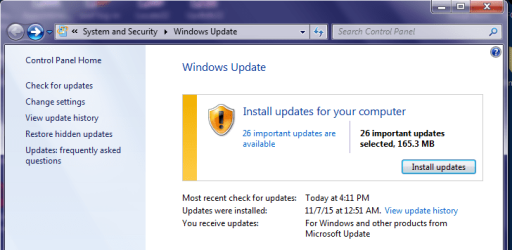
I have a laptop (HP) that I recovered back to out of box condition which I now have to do Windows updates to bring it current. Updates work just fine until a particular update. I did a check for updates and the attached came up. It is the Windows Update Agent 7.6.7600.320. Does not give the option to bypass it. Once it installs the laptop will check for updates forever. I performed the out of box recovery again and updates went just fine until this little sucker came back. Any ideas as to what to do?

See attachment.
 

Attachments

  • Windows Update.jpg
    Windows Update.jpg
    302.2 KB · Views: 9

My Computer

Computer type
PC/Desktop
Computer Manufacturer/Model Number
All
OS
Windows 7 Home Premium
Other Info
I work on many PCs/Laptops for people to get hands on experience. I am a student at a technical college learning about computers and networks.
what OS?
 

My Computer

Computer type
PC/Desktop
Computer Manufacturer/Model Number
custom build
OS
Microsoft Windows 7 Ultimate 64-bit 7601 Multiprocessor Free Service Pack 1
CPU
AMD FX(tm)-6100 Six-Core Processor
Motherboard
ASUSTeK Computer INC. M5A78L-M LX PLUS
Memory
4.00 GB
Graphics Card(s)
AMD Radeon HD 6450
Sound Card
(1) AMD High Definition Audio Device (2) Realtek High Defi
Monitor(s) Displays
Toshiba 47ZV650U 47" LCD 240Hz
Screen Resolution
1920 x 1080 x 32 bits (4294967296 colors) @ 60 Hz
Hard Drives
(1) HDT722516DLA380 ATA Device (2) Hitachi HDS721025CLA382 ATA Device (3) ST4000VN000-1H4168 ATA Device (4) Generic STORAGE DEVICE USB Device (5) Generic STORAGE DEVICE USB Device (6) Generic STORAGE DEVICE USB Device (7) Generic STORAGE
PSU
Corsair CX430M
Case
WMI (Waste Management Incorporated)
Cooling
Yes, it's very cool.
Keyboard
Bluetooth KB & Mousepad
Internet Speed
Fios 15/5 and it sucks when Verizon is throttling it down
Antivirus
Avast, MSE and Malwarebytes
Browser
Firefox v.41.0.2 and IE 11
Other Info
2 years old and so far this rig still kicks butt
Windows 7 Home Premium 64 bit
 

My Computer

Computer type
PC/Desktop
Computer Manufacturer/Model Number
All
OS
Windows 7 Home Premium
Other Info
I work on many PCs/Laptops for people to get hands on experience. I am a student at a technical college learning about computers and networks.
Are you going to want future updates or just shut them all down and only install the ones you want? I am not the expert on this, but I know there are several people on here who have better advice for Home Premium users. Give it a little time
 

My Computer

Computer type
PC/Desktop
Computer Manufacturer/Model Number
custom build
OS
Microsoft Windows 7 Ultimate 64-bit 7601 Multiprocessor Free Service Pack 1
CPU
AMD FX(tm)-6100 Six-Core Processor
Motherboard
ASUSTeK Computer INC. M5A78L-M LX PLUS
Memory
4.00 GB
Graphics Card(s)
AMD Radeon HD 6450
Sound Card
(1) AMD High Definition Audio Device (2) Realtek High Defi
Monitor(s) Displays
Toshiba 47ZV650U 47" LCD 240Hz
Screen Resolution
1920 x 1080 x 32 bits (4294967296 colors) @ 60 Hz
Hard Drives
(1) HDT722516DLA380 ATA Device (2) Hitachi HDS721025CLA382 ATA Device (3) ST4000VN000-1H4168 ATA Device (4) Generic STORAGE DEVICE USB Device (5) Generic STORAGE DEVICE USB Device (6) Generic STORAGE DEVICE USB Device (7) Generic STORAGE
PSU
Corsair CX430M
Case
WMI (Waste Management Incorporated)
Cooling
Yes, it's very cool.
Keyboard
Bluetooth KB & Mousepad
Internet Speed
Fios 15/5 and it sucks when Verizon is throttling it down
Antivirus
Avast, MSE and Malwarebytes
Browser
Firefox v.41.0.2 and IE 11
Other Info
2 years old and so far this rig still kicks butt
This is a friends laptop, so it will need to be automatic updates. Its wierd that as soon as it forces the update agent it looses its ability to update. just keeps searching forever. Anyway thanks for trying. Your right, there are some very well versed folks on this site which is why I come here.
 

My Computer

Computer type
PC/Desktop
Computer Manufacturer/Model Number
All
OS
Windows 7 Home Premium
Other Info
I work on many PCs/Laptops for people to get hands on experience. I am a student at a technical college learning about computers and networks.
I have a laptop (HP) that I recovered back to out of box condition which I now have to do Windows updates to bring it current. Updates work just fine until a particular update. I did a check for updates and the attached came up. It is the Windows Update Agent 7.6.7600.320. Does not give the option to bypass it. Once it installs the laptop will check for updates forever. I performed the out of box recovery again and updates went just fine until this little sucker came back. Any ideas as to what to do?

See attachment.
Not quite forever, but it can take 24+ hours.

You can manually install this update...
https://support.microsoft.com/en-us/kb/3083324 (See edit2 below.)
...and then manually check for updates. Doing that will let you bypass installing Windows Update Agent 7.6.7600.320. But you might still need to wait for hours to get the list of updates. Some users have shortened that time by manually installing this update: https://support.microsoft.com/en-us/kb/3102810

edit1: In my testing, I could not manually download KB3102810 using IE8. The main part of the website would not load. Way to go MS.

edit2: As a prerequisite to my ramblings below, I offer this useless tidbit concerning MS terms: The Windows Update Agent was renamed to the Windows Update Client... perhaps after SP1. I've not bothered to find out exactly when the name changed.


I really should spend more time looking in the Windows Catalog website. That website tells me that KB3102810 replaces KB3083324. There is no need to install KB3083324. Just install KB3102810.

KB3102810 is Microsoft's Windows Update Client update for November 2015. They just don't call it that. I should have known that just from looking at the files that it updates. Anyway, as I mention in edit1 of this post, IE8 would not display the body of this link: https://support.microsoft.com/en-us/kb/3102810 Use these links instead:

All supported x86-based versions of Windows 7:
Download Update for Windows 7 (KB3102810) from Official Microsoft Download Center

All supported x64-based versions of Windows 7:
Download Update for Windows 7 for x64-based Systems (KB3102810) from Official Microsoft Download Center

Those links will function within IE8 (which is what you might have with a fresh install or factory reset).

If you started the Windows Update process before manually installing KB3102810 (or any of the newer Windows Update Clients), then you will probably see the screen shown in the original post of this thread. After installing KB3102810, you might still see that same screen. Ignore the main part of the screen and click on the link named "Check for updates" in the upper left corner of that interface.

In my testing (using a W7 Virtual Machine (VM) that only had SP1 installed), installing KB3102810 allowed me to skip the update shown in the screenshot in the original post in this thread. The reason to skip that update is: the scan for the list of Windows updates can take 24+ hours. There have been many threads confirming this long scan time. With KB3102810 installed, the list of 200+ updates came in within 10 minutes (having the VM running on an SSD helps shorten that scan time - your scan time may be longer).


edit3:
December's update to the Windows Update Clients is out.
It can be used in place of KB3102810.
https://support.microsoft.com/en-us/kb/3112343

 
Last edited:

My Computer

Computer type
Laptop
Computer Manufacturer/Model Number
Employer provided Dell Latitude
OS
W7 Pro SP1 64bit
CPU
i7
Memory
8GB
Graphics Card(s)
Intel HD Graphics
Hard Drives
crappy SSD
Antivirus
Employer mandated Symantec Endpoint Protection
Browser
Pale Moon 64bit, IE11 64bit & Chrome 64bit
Here's the direct download link for KB3102810 for 64bit machines.

Extracted URL from windowsupdate.log

h**p://download.windowsupdate.com/c/msdownload/update/software/updt/2015/10/windows6.1-kb3102810-x64_c5145c2d21519cffb332e678bf22da0a22cf0442.msu

For installing the update save to desktop then run the following command - (replace Username)

Code:
"C:\Users\Username\Desktop\windows6.1-kb3102810-x64_c5145c2d21519cffb332e678bf22da0a22cf0442.msu" /wuforce
 
Last edited:

My Computer

Computer type
Laptop
Computer Manufacturer/Model Number
ASUS
OS
Microsoft Windows 7 Home Premium 64-bit 7601 Multiprocessor Free Service Pack 1
CPU
AMD C-60 APU with Radeon(tm) HD Graphics
Motherboard
ASUSTeK COMPUTER INC. X501U
Memory
4.00 GB
Graphics Card(s)
AMD Radeon HD 6290 Graphics
Sound Card
(1) AMD High Definition Audio Device (2) Realtek High Defi
Screen Resolution
1366 x 768 x 32 bits (4294967296 colors) @ 60 Hz
Hard Drives
Hitachi HTS545050A7E380 SATA Disk Device
Antivirus
Comodo CIS & FW, SecureAplus App Whitelisting, Threatfire
Browser
Cyberfox 64bit, Opera 64bit, Airfox
Other Info
Spy-The-Spy, HitmanPro.Alert, Norton Connect Safe, MJRegWatcher, BitDefender TrafficLight, Voodoo Shield, Zemana AntiMalware
Open windows update

click Change Settings

Probably have it set to:

Install updates automatically (recommended)

Try changing it to:

Check for update but let me choose whether to download and install them

or

Download updates but let me choose whether to install them.

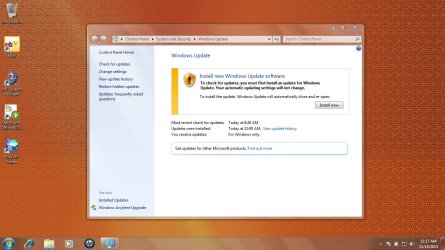
Should then look like
 

Attachments

  • windows update.png
    windows update.png
    92.7 KB · Views: 10

My Computer

Computer type
Laptop
OS
Win 7 Home Premium x64/Linux Lite 2.6 x64
I have a laptop (HP) that I recovered back to out of box condition which I now have to do Windows updates to bring it current. Updates work just fine until a particular update. I did a check for updates and the attached came up. It is the Windows Update Agent 7.6.7600.320. Does not give the option to bypass it. Once it installs the laptop will check for updates forever. I performed the out of box recovery again and updates went just fine until this little sucker came back. Any ideas as to what to do?

See attachment.
Not quite forever, but it can take 24+ hours.

You can manually install this update...
https://support.microsoft.com/en-us/kb/3083324
...and then manually check for updates. Doing that will let you bypass installing Windows Update Agent 7.6.7600.320. But you might still need to wait for hours to get the list of updates. Some users have shortened that time by manually installing this update: https://support.microsoft.com/en-us/kb/3102810

edit: In my testing, I could not manually download KB3102810 using IE8. The main part of the website would not load. Way to go MS.

Idid what you suggested and still no go. I know about IE8 because when I recovered to out of box it had IE8. I just went in and loaded IE11 so I could get to the MS site.
 

My Computer

Computer type
PC/Desktop
Computer Manufacturer/Model Number
All
OS
Windows 7 Home Premium
Other Info
I work on many PCs/Laptops for people to get hands on experience. I am a student at a technical college learning about computers and networks.
Here's the direct download link for KB3102810 for 64bit machines.

Extracted URL from windowsupdate.log

h**p://download.windowsupdate.com/c/msdownload/update/software/updt/2015/10/windows6.1-kb3102810-x64_c5145c2d21519cffb332e678bf22da0a22cf0442.msu

For installing the update save to desktop then run the following command - (replace Username)

Code:
"C:\Users\Username\Desktop\windows6.1-kb3102810-x64_c5145c2d21519cffb332e678bf22da0a22cf0442.msu" /wuforce

I'm sorry but I don't understand what your suggesting. Could you explain?
 

My Computer

Computer type
PC/Desktop
Computer Manufacturer/Model Number
All
OS
Windows 7 Home Premium
Other Info
I work on many PCs/Laptops for people to get hands on experience. I am a student at a technical college learning about computers and networks.
Open windows update

click Change Settings

Probably have it set to:

Install updates automatically (recommended)

Try changing it to:

Check for update but let me choose whether to download and install them

or

Download updates but let me choose whether to install them.

Should then look like

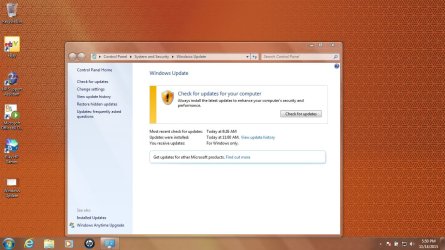
Made the change and only get this
 

Attachments

  • Windows update 2.jpg
    Windows update 2.jpg
    282.4 KB · Views: 4

My Computer

Computer type
PC/Desktop
Computer Manufacturer/Model Number
All
OS
Windows 7 Home Premium
Other Info
I work on many PCs/Laptops for people to get hands on experience. I am a student at a technical college learning about computers and networks.
I have a laptop (HP) that I recovered back to out of box condition which I now have to do Windows updates to bring it current. Updates work just fine until a particular update. I did a check for updates and the attached came up. It is the Windows Update Agent 7.6.7600.320. Does not give the option to bypass it. Once it installs the laptop will check for updates forever. I performed the out of box recovery again and updates went just fine until this little sucker came back. Any ideas as to what to do?

See attachment.
Not quite forever, but it can take 24+ hours.

You can manually install this update...
https://support.microsoft.com/en-us/kb/3083324
...and then manually check for updates. Doing that will let you bypass installing Windows Update Agent 7.6.7600.320. But you might still need to wait for hours to get the list of updates. Some users have shortened that time by manually installing this update: https://support.microsoft.com/en-us/kb/3102810

edit: In my testing, I could not manually download KB3102810 using IE8. The main part of the website would not load. Way to go MS.

Idid what you suggested and still no go. I know about IE8 because when I recovered to out of box it had IE8. I just went in and loaded IE11 so I could get to the MS site.
When you open the control panel for Windows Update, you will still see the prompt to install Windows Update Agent 7.6.7600.320. You should be able to click on the link named "Check for updates" in the upper left corner of that interface. That sould start the scan without needing to install Windows Update Agent 7.6.7600.320.

edit: I have heavily edited post #6. Please refer to that post.
 
Last edited:

My Computer

Computer type
Laptop
Computer Manufacturer/Model Number
Employer provided Dell Latitude
OS
W7 Pro SP1 64bit
CPU
i7
Memory
8GB
Graphics Card(s)
Intel HD Graphics
Hard Drives
crappy SSD
Antivirus
Employer mandated Symantec Endpoint Protection
Browser
Pale Moon 64bit, IE11 64bit & Chrome 64bit
Here's the direct download link for KB3102810 for 64bit machines.

Extracted URL from windowsupdate.log

h**p://download.windowsupdate.com/c/msdownload/update/software/updt/2015/10/windows6.1-kb3102810-x64_c5145c2d21519cffb332e678bf22da0a22cf0442.msu

For installing the update save to desktop then run the following command - (replace Username)

Code:
"C:\Users\Username\Desktop\windows6.1-kb3102810-x64_c5145c2d21519cffb332e678bf22da0a22cf0442.msu" /wuforce

I'm sorry but I don't understand what your suggesting. Could you explain?

If you want to try UserNameIssues' suggestion on installing a specific windows update client - Download the update KB3102810 from the direct download link and replace the first part of the URL (h**p) with http to make it work.

Save the file to desktop.

Then Start> Run then type

Code:
"C:\Users\Username\Desktop\windows6.1-kb3102810-x64_c5145c2d21519cffb332e678bf22da0a22cf0442.msu" /wuforce
[/QUOTE]

Replace Username in the code above with the account name of the user.

So for me it would be:

Code:
[CODE]"C:\Users\[B]Chris[/B]\Desktop\windows6.1-kb3102810-x64_c5145c2d21519cffb332e678bf22da0a22cf0442.msu" /wuforce
[/QUOTE][/CODE]

[EDIT] See UserNameIssues post below.
 
Last edited:

My Computer

Computer type
Laptop
Computer Manufacturer/Model Number
ASUS
OS
Microsoft Windows 7 Home Premium 64-bit 7601 Multiprocessor Free Service Pack 1
CPU
AMD C-60 APU with Radeon(tm) HD Graphics
Motherboard
ASUSTeK COMPUTER INC. X501U
Memory
4.00 GB
Graphics Card(s)
AMD Radeon HD 6290 Graphics
Sound Card
(1) AMD High Definition Audio Device (2) Realtek High Defi
Screen Resolution
1366 x 768 x 32 bits (4294967296 colors) @ 60 Hz
Hard Drives
Hitachi HTS545050A7E380 SATA Disk Device
Antivirus
Comodo CIS & FW, SecureAplus App Whitelisting, Threatfire
Browser
Cyberfox 64bit, Opera 64bit, Airfox
Other Info
Spy-The-Spy, HitmanPro.Alert, Norton Connect Safe, MJRegWatcher, BitDefender TrafficLight, Voodoo Shield, Zemana AntiMalware
I have heavily edited post #6. Please refer to that post.
 

My Computer

Computer type
Laptop
Computer Manufacturer/Model Number
Employer provided Dell Latitude
OS
W7 Pro SP1 64bit
CPU
i7
Memory
8GB
Graphics Card(s)
Intel HD Graphics
Hard Drives
crappy SSD
Antivirus
Employer mandated Symantec Endpoint Protection
Browser
Pale Moon 64bit, IE11 64bit & Chrome 64bit
Windows Update Agent updates are mandatory - and will happen in the background whatever the WU settings (read your Windows License Terms).

The only thing that will prevent them is turning BITS off completely - which means no updates, ever, unless you do them manually from standalone downloads.

The update is designed to increased the stability of WU, and the security

Why wouldn't you want to install it?

Yes win7 updates are taking a long time usually less than 6 hours (some much longer)

I have my update setting set to:

Check for updates but let me choose whether to download and install them
 

My Computer

Computer type
Laptop
OS
Win 7 Home Premium x64/Linux Lite 2.6 x64
Old HP laptop recovery, couldn't get pass checking for updates being hung.
After trying a ton of things, installing KB3102810 finally fixed it.
Clicked check for updates, 12min. later 214 new updates - woohoo, thank you!
 

My Computer

Computer type
PC/Desktop
OS
Windows 7
Sorry for the delay in getting back to everyone. The main problem was my impatience. The kb3102810 actually resolved my issue. My problem was when the standalone installer was checking for updates it took a long time, so I thought it was not working. I finally let it take its course. It ran for a couple of hours and finally found the updates. It also took a long time to install those updates. I did as UsernameIssues suggested and I am happy to say that all updates were installed.

I read where someone posted on Microsoft's forum about update issues. They felt that since Windows 10 started pushing out the updates it could be overwhelming their servers. Also there are people that may feel they have a problem due to not getting updates in a timely manner and either doing a repair and/or clean install, or in my case a recovery. Then when they try to install all those updates it takes a really long time which adds more load on the servers. It seems to make sense. I guess we just need to be patient.

Thanks to all that helped and a special thanks to UsernameIssues.

Take a look at how many and how fast the Windows 10 thing is going:
 

Attachments

  • original.jpg
    original.jpg
    27.7 KB · Views: 107

My Computer

Computer type
PC/Desktop
Computer Manufacturer/Model Number
All
OS
Windows 7 Home Premium
Other Info
I work on many PCs/Laptops for people to get hands on experience. I am a student at a technical college learning about computers and networks.
In my testing (using a W7 Virtual Machine (VM) that only had SP1 installed), installing KB3102810 allowed me to skip the update shown in the screenshot in the original post in this thread. The reason to skip that update is: the scan for the list of Windows updates can take 24+ hours. There have been many threads confirming this long scan time. With KB3102810 installed, the list of 200+ updates came in within 10 minutes (having the VM running on an SSD helps shorten that scan time - your scan time may be longer).


edit3:
December's update to the Windows Update Clients is out.
It can be used in place of KB3102810.
https://support.microsoft.com/en-us/kb/3112343
Just registered so I could say that after letting the scan for updates run for several hours (after a new install of Win 7 Home Premium 32 bit), I found your post after wading through a potload of low-quality advice and "solutions."

I installed the KB3112343 update, changed WU settings to "Download but let me decide" etc., and the 200+ updates came up in less than 10 minutes on a conventional HD (but of course not all updates were actually downloaded). I'm happily updating in batches as we speak. Many thanks for the effort you put into this post.
 

My Computer

Computer type
PC/Desktop
OS
Windows 7 Home Premium 32bit
I too just registered to thank @UsernameIssues and the solution he provided in post #6. What I did from a fresh install of Windows 7 Professional 32-Bit were as follows:

1. After the fresh Windows 7 install, disable internet connection.
2. Change Windows Update settings to "Check for updates but let me choose whether to download and install them."
3. Enable internet connection.
4. Go to Windows Update and select "Check for updates".
5. Select and install only Important Updates relating to Windows 7 Service Pack 1 (SP1). (ignore Recommended Updates completely- see Note* at the bottom of this post). Restart.
6. Do Step 4 again.
7. Do Step 5 again.
8. Download and install the update to Windows Update here (this update is as of December 2015, so do dig around to see if there are newer ones). Restart.
9. Do Step 4 again.

If everything goes well, you should only have to wait less than 10 minutes for Windows Update to list all available updates (mine was a list of 150 important, and around 65 recommended updates).

I hope this heps somebody and credit to the original solution provider for figuring this one out.

Note*: The reason you want to install everything related to Windows 7 SP1 first is because it is a pre-requisite to installing the update to Windows Update in Step 8.
 

My Computer

Computer type
Laptop
Computer Manufacturer/Model Number
Dell Latitude E6410
OS
Windows 7 Professional 32-Bit
CPU
Intel Core i7-620M (2.66GHz, 4M cache) with Turbo Boost
Memory
4GB (2X2GB) DDR3 SDRAM 1333MHz
Hard Drives
250GB Samsung SSD 850 EVO
A massive thank you to all who contributed to this thread. The only proper solution as far as i can see, on every forum i checked

Win7 SP1 fresh install with the issue of not updating.

KB3112343 update resolved this.
 

My Computer

OS
Win 7 x64
Back
Top