

How to Create a Password for a Windows 7 User Account
InformationThis will show you how to create a password for a user account so that it will be password protected in Windows 7.NoteDuring the installation of Windows 7, you also have the option to create a password to password protect your default administrator account.TipFor help on how to create a strong password, see: Tips for creating a strong password - Windows Vista HelpWarningThe password in Windows 7 in case sensitive. If your password contains capital letters, they must be typed the same way every time you log on.
OPTION ONETo Create a Password for Your User Account
1. Open the Control Panel (icons View).
2. Click on the User Accounts icon.
3. Click on the Create a password for your account link. (See screenshot below)
4. Type in a New password. (See screenshot below step 7)
5. Type in the same password again to Confirm new password.
6. If you want a password hint, Type a password hint in. If you do not want a password hint, then you can skip that field.
WARNING: Remember that anyone using the computer will be able to see the password hint.
7. Click on the Create Password button.
8. Your User Account is now Password protected. (See screenshot below)
9. It is recommended that you create a Windows 7 Password Reset Disk to have handy in case you forget the password for this user account in the future.
OPTION TWOTo Create a Password for Another User Account
NOTE: You must be logged on to an administrator account to be able to do this.
1. Open the Control Panel (icons View).That's it,
2. Click on the User Accounts icon.
3. Click on the Manage another account link. (See screenshot below)
4. Click on the other account you want to password protect to select it. (See screenshot below)
5. Click on the Create a password link. (See screenshot below)
6. Type in a New password. (See screenshot below step 9)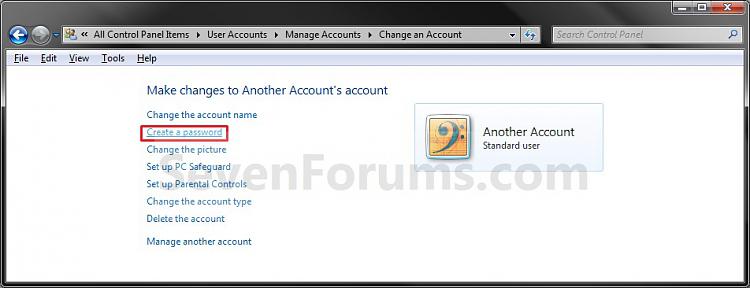
7. Type in the same password again to Confirm new password.
8. If you want a password hint, Type a password hint in. If you do not want a password hint, then you can skip that field.
WARNING: Remember that anyone using the computer will be able to see the password hint.
9. Click on the Create Password button.
10. The other Account is now Password protected. (See screenshot below)
11. It is recommended that you create a Windows 7 Password Reset Disk to have handy in case you forget the password for this user account in the future.
Shawn
Related Tutorials
- How to Change the Password for Your or Another User Account in Windows 7
- How to Change the User Account Password if Unable to Login to Windows
- How to Automatically Log On a User Account at Windows 7 Startup
- How to Enable or Disable Require Password on Wakeup in Windows 7
- How to Add or Remove Change Password from the CTRL+ALT+DEL Screen
- How to Create a Windows 7 Password Reset Disk
- How to Create a "Forgotten Password Wizard" Shortcut in Windows 7 and Vista
- How to Create a User Account in Windows 7
- How to Delete a User Account in Windows 7
- How to Use System Restore to Change User Account Password
- How to Create a User Accounts Shortcut in Windows 7
- How to Set Account Lockout Threshold for Invalid Logon Attempts
- How to Set Account Lockout Duration for Locked Out User Accounts
- How to Set the Reset Account Lockout Counter After Setting
- How to Reset the Password of a User Account in Windows 7
- How to Enable or Disable Password must meet Complexity Requirements
- How to Enable or Disable Password Expiration for a User in Windows 7
- How to Change the Maximum and Minimum Password Age in Windows 7
- How to Enable or Disable Windows 7 Password History Enforcement
- How to Change the Time to Warn a User to Change Password Before Expiration
- How to Prevent or Allow a User to Change their Password in Vista and Windows 7
- How to Remove the Password for Your or Another User Account in Windows 7
- How to Create a "Password Reset Wizard" Shortcut in Windows 7 and Vista
- How to Create, Change, and Use a Password Hint in Windows 7
Password - Create for a User Account
-
New #1
yet another senior moment
good morning Brink
It's been over 5 years since I have had to assign a 'log on' password in XP, and I have forgotten some details about setting a password for when I log off/back on. I know there is much advice out there, but I find it too vague and imprecise. I need precise and won't in the least be offended if you talk to me like a 3-year old *LOL*. At least I'll 'get' it.
So, in Win7 Pro I have been told to navigate to control panel/user accounts/create a password for your account. Not a problem.
When I click on "create a password for your account", I note that I am "PW, Administrator". So...does that mean that the password I will have just created is my Admin password or my USER password....damn MS can be so obscure at times.
the questions are:
1. if I assign the 'user account' password.. is that the password PW uses to log on with? or do I have to log in as Admin? (I don't know how to log in as Admin either... duh)
2. if I assign the above password.. is that the pwd I need to use for my screensaver as well, or would I have to create a NEW one for the screensaver?
any help/advice you can give would be so much appreciated. The answer is probably staring me right in the face but....I can't see it
thanks again,
Bootsmom
-
New #2
Hello Bootsmom,
The new password that you created for your administrator account is what will need to be used at log in and anywhere where it asks you to enter your password at. This will also be your administrator password since this is an administrator account.
Hope this helps,
Shawn
-
New #3
not to belabour the point but......
are you saying that because PW IS the Admin, the password would be the same for the user account PW AND the Admin account?
I swear I took my stoopid pill this morning, I have a mental block about this <grin>
*sorry* !
TIA
-
New #4
LOL, no problem. I get the same way at times.
If your user account is this same administrator account, then yes the password is the same as well.
-
New #5
thanks for your patience, Brink. I appreciate your help.
Bootsmom
-
-
New #7
So... :) in order to be certain that I was logged on with my PW username (and not admin), I logged OFF (knowing there was no password for either account yet) then logged back on again and found the little lighthouse icon with my PW under it. Then I created my PW username password, logged off then back on, typed it in and it WORKED! *yay* Thanks Brink.
-
-
New #9
Unsetting user account password expiration
Hello Brink, hope you can help. I administer the home pc which has family member user accounts on it (no passwords are set). I am forever getting it in the neck from these family members when the windows account password expiration kicks in every (I guess 42 days).
I have tried to follow 2 of your tutorials on un setting the maximum password age, but both have failed. I note the detail about some things not working in the Home version, so have tried using the C: prompt screen, as described.
when typing net accounts /maxpwage:unlimited - I get system error 5 has occurred access is denied
when typing in wmic path Win32_UserAccount set PasswordExpires=False - it does it for the Administrator, my account, Guest and the HomeGroup users but not for the family accounts which gives generic failure on the first account.
Hope this makes sense and you can help.
Thanks

Password - Create for a User Account
How to Create a Password for a Windows 7 User AccountPublished by Brink


 Quote
Quote
Related Discussions