"Ethernet" Connection Drop

If you want another crazy thing to twist your wig... here goes.... now i know this is a router based issue more than less. Ok i setup router #2 SSID and router name as Santa's workshop during xmas. Ok, last week, when i swapped out routers testing the wireless, that was the santa. Well i changed both SSID and router name, last week mind you, and had used this for about 5 days, unplugged and then used the #1 router. Well today, i was plugging up the entire network, and plugged up and connected to #2. double checked ALL settings head to toe, noticing the new name i had given the router LAST WEEK. So all i had to change some port forwarding. Well, i dont know why on earth, but the nvidia picked up the network just fine when first connected, but displayed the Santa's workshop as the name of the network. I about fell outta my chair, triple checked the router settings, even ALL the routers on the network just to MAKE sure. Nope, no santa here, but not so says the nvidia controller. Even with mouse hover it displays "santa's workshop" "internet access" with the X. Happy times i say, happy times. :rolleyes:
 

My Computer

Computer Manufacturer/Model Number
CUSTOM
OS
XP/win7 x86 build 7127
CPU
Athlon64 X2 DUAL 4200+ 2.21ghz
Motherboard
ASUS K8 PRO SLI
Memory
2GB Dual Chan DDR2 Corsair
Graphics Card(s)
Nvidia 6800GT
Sound Card
nvidia
Monitor(s) Displays
19' LCD
Screen Resolution
1280x1024
Hard Drives
WD 250, 2x500, 2x1TB IDE/USB
WD 250 SATA (system)
SEAGATE 120 Sata
PSU
coolermaster 450
Case
SUPERFLOWER
Cooling
1 HDD bay fan, 5x80mm Case Fans, AEROGATE II Fan/Temp
Keyboard
MS wireless
Mouse
MS Wireless
Internet Speed
fassssssssst
7 + networking = LSD trip to the moon, eh?

Seriously, though: Any of the posters in here using any Apple products (QuickTime, iPod stuff / iTunes)?

if so, disable Bonjour service - and see how your network plays....
 

My Computers

System One System Two

  • Computer type
    PC/Desktop
    Computer Manufacturer/Model Number
    The Beast Model A (homebrew)
    OS
    Windows 11 21H2 Current build
    CPU
    AMD Ryzen 9 3950X
    Motherboard
    MSI MEG X570 GODLIKE
    Memory
    4 * 32 GB - Corsair Vengeance 3600 MHz
    Graphics Card(s)
    EVGA GeForce RTX 3080 Ti XC3 ULTRA GAMING (12G-P5-3955-KR)
    Sound Card
    Realtek® ALC1220 Codec
    Monitor(s) Displays
    2x Eve Spectrum ES07D03 4K Gaming Monitor (Matte) | Eve Spec
    Screen Resolution
    3x 3840 x 2160
    Hard Drives
    3x Samsung 980 Pro NVMe PCIe 4 M.2 2 TB SSD (MZ-V8P2T0B/AM) } 3x Sabrent Rocket NVMe 4.0 1 TB SSD
    PSU
    PC Power & Cooling’s Silencer Series 1050 Watt, 80 Plus Plat
    Case
    Fractal Design Define 7 XL Dark ATX Full Tower Case
    Cooling
    SteelSeries Apex Pro Wired Gaming Keyboard
    Keyboard
    SteelSeries Apex Pro
    Mouse
    Logitech MX Master 3S | MX Master 3 for business
    Internet Speed
    AT&T LightSpeed Gigabit Duplex Ftth
    Antivirus
    Windows Defender + MB 3
    Browser
    Nightly (default) + Firefox (stable),Chrome, Edge
  • Computer type
    PC/Desktop
    System Manufacturer/Model Number
    Dell Latitude E5470
    OS
    ChromeOS Flex Dev Channel (current)
    CPU
    Intel(R) Core(TM) i5-6300U CPU @ 2.40GHz, 2501 Mhz, 2 Core(s), 4 Logical Processor(s)
    Motherboard
    Dell
    Memory
    16 GB
    Graphics Card(s)
    Intel(R) HD Graphics 520
    Sound Card
    Intel(R) HD Graphics 520 + RealTek Audio
    Monitor(s) Displays
    Dell laptop display 15"
    Screen Resolution
    1920 * 1080
    Hard Drives
    Toshiba 128GB M.2 22300 drive
    INTEL Cherryville 520 Series SSDSC2CW180A 180 GB SATA III SSD
    PSU
    Dell
    Case
    Dell
    Cooling
    Dell
    Keyboard
    Dell
    Mouse
    Logitech MX Master 3S (shared w. Sys 1) | Dell TouchPad
    Internet Speed
    AT&T LightSpeed Gigabit Duplex Ftth
You don't have to use tweaks. You installed 3rd party unsupported drivers.
They probably changed the settings FOR you instead of a tweaking program.
Intels' driver package does it every time... what makes you think your NIC is any different?


Again, you installed a driver different to the one W7 comes with stock. I tried as well, luckily for some reason my "updated" driver from windows update failed to install.
After seeing the thread on realtech lan cards having dropouts more frequently than any other maker, i'm feeling rather lucky it DID fail.

for one, its not an intel. Second, give me a reg snapshot of some of your "talk", especially with W7... and what settings were being changed? So then with your notion, what about if you have 3 adapters installed at once. You mean to tell me it makes three RcvWin entries in the reg... i think not. I think your own careless tweaking screwed up things and then you reset your changes back to the default, which tweak7 would know now what the default values for W7 would be. So in essence, you dont know if you had a problem before messing about with Tweak7. Therefore you have no control variable to go by, unless you were to reinstall RC and then mirror your steps that you took leaving out tweak7. Then tell me if and what problems you would be running into. I know in my case its the same, same for 7100 as is 7127. 7127 was installed bareboned... hadnt even changed the desktop. Purely installed to run stress tests and test driver scenarios.


by the way, my nvidia controller actually is a Marvell 88E8111 Gigabit LAN PHY chip
 

My Computer

Computer Manufacturer/Model Number
CUSTOM
OS
XP/win7 x86 build 7127
CPU
Athlon64 X2 DUAL 4200+ 2.21ghz
Motherboard
ASUS K8 PRO SLI
Memory
2GB Dual Chan DDR2 Corsair
Graphics Card(s)
Nvidia 6800GT
Sound Card
nvidia
Monitor(s) Displays
19' LCD
Screen Resolution
1280x1024
Hard Drives
WD 250, 2x500, 2x1TB IDE/USB
WD 250 SATA (system)
SEAGATE 120 Sata
PSU
coolermaster 450
Case
SUPERFLOWER
Cooling
1 HDD bay fan, 5x80mm Case Fans, AEROGATE II Fan/Temp
Keyboard
MS wireless
Mouse
MS Wireless
Internet Speed
fassssssssst
Oh, God, those can be just as bad.

At Uni, we have a large batch of gateway PCs that were bought over the course of a year that have the older brother of those cards - and none of those machines will perform a correct PXE boot regardless of what BIOS is installed on those machines. PXE boot fails every single time - but booting off a floppy / CD ROM with a generic Ethernet driver will allow the machine to connected to a Ghost server flawlessly.
 

My Computers

System One System Two

  • Computer type
    PC/Desktop
    Computer Manufacturer/Model Number
    The Beast Model A (homebrew)
    OS
    Windows 11 21H2 Current build
    CPU
    AMD Ryzen 9 3950X
    Motherboard
    MSI MEG X570 GODLIKE
    Memory
    4 * 32 GB - Corsair Vengeance 3600 MHz
    Graphics Card(s)
    EVGA GeForce RTX 3080 Ti XC3 ULTRA GAMING (12G-P5-3955-KR)
    Sound Card
    Realtek® ALC1220 Codec
    Monitor(s) Displays
    2x Eve Spectrum ES07D03 4K Gaming Monitor (Matte) | Eve Spec
    Screen Resolution
    3x 3840 x 2160
    Hard Drives
    3x Samsung 980 Pro NVMe PCIe 4 M.2 2 TB SSD (MZ-V8P2T0B/AM) } 3x Sabrent Rocket NVMe 4.0 1 TB SSD
    PSU
    PC Power & Cooling’s Silencer Series 1050 Watt, 80 Plus Plat
    Case
    Fractal Design Define 7 XL Dark ATX Full Tower Case
    Cooling
    SteelSeries Apex Pro Wired Gaming Keyboard
    Keyboard
    SteelSeries Apex Pro
    Mouse
    Logitech MX Master 3S | MX Master 3 for business
    Internet Speed
    AT&T LightSpeed Gigabit Duplex Ftth
    Antivirus
    Windows Defender + MB 3
    Browser
    Nightly (default) + Firefox (stable),Chrome, Edge
  • Computer type
    PC/Desktop
    System Manufacturer/Model Number
    Dell Latitude E5470
    OS
    ChromeOS Flex Dev Channel (current)
    CPU
    Intel(R) Core(TM) i5-6300U CPU @ 2.40GHz, 2501 Mhz, 2 Core(s), 4 Logical Processor(s)
    Motherboard
    Dell
    Memory
    16 GB
    Graphics Card(s)
    Intel(R) HD Graphics 520
    Sound Card
    Intel(R) HD Graphics 520 + RealTek Audio
    Monitor(s) Displays
    Dell laptop display 15"
    Screen Resolution
    1920 * 1080
    Hard Drives
    Toshiba 128GB M.2 22300 drive
    INTEL Cherryville 520 Series SSDSC2CW180A 180 GB SATA III SSD
    PSU
    Dell
    Case
    Dell
    Cooling
    Dell
    Keyboard
    Dell
    Mouse
    Logitech MX Master 3S (shared w. Sys 1) | Dell TouchPad
    Internet Speed
    AT&T LightSpeed Gigabit Duplex Ftth
7 + networking = LSD trip to the moon, eh?

i think it must be all the damn coffee today and forgetting to eat :shock: wait a min... :roflmao:


i cant even type/spell anymore... hard to when trying to smash all these ants... heheh, lol
 

My Computer

Computer Manufacturer/Model Number
CUSTOM
OS
XP/win7 x86 build 7127
CPU
Athlon64 X2 DUAL 4200+ 2.21ghz
Motherboard
ASUS K8 PRO SLI
Memory
2GB Dual Chan DDR2 Corsair
Graphics Card(s)
Nvidia 6800GT
Sound Card
nvidia
Monitor(s) Displays
19' LCD
Screen Resolution
1280x1024
Hard Drives
WD 250, 2x500, 2x1TB IDE/USB
WD 250 SATA (system)
SEAGATE 120 Sata
PSU
coolermaster 450
Case
SUPERFLOWER
Cooling
1 HDD bay fan, 5x80mm Case Fans, AEROGATE II Fan/Temp
Keyboard
MS wireless
Mouse
MS Wireless
Internet Speed
fassssssssst
for one, its not an intel. Second, give me a reg snapshot of some of your "talk", especially with W7... and what settings were being changed? So then with your notion, what about if you have 3 adapters installed at once. You mean to tell me it makes three RcvWin entries in the reg... i think not.

./groan. This is becoming painful. There is more to networking than RcvWin. In fact the list below of tweaks used just by TCP Optimiser shows there's a good 30+ for the windows registry/software side of things purely.

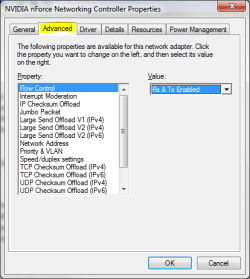
Intel adapters for example, extend on that by having far more features than the usual NIC - or at least the option to CHANGE these features and how they are used e.g Flow Control, Interrupt moderation, Jumbo Frame size, TCP Checksums offload.

ANY one of these driver-related settings could be causing an error with W7 RC and causing the drop outs. Does that make it a driver fault? No. It makes it a W7 network host fault, e.g SVCHost.exe and that can clearly be proven with the system event log as i already posted earlier.

When you installed your network card, you also installed the driver package which will set values to it's preferred defaults, not windows' 7 preffered defaults.

Tweak 7 at least will reset all registry data back to default and ignore your drivers' preference. Your driver is a vista driver, there's an extremely high chance it's changed a setting on install - perhaps it's the default for Vista; who really cares?

The important thing is to try your system with windows DEFAULTS. So far only Tweak7 offers that capability.


I think your own careless tweaking screwed up things and then you reset your changes back to the default, which tweak7 would know now what the default values for W7 would be. So in essence, you dont know if you had a problem before messing about with Tweak7. Therefore you have no control variable to go by, unless you were to reinstall RC and then mirror your steps that you took leaving out tweak7. Then tell me if and what problems you would be running into. I know in my case its the same, same for 7100 as is 7127. 7127 was installed bareboned... hadnt even changed the desktop. Purely installed to run stress tests and test driver scenarios.


by the way, my nvidia controller actually is a Marvell 88E8111 Gigabit LAN PHY chip

Now you're making assumptions, that makes an ASS out of U and ME.
Bit of a pun i got from old man.

I DO KNOW if i had a problem or not before tweak 7, because i'd been running RC1 7100 for a week BEFORE i even knew tweak 7 existed.

That's right, my system had been running untweaked, totally stable for a WEEK before i ran Tweak 7's Network Optimiser and started getting dropouts.

Since i knew the only thing i had changed had been tweaks via Tweak 7, i knew where the problem of the dropouts originated and investigated the program further, hoping to find a "Reset to defaults" option.
I did. And the problem was fixed.
 

My Computer

OS
Windows 7 dual with XP SP2 ((Highly Custom))
CPU
Intel Core2Duo e7300 sometimes @ 3.33Ghtz
Motherboard
Gigabyte G31M-S2L
Memory
2gb Kingston HyperX
Graphics Card(s)
nVidia 9800GT 1gb
Sound Card
Onboard Realtech AC97 High Definition codec
Monitor(s) Displays
HP P1120 21" CRT
Screen Resolution
1600x1200
Hard Drives
WD 250gb caviar
WD 500GB SATAII
PSU
Gigabyte bundled 550w
Case
Gigabyte Generic
Cooling
stock
Keyboard
POS $25 cheapo because i type too fast, wears down kb's
Mouse
M$ Intellipoint 1.1 5 button
Internet Speed
ADSL2 @ max 1.3MBYTE/sec down, 1 up.
I DO KNOW if i had a problem or not before tweak 7, because i'd been running RC1 7100 for a week BEFORE i even knew tweak 7 existed.

That's right, my system had been running untweaked, totally stable for a WEEK before i ran Tweak 7's Network Optimiser and started getting dropouts.

Since i knew the only thing i had changed had been tweaks via Tweak 7, i knew where the problem of the dropouts originated and investigated the program further, hoping to find a "Reset to defaults" option.
I did. And the problem was fixed.

OK then, you make my point... your problem WASNT a problem until you went around tweaking things... then you (hopefully) undid everything by resetting to default. Do you not see that you are the lone man in your boat here? No one else has reported the use of Tweak7, and the screwing up Tweak7 had done thus making an unstable connection.

in other words...
You are telling me to not add salt (use tweak7) to the brownies when it calls for sugar... when all i was doing was pouring sugar, not salt. Not doing what you think i was doing, or had done like you had done with your batch of brownies (RC install). Until you recognize that your batch went bad with the salt, you cant pull salt outta my batch of brownies, i didnt add any.

Now i may have used some bad eggs (MS drivers) in my recipe, but how was i to know the eggs where bad when they didnt smell funny? Thing is, EVERYONE has been getting the same batch of bad eggs for their brownie recipe.


did i make anyone hungry by now? :shock:
 

My Computer

Computer Manufacturer/Model Number
CUSTOM
OS
XP/win7 x86 build 7127
CPU
Athlon64 X2 DUAL 4200+ 2.21ghz
Motherboard
ASUS K8 PRO SLI
Memory
2GB Dual Chan DDR2 Corsair
Graphics Card(s)
Nvidia 6800GT
Sound Card
nvidia
Monitor(s) Displays
19' LCD
Screen Resolution
1280x1024
Hard Drives
WD 250, 2x500, 2x1TB IDE/USB
WD 250 SATA (system)
SEAGATE 120 Sata
PSU
coolermaster 450
Case
SUPERFLOWER
Cooling
1 HDD bay fan, 5x80mm Case Fans, AEROGATE II Fan/Temp
Keyboard
MS wireless
Mouse
MS Wireless
Internet Speed
fassssssssst
Ahem: Perhaps this will show you how to get access to 'said' tweaks without having to use a tweaking program or reg editing:

NIC driver properties Advanced tab.PNG

Not necessarily 30 of them, but enough....

Not all drivers offer these options though - mine are from the nForce drivers for this motherboard....
 

My Computers

System One System Two

  • Computer type
    PC/Desktop
    Computer Manufacturer/Model Number
    The Beast Model A (homebrew)
    OS
    Windows 11 21H2 Current build
    CPU
    AMD Ryzen 9 3950X
    Motherboard
    MSI MEG X570 GODLIKE
    Memory
    4 * 32 GB - Corsair Vengeance 3600 MHz
    Graphics Card(s)
    EVGA GeForce RTX 3080 Ti XC3 ULTRA GAMING (12G-P5-3955-KR)
    Sound Card
    Realtek® ALC1220 Codec
    Monitor(s) Displays
    2x Eve Spectrum ES07D03 4K Gaming Monitor (Matte) | Eve Spec
    Screen Resolution
    3x 3840 x 2160
    Hard Drives
    3x Samsung 980 Pro NVMe PCIe 4 M.2 2 TB SSD (MZ-V8P2T0B/AM) } 3x Sabrent Rocket NVMe 4.0 1 TB SSD
    PSU
    PC Power & Cooling’s Silencer Series 1050 Watt, 80 Plus Plat
    Case
    Fractal Design Define 7 XL Dark ATX Full Tower Case
    Cooling
    SteelSeries Apex Pro Wired Gaming Keyboard
    Keyboard
    SteelSeries Apex Pro
    Mouse
    Logitech MX Master 3S | MX Master 3 for business
    Internet Speed
    AT&T LightSpeed Gigabit Duplex Ftth
    Antivirus
    Windows Defender + MB 3
    Browser
    Nightly (default) + Firefox (stable),Chrome, Edge
  • Computer type
    PC/Desktop
    System Manufacturer/Model Number
    Dell Latitude E5470
    OS
    ChromeOS Flex Dev Channel (current)
    CPU
    Intel(R) Core(TM) i5-6300U CPU @ 2.40GHz, 2501 Mhz, 2 Core(s), 4 Logical Processor(s)
    Motherboard
    Dell
    Memory
    16 GB
    Graphics Card(s)
    Intel(R) HD Graphics 520
    Sound Card
    Intel(R) HD Graphics 520 + RealTek Audio
    Monitor(s) Displays
    Dell laptop display 15"
    Screen Resolution
    1920 * 1080
    Hard Drives
    Toshiba 128GB M.2 22300 drive
    INTEL Cherryville 520 Series SSDSC2CW180A 180 GB SATA III SSD
    PSU
    Dell
    Case
    Dell
    Cooling
    Dell
    Keyboard
    Dell
    Mouse
    Logitech MX Master 3S (shared w. Sys 1) | Dell TouchPad
    Internet Speed
    AT&T LightSpeed Gigabit Duplex Ftth
That's the page i had open when i was writing my last post :P
Re-read my post. I never called those 'tweaks' those are features.

Tweak 7 modifies registry values for better optimised speeds.
Drivers modify registry valules for better optimised speeds.

See the similarity?

Tweak 7 offers you the option to reset your values back to default.
Your drivers, don't.
Un-installing your drivers, will not reset your settings back to default.

So the ONLY way to get windows 7 back to DEFAULT settings, is tweak 7.

I'm not telling you to "Not add tweak 7" i'm telling you Tweak 7 will fix the issue your drivers caused in the first place.

The problem originates in SVCHost coding.
 

My Computer

OS
Windows 7 dual with XP SP2 ((Highly Custom))
CPU
Intel Core2Duo e7300 sometimes @ 3.33Ghtz
Motherboard
Gigabyte G31M-S2L
Memory
2gb Kingston HyperX
Graphics Card(s)
nVidia 9800GT 1gb
Sound Card
Onboard Realtech AC97 High Definition codec
Monitor(s) Displays
HP P1120 21" CRT
Screen Resolution
1600x1200
Hard Drives
WD 250gb caviar
WD 500GB SATAII
PSU
Gigabyte bundled 550w
Case
Gigabyte Generic
Cooling
stock
Keyboard
POS $25 cheapo because i type too fast, wears down kb's
Mouse
M$ Intellipoint 1.1 5 button
Internet Speed
ADSL2 @ max 1.3MBYTE/sec down, 1 up.
And *I* am telling you that I have no such issues to begin with, and yet those 'features' are present and 'tweaked' ' modified' or whatever the heck you want to call it....

In case you're wondering:


My Computers

System One System Two

  • Computer type
    PC/Desktop
    Computer Manufacturer/Model Number
    The Beast Model A (homebrew)
    OS
    Windows 11 21H2 Current build
    CPU
    AMD Ryzen 9 3950X
    Motherboard
    MSI MEG X570 GODLIKE
    Memory
    4 * 32 GB - Corsair Vengeance 3600 MHz
    Graphics Card(s)
    EVGA GeForce RTX 3080 Ti XC3 ULTRA GAMING (12G-P5-3955-KR)
    Sound Card
    Realtek® ALC1220 Codec
    Monitor(s) Displays
    2x Eve Spectrum ES07D03 4K Gaming Monitor (Matte) | Eve Spec
    Screen Resolution
    3x 3840 x 2160
    Hard Drives
    3x Samsung 980 Pro NVMe PCIe 4 M.2 2 TB SSD (MZ-V8P2T0B/AM) } 3x Sabrent Rocket NVMe 4.0 1 TB SSD
    PSU
    PC Power & Cooling’s Silencer Series 1050 Watt, 80 Plus Plat
    Case
    Fractal Design Define 7 XL Dark ATX Full Tower Case
    Cooling
    SteelSeries Apex Pro Wired Gaming Keyboard
    Keyboard
    SteelSeries Apex Pro
    Mouse
    Logitech MX Master 3S | MX Master 3 for business
    Internet Speed
    AT&T LightSpeed Gigabit Duplex Ftth
    Antivirus
    Windows Defender + MB 3
    Browser
    Nightly (default) + Firefox (stable),Chrome, Edge
  • Computer type
    PC/Desktop
    System Manufacturer/Model Number
    Dell Latitude E5470
    OS
    ChromeOS Flex Dev Channel (current)
    CPU
    Intel(R) Core(TM) i5-6300U CPU @ 2.40GHz, 2501 Mhz, 2 Core(s), 4 Logical Processor(s)
    Motherboard
    Dell
    Memory
    16 GB
    Graphics Card(s)
    Intel(R) HD Graphics 520
    Sound Card
    Intel(R) HD Graphics 520 + RealTek Audio
    Monitor(s) Displays
    Dell laptop display 15"
    Screen Resolution
    1920 * 1080
    Hard Drives
    Toshiba 128GB M.2 22300 drive
    INTEL Cherryville 520 Series SSDSC2CW180A 180 GB SATA III SSD
    PSU
    Dell
    Case
    Dell
    Cooling
    Dell
    Keyboard
    Dell
    Mouse
    Logitech MX Master 3S (shared w. Sys 1) | Dell TouchPad
    Internet Speed
    AT&T LightSpeed Gigabit Duplex Ftth
EDIT: That was an edit not a repost =/ how the hell did that end up as a double post :S

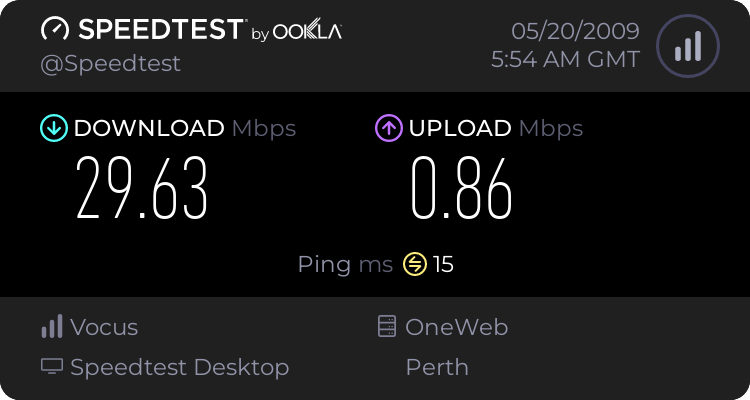
477503930.png


I'm over 5 kilometers away from my exchange.
 

My Computer

OS
Windows 7 dual with XP SP2 ((Highly Custom))
CPU
Intel Core2Duo e7300 sometimes @ 3.33Ghtz
Motherboard
Gigabyte G31M-S2L
Memory
2gb Kingston HyperX
Graphics Card(s)
nVidia 9800GT 1gb
Sound Card
Onboard Realtech AC97 High Definition codec
Monitor(s) Displays
HP P1120 21" CRT
Screen Resolution
1600x1200
Hard Drives
WD 250gb caviar
WD 500GB SATAII
PSU
Gigabyte bundled 550w
Case
Gigabyte Generic
Cooling
stock
Keyboard
POS $25 cheapo because i type too fast, wears down kb's
Mouse
M$ Intellipoint 1.1 5 button
Internet Speed
ADSL2 @ max 1.3MBYTE/sec down, 1 up.
Dunno - fixed.
 

My Computers

System One System Two

  • Computer type
    PC/Desktop
    Computer Manufacturer/Model Number
    The Beast Model A (homebrew)
    OS
    Windows 11 21H2 Current build
    CPU
    AMD Ryzen 9 3950X
    Motherboard
    MSI MEG X570 GODLIKE
    Memory
    4 * 32 GB - Corsair Vengeance 3600 MHz
    Graphics Card(s)
    EVGA GeForce RTX 3080 Ti XC3 ULTRA GAMING (12G-P5-3955-KR)
    Sound Card
    Realtek® ALC1220 Codec
    Monitor(s) Displays
    2x Eve Spectrum ES07D03 4K Gaming Monitor (Matte) | Eve Spec
    Screen Resolution
    3x 3840 x 2160
    Hard Drives
    3x Samsung 980 Pro NVMe PCIe 4 M.2 2 TB SSD (MZ-V8P2T0B/AM) } 3x Sabrent Rocket NVMe 4.0 1 TB SSD
    PSU
    PC Power & Cooling’s Silencer Series 1050 Watt, 80 Plus Plat
    Case
    Fractal Design Define 7 XL Dark ATX Full Tower Case
    Cooling
    SteelSeries Apex Pro Wired Gaming Keyboard
    Keyboard
    SteelSeries Apex Pro
    Mouse
    Logitech MX Master 3S | MX Master 3 for business
    Internet Speed
    AT&T LightSpeed Gigabit Duplex Ftth
    Antivirus
    Windows Defender + MB 3
    Browser
    Nightly (default) + Firefox (stable),Chrome, Edge
  • Computer type
    PC/Desktop
    System Manufacturer/Model Number
    Dell Latitude E5470
    OS
    ChromeOS Flex Dev Channel (current)
    CPU
    Intel(R) Core(TM) i5-6300U CPU @ 2.40GHz, 2501 Mhz, 2 Core(s), 4 Logical Processor(s)
    Motherboard
    Dell
    Memory
    16 GB
    Graphics Card(s)
    Intel(R) HD Graphics 520
    Sound Card
    Intel(R) HD Graphics 520 + RealTek Audio
    Monitor(s) Displays
    Dell laptop display 15"
    Screen Resolution
    1920 * 1080
    Hard Drives
    Toshiba 128GB M.2 22300 drive
    INTEL Cherryville 520 Series SSDSC2CW180A 180 GB SATA III SSD
    PSU
    Dell
    Case
    Dell
    Cooling
    Dell
    Keyboard
    Dell
    Mouse
    Logitech MX Master 3S (shared w. Sys 1) | Dell TouchPad
    Internet Speed
    AT&T LightSpeed Gigabit Duplex Ftth
That's the page i had open when i was writing my last post :P
Re-read my post. I never called those 'tweaks' those are features.

Tweak 7 modifies registry values for better optimised speeds.
Drivers modify registry valules for better optimised speeds.

See the similarity?

Tweak 7 offers you the option to reset your values back to default.
Your drivers, don't.
Un-installing your drivers, will not reset your settings back to default.

So the ONLY way to get windows 7 back to DEFAULT settings, is tweak 7.

I'm not telling you to "Not add tweak 7" i'm telling you Tweak 7 will fix the issue your drivers caused in the first place.

The problem originates in SVCHost coding.


Drivers dont modify, the settings are already there in registry, it just makes it more easily accessible to someone who doesnt know there way thru registry and are lucky enough to find them via device manager adapter/driver/ properties. Why do you think all the fuss was about back in win98 days and ppl were switching from dialup to broadband but not getting the desired/advertised speeds from a cable modem? Um, the RcvWin wasnt optomized back then for any broadband connection. When you installed your 100/10 card's drivers, that didnt change any registry "connection" value settings. You had to manually go in registry and change it and a few other values yourself.


what do you think you can do there (shown in john's image) those are all values that are entered in the registery, therefore technically registry "tweaks", the driver itself is NOT a TWEAK aka registry value entry. It has recommended default values by MS. How do you think they begin to write a driver for an OS they know nothing about, one that has changed somewhat drastically in nature in areas.

Like i stated earlier, I hadnt made any tweaks at all, only on network. The only tweak or reg value that was changed, not by any program, was the duplex from auto negotiation to 100 full. I didnt optomize anything, or tear into the registry manually or load up TCPZ and change any limits... which are all registry values fyi. Which when i do them myself, i know WHAT i changed, WHERE i changed it, AND WHAT value it was beforehand. Instead of letting some other user who created a beta program for a beta OS go calculating my registry entry values.
 

My Computer

Computer Manufacturer/Model Number
CUSTOM
OS
XP/win7 x86 build 7127
CPU
Athlon64 X2 DUAL 4200+ 2.21ghz
Motherboard
ASUS K8 PRO SLI
Memory
2GB Dual Chan DDR2 Corsair
Graphics Card(s)
Nvidia 6800GT
Sound Card
nvidia
Monitor(s) Displays
19' LCD
Screen Resolution
1280x1024
Hard Drives
WD 250, 2x500, 2x1TB IDE/USB
WD 250 SATA (system)
SEAGATE 120 Sata
PSU
coolermaster 450
Case
SUPERFLOWER
Cooling
1 HDD bay fan, 5x80mm Case Fans, AEROGATE II Fan/Temp
Keyboard
MS wireless
Mouse
MS Wireless
Internet Speed
fassssssssst
Sorry, Digger, but I have personally seen drivers modifying both existing reg entries as well as creating new reg entries for settings on various things - to go back to Win 2000 and XP, Conexant v.90 modem drivers would physically alter the FIFO settings for the COM port being used by the modem to allow for full uses of the port, allowing settings up to 115200 baud, which were not normally set without the drivers being installed....
 

My Computers

System One System Two

  • Computer type
    PC/Desktop
    Computer Manufacturer/Model Number
    The Beast Model A (homebrew)
    OS
    Windows 11 21H2 Current build
    CPU
    AMD Ryzen 9 3950X
    Motherboard
    MSI MEG X570 GODLIKE
    Memory
    4 * 32 GB - Corsair Vengeance 3600 MHz
    Graphics Card(s)
    EVGA GeForce RTX 3080 Ti XC3 ULTRA GAMING (12G-P5-3955-KR)
    Sound Card
    Realtek® ALC1220 Codec
    Monitor(s) Displays
    2x Eve Spectrum ES07D03 4K Gaming Monitor (Matte) | Eve Spec
    Screen Resolution
    3x 3840 x 2160
    Hard Drives
    3x Samsung 980 Pro NVMe PCIe 4 M.2 2 TB SSD (MZ-V8P2T0B/AM) } 3x Sabrent Rocket NVMe 4.0 1 TB SSD
    PSU
    PC Power & Cooling’s Silencer Series 1050 Watt, 80 Plus Plat
    Case
    Fractal Design Define 7 XL Dark ATX Full Tower Case
    Cooling
    SteelSeries Apex Pro Wired Gaming Keyboard
    Keyboard
    SteelSeries Apex Pro
    Mouse
    Logitech MX Master 3S | MX Master 3 for business
    Internet Speed
    AT&T LightSpeed Gigabit Duplex Ftth
    Antivirus
    Windows Defender + MB 3
    Browser
    Nightly (default) + Firefox (stable),Chrome, Edge
  • Computer type
    PC/Desktop
    System Manufacturer/Model Number
    Dell Latitude E5470
    OS
    ChromeOS Flex Dev Channel (current)
    CPU
    Intel(R) Core(TM) i5-6300U CPU @ 2.40GHz, 2501 Mhz, 2 Core(s), 4 Logical Processor(s)
    Motherboard
    Dell
    Memory
    16 GB
    Graphics Card(s)
    Intel(R) HD Graphics 520
    Sound Card
    Intel(R) HD Graphics 520 + RealTek Audio
    Monitor(s) Displays
    Dell laptop display 15"
    Screen Resolution
    1920 * 1080
    Hard Drives
    Toshiba 128GB M.2 22300 drive
    INTEL Cherryville 520 Series SSDSC2CW180A 180 GB SATA III SSD
    PSU
    Dell
    Case
    Dell
    Cooling
    Dell
    Keyboard
    Dell
    Mouse
    Logitech MX Master 3S (shared w. Sys 1) | Dell TouchPad
    Internet Speed
    AT&T LightSpeed Gigabit Duplex Ftth
Sorry, Digger, but I have personally seen drivers modifying both existing reg entries as well as creating new reg entries for settings on various things - to go back to Win 2000 and XP, Conexant v.90 modem drivers would physically alter the FIFO settings for the COM port being used by the modem to allow for full uses of the port, allowing settings up to 115200 baud, which were not normally set without the drivers being installed....

exactly john, see my last post about win98 days, you are just reversing what i said in my example... instead of a nic card on old OS, you are talking old card on a newer OS. That i can totally understand why it would be the way it was. You would have to manually go in and edit those values, for sure, i understand that, makes complete sense. But i would say that would BE THE exception to the rule. Of course i knew if someone found it, well... ... :P lol
 

My Computer

Computer Manufacturer/Model Number
CUSTOM
OS
XP/win7 x86 build 7127
CPU
Athlon64 X2 DUAL 4200+ 2.21ghz
Motherboard
ASUS K8 PRO SLI
Memory
2GB Dual Chan DDR2 Corsair
Graphics Card(s)
Nvidia 6800GT
Sound Card
nvidia
Monitor(s) Displays
19' LCD
Screen Resolution
1280x1024
Hard Drives
WD 250, 2x500, 2x1TB IDE/USB
WD 250 SATA (system)
SEAGATE 120 Sata
PSU
coolermaster 450
Case
SUPERFLOWER
Cooling
1 HDD bay fan, 5x80mm Case Fans, AEROGATE II Fan/Temp
Keyboard
MS wireless
Mouse
MS Wireless
Internet Speed
fassssssssst
And you would be wrong. I've seen my old intel card do it, i've seen realteck 8139 cards do it - And they were using the WINDOWS DRIVER!

There's hundreds, litterally hundreds of examples of driver installations changing registry values - wether by intention or by mistake!

You *cannot* know what has changed in your registry in the stages before and after NIC driver installation, so don't even pretend to know, that's just arrogance.

On the other hand, i've not only managed to replicated the "network dropout bug" by a tracable process.
BUT i've also managed to FIX it once it's been bad to the stage of dropping out twice in 1/2 an hour!

Yes Tweak 7 is a beta peice of software. SO WHAT? You want a fix, i'm offering it.
Quit with the arrogance already, create a restore point if you makes you feel any better, but JUST DO IT MAN.
 

My Computer

OS
Windows 7 dual with XP SP2 ((Highly Custom))
CPU
Intel Core2Duo e7300 sometimes @ 3.33Ghtz
Motherboard
Gigabyte G31M-S2L
Memory
2gb Kingston HyperX
Graphics Card(s)
nVidia 9800GT 1gb
Sound Card
Onboard Realtech AC97 High Definition codec
Monitor(s) Displays
HP P1120 21" CRT
Screen Resolution
1600x1200
Hard Drives
WD 250gb caviar
WD 500GB SATAII
PSU
Gigabyte bundled 550w
Case
Gigabyte Generic
Cooling
stock
Keyboard
POS $25 cheapo because i type too fast, wears down kb's
Mouse
M$ Intellipoint 1.1 5 button
Internet Speed
ADSL2 @ max 1.3MBYTE/sec down, 1 up.
exactly john, see my last post about win98 days, you are just reversing what i said in my example... instead of a nic card on old OS, you are talking old card on a newer OS. That i can totally understand why it would be the way it was. You would have to manually go in and edit those values, for sure, i understand that, makes complete sense. But i would say that would BE THE exception to the rule. Of course i knew if someone found it, well... ... :P lol

Not so sure about that either.

A more 'modern' example:

http://www.sevenforums.com/performance-maintenance/342-show-us-your-wei-16.html#post12925

Same HD but different SATA controllers resulted in different aspects of the controller not being able to be 'edited' thus resulting in a massive HD WEI score breakdown in the earlier Betas.

My nForce controller, for example, had settings in there that other controllers did not - I seriously doubt that these were generic settings that were already in Windows 7 - that is the whole point of an OEM driver - it makes adjustments (using both files and settings) to how the hardware interacts with the OS - or, rather, how the OS is able to make use of the hardware.

Granted, there are some generic settings that will probably be common to all hardware types - for example, for modems, one setting common to all modems will be which COM port it is using, and one setting common to all HDs would be a S.M.A.R.T. enabled / disabled switch. However, my post above shows that my nForce controllers had a whole slew of (important) features not available to folks using an Intel controller....

And you would be wrong. I've seen my old intel card do it, i've seen realteck 8139 cards do it - And they were using the WINDOWS DRIVER!

There's hundreds, litterally hundreds of examples of driver installations changing registry values - wether by intention or by mistake!

You *cannot* know what has changed in your registry in the stages before and after NIC driver installation, so don't even pretend to know, that's just arrogance.

On the other hand, i've not only managed to replicated the "network dropout bug" by a tracable process.
BUT i've also managed to FIX it once it's been bad to the stage of dropping out twice in 1/2 an hour!

Yes Tweak 7 is a beta peice of software. SO WHAT? You want a fix, i'm offering it.
Quit with the arrogance already, create a restore point if you makes you feel any better, but JUST DO IT MAN.

No offense, but you can be a lot more calm about it and avoid using phrases that are inciting like "you're wrong" and especially "that's just arrogance"....

Please keep this civil, even if someone else is wrong....
 

My Computers

System One System Two

  • Computer type
    PC/Desktop
    Computer Manufacturer/Model Number
    The Beast Model A (homebrew)
    OS
    Windows 11 21H2 Current build
    CPU
    AMD Ryzen 9 3950X
    Motherboard
    MSI MEG X570 GODLIKE
    Memory
    4 * 32 GB - Corsair Vengeance 3600 MHz
    Graphics Card(s)
    EVGA GeForce RTX 3080 Ti XC3 ULTRA GAMING (12G-P5-3955-KR)
    Sound Card
    Realtek® ALC1220 Codec
    Monitor(s) Displays
    2x Eve Spectrum ES07D03 4K Gaming Monitor (Matte) | Eve Spec
    Screen Resolution
    3x 3840 x 2160
    Hard Drives
    3x Samsung 980 Pro NVMe PCIe 4 M.2 2 TB SSD (MZ-V8P2T0B/AM) } 3x Sabrent Rocket NVMe 4.0 1 TB SSD
    PSU
    PC Power & Cooling’s Silencer Series 1050 Watt, 80 Plus Plat
    Case
    Fractal Design Define 7 XL Dark ATX Full Tower Case
    Cooling
    SteelSeries Apex Pro Wired Gaming Keyboard
    Keyboard
    SteelSeries Apex Pro
    Mouse
    Logitech MX Master 3S | MX Master 3 for business
    Internet Speed
    AT&T LightSpeed Gigabit Duplex Ftth
    Antivirus
    Windows Defender + MB 3
    Browser
    Nightly (default) + Firefox (stable),Chrome, Edge
  • Computer type
    PC/Desktop
    System Manufacturer/Model Number
    Dell Latitude E5470
    OS
    ChromeOS Flex Dev Channel (current)
    CPU
    Intel(R) Core(TM) i5-6300U CPU @ 2.40GHz, 2501 Mhz, 2 Core(s), 4 Logical Processor(s)
    Motherboard
    Dell
    Memory
    16 GB
    Graphics Card(s)
    Intel(R) HD Graphics 520
    Sound Card
    Intel(R) HD Graphics 520 + RealTek Audio
    Monitor(s) Displays
    Dell laptop display 15"
    Screen Resolution
    1920 * 1080
    Hard Drives
    Toshiba 128GB M.2 22300 drive
    INTEL Cherryville 520 Series SSDSC2CW180A 180 GB SATA III SSD
    PSU
    Dell
    Case
    Dell
    Cooling
    Dell
    Keyboard
    Dell
    Mouse
    Logitech MX Master 3S (shared w. Sys 1) | Dell TouchPad
    Internet Speed
    AT&T LightSpeed Gigabit Duplex Ftth
Not so sure about that either.

A more 'modern' example:

http://www.sevenforums.com/performance-maintenance/342-show-us-your-wei-16.html#post12925

Same HD but different SATA controllers resulted in different aspects of the controller not being able to be 'edited' thus resulting in a massive HD WEI score breakdown in the earlier Betas.

My nForce controller, for example, had settings in there that other controllers did not - I seriously doubt that these were generic settings that were already in Windows 7 - that is the whole point of an OEM driver - it makes adjustments (using both files and settings) to how the hardware interacts with the OS - or, rather, how the OS is able to make use of the hardware.

Granted, there are some generic settings that will probably be common to all hardware types - for example, for modems, one setting common to all modems will be which COM port it is using, and one setting common to all HDs would be a S.M.A.R.T. enabled / disabled switch. However, my post above shows that my nForce controllers had a whole slew of (important) features not available to folks using an Intel controller....


No offense, but you can be a lot more calm about it and avoid using phrases that are inciting like "you're wrong" and especially "that's just arrogance"....

Please keep this civil, even if someone else is wrong....

yes john, but could that also just be that the version of the driver was just "unlocking" the registry settings, as far as connection goes, like RcvWin, duplex, preamble and a few other values are the "W7 default" you would be speaking of. now things like Tx and Rx and other advanced things, depending on driver version and manufacturer for that matter, are then made available by the addition of the new improved driver unlocking the "advanced tweaking features". Thus back to topic, I didnt have, therefore i couldnt even change. And if the driver i have installed wont recognize a value that some other app enters, what use would it make of it? makes me think if then statements.


As for setting back to default, ST, I told ya, i am gonna run tests in the morn, if i ever make it to bed. I want and need a control basis for this ethernet as i did for the wireless. Then i will and can go from there... sorry, its been my nature and habits to have that kind of problem solving structure. Less mistakes and assumptions can be made that way.
 

My Computer

Computer Manufacturer/Model Number
CUSTOM
OS
XP/win7 x86 build 7127
CPU
Athlon64 X2 DUAL 4200+ 2.21ghz
Motherboard
ASUS K8 PRO SLI
Memory
2GB Dual Chan DDR2 Corsair
Graphics Card(s)
Nvidia 6800GT
Sound Card
nvidia
Monitor(s) Displays
19' LCD
Screen Resolution
1280x1024
Hard Drives
WD 250, 2x500, 2x1TB IDE/USB
WD 250 SATA (system)
SEAGATE 120 Sata
PSU
coolermaster 450
Case
SUPERFLOWER
Cooling
1 HDD bay fan, 5x80mm Case Fans, AEROGATE II Fan/Temp
Keyboard
MS wireless
Mouse
MS Wireless
Internet Speed
fassssssssst
Understood. Sorry Digger, i'm only trying to go by the hard facts and leave you with a favourable result.

To have you throw the hard facts straight out the window based on assumptions and opinion is just exceedingly frustrating.

I've replicated the bug. I've spotted the cause of - windows registry and it's interaction with SVCHost.exe.
I've spotted a process that has a very high chance of fixing the problem and it has NO risk whatsoever.

What is stopping you from trying it? You have absolutely nothing to lose and alot to gain.

EDIT: Just saw your latest post. Fair enough. You simply came accross as "Will not" and "refuse to" try Tweak 7's reset to default process - I didn't know you just wanted to get your own testing done first.
 

My Computer

OS
Windows 7 dual with XP SP2 ((Highly Custom))
CPU
Intel Core2Duo e7300 sometimes @ 3.33Ghtz
Motherboard
Gigabyte G31M-S2L
Memory
2gb Kingston HyperX
Graphics Card(s)
nVidia 9800GT 1gb
Sound Card
Onboard Realtech AC97 High Definition codec
Monitor(s) Displays
HP P1120 21" CRT
Screen Resolution
1600x1200
Hard Drives
WD 250gb caviar
WD 500GB SATAII
PSU
Gigabyte bundled 550w
Case
Gigabyte Generic
Cooling
stock
Keyboard
POS $25 cheapo because i type too fast, wears down kb's
Mouse
M$ Intellipoint 1.1 5 button
Internet Speed
ADSL2 @ max 1.3MBYTE/sec down, 1 up.
"the hard facts" to me would be for you to show me your 7000 reg compared to 7100 reg pre Tweak7 tweaks, with Tweak 7 tweaks, and after tweak7 reset default. Even if it does fix it ST, i want to KNOW WHY. I am not one to fix and forget it, not knowing how or why something did what it was doing. I dont gain any knowledge that-a-way. This is the reason for base tests, or a controlled test. and for that matter multiple tests.
 

My Computer

Computer Manufacturer/Model Number
CUSTOM
OS
XP/win7 x86 build 7127
CPU
Athlon64 X2 DUAL 4200+ 2.21ghz
Motherboard
ASUS K8 PRO SLI
Memory
2GB Dual Chan DDR2 Corsair
Graphics Card(s)
Nvidia 6800GT
Sound Card
nvidia
Monitor(s) Displays
19' LCD
Screen Resolution
1280x1024
Hard Drives
WD 250, 2x500, 2x1TB IDE/USB
WD 250 SATA (system)
SEAGATE 120 Sata
PSU
coolermaster 450
Case
SUPERFLOWER
Cooling
1 HDD bay fan, 5x80mm Case Fans, AEROGATE II Fan/Temp
Keyboard
MS wireless
Mouse
MS Wireless
Internet Speed
fassssssssst
Back
Top