
Windows 7 installs onto the "Factory Image" D: drive on my pc?

glennj6556

New member
Local time
1:43 AM
Messages
3
Windows 7 installs onto the "Factory Image" D: drive on my pc?

Not sure if I am in the right place for this, but here goes. I have done my install and things are working great. Can you tell me if Windows 7 installs itself onto the "Factory Image" D: drive on my pc? PC originally had Vista and now with 7 installed, I would like to run Windows Backup to install a system image backup to the D: drive. That is what this drive is for anyways, correct?
 

My Computer My Computer

At a glance

Windows 7 Home Premium 64 bitAMD Phenom 9550 Quad Core 2.20 ghz6 gbNVIDIA GeForce 9800GT
Computer Manufacturer/Model Number
HP Pavilion a6720y
OS
Windows 7 Home Premium 64 bit
CPU
AMD Phenom 9550 Quad Core 2.20 ghz
Memory
6 gb
Graphics Card(s)
NVIDIA GeForce 9800GT
Sound Card
(on board)
Monitor(s) Displays
HP 2159m
Hard Drives
WDC WD64 00AKS-65A7B SCSI (internal)
WD My Book 1110 USB
WD 2500JB USB
PSU
600 watt
No it is not on the D drive. But if you installed a new OS, the restore partition may no longer work.
 

My Computer My Computer

At a glance

Windows 10, Home Clean InstallIntel Core2 processsor Q8200(2.33Ghz 1333FSB)...6 gbATI Radeon 256MB HD3650
Computer type
PC/Desktop
Computer Manufacturer/Model Number
Dell XPS 420
OS
Windows 10, Home Clean Install
CPU
Intel Core2 processsor Q8200(2.33Ghz 1333FSB) Quad Core Tech
Motherboard
Dell
Memory
6 gb
Graphics Card(s)
ATI Radeon 256MB HD3650
Sound Card
Intergrated 7.1 Channel Audio
Monitor(s) Displays
Dell SP2009W 20"
Hard Drives
640 GB Serial ATA Hard drive
Cooling
Fan
Keyboard
Dell USB Keyboard
Mouse
Dell Premium Optical USB
Internet Speed
DSL 2.85
Hello glennj6556, welcome to Seven Forum!


If you have a partition named as "D: Factory Restore" or something similar, that is used for creating the recovery disks and may be able to be used to restore the PC to factory settings and if you store anything there you will destroy any chance of either creating the set of disks or doing a restore back to the factory condition.

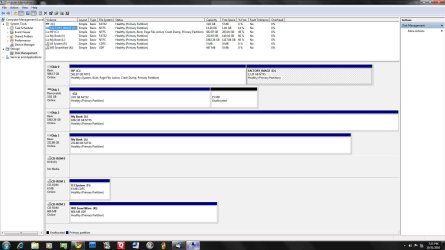
What company manufactured the PC and what model is it? Also in the Windows start menu right click computer and click manage, in the left pane of the "Computer Management" window that opens click disk management and post a snip of that so we can see what you have.


How to Upload and Post a Screenshot and File in Seven Forums
 

My Computer My Computer

At a glance

W 7 64-bit UltimateIntel Q9550 Yorkfield8GB Dominator 8500C5DATI : XFX 5870
Computer Manufacturer/Model Number
* BFK Customs *
OS
W 7 64-bit Ultimate
CPU
Intel Q9550 Yorkfield
Motherboard
ASUS P5Q Pro
Memory
8GB Dominator 8500C5D
Graphics Card(s)
ATI : XFX 5870
Sound Card
Realtek HD Audio 7-1
Monitor(s) Displays
1x 47" LCD HDMI & 3x 26" LCD HDMI
Screen Resolution
1920x1080P & 1920x1200
Hard Drives
1x 80GB Intel X25-M G2 SSD : 1x 500GB & 1x 640GB WD Caviar Black(s)
PSU
Corsair 620HX
Case
Cooler Master RC-690
Cooling
Tuniq Tower 120, 2x 140mm and 3x 120mm case fans
Keyboard
Microsoft 500
Mouse
Razer Diamondback 3G
Internet Speed
14 Mb/s
Other Info
1x Koutech 3Gb/s SATA HDD Hot Swap Rack
Here is the image requested. What I am trying to do is, if the recovery partition (D:) is still set up for recovering to Vista, I would like to do a system backup including all the libraries and such, to the D: drive, instead of one of my external drives.
 

Attachments

  • Clipboard01.jpg
    Clipboard01.jpg
    146.6 KB · Views: 89

My Computer My Computer

At a glance

Windows 7 Home Premium 64 bitAMD Phenom 9550 Quad Core 2.20 ghz6 gbNVIDIA GeForce 9800GT
Computer Manufacturer/Model Number
HP Pavilion a6720y
OS
Windows 7 Home Premium 64 bit
CPU
AMD Phenom 9550 Quad Core 2.20 ghz
Memory
6 gb
Graphics Card(s)
NVIDIA GeForce 9800GT
Sound Card
(on board)
Monitor(s) Displays
HP 2159m
Hard Drives
WDC WD64 00AKS-65A7B SCSI (internal)
WD My Book 1110 USB
WD 2500JB USB
PSU
600 watt
It looks like your factory image is still there so you should keep it if you didn't make your Vista Recovery Disks and think you might ever want to restore the PC to factory condition.

Since you have other HD's, it's best to store your Win7 backup image and file backups on another HD in case of HD failure.

You can place your User files on another partition so that if the OS becomes irreparable you can reimage the OS/Programs partition and your data is waiting and current in its own vault. http://www.sevenforums.com/tutorials/18629-user-folders-change-default-location.html
 
Hello glennj6556, welcome to Seven Forum!


If you have a partition named as "D: Factory Restore" or something similar, that is used for creating the recovery disks and may be able to be used to restore the PC to factory settings and if you store anything there you will destroy any chance of either creating the set of disks or doing a restore back to the factory condition.

What company manufactured the PC and what model is it? Also in the Windows start menu right click computer and click manage, in the left pane of the "Computer Management" window that opens click disk management and post a snip of that so we can see what you have.


How to Upload and Post a Screenshot and File in Seven Forums


I reiterate this one last time.
 

My Computer My Computer

At a glance

W 7 64-bit UltimateIntel Q9550 Yorkfield8GB Dominator 8500C5DATI : XFX 5870
Computer Manufacturer/Model Number
* BFK Customs *
OS
W 7 64-bit Ultimate
CPU
Intel Q9550 Yorkfield
Motherboard
ASUS P5Q Pro
Memory
8GB Dominator 8500C5D
Graphics Card(s)
ATI : XFX 5870
Sound Card
Realtek HD Audio 7-1
Monitor(s) Displays
1x 47" LCD HDMI & 3x 26" LCD HDMI
Screen Resolution
1920x1080P & 1920x1200
Hard Drives
1x 80GB Intel X25-M G2 SSD : 1x 500GB & 1x 640GB WD Caviar Black(s)
PSU
Corsair 620HX
Case
Cooler Master RC-690
Cooling
Tuniq Tower 120, 2x 140mm and 3x 120mm case fans
Keyboard
Microsoft 500
Mouse
Razer Diamondback 3G
Internet Speed
14 Mb/s
Other Info
1x Koutech 3Gb/s SATA HDD Hot Swap Rack
Thank you, gentlemen, for your answers. The only reason I asked was that, as I have upgraded to Windows 7, I would have no use for a recovery partition returning my PC to Vista. But, sound advice to leave it as is and use an external drive for my system backup. :)
 

My Computer My Computer

At a glance

Windows 7 Home Premium 64 bitAMD Phenom 9550 Quad Core 2.20 ghz6 gbNVIDIA GeForce 9800GT
Computer Manufacturer/Model Number
HP Pavilion a6720y
OS
Windows 7 Home Premium 64 bit
CPU
AMD Phenom 9550 Quad Core 2.20 ghz
Memory
6 gb
Graphics Card(s)
NVIDIA GeForce 9800GT
Sound Card
(on board)
Monitor(s) Displays
HP 2159m
Hard Drives
WDC WD64 00AKS-65A7B SCSI (internal)
WD My Book 1110 USB
WD 2500JB USB
PSU
600 watt
You never know, you may have use for it in future.
 

My Computer My Computer

At a glance

W 7 64-bit UltimateIntel Q9550 Yorkfield8GB Dominator 8500C5DATI : XFX 5870
Computer Manufacturer/Model Number
* BFK Customs *
OS
W 7 64-bit Ultimate
CPU
Intel Q9550 Yorkfield
Motherboard
ASUS P5Q Pro
Memory
8GB Dominator 8500C5D
Graphics Card(s)
ATI : XFX 5870
Sound Card
Realtek HD Audio 7-1
Monitor(s) Displays
1x 47" LCD HDMI & 3x 26" LCD HDMI
Screen Resolution
1920x1080P & 1920x1200
Hard Drives
1x 80GB Intel X25-M G2 SSD : 1x 500GB & 1x 640GB WD Caviar Black(s)
PSU
Corsair 620HX
Case
Cooler Master RC-690
Cooling
Tuniq Tower 120, 2x 140mm and 3x 120mm case fans
Keyboard
Microsoft 500
Mouse
Razer Diamondback 3G
Internet Speed
14 Mb/s
Other Info
1x Koutech 3Gb/s SATA HDD Hot Swap Rack
Back
Top