Opera 11.0 Alpha out

I am at a crossroads now, because after the yesterday's reinstall of Win7, I decided to stick with IE9, which works faster and better than ever.
However, the situation with Flash usage in Opera I was "complaining" about ended in an unexpected way: The game I've been playing for over a year is no longer free, so I don't play anymore, which means that I might just as well install Opera11. But now I like IE9 and got used to it, lol. A fresh install of Windows means that, at least for a while, I have no need to poke around the registry and Ccleaner and all that stuff...
Unless I install Revo uninstaller, which can do the work for me when uninstalling apps, even if I decide to install Opera...

Bah, I am babbling, don't mind me xD

Very easy to check out Opera now there is a portable option built into the installer, everything is contained inside the install folder no registry entries so just delete the folder to uninstal plus it makes it very easy to backup or take with you on a USB stick.

Get it at Opera Desktop Team - Desktop Team only 6.8MB
When you run the installer click on Options.
Change the Install path to another folder & change All users to External drive.

To open Help F1
Anyone new to Opera should check out.
The Appearance floating panel Alt a or Shift F12 tons of option's.
The Preferences floating panel Alt i p or Ctrl F12
I've a blog on My opera & i have made a page on how I customize Opera visit
Stephen Turrell - Opera Tips on customizing

Click on the blog button top of page to see the rest of the blog.
It might be worth installing Opera just to be able to use the free blog I started mine in April this year , its the first blog I've had & its a lot easier than I expected it to be.
You get 2 GB free space for files & photos & Opera have optimised the blogs to appear high in the rankings so search for my blog steves snaps on Google & it is near the top of the page.

The number of extensions is now up to 81 & this Build 1045 seems more stable with extensions but install several & you will probably have more crashes.
Personally I'm only going to use one or two at a time to check them out.
 
Last edited:

My Computer My Computer

Computer type
PC/Desktop
Computer Manufacturer/Model Number
self build
OS
Windows 7 Ultimate 64 bit
CPU
Intel Core i7 4770K overclocked to 4.7GHz Quad Core Haswell
Motherboard
Asus Z87 Pro (Socket 1150) ATX Motherboard
Memory
16GB Team Group Vulcan Gold 2133MHz
Graphics Card(s)
ATI Radeon HD 7880 Series Display adapter
Monitor(s) Displays
NEC LCD2690WUXi2
Screen Resolution
26" 1920 x 1200
Hard Drives
Samsung 500GB SSD 840 EVO SATA 6Gb/s
Samsung 250GB SSD 840 EVO SATA 6Gb/s
PSU
Corsair AX760 Platinum
Case
Cooler Master HAF X Gaming Tower
Cooling
XSPC RayStorm 750 RS360 Water cooling
Mouse
Razer Death Adder left handed
Internet Speed
126Mb download 11.5Mb up
Antivirus
Avast free
Browser
Opera
Other Info
Main Browser is Opera
Favorite software Adobe Lightroom & Photoshop
best plugins Nik software
Firewall : Private firewall 7
+REP!

Thank you for the tips, Steve, I noticed the availability of the portable version, just never thought of using it for testing xD As far as Appearance goes, I know exactly how I want Opera to look like for me, I also tried a few extensions in Alpha 1, so it's just a matter of optimizing it a bit for Flash.
 

My Computer My Computer

Computer type
Laptop
Computer Manufacturer/Model Number
Custom
OS
Windows 7 Home Premium x64
CPU
Intel Core i5 2500K
Motherboard
MSI MS-7750
Memory
8GB DDR3
Graphics Card(s)
nVidia GeForce GTX650 Ti BOOST
Sound Card
Realtek
Monitor(s) Displays
21' Philips
Screen Resolution
Full HD
Hard Drives
1TB
PSU
500W

My Computer My Computer

Computer type
PC/Desktop
OS
Windows 10 Home x64
CPU
INTEL Core i5-750 Quad-Core 3.37GHz
Motherboard
ASUS P7P55D
Memory
HyperX Fury Black Series 8GB (2 x 4GB) 1866Mhz
Graphics Card(s)
EVGA GeForce GTX 750 Superclocked 1GB 128-Bit GDDR5
Monitor(s) Displays
LG 32MA68HY 32" IPS
Screen Resolution
1920 x 1080
Hard Drives
Samsung 840 Evo 120GB, SEAGATE 500GB Barracuda® 7200.12, SATA 3 Gb/s, 7200 RPM, 16MB cache
PSU
ANTEC TruePower New TP-550, 80 PLUS, 550W
Case
ANTEC Three Hundred Illusion
Cooling
COOLER MASTER Hyper 212 Plus, 4 x 120mm 1 x 140mm Noctua's
Internet Speed
85 + Mbps
Antivirus
Avast
Browser
Vivaldi
Totally weird, but the portable instal of the Alpha build handled Flash almost perfectly. It's still almost as bad as Firefox, but definitely not horrible like before xD
 

My Computer My Computer

Computer type
Laptop
Computer Manufacturer/Model Number
Custom
OS
Windows 7 Home Premium x64
CPU
Intel Core i5 2500K
Motherboard
MSI MS-7750
Memory
8GB DDR3
Graphics Card(s)
nVidia GeForce GTX650 Ti BOOST
Sound Card
Realtek
Monitor(s) Displays
21' Philips
Screen Resolution
Full HD
Hard Drives
1TB
PSU
500W
+REP!

Thank you for the tips, Steve, I noticed the availability of the portable version, just never thought of using it for testing xD As far as Appearance goes, I know exactly how I want Opera to look like for me, I also tried a few extensions in Alpha 1, so it's just a matter of optimizing it a bit for Flash.

Flash is good for me what plugin are u using? check under

preferences / Advanced / Downloads
I have application/x-shockwave for flash
Theres a download link on this page & also a link to check what version you already have.
Adobe - Products : Adobe Shockwave Player
 

My Computer My Computer

Computer type
PC/Desktop
Computer Manufacturer/Model Number
self build
OS
Windows 7 Ultimate 64 bit
CPU
Intel Core i7 4770K overclocked to 4.7GHz Quad Core Haswell
Motherboard
Asus Z87 Pro (Socket 1150) ATX Motherboard
Memory
16GB Team Group Vulcan Gold 2133MHz
Graphics Card(s)
ATI Radeon HD 7880 Series Display adapter
Monitor(s) Displays
NEC LCD2690WUXi2
Screen Resolution
26" 1920 x 1200
Hard Drives
Samsung 500GB SSD 840 EVO SATA 6Gb/s
Samsung 250GB SSD 840 EVO SATA 6Gb/s
PSU
Corsair AX760 Platinum
Case
Cooler Master HAF X Gaming Tower
Cooling
XSPC RayStorm 750 RS360 Water cooling
Mouse
Razer Death Adder left handed
Internet Speed
126Mb download 11.5Mb up
Antivirus
Avast free
Browser
Opera
Other Info
Main Browser is Opera
Favorite software Adobe Lightroom & Photoshop
best plugins Nik software
Firewall : Private firewall 7
Third build 1055 released
link
 

My Computer My Computer

Computer type
PC/Desktop
Computer Manufacturer/Model Number
Custom Build
OS
Windows 10 Pro x64, Arch Linux
CPU
Intel Core 2 Quad Q8200 OC'd 3.08GHz
Motherboard
Asus Rampage formula LGA775
Memory
8GB DDR2 900Mhz
Graphics Card(s)
MSI GT730 2GB GDDR5 (Kepler)
Sound Card
Supreme FX2
Monitor(s) Displays
Samsung LS22F350 LED
Screen Resolution
1080P
Hard Drives
Kingston SSDNow UV400 120GB, 500GB Hitachi, 2TB Samsung, 500GB Seagate FreeAgent, 640GB Samsung, 160GB Toshiba (Arch)
PSU
AeroCool 500W Bronze
Cooling
Cooler Master V6 + 3X fans
Keyboard
Prolink keyboard
Mouse
Logitech M705
Internet Speed
1MiB/s
Browser
Chrome Beta
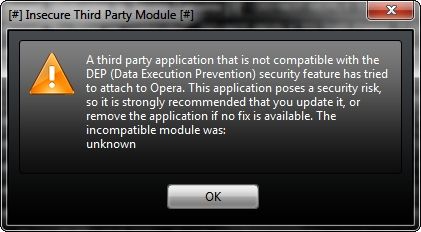
DEPWarning.jpg


Opera 11 Alpha b1055 is supposed to fix the DSK-317389 (Insecure Third Party Module warning when starting Opera (DEP/Data Execution Prevention).

~Maxx~

OperaGold_60.png
 

My Computer My Computer

Computer Manufacturer/Model Number
HP HPE 270f
OS
Windows 7 x64 Home Premium
CPU
Intel Core i7 930 @ 2.8 Ghz Socket 1366 LGA
Motherboard
Pegatron Truckee v1.04E41
Memory
8 GB 1366 Mhz DDR3 (PC3-10700) RAM
Graphics Card(s)
ATI Radeon 5770 1 GB DDR5 RAM
Sound Card
Realtech High Definition
Monitor(s) Displays
32" Sony Bravia
Screen Resolution
1366 X 768
Hard Drives
Intel 25nm 120 GB Series 320 SSD HD Tune- 265 MBps Read/ 130 MBps Write

LaCie 1TB + 1TB RAID 0 eSATA Drive HD Tune- 160 MBps Read/ 90 MBps Write
Keyboard
Logitech Illuminated
Mouse
Logitech MX Revolution
Internet Speed
36.4 Mbps Maximum on a 37 Mbps Motorola SB501 Modem
Opera 11 Alpha b1055 is supposed to fix the DSK-317389 (Insecure Third Party Module warning when starting Opera (DEP/Data Execution Prevention).
~Maxx~

Never saw that myself either with upgrading or installing to External drive.

I'm guessing you upgraded & its one of your extensions producing the warning.
I think Opera are aiming for a auto update of extensions in the future.
 

My Computer My Computer

Computer type
PC/Desktop
Computer Manufacturer/Model Number
self build
OS
Windows 7 Ultimate 64 bit
CPU
Intel Core i7 4770K overclocked to 4.7GHz Quad Core Haswell
Motherboard
Asus Z87 Pro (Socket 1150) ATX Motherboard
Memory
16GB Team Group Vulcan Gold 2133MHz
Graphics Card(s)
ATI Radeon HD 7880 Series Display adapter
Monitor(s) Displays
NEC LCD2690WUXi2
Screen Resolution
26" 1920 x 1200
Hard Drives
Samsung 500GB SSD 840 EVO SATA 6Gb/s
Samsung 250GB SSD 840 EVO SATA 6Gb/s
PSU
Corsair AX760 Platinum
Case
Cooler Master HAF X Gaming Tower
Cooling
XSPC RayStorm 750 RS360 Water cooling
Mouse
Razer Death Adder left handed
Internet Speed
126Mb download 11.5Mb up
Antivirus
Avast free
Browser
Opera
Other Info
Main Browser is Opera
Favorite software Adobe Lightroom & Photoshop
best plugins Nik software
Firewall : Private firewall 7
Yup, same issue here.
 

My Computer My Computer

Computer type
Laptop
Computer Manufacturer/Model Number
Custom
OS
Windows 7 Home Premium x64
CPU
Intel Core i5 2500K
Motherboard
MSI MS-7750
Memory
8GB DDR3
Graphics Card(s)
nVidia GeForce GTX650 Ti BOOST
Sound Card
Realtek
Monitor(s) Displays
21' Philips
Screen Resolution
Full HD
Hard Drives
1TB
PSU
500W
Never got that issue, a fresh opera profile might fix it
 

My Computer My Computer

Computer type
PC/Desktop
Computer Manufacturer/Model Number
Custom Build
OS
Windows 10 Pro x64, Arch Linux
CPU
Intel Core 2 Quad Q8200 OC'd 3.08GHz
Motherboard
Asus Rampage formula LGA775
Memory
8GB DDR2 900Mhz
Graphics Card(s)
MSI GT730 2GB GDDR5 (Kepler)
Sound Card
Supreme FX2
Monitor(s) Displays
Samsung LS22F350 LED
Screen Resolution
1080P
Hard Drives
Kingston SSDNow UV400 120GB, 500GB Hitachi, 2TB Samsung, 500GB Seagate FreeAgent, 640GB Samsung, 160GB Toshiba (Arch)
PSU
AeroCool 500W Bronze
Cooling
Cooler Master V6 + 3X fans
Keyboard
Prolink keyboard
Mouse
Logitech M705
Internet Speed
1MiB/s
Browser
Chrome Beta
Opera 11 Alpha b1055 is supposed to fix the DSK-317389 (Insecure Third Party Module warning when starting Opera (DEP/Data Execution Prevention).
~Maxx~

I'm guessing you upgraded & its one of your extensions producing the warning.
I think Opera are aiming for a auto update of extensions in the future.

Stve- Although I run no extensions I occasionally saw this warning with Opera 11 Alpha b1035 running the .exe and then in b1045 with it installed. I have not seen it since I installed the b1055 snapshot. It appears as though the Opera development team has solved the problem in this latest release. If I wasn't running Opera 11 Alpha in the virtual space of Sandboxie with Comodo Defense+ HIPS on the desktop I probably would have been more concerned when I first saw the warning, but its great that the Opera Devs have fixed the problem so quickly!

~Maxx~

Rainier_R.png
 

My Computer My Computer

Computer Manufacturer/Model Number
HP HPE 270f
OS
Windows 7 x64 Home Premium
CPU
Intel Core i7 930 @ 2.8 Ghz Socket 1366 LGA
Motherboard
Pegatron Truckee v1.04E41
Memory
8 GB 1366 Mhz DDR3 (PC3-10700) RAM
Graphics Card(s)
ATI Radeon 5770 1 GB DDR5 RAM
Sound Card
Realtech High Definition
Monitor(s) Displays
32" Sony Bravia
Screen Resolution
1366 X 768
Hard Drives
Intel 25nm 120 GB Series 320 SSD HD Tune- 265 MBps Read/ 130 MBps Write

LaCie 1TB + 1TB RAID 0 eSATA Drive HD Tune- 160 MBps Read/ 90 MBps Write
Keyboard
Logitech Illuminated
Mouse
Logitech MX Revolution
Internet Speed
36.4 Mbps Maximum on a 37 Mbps Motorola SB501 Modem
with Comodo Defense+ HIPS
Hi Max is Comodo defense still supported I don't see it at their site for download.
Unsupported security software is not a good idea.
Comodo's Internet security Suite is a lot more user friendly with the latest version.

Opera have moved into top gear this year its all the little things they do that impress me like the little Installer.
Installing Opera is a breeze compared to the other browsers.
 

My Computer My Computer

Computer type
PC/Desktop
Computer Manufacturer/Model Number
self build
OS
Windows 7 Ultimate 64 bit
CPU
Intel Core i7 4770K overclocked to 4.7GHz Quad Core Haswell
Motherboard
Asus Z87 Pro (Socket 1150) ATX Motherboard
Memory
16GB Team Group Vulcan Gold 2133MHz
Graphics Card(s)
ATI Radeon HD 7880 Series Display adapter
Monitor(s) Displays
NEC LCD2690WUXi2
Screen Resolution
26" 1920 x 1200
Hard Drives
Samsung 500GB SSD 840 EVO SATA 6Gb/s
Samsung 250GB SSD 840 EVO SATA 6Gb/s
PSU
Corsair AX760 Platinum
Case
Cooler Master HAF X Gaming Tower
Cooling
XSPC RayStorm 750 RS360 Water cooling
Mouse
Razer Death Adder left handed
Internet Speed
126Mb download 11.5Mb up
Antivirus
Avast free
Browser
Opera
Other Info
Main Browser is Opera
Favorite software Adobe Lightroom & Photoshop
best plugins Nik software
Firewall : Private firewall 7
with Comodo Defense+ HIPS
Hi Max is Comodo defense still supported I don't see it at their site for download.
Unsupported security software is not a good idea.
Comodo's Internet security Suite is a lot more user friendly with the latest version.

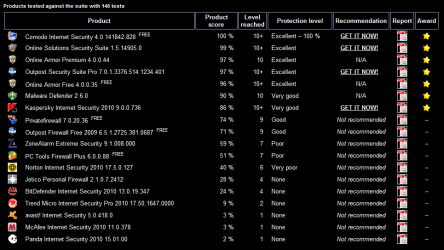
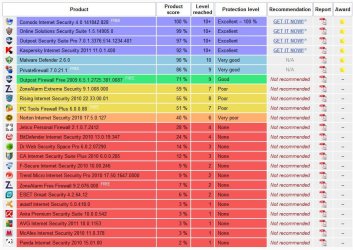
Comodo Proactive Defense+ HIPS is not only supported, but it is the main tool which Comodo has used to remain at the top of the Matousec Proactive Secutity Challenge with a 100% 148/148 rating for so long and remains a main component of CIS.

I used to run the CIS Suite, but when I started running Opera in the virtual space of Sandboxie the definitions dependent Antivirus was replaced by Virus Total and several on demand scanners to scan items downloaded from the Internet and moved from the virtual space to the real computer and since then I have just been running The Comodo Firewall and Proactive Defense+ with HIPS with not a single detection of Malware on either of my computers thanks mainly to the ~42 different scanners at Virus Total which offer an accurate group opinion that no single Antivirus could match in accuracy.

~Maxx~

OperaGold_60.png
 

Attachments

  • Matousec July 2010.PNG
    Matousec July 2010.PNG
    23.2 KB · Views: 9

My Computer My Computer

Computer Manufacturer/Model Number
HP HPE 270f
OS
Windows 7 x64 Home Premium
CPU
Intel Core i7 930 @ 2.8 Ghz Socket 1366 LGA
Motherboard
Pegatron Truckee v1.04E41
Memory
8 GB 1366 Mhz DDR3 (PC3-10700) RAM
Graphics Card(s)
ATI Radeon 5770 1 GB DDR5 RAM
Sound Card
Realtech High Definition
Monitor(s) Displays
32" Sony Bravia
Screen Resolution
1366 X 768
Hard Drives
Intel 25nm 120 GB Series 320 SSD HD Tune- 265 MBps Read/ 130 MBps Write

LaCie 1TB + 1TB RAID 0 eSATA Drive HD Tune- 160 MBps Read/ 90 MBps Write
Keyboard
Logitech Illuminated
Mouse
Logitech MX Revolution
Internet Speed
36.4 Mbps Maximum on a 37 Mbps Motorola SB501 Modem
As my PC has all the important stuff backed up & its just used for leisure I don't use sandboxie only for high risk situations.
3 or 4 virus's get by every month but whenever they try to launch they always get caught by Comodo ,
at least I assume they always get caught ?
To the best of my knowledge my PC is clean its been running extremely well for nearly a year & my friends never complain about spam emails from my PC.
Life used to be more interesting on Vista & Windows XP .:geek:
Why I use Comodo IT'S FREE & pretty good as well

http://stevessnaps.fotopic.net/p68043282.html
 

Attachments

  • Comodo.JPG
    Comodo.JPG
    136.1 KB · Views: 10
Last edited:

My Computer My Computer

Computer type
PC/Desktop
Computer Manufacturer/Model Number
self build
OS
Windows 7 Ultimate 64 bit
CPU
Intel Core i7 4770K overclocked to 4.7GHz Quad Core Haswell
Motherboard
Asus Z87 Pro (Socket 1150) ATX Motherboard
Memory
16GB Team Group Vulcan Gold 2133MHz
Graphics Card(s)
ATI Radeon HD 7880 Series Display adapter
Monitor(s) Displays
NEC LCD2690WUXi2
Screen Resolution
26" 1920 x 1200
Hard Drives
Samsung 500GB SSD 840 EVO SATA 6Gb/s
Samsung 250GB SSD 840 EVO SATA 6Gb/s
PSU
Corsair AX760 Platinum
Case
Cooler Master HAF X Gaming Tower
Cooling
XSPC RayStorm 750 RS360 Water cooling
Mouse
Razer Death Adder left handed
Internet Speed
126Mb download 11.5Mb up
Antivirus
Avast free
Browser
Opera
Other Info
Main Browser is Opera
Favorite software Adobe Lightroom & Photoshop
best plugins Nik software
Firewall : Private firewall 7
As my PC has all the important stuff backed up & its just used for leisure I don't use sandboxie only for high risk situations.

In addition to Windows 7 System Images I also keep incremental Macruim Reflect Disk Images as you can see they include Image backups for Comodo v3.14, v4.1 and v5.0 as I went back to v3.14 several times during the transition where v4.1 would not let the Sandboxie kernel load, but everything is fine in v5.0 as I'm sure you know.

I used to only use Sandboxie for high risk situation, but one day I got a driveby Malware download at Tom's Hardware and the Comodo AV wanted to know if I wanted it to quarantine the Trojan Downloader and suddenly it occurred to me that all the AV was doing was telling me the name of the Malware. Not caring what the name of the Malware was and not wanting the Malware on my computer at all even in quarantine I simply exited Opera and overwrote the Sandbox with 7 passes of the Schneier Algorithm in Eraser and it was so long Malware! I then reinstalled CIS with the Firewall and Defense+ only which is why I have Opera forced to run in Sandboxie so that Comodo doesn't even have to be bothered with any Malware getting through and since I have never received a Defense + alert for any kind of Malware on the desktop Sandboxie must be doing its job.

~Maxx~

Shieldgif.gif
 

Attachments

  • 8Reflectbackups.png
    8Reflectbackups.png
    8.6 KB · Views: 7

My Computer My Computer

Computer Manufacturer/Model Number
HP HPE 270f
OS
Windows 7 x64 Home Premium
CPU
Intel Core i7 930 @ 2.8 Ghz Socket 1366 LGA
Motherboard
Pegatron Truckee v1.04E41
Memory
8 GB 1366 Mhz DDR3 (PC3-10700) RAM
Graphics Card(s)
ATI Radeon 5770 1 GB DDR5 RAM
Sound Card
Realtech High Definition
Monitor(s) Displays
32" Sony Bravia
Screen Resolution
1366 X 768
Hard Drives
Intel 25nm 120 GB Series 320 SSD HD Tune- 265 MBps Read/ 130 MBps Write

LaCie 1TB + 1TB RAID 0 eSATA Drive HD Tune- 160 MBps Read/ 90 MBps Write
Keyboard
Logitech Illuminated
Mouse
Logitech MX Revolution
Internet Speed
36.4 Mbps Maximum on a 37 Mbps Motorola SB501 Modem
Hey Max ever thought you might be paranoid ?
Either you have very important data & sensitive materials or you enjoy the security side as a hobby :geek:
My backups are just data , info i need to set my PC up properly drivers for my motherboard a lot of it is also in Opera notes so a fresh install of windows, install Comodo Internet security then download & synchronize Opera & i have all the info i need at hand.
I have other stuff backed up to the cloud Dropbox & Evernote & online photo sites & to external hard drives.
I don't bother with Windows system restore or backing up Window.
Have you tried Comodo Time Machine it sounds good . When it first came out there were lots of complaints in Comodo forums but i expect they have ironed out the bugs by now.

http://www.comodo.com/home/data-storage-encryption/data-recovery.php

Opera extensions count = 103 & rising
 

My Computer My Computer

Computer type
PC/Desktop
Computer Manufacturer/Model Number
self build
OS
Windows 7 Ultimate 64 bit
CPU
Intel Core i7 4770K overclocked to 4.7GHz Quad Core Haswell
Motherboard
Asus Z87 Pro (Socket 1150) ATX Motherboard
Memory
16GB Team Group Vulcan Gold 2133MHz
Graphics Card(s)
ATI Radeon HD 7880 Series Display adapter
Monitor(s) Displays
NEC LCD2690WUXi2
Screen Resolution
26" 1920 x 1200
Hard Drives
Samsung 500GB SSD 840 EVO SATA 6Gb/s
Samsung 250GB SSD 840 EVO SATA 6Gb/s
PSU
Corsair AX760 Platinum
Case
Cooler Master HAF X Gaming Tower
Cooling
XSPC RayStorm 750 RS360 Water cooling
Mouse
Razer Death Adder left handed
Internet Speed
126Mb download 11.5Mb up
Antivirus
Avast free
Browser
Opera
Other Info
Main Browser is Opera
Favorite software Adobe Lightroom & Photoshop
best plugins Nik software
Firewall : Private firewall 7
stve- In the past I have been forced to rebuild both Vista and Win 7 from the OEM factory image with up to 6 GB of crapware to unintall and 65 programs to restore and each manual restore took about 100 hours of my time which has now been reduced to 4 minutes and 40 seconds restoring a compressed 8 GB Macrium Reflect Image.

Reflect Image Restoration is so efficient that I find it quicker and less hassle restoring an Image which has the particular version of Comodo that I want with all the Firewall and Defense+ rules in place that I use Reflect rather than uninstalling and reinstalling a different version of Comodo which I did many times over the many conflicts that occured while they were refining v4.1.

You can call me paranoid if you like for keeping such a complete set of Image Backups, but for me the Reflect Image backups represent the difference between a 100 hour manual recovery when Windows Recovery fails and a 4 minute and 40 second Reflect Image Recovery which my calculator tells me is over 12,000 times faster and I know that you have a perfect understanding of the need for speed.

~Maxx~

OperaGold_60.png
 

My Computer My Computer

Computer Manufacturer/Model Number
HP HPE 270f
OS
Windows 7 x64 Home Premium
CPU
Intel Core i7 930 @ 2.8 Ghz Socket 1366 LGA
Motherboard
Pegatron Truckee v1.04E41
Memory
8 GB 1366 Mhz DDR3 (PC3-10700) RAM
Graphics Card(s)
ATI Radeon 5770 1 GB DDR5 RAM
Sound Card
Realtech High Definition
Monitor(s) Displays
32" Sony Bravia
Screen Resolution
1366 X 768
Hard Drives
Intel 25nm 120 GB Series 320 SSD HD Tune- 265 MBps Read/ 130 MBps Write

LaCie 1TB + 1TB RAID 0 eSATA Drive HD Tune- 160 MBps Read/ 90 MBps Write
Keyboard
Logitech Illuminated
Mouse
Logitech MX Revolution
Internet Speed
36.4 Mbps Maximum on a 37 Mbps Motorola SB501 Modem
Believe me no offense intended,
If you browse these forums you are not normal as in the average Internet user who thinks their browser is called Google.
I'm retired with plenty of spare time & enjoy messing with computers so spending a couple of hours reinstalling Windows is not a problem for me.
 

My Computer My Computer

Computer type
PC/Desktop
Computer Manufacturer/Model Number
self build
OS
Windows 7 Ultimate 64 bit
CPU
Intel Core i7 4770K overclocked to 4.7GHz Quad Core Haswell
Motherboard
Asus Z87 Pro (Socket 1150) ATX Motherboard
Memory
16GB Team Group Vulcan Gold 2133MHz
Graphics Card(s)
ATI Radeon HD 7880 Series Display adapter
Monitor(s) Displays
NEC LCD2690WUXi2
Screen Resolution
26" 1920 x 1200
Hard Drives
Samsung 500GB SSD 840 EVO SATA 6Gb/s
Samsung 250GB SSD 840 EVO SATA 6Gb/s
PSU
Corsair AX760 Platinum
Case
Cooler Master HAF X Gaming Tower
Cooling
XSPC RayStorm 750 RS360 Water cooling
Mouse
Razer Death Adder left handed
Internet Speed
126Mb download 11.5Mb up
Antivirus
Avast free
Browser
Opera
Other Info
Main Browser is Opera
Favorite software Adobe Lightroom & Photoshop
best plugins Nik software
Firewall : Private firewall 7
Forth build(1060) released
link
 

My Computer My Computer

Computer type
PC/Desktop
Computer Manufacturer/Model Number
Custom Build
OS
Windows 10 Pro x64, Arch Linux
CPU
Intel Core 2 Quad Q8200 OC'd 3.08GHz
Motherboard
Asus Rampage formula LGA775
Memory
8GB DDR2 900Mhz
Graphics Card(s)
MSI GT730 2GB GDDR5 (Kepler)
Sound Card
Supreme FX2
Monitor(s) Displays
Samsung LS22F350 LED
Screen Resolution
1080P
Hard Drives
Kingston SSDNow UV400 120GB, 500GB Hitachi, 2TB Samsung, 500GB Seagate FreeAgent, 640GB Samsung, 160GB Toshiba (Arch)
PSU
AeroCool 500W Bronze
Cooling
Cooler Master V6 + 3X fans
Keyboard
Prolink keyboard
Mouse
Logitech M705
Internet Speed
1MiB/s
Browser
Chrome Beta
Thanks. Opera 11 is turning out to be pretty good, unlike Firefox 4.
 

My Computer My Computer

Computer Manufacturer/Model Number
self built
OS
Windows 7 Professional 64-bit
CPU
Intel E8400 3GHz
Motherboard
Intel DX48BT2
Memory
Kingston PC3-10700H 4Gb
Graphics Card(s)
XFX Radeon HD 5850 BlackEd.
Sound Card
Asus Xonar DG
Monitor(s) Displays
2x Samsung SM-T220HD 22"
Screen Resolution
1680x1050 on two monitors
Hard Drives
OCZ Vertex 2 120gb 3.5" (OS)
Seagate Momentus XT 500gb
Samsung F3 1Tb (games)
2x Samsung F1 1Tb
PSU
Thermaltake ToughPower 850w
Case
Thermaltake Armor
Cooling
Scythe Mugen II
Keyboard
Microsoft Comfort Curve USB
Mouse
Razer Diamondback 3G
Internet Speed
8128/443
Back
Top