Context Menu - Add Shortcuts with Icons

How to Add Shortcuts to Context Menu with Icons in Windows 7


   Note
To add items to the context menu refer to Mr Grim's context menu shortcuts tutorial or download context menu tweaker.


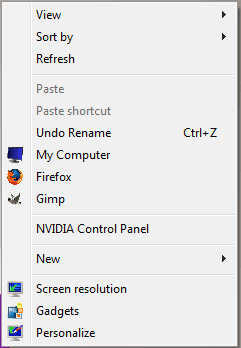
After adding shortcuts follow the steps given below to add icons to the shortcuts:
1. Open regedit. (open startmenu enter 'regedit' in search and hit enter)

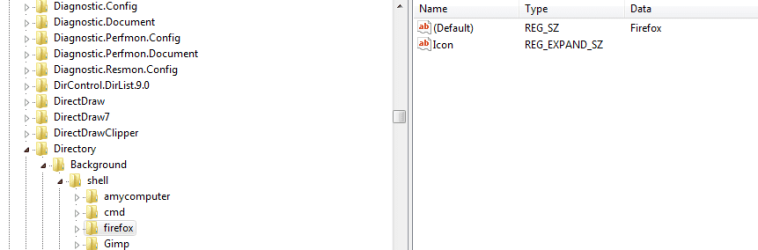
2. Navigate to HKEY_CLASSES_ROOT\Directory\Background\shell\ in the registry.

3. Click on shell to see the context menu items.

4. If you have added firefox u will see firefox inside the shell key.
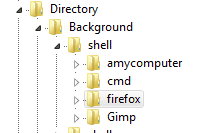
1..PNG
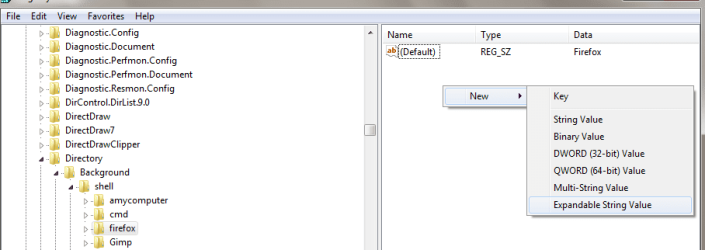
5. Click on firefox and the in the values pane right click and click 'new' and then 'expandable string value'. Name the new value 'Icon'.
2.png

3.PNG
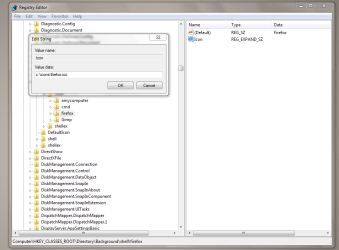
6. Right Click on 'Icon' and click modify and in the edit string dialog enter the path of the icon file.(the file must have .ico extension)
4.PNG
7. Click on OK and you're done.
5.png
   Tip
TO MAKE THIS ITEM VISIBLE ONLY ON "SHIFT + RIGHT CLICK"
1. Follow steps 1-4 above.
2. Click on firefox and the in the values pane right click and click 'new' and then 'String Value'. Name the new value 'Extended'.


Last edited by a moderator:
Nice Work!

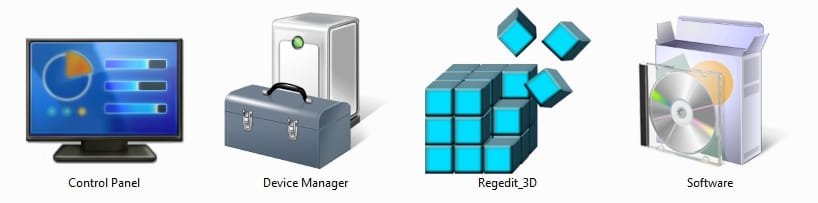
Here are some icons for anyone who wants to put them into a folder so they can be added to the Context menu.

2009-08-22_233154.jpg

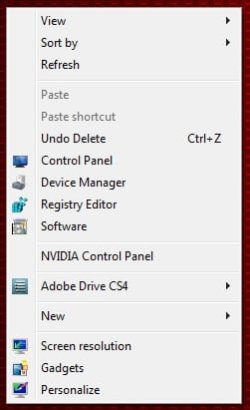
To make it easier, you can add the above folder to the windows directory and use this registry tweak to automate adding the context menu shortcuts and pictures which will will look like this.

2009-08-22_235655.jpg
 

Attachments

Last edited:

My Computer

Computer Manufacturer/Model Number
Home Brew
OS
Windows 7 Ultimate Vista Ultimate x64
CPU
Core 2 Duo E8500 3.16Ghz @ 3.8Ghz
Motherboard
eVGA 750i FTW
Memory
2x2Gigs Patriot PC2-6400 LL
Graphics Card(s)
Inno3D GeForce GTX260 216 SP
Monitor(s) Displays
ASUS VW222U 22" 2ms Response time
Screen Resolution
1680x1050
Hard Drives
SATA 150GB
SATA II 250GB
USB IDE 750GB Ext.
PSU
HYTEC 600W & Thermaltake 650W Toughpower Power Exp
Case
Thermaltake Armor LCS (Liquid Cooling System)
Cooling
Liquid Cooling System
Keyboard
Logitech G15 Gaming Keyboard
Mouse
Logitech G9 Gaming Mouse
Nice Work!

Here are some icons for anyone who wants to put them into a folder so they can be added to the Context menu.

View attachment 24730

To make it easier, you can add the above folder to the windows directory and use this registry tweak to automate adding the context menu shortcuts and pictures which will will look like this.

View attachment 24742
thanks Mr.Grim
 

My Computer

OS
windows 7 Ultimate 32bit
CPU
intel c2d e7200 2.53ghz
Motherboard
asus p5gcmx/1333
Memory
2gb DDR2
Graphics Card(s)
nvidia GeForce 7300SE
Monitor(s) Displays
samsung sync master 793s
Screen Resolution
1280X1024
Hard Drives
250gb seagate
Case
Circle
Keyboard
iball
Mouse
iball
Internet Speed
512kbps
Thank you very much...Good job !! :)
 

My Computer

OS
Windows 7
CPU
Core 2 Duo
Motherboard
ASUS P5GC-MX
Memory
King Max
Graphics Card(s)
Intel(R) 82945G Express Chipset Family
Sound Card
C-Media PCI Audio Device
Monitor(s) Displays
Sam Sung
your welcome
 

My Computer

OS
windows 7 Ultimate 32bit
CPU
intel c2d e7200 2.53ghz
Motherboard
asus p5gcmx/1333
Memory
2gb DDR2
Graphics Card(s)
nvidia GeForce 7300SE
Monitor(s) Displays
samsung sync master 793s
Screen Resolution
1280X1024
Hard Drives
250gb seagate
Case
Circle
Keyboard
iball
Mouse
iball
Internet Speed
512kbps
:thumbsup:
 

My Computer

OS
windows 7 Ultimate 32bit
CPU
intel c2d e7200 2.53ghz
Motherboard
asus p5gcmx/1333
Memory
2gb DDR2
Graphics Card(s)
nvidia GeForce 7300SE
Monitor(s) Displays
samsung sync master 793s
Screen Resolution
1280X1024
Hard Drives
250gb seagate
Case
Circle
Keyboard
iball
Mouse
iball
Internet Speed
512kbps
help

i need to add an icon near the nvidia control panel......help plzz
 

My Computer

Computer Manufacturer/Model Number
lenovo 3000 n100
OS
windows 7
Memory
1.5 gb
Graphics Card(s)
Nvidia ge force 7300 go
Sound Card
realteck
this forum is awesome like always. Thanks for the tutorial.
 

My Computer

Computer type
PC/Desktop
Computer Manufacturer/Model Number
HP
OS
Windows Seven Ultimate x64 SP1
CPU
Intel Core i7 x980 @ 3.33GHz
Memory
12.0 GB
Graphics Card(s)
Nvidia GeForce GTX 260
Its not work for me!
I can't clear what should i do in step 6!


Please help!
 

My Computer

Computer Manufacturer/Model Number
Intel DG31PR (Intel Dual core 2.5 E5200 @ 2.5GHz)
OS
windows7 Ultimate SP1 x32bit
CPU
Intel
Motherboard
Intel DG31PR
Memory
Kinsgton 1GB an Transcend 2GB
Graphics Card(s)
Intel- onboard
Sound Card
Intel- onboard
Monitor(s) Displays
ViewSonic LCD Widescreen 19
Screen Resolution
1400x900
Hard Drives
Samsung 256GB
PSU
Legend
Case
Legend
Cooling
Intel
Keyboard
Seemo
Mouse
Prolink
Internet Speed
Download Speed-512Kbps, Upload Speed-128Kbps (ADSL wired)
Other Info
UPS- Prolink Pro650s
Router Prolink H5201
Sub Woofer - Creative 2.1
Its not work for me!
I can't clear what should i do in step 6!


Please help!

You are going to just edit the string and type the path of where icon you want to use is located in your computer.

example: i want to use an icon i put in the folder C:/icons/

in the string i will put: C:/icon/myicon.ico

Again, if you have an icon it must have the .ico extension.
 

My Computer

Computer type
PC/Desktop
Computer Manufacturer/Model Number
HP
OS
Windows Seven Ultimate x64 SP1
CPU
Intel Core i7 x980 @ 3.33GHz
Memory
12.0 GB
Graphics Card(s)
Nvidia GeForce GTX 260
Its not work for me!
I can't clear what should i do in step 6!


Please help!

You are going to just edit the string and type the path of where icon you want to use is located in your computer.

example: i want to use an icon i put in the folder C:/icons/

in the string i will put: C:/icon/myicon.ico

Again, if you have an icon it must have the .ico extension.

I don't have that kind of icon so how do i get them!
 

My Computer

Computer Manufacturer/Model Number
Intel DG31PR (Intel Dual core 2.5 E5200 @ 2.5GHz)
OS
windows7 Ultimate SP1 x32bit
CPU
Intel
Motherboard
Intel DG31PR
Memory
Kinsgton 1GB an Transcend 2GB
Graphics Card(s)
Intel- onboard
Sound Card
Intel- onboard
Monitor(s) Displays
ViewSonic LCD Widescreen 19
Screen Resolution
1400x900
Hard Drives
Samsung 256GB
PSU
Legend
Case
Legend
Cooling
Intel
Keyboard
Seemo
Mouse
Prolink
Internet Speed
Download Speed-512Kbps, Upload Speed-128Kbps (ADSL wired)
Other Info
UPS- Prolink Pro650s
Router Prolink H5201
Sub Woofer - Creative 2.1
Its not work for me!
I can't clear what should i do in step 6!


Please help!

You are going to just edit the string and type the path of where icon you want to use is located in your computer.

example: i want to use an icon i put in the folder C:/icons/

in the string i will put: C:/icon/myicon.ico

Again, if you have an icon it must have the .ico extension.

I don't have that kind of icon so how do i get them!

you don't have it because it is an example i used. You have to find your own icons through windows or find them on the internet.

try:Icon Archive - 207,289 free icons, buddy icons, xp icons, vista icons, desktop icons
 

My Computer

Computer type
PC/Desktop
Computer Manufacturer/Model Number
HP
OS
Windows Seven Ultimate x64 SP1
CPU
Intel Core i7 x980 @ 3.33GHz
Memory
12.0 GB
Graphics Card(s)
Nvidia GeForce GTX 260
Its not work for me!
I can't clear what should i do in step 6!


Please help!

You are going to just edit the string and type the path of where icon you want to use is located in your computer.

example: i want to use an icon i put in the folder C:/icons/

in the string i will put: C:/icon/myicon.ico

Again, if you have an icon it must have the .ico extension.

I don't have that kind of icon so how do i get them!

u can edit watever images u hav in paint n save them as watever.ico:D
 

My Computer

OS
windows 7 Ultimate 32bit
CPU
intel c2d e7200 2.53ghz
Motherboard
asus p5gcmx/1333
Memory
2gb DDR2
Graphics Card(s)
nvidia GeForce 7300SE
Monitor(s) Displays
samsung sync master 793s
Screen Resolution
1280X1024
Hard Drives
250gb seagate
Case
Circle
Keyboard
iball
Mouse
iball
Internet Speed
512kbps
Now my context menu show Firefox icon Thanks for help, if i click that icon Firefox not open this error came (Look screen shot) .
How do i fix this matter now?
 
Last edited by a moderator:

My Computer

Computer Manufacturer/Model Number
Intel DG31PR (Intel Dual core 2.5 E5200 @ 2.5GHz)
OS
windows7 Ultimate SP1 x32bit
CPU
Intel
Motherboard
Intel DG31PR
Memory
Kinsgton 1GB an Transcend 2GB
Graphics Card(s)
Intel- onboard
Sound Card
Intel- onboard
Monitor(s) Displays
ViewSonic LCD Widescreen 19
Screen Resolution
1400x900
Hard Drives
Samsung 256GB
PSU
Legend
Case
Legend
Cooling
Intel
Keyboard
Seemo
Mouse
Prolink
Internet Speed
Download Speed-512Kbps, Upload Speed-128Kbps (ADSL wired)
Other Info
UPS- Prolink Pro650s
Router Prolink H5201
Sub Woofer - Creative 2.1
I think this tutorial miss adding command options to the registry. For example if we click that context menu shot cut we can't open that program so then that process will be useless so i decided to add that information in here. Don't angry with me!

Follow these screen shots after you create short cut!


1st

Create sub key naming it as a "command" ("C" should be lower case).


After create it you can see this way.


2nd

Copy short path including its .exe file name


Modify command key bubble click it and Past its path.
Like this way.


After that you can see it this way.


You done it!
Now you can launch your favorite program clicking context menu shortcut!


Last edited:

My Computer

Computer Manufacturer/Model Number
Intel DG31PR (Intel Dual core 2.5 E5200 @ 2.5GHz)
OS
windows7 Ultimate SP1 x32bit
CPU
Intel
Motherboard
Intel DG31PR
Memory
Kinsgton 1GB an Transcend 2GB
Graphics Card(s)
Intel- onboard
Sound Card
Intel- onboard
Monitor(s) Displays
ViewSonic LCD Widescreen 19
Screen Resolution
1400x900
Hard Drives
Samsung 256GB
PSU
Legend
Case
Legend
Cooling
Intel
Keyboard
Seemo
Mouse
Prolink
Internet Speed
Download Speed-512Kbps, Upload Speed-128Kbps (ADSL wired)
Other Info
UPS- Prolink Pro650s
Router Prolink H5201
Sub Woofer - Creative 2.1
Hi there, I don't have any entries in HKEY_CLASSES_ROOT\Directory\Background\shell\ but I have changed ones in HKEY_CLASSES_ROOT\Directory\shell\ and HKEY_CLASSES_ROOT\*\shell\. I have one for MediaInfo lite in HKEY_CLASSES_ROOT\*\shell\. It shows the context menu entry for all filetypes, as it should, but it shows the icon only for certain filetypes. Why would this be? Cheers.
 

My Computer

Computer Manufacturer/Model Number
Acer Aspire 5741
OS
windows 7 Home Premium
CPU
Intel Core i5 @ 2.27GHz 32nm Technology
Motherboard
Acer Aspire 5741 (CPU)
Memory
DDR3 4.0GB
Graphics Card(s)
Intel(R) Graphics Media Accelerator HD
Sound Card
Realtek High Definition Audio Intel(R) Display Audio
Monitor(s) Displays
Generic PnP Monitor on Intel Graphics Media Accelerator HD
Screen Resolution
1366x768
Hard Drives
Seagate 2.5" SATA 500GB
Keyboard
Synaptics PS/2 Port TouchPad
Mouse
Microsoft Comfort Mouse 4500 (IntelliPoint)
What size icon is best displayed in the context menu? My guess would be 16x16?
 

My Computer

Computer Manufacturer/Model Number
HP 2000 Notebook
OS
Windows 7 Home Premium (64-bit)
CPU
AMD E-350 [1.60 Ghz]
Memory
3G DDR3
Graphics Card(s)
AMD Radeon HD [1.42G]
Monitor(s) Displays
15,6" HD LED [HP]
Screen Resolution
1366 x 768
Hard Drives
320G - SATA [Internal]
2T - Western Digital "My Book Essential"
Other Info
New Desktop "In-Progress"
Hello Brandon,

Correct. The context menu would only need a small size icon. :)
 

My Computer

Computer type
PC/Desktop
Computer Manufacturer/Model Number
Self built custom
OS
64-bit Windows 11 Pro for Workstations
CPU
Intel i7-8700K OC'd to 5 GHz
Motherboard
ASUS ROG Maximus XI Formula Z390
Memory
64 GB (4x16GB) G.SKILL TridentZ RGB DDR4 3600 MHz
Graphics Card(s)
ASUS ROG-STRIX-GTX1080TI-O11G-GAMING
Sound Card
Integrated
Monitor(s) Displays
2 x Samsung Odyssey G7 27"
Screen Resolution
2560x1440
Hard Drives
1TB Samsung 990 PRO M.2,
4TB Samsung 990 PRO PRO M.2,
TerraMaster F8 SSD Plus NAS
PSU
Seasonic Prime Titanium 850W
Case
Thermaltake Core P3
Cooling
Corsair Hydro H115i
Keyboard
Logitech wireless K800
Mouse
Logitech MX Master 4
Internet Speed
2 Gb/s Download and 100 Mb/s Upload
Antivirus
Malwarebyte Anti-Malware Premium
Browser
Google Chrome
Other Info
Logitech Z625 speaker system,
Logitech BRIO 4K Pro webcam,
HP Color LaserJet Pro MFP M477fdn,
APC SMART-UPS RT 1000 XL - SURT1000XLI,
Galaxy S23 Plus phone
Interesting. I guess now there should be a Shell Add-In just in case too like the handy Tweak Send To Toys or CuteMenus for example.

In addition, in case you want to Extract icons quickly, try the little app recommended by HowToGeek Staff: BeCyIconGrabber.

If you liked it, just don't forget to say 'thank you'.


Enjoy and have a happy new year!
 

My Computer

OS
Windows 7 Ultimate x32 SP1 (still)
Back
Top