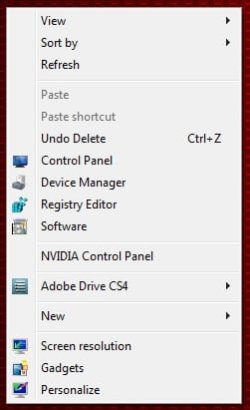
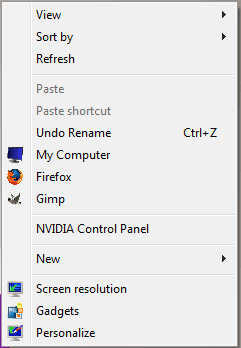
How to Add Shortcuts to Context Menu with Icons in Windows 7
Note
To add items to the context menu refer to Mr Grim's context menu shortcuts tutorial or download context menu tweaker.
After adding shortcuts follow the steps given below to add icons to the shortcuts:
1. Open regedit. (open startmenu enter 'regedit' in search and hit enter)
2. Navigate to HKEY_CLASSES_ROOT\Directory\Background\shell\ in the registry.
3. Click on shell to see the context menu items.
4. If you have added firefox u will see firefox inside the shell key.

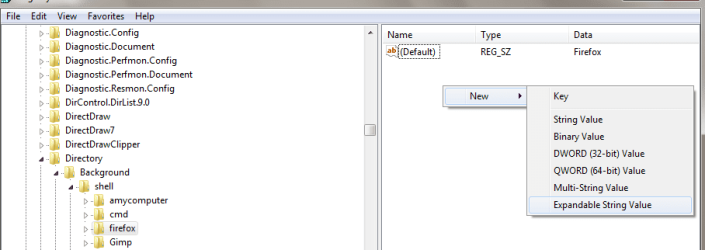
5. Click on firefox and the in the values pane right click and click 'new' and then 'expandable string value'. Name the new value 'Icon'.
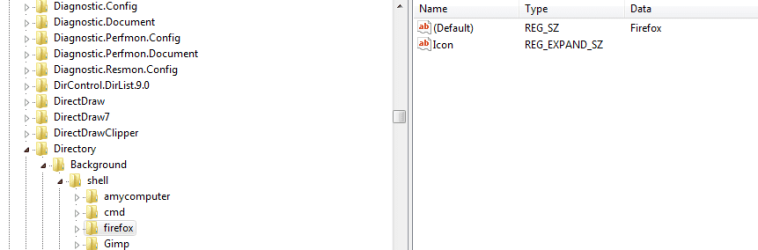
6. Right Click on 'Icon' and click modify and in the edit string dialog enter the path of the icon file.(the file must have .ico extension)
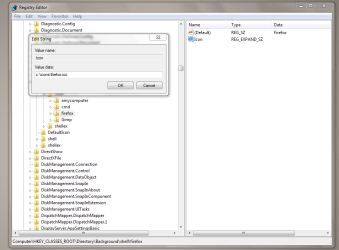
7. Click on OK and you're done.
Tip
TO MAKE THIS ITEM VISIBLE ONLY ON "SHIFT + RIGHT CLICK"
1. Follow steps 1-4 above.
2. Click on firefox and the in the values pane right click and click 'new' and then 'String Value'. Name the new value 'Extended'.
1. Follow steps 1-4 above.
2. Click on firefox and the in the values pane right click and click 'new' and then 'String Value'. Name the new value 'Extended'.
Last edited by a moderator: