Bluetooth headset pairs but won't connect, not avail as playback devic

simplecj

New member
Local time
1:53 PM
Messages
14
Bluetooth headset pairs but won't connect - SOLVED!

My setup:
Windows 7 64bit Prof (on a suped up PC)
Asus BT211 - BT 2.1 + EDR (full A2DP support with latest Win7 64bit drivers - Broadcom Bluetooth 2.1 +EDR driver version 6.3.5.430 (4/8/10)
Sony DR-BT101 Headphones - (Microsoft says they're compatible)

PROBLEM:
All BT devices successfully installed and appear to be working. I can even find the A2DP device if I show all hidden devices in Device Manager. The headset pairs with no problems, Remote, Headset, Handsfree Telephony, and Audio Sink Services are available under device properties. However, non of the headphone services are available under "Playback Devices" or "Recording Devices".

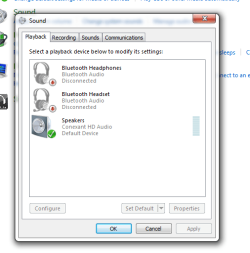
When I right-click on the Bluetooth system tray icon and select "Open Settings" then click on the "Audio" tab I can see all of the active services from my headset. All services show "disconnected" below them. When I right-click on a service (with the headphones on and in connectible mode - steady flashing blue) I can select "Connect" (the only place in Win7 I've found the connect function). When I try to connect, it shows "Connecting" for a minute or two then goes back to "Disconnected". The headset never appears to respond.

SO... basically it appears everything should be working, but for some reason it isn't. I can PAIR but I can't CONNECT. I can install services but I can't actually use any of them.
4-dontknow.gif


I've tried everything, there must be something I'm missing. Others have said they got these headphones working with Win7, many have also had problems not just with these headphones, but a whole range of BT devices and connecting to Win7.

I also have a Logitech BT MX5000 keyboard and mouse combo and they work fine.... well, when they're not lagging out or dropping out, they work fine.
 
Last edited:

My Computer My Computer

At a glance

Windows 7 Professional x64Intel Core 2 Duo E8400 Wolfdale (OC stable 3....4GB (2x2) GSkillz DDR2 @ 1066MHzAsus EN9600GT - upgrading soon
Computer Manufacturer/Model Number
Custom Assembled and Configured by Myself
OS
Windows 7 Professional x64
CPU
Intel Core 2 Duo E8400 Wolfdale (OC stable 3.6GHz)
Motherboard
Asus P5Q-E
Memory
4GB (2x2) GSkillz DDR2 @ 1066MHz
Graphics Card(s)
Asus EN9600GT - upgrading soon
Sound Card
HTO Omega Striker 7.1 - Using optical out to Logitech DTS
Monitor(s) Displays
BenQ FP202W LCD & BenQ MP720 DLP Projector in Dualview
Hard Drives
64GB Kingston SSD-Now SSD - System Drive
500GB Seagate SATA - My Documents and Files
1TB Seagate SATA - Media and Archive Drive
500GB Seagate Freeagent External - Backup Drive
PSU
OCZ500MXSP - Modularized cable system, 120mm Exaust Fan
Case
Tsunami Dream Tower
Cooling
Zalman "Copper Flower" sinks on both CPU and GPU + 4x120mm

My Computer My Computer

At a glance

Windows 7 Ultimate x641.80 GHz Intel Core 2 Duo processor T71003 gig ddr2NVIDIA GeForce 8400M GS
Computer Manufacturer/Model Number
HP dv6519tx
OS
Windows 7 Ultimate x64
CPU
1.80 GHz Intel Core 2 Duo processor T7100
Memory
3 gig ddr2
Graphics Card(s)
NVIDIA GeForce 8400M GS
Sound Card
Realtek High Definition Audio
Monitor(s) Displays
15.4” WXGA High Definition BrightView Widescreen
Screen Resolution
1280 x 800
Hard Drives
Hitachi 320 GB (5400 rpm)
PSU
90 W AC Power Adapter
Cooling
Kitchen plate under the lappy
Keyboard
101 key compatible
Mouse
Touch Pad with On/Off button and dedicated vertical Scroll
Internet Speed
Three Wireless internet prepaid using E160G USB dongle
Tried it, no go. It doesn't detect the BT device. When I try to manually set the driver it gives me an error saying the device cannot start. I've tried probably 5 or 6 different drivers so far and the only one that successfully installs is the one from Asus using the most recent Broadcom drivers.

I'm going to try this on my XP laptop and see if I can narrow it down to the OS. I think my drivers are the best I can get, I think it's an OS issue...
 

My Computer My Computer

At a glance

Windows 7 Professional x64Intel Core 2 Duo E8400 Wolfdale (OC stable 3....4GB (2x2) GSkillz DDR2 @ 1066MHzAsus EN9600GT - upgrading soon
Computer Manufacturer/Model Number
Custom Assembled and Configured by Myself
OS
Windows 7 Professional x64
CPU
Intel Core 2 Duo E8400 Wolfdale (OC stable 3.6GHz)
Motherboard
Asus P5Q-E
Memory
4GB (2x2) GSkillz DDR2 @ 1066MHz
Graphics Card(s)
Asus EN9600GT - upgrading soon
Sound Card
HTO Omega Striker 7.1 - Using optical out to Logitech DTS
Monitor(s) Displays
BenQ FP202W LCD & BenQ MP720 DLP Projector in Dualview
Hard Drives
64GB Kingston SSD-Now SSD - System Drive
500GB Seagate SATA - My Documents and Files
1TB Seagate SATA - Media and Archive Drive
500GB Seagate Freeagent External - Backup Drive
PSU
OCZ500MXSP - Modularized cable system, 120mm Exaust Fan
Case
Tsunami Dream Tower
Cooling
Zalman "Copper Flower" sinks on both CPU and GPU + 4x120mm
Have you set your headphone to discoverable and then set your Bluetooth manager to search for devices?
Lastly in playback devices under the speaker icon have you set to default the headphone device?
 

My Computer My Computer

At a glance

Windows 7 Ultimate 64i7 3770k OC'd 4.6 @ 1.17v, also FX 8120 & i5 ...32 gb G.Skill Sniper DDR3 10-12-12-31 @ 2133XFX Radeon 7870 2GB DDR5
Computer type
PC/Desktop
Computer Manufacturer/Model Number
A blend of brains, brawn and dumb luck.
OS
Windows 7 Ultimate 64
CPU
i7 3770k OC'd 4.6 @ 1.17v, also FX 8120 & i5 miniITX
Motherboard
MSI P67A-GD80 b3
Memory
32 gb G.Skill Sniper DDR3 10-12-12-31 @ 2133
Graphics Card(s)
XFX Radeon 7870 2GB DDR5
Sound Card
Sound Blaster Z Series Card
Monitor(s) Displays
(2) LG LED 23" 1920 x 1080 2ms Monitors via mini d-port
Screen Resolution
1680 X 1050 p
Hard Drives
Samsung 256 gb 830 SSD sata III
(1) 1 tb WD Black
(2) 1 tb Hitachi deskmates/sata II
(2) 1 tb WD green/sata II
(2) 3 tb Seagate Barracuda
(1) 120 gb OCZ Vertex SS
(1) Drobo 5N w/5 Seagate 3tb
PSU
EVGA modular 1000G2 80% gold rating & APC 1200 RS
Case
CoolerMaster Storm Styker
Cooling
7 case fans 140mm & 120mm, NZXT Kraken X60
Keyboard
(2) Logitech Illuminated Keyboards (1) usb (1) wireless
Mouse
Logitech G700 & T-BC21 - nano nx for the laptop
Internet Speed
Basic 120mbps down
Antivirus
Trend Micro Titanium Max Security & Malwarebytes Premium
Browser
Chrome and IE 10
Other Info
5 Noctua case fans + 3 Noctua in p/p on NZXT cooler
Integrated hot swap drive bays for 2.5" Drives
(2) Lite-on dvd/cd/Blu Ray optical 22X
Integrated fan controller and led on/off
HP Officejet Pro 8630 all-n-one
Hot-swappable 3.5" hard drive bay
Netgear Nighthawk router
Asus USB 3 & sata 6 PCIe card
Vantec IDE to sata adptr./Ultra sata adptr
Lenovo L420 i5 lappy with m sata
Drobo 5N advanced NAS
Have you set your headphone to discoverable and then set your Bluetooth manager to search for devices?
Lastly in playback devices under the speaker icon have you set to default the headphone device?

You didn't read my original post... The headphones are paired successfully, but they won't connect (yes they are in discoverable mode when I try to connect) None of the headphone services show up in Playback or Recording devices... I'm installing it on my XP laptop, should know soon if it's Win7 causing the prob.

UPDATE: I installed BT on my laptop and everything worked fine, crystal clear stereo music! SOOOO that means the problem is Win7 related and not the headphones.

Hopefully this will also eliminate anyone assuming I just don't know what I'm doing. I've been a computer geek since I got my first desktop computer 16 years ago. That system had a whopping 25MHz processor and 200MB hard drive, whole system cost $2000... man we've come along ways since then! :geek:) I have completed probably three dozen or more clean installs, built custom computers ect. With this bluetooth issue I think I've tried everything I can short of buying another BT adapter, but I just bought this ASUS one specifically for A2DP audio and it's class 1 range (100m).

PLUS after all the forum posts I've read with people having similar problems I think this is something Microsoft needs to resolve. Apparently Win7 bluetooth support sucks. My headphones and bluetooth adapter work fine on XP. Unfortunately I need them to work on my Win 7 system since it's basically my HTPC. I rarely use my laptop and I'm not going back to XP after shelling out $260 for Win7. :mad:
 
Last edited:

My Computer My Computer

At a glance

Windows 7 Professional x64Intel Core 2 Duo E8400 Wolfdale (OC stable 3....4GB (2x2) GSkillz DDR2 @ 1066MHzAsus EN9600GT - upgrading soon
Computer Manufacturer/Model Number
Custom Assembled and Configured by Myself
OS
Windows 7 Professional x64
CPU
Intel Core 2 Duo E8400 Wolfdale (OC stable 3.6GHz)
Motherboard
Asus P5Q-E
Memory
4GB (2x2) GSkillz DDR2 @ 1066MHz
Graphics Card(s)
Asus EN9600GT - upgrading soon
Sound Card
HTO Omega Striker 7.1 - Using optical out to Logitech DTS
Monitor(s) Displays
BenQ FP202W LCD & BenQ MP720 DLP Projector in Dualview
Hard Drives
64GB Kingston SSD-Now SSD - System Drive
500GB Seagate SATA - My Documents and Files
1TB Seagate SATA - Media and Archive Drive
500GB Seagate Freeagent External - Backup Drive
PSU
OCZ500MXSP - Modularized cable system, 120mm Exaust Fan
Case
Tsunami Dream Tower
Cooling
Zalman "Copper Flower" sinks on both CPU and GPU + 4x120mm
SOLVED!!! :D Clean install with Win7 x64 SP1 RC (slipstreamed) onto some new OCZ Vertex2 SSDs in RAID0. Computer is running lightening fast and BT headphones worked on the first try with the ASUS BT driver suite.
I LOVE BT STEREO HEADPHONES!! With the Class 1 dongle I can go downstairs and out into the garage and it keeps the signal with only an occasional split second break. I now have audio anywhere in my house!! Now I need to get a BT reciever unit that can plug into a stereo downstairs, would be the perfect setup! :geek:
 

My Computer My Computer

At a glance

Windows 7 Professional x64Intel Core 2 Duo E8400 Wolfdale (OC stable 3....4GB (2x2) GSkillz DDR2 @ 1066MHzAsus EN9600GT - upgrading soon
Computer Manufacturer/Model Number
Custom Assembled and Configured by Myself
OS
Windows 7 Professional x64
CPU
Intel Core 2 Duo E8400 Wolfdale (OC stable 3.6GHz)
Motherboard
Asus P5Q-E
Memory
4GB (2x2) GSkillz DDR2 @ 1066MHz
Graphics Card(s)
Asus EN9600GT - upgrading soon
Sound Card
HTO Omega Striker 7.1 - Using optical out to Logitech DTS
Monitor(s) Displays
BenQ FP202W LCD & BenQ MP720 DLP Projector in Dualview
Hard Drives
64GB Kingston SSD-Now SSD - System Drive
500GB Seagate SATA - My Documents and Files
1TB Seagate SATA - Media and Archive Drive
500GB Seagate Freeagent External - Backup Drive
PSU
OCZ500MXSP - Modularized cable system, 120mm Exaust Fan
Case
Tsunami Dream Tower
Cooling
Zalman "Copper Flower" sinks on both CPU and GPU + 4x120mm
*RESOLUTION*Bluetooth Device pairs but doesnt connect in WINDOWS 7 FIX

Hey all,

I stumbled upon this post and I didn't want to re-install because I was having the same problem. After a few hours of trying to figure this out; re-installed Bluetooth drives etc... I left the problem for a bit and came back to it and figured out a fix.

HERE IS THE FIX:

Remove the device from your PC (Devices and Printers) > click on Add a Device and set your bluetooth to pairing mode > when your device shows up in the list DO NOT HIT NEXT just yet > Instead right click and go to Properties and select ALL the options for the services and after it install everything it will work for you. Also, please don't forget to change your default sound device in Control Panel and Sound.

Hope this helps.

JayMac
 

My Computer My Computer

At a glance

Windows 7 Pro 64bit
OS
Windows 7 Pro 64bit
Didn't work for me, and I can't seem to find the way, nor do I have the patience to look for, how to post a new thread. I've tried EVERYTHING on this forum, and if you buy one of the new great sounding Bluetooth headphones, which can be used with your cellphone, (they have mics) and pair with everything, (even Blackberry) except! Windows Laptops, you just give up as I did, and figure, both companies have given up on 7 now that there's 8, and if it doesn't connect, it's not our problem! Just check Broadcom's (two m's?) site. There they explain that there is no such thing as a "BLUETOOTH DRIVER" yet if you insist, here's the latest download of junk for you Windows 7 throwbacks. - Tried downloading it, get error message, "You must 1st remove old bluetooth programs, before installing this one" - Really? Every other program, even illicit ones. (TOR etc), have a way of ridding your PC of the old version. -By the way, there is no way to remove any "old version" it came "bundled" with Windows 7. - Neither company seems to care anymore.

Shot in the dark here. Anyone care?- Dongle is out of the question. I'd rather take out my real dongle at best buy.
 

My Computer My Computer

At a glance

Windows 7 Home Premium 64bit 6.1.7601 Service...Processor Intel(R) Core(TM) i3 CPU M 350 @ 2....4.00 GB (3.67 usable)
Computer Manufacturer/Model Number
Sony VAIO VPCEA24FM
OS
Windows 7 Home Premium 64bit 6.1.7601 Service Pack 1 Build 7601
CPU
Processor Intel(R) Core(TM) i3 CPU M 350 @ 2.27GHz, 2
Motherboard
350 @2.27Hz 2.27Hz (that was listed below CPU)
Memory
4.00 GB (3.67 usable)
Sound Card
PNP Device ID HDAUDIO\FUNC_01&VEN_10EC&DEV_0269&SUBSYS_104D4
Monitor(s) Displays
Intel(R) Graphics Media Accelerator HD
Screen Resolution
1366 x 768 x 59 hertz
Other Info
Most info I could find on short notice.
*RESOLUTION*Bluetooth Device pairs but doesnt connect in WINDOWS 7 FIX

JayMac : HERE IS THE FIX:

Remove the device from your PC (Devices and Printers) > click on Add a Device and set your bluetooth to pairing mode > when your device shows up in the list DO NOT HIT NEXT just yet > Instead right click and go to Properties and select ALL the options for the services and after it install everything it will work for you. Also, please don't forget to change your default sound device in Control Panel and Sound.

Hope this helps.

JayMac

Thanks man it finally works !!!
I can't believe it was so complicated to pair my logitech wireless bluetooth adapter 2.1 with windows 7 while it was plug and play on ubuntu 12.10 ... !!

Anyway if it can help people that got the same device, here the name of the driver I found, it is from broadcom (works well with Win 7 Ultimate x64): you look for BTW_6.2.0.9700.rar on google, you DL it, and you just run setup.
Then you do what Jaymac said because windows did not wait for the device to be in pairing mode, so it can not be paired yet ...

Thanks again and I hope I helped to =)

Bye
 

My Computer My Computer

At a glance

Windows 7 Ultimate x64
Computer type
PC/Desktop
OS
Windows 7 Ultimate x64
Good Luck

This and every other fix of the dozens I've read on the internet does not help. Its hard to believe that something so common and probably easy to fix for Windows 7 has not been addressed.
 

My Computer My Computer

At a glance

Windows 7 pro 64
Computer type
PC/Desktop
OS
Windows 7 pro 64
Fixed

I followed the instructions to download the driver. My original problem was that the drivers weren't installing. Once I got them to be installed, it would accept my bluetooth speaker, but it wouldn't play my audio to the speakers. I did see that after adding the driver I was able to right click then do advanced options. It showed me a spot where it said that If I want to have audio from the computer to play on the bluetooth headset to Connect. I hit Connect and nothing would happen. Then I uninstalled the Speaker then reinstalled it. This time I went through the orginal motion from when I first added the speaker. I added it with the code (0000) then it worked perfectly.
 

My Computer My Computer

At a glance

Minnesotai5
Computer type
PC/Desktop
Computer Manufacturer/Model Number
Gateway
OS
Minnesota
CPU
i5
Antivirus
Kaspersky
I haven't registered for a forum in years, but the problems I was having with Bluetooth audio were so frustrating that by the time I solved them I thought it would be worth helping others, or trying to at least.

I fitted a new Wifi card into my Samsung Q300 (that's a story of its own...!) because the included one was a really toss version of 802.11n wireless that did a pathetic 72mbps. The new one is an Intel 7260, which does 802.11ac and has Bluetooth 4.0 (and 3.0, 2.1 etc).

After getting the Wifi up and running, I had Bluetooth working but unreliably. My bluetooth keyboard kept dropping out, and getting my Nokia BH-103 headset working was impossible. Windows would pair with the device but had no drivers for any of the services. I wanted to at least use it with Skype, and hopefully as a backup audio-out device as well (A2DP).

The first thing I had to do was to install the Intel Bluetooth 4.0 driver package over the top of the Microsoft Generic Bluetooth adapter. I know this is a bit out of the scope of this particular thread, but worth it for anyone who stumbles across it with the same setup as me. The generic MS stack doesn't support the audio profiles for this device and, from the frustrating accounts on other forums, the same is true for many other bluetooth headsets.

After this, I had the problem that the OP had on this thread. The audio devices appears in the Windows 7 "sound" dialog, but they were Disconnected. Right-clicking and clicking connect did absolutely nothing.

I had tried right-clicking on the device in the Bluetooth Devices dialog (in control panel) and ticking all the Services box on the services tab. Still nothing. Skype hadn't yet seen the device either. As others on the thread have tried to explain to those still thinking the problem is with pairing or drivers: The device is paired and drivers are installed. It just won't "connect" according to Windows.

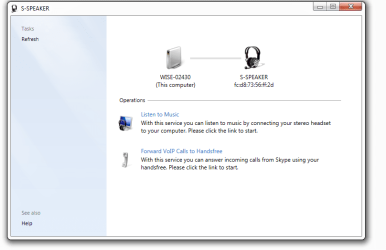
The solution is to double click the device, and in the "operations" section of the device dialog, click "Listen to Music" (or whatever the feature is that you want to use). You then see a "connecting to bluetooth service" message, and after a few seconds you should be able to select the device as an audio-out.

I hope this solved the issue for some people.
 

My Computer My Computer

At a glance

Windows 7 HPrem 32 bit
Computer type
Laptop
OS
Windows 7 HPrem 32 bit
I bow to you

This problem was driving me nuts. Your solution worked perfectly. My CSR bluetooth was working and pairing but no services other than OBEX push. Now it's all good. Thanks man!
 

My Computer My Computer

At a glance

Windows 7 Professional 64bit
Computer type
Laptop
OS
Windows 7 Professional 64bit
Great - pleased to have been able to help!
 

My Computer My Computer

At a glance

Windows 7 HPrem 32 bit
Computer type
Laptop
OS
Windows 7 HPrem 32 bit
Bluetooth

I have Windows 7 64 bit and an HP Pavilion laptop. The Bluetooth adaptor is working. I have
some Bluetooth speakers and headphones that I use with the PC. When the PC is on and the PC speakers are providing sound, I can connect to my Bluetooth devices thru the adaptor and use the device(s) as long as the window is open. If I close the window, the PC severs the connection.

Solution? Turn on the Bluetooth speaker/mouse/headphones/whatever and let it stay in pairing mode.
Turn on the PC and when the PC boots up it will connect to the Bluetooth device and make it the default until I shut down the PC or disconnect the device. Problem solved -- the device stays connected.

Hope this helps everyone.
 

My Computer My Computer

At a glance

Windows 7 64 bit
Computer type
PC/Desktop
Computer Manufacturer/Model Number
HP
OS
Windows 7 64 bit
Sparkle B570 headset connects but signal breaks up

Has anyone had any real success with bluetooth headsets using win7 x64?

After much effort, and a Chinglish instruction manual, I managed to get Sparkle B570 headset to work. However, it only works for a short time before signal starts to break up and then nothing! This is not battery related; more like a timing issue between signal process and signal transmit or some such thing?
 

My Computer My Computer

At a glance

win 7 Pro x64intel i5 7508gb
Computer type
PC/Desktop
Computer Manufacturer/Model Number
PcSpecialist
OS
win 7 Pro x64
CPU
intel i5 750
Motherboard
p7p55d
Memory
8gb
Hard Drives
Western Digital 1Tb 2Tb 500Gb
Antivirus
macafee
Browser
chrome
The solution is to double click the device, and in the "operations" section of the device dialog, click "Listen to Music" (or whatever the feature is that you want to use). You then see a "connecting to bluetooth service" message, and after a few seconds you should be able to select the device as an audio-out.

I hope this solved the issue for some people.

I have gotten to the stage here, but I still have an issue, I click "Listen to Music" and it does nothing. I don't know if it's because of my privileges on my laptop (school laptop) or if there's something else going on
 

My Computer My Computer

At a glance

Windows 7 Enterprise Edition 32-bit (School L...Intel i3 U380 Dual Core 1.33ghz
Computer type
Laptop
Computer Manufacturer/Model Number
Acer Aspire 1830
OS
Windows 7 Enterprise Edition 32-bit (School Laptop)
CPU
Intel i3 U380 Dual Core 1.33ghz
needing help

i am having the same issues here with connected the bluetooth speaker

not sure if they are paired in the first place as i can see it in the devices but not sure if that means the device has paired with it

but when i go into sounds i can see the device is there but i cannot connect it or set it as defaults

hope the picture comes up for you to see what i mean

also i have another picture where it shows the services on device but when i click listen to music nothing happens the screen just stays the same
 

Attachments

  • bluetooth.png
    bluetooth.png
    16.1 KB · Views: 99
  • listen.png
    listen.png
    22.9 KB · Views: 5
Last edited:

My Computer My Computer

At a glance

win 7 64b
Computer type
PC/Desktop
Computer Manufacturer/Model Number
dell
OS
win 7 64b
I also do not often join boards and I had this trouble with my Vaio/Oontz (BT speakers) and struggled for a couple days. So here's my contribution for posterity.

My speakers connected flawlessly with my droid but they would not connect to my Vaio laptop (Win7 Prof) I could get them to pair up, I could see the speakers in my devices, I received no error when the drivers installed. BUT the speakers would not show up in my playback devices. I went through a ton of forums, tried tinkering around with different settings and finally just tried going to Sony's page and installing the update drivers for my Vaio model. I deleted the oontz from my devices. Restarted.Repaired the oontz. FINALLY got a new option when right clicking on the oontz in the Control Panel/Hardware and Sound/Devices and Printers- BLUETOOTH OPERATIONS. Clicked that new bolded option, clicked "Listen to Music". . . .and finally it stopped spilling out of my tinny laptop speakers.

Not sure if it will help anyone- but you might try downloading the newest versions of BT drivers for your laptop model through it's company's webpage. Cheers.
 

My Computer My Computer

At a glance

Windows 7 Professional
Computer type
PC/Desktop
OS
Windows 7 Professional
Hi,

When you go to your DEVICE MANAGER, On unrecognized bluetooth device Right click PROPERTIES > DETAILS > PROPERTY "choose HARDWARE IDs" and you will see what to search for on GOOGLE.

Example;
BTHENUM\{453994d5-d58b-96f9-6616-b37f586ba2ec} on google.


As seen here ;

http://h30434.www3.hp.com/t5/Notebo...luetooth-drivers-for-Win7/td-p/184132/page/22


And depending on your computer you have to download it from your COMPUTERs manufacturer.
For HP 2740P (which is mine)

http://ftp.hp.com/pub/softpaq/sp45501-46000/sp45578.exe


An then go to DEVICES and PRINTERS.

RIGHT CLICK on LOGITECH X100 choose CONTROL

on the screen that pops up "Logitech X100" choose CONNECT

Now you can choose X100 as your default AUDIO DEVICE

Have fun ...
 
Last edited:

My Computer My Computer

At a glance

Windows 7 Ultimate x64i58GB
Computer type
Laptop
Computer Manufacturer/Model Number
HP
OS
Windows 7 Ultimate x64
CPU
i5
Memory
8GB
Antivirus
Vipre Internet Security 2015
Browser
Firefox
Back
Top