simplecj
New member
- Local time
- 11:25 AM
- Messages
- 14
Bluetooth headset pairs but won't connect - SOLVED!
My setup:
Windows 7 64bit Prof (on a suped up PC)
Asus BT211 - BT 2.1 + EDR (full A2DP support with latest Win7 64bit drivers - Broadcom Bluetooth 2.1 +EDR driver version 6.3.5.430 (4/8/10)
Sony DR-BT101 Headphones - (Microsoft says they're compatible)
PROBLEM:
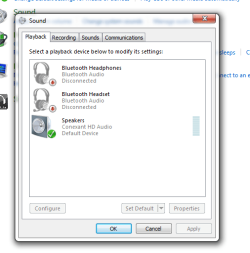
All BT devices successfully installed and appear to be working. I can even find the A2DP device if I show all hidden devices in Device Manager. The headset pairs with no problems, Remote, Headset, Handsfree Telephony, and Audio Sink Services are available under device properties. However, non of the headphone services are available under "Playback Devices" or "Recording Devices".
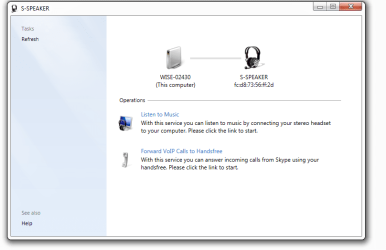
When I right-click on the Bluetooth system tray icon and select "Open Settings" then click on the "Audio" tab I can see all of the active services from my headset. All services show "disconnected" below them. When I right-click on a service (with the headphones on and in connectible mode - steady flashing blue) I can select "Connect" (the only place in Win7 I've found the connect function). When I try to connect, it shows "Connecting" for a minute or two then goes back to "Disconnected". The headset never appears to respond.
SO... basically it appears everything should be working, but for some reason it isn't. I can PAIR but I can't CONNECT. I can install services but I can't actually use any of them.

I've tried everything, there must be something I'm missing. Others have said they got these headphones working with Win7, many have also had problems not just with these headphones, but a whole range of BT devices and connecting to Win7.
I also have a Logitech BT MX5000 keyboard and mouse combo and they work fine.... well, when they're not lagging out or dropping out, they work fine.
My setup:
Windows 7 64bit Prof (on a suped up PC)
Asus BT211 - BT 2.1 + EDR (full A2DP support with latest Win7 64bit drivers - Broadcom Bluetooth 2.1 +EDR driver version 6.3.5.430 (4/8/10)
Sony DR-BT101 Headphones - (Microsoft says they're compatible)
PROBLEM:
All BT devices successfully installed and appear to be working. I can even find the A2DP device if I show all hidden devices in Device Manager. The headset pairs with no problems, Remote, Headset, Handsfree Telephony, and Audio Sink Services are available under device properties. However, non of the headphone services are available under "Playback Devices" or "Recording Devices".
When I right-click on the Bluetooth system tray icon and select "Open Settings" then click on the "Audio" tab I can see all of the active services from my headset. All services show "disconnected" below them. When I right-click on a service (with the headphones on and in connectible mode - steady flashing blue) I can select "Connect" (the only place in Win7 I've found the connect function). When I try to connect, it shows "Connecting" for a minute or two then goes back to "Disconnected". The headset never appears to respond.
SO... basically it appears everything should be working, but for some reason it isn't. I can PAIR but I can't CONNECT. I can install services but I can't actually use any of them.
I've tried everything, there must be something I'm missing. Others have said they got these headphones working with Win7, many have also had problems not just with these headphones, but a whole range of BT devices and connecting to Win7.
I also have a Logitech BT MX5000 keyboard and mouse combo and they work fine.... well, when they're not lagging out or dropping out, they work fine.
Last edited:
My Computer
At a glance
Windows 7 Professional x64Intel Core 2 Duo E8400 Wolfdale (OC stable 3....4GB (2x2) GSkillz DDR2 @ 1066MHzAsus EN9600GT - upgrading soon
- Computer Manufacturer/Model Number
- Custom Assembled and Configured by Myself
- OS
- Windows 7 Professional x64
- CPU
- Intel Core 2 Duo E8400 Wolfdale (OC stable 3.6GHz)
- Motherboard
- Asus P5Q-E
- Memory
- 4GB (2x2) GSkillz DDR2 @ 1066MHz
- Graphics Card(s)
- Asus EN9600GT - upgrading soon
- Sound Card
- HTO Omega Striker 7.1 - Using optical out to Logitech DTS
- Monitor(s) Displays
- BenQ FP202W LCD & BenQ MP720 DLP Projector in Dualview
- Hard Drives
- 64GB Kingston SSD-Now SSD - System Drive
500GB Seagate SATA - My Documents and Files
1TB Seagate SATA - Media and Archive Drive
500GB Seagate Freeagent External - Backup Drive
- PSU
- OCZ500MXSP - Modularized cable system, 120mm Exaust Fan
- Case
- Tsunami Dream Tower
- Cooling
- Zalman "Copper Flower" sinks on both CPU and GPU + 4x120mm


 ) I have completed probably three dozen or more clean installs, built custom computers ect. With this bluetooth issue I think I've tried everything I can short of buying another BT adapter, but I just bought this ASUS one specifically for A2DP audio and it's class 1 range (100m).
 Clean install with Win7 x64 SP1 RC (slipstreamed) onto some new OCZ Vertex2 SSDs in RAID0. Computer is running lightening fast and BT headphones worked on the first try with the ASUS BT driver suite.