Solved Kyle's thread of RAM noobage

OneSerious

New member
Power User
VIP
Local time
1:40 PM
Messages
324
Hello there Seven Forums.

Since I started trying to build systems a year or so back I keep on learning more and more about them everyday, which is great. However ever, every now and then I come across something that is probably considered "basic" that I realise I'm not up to scratch on and I feel like a bit of spanner.:o

A friend of mine is upgrading his system and asked me for a bit of advice. He asked me about RAM and so of I went to find him the best stuff... In doing this I found out I had made the wrong decision when selecting my own memory. So I looked around the net, read up in my Mobo manual and as above, I know feel like a bit of a tool.:rolleyes:

When buying my RAM I went for Corsair XMS3 DDR3 PC3-12800 1600MHz because it was Corsair and also the highest frequenzy the store sold. My mobo can support up to 1866MHz so I thought it was a safe bet. However, I never took in to consideration what my CPU could support, which as it turns it is only 1333MHz. When I looked at my system and it reports that the RAM is running at 1333MHz.

Now come the questions... :D

1. Is it perfectly safe for me to be using 1600MHz in my system when the CPU only supports 1333MHz? It has worked okay thus far, and I assume the system only uses what it can, but I just want to know for sure.

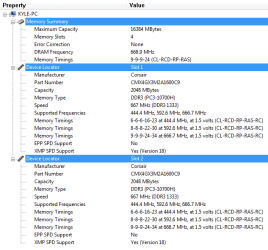
2. In the attached image shows various memory timings and frequencies. Is there anything I can edit in the BIOS to get the most out of my RAM? ie change frequency and speed.

3. I assume since the timing is labelled as "latency" then the smaller the number the faster the memory?

These probably all sound like very simple questions, I just can't believe I never came across this before now.

cheers in advance for any help guys! :D
 

Attachments

  • MEM.PNG
    MEM.PNG
    14.9 KB · Views: 26

My Computer My Computer

At a glance

MS Windows 7 Home Premium 64-bit
OS
MS Windows 7 Home Premium 64-bit
First for question #1 yes as long as it's running stable. #2 from what i'm seeing in pic is your running at max timings for your cpu and motherboard spec's. #3 your motherboard and cpu supports 668mhz which is 1333 mhz dual channel, when you start messing around with timings and voltage's you really need to know what your doing because you can render your comp unuseable with the slightest change so be careful what you wish for. Stable and running smooth is GOOD:)
 

My Computer My Computer

At a glance

Windows 7 Home Premium 64 bitIntel Core 2 quad Extreme Q9770 @ 3.2 GHz4x2 GB Muskin 1600 MHz ramNVidia GTX 250
Computer Manufacturer/Model Number
Dell XPS 730
OS
Windows 7 Home Premium 64 bit
CPU
Intel Core 2 quad Extreme Q9770 @ 3.2 GHz
Memory
4x2 GB Muskin 1600 MHz ram
Graphics Card(s)
NVidia GTX 250
Sound Card
Soundblaster X-Fi Fatality Champion
Monitor(s) Displays
2 Dell 2007WFP Ultrascans
Screen Resolution
3360 x 1050
Hard Drives
WD Black 1TB sata, 2-WD Black 500 sata, 2-Seagate 500 Go external
PSU
1000 Watt
Cooling
air
Keyboard
MS Natrual Keyboard Pro
Mouse
Logitech Wireless Trackball
Internet Speed
DSL Elite
First for question #1 yes as long as it's running stable. #2 from what i'm seeing in pic is your running at max timings for your cpu and motherboard spec's. #3 your motherboard and cpu supports 668mhz which is 1333 mhz dual channel, when you start messing around with timings and voltage's you really need to know what your doing because you can render your comp unuseable with the slightest change so be careful what you wish for. Stable and running smooth is GOOD:)
If looking at the pic you think the timings are fine then I'm happy. Since I'm not in the know, I would have been willing to change stuff had it of been worth while. The system is running smooth so I'm happy enough.

Am I right in saying that when it comes to timing lower numbers are better? For example 7-7-7-20 is faster than 9-9-9-24.
 

My Computer My Computer

At a glance

MS Windows 7 Home Premium 64-bit
OS
MS Windows 7 Home Premium 64-bit
Ok on the CPU only supports 1333Mhz BS, that is just the Intel imposed limit which in reality is much much higher than what Intel claims. They also claim that their CPU's don't support overclocking which as we all know is not true.

They just do that to protect their CPU as the memory controller is now on the CPU. You can easily and safely go much higher and contrary to what Intel says their CPU's do indeed work with higher Mhz memory, 1333-2000MHz+.

And yes tighter timings are faster but it gets to a point where it won't be stable anymore.
 

My Computer My Computer

At a glance

Windows 7 Ult, Windows 8.1 Pro,Q9650-4.275GHz, E8600 4.5GHz, E6750-3.8GHzG.Skill PC2 9600 1200Mhz 5 5 5 15 2TGTX480
Computer type
PC/Desktop
Computer Manufacturer/Model Number
Home built
OS
Windows 7 Ult, Windows 8.1 Pro,
CPU
Q9650-4.275GHz, E8600 4.5GHz, E6750-3.8GHz
Motherboard
Evga 780i FTW
Memory
G.Skill PC2 9600 1200Mhz 5 5 5 15 2T
Graphics Card(s)
GTX480
Sound Card
Asus Xonar D2
Monitor(s) Displays
HannsG
Screen Resolution
1680X1050
Hard Drives
GSkill Phoenix Pro 120GB SSD
PSU
ThermalTake Toughpower 1000Watt modular
Case
ThermalTake XaserV
Cooling
Xigmatek S1283
Keyboard
Logitech G15
Mouse
Logitech G9
Internet Speed
T1
Ok on the CPU only supports 1333Mhz BS, that is just the Intel imposed limit which in reality is much much higher than what Intel claims. They also claim that their CPU's don't support overclocking which as we all know is not true.

They just do that to protect their CPU as the memory controller is now on the CPU. You can easily and safely go much higher and contrary to what Intel says their CPU's do indeed work with higher Mhz memory, 1333-2000MHz+.

And yes tighter timings are faster but it gets to a point where it won't be stable anymore.
Well the only thing there is is that my CPU is an AMD. Would you say the same applies to them?
 

My Computer My Computer

At a glance

MS Windows 7 Home Premium 64-bit
OS
MS Windows 7 Home Premium 64-bit
Add me on the list of having no idea as to the relation of CPU to RAM.

I know there is a relationship between the two, I just don't know how it works.

~Lordbob
 

My Computer My Computer

At a glance

Windows 7 Ultimate x64, Mint 9Intel i5-2500k2x 4Gb Corsair VENGEANCE DDR3-1600NVidia GeForce N260GTX Twin Frozr
Computer Manufacturer/Model Number
Hera
OS
Windows 7 Ultimate x64, Mint 9
CPU
Intel i5-2500k
Motherboard
ASUS P8P67 Pro
Memory
2x 4Gb Corsair VENGEANCE DDR3-1600
Graphics Card(s)
NVidia GeForce N260GTX Twin Frozr
Sound Card
Realtek HD OnBoard Audio
Monitor(s) Displays
ASUS 24" Monitor
Screen Resolution
1920x1080
Hard Drives
G.SKILL Phoenix Series 60GB SATA II MLC Internal Solid State Drive (SSD)
SAMSUNG Spinpoint F3R 1TB 7200 RPM 32MB Cache SATA II
PSU
Cooler Master Real Power Pro 750W
Case
Cooler Master Haf 932
Cooling
Fans
Keyboard
Razer Tarantula
Mouse
Razer Lachesis
Internet Speed
not fast enough
First for question #1 yes as long as it's running stable. #2 from what i'm seeing in pic is your running at max timings for your cpu and motherboard spec's. #3 your motherboard and cpu supports 668mhz which is 1333 mhz dual channel, when you start messing around with timings and voltage's you really need to know what your doing because you can render your comp unuseable with the slightest change so be careful what you wish for. Stable and running smooth is GOOD:)
If looking at the pic you think the timings are fine then I'm happy. Since I'm not in the know, I would have been willing to change stuff had it of been worth while. The system is running smooth so I'm happy enough.

Am I right in saying that when it comes to timing lower numbers are better? For example 7-7-7-20 is faster than 9-9-9-24.
That is correct - the lower the latency, the better. It is especially the first number (CAS latency) that counts. 9 at 667MHz is rather high. I think there are Dimms with a CAS latency of 6 at 667.

PS: if you want to educate yourself on the matter, there are several excellent (e.g. Wikipedia) entries on the web.
 

My Computer My Computer

At a glance

Vista, Windows7, Mint Mate, Zorin, Windows 8from 1.6GHz Duo to i7
Computer Manufacturer/Model Number
HP, Dell, Gateway, Toshiba - 4 laptops and 2 desktops
OS
Vista, Windows7, Mint Mate, Zorin, Windows 8
CPU
from 1.6GHz Duo to i7
Monitor(s) Displays
2x HP w2207
Hard Drives
5x HDD, 7x SSD, 12x Externals
Keyboard
with trackball - no mices
Mouse
Trackball mice
Internet Speed
DSL 6000
Higher latencies mean slower RAM in the sense that as you raise the timings, especially CAS, you delay more clock cycles, thus increasing the latency in nanoseconds.

For arguments sake, take a typical CPU at 3GHz, and RAM with a raw latency at 5ns (don't bring the CAS in to the equation). Now the CPU is doing 3 billion cycles a second and wants to access the RAM. In that 5ns the CPU has already wasted 4 complete cycles from the first cycle where it wanted to access the RAM, to actually accessing the RAM. Yea the RAM is the fastest component in the PC in terms of bandwidth etc, but it's quite a big bottleneck in terms of how fast the CPU and RAM work together.
 

My Computer My Computer

At a glance

Windows 8.1 Pro x64Intel Core i7 4790k8GB Corsair Dominator 1600MHzMSI TwinFrozr GeForce GTX770
Computer type
PC/Desktop
Computer Manufacturer/Model Number
Custom Built
OS
Windows 8.1 Pro x64
CPU
Intel Core i7 4790k
Motherboard
MSI Z97S Krait Edition
Memory
8GB Corsair Dominator 1600MHz
Graphics Card(s)
MSI TwinFrozr GeForce GTX770
Sound Card
ASUS Xonar DX/XD 7.1
Monitor(s) Displays
Dell 24" S2409W + Dell 20" E207WFP
Screen Resolution
1920x1080 + 1680x1050
Hard Drives
1x 120GB OCZ Agility 3, 1x 750GB Western Digital Caviar Black, 1x 1TB Western Digital Caviar Blue
PSU
Corsair HX850 modular
Case
Fractal Design Define R4
Cooling
Corsair H60 w/ twin Corsair SP120 fans
Keyboard
Logitech G510S Keyboard
Mouse
Logitech G500S Laser Mouse
Internet Speed
40Mbps
Antivirus
Microsoft Security Essentials
Browser
Google Chrome
Other Info
LG Blu-Ray player
I am not sure your motherboard will support this - some Asus do. You may be able to select timing profiles for your memory. The SPD interface to the memory allows the BIOS to detect memory profiles from the memory. Check your BIOS.

Yes the lower numbers are better. Those are the number of memory cycles needed to perform certain operations. The most important, CAS latency, is the number of clock cycles it takes to read out a column from memory. So 7 is 7 clock cycles.

You should be able to get the 6 or worst 7 CAS at that frequency (1333).

Gene
 

My Computer My Computer

At a glance

Windows 10 Pro. EFI boot partition, full EFI ...i7 4770k 4.4GHz (44-44-43-43 turbo) @ 1.248V16GB (8GBx2) @2200 MHz G.skill Sniper 10-11-1...MSI GTX 970 Gaming 4G
Computer type
PC/Desktop
Computer Manufacturer/Model Number
Home built (GeneO industries)/Model 4
OS
Windows 10 Pro. EFI boot partition, full EFI boot
CPU
i7 4770k 4.4GHz (44-44-43-43 turbo) @ 1.248V
Motherboard
ASUS Maximus VI Hero
Memory
16GB (8GBx2) @2200 MHz G.skill Sniper 10-11-10-30-1, 1.6V
Graphics Card(s)
MSI GTX 970 Gaming 4G
Sound Card
Onboard SupremeFX Audio
Monitor(s) Displays
NEC Spectraview 2490WUXi-SV
Screen Resolution
1920 x 1200
Hard Drives
Samsung 850 Pro 256GB (OS), Samsung 2x 128GB 840 Pro SSD in RAID0, 3x WD Blue 6Gb/s 1TB RAID0, WD 2TB Black external USB 3.0, 2TB WD20EARS Green external USB 3.0, 2x 500GB Seagate and 1 750 GB external USB, 1x 350GB external USB3
PSU
Seasonic X-850 (2012 KM3 model)
Case
Fractal Design Define R4
Cooling
NH-D14, NF-F12, NF-A15; NF-P14, NF-P12,NF-A14, S12A PWM
Keyboard
Cooler Master Storm Quickfire Rapid - Brown
Mouse
Logitech G602
Internet Speed
126.4 Mb/s down, 24.3 Mb/s up
Other Info
USB 3.0 x8 , SATA III x8, eSATA, USB 2.0 x6. Samsung DVD R/W drive.

WEI: CPU 7.8, Memory 7.9, Graphics 7.9, Disk 7.9
Add me on the list of having no idea as to the relation of CPU to RAM.

I know there is a relationship between the two, I just don't know how it works.

~Lordbob
Glad I'm not the only one.:D

That is correct - the lower the latency, the better. It is especially the first number (CAS latency) that counts. 9 at 667MHz is rather high. I think there are Dimms with a CAS latency of 6 at 667.

PS: if you want to educate yourself on the matter, there are several excellent (e.g. Wikipedia) entries on the web.
Whilst 9 is the highest I've seen would you consider it bad? I have no intentions of changing the RAM now because I don't have the money or anybody to take the old sticks off me, but I use the system for gaming and it seems adequate. Do you think faster RAM would make much of an impact on performance?

Higher latencies mean slower RAM in the sense that as you raise the timings, especially CAS, you delay more clock cycles, thus increasing the latency in nanoseconds.

For arguments sake, take a typical CPU at 3GHz, and RAM with a raw latency at 5ns (don't bring the CAS in to the equation). Now the CPU is doing 3 billion cycles a second and wants to access the RAM. In that 5ns the CPU has already wasted 4 complete cycles from the first cycle where it wanted to access the RAM, to actually accessing the RAM. Yea the RAM is the fastest component in the PC in terms of bandwidth etc, but it's quite a big bottleneck in terms of how fast the CPU and RAM work together.
So in my case the CPU wastes 8 cycles before it accesses the RAM? I'm not asking for a full explanation here because I could probably keep you going all day about it, so I'll try and read up myself. But long story short, since we are talking about nanoseconds, how big an impact does that have on a systems performance running games for example? Since I'm not in the know I can't say, but I imagine because of the time frames we are covering here it couldn't be much.

Thanks for the help thus far guys. :D
 

My Computer My Computer

At a glance

MS Windows 7 Home Premium 64-bit
OS
MS Windows 7 Home Premium 64-bit
To a certain extent the discussion is a bit academic - agreed. Since you are where you are and stuck with those Dimms, I would not really worry about it. As with many of those performance numbers, they are nice to know, but in real life they may not make a big difference. The main thing is that you are happy with your system and its performance. If you are able to settle with what you have, you made a big step forward.
 

My Computer My Computer

At a glance

Vista, Windows7, Mint Mate, Zorin, Windows 8from 1.6GHz Duo to i7
Computer Manufacturer/Model Number
HP, Dell, Gateway, Toshiba - 4 laptops and 2 desktops
OS
Vista, Windows7, Mint Mate, Zorin, Windows 8
CPU
from 1.6GHz Duo to i7
Monitor(s) Displays
2x HP w2207
Hard Drives
5x HDD, 7x SSD, 12x Externals
Keyboard
with trackball - no mices
Mouse
Trackball mice
Internet Speed
DSL 6000
Yea what I said is going kinda too far in to it all, and doesn't really matter as it's negligible for just general computer usage, unless you need precision to the nanosecond.
 

My Computer My Computer

At a glance

Windows 8.1 Pro x64Intel Core i7 4790k8GB Corsair Dominator 1600MHzMSI TwinFrozr GeForce GTX770
Computer type
PC/Desktop
Computer Manufacturer/Model Number
Custom Built
OS
Windows 8.1 Pro x64
CPU
Intel Core i7 4790k
Motherboard
MSI Z97S Krait Edition
Memory
8GB Corsair Dominator 1600MHz
Graphics Card(s)
MSI TwinFrozr GeForce GTX770
Sound Card
ASUS Xonar DX/XD 7.1
Monitor(s) Displays
Dell 24" S2409W + Dell 20" E207WFP
Screen Resolution
1920x1080 + 1680x1050
Hard Drives
1x 120GB OCZ Agility 3, 1x 750GB Western Digital Caviar Black, 1x 1TB Western Digital Caviar Blue
PSU
Corsair HX850 modular
Case
Fractal Design Define R4
Cooling
Corsair H60 w/ twin Corsair SP120 fans
Keyboard
Logitech G510S Keyboard
Mouse
Logitech G500S Laser Mouse
Internet Speed
40Mbps
Antivirus
Microsoft Security Essentials
Browser
Google Chrome
Other Info
LG Blu-Ray player
As a real-time programmer I knew oft said (though it was in microseconds instead of nanoseconds):

A nanosecond here, a nanosecond there, pretty soon you have real-time!

Seriously though, between 9 and 7 at the same frequency you are talking 29% difference, though it will not translate into that much in reality.

- Gene
 

My Computer My Computer

At a glance

Windows 10 Pro. EFI boot partition, full EFI ...i7 4770k 4.4GHz (44-44-43-43 turbo) @ 1.248V16GB (8GBx2) @2200 MHz G.skill Sniper 10-11-1...MSI GTX 970 Gaming 4G
Computer type
PC/Desktop
Computer Manufacturer/Model Number
Home built (GeneO industries)/Model 4
OS
Windows 10 Pro. EFI boot partition, full EFI boot
CPU
i7 4770k 4.4GHz (44-44-43-43 turbo) @ 1.248V
Motherboard
ASUS Maximus VI Hero
Memory
16GB (8GBx2) @2200 MHz G.skill Sniper 10-11-10-30-1, 1.6V
Graphics Card(s)
MSI GTX 970 Gaming 4G
Sound Card
Onboard SupremeFX Audio
Monitor(s) Displays
NEC Spectraview 2490WUXi-SV
Screen Resolution
1920 x 1200
Hard Drives
Samsung 850 Pro 256GB (OS), Samsung 2x 128GB 840 Pro SSD in RAID0, 3x WD Blue 6Gb/s 1TB RAID0, WD 2TB Black external USB 3.0, 2TB WD20EARS Green external USB 3.0, 2x 500GB Seagate and 1 750 GB external USB, 1x 350GB external USB3
PSU
Seasonic X-850 (2012 KM3 model)
Case
Fractal Design Define R4
Cooling
NH-D14, NF-F12, NF-A15; NF-P14, NF-P12,NF-A14, S12A PWM
Keyboard
Cooler Master Storm Quickfire Rapid - Brown
Mouse
Logitech G602
Internet Speed
126.4 Mb/s down, 24.3 Mb/s up
Other Info
USB 3.0 x8 , SATA III x8, eSATA, USB 2.0 x6. Samsung DVD R/W drive.

WEI: CPU 7.8, Memory 7.9, Graphics 7.9, Disk 7.9
As a real-time programmer I knew oft said (though it was in microseconds instead of nanoseconds):

A nanosecond here, a nanosecond there, pretty soon you have real-time!

Seriously though, between 9 and 7 at the same frequency you are talking 29% difference, though it will not translate into that much in reality.

- Gene

Real time computing will come when computers are photonic. Computer scientists kid themselves about instantaneous computing at the moment just to help them sleep at night :p
 

My Computer My Computer

At a glance

Windows 8.1 Pro x64Intel Core i7 4790k8GB Corsair Dominator 1600MHzMSI TwinFrozr GeForce GTX770
Computer type
PC/Desktop
Computer Manufacturer/Model Number
Custom Built
OS
Windows 8.1 Pro x64
CPU
Intel Core i7 4790k
Motherboard
MSI Z97S Krait Edition
Memory
8GB Corsair Dominator 1600MHz
Graphics Card(s)
MSI TwinFrozr GeForce GTX770
Sound Card
ASUS Xonar DX/XD 7.1
Monitor(s) Displays
Dell 24" S2409W + Dell 20" E207WFP
Screen Resolution
1920x1080 + 1680x1050
Hard Drives
1x 120GB OCZ Agility 3, 1x 750GB Western Digital Caviar Black, 1x 1TB Western Digital Caviar Blue
PSU
Corsair HX850 modular
Case
Fractal Design Define R4
Cooling
Corsair H60 w/ twin Corsair SP120 fans
Keyboard
Logitech G510S Keyboard
Mouse
Logitech G500S Laser Mouse
Internet Speed
40Mbps
Antivirus
Microsoft Security Essentials
Browser
Google Chrome
Other Info
LG Blu-Ray player
Cheers folks! I think my RAM understanding is where it needs to be without getting down to the real nitty gritty. It is funny how these things pass you by, but now I know.

Thanks again.:D
 

My Computer My Computer

At a glance

MS Windows 7 Home Premium 64-bit
OS
MS Windows 7 Home Premium 64-bit
Glad your satisfied with what you learned and as long as your computer is stable and playing your games the way you want, it's all good.
 

My Computer My Computer

At a glance

Windows 7 Home Premium 64 bitIntel Core 2 quad Extreme Q9770 @ 3.2 GHz4x2 GB Muskin 1600 MHz ramNVidia GTX 250
Computer Manufacturer/Model Number
Dell XPS 730
OS
Windows 7 Home Premium 64 bit
CPU
Intel Core 2 quad Extreme Q9770 @ 3.2 GHz
Memory
4x2 GB Muskin 1600 MHz ram
Graphics Card(s)
NVidia GTX 250
Sound Card
Soundblaster X-Fi Fatality Champion
Monitor(s) Displays
2 Dell 2007WFP Ultrascans
Screen Resolution
3360 x 1050
Hard Drives
WD Black 1TB sata, 2-WD Black 500 sata, 2-Seagate 500 Go external
PSU
1000 Watt
Cooling
air
Keyboard
MS Natrual Keyboard Pro
Mouse
Logitech Wireless Trackball
Internet Speed
DSL Elite
Back
Top