
- Local time
- 2:45 PM
- Messages
- 324
Hello there Seven Forums.
Since I started trying to build systems a year or so back I keep on learning more and more about them everyday, which is great. However ever, every now and then I come across something that is probably considered "basic" that I realise I'm not up to scratch on and I feel like a bit of spanner.
A friend of mine is upgrading his system and asked me for a bit of advice. He asked me about RAM and so of I went to find him the best stuff... In doing this I found out I had made the wrong decision when selecting my own memory. So I looked around the net, read up in my Mobo manual and as above, I know feel like a bit of a tool.
When buying my RAM I went for Corsair XMS3 DDR3 PC3-12800 1600MHz because it was Corsair and also the highest frequenzy the store sold. My mobo can support up to 1866MHz so I thought it was a safe bet. However, I never took in to consideration what my CPU could support, which as it turns it is only 1333MHz. When I looked at my system and it reports that the RAM is running at 1333MHz.
Now come the questions...
1. Is it perfectly safe for me to be using 1600MHz in my system when the CPU only supports 1333MHz? It has worked okay thus far, and I assume the system only uses what it can, but I just want to know for sure.
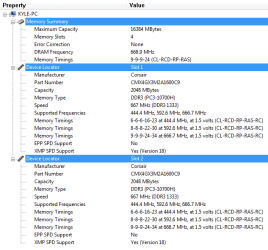
2. In the attached image shows various memory timings and frequencies. Is there anything I can edit in the BIOS to get the most out of my RAM? ie change frequency and speed.
3. I assume since the timing is labelled as "latency" then the smaller the number the faster the memory?
These probably all sound like very simple questions, I just can't believe I never came across this before now.
cheers in advance for any help guys!
Since I started trying to build systems a year or so back I keep on learning more and more about them everyday, which is great. However ever, every now and then I come across something that is probably considered "basic" that I realise I'm not up to scratch on and I feel like a bit of spanner.
A friend of mine is upgrading his system and asked me for a bit of advice. He asked me about RAM and so of I went to find him the best stuff... In doing this I found out I had made the wrong decision when selecting my own memory. So I looked around the net, read up in my Mobo manual and as above, I know feel like a bit of a tool.
When buying my RAM I went for Corsair XMS3 DDR3 PC3-12800 1600MHz because it was Corsair and also the highest frequenzy the store sold. My mobo can support up to 1866MHz so I thought it was a safe bet. However, I never took in to consideration what my CPU could support, which as it turns it is only 1333MHz. When I looked at my system and it reports that the RAM is running at 1333MHz.
Now come the questions...
1. Is it perfectly safe for me to be using 1600MHz in my system when the CPU only supports 1333MHz? It has worked okay thus far, and I assume the system only uses what it can, but I just want to know for sure.
2. In the attached image shows various memory timings and frequencies. Is there anything I can edit in the BIOS to get the most out of my RAM? ie change frequency and speed.
3. I assume since the timing is labelled as "latency" then the smaller the number the faster the memory?
These probably all sound like very simple questions, I just can't believe I never came across this before now.
cheers in advance for any help guys!
Attachments
My Computer
At a glance
MS Windows 7 Home Premium 64-bit
- OS
- MS Windows 7 Home Premium 64-bit


