HP laptop mute button stuck on (orange)

dannet

New member
Local time
10:05 PM
Messages
60
I'm using the Windows 7 RC and the mute button on my HP Pavillion DV7 is stuck in the 'on' phase (ie: it is lit up orange) regardless of whether the sound is actually muted or not.

I can live with it but it's really bugging me.

Does anyone know how to sort this out?
 

My Computer My Computer

Computer Manufacturer/Model Number
HP / Pavilion dv7 1135ea
OS
Windows 7 Professional x86
CPU
Intel Core 2 Duo - P8400 @ 2.26Ghz
Memory
2.998GB
Graphics Card(s)
NVIDIA GeForce 9600M GT
Screen Resolution
1440x900
Hard Drives
2x Serial ATA-150 (2x 250GB)
Case
HP Vader 1.0a apparently ;)
Internet Speed
10MB/s
same here. sound still works, but you can hear it go on and off with the orange light.

win7rc let me know that an HP Quick Button update was available, but it didn't change a thing.

now real answers here. looks like something that has to wait to be fixed when HP releases an update when win7 is in production.
 

My Computer My Computer

OS
windows 7100
Yeah it's really weird though. I installed Win7rc on Tuesday and this problem only started today. Obviously windows has installed various updates including some today so I don't know if one of those has caused an issue?

Ah well..
 

My Computer My Computer

Computer Manufacturer/Model Number
HP / Pavilion dv7 1135ea
OS
Windows 7 Professional x86
CPU
Intel Core 2 Duo - P8400 @ 2.26Ghz
Memory
2.998GB
Graphics Card(s)
NVIDIA GeForce 9600M GT
Screen Resolution
1440x900
Hard Drives
2x Serial ATA-150 (2x 250GB)
Case
HP Vader 1.0a apparently ;)
Internet Speed
10MB/s
same here. sound still works, but you can hear it go on and off with the orange light.

win7rc let me know that an HP Quick Button update was available, but it didn't change a thing.

now real answers here. looks like something that has to wait to be fixed when HP releases an update when win7 is in production.

I think this might actually have something to do with the windows UAC.

I accessed the System and Security section of control panel and then clicked on 'Quicktouch'. This allows you to change the sound made when pressing the quicktouch buttons.

When I did this windows UAC asked whether to allow quicktouch and after clicking 'yes' the light has started working properly.

You might want to try this and see if it works... :)
 

My Computer My Computer

Computer Manufacturer/Model Number
HP / Pavilion dv7 1135ea
OS
Windows 7 Professional x86
CPU
Intel Core 2 Duo - P8400 @ 2.26Ghz
Memory
2.998GB
Graphics Card(s)
NVIDIA GeForce 9600M GT
Screen Resolution
1440x900
Hard Drives
2x Serial ATA-150 (2x 250GB)
Case
HP Vader 1.0a apparently ;)
Internet Speed
10MB/s
Putting all this together, it sounds like Windows Downloaded that update for the QuickTouch buttons, but since it has not been used since then, it is not actually working anymore.

Good Sleuthing
 

My Computers My Computers

System One System Two

  • Computer type
    PC/Desktop
    Computer Manufacturer/Model Number
    The Beast Model A (homebrew)
    OS
    Windows 11 21H2 Current build
    CPU
    AMD Ryzen 9 3950X
    Motherboard
    MSI MEG X570 GODLIKE
    Memory
    4 * 32 GB - Corsair Vengeance 3600 MHz
    Graphics Card(s)
    EVGA GeForce RTX 3080 Ti XC3 ULTRA GAMING (12G-P5-3955-KR)
    Sound Card
    Realtek® ALC1220 Codec
    Monitor(s) Displays
    2x Eve Spectrum ES07D03 4K Gaming Monitor (Matte) | Eve Spec
    Screen Resolution
    3x 3840 x 2160
    Hard Drives
    3x Samsung 980 Pro NVMe PCIe 4 M.2 2 TB SSD (MZ-V8P2T0B/AM) } 3x Sabrent Rocket NVMe 4.0 1 TB SSD
    PSU
    PC Power & Cooling’s Silencer Series 1050 Watt, 80 Plus Plat
    Case
    Fractal Design Define 7 XL Dark ATX Full Tower Case
    Cooling
    SteelSeries Apex Pro Wired Gaming Keyboard
    Keyboard
    SteelSeries Apex Pro
    Mouse
    Logitech MX Master 3S | MX Master 3 for business
    Internet Speed
    AT&T LightSpeed Gigabit Duplex Ftth
    Antivirus
    Windows Defender + MB 3
    Browser
    Nightly (default) + Firefox (stable),Chrome, Edge
  • Computer type
    PC/Desktop
    System Manufacturer/Model Number
    Dell Latitude E5470
    OS
    ChromeOS Flex Dev Channel (current)
    CPU
    Intel(R) Core(TM) i5-6300U CPU @ 2.40GHz, 2501 Mhz, 2 Core(s), 4 Logical Processor(s)
    Motherboard
    Dell
    Memory
    16 GB
    Graphics Card(s)
    Intel(R) HD Graphics 520
    Sound Card
    Intel(R) HD Graphics 520 + RealTek Audio
    Monitor(s) Displays
    Dell laptop display 15"
    Screen Resolution
    1920 * 1080
    Hard Drives
    Toshiba 128GB M.2 22300 drive
    INTEL Cherryville 520 Series SSDSC2CW180A 180 GB SATA III SSD
    PSU
    Dell
    Case
    Dell
    Cooling
    Dell
    Keyboard
    Dell
    Mouse
    Logitech MX Master 3S (shared w. Sys 1) | Dell TouchPad
    Internet Speed
    AT&T LightSpeed Gigabit Duplex Ftth
well, i reinstalled HP Quick Launch Buttons 6.40 H and ignored the compatibility warnings. it seems to work now.

oops. posted too soon. light still randomly turns on. not as often as before, but it still happens.
 
Last edited by a moderator:

My Computer My Computer

OS
windows 7100
oops. posted too soon. light still randomly turns on. not as often as before, but it still happens.

Yeah looks like I posted too soon as well. Now mine has stopped working again. Stuck on orange... :rolleyes:
 

My Computer My Computer

Computer Manufacturer/Model Number
HP / Pavilion dv7 1135ea
OS
Windows 7 Professional x86
CPU
Intel Core 2 Duo - P8400 @ 2.26Ghz
Memory
2.998GB
Graphics Card(s)
NVIDIA GeForce 9600M GT
Screen Resolution
1440x900
Hard Drives
2x Serial ATA-150 (2x 250GB)
Case
HP Vader 1.0a apparently ;)
Internet Speed
10MB/s
I have just installed windows 7 on my dv7, and I have the opposite problem. My mute button is stuck on the white, off, position, regardless of the actual mute status. Has anyone gotten a resolution for this yet? It worked when windows 7 was first installed, then only the mute has stopped working...
 

My Computer My Computer

OS
Windows 7
I had that exact same problem on my DV5, what fixed it was installing the quick launch and then going in your speaker settings and making sure your laptop speakers is checked. mine was stuck on headphones for some reason. BTW this site rocks!
 

My Computer My Computer

Computer type
PC/Desktop
Computer Manufacturer/Model Number
Asus clone / Gateway DX4850-57
OS
Se7en X64 ultimate/Se7en X64 ultimate
CPU
Intel quad [email protected]/intel i7 quad [email protected]
Motherboard
Asus P5KPL-CM/Intel H67
Memory
kingston 4GB/32GB DDR3 Dual-Channel 1333MHz
Graphics Card(s)
ATI Radeon HD5770 1GB/NVidia GeForce GTX560 2GB
Sound Card
5.1 onboard/5.1 onboard
Monitor(s) Displays
sharp Aqous 46" 120MHz/LG 32" LCD/Asus VW266H 26"
Screen Resolution
1824X1026/1920X1080
Hard Drives
2x150GB=300GB raptor drives 10,000rpm+1TB seagate portable hard drive for movies/music/pictures/game iso's /programs
Gateway: Kingston 240GB Solid State Drive and 1.5 TB for storage
PSU
700 watts / 700 watts coolermaster extreme/on board
Case
Asus mid tower / Gateway mid tower
Cooling
stock / stock
Keyboard
logitech / razor Lycosa gaming
Mouse
logitech gaming mouse G500 5700DPI/Razer Lycosa & DeathAdder
Internet Speed
60MB/s
I had that exact same problem on my DV5, what fixed it was installing the quick launch and then going in your speaker settings and making sure your laptop speakers is checked. mine was stuck on headphones for some reason. BTW this site rocks!

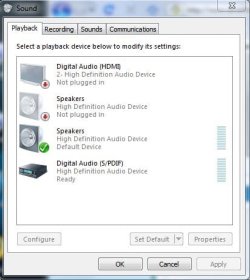
I have reinstalled the quick launch from the hp.com/support site, nb406av, and have checked the speaker settings, but to no avail. What selection was stuck on headphones? I have attached a screenshot of my sound settings for better reference.

Any further help would be very welcome, as although I can live with it, it is rather annoying!
 

Attachments

  • Sound.JPG
    Sound.JPG
    32.4 KB · Views: 329

My Computer My Computer

OS
Windows 7
ok ever since I fixed my problem like yours, it went away...it now looks identicle to yours so I don't know why yours is not working (the mute button) but I notice you have 4 icons (I only have 3) double speakers icon that could be your problem, try removing one and see if that works (green check on the other one?)
 

My Computer My Computer

Computer type
PC/Desktop
Computer Manufacturer/Model Number
Asus clone / Gateway DX4850-57
OS
Se7en X64 ultimate/Se7en X64 ultimate
CPU
Intel quad [email protected]/intel i7 quad [email protected]
Motherboard
Asus P5KPL-CM/Intel H67
Memory
kingston 4GB/32GB DDR3 Dual-Channel 1333MHz
Graphics Card(s)
ATI Radeon HD5770 1GB/NVidia GeForce GTX560 2GB
Sound Card
5.1 onboard/5.1 onboard
Monitor(s) Displays
sharp Aqous 46" 120MHz/LG 32" LCD/Asus VW266H 26"
Screen Resolution
1824X1026/1920X1080
Hard Drives
2x150GB=300GB raptor drives 10,000rpm+1TB seagate portable hard drive for movies/music/pictures/game iso's /programs
Gateway: Kingston 240GB Solid State Drive and 1.5 TB for storage
PSU
700 watts / 700 watts coolermaster extreme/on board
Case
Asus mid tower / Gateway mid tower
Cooling
stock / stock
Keyboard
logitech / razor Lycosa gaming
Mouse
logitech gaming mouse G500 5700DPI/Razer Lycosa & DeathAdder
Internet Speed
60MB/s
Upon attempting to put a check on the speakers listed first, I find out that the first listing is for the headphone jack on the front of my computer. When I insert headphones to that jack, the check mark moves. I have tried every combination of disabling devices, and setting defaults, but to no avail. The second listing of speakers in my screenshot above, as proved by selecting the 'test' option, is my primary audio device. I have found no listing for a headphone setting on this listing.
 

My Computer My Computer

OS
Windows 7
Well, This issue doesn't have any dependancy on HP Quick Launch Buttons drivers.

1) Install corresponding Audio Driver available for download for Vista from HP Website eventhough audio is working by default.
2) Reboot.
3) The mute functionality will work without any issues.
 

My Computer My Computer

Computer Manufacturer/Model Number
TX2-1005AU
OS
Windows 7
this forum is awesome!

I just wanted to let you all know that I am so glad that I came across this forum - I'm sure I'll find it very helpful for 7 things to come!

Thanks!
Klaus
 

My Computer My Computer

Computer Manufacturer/Model Number
HP DV 6425US
OS
Windows 7 RTM
CPU
2 GHZ
Motherboard
INTEL
Memory
2G
Hello, I was also having this problem with my HP dv41120us and found a solution that works!

The mute icon on my keyboard keeps on making a sound whenever it turns to orange color. Also most of the time, my laptop just freezes and I'm thinking might be something related to my sound device. Most of the suggestion here says you have to reinstall your sound driver. They are correct but you need to install the correct driver else they won't work.

The driver I used is sp41693.exe which can be download from HP (just google it I'm sure you'll find where to download it). Hope that helps. Good luck! :geek:
 

My Computer My Computer

Computer Manufacturer/Model Number
HP DV41120US
OS
Vista
CPU
Intel Core 2 Duo
Memory
4 GB
Graphics Card(s)
Intel
Hard Drives
260+GB
I fixed it... for now - updated driver

I got the mute button to work again! Hopefully this can help someone else out! I clicked on my speaker icon and then went up to the laptop icon (at top of volume box). In the new box, under "General" tab, I clicked on "Properties" (under controller information). In the new box (IDT high-def audio codec properties) under the "general" tab I clicked "Change settings". I then clicked the "driver" tab the clicked "update driver." After an auto restart my mute button works as it should! GOOD LUCK! The orange has been bugging me for WEEKS!
 

My Computer My Computer

OS
Windows 7
Here is what I did and it worked.

I went to the device manager. Then went to sound and video game controllers. Mine had two devices show up. I clicked on each one and then went to the driver tab. I rolled back each driver. As soon as I rolled back both of the drivers the orange light went off on the mute button. Then I clicked on each device again and went back to the driver tab and updated the driver on each device. The orange light has not come back on.

Not sure if this will work for you, but it really was an easy solution for me.
 

My Computer My Computer

OS
windows 7
Here is what I did and it worked.

I went to the device manager. Then went to sound and video game controllers. Mine had two devices show up. I clicked on each one and then went to the driver tab. I rolled back each driver. As soon as I rolled back both of the drivers the orange light went off on the mute button. Then I clicked on each device again and went back to the driver tab and updated the driver on each device. The orange light has not come back on.

Not sure if this will work for you, but it really was an easy solution for me.


This worked for me as well. Uninstalled both the drivers from the device manager and allowed for the troubleshooter to reinstall the drivers. Works for now. :thumbsup:
 

My Computer My Computer

OS
Windows 7
Here is what I did and it worked.

I went to the device manager. Then went to sound and video game controllers. Mine had two devices show up. I clicked on each one and then went to the driver tab. I rolled back each driver. As soon as I rolled back both of the drivers the orange light went off on the mute button. Then I clicked on each device again and went back to the driver tab and updated the driver on each device. The orange light has not come back on.

Not sure if this will work for you, but it really was an easy solution for me.


This worked for me as well. Uninstalled both the drivers from the device manager and allowed for the troubleshooter to reinstall the drivers. Works for now. :thumbsup:


I think what seemed to cause this on my laptop was that while in MSCONFIG disabling start up and non-windows services I clicked on the HP Quick Start Buttons. After I figured out how to fix the mute button I went back into MSCONFIG and disabled the HP Quick Start Buttons and restarted and the mute button went orange again.

What sucks is you can't just re-enable the HP Quick Start Buttons in MSCONFIG and restart. Sure you can check it so it starts up with the machine, but it won't turn the mute button back to white. You have to go to the device manager and go through the uninstall steps like you took, or the roll back driver steps like I described.

At least I know how to fix it now.

Bottom line for me is to not disable the HP Quick Start Button start up feature.
 

My Computer My Computer

OS
windows 7
Mute Button Solution

Guys .. I think I got to the bottom of this problem. Not only do you need to undate the standard driver, Windows needs to update the CODEC as well and once you do that, problem should be resolved.
 

My Computer My Computer

OS
Windows 7
Back
Top