Failure to format external HD in Win 7

caribbeanspur

New member
Local time
3:01 PM
Messages
4
Hi guys,

I purchased an iomega ego 500gb external HD and I wanted to reformat it before using it. I selected a complete reformat (instead of a quick format) using the windows 7 utility. After over 12 hours I could barely see a green bar of progress! It was on a pace of at least week of reformat lol!

Anyway, I killed the whole process and tried it on my old inspiron 5100 with XP on it. And after 2 hours, reformat was done!

So my question is, is there something I should be doing in windows 7? I remember when I had Vista formatting rewritable CD would always fail (but I would get an error message as opposed to never ending format). Any input would be great!


Thanks!
 

My Computer My Computer

OS
win7 home 32bit
hi and hello to the forums :)

you have done nothing wrong quick format is the choice of formating because its quick!(excuse the pun!)

**When you choose to run a Full format on a volume, files are removed from the volume that you are formatting and the hard disk is scanned for bad sectors. The scan for bad sectors is the reason why the Full format takes twice as long as the Quick format.

If you choose the Quick format option, the format removes files from the partition, but does not scan the disk for bad sectors. This option is best when your hard disk has been previously formatted and you are sure that your hard disk is not damaged nor has bad sectors. This can be a problem later because bad sectors that are not located can cause damage to the hard drive. For example, if data is later installed on this “bad sector”, the data will read errors or as corrupted files.

In simple terms, a Full format will truly scrub through the hard drive from scratch, rebuild all of its file structures, and scans the drive to make sure that everything is on a satisfactory level. On the other hand, what a Quick format does is lay down a blank FAT and directory table without checking for bad sectors.

**extract from HDD TOOL :ar: Difference between Full Format and Quick Format
 

My Computer My Computer

Computer Manufacturer/Model Number
packard bell IXTREME M5722
OS
Operating System : Windows 7 Home Premium Edition 6.01.7600 SP1 (x64)
CPU
Processor : Intel Core 2 Quad Q8300 @ 2500 MHz
Motherboard
Mainboard : Packard Bell (Acer EG43M )
Memory
Physical Memory :8GB Corsair4x 2GB 800MHz C5 DDR2
Graphics Card(s)
Video Card : XFX 6700 AMD
Monitor(s) Displays
Maestro 234DL - BenQ V2220 - BenQ VW2420H
Screen Resolution
Current Display :1920x1080p pixels at 60 Hz in HD LED
Hard Drives
Hard Disks : WDC (1000 GB)
Drive C: (Hard Disk) : 428 GB available on 491 GB
Drive D: (Hard Disk) : 426 GB available on 492 GB
SAMSUNG spinpoint HD103SJ 1000.2 GB
(X 2) KINGSTON SSD NOW V 30GB
PSU
XFX ProSeries 550W PSU
Case
PACKARD BELL IXTREME
Cooling
System Blower Current: 150mA Air Flow16CFM ;Akasa 90mm rear
Keyboard
Gigabyte Aivia K8100
Mouse
TRUST-Wireless Laser Mouse - Carbon edition MI-7770C
Internet Speed
TP-LINK > TL-WN951N / AV500 Gigabit Powerline Adapters
Browser
chrome dev
Other Info
EXTRA COOLING>(FAN CONTROLLER) PC Bay Cooler 3 x 40mm fans; Akasa AK-HD-BL Blue hard drive cooler 2 x 40 mm fan 4500 rpm 29.7 dBA
Bios> American Megatrends Inc.
Version : P01-A1
Date : 08/31/2009
Thanks for the reply. I know the difference between quick and non-quick format. What I don't understand is why it fails in Windows 7. When I do a non-quick format in windows XP it works no problem, when I tried in Win 7 it does not work. this is my problem.
 

My Computer My Computer

OS
win7 home 32bit
im sure windows 7 will do it its the time it takes over xp maybe xp does not do a complete reformat as in windows 7 the amount of sectors it has to check is time consuming, did you read this

This is why when you buy a brand-new unformatted hard drive, you cannot give it a Quick format. The drive needs a Full Format because it needs the entire file structures set-up, so the FAT actually has blocks and sectors to track, rather than a chaotic mess. However, like we mention earlier, if your hard drive is already has a clean slate and has no bad sectors, a Quick format will be suitable.
 

My Computer My Computer

Computer Manufacturer/Model Number
packard bell IXTREME M5722
OS
Operating System : Windows 7 Home Premium Edition 6.01.7600 SP1 (x64)
CPU
Processor : Intel Core 2 Quad Q8300 @ 2500 MHz
Motherboard
Mainboard : Packard Bell (Acer EG43M )
Memory
Physical Memory :8GB Corsair4x 2GB 800MHz C5 DDR2
Graphics Card(s)
Video Card : XFX 6700 AMD
Monitor(s) Displays
Maestro 234DL - BenQ V2220 - BenQ VW2420H
Screen Resolution
Current Display :1920x1080p pixels at 60 Hz in HD LED
Hard Drives
Hard Disks : WDC (1000 GB)
Drive C: (Hard Disk) : 428 GB available on 491 GB
Drive D: (Hard Disk) : 426 GB available on 492 GB
SAMSUNG spinpoint HD103SJ 1000.2 GB
(X 2) KINGSTON SSD NOW V 30GB
PSU
XFX ProSeries 550W PSU
Case
PACKARD BELL IXTREME
Cooling
System Blower Current: 150mA Air Flow16CFM ;Akasa 90mm rear
Keyboard
Gigabyte Aivia K8100
Mouse
TRUST-Wireless Laser Mouse - Carbon edition MI-7770C
Internet Speed
TP-LINK > TL-WN951N / AV500 Gigabit Powerline Adapters
Browser
chrome dev
Other Info
EXTRA COOLING>(FAN CONTROLLER) PC Bay Cooler 3 x 40mm fans; Akasa AK-HD-BL Blue hard drive cooler 2 x 40 mm fan 4500 rpm 29.7 dBA
Bios> American Megatrends Inc.
Version : P01-A1
Date : 08/31/2009
Why would XP not do a full format, when it is set to do a full format?I mean it took windows XP almost 3 hours to do a full format of a 500 gb drive, do you consider that too fast to be a full format?

I understand that the full format takes time, I don't question that but , when I tried (twice) in windows 7, the green progress bar was not even showing 5% progress after over 12 hours! Which means that at this pace, it would take windows 7 over 10 days to reformat a 500 gb disk. I just find that rather unlikely. In average how long do you think a full format should take on a new 500 gb hard drive? (I know it is not necessary to do a full format, I just want to understand why it took soooo long)
 

My Computer My Computer

OS
win7 home 32bit
Do you have any other performance issues with Win7, such as it's recognition of USB storage devices?

Is this a clean install or an in-place Upgrade from Vista? Did you check optional Windows Updates for newer chipset drivers? If you have continued problems with storage devices, try updating the chipset from manufacturer's Support Downloads webpage for your model computer or mobo.
 
Some newer USB drives have chips in them that requires a driver installation for them to run at full speed. I had some really bad issues with some WDC USB drives. Finally I solved it by using a standalone partitioning/formatting software (Acronis Disk Director in this case) to get it done.

Iomega should have drivers and software available to do this without having to resort to other measures.
 

My Computer My Computer

Computer type
PC/Desktop
Computer Manufacturer/Model Number
Main WKS/Gaming Sloth
OS
W10 Pro
CPU
AMD Ryzen 5 2600X
Motherboard
Asus TUF B450M-PRO-GAMING
Memory
32 GB DDR4
Graphics Card(s)
AMD Radeon RX 5600 XT
Sound Card
Generic Motherboard
Monitor(s) Displays
2 x Dell 24" LED P2415Q
Screen Resolution
2 x 3840 x 2160
Hard Drives
Samsung NVME
PSU
750 W
Case
Fractal Design
Cooling
Fractal Design
Keyboard
Roccat Horde AIMO
Mouse
Logitech G703
Internet Speed
ADSL 30 MBit
Antivirus
Bitdefender
Browser
Firefox
Why would XP not do a full format, when it is set to do a full format?I mean it took windows XP almost 3 hours to do a full format of a 500 gb drive, do you consider that too fast to be a full format?

I understand that the full format takes time, I don't question that but , when I tried (twice) in windows 7, the green progress bar was not even showing 5% progress after over 12 hours! Which means that at this pace, it would take windows 7 over 10 days to reformat a 500 gb disk. I just find that rather unlikely. In average how long do you think a full format should take on a new 500 gb hard drive? (I know it is not necessary to do a full format, I just want to understand why it took soooo long)
was the drive bought second hand or brand new? if second hand the age (year of manufacture) and hours of use will contribute to the performance of the drive as would how data was used on it (deleted reformatted etc)

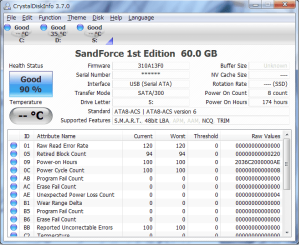
CrystalDiskInfo 3.9.3 is a good program to see how well your drive is it will tell you lots of info (as in the pic) you can download it here :ar: Download Center - Crystal Dew World
 

Attachments

  • cd.PNG
    cd.PNG
    35.7 KB · Views: 26

My Computer My Computer

Computer Manufacturer/Model Number
packard bell IXTREME M5722
OS
Operating System : Windows 7 Home Premium Edition 6.01.7600 SP1 (x64)
CPU
Processor : Intel Core 2 Quad Q8300 @ 2500 MHz
Motherboard
Mainboard : Packard Bell (Acer EG43M )
Memory
Physical Memory :8GB Corsair4x 2GB 800MHz C5 DDR2
Graphics Card(s)
Video Card : XFX 6700 AMD
Monitor(s) Displays
Maestro 234DL - BenQ V2220 - BenQ VW2420H
Screen Resolution
Current Display :1920x1080p pixels at 60 Hz in HD LED
Hard Drives
Hard Disks : WDC (1000 GB)
Drive C: (Hard Disk) : 428 GB available on 491 GB
Drive D: (Hard Disk) : 426 GB available on 492 GB
SAMSUNG spinpoint HD103SJ 1000.2 GB
(X 2) KINGSTON SSD NOW V 30GB
PSU
XFX ProSeries 550W PSU
Case
PACKARD BELL IXTREME
Cooling
System Blower Current: 150mA Air Flow16CFM ;Akasa 90mm rear
Keyboard
Gigabyte Aivia K8100
Mouse
TRUST-Wireless Laser Mouse - Carbon edition MI-7770C
Internet Speed
TP-LINK > TL-WN951N / AV500 Gigabit Powerline Adapters
Browser
chrome dev
Other Info
EXTRA COOLING>(FAN CONTROLLER) PC Bay Cooler 3 x 40mm fans; Akasa AK-HD-BL Blue hard drive cooler 2 x 40 mm fan 4500 rpm 29.7 dBA
Bios> American Megatrends Inc.
Version : P01-A1
Date : 08/31/2009
Thanks guys for all the answers. Let me answer your questions:
- I did a clean install for windows 7 (not an upgrade)
- Never had any problem with usb device. Windows 7 has been good to me (as oppsed to vista)
- The drive was brand new

I ended up returning the drive today and got a toshiba ( the toshiba was on sale) and I did a format in XP to be on the safe side.

Too bad I won't know what the problem was. I am researcher and I have a tendency to want to know why things don't work :) . But I guess I learned a few things from you guys so all is not lost. Thanks again guys!
 

My Computer My Computer

OS
win7 home 32bit
Back
Top