Internet explorer 32-bit does not work, but 64bit does

Problem fixed!

This was my scenario:
1.) Uninstalled Advanced System Optimizer
2.) Installed System Mechanic (This software really sucks and I am sure this peace of shit caused this problem!)
3.) Uninstalled System Mechanic.
4.) Boom!... no browser worked after restarting PC.. only IE 64-Bit was working.
5.) I tried my own solutions and restarted PC several times.
6.) when I restarted my PC for 3rd(or may b 5th I dont remember!
biggrin.gif
) time IDM got activated and started displaying a msg which asked to check Network Integrity... so I clicked on check and it detected that some 3rd party software corrupted network integrity. Would you like to repair it?(obviously man! I clicked yes)

Hurrrrrrrrray! after restarting my PC everything started working!

IDM=Internet Download Manager
 

My Computer My Computer

At a glance

WINDOWS 7CORE 2 DUO4 GB8800 ULTRA
Computer Manufacturer/Model Number
ASUS
OS
WINDOWS 7
CPU
CORE 2 DUO
Motherboard
ASUS P5W-DH DELUXE
Memory
4 GB
Graphics Card(s)
8800 ULTRA
Sound Card
8.1 CHANNEL
Monitor(s) Displays
19" SAMSUNG
Screen Resolution
1440 X 900
Hard Drives
500 GB
PSU
650 WATT
Internet Speed
2 MB
well i have none of these programs and ie32 has stopped working
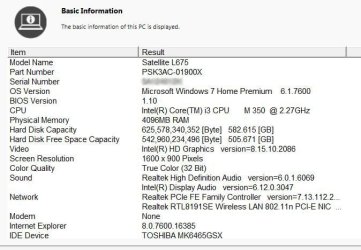
see attached specs
thanks


cannot display webpage is the error message
Internet Explorer cannot display the webpage


What you can try:

Diagnose Connection Problems

More information
 

Attachments

  • t-17 specs2.jpg
    t-17 specs2.jpg
    82.9 KB · Views: 52

My Computer My Computer

At a glance

7 64
OS
7 64
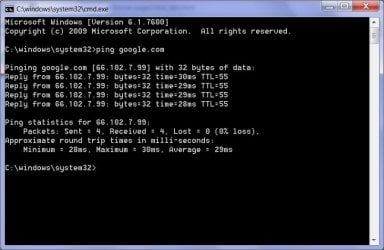
Try to ping a website

open cmd(google it)
type: ping google.com <hit enter>

if u see these(or similar) lines then ur internet is working fine and there might be problem in ur browser:

Pinging google.com [208.87.34.18] with 32 bytes of da
Reply from 208.87.34.18: bytes=32 time=324ms TTL=45
Reply from 208.87.34.18: bytes=32 time=297ms TTL=45
Reply from 208.87.34.18: bytes=32 time=299ms TTL=45
 
Last edited:

My Computer My Computer

At a glance

WINDOWS 7CORE 2 DUO4 GB8800 ULTRA
Computer Manufacturer/Model Number
ASUS
OS
WINDOWS 7
CPU
CORE 2 DUO
Motherboard
ASUS P5W-DH DELUXE
Memory
4 GB
Graphics Card(s)
8800 ULTRA
Sound Card
8.1 CHANNEL
Monitor(s) Displays
19" SAMSUNG
Screen Resolution
1440 X 900
Hard Drives
500 GB
PSU
650 WATT
Internet Speed
2 MB
thanks
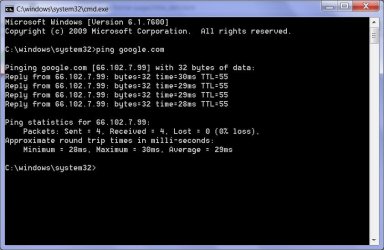
i pinged - see attached
the ie 8 64 bit one works
have i managed to ping with the dud one
when i click the icon i just get
Internet Explorer cannot display the webpage
 

Attachments

  • ping.jpg
    ping.jpg
    51.9 KB · Views: 44

My Computer My Computer

At a glance

7 64
OS
7 64
Did you try to "Diagnose Connection Problems"?

You could try a reset: Tools/Internet Options/Advanced/Reset
 

My Computer My Computer

At a glance

Windows 8 Pro w/MC 32-bitIntel Atom 1.86 GHz2 GBIntel GMA 500
Computer type
PC/Desktop
Computer Manufacturer/Model Number
OQO 2+
OS
Windows 8 Pro w/MC 32-bit
CPU
Intel Atom 1.86 GHz
Motherboard
OQO 2+
Memory
2 GB
Graphics Card(s)
Intel GMA 500
Sound Card
IDT
Monitor(s) Displays
LCD
Screen Resolution
800 x 480 (portable) 1280 x 1024 (docked)
Hard Drives
64 GB SSD
PSU
9 Ah Battery (portable) or OQO Brick (docked)
Case
Shirt Pocket Sized
Cooling
Tiny Fan
Keyboard
Slide out (portable) DiNovo Edge (docked)
Mouse
Eraser head (portable) Logitech Bluetooth (docked)
Internet Speed
WWAN or 802.11G (portable) T1 (docked)
Browser
IE 10
Other Info
DVD-RW OQO Docking Station
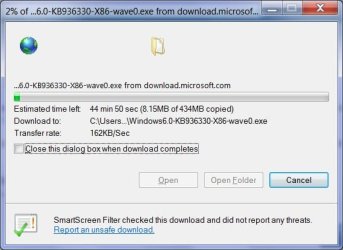
Before trying anything else. Download IDM from internetdownloadmanager.com (Use your IE8 64 to download). Install it.

Download this file(or any other) from microsoft.com (because there servers are fast and responsive) via IDM:
http://download.microsoft.com/downl...4c056d4c34d/Windows6.0-KB936330-X86-wave0.exe

Note: you dont need to download the whole file!... Its for testing purpose only. Once it reaches 1% or 2% stop it.

It detects and corrects the bad settings in your network!......
( I know this solution seems awkward :geek:)
 

My Computer My Computer

At a glance

WINDOWS 7CORE 2 DUO4 GB8800 ULTRA
Computer Manufacturer/Model Number
ASUS
OS
WINDOWS 7
CPU
CORE 2 DUO
Motherboard
ASUS P5W-DH DELUXE
Memory
4 GB
Graphics Card(s)
8800 ULTRA
Sound Card
8.1 CHANNEL
Monitor(s) Displays
19" SAMSUNG
Screen Resolution
1440 X 900
Hard Drives
500 GB
PSU
650 WATT
Internet Speed
2 MB
Did you try to "Diagnose Connection Problems"?

You could try a reset: Tools/Internet Options/Advanced/Reset

thanks
yes, tried that
and unselecting restart, selecting it and restart
it does ping
 

Attachments

  • ping.jpg
    ping.jpg
    51.9 KB · Views: 21

My Computer My Computer

At a glance

7 64
OS
7 64
Before trying anything else. Download IDM from internetdownloadmanager.com (Use your IE8 64 to download). Install it.

Download this file(or any other) from microsoft.com (because there servers are fast and responsive) via IDM:
http://download.microsoft.com/downl...4c056d4c34d/Windows6.0-KB936330-X86-wave0.exe

Note: you dont need to download the whole file!... Its for testing purpose only. Once it reaches 1% or 2% stop it.

It detects and corrects the bad settings in your network!......
( I know this solution seems awkward :geek:)
thanks
not keen on adding even more software!
that download seemed to work.
i have a backup registry from before this chaos started, should i just use that?
 

Attachments

  • download.jpg
    download.jpg
    34.1 KB · Views: 15

My Computer My Computer

At a glance

7 64
OS
7 64
Since a 64 bit browser is working, try this:

Start> In search box, type cmd> Right click cmd.exe in results above and choose Run as administrator

When the command prompt opens type:

netsh winsock reset

Press enter

Restart PC

Hopefully that will fix it

A Guy
 

My Computer My Computer

At a glance

Windows 10 Home x64INTEL Core i5-750 Quad-Core 3.37GHzHyperX Fury Black Series 8GB (2 x 4GB) 1866MhzEVGA GeForce GTX 750 Superclocked 1GB 128-Bit...
Computer type
PC/Desktop
OS
Windows 10 Home x64
CPU
INTEL Core i5-750 Quad-Core 3.37GHz
Motherboard
ASUS P7P55D
Memory
HyperX Fury Black Series 8GB (2 x 4GB) 1866Mhz
Graphics Card(s)
EVGA GeForce GTX 750 Superclocked 1GB 128-Bit GDDR5
Monitor(s) Displays
LG 32MA68HY 32" IPS
Screen Resolution
1920 x 1080
Hard Drives
Samsung 840 Evo 120GB, SEAGATE 500GB Barracuda® 7200.12, SATA 3 Gb/s, 7200 RPM, 16MB cache
PSU
ANTEC TruePower New TP-550, 80 PLUS, 550W
Case
ANTEC Three Hundred Illusion
Cooling
COOLER MASTER Hyper 212 Plus, 4 x 120mm 1 x 140mm Noctua's
Internet Speed
85 + Mbps
Antivirus
Avast
Browser
Vivaldi
lol! :D

I think you didnt read full post... I didnt said to do that...
 

My Computer My Computer

At a glance

WINDOWS 7CORE 2 DUO4 GB8800 ULTRA
Computer Manufacturer/Model Number
ASUS
OS
WINDOWS 7
CPU
CORE 2 DUO
Motherboard
ASUS P5W-DH DELUXE
Memory
4 GB
Graphics Card(s)
8800 ULTRA
Sound Card
8.1 CHANNEL
Monitor(s) Displays
19" SAMSUNG
Screen Resolution
1440 X 900
Hard Drives
500 GB
PSU
650 WATT
Internet Speed
2 MB
Since a 64 bit browser is working, try this:

Start> In search box, type cmd> Right click cmd.exe in results above and choose Run as administrator

When the command prompt opens type:

netsh winsock reset

Press enter

Restart PC

Hopefully that will fix it

A Guy
thanks a zillion
that worked....for now
i had before reset it the other way-without dos, but that did not work
thanks again.
how can i learn this stuff - fixing win7/64 - quickly - at my age i cannot take years!
 

My Computer My Computer

At a glance

7 64
OS
7 64
You are welcome, I was hoping it would ;) How do you learn. Hang around this forum, read posts, google for help. It's amazing what you learn trying to help others, and seeing what others post as help. A Guy
 

My Computer My Computer

At a glance

Windows 10 Home x64INTEL Core i5-750 Quad-Core 3.37GHzHyperX Fury Black Series 8GB (2 x 4GB) 1866MhzEVGA GeForce GTX 750 Superclocked 1GB 128-Bit...
Computer type
PC/Desktop
OS
Windows 10 Home x64
CPU
INTEL Core i5-750 Quad-Core 3.37GHz
Motherboard
ASUS P7P55D
Memory
HyperX Fury Black Series 8GB (2 x 4GB) 1866Mhz
Graphics Card(s)
EVGA GeForce GTX 750 Superclocked 1GB 128-Bit GDDR5
Monitor(s) Displays
LG 32MA68HY 32" IPS
Screen Resolution
1920 x 1080
Hard Drives
Samsung 840 Evo 120GB, SEAGATE 500GB Barracuda® 7200.12, SATA 3 Gb/s, 7200 RPM, 16MB cache
PSU
ANTEC TruePower New TP-550, 80 PLUS, 550W
Case
ANTEC Three Hundred Illusion
Cooling
COOLER MASTER Hyper 212 Plus, 4 x 120mm 1 x 140mm Noctua's
Internet Speed
85 + Mbps
Antivirus
Avast
Browser
Vivaldi
EDITED: I went back to the beginning of this thread and tried some things suggested, and I now have 32 bit IE back. :D

I didn't see an option where I could delete this message.

Anyway, you guys rock.

Joanner---newbie!!
 

My Computer My Computer

At a glance

windows 7 home premium32bit
OS
windows 7 home premium32bit
...I didn't see an option where I could delete this message...
When you roll your mouse over the "Edit" button (to the left of the "Quote" button) a popup will appear saying "Edit/Delete Message". Of course you need to be logged in to the forum.
 

My Computer My Computer

At a glance

Windows 8 Pro w/MC 32-bitIntel Atom 1.86 GHz2 GBIntel GMA 500
Computer type
PC/Desktop
Computer Manufacturer/Model Number
OQO 2+
OS
Windows 8 Pro w/MC 32-bit
CPU
Intel Atom 1.86 GHz
Motherboard
OQO 2+
Memory
2 GB
Graphics Card(s)
Intel GMA 500
Sound Card
IDT
Monitor(s) Displays
LCD
Screen Resolution
800 x 480 (portable) 1280 x 1024 (docked)
Hard Drives
64 GB SSD
PSU
9 Ah Battery (portable) or OQO Brick (docked)
Case
Shirt Pocket Sized
Cooling
Tiny Fan
Keyboard
Slide out (portable) DiNovo Edge (docked)
Mouse
Eraser head (portable) Logitech Bluetooth (docked)
Internet Speed
WWAN or 802.11G (portable) T1 (docked)
Browser
IE 10
Other Info
DVD-RW OQO Docking Station
I am having the same issue posted this on tghe other thread a few minutes ago IE8 works fine for me in 64 bit not 32 bot here is the message I get when trying to use the 32bit


Problem signature:
Problem Event Name: APPCRASH
Application Name: iexplore.exe
Application Version: 8.0.7600.16722
Application Timestamp: 4d0c2f29
Fault Module Name: mshtml.dll
Fault Module Version: 8.0.7600.16722
Fault Module Timestamp: 4d0c44e7
Exception Code: c0000005
Exception Offset: 001b71ef
OS Version: 6.1.7600.2.0.0.256.48
Locale ID: 1033
Additional Information 1: 0a9e
Additional Information 2: 0a9e372d3b4ad19135b953a78882e789
Additional Information 3: 0a9e
Additional Information 4: 0a9e372d3b4ad19135b953a78882e789

Read our privacy statement online:
http://go.microsoft.com/fwlink/?linkid=104288&clcid=0x0409

If the online privacy statement is not available, please read our privacy statement offline:
C:\Windows\system32\en-US\erofflps.txt

Hope this helps you guys figure it out................

Thanks as always
 

My Computer My Computer

At a glance

Windows 7 Pro 64 Bit SP1Intel I7 960 3.2 ghz12 Gig DDR3 1600Nvidia Geforce GTX 660 Ti 3GB
Computer type
PC/Desktop
Computer Manufacturer/Model Number
CyberPower
OS
Windows 7 Pro 64 Bit SP1
CPU
Intel I7 960 3.2 ghz
Motherboard
Asus PT6 SE X58 Crossfire Triple Channel DDR3
Memory
12 Gig DDR3 1600
Graphics Card(s)
Nvidia Geforce GTX 660 Ti 3GB
Sound Card
Creative SB Xfi Xtreme
Monitor(s) Displays
ViewSonic 27 inch wb
Screen Resolution
1400 X 1050
Hard Drives
2TB SATA III 6GB 7200 RPM 64mb Cache
2TB SATA III 6GB 7200 RPM 64 MB Cache
PSU
Xtremegear 950 Watt
Case
Coolermaster HAF 932 Advanced
Cooling
Asetek 510LC 120MM Watercooler
Keyboard
Razer Death Stalker
Mouse
Logitech Trackman Wheel
Internet Speed
Cable
Antivirus
Norton Internet Security 2014
Browser
Windows Explorer 11
I tried the following suggestion however it did not work for me IE8 still does not work in the 32 bit version...


Since a 64 bit browser is working, try this:

Start> In search box, type cmd> Right click cmd.exe in results above and choose Run as administrator

When the command prompt opens type:

netsh winsock reset

Press enter

Restart PC

Hopefully that will fix it

A Guy
 

My Computer My Computer

At a glance

Windows 7 Pro 64 Bit SP1Intel I7 960 3.2 ghz12 Gig DDR3 1600Nvidia Geforce GTX 660 Ti 3GB
Computer type
PC/Desktop
Computer Manufacturer/Model Number
CyberPower
OS
Windows 7 Pro 64 Bit SP1
CPU
Intel I7 960 3.2 ghz
Motherboard
Asus PT6 SE X58 Crossfire Triple Channel DDR3
Memory
12 Gig DDR3 1600
Graphics Card(s)
Nvidia Geforce GTX 660 Ti 3GB
Sound Card
Creative SB Xfi Xtreme
Monitor(s) Displays
ViewSonic 27 inch wb
Screen Resolution
1400 X 1050
Hard Drives
2TB SATA III 6GB 7200 RPM 64mb Cache
2TB SATA III 6GB 7200 RPM 64 MB Cache
PSU
Xtremegear 950 Watt
Case
Coolermaster HAF 932 Advanced
Cooling
Asetek 510LC 120MM Watercooler
Keyboard
Razer Death Stalker
Mouse
Logitech Trackman Wheel
Internet Speed
Cable
Antivirus
Norton Internet Security 2014
Browser
Windows Explorer 11
All: I tried all the suggestions posted here, including re-setting winsock, the TCP/IP stack and IE-32. Nothing worked. Here is what did.

I first noticed that on the Tools - Internet options - Connections - Lan Settings that the proxy setting on IE-32 (auto detect off and proxy server on but no server specified) vs IE-64 (auto detect on, no proxy server) were different. This appears to have taken place when uninstalling some internet stick software. Control over these settings (there are greyed out) has been removed either because i"m not using an admin account or disabled by my corporate IT group when connecting to the corporate lan.

To fix this use the following steps:

1) Press Start and Search for cmd.exe - right click and select "Run as Administrator"

2) Enter the following at the command prompt including the quotes: "c:\Program Files (x86)\Internet Explorer\iexplore.exe"

This starts IE-32 from the command line in administrative mode.

3) Select Tools - Internet Options - Connections - Lan Settings. These settings should now be editable. Uncheck the "Use a proxy server..." and check "Automatically detect settings".

4) Close IE-32 and restart. Presto both IE-32 and IE-64 should now be working identically.

Cheers
 

My Computer My Computer

At a glance

Windows 7Q95508 GBGTS 250
Computer Manufacturer/Model Number
Compatible
OS
Windows 7
CPU
Q9550
Motherboard
Asus
Memory
8 GB
Graphics Card(s)
GTS 250
Sound Card
Creative
Monitor(s) Displays
LCD 1080p
Hard Drives
2
PSU
750 watt Antek
Case
Antek 600
Welcome to Seven Forums keithgersen. Nice addition to this thread. A Guy
 

My Computer My Computer

At a glance

Windows 10 Home x64INTEL Core i5-750 Quad-Core 3.37GHzHyperX Fury Black Series 8GB (2 x 4GB) 1866MhzEVGA GeForce GTX 750 Superclocked 1GB 128-Bit...
Computer type
PC/Desktop
OS
Windows 10 Home x64
CPU
INTEL Core i5-750 Quad-Core 3.37GHz
Motherboard
ASUS P7P55D
Memory
HyperX Fury Black Series 8GB (2 x 4GB) 1866Mhz
Graphics Card(s)
EVGA GeForce GTX 750 Superclocked 1GB 128-Bit GDDR5
Monitor(s) Displays
LG 32MA68HY 32" IPS
Screen Resolution
1920 x 1080
Hard Drives
Samsung 840 Evo 120GB, SEAGATE 500GB Barracuda® 7200.12, SATA 3 Gb/s, 7200 RPM, 16MB cache
PSU
ANTEC TruePower New TP-550, 80 PLUS, 550W
Case
ANTEC Three Hundred Illusion
Cooling
COOLER MASTER Hyper 212 Plus, 4 x 120mm 1 x 140mm Noctua's
Internet Speed
85 + Mbps
Antivirus
Avast
Browser
Vivaldi
Since a 64 bit browser is working, try this:

Start> In search box, type cmd> Right click cmd.exe in results above and choose Run as administrator

When the command prompt opens type:

netsh winsock reset

Press enter

Restart PC

Hopefully that will fix it

A Guy


Hi - just want to say a big thank you!!!!! to A Guy, tried your fix and worked like a treat. I was almost giving up hope with IE 32 bit not working but 64 bit was. I tried everything available on the net, on MS knowledge base and my last resort was to reinstall windows 7 on top. I was very worried, apart from IE 32 bit not working, I kept getting Visual C++ Runtime Error and Windows Live not working. I was running Spyware Doctor which was doing fine when I had a Windows XP laptop before. But when I got the new laptop with Windows 7, it has been giving problems and won't update and kept asking for proxy server setting and I'm not even using one! Finally pin down to 32 bit not working, uninstall Spyware Doctor, downloaded AVG and MalwareByte but they won't update as IE 32bit not working and meanwhile. Tried using Firefox, no joy! It has taken me 3 days to find this post. Thank you once again!!:D:D:D
 

My Computer My Computer

At a glance

Windows 7 Home Premium 64-bitPentium Dual Core T4400 2.2GHz4GB
Computer Manufacturer/Model Number
Dell Inspiron 1545
OS
Windows 7 Home Premium 64-bit
CPU
Pentium Dual Core T4400 2.2GHz
Memory
4GB
Sound Card
IDT HD Audio CODEC
Hard Drives
Samsung HM321HI
Back
Top