
Questions About my PC and upgrades

Chiumiento

Chiumiento
Power User
Local time
1:41 PM
Messages
237
Location
United States, Bangor, Maine, 04401
I have been talking a lot about my PC. What upgrades I should get. Other things also like if I could over clock my Graphics card. Just a whole bunch of new things. But because this conversation has been taking place in a completely different thread where someone asked what type of graphics card he should get. I decided to make my own. SO I for one would have all the info I could want about my computer in one thread. For two. Because I think I am supposed to do this anyway when I ask questions about different things. Not just jump into someones else's thread and start asking many off topic questions.
 

My Computer My Computer

Computer Manufacturer/Model Number
HP Pavilion p6000 series/Model p6654y
OS
Windows 7 Ultimate x64
CPU
AMD Athlon(tm) II X4 630
Motherboard
Socket AM3 (938)
Memory
DDR3 2048 MB's/ PC3-10600 (1,333 MHz) (2 Cards)
Graphics Card(s)
ATI Radeon HD 4200
Sound Card
Realtek High definition Audio
Monitor(s) Displays
PnP-Monitor (Standard) (I am using my Emerson TV)
Screen Resolution
1024 x 768 pixels at 75 Hz in true colors (32-bit)
Hard Drives
750.05 Gigabytes Usable Hard Drive Capacity
692.61 Gigabytes Hard Drive Free Space

hp DVD-RAM GH60L SATA CdRom Device [Optical drive]
YMAX magicJack USB Device [Optical drive]

Generic- Compact Flash USB Device [Hard drive] -- drive 2
Generic
PSU
250 Watts
Case
HP
Cooling
Fan
Keyboard
Logitech wireless wave combo MK550 (Came with mouse)
Mouse
Logitech wireless wave combo MK550 (Came with keyboard)
Internet Speed
DSL Download speed 15.06-mb/s Upload .49-mb/s ping 45ms
Other Info
HP Wireless 802.11 b/g/n PCIe Card
So yes my computer is running in Dual channel. Now isn't there such thing as getting a CPU that can not come out of your computer? an integrated one I think it is called? If so. Is there anyway to be able to get a new one?
 

My Computer My Computer

Computer Manufacturer/Model Number
HP Pavilion p6000 series/Model p6654y
OS
Windows 7 Ultimate x64
CPU
AMD Athlon(tm) II X4 630
Motherboard
Socket AM3 (938)
Memory
DDR3 2048 MB's/ PC3-10600 (1,333 MHz) (2 Cards)
Graphics Card(s)
ATI Radeon HD 4200
Sound Card
Realtek High definition Audio
Monitor(s) Displays
PnP-Monitor (Standard) (I am using my Emerson TV)
Screen Resolution
1024 x 768 pixels at 75 Hz in true colors (32-bit)
Hard Drives
750.05 Gigabytes Usable Hard Drive Capacity
692.61 Gigabytes Hard Drive Free Space

hp DVD-RAM GH60L SATA CdRom Device [Optical drive]
YMAX magicJack USB Device [Optical drive]

Generic- Compact Flash USB Device [Hard drive] -- drive 2
Generic
PSU
250 Watts
Case
HP
Cooling
Fan
Keyboard
Logitech wireless wave combo MK550 (Came with mouse)
Mouse
Logitech wireless wave combo MK550 (Came with keyboard)
Internet Speed
DSL Download speed 15.06-mb/s Upload .49-mb/s ping 45ms
Other Info
HP Wireless 802.11 b/g/n PCIe Card
So yes my computer is running in Dual channel. Now isn't there such thing as getting a CPU that can not come out of your computer? an integrated one I think it is called? If so. Is there anyway to be able to get a new one?

Those are typically found in Laptops and mobile devices. In your case, (per the other thread) you'd have to replace your entire motherboard. If you did that, you might as well go all the way and replace your case too, then eliminating HP from your setup altogether (eventually)
 

My Computer My Computer

OS
Windows 7 Ultimate 64-bit
CPU
AMD Phenom II X6 1090T 3.2GHZ
Motherboard
MSI 890FXA-GD70
Memory
G.SKILL RipJaw 3x2GB DDR3-1066
Graphics Card(s)
2x HIS Radeon HD 6850 1 GB
Sound Card
VIA 8-channel
Monitor(s) Displays
2x 20 inch Acer LCDs, 1x 32" Sony LCD TV
Screen Resolution
4480x900
Hard Drives
1x Crucial 64GB SSD
3x 1TB HDDs (WD, Seagate, Hitatchi)
1x 500GB Seagate External
PSU
Kingwin 1000W Modular
Case
Coolermaster HAF 932
Cooling
1x 120mm, 3x 200mm, CoolerMaster Hyper 212+
Keyboard
Microsoft Wireless Keyboard 1000
Mouse
Microsoft Wiresless Mouse 5000
Internet Speed
20mbps
Other Info
Samsung BD-ROM/DVD-RW
Well I want to try and do a clean install on my computer. But I still want to have programs to be able to burn DVD's and Cd's and ISO files onto DVD. Things like that. I am not sure if I will still have program to do all that stuff if I do a clean install and get rid of all the HP programs on my computer. That is why I still have not gone ahead and gotten rid of all the Hp software on my computer. I know that when I hit f11 on reboot it also pops up the HP advisor thing and asks me what I want to do like system restore recovery or what. So What will happen If I was to get rid of all the HP programs on my computer. Would it just straight up stop most things from working properly. That is what I am worried about. I mean I am talking about doing 2 different things here. One is do do the clean install. If I did I would lose all my cool software and I am afraid I would not be able to get it back without paying for it. Thew other would be to use PC decrapyfier and uninstall all the HP programs it says are bloat ware. Witch is all HP period. Is there anyway to get away with doing one of these and still having what I want?

By the way. Almost all of the cool DVD, CD, ISO burning programs are made by HP. But is there any other ones that are not I could get?

Would I be able to over clock my current processor do you know? I will not be buying a new one anyway. I think I will be done with this computer after I do the graphics card, RAM, and Maybe an SSD. I do not see what else I could really do. I mine as well start building my own Computer by then. I mine as well with all that money anyway. But I would like to make this one better than it is. I want to put it at a pretty good state before I Go ahead and build a computer from scratch. This way I will have a half decent computer while I build the next one. I know it will take me a long time before I complete a computer build. I do not have money for that stuff at all. Doing what I want to this computer is going to kill me. I just want to so bad. I can not help it. I really love computers. I want to really have a good one. I get to learn about them also.
 

My Computer My Computer

Computer Manufacturer/Model Number
HP Pavilion p6000 series/Model p6654y
OS
Windows 7 Ultimate x64
CPU
AMD Athlon(tm) II X4 630
Motherboard
Socket AM3 (938)
Memory
DDR3 2048 MB's/ PC3-10600 (1,333 MHz) (2 Cards)
Graphics Card(s)
ATI Radeon HD 4200
Sound Card
Realtek High definition Audio
Monitor(s) Displays
PnP-Monitor (Standard) (I am using my Emerson TV)
Screen Resolution
1024 x 768 pixels at 75 Hz in true colors (32-bit)
Hard Drives
750.05 Gigabytes Usable Hard Drive Capacity
692.61 Gigabytes Hard Drive Free Space

hp DVD-RAM GH60L SATA CdRom Device [Optical drive]
YMAX magicJack USB Device [Optical drive]

Generic- Compact Flash USB Device [Hard drive] -- drive 2
Generic
PSU
250 Watts
Case
HP
Cooling
Fan
Keyboard
Logitech wireless wave combo MK550 (Came with mouse)
Mouse
Logitech wireless wave combo MK550 (Came with keyboard)
Internet Speed
DSL Download speed 15.06-mb/s Upload .49-mb/s ping 45ms
Other Info
HP Wireless 802.11 b/g/n PCIe Card
Also please explain what you mean I would have to replace my whole computer. I can not remember what I said. Sorry.
 

My Computer My Computer

Computer Manufacturer/Model Number
HP Pavilion p6000 series/Model p6654y
OS
Windows 7 Ultimate x64
CPU
AMD Athlon(tm) II X4 630
Motherboard
Socket AM3 (938)
Memory
DDR3 2048 MB's/ PC3-10600 (1,333 MHz) (2 Cards)
Graphics Card(s)
ATI Radeon HD 4200
Sound Card
Realtek High definition Audio
Monitor(s) Displays
PnP-Monitor (Standard) (I am using my Emerson TV)
Screen Resolution
1024 x 768 pixels at 75 Hz in true colors (32-bit)
Hard Drives
750.05 Gigabytes Usable Hard Drive Capacity
692.61 Gigabytes Hard Drive Free Space

hp DVD-RAM GH60L SATA CdRom Device [Optical drive]
YMAX magicJack USB Device [Optical drive]

Generic- Compact Flash USB Device [Hard drive] -- drive 2
Generic
PSU
250 Watts
Case
HP
Cooling
Fan
Keyboard
Logitech wireless wave combo MK550 (Came with mouse)
Mouse
Logitech wireless wave combo MK550 (Came with keyboard)
Internet Speed
DSL Download speed 15.06-mb/s Upload .49-mb/s ping 45ms
Other Info
HP Wireless 802.11 b/g/n PCIe Card
It's a near certainty that any programs HP put on that PC can be replaced by equal or better programs at little or no cost. The exception might be Microsoft Office if that was included.

What specifically do you want to do with your PC with the HP programs?

Burn data CDs? Burn music CDs? Edit pictures or videos? Send email to grandma?

All of that and more can be done without anything from HP.

I' d guess you don't have Windows install discs and I'd guess you can only restore to the factory condition, which would give you all those HP programs. But they can be deleted, easily or otherwise.

Why would you want a PC that had an integrated processor if you could avoid it?

As far as I know, the HP Pavilion 6000 is a traditional desktop with a removable processor. You don't want that?
 

My Computer My Computer

Computer type
PC/Desktop
Computer Manufacturer/Model Number
Ignatz Special; 4 speed manual gearbox; factory air conditioning; one of one
OS
Windows 7 Home Premium SP1, 64-bit
CPU
Intel Skylake i5-6600K, not overclocked
Motherboard
AsRock Z170M Extreme 4, micro ATX
Memory
8 GB HyperX DDR4-2666 (2 x 4 GB)
Graphics Card(s)
none; graphics are integrated on CPU
Sound Card
onboard: Realtek ALC1150; external: USB Behringer UF0-202
Monitor(s) Displays
Dell S2340M 23 inch IPS
Screen Resolution
1600 x 900
Hard Drives
System: Crucial MX100 series SSD, 128 GB;
Data: Samsung Spinpoint 103SJ, 1 TB;
Backup: WD Caviar Green WD30EZRX-00D8PB0, 3 TB
PSU
Rosewill SilentNight 500 watt fanless, semi-modular
Case
Antec Solo II
Cooling
Noctua NH-U12S; Noctua F12 intake, Noctua S12A exhaust
Keyboard
Microsoft 200 6JH-00001 USB
Mouse
Dell or Microsoft optical wired; USB
Antivirus
Microsoft Security Essentials and Malwarebytes Premium
Browser
Pale Moon
Other Info
All fans PWM; speeds at idle: CPU circa 500 rpm; intake circa 600 rpm; exhaust circa 600 rpm; CPU temps 27 idle and 47 C load in a warm room (27 C/81 F) when running Intel Extreme Tuning Utility stress test.
Why would you want a PC that had an integrated processor if you could avoid it?

As far as I know, the HP Pavilion 6000 is a traditional desktop with a removable processor. You don't want that?

Maybe he thought it was something else.

He's got a lot of questions dancing around in his head it seems (which is ok, I get paid all.... oh wait... I'm not getting paid, silly me).

By the way. Almost all of the cool DVD, CD, ISO burning programs are made by HP. But is there any other ones that are not I could get?

Windows 7 has an ISO burner built into it :P
 

My Computer My Computer

OS
Windows 7 Ultimate 64-bit
CPU
AMD Phenom II X6 1090T 3.2GHZ
Motherboard
MSI 890FXA-GD70
Memory
G.SKILL RipJaw 3x2GB DDR3-1066
Graphics Card(s)
2x HIS Radeon HD 6850 1 GB
Sound Card
VIA 8-channel
Monitor(s) Displays
2x 20 inch Acer LCDs, 1x 32" Sony LCD TV
Screen Resolution
4480x900
Hard Drives
1x Crucial 64GB SSD
3x 1TB HDDs (WD, Seagate, Hitatchi)
1x 500GB Seagate External
PSU
Kingwin 1000W Modular
Case
Coolermaster HAF 932
Cooling
1x 120mm, 3x 200mm, CoolerMaster Hyper 212+
Keyboard
Microsoft Wireless Keyboard 1000
Mouse
Microsoft Wiresless Mouse 5000
Internet Speed
20mbps
Other Info
Samsung BD-ROM/DVD-RW
Okay. I thought the ISO was in the system. And I do not want an integrated processor. I was basically asking if my PC came with one. That is all.

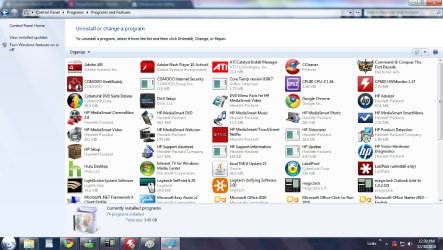
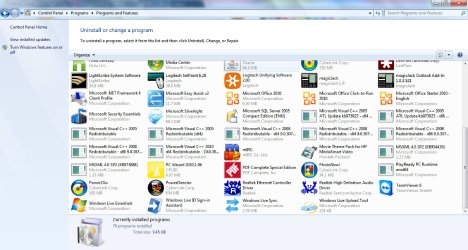
But I do and would like to get rid of all the HP crap that is on my computer. They have HP updates. Witch is stupid. It makes sure my computer is up to date. I have it turned right off. It doe not even boot with my computer. I turned that off also. Microsoft has there own update program. It also has an maintenance monitor. Do not need or want that. Also the HP advisor is also dumb. Do not use any of them. The only things I do want to keep are all the files burning softwares. I also have lightscribe. There is a couple really good programs that I do want to keep. But I am afraid that if I get rid of one of them it will ruin all of them. I do want to keep some of the media burner software yes. Some of it is very good. My next post will have all the programs that HP has on here that PC decrapifier says I can delete. I will show the picture of it. I at least would like to know witch programs are doing the same as others. But witch one I should keep. I am not sure if I get rid of one will that be the one that did more than the other. I really wish I had someone here at my house to just talk to me about it. I wish I had friends like you. I really hate this. It is so hard for me to try and explain all this stuff I want to know in these messages. I am really bad at this.

Just call me or come to my house.
:confused:
 

My Computer My Computer

Computer Manufacturer/Model Number
HP Pavilion p6000 series/Model p6654y
OS
Windows 7 Ultimate x64
CPU
AMD Athlon(tm) II X4 630
Motherboard
Socket AM3 (938)
Memory
DDR3 2048 MB's/ PC3-10600 (1,333 MHz) (2 Cards)
Graphics Card(s)
ATI Radeon HD 4200
Sound Card
Realtek High definition Audio
Monitor(s) Displays
PnP-Monitor (Standard) (I am using my Emerson TV)
Screen Resolution
1024 x 768 pixels at 75 Hz in true colors (32-bit)
Hard Drives
750.05 Gigabytes Usable Hard Drive Capacity
692.61 Gigabytes Hard Drive Free Space

hp DVD-RAM GH60L SATA CdRom Device [Optical drive]
YMAX magicJack USB Device [Optical drive]

Generic- Compact Flash USB Device [Hard drive] -- drive 2
Generic
PSU
250 Watts
Case
HP
Cooling
Fan
Keyboard
Logitech wireless wave combo MK550 (Came with mouse)
Mouse
Logitech wireless wave combo MK550 (Came with keyboard)
Internet Speed
DSL Download speed 15.06-mb/s Upload .49-mb/s ping 45ms
Other Info
HP Wireless 802.11 b/g/n PCIe Card
Go to control panel/ programs and features, there you will see all the programs that are installed on your computer, highlite the one's you don't want and uninstall them one at a time.
 

My Computer My Computer

Computer Manufacturer/Model Number
Dell XPS 730
OS
Windows 7 Home Premium 64 bit
CPU
Intel Core 2 quad Extreme Q9770 @ 3.2 GHz
Memory
4x2 GB Muskin 1600 MHz ram
Graphics Card(s)
NVidia GTX 250
Sound Card
Soundblaster X-Fi Fatality Champion
Monitor(s) Displays
2 Dell 2007WFP Ultrascans
Screen Resolution
3360 x 1050
Hard Drives
WD Black 1TB sata, 2-WD Black 500 sata, 2-Seagate 500 Go external
PSU
1000 Watt
Cooling
air
Keyboard
MS Natrual Keyboard Pro
Mouse
Logitech Wireless Trackball
Internet Speed
DSL Elite
I know to do that. What I am saying. Is that I am not sure witch ones I want to. I knowq how to do all that stuff. I just do not know witch ones do what I want. And witch ones don't. Witch ones can do everything I want. So can do some things that others can't. I also am not sure if I can get rid of HP advisor and HP.

Lets just do it this way.

Please tell me Witch of all of these programs I can delete. If you really want to help me. Please tell me witch ones I should keep to be able to do these tasks. 1. Burn ISO disks, DVD's, CD's, Make system Images to put my computer back to an earlier date. I think I would rather have Picasa then any of the photo editing programs. Plus all my picture are on Picasa. But if you see or know of one that is better let me know about it please.

1.jpg

2.jpg
 

My Computer My Computer

Computer Manufacturer/Model Number
HP Pavilion p6000 series/Model p6654y
OS
Windows 7 Ultimate x64
CPU
AMD Athlon(tm) II X4 630
Motherboard
Socket AM3 (938)
Memory
DDR3 2048 MB's/ PC3-10600 (1,333 MHz) (2 Cards)
Graphics Card(s)
ATI Radeon HD 4200
Sound Card
Realtek High definition Audio
Monitor(s) Displays
PnP-Monitor (Standard) (I am using my Emerson TV)
Screen Resolution
1024 x 768 pixels at 75 Hz in true colors (32-bit)
Hard Drives
750.05 Gigabytes Usable Hard Drive Capacity
692.61 Gigabytes Hard Drive Free Space

hp DVD-RAM GH60L SATA CdRom Device [Optical drive]
YMAX magicJack USB Device [Optical drive]

Generic- Compact Flash USB Device [Hard drive] -- drive 2
Generic
PSU
250 Watts
Case
HP
Cooling
Fan
Keyboard
Logitech wireless wave combo MK550 (Came with mouse)
Mouse
Logitech wireless wave combo MK550 (Came with keyboard)
Internet Speed
DSL Download speed 15.06-mb/s Upload .49-mb/s ping 45ms
Other Info
HP Wireless 802.11 b/g/n PCIe Card
One other thing. Is there a very safe way of maybe over clocking my CPU just a little bit. Like could I over clock it just a little bit so I would know for a fact that it would not be to high at all. Like instead of doing it and checking it every hour to make sure there are no little specs wrong or anything like that and having it at the max possible like 3GHz. Could I just Put it up to like 2.5GHz and no for a fact that it is safe?

I am not saying that these number are my CPU's real number at all. I just used this as an example. But I am wondering if it is possible to do this. Like I believe my CPU is a 2.8GHz. Could I put it to like 2.9 or 3.0 and not be worried about anything? Or would that not even really make a difference to where I shouldn't even bother?
 

My Computer My Computer

Computer Manufacturer/Model Number
HP Pavilion p6000 series/Model p6654y
OS
Windows 7 Ultimate x64
CPU
AMD Athlon(tm) II X4 630
Motherboard
Socket AM3 (938)
Memory
DDR3 2048 MB's/ PC3-10600 (1,333 MHz) (2 Cards)
Graphics Card(s)
ATI Radeon HD 4200
Sound Card
Realtek High definition Audio
Monitor(s) Displays
PnP-Monitor (Standard) (I am using my Emerson TV)
Screen Resolution
1024 x 768 pixels at 75 Hz in true colors (32-bit)
Hard Drives
750.05 Gigabytes Usable Hard Drive Capacity
692.61 Gigabytes Hard Drive Free Space

hp DVD-RAM GH60L SATA CdRom Device [Optical drive]
YMAX magicJack USB Device [Optical drive]

Generic- Compact Flash USB Device [Hard drive] -- drive 2
Generic
PSU
250 Watts
Case
HP
Cooling
Fan
Keyboard
Logitech wireless wave combo MK550 (Came with mouse)
Mouse
Logitech wireless wave combo MK550 (Came with keyboard)
Internet Speed
DSL Download speed 15.06-mb/s Upload .49-mb/s ping 45ms
Other Info
HP Wireless 802.11 b/g/n PCIe Card
The possible problems of overclocking, if you dont know what you are doing, is not worth the small increase that you may gain in your clock speed ... imho... ;)
 

My Computer My Computer

Computer type
PC/Desktop
Computer Manufacturer/Model Number
LENOVO K450 @3.0GHZ
OS
64-bit Windows 8.1 Pro
CPU
Core(TM) i5 CPU 4330 Haswell @ 3.20GHz
Motherboard
LENOVO
Memory
12.00 GB
Graphics Card(s)
Intel(R) HD Graphics
Sound Card
Intel HD integtrated
Monitor(s) Displays
HP 25' ISP Monitor
Screen Resolution
1900/1020
Hard Drives
(1) ST1000DM003-1CH162 (2) Generic STORAGE DEVICE USB Device (3) Generic STORAGE DEVICE USB Device
Internet Speed
100mb down/10mb up
One other thing. Is there a very safe way of maybe over clocking my CPU just a little bit. Like could I over clock it just a little bit so I would know for a fact that it would not be to high at all. Like instead of doing it and checking it every hour to make sure there are no little specs wrong or anything like that and having it at the max possible like 3GHz. Could I just Put it up to like 2.5GHz and no for a fact that it is safe?

I am not saying that these number are my CPU's real number at all. I just used this as an example. But I am wondering if it is possible to do this. Like I believe my CPU is a 2.8GHz. Could I put it to like 2.9 or 3.0 and not be worried about anything? Or would that not even really make a difference to where I shouldn't even bother?

I overclocked my processor by 550mhz, I wouldn't call it a little bit. Overclocking serves little purpose if all you do is essentially give it a little bit of coffee. You have to give it crack. But it also needs to be able to handle the crack, so to speak. Overclocking creates more heat and if a processor gets too hot or is clocked too high, it can shorten or end its life AND void your warranty if it breaks.

The possible problems of overclocking, if you dont know what you are doing, is not worth the small increase that you may gain in your clock speed ... imho... ;)

Agreed.
 

My Computer My Computer

OS
Windows 7 Ultimate 64-bit
CPU
AMD Phenom II X6 1090T 3.2GHZ
Motherboard
MSI 890FXA-GD70
Memory
G.SKILL RipJaw 3x2GB DDR3-1066
Graphics Card(s)
2x HIS Radeon HD 6850 1 GB
Sound Card
VIA 8-channel
Monitor(s) Displays
2x 20 inch Acer LCDs, 1x 32" Sony LCD TV
Screen Resolution
4480x900
Hard Drives
1x Crucial 64GB SSD
3x 1TB HDDs (WD, Seagate, Hitatchi)
1x 500GB Seagate External
PSU
Kingwin 1000W Modular
Case
Coolermaster HAF 932
Cooling
1x 120mm, 3x 200mm, CoolerMaster Hyper 212+
Keyboard
Microsoft Wireless Keyboard 1000
Mouse
Microsoft Wiresless Mouse 5000
Internet Speed
20mbps
Other Info
Samsung BD-ROM/DVD-RW
First off HP store bought comp probably won't let you overclock, second if you don't know which programs you want to keep, you have no business overclocking, third just looking at your programs i'd get rid of 3/4 of them looks like you dl'd way more than you need :rolleyes:
 

My Computer My Computer

Computer Manufacturer/Model Number
Dell XPS 730
OS
Windows 7 Home Premium 64 bit
CPU
Intel Core 2 quad Extreme Q9770 @ 3.2 GHz
Memory
4x2 GB Muskin 1600 MHz ram
Graphics Card(s)
NVidia GTX 250
Sound Card
Soundblaster X-Fi Fatality Champion
Monitor(s) Displays
2 Dell 2007WFP Ultrascans
Screen Resolution
3360 x 1050
Hard Drives
WD Black 1TB sata, 2-WD Black 500 sata, 2-Seagate 500 Go external
PSU
1000 Watt
Cooling
air
Keyboard
MS Natrual Keyboard Pro
Mouse
Logitech Wireless Trackball
Internet Speed
DSL Elite
I know to do that. What I am saying. Is that I am not sure witch ones I want to. I knowq how to do all that stuff. I just do not know witch ones do what I want. And witch ones don't. Witch ones can do everything I want. So can do some things that others can't. I also am not sure if I can get rid of HP advisor and HP.

Lets just do it this way.

Please tell me Witch of all of these programs I can delete. If you really want to help me. Please tell me witch ones I should keep to be able to do these tasks. 1. Burn ISO disks, DVD's, CD's, Make system Images to put my computer back to an earlier date. I think I would rather have Picasa then any of the photo editing programs. Plus all my picture are on Picasa. But if you see or know of one that is better let me know about it please.

What a load of crap on that PC! I haven't used or even looked at an HP in over 10 years and had no idea they were that loaded down.

I have never even heard of half of that stuff.

I was going to try to recommend stuff you could delete, but many of them are "mystery applications" to me.

Your choices are:

A: Do your own research as to what each of them do. Then decide if you need it to do what you want to do on the computer. If not, uninstall it.


B: Go downtown and buy a retail Windows 7 installation disc for $100. Install your own Windows 7. Spend little or nothing on freeware/shareware applications for burning software, Picassa, imaging software, and a few necessities like anti-virus and anti-malware. Add another application when you discover something else you want to do with the PC.


C: investigate something like PC De-crapifier (or whatever it is called)

D: do nothing now and vow to avoid buying a pre-built PC full of bloat next time.

Choice A will take a long time and probably frustrate you.

Choice B is easy, but may frighten you.

Choice C and D are probably the paths of least resistance.

Consolation note: the unneeded applications are mostly just clutter and annoyance, taking up space unnecessarily. If they aren't running, they aren't going to slow your PC down. It's not as if the same PC without bloatware is going to perform twice as well. I have no idea how many of them are running by default.

Forget about the overclocking.
 

My Computer My Computer

Computer type
PC/Desktop
Computer Manufacturer/Model Number
Ignatz Special; 4 speed manual gearbox; factory air conditioning; one of one
OS
Windows 7 Home Premium SP1, 64-bit
CPU
Intel Skylake i5-6600K, not overclocked
Motherboard
AsRock Z170M Extreme 4, micro ATX
Memory
8 GB HyperX DDR4-2666 (2 x 4 GB)
Graphics Card(s)
none; graphics are integrated on CPU
Sound Card
onboard: Realtek ALC1150; external: USB Behringer UF0-202
Monitor(s) Displays
Dell S2340M 23 inch IPS
Screen Resolution
1600 x 900
Hard Drives
System: Crucial MX100 series SSD, 128 GB;
Data: Samsung Spinpoint 103SJ, 1 TB;
Backup: WD Caviar Green WD30EZRX-00D8PB0, 3 TB
PSU
Rosewill SilentNight 500 watt fanless, semi-modular
Case
Antec Solo II
Cooling
Noctua NH-U12S; Noctua F12 intake, Noctua S12A exhaust
Keyboard
Microsoft 200 6JH-00001 USB
Mouse
Dell or Microsoft optical wired; USB
Antivirus
Microsoft Security Essentials and Malwarebytes Premium
Browser
Pale Moon
Other Info
All fans PWM; speeds at idle: CPU circa 500 rpm; intake circa 600 rpm; exhaust circa 600 rpm; CPU temps 27 idle and 47 C load in a warm room (27 C/81 F) when running Intel Extreme Tuning Utility stress test.
I've heard of all of that stuff. And to think they're less loaded now than they were pre-Vista. :P

ignatzatsonic speaks the cold, hard truth. :D
 

My Computer My Computer

OS
Windows 7 Ultimate 64-bit
CPU
AMD Phenom II X6 1090T 3.2GHZ
Motherboard
MSI 890FXA-GD70
Memory
G.SKILL RipJaw 3x2GB DDR3-1066
Graphics Card(s)
2x HIS Radeon HD 6850 1 GB
Sound Card
VIA 8-channel
Monitor(s) Displays
2x 20 inch Acer LCDs, 1x 32" Sony LCD TV
Screen Resolution
4480x900
Hard Drives
1x Crucial 64GB SSD
3x 1TB HDDs (WD, Seagate, Hitatchi)
1x 500GB Seagate External
PSU
Kingwin 1000W Modular
Case
Coolermaster HAF 932
Cooling
1x 120mm, 3x 200mm, CoolerMaster Hyper 212+
Keyboard
Microsoft Wireless Keyboard 1000
Mouse
Microsoft Wiresless Mouse 5000
Internet Speed
20mbps
Other Info
Samsung BD-ROM/DVD-RW
All I want to know exactly to fix this issue. I know how to uninstall the programs and all that. What I want to know is witch programs will do what I want to do & witch ones will not. This way I will know witch programs to get rid of and witch ones to keep. There is one other problem. I want to know that if I get rid of all the HP advisor programs like updates. And HP advisor. And hp manager. Will it make it so when I go to run my Recovery when I first start the computer will it not run. I do know that that did happen to me one time. My recovery partition stopped working one time. Luckily I had a registry backup right on my desktop. And I ran that and it fixed it. that was the closest I have ever come to losing everything. I think it was because I was using Revo uninstaller though. Not because of getting rid of HP programs. That is why I am still asking about it.

Another thing is. I have upgraded my windows 7 home premium to ultimate. I obviously have the key still. Could I make my own windows 7 disk and do a clean install this way if I wanted to.? I have seen a couple tutorials on how to do it in the forums. but I could not find the exact one I am looking for to do it this way. If so please give me the link.

The other question I have is What is the best Graphics card I could get that will let me hook up multiple monitors and let me be able to play X-Box games on my computer with out any problems. I want to be able to play any X-Box game there is with no problems what so ever. But I want to get the cheapest card I can. SO witch ever card qualifies for both of those that cost the least is what I am looking for.
 

My Computer My Computer

Computer Manufacturer/Model Number
HP Pavilion p6000 series/Model p6654y
OS
Windows 7 Ultimate x64
CPU
AMD Athlon(tm) II X4 630
Motherboard
Socket AM3 (938)
Memory
DDR3 2048 MB's/ PC3-10600 (1,333 MHz) (2 Cards)
Graphics Card(s)
ATI Radeon HD 4200
Sound Card
Realtek High definition Audio
Monitor(s) Displays
PnP-Monitor (Standard) (I am using my Emerson TV)
Screen Resolution
1024 x 768 pixels at 75 Hz in true colors (32-bit)
Hard Drives
750.05 Gigabytes Usable Hard Drive Capacity
692.61 Gigabytes Hard Drive Free Space

hp DVD-RAM GH60L SATA CdRom Device [Optical drive]
YMAX magicJack USB Device [Optical drive]

Generic- Compact Flash USB Device [Hard drive] -- drive 2
Generic
PSU
250 Watts
Case
HP
Cooling
Fan
Keyboard
Logitech wireless wave combo MK550 (Came with mouse)
Mouse
Logitech wireless wave combo MK550 (Came with keyboard)
Internet Speed
DSL Download speed 15.06-mb/s Upload .49-mb/s ping 45ms
Other Info
HP Wireless 802.11 b/g/n PCIe Card
Look over these tips for getting the best possible clean reinstall of Factory preinstalled Win7: re-install windows 7

Then look at the HP Support Downloads webpage for your exact model to see if it has the software you need. If not, you can actually extract favorite preinstalled software from the HP Recovery Disks using this method: HP 3rd Party Software After Clean Win 7 Install But most important software should be on the Downloads page with the drivers.

If you want to try cleaning up your factory preinstalled bloatware first, here are some tips for that: http://www.sevenforums.com/installa...p-all-four-primary-partitions.html#post952573
 
Please give me a link to go to where It brings me to the exact page I need to be to down load the files to make my own windows 7 installation disk please. That is all I want. I want to be able to make the disk. I also want to be able to download any edition of windows I want to. But I have the tutorials to all that. I think I did find the files I need. I just want to make sure from one of you guys that I am down,loading from the right place and the right files. I do know that I was here downloading these files. I was downloading all the files from the top 6 downloads. Both the files that say setup 2. Were taking a very long time to download. Though they were the smallest files. Why is this? Also am I doing this from the right place? Is there a better more trusted place to get these files from? are these all the files I need to be able to do every edition of windows. I thought I needed to download the files from every edition and collaborate them together? Please answer these questions for me. If so. Could I just get the links to where I need to go to just make the CD first of all. After I make the CD. I will then look into actually doing a clean install. I would like to have this CD for many reasons. Not just for myself. For others who may need it. Not that I really know anyone. But I do plan on working on computers of my own and playing around with them. Other computers I have that I do not care about. Please help me to make this CD. If someone could show me a tutorial that gives me step by step instructions would be great. But I also need to know Where exactly to get the downloads and witch ones I need. I think I am right when I say I need every different version then put them all together. Please help me with this before anything else. I will take this one step at a time.
 

My Computer My Computer

Computer Manufacturer/Model Number
HP Pavilion p6000 series/Model p6654y
OS
Windows 7 Ultimate x64
CPU
AMD Athlon(tm) II X4 630
Motherboard
Socket AM3 (938)
Memory
DDR3 2048 MB's/ PC3-10600 (1,333 MHz) (2 Cards)
Graphics Card(s)
ATI Radeon HD 4200
Sound Card
Realtek High definition Audio
Monitor(s) Displays
PnP-Monitor (Standard) (I am using my Emerson TV)
Screen Resolution
1024 x 768 pixels at 75 Hz in true colors (32-bit)
Hard Drives
750.05 Gigabytes Usable Hard Drive Capacity
692.61 Gigabytes Hard Drive Free Space

hp DVD-RAM GH60L SATA CdRom Device [Optical drive]
YMAX magicJack USB Device [Optical drive]

Generic- Compact Flash USB Device [Hard drive] -- drive 2
Generic
PSU
250 Watts
Case
HP
Cooling
Fan
Keyboard
Logitech wireless wave combo MK550 (Came with mouse)
Mouse
Logitech wireless wave combo MK550 (Came with keyboard)
Internet Speed
DSL Download speed 15.06-mb/s Upload .49-mb/s ping 45ms
Other Info
HP Wireless 802.11 b/g/n PCIe Card
Please give me a link to go to where It brings me to the exact page I need to be to down load the files to make my own windows 7 installation disk please. That is all I want. I want to be able to make the disk. I also want to be able to download any edition of windows I want to.

Typically, you BUY Windows. Comes in a Green (Home Premium), Blue (Professional), or Black (Ultimate) package. Has discs in it. You run those discs.
 

My Computer My Computer

OS
Windows 7 Ultimate 64-bit
CPU
AMD Phenom II X6 1090T 3.2GHZ
Motherboard
MSI 890FXA-GD70
Memory
G.SKILL RipJaw 3x2GB DDR3-1066
Graphics Card(s)
2x HIS Radeon HD 6850 1 GB
Sound Card
VIA 8-channel
Monitor(s) Displays
2x 20 inch Acer LCDs, 1x 32" Sony LCD TV
Screen Resolution
4480x900
Hard Drives
1x Crucial 64GB SSD
3x 1TB HDDs (WD, Seagate, Hitatchi)
1x 500GB Seagate External
PSU
Kingwin 1000W Modular
Case
Coolermaster HAF 932
Cooling
1x 120mm, 3x 200mm, CoolerMaster Hyper 212+
Keyboard
Microsoft Wireless Keyboard 1000
Mouse
Microsoft Wiresless Mouse 5000
Internet Speed
20mbps
Other Info
Samsung BD-ROM/DVD-RW
Back
Top