Solved Where to go from here

where to from here

I hope this is it
 

Attachments

  • Capture.JPG
    Capture.JPG
    45.3 KB · Views: 10

My Computer My Computer

Computer Manufacturer/Model Number
PSK3JV-01D001
OS
Win 7 64 bit
CPU
P520 2.30 GHz
Motherboard
?
Memory
4 MB RAM
Monitor(s) Displays
17.3
Hard Drives
320 GB

My Computer My Computer

Computer Manufacturer/Model Number
* BFK Customs *
OS
W 7 64-bit Ultimate
CPU
Intel Q9550 Yorkfield
Motherboard
ASUS P5Q Pro
Memory
8GB Dominator 8500C5D
Graphics Card(s)
ATI : XFX 5870
Sound Card
Realtek HD Audio 7-1
Monitor(s) Displays
1x 47" LCD HDMI & 3x 26" LCD HDMI
Screen Resolution
1920x1080P & 1920x1200
Hard Drives
1x 80GB Intel X25-M G2 SSD : 1x 500GB & 1x 640GB WD Caviar Black(s)
PSU
Corsair 620HX
Case
Cooler Master RC-690
Cooling
Tuniq Tower 120, 2x 140mm and 3x 120mm case fans
Keyboard
Microsoft 500
Mouse
Razer Diamondback 3G
Internet Speed
14 Mb/s
Other Info
1x Koutech 3Gb/s SATA HDD Hot Swap Rack
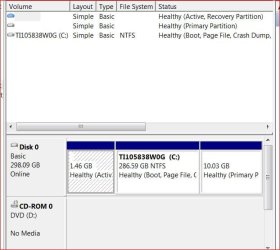
Ted, Have you ever seen such a disk layout. What on earth is this 1.46GB recovery partition - that is far too small to hold a system iso. And then that 10.03GB primary with no designation.

My suspicion is that the 1.46 partition is the boot partition that boots both the system and the recovery partitions - somewhat like the 100MB boot partition. And the recovery data is really on the 10.03GB partition.

Any other ideas?
 

My Computer My Computer

Computer Manufacturer/Model Number
HP, Dell, Gateway, Toshiba - 4 laptops and 2 desktops
OS
Vista, Windows7, Mint Mate, Zorin, Windows 8
CPU
from 1.6GHz Duo to i7
Monitor(s) Displays
2x HP w2207
Hard Drives
5x HDD, 7x SSD, 12x Externals
Keyboard
with trackball - no mices
Mouse
Trackball mice
Internet Speed
DSL 6000
It is a new unit Toshiba L670
Yes I still have my old HP on line infact.
Out box this has 3 primary Capacity Used Unused
System NTFS 1.46 GB 190.96MB 1.28.GB
CT1105838 NTFS 286.59 38.05 GB 248.54
Recovery NTFS 10.03GB 9.44GB 610.95MB

To restate my needs, I want an extended with 3 logical for 3 different linux OS

OK, thanks for the info.

First off, how do you stay so fit when you work around such wonderful food all the time?

Back to the business at hand. I too have been down this road of trying to add Linux to a laptop pre-installed with Windows - same initial partitioning. I found two areas that I didn't like:

1) Adding Linux second mean using GRUB as the boot loader, which is ok but know what you're getting into (sounds like you already know)
2) You can only create one more partition with the current scheme - thus adding more than one version of Linux could be a challenge - may need different formats (say Reiser4 and ext3) to differentiate the installations but the \boot sectors may be a problem (I'm not sure)

I would make life a LOT easier (and safer) by installing each Linux distro to a bootable flash drive - one flash drive per distro. 16GB flash drives are fairly inexpensive and almost all distros have utilities to make bootable flash drive installations.

Then I would use Windows to shrink your Windows C: drive to yield a 50GB free space. Format as NTFS and use that for storage and common use between all OSes. Or format as ext3 and use it as a linux storage partition.

NOTE: If you ever have to use the Toshiba factory "restore" function, EVERYTHING on your laptop will be reset as you fisrt purchased it - new partition will be gone.

Like I said, been here and done that. Make it simple and keep it simple: boot Linux from a flash drive.

Regards,
GEWB
 

My Computer My Computer

Computer type
PC/Desktop
Computer Manufacturer/Model Number
(7 different computers booting up to 10 systems)
OS
Linux Mint / XP / Win7 Home, Pro, Ultimate / Win8.1 / Win10
Other Info
Four desktops, two laptops, one notebook and one tablet
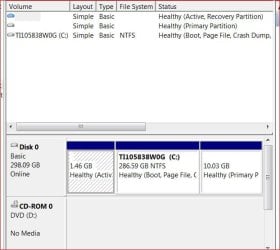
Ted, Have you ever seen such a disk layout. What on earth is this 1.46GB recovery partition - that is far too small to hold a system iso. And then that 10.03GB primary with no designation.

My suspicion is that the 1.46 partition is the boot partition that boots both the system and the recovery partitions - somewhat like the 100MB boot partition. And the recovery data is reall on the 10.03GB partition.

Any other ideas?

I'm not Ted but that is a common partition scheme for new laptops - boot section, main Windows partition, "hidden" partition for recovery software (gets called by the BIOS for a restore). Same scheme on my Compaq / HP laptop.

Regards,
GEWB
 

My Computer My Computer

Computer type
PC/Desktop
Computer Manufacturer/Model Number
(7 different computers booting up to 10 systems)
OS
Linux Mint / XP / Win7 Home, Pro, Ultimate / Win8.1 / Win10
Other Info
Four desktops, two laptops, one notebook and one tablet
Ted, Have you ever seen such a disk layout. What on earth is this 1.46GB recovery partition - that is far too small to hold a system iso. And then that 10.03GB primary with no designation.

My suspicion is that the 1.46 partition is the boot partition that boots both the system and the recovery partitions - somewhat like the 100MB boot partition. And the recovery data is really on the 10.03GB partition.

Any other ideas?


That's what I was thinking; the OEMs sure are making life difficult for the casual users.


... and yes, we're aware that the OEM are making it difficult; whoever you are.
 

My Computer My Computer

Computer Manufacturer/Model Number
* BFK Customs *
OS
W 7 64-bit Ultimate
CPU
Intel Q9550 Yorkfield
Motherboard
ASUS P5Q Pro
Memory
8GB Dominator 8500C5D
Graphics Card(s)
ATI : XFX 5870
Sound Card
Realtek HD Audio 7-1
Monitor(s) Displays
1x 47" LCD HDMI & 3x 26" LCD HDMI
Screen Resolution
1920x1080P & 1920x1200
Hard Drives
1x 80GB Intel X25-M G2 SSD : 1x 500GB & 1x 640GB WD Caviar Black(s)
PSU
Corsair 620HX
Case
Cooler Master RC-690
Cooling
Tuniq Tower 120, 2x 140mm and 3x 120mm case fans
Keyboard
Microsoft 500
Mouse
Razer Diamondback 3G
Internet Speed
14 Mb/s
Other Info
1x Koutech 3Gb/s SATA HDD Hot Swap Rack
Ted, Have you ever seen such a disk layout. What on earth is this 1.46GB recovery partition - that is far too small to hold a system iso. And then that 10.03GB primary with no designation.

My suspicion is that the 1.46 partition is the boot partition that boots both the system and the recovery partitions - somewhat like the 100MB boot partition. And the recovery data is reall on the 10.03GB partition.

Any other ideas?

I'm not Ted but that is a common partition scheme for new laptops - boot section, main Windows partition, "hidden" partition for recovery software (gets called by the BIOS for a restore). Same scheme on my Compaq / HP laptop.

Regards,
GEWB
Yeah, I know. But with one twist. The boot partition is usually 100MB and the Recovery partition can boot by itself. This particular scheme I had never seen. You live and learn.
 

My Computer My Computer

Computer Manufacturer/Model Number
HP, Dell, Gateway, Toshiba - 4 laptops and 2 desktops
OS
Vista, Windows7, Mint Mate, Zorin, Windows 8
CPU
from 1.6GHz Duo to i7
Monitor(s) Displays
2x HP w2207
Hard Drives
5x HDD, 7x SSD, 12x Externals
Keyboard
with trackball - no mices
Mouse
Trackball mice
Internet Speed
DSL 6000
@GEWB, I saw you recommend Linux from a flash drive. I sometimes run Fedora from a flash drive which I have set up over 2 years ago. Problem with that is that every download or setting I make during the session is gone when I end the session. Nothing remains on the drive other than my initial setup.

Is there a more "modern" flash drive version where the evolution of the system is being kept?

For that very reason I run Ubuntu in Virtual Box. There I have an environment like a real machine. And it runs beautifully (both Ubuntu and the Win7 host together) on a relatively modest system (3GB RAM, 2.5GHz duo core) - which, however, runs off a SSD.
 

My Computer My Computer

Computer Manufacturer/Model Number
HP, Dell, Gateway, Toshiba - 4 laptops and 2 desktops
OS
Vista, Windows7, Mint Mate, Zorin, Windows 8
CPU
from 1.6GHz Duo to i7
Monitor(s) Displays
2x HP w2207
Hard Drives
5x HDD, 7x SSD, 12x Externals
Keyboard
with trackball - no mices
Mouse
Trackball mice
Internet Speed
DSL 6000
While I appreciate the analysis of my HD configuration I am left with wonfering even with the sale less then $600 did I make a monumental purchase error?????
If I am to use flash drives to to access Linux then the 320 GB HD is actually just a whole bunch window dressing!!!!
So allow this old man to throw a 149 GB USB external into the mix. I have one with gparted I can partition it into (3) ext 3 partitions of 40 GB each, then a reasonable swap and 5th into a data partition for remainder of the unallocated.
Will that work??>?
Then when I insert the live CD I trust I will have an opportunity to se the partition. Dumb question but what about grub and MBR
Just looking for a solution besides selling this damn thing and staying with my HP
 

My Computer My Computer

Computer Manufacturer/Model Number
PSK3JV-01D001
OS
Win 7 64 bit
CPU
P520 2.30 GHz
Motherboard
?
Memory
4 MB RAM
Monitor(s) Displays
17.3
Hard Drives
320 GB
I don't know whether the $600 are an OK expense. For that I would have to know the complete configuration of your box. But 320GB disks are considered small these days. Even laptops come now with 500GB and desktops often have 1TB,

I do not think booting from the external disk will work. And on USB sticks you will need a stick per distro. I still think you would be best off with Virtual Box ( VirtualBox ). There you can install as many distros as you like. And we have at least one top expert (Kari) who knows everything about it and can help you if you get stalled.

The double/triple booting scenario is paved with trouble. A lot of people had problems with that - especially the Grub. But if you feel comfortable with it, go ahead. The partitioning of the disk as we described above - real simple if you follow the rules.
 

My Computer My Computer

Computer Manufacturer/Model Number
HP, Dell, Gateway, Toshiba - 4 laptops and 2 desktops
OS
Vista, Windows7, Mint Mate, Zorin, Windows 8
CPU
from 1.6GHz Duo to i7
Monitor(s) Displays
2x HP w2207
Hard Drives
5x HDD, 7x SSD, 12x Externals
Keyboard
with trackball - no mices
Mouse
Trackball mice
Internet Speed
DSL 6000
Ok from all the suggestions I take it the logical course of action is to download virtual box and see how far I get e I yell help. I considered this way back when and for the life of me have no clue why I did not follow up. So away I go
 

My Computer My Computer

Computer Manufacturer/Model Number
PSK3JV-01D001
OS
Win 7 64 bit
CPU
P520 2.30 GHz
Motherboard
?
Memory
4 MB RAM
Monitor(s) Displays
17.3
Hard Drives
320 GB

My Computer My Computer

Computer Manufacturer/Model Number
HP, Dell, Gateway, Toshiba - 4 laptops and 2 desktops
OS
Vista, Windows7, Mint Mate, Zorin, Windows 8
CPU
from 1.6GHz Duo to i7
Monitor(s) Displays
2x HP w2207
Hard Drives
5x HDD, 7x SSD, 12x Externals
Keyboard
with trackball - no mices
Mouse
Trackball mice
Internet Speed
DSL 6000
First and foremost I am posting this to aid the great folks here and not because I went against advice and partitioned anyway.
First off I used the provided program within win 7 to do the partitioning. While I was at it I created an additional partition should I want to play around with another distro.
I loaded Ubuntu 10.04 because it was the live CD I had.
As an additiomal point reference after updates it immediately recognized wireless.
Again thank each of you who was part pf this process, I came away knowing more and appreciating 7 more. See attachments before and after
 

Attachments

  • partition out of the box.JPG
    partition out of the box.JPG
    45.3 KB · Views: 1
  • after partitioning-addition Ubuntu.JPG
    after partitioning-addition Ubuntu.JPG
    13.2 KB · Views: 15

My Computer My Computer

Computer Manufacturer/Model Number
PSK3JV-01D001
OS
Win 7 64 bit
CPU
P520 2.30 GHz
Motherboard
?
Memory
4 MB RAM
Monitor(s) Displays
17.3
Hard Drives
320 GB
Hello again.


Good to see you got it running and thanks for the update.
 

My Computer My Computer

Computer Manufacturer/Model Number
* BFK Customs *
OS
W 7 64-bit Ultimate
CPU
Intel Q9550 Yorkfield
Motherboard
ASUS P5Q Pro
Memory
8GB Dominator 8500C5D
Graphics Card(s)
ATI : XFX 5870
Sound Card
Realtek HD Audio 7-1
Monitor(s) Displays
1x 47" LCD HDMI & 3x 26" LCD HDMI
Screen Resolution
1920x1080P & 1920x1200
Hard Drives
1x 80GB Intel X25-M G2 SSD : 1x 500GB & 1x 640GB WD Caviar Black(s)
PSU
Corsair 620HX
Case
Cooler Master RC-690
Cooling
Tuniq Tower 120, 2x 140mm and 3x 120mm case fans
Keyboard
Microsoft 500
Mouse
Razer Diamondback 3G
Internet Speed
14 Mb/s
Other Info
1x Koutech 3Gb/s SATA HDD Hot Swap Rack
Back
Top