Partitioned drive on Samsung R780 / Windows 7

ratcs01

New member
Local time
5:51 PM
Messages
11
Hello to you all,

This is my first post and I'm far from being a computer expert... so please accept my apologies if this is in the wrong section or if it is such a simply query that a four year old could solve it!

I've recently purchased a Samsung R780 laptop and when it first started to install Windows 7 it asked me to partition my hard-drive. As I was a little unsure about this I did some searches on my phone and found that it was good to have a small ish partition as my 'C' Drive (i.e. where Windows was to be installed) and a bigger partition for my 'D' Drive to store my personal data. As such, I opted to have 86 gig on my 'C' Drive and 490 gig on my 'D' Drive. This is all well and good, however, I've found that when I installed my virus protector it didn't give me the option to select which drive I wanted to install to. I.e. I downloaded ESET NOD 32 and it automatically assigned itself to my 'C' Drive. So, my first question for you Windows experts is, can I set something up so that I'm given the option of which drive to install programs too (I want to install iTunes, but knowing how large their software is I'm afraid I will run out of space on my 'C' Drive - I only have 55 gig left)... I would prefer not to have to use regedit if possible, as I understand this can be a minefield for inexperienced people like myself.

My second question relates to the fact that I tried assigning 'My Music' folder to the 'D' Drive. I did this by changing its location under preferences. However, this created a duplicate folder in the original location. For example, I had 'My Music' and 'Music' - when I opened 'My Music' it worked fine and was pointing to my 'D' Drive, however, when I tried to open/delete 'Music' I received an error message saying something like I didn't have admin rights (I double checked and I am definitely set up as an administrator). As such, I reverted to the restore program which put everything back to a state as if I had just booted the laptop for the first time. Does anyone know if I can have folders such as 'My Music'; 'My Documents'; My Pictures etc. located on my 'D' Drive and not duplicated as an un-accessible folder on my 'C' Drive?

I'm really sorry for the long post - I hope that someone is able to help me as I'm too scared to install any more programs until I've figured this out.

My thanks in advance to those who respond.

Stephen
 

My Computer My Computer

At a glance

Windows 7 Home Premium 64 bitIntel Core I5 Dual Core Processor 460M (2.53 ...4 Gb DDR3 1066 MHzATI HD545V
Computer Manufacturer/Model Number
Samsung R780
OS
Windows 7 Home Premium 64 bit
CPU
Intel Core I5 Dual Core Processor 460M (2.53 GHz)
Memory
4 Gb DDR3 1066 MHz
Graphics Card(s)
ATI HD545V
Monitor(s) Displays
17.3 inch LED Backlit LCD
Hard Drives
640 Gb SATA 5400 rpm
Welcome Stephen to the windows 7 forums.
Most programs do give you the option of where to install them. Some do not but most do. Many times there is a small screen where you can change the drive and directory where they will be installed.

That aside. I have many programs and their data installed on my larger D drive like documents and special directories for my email. My outlook uses a directory on my D to store the .pst file which can get large.

I would recommend creating directories on your data drive that you will then have to go into each program and change the default directory for it's data.

Once you install a program on your C drive, you are kind of out of luck unless you uninstall and then re-install telling it to use the D drive. Many people just take the defaults but many programs require that you allow them to put some data on the C, such as dll's and such.

Ymmv.

Rich
PS: again Welcome.
 

My Computer My Computer

At a glance

Windows 7 Pro x64 SP1Intel Core I716 GigsNVIDIA GeForce GTX 670M
Computer type
Laptop
Computer Manufacturer/Model Number
Toshiba Laptop Qosimo X870
OS
Windows 7 Pro x64 SP1
CPU
Intel Core I7
Motherboard
Toshiba Qosmio
Memory
16 Gigs
Graphics Card(s)
NVIDIA GeForce GTX 670M
Monitor(s) Displays
17.7" laptop
Screen Resolution
1600 x 900
Hard Drives
256 Gig SanDisk SSD for C
256 Gig Intel SSD for D
Internet Speed
50/25 FIOS
Antivirus
Vipre (all you can eat for 10 machines)
Browser
IE and FF
Other Info
I have dos 6.22, wfwg 3.11, win98, 2000 and xp VHD's available for testing. MS's Virtual PC works great.
Hey Rich - thanks for the reply and thanks for the welcome. Here's hoping that most of my installs give me the option of where to install them.

Any ideas how I can stop the duplicate folders when I change the location from my 'C' drive to the 'D' drive.

Anyway, thanks again for the response.
 

My Computer My Computer

At a glance

Windows 7 Home Premium 64 bitIntel Core I5 Dual Core Processor 460M (2.53 ...4 Gb DDR3 1066 MHzATI HD545V
Computer Manufacturer/Model Number
Samsung R780
OS
Windows 7 Home Premium 64 bit
CPU
Intel Core I5 Dual Core Processor 460M (2.53 GHz)
Memory
4 Gb DDR3 1066 MHz
Graphics Card(s)
ATI HD545V
Monitor(s) Displays
17.3 inch LED Backlit LCD
Hard Drives
640 Gb SATA 5400 rpm
Don't know about your folder situation, but you are probably worrying needlessly about drive space on C.

86 GB is quite large. I have 22 GB occupied out of 60 available.

Some apps demand that all or part of them go on C. I've never seen a reason to not install all apps to C, but I guess there might be a reason if you have an extraordinary number of apps, have big gaming installs, or some other unusual situation.
 

My Computer My Computer

At a glance

Windows 7 Home Premium SP1, 64-bitIntel Skylake i5-6600K, not overclocked8 GB HyperX DDR4-2666 (2 x 4 GB)none; graphics are integrated on CPU
Computer type
PC/Desktop
Computer Manufacturer/Model Number
Ignatz Special; 4 speed manual gearbox; factory air conditioning; one of one
OS
Windows 7 Home Premium SP1, 64-bit
CPU
Intel Skylake i5-6600K, not overclocked
Motherboard
AsRock Z170M Extreme 4, micro ATX
Memory
8 GB HyperX DDR4-2666 (2 x 4 GB)
Graphics Card(s)
none; graphics are integrated on CPU
Sound Card
onboard: Realtek ALC1150; external: USB Behringer UF0-202
Monitor(s) Displays
Dell S2340M 23 inch IPS
Screen Resolution
1600 x 900
Hard Drives
System: Crucial MX100 series SSD, 128 GB;
Data: Samsung Spinpoint 103SJ, 1 TB;
Backup: WD Caviar Green WD30EZRX-00D8PB0, 3 TB
PSU
Rosewill SilentNight 500 watt fanless, semi-modular
Case
Antec Solo II
Cooling
Noctua NH-U12S; Noctua F12 intake, Noctua S12A exhaust
Keyboard
Microsoft 200 6JH-00001 USB
Mouse
Dell or Microsoft optical wired; USB
Antivirus
Microsoft Security Essentials and Malwarebytes Premium
Browser
Pale Moon
Other Info
All fans PWM; speeds at idle: CPU circa 500 rpm; intake circa 600 rpm; exhaust circa 600 rpm; CPU temps 27 idle and 47 C load in a warm room (27 C/81 F) when running Intel Extreme Tuning Utility stress test.
Why are you installing programs to your data drive when you have a 86gb Win7 partition? What are you putting on the C partition?

Programs write Registry keys which integrate themselves into the OS so should remain on the same partition. This way if Win7 becomes irreparable you can reimage the OS/Programs partition in 20 minutes and your data is ready and current in its separate partition "vault."

Here is how to move your User folders to their own data partition: http://www.sevenforums.com/tutorials/18629-user-folders-change-default-location.html

http://www.sevenforums.com/tutorials/675-system-image-recovery.html
http://www.sevenforums.com/tutorials/663-backup-complete-computer-create-image-backup.html
http://www.sevenforums.com/tutorials/615-backup-user-system-files.html
 
Thanks ignatzatsonic and gregrocker for the replies - really appreciate your help.

I'm perhaps worrying about nothing then. My 86 gig drive already has 56 gig used up, so I'm guessing that 30 gig should be okay to install iTunes (and their many updates) as wells as some other programs... does this sound enought? I do not intend on installing any games.

As for moving the folders, thanks for the link gregrocker - I will try this out now.

Thanks again guys.
 

My Computer My Computer

At a glance

Windows 7 Home Premium 64 bitIntel Core I5 Dual Core Processor 460M (2.53 ...4 Gb DDR3 1066 MHzATI HD545V
Computer Manufacturer/Model Number
Samsung R780
OS
Windows 7 Home Premium 64 bit
CPU
Intel Core I5 Dual Core Processor 460M (2.53 GHz)
Memory
4 Gb DDR3 1066 MHz
Graphics Card(s)
ATI HD545V
Monitor(s) Displays
17.3 inch LED Backlit LCD
Hard Drives
640 Gb SATA 5400 rpm
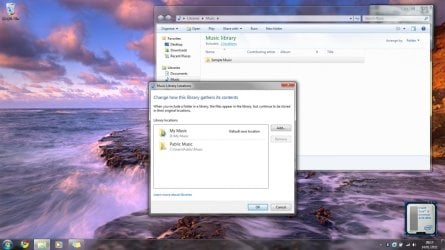
Okay, so I followed the link provided to me by greglocker, point by point, and I'm left with a 'My Music' folder in my 'D' Drive and a 'Music' folder in my 'C' drive. I want to delete the Music folder from the 'C' drive, but whenever I try I receive this error message: 'C:Users\Stephen\Music is not accessible. Access is denied.' Please see example attached. Can anyone advise how I can get rid of this 'Music' folder and is 'My Music' definitely now defaulting to the 'D' Drive.

As a side note, just to confirm that I followed the instructions on the link perfectly. I ensured that I clicked yes when I got the warning asking if I wanted to move all of the files from the old location to the new location... so I do not believe that the reason this is happening is anything I've done wrong... although I'm happy to be corrected?

Does anyone have any ideas please, as this is driving me nuts?

Thanks in advance.
 

My Computer My Computer

At a glance

Windows 7 Home Premium 64 bitIntel Core I5 Dual Core Processor 460M (2.53 ...4 Gb DDR3 1066 MHzATI HD545V
Computer Manufacturer/Model Number
Samsung R780
OS
Windows 7 Home Premium 64 bit
CPU
Intel Core I5 Dual Core Processor 460M (2.53 GHz)
Memory
4 Gb DDR3 1066 MHz
Graphics Card(s)
ATI HD545V
Monitor(s) Displays
17.3 inch LED Backlit LCD
Hard Drives
640 Gb SATA 5400 rpm
In addition to my last e-mail, I've also taken another screen dump which shows that I appear to have two 'Music' files. I accessed this by going to the start menu and clicking on 'My Music' from there... I really am confused?
 

Attachments

  • Further Example.jpg
    Further Example.jpg
    138.1 KB · Views: 40

My Computer My Computer

At a glance

Windows 7 Home Premium 64 bitIntel Core I5 Dual Core Processor 460M (2.53 ...4 Gb DDR3 1066 MHzATI HD545V
Computer Manufacturer/Model Number
Samsung R780
OS
Windows 7 Home Premium 64 bit
CPU
Intel Core I5 Dual Core Processor 460M (2.53 GHz)
Memory
4 Gb DDR3 1066 MHz
Graphics Card(s)
ATI HD545V
Monitor(s) Displays
17.3 inch LED Backlit LCD
Hard Drives
640 Gb SATA 5400 rpm
Hi

If all this Folder shifiting is to create more space on your primary partition...

Have you considered extending the size of your C: partition HDD in your Disk Management console?

If you wish to carry on shifiting these folders im sure someone else with the practical knowledge in this forum will help you...


hope this helps...


These two folders are creted by windows and stay on windows.. this is ok...
 

My Computer My Computer

At a glance

7 ultimate x64Intel core i7 2600KVengeance™ — 16GB Triple Channel DDR3 PC16000GeForce GTX 560 Ti
Computer Manufacturer/Model Number
CustomBuild001
OS
7 ultimate x64
CPU
Intel core i7 2600K
Motherboard
ASUS P8Z68-V PRO
Memory
Vengeance™ — 16GB Triple Channel DDR3 PC16000
Graphics Card(s)
GeForce GTX 560 Ti
Monitor(s) Displays
HannsG 22" widescreen (HDMI)
Screen Resolution
1680x1050
Hard Drives
Samsung 1TB x2(RAID1) Deskstar 160G, Buffalo ExHD 500GB
PSU
Corsair 850HX
Case
Antec Three Hundred Gaming Tower Case
Cooling
CPU Freezer 7 Pro Rev. 2...ANTEC 3phase cooling, 2 intake.
Keyboard
microsoft intellitype 6000 v3.0
Mouse
microsoft sidewinder
Internet Speed
50Mb
Other Info
64GB SSD in pipeline for Intel Smart Response Technology.
Hi Classic D - thanks for the advice. I want to keep my 'C' partition small so that my system boots quickly, however, I would ideally like to have 'My Music'; 'My Videos'; 'My Documents' and 'My Pictures' on my 'D' Drive and no duplicate folders of them on another drive... especially considering my start menu seems to still be pointing to the 'C' drive.

I do have the option of removing the 'Music' folder from my 'C' drive by clicking the button shown in my last picture - however, I'm wondering if that would mean when I click 'Music' from the start menu that Windows wouldn't be able to find my 'D' drive file seeing as it's currently point to the 'C' drive (hope that makes sense).

I'm surprised that I'm the only person who seems to have had this issue... it makes me feel I'm doing something wrong, however, I followed the steps I was given step by step.
 

My Computer My Computer

At a glance

Windows 7 Home Premium 64 bitIntel Core I5 Dual Core Processor 460M (2.53 ...4 Gb DDR3 1066 MHzATI HD545V
Computer Manufacturer/Model Number
Samsung R780
OS
Windows 7 Home Premium 64 bit
CPU
Intel Core I5 Dual Core Processor 460M (2.53 GHz)
Memory
4 Gb DDR3 1066 MHz
Graphics Card(s)
ATI HD545V
Monitor(s) Displays
17.3 inch LED Backlit LCD
Hard Drives
640 Gb SATA 5400 rpm
Im not sure if i have come across anyone that has tried to do this. I certainly haven't.

Although keeping a small partition for you OS is good for some problems, You have an OEM with windows so the backup/rollback services offered are excellent, I know I have the same Laptop...

Also a small partition will not increase the speed of your Boot into windows, this requires a configuration of MSCONFIG utility...depending on your required startup services...


Increaing the size of your C: partition is as easy as a few mouse clicks...
 

My Computer My Computer

At a glance

7 ultimate x64Intel core i7 2600KVengeance™ — 16GB Triple Channel DDR3 PC16000GeForce GTX 560 Ti
Computer Manufacturer/Model Number
CustomBuild001
OS
7 ultimate x64
CPU
Intel core i7 2600K
Motherboard
ASUS P8Z68-V PRO
Memory
Vengeance™ — 16GB Triple Channel DDR3 PC16000
Graphics Card(s)
GeForce GTX 560 Ti
Monitor(s) Displays
HannsG 22" widescreen (HDMI)
Screen Resolution
1680x1050
Hard Drives
Samsung 1TB x2(RAID1) Deskstar 160G, Buffalo ExHD 500GB
PSU
Corsair 850HX
Case
Antec Three Hundred Gaming Tower Case
Cooling
CPU Freezer 7 Pro Rev. 2...ANTEC 3phase cooling, 2 intake.
Keyboard
microsoft intellitype 6000 v3.0
Mouse
microsoft sidewinder
Internet Speed
50Mb
Other Info
64GB SSD in pipeline for Intel Smart Response Technology.
Hi Classic,

If, as you say, it doesn't benefit me having a small 'C' Drive, then yes, I would be very grateful if you could explain how I can expand my 'C' Drive and thus shrink my 'D' Drive. Would also be grateful if you could explain how I can keep my system boot fast... a friend of mine who's in IT told me that by installing music and pictures into their default location, this would have the knock on effect of slowing my system down (well at least that's what I think he said - it was a while ago now).

I really do appreciate your continued advice... and will of course reflect this in your rep :)
 

My Computer My Computer

At a glance

Windows 7 Home Premium 64 bitIntel Core I5 Dual Core Processor 460M (2.53 ...4 Gb DDR3 1066 MHzATI HD545V
Computer Manufacturer/Model Number
Samsung R780
OS
Windows 7 Home Premium 64 bit
CPU
Intel Core I5 Dual Core Processor 460M (2.53 GHz)
Memory
4 Gb DDR3 1066 MHz
Graphics Card(s)
ATI HD545V
Monitor(s) Displays
17.3 inch LED Backlit LCD
Hard Drives
640 Gb SATA 5400 rpm
Ok

To extend your C: drive:

Right click on your 'Computer' and select manage.
Choose Disk management
Right click on the partition you want to extend and select Extend Volume
Choose the amount of space you want to allocate from D: to C: (1024 MB = 1GB)

This should extend the size of your C: partition...

For starup programs:

Press windows key + r at the same time to get the run utility.
Type msconfig
Under the startup tab select or deselect the programs you want to start or not at windows startup...
Under the services tab select or deselect the services you want to start or not at windows startup...

notes: In the services tab Check box Hide all Microsoft servicesBe carefull not to stop some programs/services you need like your AV or other programs/services, example programs/services to stop are iTunes or adobe or Google updater etc

hope this helps...

Just to note a MS note about moving your user files...
ProfilesDirectory
They say this is not recommended...
 

My Computer My Computer

At a glance

7 ultimate x64Intel core i7 2600KVengeance™ — 16GB Triple Channel DDR3 PC16000GeForce GTX 560 Ti
Computer Manufacturer/Model Number
CustomBuild001
OS
7 ultimate x64
CPU
Intel core i7 2600K
Motherboard
ASUS P8Z68-V PRO
Memory
Vengeance™ — 16GB Triple Channel DDR3 PC16000
Graphics Card(s)
GeForce GTX 560 Ti
Monitor(s) Displays
HannsG 22" widescreen (HDMI)
Screen Resolution
1680x1050
Hard Drives
Samsung 1TB x2(RAID1) Deskstar 160G, Buffalo ExHD 500GB
PSU
Corsair 850HX
Case
Antec Three Hundred Gaming Tower Case
Cooling
CPU Freezer 7 Pro Rev. 2...ANTEC 3phase cooling, 2 intake.
Keyboard
microsoft intellitype 6000 v3.0
Mouse
microsoft sidewinder
Internet Speed
50Mb
Other Info
64GB SSD in pipeline for Intel Smart Response Technology.
Hi mate,

Extend volume is greyed out... presumably I need to shrink the volume on 'D' first (I know this is probably a stupid question, however, I do not want to mess anything up)?
 

My Computer My Computer

At a glance

Windows 7 Home Premium 64 bitIntel Core I5 Dual Core Processor 460M (2.53 ...4 Gb DDR3 1066 MHzATI HD545V
Computer Manufacturer/Model Number
Samsung R780
OS
Windows 7 Home Premium 64 bit
CPU
Intel Core I5 Dual Core Processor 460M (2.53 GHz)
Memory
4 Gb DDR3 1066 MHz
Graphics Card(s)
ATI HD545V
Monitor(s) Displays
17.3 inch LED Backlit LCD
Hard Drives
640 Gb SATA 5400 rpm
Just tried shrinking volume on 'D' by 256,000 MB's to see if I could extend volume on 'C' by the same amount, however, the extend option was still greyed out on 'C'. So, I extended the volume back on 'D' just to make sure I hadn't lost it. I must either really suck on computers or this isn't as easy as it should be.
 

My Computer My Computer

At a glance

Windows 7 Home Premium 64 bitIntel Core I5 Dual Core Processor 460M (2.53 ...4 Gb DDR3 1066 MHzATI HD545V
Computer Manufacturer/Model Number
Samsung R780
OS
Windows 7 Home Premium 64 bit
CPU
Intel Core I5 Dual Core Processor 460M (2.53 GHz)
Memory
4 Gb DDR3 1066 MHz
Graphics Card(s)
ATI HD545V
Monitor(s) Displays
17.3 inch LED Backlit LCD
Hard Drives
640 Gb SATA 5400 rpm
Hi,

You will have to excuse me i should have mentioned this from the start...you will have to delete your D: partition before you can extend your C: partiton...

Im assuming that you don't have much Data on your D: partition as this is a new laptop, do a backup of this data first...

I hope this is not an issue
 

My Computer My Computer

At a glance

7 ultimate x64Intel core i7 2600KVengeance™ — 16GB Triple Channel DDR3 PC16000GeForce GTX 560 Ti
Computer Manufacturer/Model Number
CustomBuild001
OS
7 ultimate x64
CPU
Intel core i7 2600K
Motherboard
ASUS P8Z68-V PRO
Memory
Vengeance™ — 16GB Triple Channel DDR3 PC16000
Graphics Card(s)
GeForce GTX 560 Ti
Monitor(s) Displays
HannsG 22" widescreen (HDMI)
Screen Resolution
1680x1050
Hard Drives
Samsung 1TB x2(RAID1) Deskstar 160G, Buffalo ExHD 500GB
PSU
Corsair 850HX
Case
Antec Three Hundred Gaming Tower Case
Cooling
CPU Freezer 7 Pro Rev. 2...ANTEC 3phase cooling, 2 intake.
Keyboard
microsoft intellitype 6000 v3.0
Mouse
microsoft sidewinder
Internet Speed
50Mb
Other Info
64GB SSD in pipeline for Intel Smart Response Technology.
No problems Classic (it's not your fault your dealing with someone who's PC illiterate!) :)

Okay, the only thing I have saved to my 'D' drive is the Samsung Recovery (I set this up in case I messed up with moving folders etc.) and perhaps some hidden files if Windows has added them there. So, I guess I have to decide if I just want one partition or not, however, at least I know what to do if I do only want one.

I quite like the idea of having a small 'C' drive, as it will allow me to make quick back-ups with the Samsung System Recovery Solution 4, and I could then back-up my 'D' drive (i.e. with my pictures, movies, music etc.) to an external hard drive. Not sure what to do at the moment, but I will think about it. Would appreciate yours and other people's views...?

Anyway, thanks for all of your help. I think it's amazing that there are people out there willing to give up their free time to help others out for nothing in return. All I can offer is to hit up your reputation, which I'm just about to do. However, I really do want to thank you for taking the time to post back to me.
 

My Computer My Computer

At a glance

Windows 7 Home Premium 64 bitIntel Core I5 Dual Core Processor 460M (2.53 ...4 Gb DDR3 1066 MHzATI HD545V
Computer Manufacturer/Model Number
Samsung R780
OS
Windows 7 Home Premium 64 bit
CPU
Intel Core I5 Dual Core Processor 460M (2.53 GHz)
Memory
4 Gb DDR3 1066 MHz
Graphics Card(s)
ATI HD545V
Monitor(s) Displays
17.3 inch LED Backlit LCD
Hard Drives
640 Gb SATA 5400 rpm
I think it just may be the icons that are in your D: partition, if not the programs can be easliy transferred to you C: partition...plus are also available for download from samsung...

Backing up to an External HDD is always a good idea...

Glad to be of assistance...
 

My Computer My Computer

At a glance

7 ultimate x64Intel core i7 2600KVengeance™ — 16GB Triple Channel DDR3 PC16000GeForce GTX 560 Ti
Computer Manufacturer/Model Number
CustomBuild001
OS
7 ultimate x64
CPU
Intel core i7 2600K
Motherboard
ASUS P8Z68-V PRO
Memory
Vengeance™ — 16GB Triple Channel DDR3 PC16000
Graphics Card(s)
GeForce GTX 560 Ti
Monitor(s) Displays
HannsG 22" widescreen (HDMI)
Screen Resolution
1680x1050
Hard Drives
Samsung 1TB x2(RAID1) Deskstar 160G, Buffalo ExHD 500GB
PSU
Corsair 850HX
Case
Antec Three Hundred Gaming Tower Case
Cooling
CPU Freezer 7 Pro Rev. 2...ANTEC 3phase cooling, 2 intake.
Keyboard
microsoft intellitype 6000 v3.0
Mouse
microsoft sidewinder
Internet Speed
50Mb
Other Info
64GB SSD in pipeline for Intel Smart Response Technology.
Okay, so I followed the link provided to me by greglocker, point by point, and I'm left with a 'My Music' folder in my 'D' Drive and a 'Music' folder in my 'C' drive. I want to delete the Music folder from the 'C' drive, but whenever I try I receive this error message: 'C:Users\Stephen\Music is not accessible. Access is denied.' Please see example attached. Can anyone advise how I can get rid of this 'Music' folder and is 'My Music' definitely now defaulting to the 'D' Drive.

As a side note, just to confirm that I followed the instructions on the link perfectly. I ensured that I clicked yes when I got the warning asking if I wanted to move all of the files from the old location to the new location... so I do not believe that the reason this is happening is anything I've done wrong... although I'm happy to be corrected?

Does anyone have any ideas please, as this is driving me nuts?

Thanks in advance.

Go to Step 11 in the Move User Folders tutorial and confirm that the moved Music folder has the correct Music shell folder markings on it. If not and shell Music folder is still remaining on C under your User name then it was not moved correctly. Do the steps over leaving the files where they now are.

If you still need to enlarge C then post back a screenshot of your full Disk Mgmt drive map and listings using Snipping Tool in Start Menu.
 
Last edited:
Hi Greg,

Thanks for the reply - I never received an e-mail to say you had replied for some reason. Anyway, I thought I would just update on what I decided to do, in the hope that it may help anyone else who finds themselves in a similar predicament.

I decided to stick with the original plan and keep my partitions the size they were. I transferred 'My Music, Documents etc.' and whilst I couldn't delete the shell's left behind immediately (which had been renamed to 'Music, Documents etc.') I found that after I had rebooted I was then able to delete them. I've been slowly installing programs on my 'C' Drive and my Music content on my 'D' Drive - at the moment all seems to be going well.

Again, would like to thank everyone for their assistance and I hope this assists others at a later stage.
 

My Computer My Computer

At a glance

Windows 7 Home Premium 64 bitIntel Core I5 Dual Core Processor 460M (2.53 ...4 Gb DDR3 1066 MHzATI HD545V
Computer Manufacturer/Model Number
Samsung R780
OS
Windows 7 Home Premium 64 bit
CPU
Intel Core I5 Dual Core Processor 460M (2.53 GHz)
Memory
4 Gb DDR3 1066 MHz
Graphics Card(s)
ATI HD545V
Monitor(s) Displays
17.3 inch LED Backlit LCD
Hard Drives
640 Gb SATA 5400 rpm
Back
Top