Local Area Connection" doesn't have a valid IP configuration

suzannec

New member
Local time
2:36 AM
Messages
23
Mmkay, so I was getting on my internet at some point yesterday - a wired connection that I just plug in with a cable - and I started getting "Unidentified Network." I diagnosed the problem and I get this:

Investigate router or broadband modem issues

Local Area Connection" doesn't have a valid IP configuration"Local Area Connection" doesn't have a valid IP configuration Not fixed
Investigate router or broadband modem issues Failed
Reset the "Local Area Connection" adapter Completed


Network adapter Local Area Connection driver information:

Description . . . . . . . . . . : Marvell Yukon 88E8059 Family PCI-E Gigabit Ethernet Controller
Manufacturer . . . . . . . . . : Marvell
Provider . . . . . . . . . . . : Marvell
Version . . . . . . . . . . . : 11.22.3.3
Inf File Name . . . . . . . . . : C:\windows\INF\oem9.inf
Inf File Date . . . . . . . . . : Monday, September 28, 2009 9:22:00 AM
Section Name . . . . . . . . . : SLYuk2CopGig_38CB86BF.ndi
Hardware ID . . . . . . . . . . : pci\ven_11ab&dev_4381
Instance Status Flags . . . . . : 0x180200a
Device Manager Status Code . . : 0
IfType . . . . . . . . . . . . : 6
Physical Media Type . . . . . . : 14

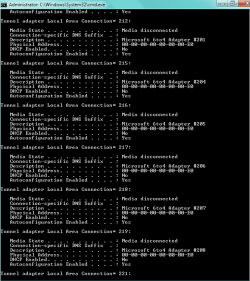
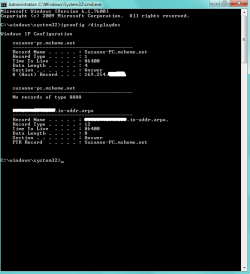
The attached pictures show what I have going on. I also did the ipconfig as requested by some other thread and I followed the steps here (even though it's vista and I'm on Windows 7).

I'm currently on my school's wireless.

And before talking to the school's tech support . . . They aren't insured to do a lot of touching with personal computers, so they're hesitant to play with them. Also, the girl working this weekend just puts in tickets for school related technical problems - she isn't actually knowledgable on computers.

I'm fairly certain it's not my room, as I checked another room and it was the same thing. And everyone else's internet is working fine.

More information:

Windows IP Configuration

Host Name . . . . . . . . . . . . : Suzanne-PC
Primary Dns Suffix . . . . . . . :
Node Type . . . . . . . . . . . . : Hybrid
IP Routing Enabled. . . . . . . . : No
WINS Proxy Enabled. . . . . . . . : No
DNS Suffix Search List. . . . . . : local

Wireless LAN adapter Wireless Network Connection:

Connection-specific DNS Suffix . : local
Description . . . . . . . . . . . : Atheros AR9285 Wireless Network Adapter
Physical Address. . . . . . . . . : F0-7B-CB-5B-74-49
DHCP Enabled. . . . . . . . . . . : Yes
Autoconfiguration Enabled . . . . : Yes
Link-local IPv6 Address . . . . . : fe80::11e6:c8d8:17ea:2027%20(Preferred)
IPv4 Address. . . . . . . . . . . : 192.168.1.192(Preferred)
Subnet Mask . . . . . . . . . . . : 255.255.255.0
Lease Obtained. . . . . . . . . . : Saturday, January 15, 2011 10:09:20 PM
Lease Expires . . . . . . . . . . : Saturday, January 15, 2011 11:29:29 PM
Default Gateway . . . . . . . . . : fe80::224:1ff:fecc:ffc%20
192.168.1.1
DHCP Server . . . . . . . . . . . : 192.168.1.1
DNS Servers . . . . . . . . . . . : 192.168.1.2
NetBIOS over Tcpip. . . . . . . . : Enabled

Ethernet adapter Local Area Connection:

Media State . . . . . . . . . . . : Media disconnected
Connection-specific DNS Suffix . :
Description . . . . . . . . . . . : Marvell Yukon 88E8059 Family PCI-E Gigabit Ethernet Controller
Physical Address. . . . . . . . . : 00-24-54-83-F9-2F
DHCP Enabled. . . . . . . . . . . : Yes
Autoconfiguration Enabled . . . . : Yes

Tunnel adapter Local Area Connection* 16:

Media State . . . . . . . . . . . : Media disconnected
Connection-specific DNS Suffix . :
Description . . . . . . . . . . . : Microsoft 6to4 Adapter #5
Physical Address. . . . . . . . . : 00-00-00-00-00-00-00-E0
DHCP Enabled. . . . . . . . . . . : No
Autoconfiguration Enabled . . . . : Yes

Tunnel adapter Local Area Connection* 15:

Media State . . . . . . . . . . . : Media disconnected
Connection-specific DNS Suffix . :
Description . . . . . . . . . . . : Microsoft 6to4 Adapter #4
Physical Address. . . . . . . . . : 00-00-00-00-00-00-00-E0
DHCP Enabled. . . . . . . . . . . : No
Autoconfiguration Enabled . . . . : Yes

Tunnel adapter Reusable Microsoft 6To4 Adapter:

Media State . . . . . . . . . . . : Media disconnected
Connection-specific DNS Suffix . :
Description . . . . . . . . . . . : Microsoft 6to4 Adapter #2
Physical Address. . . . . . . . . : 00-00-00-00-00-00-00-E0
DHCP Enabled. . . . . . . . . . . : No
Autoconfiguration Enabled . . . . : Yes

Tunnel adapter 6TO4 Adapter:

Media State . . . . . . . . . . . : Media disconnected
Connection-specific DNS Suffix . :
Description . . . . . . . . . . . : Microsoft 6to4 Adapter
Physical Address. . . . . . . . . : 00-00-00-00-00-00-00-E0
DHCP Enabled. . . . . . . . . . . : No
Autoconfiguration Enabled . . . . : Yes

Tunnel adapter Teredo Tunneling Pseudo-Interface:

Connection-specific DNS Suffix . :
Description . . . . . . . . . . . : Teredo Tunneling Pseudo-Interface
Physical Address. . . . . . . . . : 00-00-00-00-00-00-00-E0
DHCP Enabled. . . . . . . . . . . : No
Autoconfiguration Enabled . . . . : Yes
IPv6 Address. . . . . . . . . . . : 2001:0:4137:9e76:3c46:2bd2:3f57:fe3f(Preferred)
Link-local IPv6 Address . . . . . : fe80::3c46:2bd2:3f57:fe3f%22(Preferred)
Default Gateway . . . . . . . . . : ::
NetBIOS over Tcpip. . . . . . . . : Disabled

Tunnel adapter Local Area Connection* 14:

Media State . . . . . . . . . . . : Media disconnected
Connection-specific DNS Suffix . :
Description . . . . . . . . . . . : Microsoft 6to4 Adapter #3
Physical Address. . . . . . . . . : 00-00-00-00-00-00-00-E0
DHCP Enabled. . . . . . . . . . . : No
Autoconfiguration Enabled . . . . : Yes

And then it goes on. . . to like * 240+
 

Attachments

  • unidentified.png
    unidentified.png
    201.7 KB · Views: 208
  • ipconfig.png
    ipconfig.png
    14.9 KB · Views: 115
  • displaydnsblock.png
    displaydnsblock.png
    11.5 KB · Views: 98
Last edited:

My Computer My Computer

At a glance

Windows 7 Home 64 bit OEM
OS
Windows 7 Home 64 bit OEM
When you are connected via ethernet cable and you get a 169.254.xxx.xxx IP address, you have no connection to the network. Basically Windows will attempt to get an IP address from the network (the router assigns the IP addresses) and if it doesn't get one, it will make one up. Those made up addresses will always be 169.254.xxx.xxx.

There are some possible causes: the ethernet cable is broken (easy to check, just swap it out), the MAC address on your NIC has been blocked (this is something you'd have to ask your school's IT department about), your NIC card is failing (the card could be going out, one of the wires on the connector could be bent/mangled), Windows somehow got the NIC drivers screwed up (uninstalling the drivers and reinstalling the drivers may help).
 

My Computer My Computer

At a glance

Windows 7 Ultimate x64 SP1Core i7-2670QM8GB DDR3 PC3-10600Intel HD Graphics 3000 + GeForce GT 540M
Computer Manufacturer/Model Number
Dell XPS 15 L502x
OS
Windows 7 Ultimate x64 SP1
CPU
Core i7-2670QM
Memory
8GB DDR3 PC3-10600
Graphics Card(s)
Intel HD Graphics 3000 + GeForce GT 540M
Screen Resolution
1920x1080
Hard Drives
1TB 5400RPM Seagate
Hi, kegobeer. How do I go about uninstalling the drivers and reinstalling the drivers?

Also, in my device manager, I have hundreds of tunnel adapters. Is there a reason for this? D:
 

My Computer My Computer

At a glance

Windows 7 Home 64 bit OEM
OS
Windows 7 Home 64 bit OEM
Go to the device manager, look under network adapters, right click on the adapter and select uninstall. If given the option, have it delete the driver, too. Make sure you are connected via wifi since Windows will have to go on the internet to download the driver again.

Tunnel adapters are part of the IPv6 spec. When you delete the adapter, those should also be deleted. You can ignore them.
 

My Computer My Computer

At a glance

Windows 7 Ultimate x64 SP1Core i7-2670QM8GB DDR3 PC3-10600Intel HD Graphics 3000 + GeForce GT 540M
Computer Manufacturer/Model Number
Dell XPS 15 L502x
OS
Windows 7 Ultimate x64 SP1
CPU
Core i7-2670QM
Memory
8GB DDR3 PC3-10600
Graphics Card(s)
Intel HD Graphics 3000 + GeForce GT 540M
Screen Resolution
1920x1080
Hard Drives
1TB 5400RPM Seagate
When you are connected via ethernet cable and you get a 169.254.xxx.xxx IP address, you have no connection to the network. Basically Windows will attempt to get an IP address from the network (the router assigns the IP addresses) and if it doesn't get one, it will make one up. Those made up addresses will always be 169.254.xxx.xxx.

There are some possible causes: the ethernet cable is broken (easy to check, just swap it out), the MAC address on your NIC has been blocked (this is something you'd have to ask your school's IT department about), your NIC card is failing (the card could be going out, one of the wires on the connector could be bent/mangled), Windows somehow got the NIC drivers screwed up (uninstalling the drivers and reinstalling the drivers may help).

Hi again. I went to the library and tried hooking my laptop up with one of the cables there. No luck - so it must be osmething on my computer.

I also tried uninstalling the driver and again, no luck.

I have no idea what a MAC address is. o3o

I hope to christ it's not the NIC card. This stupid thing's only like seven months old. D:
 

My Computer My Computer

At a glance

Windows 7 Home 64 bit OEM
OS
Windows 7 Home 64 bit OEM
If the library is on the school campus, then that doesn't really prove anything. It's still the school network, regardless of where you connect. Take the computer to a friend's house off campus and see if you can connect. If you can, then you need to talk to your school's IT department.
 

My Computer My Computer

At a glance

Windows 7 Ultimate x64 SP1Core i7-2670QM8GB DDR3 PC3-10600Intel HD Graphics 3000 + GeForce GT 540M
Computer Manufacturer/Model Number
Dell XPS 15 L502x
OS
Windows 7 Ultimate x64 SP1
CPU
Core i7-2670QM
Memory
8GB DDR3 PC3-10600
Graphics Card(s)
Intel HD Graphics 3000 + GeForce GT 540M
Screen Resolution
1920x1080
Hard Drives
1TB 5400RPM Seagate
Mmkay, so I was getting on my internet at some point yesterday - a wired connection that I just plug in with a cable - and I started getting "Unidentified Network." I diagnosed the problem and I get this:

Investigate router or broadband modem issues

Local Area Connection" doesn't have a valid IP configuration"Local Area Connection" doesn't have a valid IP configuration Not fixed
Investigate router or broadband modem issues Failed
Reset the "Local Area Connection" adapter Completed


Network adapter Local Area Connection driver information:

Description . . . . . . . . . . : Marvell Yukon 88E8059 Family PCI-E Gigabit Ethernet Controller
Manufacturer . . . . . . . . . : Marvell
Provider . . . . . . . . . . . : Marvell
Version . . . . . . . . . . . : 11.22.3.3
Inf File Name . . . . . . . . . : C:\windows\INF\oem9.inf
Inf File Date . . . . . . . . . : Monday, September 28, 2009 9:22:00 AM
Section Name . . . . . . . . . : SLYuk2CopGig_38CB86BF.ndi
Hardware ID . . . . . . . . . . : pci\ven_11ab&dev_4381
Instance Status Flags . . . . . : 0x180200a
Device Manager Status Code . . : 0
IfType . . . . . . . . . . . . : 6
Physical Media Type . . . . . . : 14

The attached pictures show what I have going on. I also did the ipconfig as requested by some other thread and I followed the steps here (even though it's vista and I'm on Windows 7).

I'm currently on my school's wireless.

And before talking to the school's tech support . . . They aren't insured to do a lot of touching with personal computers, so they're hesitant to play with them. Also, the girl working this weekend just puts in tickets for school related technical problems - she isn't actually knowledgable on computers.

I'm fairly certain it's not my room, as I checked another room and it was the same thing. And everyone else's internet is working fine.

More information:

Windows IP Configuration

Host Name . . . . . . . . . . . . : Suzanne-PC
Primary Dns Suffix . . . . . . . :
Node Type . . . . . . . . . . . . : Hybrid
IP Routing Enabled. . . . . . . . : No
WINS Proxy Enabled. . . . . . . . : No
DNS Suffix Search List. . . . . . : local

Wireless LAN adapter Wireless Network Connection:

Connection-specific DNS Suffix . : local
Description . . . . . . . . . . . : Atheros AR9285 Wireless Network Adapter
Physical Address. . . . . . . . . : F0-7B-CB-5B-74-49
DHCP Enabled. . . . . . . . . . . : Yes
Autoconfiguration Enabled . . . . : Yes
Link-local IPv6 Address . . . . . : fe80::11e6:c8d8:17ea:2027%20(Preferred)
IPv4 Address. . . . . . . . . . . : 192.168.1.192(Preferred)
Subnet Mask . . . . . . . . . . . : 255.255.255.0
Lease Obtained. . . . . . . . . . : Saturday, January 15, 2011 10:09:20 PM
Lease Expires . . . . . . . . . . : Saturday, January 15, 2011 11:29:29 PM
Default Gateway . . . . . . . . . : fe80::224:1ff:fecc:ffc%20
192.168.1.1
DHCP Server . . . . . . . . . . . : 192.168.1.1
DNS Servers . . . . . . . . . . . : 192.168.1.2
NetBIOS over Tcpip. . . . . . . . : Enabled

Ethernet adapter Local Area Connection:

Media State . . . . . . . . . . . : Media disconnected
Connection-specific DNS Suffix . :
Description . . . . . . . . . . . : Marvell Yukon 88E8059 Family PCI-E Gigabit Ethernet Controller
Physical Address. . . . . . . . . : 00-24-54-83-F9-2F
DHCP Enabled. . . . . . . . . . . : Yes
Autoconfiguration Enabled . . . . : Yes

Tunnel adapter Local Area Connection* 16:

Media State . . . . . . . . . . . : Media disconnected
Connection-specific DNS Suffix . :
Description . . . . . . . . . . . : Microsoft 6to4 Adapter #5
Physical Address. . . . . . . . . : 00-00-00-00-00-00-00-E0
DHCP Enabled. . . . . . . . . . . : No
Autoconfiguration Enabled . . . . : Yes

Tunnel adapter Local Area Connection* 15:

Media State . . . . . . . . . . . : Media disconnected
Connection-specific DNS Suffix . :
Description . . . . . . . . . . . : Microsoft 6to4 Adapter #4
Physical Address. . . . . . . . . : 00-00-00-00-00-00-00-E0
DHCP Enabled. . . . . . . . . . . : No
Autoconfiguration Enabled . . . . : Yes

Tunnel adapter Reusable Microsoft 6To4 Adapter:

Media State . . . . . . . . . . . : Media disconnected
Connection-specific DNS Suffix . :
Description . . . . . . . . . . . : Microsoft 6to4 Adapter #2
Physical Address. . . . . . . . . : 00-00-00-00-00-00-00-E0
DHCP Enabled. . . . . . . . . . . : No
Autoconfiguration Enabled . . . . : Yes

Tunnel adapter 6TO4 Adapter:

Media State . . . . . . . . . . . : Media disconnected
Connection-specific DNS Suffix . :
Description . . . . . . . . . . . : Microsoft 6to4 Adapter
Physical Address. . . . . . . . . : 00-00-00-00-00-00-00-E0
DHCP Enabled. . . . . . . . . . . : No
Autoconfiguration Enabled . . . . : Yes

Tunnel adapter Teredo Tunneling Pseudo-Interface:

Connection-specific DNS Suffix . :
Description . . . . . . . . . . . : Teredo Tunneling Pseudo-Interface
Physical Address. . . . . . . . . : 00-00-00-00-00-00-00-E0
DHCP Enabled. . . . . . . . . . . : No
Autoconfiguration Enabled . . . . : Yes
IPv6 Address. . . . . . . . . . . : 2001:0:4137:9e76:3c46:2bd2:3f57:fe3f(Preferred)
Link-local IPv6 Address . . . . . : fe80::3c46:2bd2:3f57:fe3f%22(Preferred)
Default Gateway . . . . . . . . . : ::
NetBIOS over Tcpip. . . . . . . . : Disabled

Tunnel adapter Local Area Connection* 14:

Media State . . . . . . . . . . . : Media disconnected
Connection-specific DNS Suffix . :
Description . . . . . . . . . . . : Microsoft 6to4 Adapter #3
Physical Address. . . . . . . . . : 00-00-00-00-00-00-00-E0
DHCP Enabled. . . . . . . . . . . : No
Autoconfiguration Enabled . . . . : Yes

And then it goes on. . . to like * 240+

The problem here is pretty obvious, you have way too many tunnel adaptors.

Too many of these indicates a driver problem and it will also ruin your connection if there are too many of those tunnel adaptors. This problem happens all the time. Click and save the zip file, then run the zip file and reboot.

Just use Tunnel Adapter – Microsoft 6to4 adapter Remover
http://www.sordum.com/deneme/6to4/do...to4remover.zip
 

My Computer My Computer

At a glance

Windows 7 Ult, Windows 8.1 Pro,Q9650-4.275GHz, E8600 4.5GHz, E6750-3.8GHzG.Skill PC2 9600 1200Mhz 5 5 5 15 2TGTX480
Computer type
PC/Desktop
Computer Manufacturer/Model Number
Home built
OS
Windows 7 Ult, Windows 8.1 Pro,
CPU
Q9650-4.275GHz, E8600 4.5GHz, E6750-3.8GHz
Motherboard
Evga 780i FTW
Memory
G.Skill PC2 9600 1200Mhz 5 5 5 15 2T
Graphics Card(s)
GTX480
Sound Card
Asus Xonar D2
Monitor(s) Displays
HannsG
Screen Resolution
1680X1050
Hard Drives
GSkill Phoenix Pro 120GB SSD
PSU
ThermalTake Toughpower 1000Watt modular
Case
ThermalTake XaserV
Cooling
Xigmatek S1283
Keyboard
Logitech G15
Mouse
Logitech G9
Internet Speed
T1
The problem here is pretty obvious, you have way too many tunnel adaptors.

Too many of these indicates a driver problem and it will also ruin your connection if there are too many of those tunnel adaptors. This problem happens all the time. Click and save the zip file, then run the zip file and reboot.

Just use Tunnel Adapter – Microsoft 6to4 adapter Remover
http://www.sordum.com/deneme/6to4/do...to4remover.zip

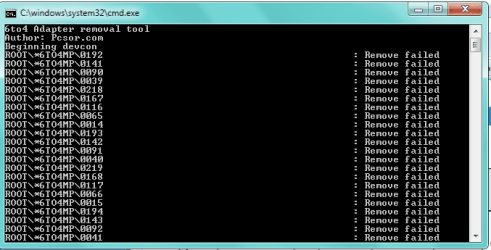
It all says "remove failed." The pic is attached.

I don't know if this means anything, but while I have a 64-bit system, when I open up my task manager and look at the processes, everything ends in * 32 (which I guess means it's all running in 32 bit). However, this has been happening before my internet spazzed. When I tried using the 64-bit one, it said that the image file \ RarSFX0\devcon.exe was valid, but for a machine type other than the current machine.
 

Attachments

  • removefailed.png
    removefailed.png
    10.3 KB · Views: 66

My Computer My Computer

At a glance

Windows 7 Home 64 bit OEM
OS
Windows 7 Home 64 bit OEM
May I ask, does your laptop support Wireless connections and if so does it work?
(my bad, the picture has just downloaded of your ipconfig /all) the last question still stands though does that work ?

this would eliminate the networking layer within windows as being the problem, highlighting as said in previous posts that the problem is probably hardware related...

it is also a question as to why you have so many tunnelled connections, failing hardware can do this, but so can malware.

do you have Anti virus/malware and is it upto date ? if so you may wish to run a full scan....
 

My Computer My Computer

At a glance

windows 7 enterprise 32bit
OS
windows 7 enterprise 32bit
Yes, wireless works on this laptop. I never have wireless and my wired connection on at the same time.

Yes, AVG is up to date. I ran a full scan and found a java /downloader.aa and /classloader virus, and they've been sent to the virus vault, but still no luck.
 

My Computer My Computer

At a glance

Windows 7 Home 64 bit OEM
OS
Windows 7 Home 64 bit OEM
Have you tried to Elevate the command prompt because you are messing with Drivers.

Just a question... if you did or not... no pun on insulting your intelligence.
 

My Computer My Computer

At a glance

Windows 7 Ultimate x64AMD Phenom x6 1045t8 GBATI Radeon HD 5570
Computer Manufacturer/Model Number
HP Pavilion Elite HPE-410f
OS
Windows 7 Ultimate x64
CPU
AMD Phenom x6 1045t
Motherboard
N/A
Memory
8 GB
Graphics Card(s)
ATI Radeon HD 5570
Sound Card
Realtek Highdefinition Audio / 5.1 Dolby Setup
Monitor(s) Displays
HP w2207h Widescreen
Screen Resolution
1680*1050
Hard Drives
1 TB (fixed), 320 Portable maxtor, Server Hard drives
PSU
350 Watt
Case
HP CASE
Cooling
Bass
Keyboard
Logitech MX 5500
Mouse
Logitech MX 5500
Internet Speed
ROAD RUNNER 16MB D/512 U
Firstly, I would make it my first job to get all the data that you need off the machine and onto usb disks/other media, to protect your data from loss.
As it sounds like you may have some problems with malware. Malware can mess with all manner of functions on a machine so it's not too far fetched to think that this could be the problem.

Although you said that you patch (windows only I presume, apologies if you go the whole hog...) and keep AVG upto date, there are other Vulnerabilities upon a windows machine which give the bad guy attack vectors...for instance a favourite "drive by" technique can utilise vulns in shockwave players. another fave at the moment are older versions of adobe acrobat readers...

to be fair those two trojans that you listed started ringing alarm bells as they were detected back in 2006
see this posting on the mcafee site; Generic Downloader.aa - Malware - McAfee Labs Threat Center click overview...

I would look around these forums for other threads which discuss the removal of malware...
I could walk you through some stuff tomorrow when I am back in the office if you wish.

the posting above mine (by acurasd) is also valid. When you run programmes like tunnelcleaner (whatever it's called) because it's accessing tucked away system parameters you will need to be running it with more privilleges than you may have as a user/admin. for info I may be teaching granma to suck eggs, for which I apologise, but from Windows vista and later saw the introduction of UAC (User Access Control, a security principle which was put in place to help protect the OS from some distributed malware) you know the little box that asks you whether you actually meant to be installing/uninstalling/running a programme just after you click it...anyhow I digress you can elevate your priveleges by 'right clicking' the shortcut then selecting the option of Run As Administrator. you may need to enter the username and password if the machine is part of a corporate network

hth.

let us know how you get on.

cheers

Ant.
 

My Computer My Computer

At a glance

windows 7 enterprise 32bit
OS
windows 7 enterprise 32bit
looking back through the thread again I decided to look up 6to4 tunnels myself.

quite a few other forum postings have pointed to this blog as resolving problems similar to yours.

Automating "6to4" Adapter Removal in Windows - RyanVictory.com


as said I think you may have a bigger problem with Malware so will check back to tomorrow.
NB I am UK based so my tomorrow maybe your tonight or vice versa...lol.
 

My Computer My Computer

At a glance

windows 7 enterprise 32bit
OS
windows 7 enterprise 32bit
Without a doubt the problem is all the extra tunnel adaptors, I'm pretty sure I made that clear with my first post. Someone seems to be making a mountain out of a mohill.

Run the file as admin or delate them manually. You need to right click the command prompt when it comes up and choose to run as admin then run the file I posted again. This problem is usually caused by using a driver that isn't compatible so replacing the network driver with a more compatible version will be required to fix the problem perminately. There is no need to complicate this simple procedure.

In case anyone is wondering I have already helped fix this exact problem on countless occasions and I have zero doubt that this is in fact the problem. :)
 

My Computer My Computer

At a glance

Windows 7 Ult, Windows 8.1 Pro,Q9650-4.275GHz, E8600 4.5GHz, E6750-3.8GHzG.Skill PC2 9600 1200Mhz 5 5 5 15 2TGTX480
Computer type
PC/Desktop
Computer Manufacturer/Model Number
Home built
OS
Windows 7 Ult, Windows 8.1 Pro,
CPU
Q9650-4.275GHz, E8600 4.5GHz, E6750-3.8GHz
Motherboard
Evga 780i FTW
Memory
G.Skill PC2 9600 1200Mhz 5 5 5 15 2T
Graphics Card(s)
GTX480
Sound Card
Asus Xonar D2
Monitor(s) Displays
HannsG
Screen Resolution
1680X1050
Hard Drives
GSkill Phoenix Pro 120GB SSD
PSU
ThermalTake Toughpower 1000Watt modular
Case
ThermalTake XaserV
Cooling
Xigmatek S1283
Keyboard
Logitech G15
Mouse
Logitech G9
Internet Speed
T1
Wow, anyone would think I am taking food of your plate....

So the fact that the Suzanne has found two OLD (dated 2006/2007) trojans on her machine isn't a problem to you...mmmmm....ok :sarc:.

Please remind me, is this a forum for helping people or just a way of getting supposed kudos by cutting and pasting the quickest....

I am not doubting that your advice has fixed a number of issues. maybe if you tried being a little more human you would have "closed" this call.
Also, I was meerly suggesting to try and get to the possible root cause of the issue, rather than treat the results. Silly me eh?

Anyway back to the important thing in this thread, Suzannec is there any update?
 

My Computer My Computer

At a glance

windows 7 enterprise 32bit
OS
windows 7 enterprise 32bit
Wow, anyone would think I am taking food of your plate....

So the fact that the Suzanne has found two OLD (dated 2006/2007) trojans on her machine isn't a problem to you...mmmmm....ok :sarc:.

Please remind me, is this a forum for helping people or just a way of getting supposed kudos by cutting and pasting the quickest....

I am not doubting that your advice has fixed a number of issues. maybe if you tried being a little more human you would have "closed" this call.
Also, I was meerly suggesting to try and get to the possible root cause of the issue, rather than treat the results. Silly me eh?

Anyway back to the important thing in this thread, Suzannec is there any update?

Maybe the fact that I have already diagnosed and fixed this problem on countless occasions has something to do with my answers. Bottom line is that there is no way on earth this problem is going away until the extra tunnel adaptors are removed. I still think that is the best way to solve the problem.

I've also narrowed the problem down to a bad driver on previous occasions, this isn't guess work on my part it's a fact. My answers come from previous experience with this problem, your last answer came from copying my responce. :sarc:
 

My Computer My Computer

At a glance

Windows 7 Ult, Windows 8.1 Pro,Q9650-4.275GHz, E8600 4.5GHz, E6750-3.8GHzG.Skill PC2 9600 1200Mhz 5 5 5 15 2TGTX480
Computer type
PC/Desktop
Computer Manufacturer/Model Number
Home built
OS
Windows 7 Ult, Windows 8.1 Pro,
CPU
Q9650-4.275GHz, E8600 4.5GHz, E6750-3.8GHz
Motherboard
Evga 780i FTW
Memory
G.Skill PC2 9600 1200Mhz 5 5 5 15 2T
Graphics Card(s)
GTX480
Sound Card
Asus Xonar D2
Monitor(s) Displays
HannsG
Screen Resolution
1680X1050
Hard Drives
GSkill Phoenix Pro 120GB SSD
PSU
ThermalTake Toughpower 1000Watt modular
Case
ThermalTake XaserV
Cooling
Xigmatek S1283
Keyboard
Logitech G15
Mouse
Logitech G9
Internet Speed
T1
lol, I give it to you are funny!

....and the malware....just sheer chance I suppose.

did you get the rep yet, sure we can't share....:D
 

My Computer My Computer

At a glance

windows 7 enterprise 32bit
OS
windows 7 enterprise 32bit
I think malware will always be an ongoing curse that tends to cause an endless array of problems which can usually be fixed by running a virus scan. As far as this problem is concerend I"ve been there and done that many times before, it won't fix itself and it's not going away until those tunnel adaptors are gone. Have a good one anta. :)
 

My Computer My Computer

At a glance

Windows 7 Ult, Windows 8.1 Pro,Q9650-4.275GHz, E8600 4.5GHz, E6750-3.8GHzG.Skill PC2 9600 1200Mhz 5 5 5 15 2TGTX480
Computer type
PC/Desktop
Computer Manufacturer/Model Number
Home built
OS
Windows 7 Ult, Windows 8.1 Pro,
CPU
Q9650-4.275GHz, E8600 4.5GHz, E6750-3.8GHz
Motherboard
Evga 780i FTW
Memory
G.Skill PC2 9600 1200Mhz 5 5 5 15 2T
Graphics Card(s)
GTX480
Sound Card
Asus Xonar D2
Monitor(s) Displays
HannsG
Screen Resolution
1680X1050
Hard Drives
GSkill Phoenix Pro 120GB SSD
PSU
ThermalTake Toughpower 1000Watt modular
Case
ThermalTake XaserV
Cooling
Xigmatek S1283
Keyboard
Logitech G15
Mouse
Logitech G9
Internet Speed
T1
I don't know if it has been mentioned... but from what I see, if this is a home connection, the gateway, dns, and dhcp should all be the same... and they are not. You might just want to double check that your set to dhcp for both your IP and your DNS because what I see below says that someone has manually entered a DNS entry (IF this is a home network with a router)

Connection-specific DNS Suffix . : local
Description . . . . . . . . . . . : Atheros AR9285 Wireless Network Adapter
Physical Address. . . . . . . . . : F0-7B-CB-5B-74-49
DHCP Enabled. . . . . . . . . . . : Yes
Autoconfiguration Enabled . . . . : Yes
Link-local IPv6 Address . . . . . : fe80::11e6:c8d8:17ea:2027%20(Preferred)
IPv4 Address. . . . . . . . . . . : 192.168.1.192(Preferred)
Subnet Mask . . . . . . . . . . . : 255.255.255.0
Lease Obtained. . . . . . . . . . : Saturday, January 15, 2011 10:09:20 PM
Lease Expires . . . . . . . . . . : Saturday, January 15, 2011 11:29:29 PM
Default Gateway . . . . . . . . . : fe80::224:1ff:fecc:ffc%20
192.168.1.1
DHCP Server . . . . . . . . . . . : 192.168.1.1
DNS Servers . . . . . . . . . . . : 192.168.1.2

NetBIOS over Tcpip. . . . . . . . : Enabled

Whats in red should say 192.168.1.1 IF this is a home network with a router.
 

My Computer My Computer

At a glance

Windows 7; Server 08; Window Home Server; Vis...Intel E8400 @ 3.4Ghz8 Gb Patriot DDr2 800NVidia GTX460 OC
Computer Manufacturer/Model Number
Home Built
OS
Windows 7; Server 08; Window Home Server; Vista; XP
CPU
Intel E8400 @ 3.4Ghz
Motherboard
Gigabyte P35 DS3L
Memory
8 Gb Patriot DDr2 800
Graphics Card(s)
NVidia GTX460 OC
Sound Card
Onboard
Monitor(s) Displays
Samsung 21"
Screen Resolution
1920x1080
Hard Drives
Seagate 160Gb x2
Samsung 250Gb
PSU
Cooler Master 650w 52a on 12v
Case
Antec 300
Cooling
Stock
Keyboard
HP Standard USB
Mouse
Logitech 518
Internet Speed
25Mbit Down 1.5Mbit up
Other Info
http://www.speedtest.net/result/723924362.png
Haxcid, I'm at college, not home.

Okay, so I'm getting frustrated.

I've been toodling along, blahblahblah, and I've looked at the device manager a few todays. Today I do it and I see a little yellow triangle over the Microsoft Teredo Tunneling Adapter - which I could have sworn said Teredo Tunneling Pseudo-Interface earlier, but whatever. Code 10, the device can't start because it hates me. That wasn't there the other day. I'm not sure if AVG caused it to spazz or my attempts at using anta's 6to4 adapter.

So I was like, "screw it, we'll try a restore."

I try that.

Can't get on wireless. It SAID it was connected, but generally, I'm prompted for my college username and and password when I open the browser. The username/password wouldn't come up. The error was gone on the teredo thing, though. Wired connection still didn't work.

So I undid the system restore and now my wireless works again, but the teredo thing has the yellow icon again, even after I tried updating the software.

The 220 6to4 adapters are gone, though. So I guess that's something.
 

My Computer My Computer

At a glance

Windows 7 Home 64 bit OEM
OS
Windows 7 Home 64 bit OEM
Back
Top