Connected to the internet but cant browse websites

Epowell40

New member
Local time
10:22 AM
Messages
3
I have an HP laptop and i can connect to the network both with wireless or wired, but i cant browse websites. I've tried connecting from several different locations and i get the same result. I took it to Best Buy and they said "its broke and they cant help me". Anyone have any suggestions for me? if you need any system info, just let me kno. Thanks!
 

My Computer My Computer

At a glance

windows 7 ultimate x64
Computer Manufacturer/Model Number
HP/ Hp pavilion dv4 Notebook PC
OS
windows 7 ultimate x64

My Computer My Computer

At a glance

Windows 7 Ultimate x64AMD Phenom x6 1045t8 GBATI Radeon HD 5570
Computer Manufacturer/Model Number
HP Pavilion Elite HPE-410f
OS
Windows 7 Ultimate x64
CPU
AMD Phenom x6 1045t
Motherboard
N/A
Memory
8 GB
Graphics Card(s)
ATI Radeon HD 5570
Sound Card
Realtek Highdefinition Audio / 5.1 Dolby Setup
Monitor(s) Displays
HP w2207h Widescreen
Screen Resolution
1680*1050
Hard Drives
1 TB (fixed), 320 Portable maxtor, Server Hard drives
PSU
350 Watt
Case
HP CASE
Cooling
Bass
Keyboard
Logitech MX 5500
Mouse
Logitech MX 5500
Internet Speed
ROAD RUNNER 16MB D/512 U
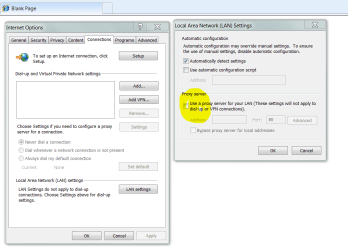
Ensure that your IE browser has not been hijacked here. The check box should be UNchecked.

Also, open a cmd box. Type IPCONFIG /FLUSHDNS and press enter.
 

Attachments

  • Capture.PNG
    Capture.PNG
    30.1 KB · Views: 294

My Computer My Computer

At a glance

Windows 7 Ultimate x64P4 3.2DDR 400ATI HD3850
OS
Windows 7 Ultimate x64
CPU
P4 3.2
Motherboard
Intel 815GM
Memory
DDR 400
Graphics Card(s)
ATI HD3850
Sound Card
C-Media 7.1
Monitor(s) Displays
SyncMaster 244T
Screen Resolution
1920*1200
Hard Drives
Several
PSU
500
Case
PowerSpec $24
Cooling
ThermalTake copper
Internet Speed
Blazing
I tried that a little bit ago at my house but it had no effect. plus that wouldnt matter if i tried connecting from different locations right??
 

My Computer My Computer

At a glance

windows 7 ultimate x64
Computer Manufacturer/Model Number
HP/ Hp pavilion dv4 Notebook PC
OS
windows 7 ultimate x64
that box is unchecked and i also tried the ipconfig /flushdns command and still have the same result
 

My Computer My Computer

At a glance

windows 7 ultimate x64
Computer Manufacturer/Model Number
HP/ Hp pavilion dv4 Notebook PC
OS
windows 7 ultimate x64
I tried that a little bit ago at my house but it had no effect. plus that wouldnt matter if i tried connecting from different locations right??
Different locations would present the same problems. The steps I outlined are related to your computer not (any) network.

Change DNS servers. A very simple way is to download ClearCloud I use it. I will not get into what it does - it is SO EASY to disable/uninstall.

You could also look in Network and Sharing Center, Change Adapter Settings, double click your NIC and see if the DNS server is set properly. Yours should be set to
Obtain DNS server automatically.

BTW, ClearCloud simply toggles the DNS server from automatic to the values you see here.
 

Attachments

  • Capture.PNG
    Capture.PNG
    98.8 KB · Views: 206

My Computer My Computer

At a glance

Windows 7 Ultimate x64P4 3.2DDR 400ATI HD3850
OS
Windows 7 Ultimate x64
CPU
P4 3.2
Motherboard
Intel 815GM
Memory
DDR 400
Graphics Card(s)
ATI HD3850
Sound Card
C-Media 7.1
Monitor(s) Displays
SyncMaster 244T
Screen Resolution
1920*1200
Hard Drives
Several
PSU
500
Case
PowerSpec $24
Cooling
ThermalTake copper
Internet Speed
Blazing
Have you tried rebooting your router as it seems that the internal side is working OK as you dont have a problem with the wired or wireless connections, this leads me to think that the problem could be a logic latch in the router which may be cleared by a reboot.
 

My Computer My Computer

At a glance

win7
OS
win7
Usually when this problem occurs it's because winsock needs to be reset.

Open your command prompt "run as admin" then type the following command and hit enter. Restart after that and see if your browser can surf the internet.

I'm fairly certain that this will fix your problem as it's worked many times in the past.

netsh winsock reset catalog < type this into your command prompt and hit enter.
 
Last edited:

My Computer My Computer

At a glance

Windows 7 Ult, Windows 8.1 Pro,Q9650-4.275GHz, E8600 4.5GHz, E6750-3.8GHzG.Skill PC2 9600 1200Mhz 5 5 5 15 2TGTX480
Computer type
PC/Desktop
Computer Manufacturer/Model Number
Home built
OS
Windows 7 Ult, Windows 8.1 Pro,
CPU
Q9650-4.275GHz, E8600 4.5GHz, E6750-3.8GHz
Motherboard
Evga 780i FTW
Memory
G.Skill PC2 9600 1200Mhz 5 5 5 15 2T
Graphics Card(s)
GTX480
Sound Card
Asus Xonar D2
Monitor(s) Displays
HannsG
Screen Resolution
1680X1050
Hard Drives
GSkill Phoenix Pro 120GB SSD
PSU
ThermalTake Toughpower 1000Watt modular
Case
ThermalTake XaserV
Cooling
Xigmatek S1283
Keyboard
Logitech G15
Mouse
Logitech G9
Internet Speed
T1
I would like to start with something simple. When you connect to a network, could you open a command prompt, go to start, run, and type cmd and hit enter, in the cmd window please type the following: ipconfig /all > c:\ipstack.txt

you can close the window after that. Now open WINDOWS explorer and go to your C: drive. You will now see a file called ipstack.txt please open it and copy the contents and post it here.

Thanks,

H
 

My Computer My Computer

At a glance

Windows 7; Server 08; Window Home Server; Vis...Intel E8400 @ 3.4Ghz8 Gb Patriot DDr2 800NVidia GTX460 OC
Computer Manufacturer/Model Number
Home Built
OS
Windows 7; Server 08; Window Home Server; Vista; XP
CPU
Intel E8400 @ 3.4Ghz
Motherboard
Gigabyte P35 DS3L
Memory
8 Gb Patriot DDr2 800
Graphics Card(s)
NVidia GTX460 OC
Sound Card
Onboard
Monitor(s) Displays
Samsung 21"
Screen Resolution
1920x1080
Hard Drives
Seagate 160Gb x2
Samsung 250Gb
PSU
Cooler Master 650w 52a on 12v
Case
Antec 300
Cooling
Stock
Keyboard
HP Standard USB
Mouse
Logitech 518
Internet Speed
25Mbit Down 1.5Mbit up
Other Info
http://www.speedtest.net/result/723924362.png
Back
Top