10X Bloated Win 7 System Image

Maxxwire

New member
Guru
Local time
12:58 PM
Messages
1,251
When I created the first System Image with my 6 month old Win 7 x64 computer it finished as a 24 GB image of the C partition. I have created several System Images since and each of them was about 24 GB.

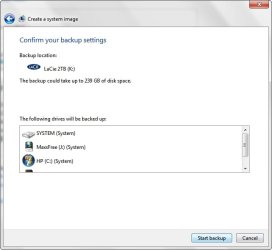
Starting a few weeks ago Windows 7 began to insist on including the D drive as well as another partition which I store Movies and Music named the J drive in the System Image thus increasing its size to over 240 GB!

What has caused this to take place and is there any way of preventing Win 7 from including from including all these drives the System Image?

~Maxx~
.
Win7_50.png
 

Attachments

  • Create System Image.jpg
    Create System Image.jpg
    22.7 KB · Views: 14

My Computer

Computer Manufacturer/Model Number
HP HPE 270f
OS
Windows 7 x64 Home Premium
CPU
Intel Core i7 930 @ 2.8 Ghz Socket 1366 LGA
Motherboard
Pegatron Truckee v1.04E41
Memory
8 GB 1366 Mhz DDR3 (PC3-10700) RAM
Graphics Card(s)
ATI Radeon 5770 1 GB DDR5 RAM
Sound Card
Realtech High Definition
Monitor(s) Displays
32" Sony Bravia
Screen Resolution
1366 X 768
Hard Drives
Intel 25nm 120 GB Series 320 SSD HD Tune- 265 MBps Read/ 130 MBps Write

LaCie 1TB + 1TB RAID 0 eSATA Drive HD Tune- 160 MBps Read/ 90 MBps Write
Keyboard
Logitech Illuminated
Mouse
Logitech MX Revolution
Internet Speed
36.4 Mbps Maximum on a 37 Mbps Motorola SB501 Modem

My Computer

Computer type
PC/Desktop
Computer Manufacturer/Model Number
Dell XPS 420
OS
Windows 10, Home Clean Install
CPU
Intel Core2 processsor Q8200(2.33Ghz 1333FSB) Quad Core Tech
Motherboard
Dell
Memory
6 gb
Graphics Card(s)
ATI Radeon 256MB HD3650
Sound Card
Intergrated 7.1 Channel Audio
Monitor(s) Displays
Dell SP2009W 20"
Hard Drives
640 GB Serial ATA Hard drive
Cooling
Fan
Keyboard
Dell USB Keyboard
Mouse
Dell Premium Optical USB
Internet Speed
DSL 2.85
Rich46- Thanks for the link to the tutorial. The Create a System Image screen in my Win 7 Backup and Restore where you can select which drives to include used to look exactly like the one in the tutorial where I could just select the C drive partition where Win 7 is located and the System Image that was created was 24 GB.

Now the same Create a System Image screen mandates that all of the partitions must be included in the System Image without giving me any choice to leave any of the partitions out as I was allowed to before which now requires 239 GB to make the System Image.

I would like to know how to once again make a 24 GB System Image like I used to be able to do instead of the 239 GB one as Win 7 is now mandating. Here is an example of the 24 GB System Images that I used to be able to make...

24GBSystemImage.jpg


BTW- All of these partitions that are now being included in the System Image are listed with the word 'system' next to them although they did not have this designation before and I suspect that this is why all of them especially the J partition which contains 204 GB of storage only like movies and music storage are now being included.

~Maxx~
.
Win7_50.png
 

Attachments

  • Create System Image.jpg
    Create System Image.jpg
    23.3 KB · Views: 6
Last edited:

My Computer

Computer Manufacturer/Model Number
HP HPE 270f
OS
Windows 7 x64 Home Premium
CPU
Intel Core i7 930 @ 2.8 Ghz Socket 1366 LGA
Motherboard
Pegatron Truckee v1.04E41
Memory
8 GB 1366 Mhz DDR3 (PC3-10700) RAM
Graphics Card(s)
ATI Radeon 5770 1 GB DDR5 RAM
Sound Card
Realtech High Definition
Monitor(s) Displays
32" Sony Bravia
Screen Resolution
1366 X 768
Hard Drives
Intel 25nm 120 GB Series 320 SSD HD Tune- 265 MBps Read/ 130 MBps Write

LaCie 1TB + 1TB RAID 0 eSATA Drive HD Tune- 160 MBps Read/ 90 MBps Write
Keyboard
Logitech Illuminated
Mouse
Logitech MX Revolution
Internet Speed
36.4 Mbps Maximum on a 37 Mbps Motorola SB501 Modem
Never heard of one like this. Guess you did not either and that is why you are posting.
First, change the read only.
You may have to give your self permission and possibly ownership first.
If that does not help the situation
I would run a anti virus scan and download and run malwarebytes full scan and after update.
If you cannot get anywhere with that scenario, I would consider a system restore from before the problem. As you know SR will not affect any of your doucments, etc.
Wish you luck
 

My Computer

Computer type
PC/Desktop
Computer Manufacturer/Model Number
Dell XPS 420
OS
Windows 10, Home Clean Install
CPU
Intel Core2 processsor Q8200(2.33Ghz 1333FSB) Quad Core Tech
Motherboard
Dell
Memory
6 gb
Graphics Card(s)
ATI Radeon 256MB HD3650
Sound Card
Intergrated 7.1 Channel Audio
Monitor(s) Displays
Dell SP2009W 20"
Hard Drives
640 GB Serial ATA Hard drive
Cooling
Fan
Keyboard
Dell USB Keyboard
Mouse
Dell Premium Optical USB
Internet Speed
DSL 2.85
Bottom Line- My question is why does Win 7 now classify each and every partition on the C drive as 'system' and to be included in the System Image (239 GB) when up until about a month ago it only considered the partition that Windows 7 is on (24 GB) as part of the System Image creation? How can I get it to return to its original configuration?

Thanks for any help with this...

~Maxx~
.
Win7_50.png
 

My Computer

Computer Manufacturer/Model Number
HP HPE 270f
OS
Windows 7 x64 Home Premium
CPU
Intel Core i7 930 @ 2.8 Ghz Socket 1366 LGA
Motherboard
Pegatron Truckee v1.04E41
Memory
8 GB 1366 Mhz DDR3 (PC3-10700) RAM
Graphics Card(s)
ATI Radeon 5770 1 GB DDR5 RAM
Sound Card
Realtech High Definition
Monitor(s) Displays
32" Sony Bravia
Screen Resolution
1366 X 768
Hard Drives
Intel 25nm 120 GB Series 320 SSD HD Tune- 265 MBps Read/ 130 MBps Write

LaCie 1TB + 1TB RAID 0 eSATA Drive HD Tune- 160 MBps Read/ 90 MBps Write
Keyboard
Logitech Illuminated
Mouse
Logitech MX Revolution
Internet Speed
36.4 Mbps Maximum on a 37 Mbps Motorola SB501 Modem
Bottom Line- My question is why does Win 7 now classify each and every partition on the C drive as 'system' and to be included in the System Image (239 GB) when up until about a month ago it only considered the partition that Windows 7 is on (24 GB) as part of the System Image creation? How can I get it to return to its original configuration?

Thanks for any help with this...

~Maxx~
.
Win7_50.png

I noticed similar behavior with mine when I was testing the built in Imaging.

I noticed, that if a program was installed to another drive (like Games that I have on another physical drive) it considered those as part of the system.

Also, if I had moved a User folder to another physical location, those too were considered as system and it insited on backing all of it up, rather than just the C drive.

If I moved all my user folders back to default location, leaving DATA on another drive, it would not back it up. Just the C drive.

I know this probably doesnt answer your question, and I have no idea why it acts this way. But I found it annoying.
 

My Computer

Computer Manufacturer/Model Number
Custom (Self Build)
OS
Windows 7 Home Premium 64bit
CPU
Intel Core i7 2700k
Motherboard
eVGA P67 SLI
Memory
8GB Mushkin Redline Ridgebacks @1866
Graphics Card(s)
EVGA GTX570 SC
Sound Card
XiFi Titanium HD
Monitor(s) Displays
LG W2453V
Screen Resolution
1920x1080
Hard Drives
Intel 320 80GB -- Intel X25-V 40GB --WD Black 1TB x2 -- WD Blue 640GB
PSU
Seasonic x750
Case
Corsair 600T SE White
Cooling
eVGA Superclocked CPU Cooler
Keyboard
Saitek Cyborg
Antivirus
Kaspersky
Browser
IE
Other Info
LG BD/DVD
Wishmaster- Thank you so much for your reply! I am moving files off of the 200+ GB partition that I do not want backed up with the System Image as I type this and moving them to the 2TB Raid 0 external SATA Drive. Once that's finished I will do some tests and I will let you know if Windows still wants to include it in the creation of a new System Image.

~Maxx~
.
Win7_50.png
 

My Computer

Computer Manufacturer/Model Number
HP HPE 270f
OS
Windows 7 x64 Home Premium
CPU
Intel Core i7 930 @ 2.8 Ghz Socket 1366 LGA
Motherboard
Pegatron Truckee v1.04E41
Memory
8 GB 1366 Mhz DDR3 (PC3-10700) RAM
Graphics Card(s)
ATI Radeon 5770 1 GB DDR5 RAM
Sound Card
Realtech High Definition
Monitor(s) Displays
32" Sony Bravia
Screen Resolution
1366 X 768
Hard Drives
Intel 25nm 120 GB Series 320 SSD HD Tune- 265 MBps Read/ 130 MBps Write

LaCie 1TB + 1TB RAID 0 eSATA Drive HD Tune- 160 MBps Read/ 90 MBps Write
Keyboard
Logitech Illuminated
Mouse
Logitech MX Revolution
Internet Speed
36.4 Mbps Maximum on a 37 Mbps Motorola SB501 Modem
Can you post back a screenshot of your full Disk Mgmt drive map, using Snipping Tool in Start Menu?

It's highly unusual with one OS that more than one partition is listed as System as this label means it contains the boot-critical files. Win7 backup imaging is not known to require any other than System and Win7 partitions if they are different.

It must be explained by something else such as what Wishmaster reports. Having programs on the OS partition is smart anyway, but if you have to more User folders back to overcome this you can link your files stored on another partition via Libraries.
 
Wishmaster- For some unknown reason Windows System Image still wants to include the J partition even after emptying all but 3 small files including one for Media Center video recordings along with the partition that Win 7 is on as well as the factory image. At least the System Image would be down to 29 GB.

Can I trust a Win 7 Recovery from such a System Image?

~Maxx~
.
Win7_50.png
 

My Computer

Computer Manufacturer/Model Number
HP HPE 270f
OS
Windows 7 x64 Home Premium
CPU
Intel Core i7 930 @ 2.8 Ghz Socket 1366 LGA
Motherboard
Pegatron Truckee v1.04E41
Memory
8 GB 1366 Mhz DDR3 (PC3-10700) RAM
Graphics Card(s)
ATI Radeon 5770 1 GB DDR5 RAM
Sound Card
Realtech High Definition
Monitor(s) Displays
32" Sony Bravia
Screen Resolution
1366 X 768
Hard Drives
Intel 25nm 120 GB Series 320 SSD HD Tune- 265 MBps Read/ 130 MBps Write

LaCie 1TB + 1TB RAID 0 eSATA Drive HD Tune- 160 MBps Read/ 90 MBps Write
Keyboard
Logitech Illuminated
Mouse
Logitech MX Revolution
Internet Speed
36.4 Mbps Maximum on a 37 Mbps Motorola SB501 Modem
Can you post back a screenshot of your full Disk Mgmt drive map, using Snipping Tool in Start Menu?

I hope this is what you are asking for...

~Maxx~
.
Win7_50.png
 

Attachments

  • Disc Management.jpg
    Disc Management.jpg
    87.8 KB · Views: 28

My Computer

Computer Manufacturer/Model Number
HP HPE 270f
OS
Windows 7 x64 Home Premium
CPU
Intel Core i7 930 @ 2.8 Ghz Socket 1366 LGA
Motherboard
Pegatron Truckee v1.04E41
Memory
8 GB 1366 Mhz DDR3 (PC3-10700) RAM
Graphics Card(s)
ATI Radeon 5770 1 GB DDR5 RAM
Sound Card
Realtech High Definition
Monitor(s) Displays
32" Sony Bravia
Screen Resolution
1366 X 768
Hard Drives
Intel 25nm 120 GB Series 320 SSD HD Tune- 265 MBps Read/ 130 MBps Write

LaCie 1TB + 1TB RAID 0 eSATA Drive HD Tune- 160 MBps Read/ 90 MBps Write
Keyboard
Logitech Illuminated
Mouse
Logitech MX Revolution
Internet Speed
36.4 Mbps Maximum on a 37 Mbps Motorola SB501 Modem
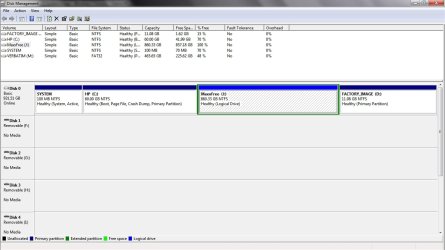
Disk management looks normal, providing no clues why Win7 backup imaging is behaving this way.

If it proves to be moving Program files or User folders to J drive causes Win7 imaging to treat it as a System drive, then this is important information so please let us know how it resolves.
 
Greg, Wishmaster- Thank you so much for your help! I have very good news to report!After I moved all but 3 files from the J partition including moving a folder which I had been running .exe programs from I rebooted the computer and now Windows 7 no longer considers the J partition a System drive!

Consider this case solved by the Windows 7 Forum Wizards!

~Maxxx~
.
Win7_50.png
 

Attachments

  • Create System Image_After.jpg
    Create System Image_After.jpg
    34.2 KB · Views: 11

My Computer

Computer Manufacturer/Model Number
HP HPE 270f
OS
Windows 7 x64 Home Premium
CPU
Intel Core i7 930 @ 2.8 Ghz Socket 1366 LGA
Motherboard
Pegatron Truckee v1.04E41
Memory
8 GB 1366 Mhz DDR3 (PC3-10700) RAM
Graphics Card(s)
ATI Radeon 5770 1 GB DDR5 RAM
Sound Card
Realtech High Definition
Monitor(s) Displays
32" Sony Bravia
Screen Resolution
1366 X 768
Hard Drives
Intel 25nm 120 GB Series 320 SSD HD Tune- 265 MBps Read/ 130 MBps Write

LaCie 1TB + 1TB RAID 0 eSATA Drive HD Tune- 160 MBps Read/ 90 MBps Write
Keyboard
Logitech Illuminated
Mouse
Logitech MX Revolution
Internet Speed
36.4 Mbps Maximum on a 37 Mbps Motorola SB501 Modem
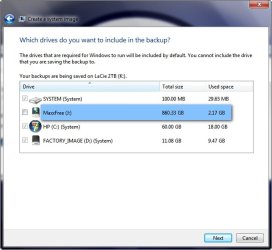
I couldn't call it a night without showing you the properties window of the new slim 24 GB System Image I just created as a result of all your help in making it possible!

~Maxx~
.
Win7_50.png
 

Attachments

  • 24 GB System Image.jpg
    24 GB System Image.jpg
    24.3 KB · Views: 2

My Computer

Computer Manufacturer/Model Number
HP HPE 270f
OS
Windows 7 x64 Home Premium
CPU
Intel Core i7 930 @ 2.8 Ghz Socket 1366 LGA
Motherboard
Pegatron Truckee v1.04E41
Memory
8 GB 1366 Mhz DDR3 (PC3-10700) RAM
Graphics Card(s)
ATI Radeon 5770 1 GB DDR5 RAM
Sound Card
Realtech High Definition
Monitor(s) Displays
32" Sony Bravia
Screen Resolution
1366 X 768
Hard Drives
Intel 25nm 120 GB Series 320 SSD HD Tune- 265 MBps Read/ 130 MBps Write

LaCie 1TB + 1TB RAID 0 eSATA Drive HD Tune- 160 MBps Read/ 90 MBps Write
Keyboard
Logitech Illuminated
Mouse
Logitech MX Revolution
Internet Speed
36.4 Mbps Maximum on a 37 Mbps Motorola SB501 Modem
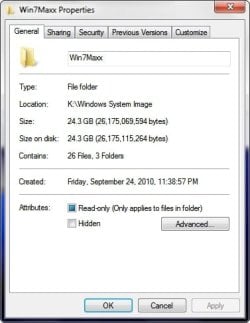
Nice work, and rep to Wishmaster for breakthrough information that will help many others as well!
 
Greg and Wishmaster- You of both deserve a heartfelt Rep for helping to straighten out was what a frightening System Restore problem of having to deal with storing and restoring a 239 GB System Image in Win 7! I have moved 170 GB of Music and Videos back on to the J partition and everything seems fine it seems to have been some .exe programs I was running from there that were causing it to be recognized as a System Drive.

~Maxx~
.
Win7_50.png
 

My Computer

Computer Manufacturer/Model Number
HP HPE 270f
OS
Windows 7 x64 Home Premium
CPU
Intel Core i7 930 @ 2.8 Ghz Socket 1366 LGA
Motherboard
Pegatron Truckee v1.04E41
Memory
8 GB 1366 Mhz DDR3 (PC3-10700) RAM
Graphics Card(s)
ATI Radeon 5770 1 GB DDR5 RAM
Sound Card
Realtech High Definition
Monitor(s) Displays
32" Sony Bravia
Screen Resolution
1366 X 768
Hard Drives
Intel 25nm 120 GB Series 320 SSD HD Tune- 265 MBps Read/ 130 MBps Write

LaCie 1TB + 1TB RAID 0 eSATA Drive HD Tune- 160 MBps Read/ 90 MBps Write
Keyboard
Logitech Illuminated
Mouse
Logitech MX Revolution
Internet Speed
36.4 Mbps Maximum on a 37 Mbps Motorola SB501 Modem
Glad you got it all worked out :)
 

My Computer

Computer Manufacturer/Model Number
Custom (Self Build)
OS
Windows 7 Home Premium 64bit
CPU
Intel Core i7 2700k
Motherboard
eVGA P67 SLI
Memory
8GB Mushkin Redline Ridgebacks @1866
Graphics Card(s)
EVGA GTX570 SC
Sound Card
XiFi Titanium HD
Monitor(s) Displays
LG W2453V
Screen Resolution
1920x1080
Hard Drives
Intel 320 80GB -- Intel X25-V 40GB --WD Black 1TB x2 -- WD Blue 640GB
PSU
Seasonic x750
Case
Corsair 600T SE White
Cooling
eVGA Superclocked CPU Cooler
Keyboard
Saitek Cyborg
Antivirus
Kaspersky
Browser
IE
Other Info
LG BD/DVD
Glad you got it all worked out :)

So am I! I had plenty of space to store the 239 GB System Image that would have been created the way it was before you and Greg stepped in, but I was truly dreading the thought of how many hours it would have taken to Restore it!

~Maxx~
Win7_50.png


PS- My 1,000th post here on the Windows 7 Forums
 

My Computer

Computer Manufacturer/Model Number
HP HPE 270f
OS
Windows 7 x64 Home Premium
CPU
Intel Core i7 930 @ 2.8 Ghz Socket 1366 LGA
Motherboard
Pegatron Truckee v1.04E41
Memory
8 GB 1366 Mhz DDR3 (PC3-10700) RAM
Graphics Card(s)
ATI Radeon 5770 1 GB DDR5 RAM
Sound Card
Realtech High Definition
Monitor(s) Displays
32" Sony Bravia
Screen Resolution
1366 X 768
Hard Drives
Intel 25nm 120 GB Series 320 SSD HD Tune- 265 MBps Read/ 130 MBps Write

LaCie 1TB + 1TB RAID 0 eSATA Drive HD Tune- 160 MBps Read/ 90 MBps Write
Keyboard
Logitech Illuminated
Mouse
Logitech MX Revolution
Internet Speed
36.4 Mbps Maximum on a 37 Mbps Motorola SB501 Modem
Back
Top