windows 7 in recovey partition

dthomas101

New member
Local time
2:47 PM
Messages
8
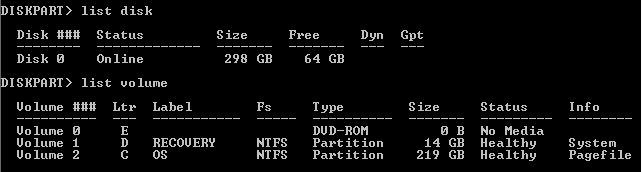
okay so my friend has a notebook that originally had vista 64bit on drive c os the school that he is attending upgraded him to windows 7 32bit in the recovery partition of his hardrive. not sure why or how but it is now full cannot load any programs and computer is how can i fix this? or can i:eek:
 

My Computer My Computer

At a glance

windows 7 pro 32bit
OS
windows 7 pro 32bit
Are you saying that a Win7 upgrade was mistakenly installed over the Recovery partition, so that it is now in a Dual Boot with Vista?

Please post back a screenshot of the full Disk Management drive map and listings so we can take a closer look. Tell us what is on each drive. Use the Snipping Tool in Start Menu to take a rectangular snip, attach it using paper clip in reply box.

If Win7 is performing satisfactorily, we may be able to help you surgically remove Vista with free Partition Wizard bootable CD, then resize Win7 into it's space. But we need to see the snip to know for sure.

http://www.sevenforums.com/tutorials/109752-partition-recover-space-used-older-os.html?ltr=P
 
partitions

i dont think it was an accident the people who did this just wanted to rig this to work as vista is or was 64bit and windows 7 is the 32bit version.
 

Attachments

  • Capture.PNG
    Capture.PNG
    3.6 KB · Views: 13
  • Capture1.PNG
    Capture1.PNG
    4.8 KB · Views: 10

My Computer My Computer

At a glance

windows 7 pro 32bit
OS
windows 7 pro 32bit
The simple solution is to shrink the Vista drive from the LEFT by , say 20 gb.

Then extend the 7 drive to the right by the same amount.

PW free boot disc will do that. You will need to update bcd after that - just one run of startup repair from 7 install dvd/recovery disc will do it.

The issue you have is there is not much free space on the Vista drive either.

Can he get rid of any thing he doesn't want off the Vista drive (restore points are worth looking at ), or move some stuff to an external drive.
 

My Computers My Computers

  • At a glance

    7 X64i5 84002x8gb 3200mhz
    Computer type
    PC/Desktop
    OS
    7 X64
    CPU
    i5 8400
    Motherboard
    gigabyte b365m ds3h
    Memory
    2x8gb 3200mhz
    Hard Drives
    various
    PSU
    pure power 11 400w cm
    Case
    Coolermaster
    Cooling
    cryorig m9i
  • At a glance

    7x64g54008gb ddr4 2400
    Computer type
    PC/Desktop
    OS
    7x64
    CPU
    g5400
    Motherboard
    ga b365m ds3h
    Memory
    8gb ddr4 2400
    PSU
    xfx pro 450w
i dont think it was an accident the people who did this just wanted to rig this to work as vista is or was 64bit and windows 7 is the 32bit version.

If he wants to keep Vista, then follow SIW2's advice to boot free Partition Wizard bootable CD, righclick C to Resize, drag left grey border to the right by as much space as you want to add to D, OK.

Next rightclick D to Resize, drag right grey border to the right to take up the space you just resized from C, OK, Apply all steps.

If he wants to get rid of vista, follow the tutorial I posted earlier substituting Vista for XP. Partition : Recover Space Used by an Older OS
 
okay so i like the idea of reallocating space i have shrunk c partition as seen in picture but cannot extend d partition as its not shown in command prompt. i am unable to just move the grey bars and in disk management it doesnt give me the option to expand the d drive just the c drive. any ideas?
 

Attachments

  • command.PNG
    command.PNG
    2 KB · Views: 4
  • unallocated.PNG
    unallocated.PNG
    3.2 KB · Views: 4

My Computer My Computer

At a glance

windows 7 pro 32bit
OS
windows 7 pro 32bit

My Computers My Computers

  • At a glance

    7 X64i5 84002x8gb 3200mhz
    Computer type
    PC/Desktop
    OS
    7 X64
    CPU
    i5 8400
    Motherboard
    gigabyte b365m ds3h
    Memory
    2x8gb 3200mhz
    Hard Drives
    various
    PSU
    pure power 11 400w cm
    Case
    Coolermaster
    Cooling
    cryorig m9i
  • At a glance

    7x64g54008gb ddr4 2400
    Computer type
    PC/Desktop
    OS
    7x64
    CPU
    g5400
    Motherboard
    ga b365m ds3h
    Memory
    8gb ddr4 2400
    PSU
    xfx pro 450w
sorry thats what i meant downloading now
 

My Computer My Computer

At a glance

windows 7 pro 32bit
OS
windows 7 pro 32bit
No prob, the steps are given here:

If he wants to keep Vista, then follow SIW2's advice to boot free Partition Wizard bootable CD

First rightclick C to Resize, drag left grey border to the right by as much space as you want to add to D, OK.

Next rightclick D to Resize, drag right grey border to the right to take up the space you just resized from C, OK, Apply all steps.

If he wants to get rid of vista, follow the tutorial I posted earlier substituting Vista for XP. Partition : Recover Space Used by an Older OS
 
just wanted to say thank you for your help the partitions are now working properly and its up and running again thanks alot:D
 

My Computer My Computer

At a glance

windows 7 pro 32bit
OS
windows 7 pro 32bit
Great - thanks for the update.
 

My Computers My Computers

  • At a glance

    7 X64i5 84002x8gb 3200mhz
    Computer type
    PC/Desktop
    OS
    7 X64
    CPU
    i5 8400
    Motherboard
    gigabyte b365m ds3h
    Memory
    2x8gb 3200mhz
    Hard Drives
    various
    PSU
    pure power 11 400w cm
    Case
    Coolermaster
    Cooling
    cryorig m9i
  • At a glance

    7x64g54008gb ddr4 2400
    Computer type
    PC/Desktop
    OS
    7x64
    CPU
    g5400
    Motherboard
    ga b365m ds3h
    Memory
    8gb ddr4 2400
    PSU
    xfx pro 450w
Back
Top