how to partition hp laptop

ssettor

New member
Local time
1:15 AM
Messages
16
hello all,,
i've bought HP G42-380TX..
it's come with 500GB HDD..(C: /450GB n D: recovery 15GB)
i need to shrink my C: ..450GB is too big..cz i need drive to save my data..
what step i need to do??
is it can be partition without formatting???
there 1 more partition said system..is it in this drive windows being install??
n 1 more drive HP tools..

one more Q:
if the partition being made..
then make recovery..is it goes back to factory setting..(what i mean is the partition made being lost n also the data)
 

My Computer My Computer

At a glance

windows 7 ultimateIntel(R) Core(TM)2 Duo CPU [email protected]1GB DDR2 766MHzGeForce 7050/nForce 610
OS
windows 7 ultimate
CPU
Intel(R) Core(TM)2 Duo CPU [email protected]
Motherboard
Zotac nForce 610i Value
Memory
1GB DDR2 766MHz
Graphics Card(s)
GeForce 7050/nForce 610
Monitor(s) Displays
Samsung 19" SyncMaster 933BW
Screen Resolution
1440 x 900
Hard Drives
Maxtor STM3250310AS ATA Device
Internet Speed
Cecom Broadband 3.6 MBps
one more Q:
if the partition being made..
then make recovery..is it goes back to factory setting..(what i mean is the partition made being lost n also the data)

The recovery/factory restore will put you back with a disk contents and layout like when you bought the machine. An unfortunate drawback.
After you are out of warranty you could try a clean install using the COA sticker.

An alternative is to consider the factory restore the last resort fallback and rely on successive "good" system images as your normal fallback. This will retain your modified partition structure.

I strongly suggest you always leave your factory recovery partition in tact unless you decide to do a clean install.
 

My Computer My Computer

At a glance

Windows 7x64 Home Premium SP1Intel i7 2600kG.Skill Ripjaws (DDR3-1600) 2x4GBNvidia GeForce GTS 450; Intel HD Graphics 300...
Computer type
PC/Desktop
Computer Manufacturer/Model Number
Own build
OS
Windows 7x64 Home Premium SP1
CPU
Intel i7 2600k
Motherboard
ASUS P8Z68 Deluxe
Memory
G.Skill Ripjaws (DDR3-1600) 2x4GB
Graphics Card(s)
Nvidia GeForce GTS 450; Intel HD Graphics 3000(GT2+)
Monitor(s) Displays
Dell Ultrasharp IPS panel U2311H, Samsung SyncMaster P2350
Screen Resolution
1920x1080
Hard Drives
Samsung 850 Pro SSD 256GB, Samsung SSD 840 120GB, Seagates 1TB Barracuda ST31000528AS x2
PSU
Seasonic M12II 520W
Case
Lian Li Lancool PC-K60
Cooling
Case: 1x120mm, 3x140mm CPU: Hyper 212+
Keyboard
Logitech MK520 (wireless)
Mouse
Logitech MK520
Internet Speed
6-7 Mbps
Antivirus
Norton Security Premium, Malwarebytes on 2 (MSE on 3rd PC)
Browser
FireFox
Other Info
Audio: Logitech Z523 2.1
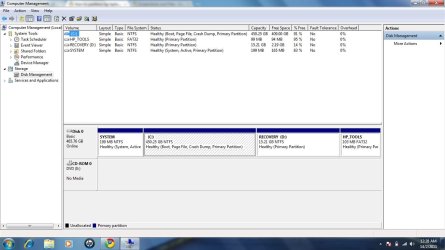
this is my disk management..
as i said i want to shrink my C drive in order to save my data on other partition...
i dont want to delete my recovery..still need to use my original windows..
 

Attachments

  • disk management.jpg
    disk management.jpg
    92.8 KB · Views: 1,003

My Computer My Computer

At a glance

windows 7 ultimateIntel(R) Core(TM)2 Duo CPU [email protected]1GB DDR2 766MHzGeForce 7050/nForce 610
OS
windows 7 ultimate
CPU
Intel(R) Core(TM)2 Duo CPU [email protected]
Motherboard
Zotac nForce 610i Value
Memory
1GB DDR2 766MHz
Graphics Card(s)
GeForce 7050/nForce 610
Monitor(s) Displays
Samsung 19" SyncMaster 933BW
Screen Resolution
1440 x 900
Hard Drives
Maxtor STM3250310AS ATA Device
Internet Speed
Cecom Broadband 3.6 MBps
There is no easy solution to your problem. I don't understand why HP do this.

You already have 4 primary partitions - you cannot have any more.
If you try to make another partition from c: using disk management you will turn your (whole) disk into a dynamic disk. You do not want to do this.

You can
(1) Live with it and use folders to manage your data on the single C: partition. But eventually you will end up with very large images.
Other options involving work and uncertainty
(2) Retain the 199MB system reserved and make C: logical, allowing further logicals to be created. You can have the OS on a logical with Windows 7 provided you retain the primary system reserved with the BCD on it.
(3) Free up a primary partition by combining the system reserved partition with C:. This needs to be done the correct way. Then you can create another primary or extended/logical partition.

I'm not sure how the HP OEM OS and "HP_Tools" would react to options (2) and (3).
Some paid imaging software may make option (1) more acceptable.
 

My Computer My Computer

At a glance

Windows 7x64 Home Premium SP1Intel i7 2600kG.Skill Ripjaws (DDR3-1600) 2x4GBNvidia GeForce GTS 450; Intel HD Graphics 300...
Computer type
PC/Desktop
Computer Manufacturer/Model Number
Own build
OS
Windows 7x64 Home Premium SP1
CPU
Intel i7 2600k
Motherboard
ASUS P8Z68 Deluxe
Memory
G.Skill Ripjaws (DDR3-1600) 2x4GB
Graphics Card(s)
Nvidia GeForce GTS 450; Intel HD Graphics 3000(GT2+)
Monitor(s) Displays
Dell Ultrasharp IPS panel U2311H, Samsung SyncMaster P2350
Screen Resolution
1920x1080
Hard Drives
Samsung 850 Pro SSD 256GB, Samsung SSD 840 120GB, Seagates 1TB Barracuda ST31000528AS x2
PSU
Seasonic M12II 520W
Case
Lian Li Lancool PC-K60
Cooling
Case: 1x120mm, 3x140mm CPU: Hyper 212+
Keyboard
Logitech MK520 (wireless)
Mouse
Logitech MK520
Internet Speed
6-7 Mbps
Antivirus
Norton Security Premium, Malwarebytes on 2 (MSE on 3rd PC)
Browser
FireFox
Other Info
Audio: Logitech Z523 2.1
Yes, you should first do what mjf says and convert the C partition to "logical" so that you do not run into the dynamic partition dilemma. Use the bootable CD of this program for the operation. You have to boot from the CD because you would not be able to do it whilst the OS is running.

Then you can create e.g. a Data Partition and move your user data. After that, you can create many more partitions if you like - until you run out of drive letters. I have described the process in this video tutorial. If Disk Management does not let you shrink C as much as you would like, resort to Partition Wizard for that too. It can do it.
 

My Computer My Computer

At a glance

Vista, Windows7, Mint Mate, Zorin, Windows 8from 1.6GHz Duo to i7
Computer Manufacturer/Model Number
HP, Dell, Gateway, Toshiba - 4 laptops and 2 desktops
OS
Vista, Windows7, Mint Mate, Zorin, Windows 8
CPU
from 1.6GHz Duo to i7
Monitor(s) Displays
2x HP w2207
Hard Drives
5x HDD, 7x SSD, 12x Externals
Keyboard
with trackball - no mices
Mouse
Trackball mice
Internet Speed
DSL 6000
i'll try to do it..
but still afraid if goes wrong
how about hp warranty???if i modify my hard disk partition...
 

My Computer My Computer

At a glance

windows 7 ultimateIntel(R) Core(TM)2 Duo CPU [email protected]1GB DDR2 766MHzGeForce 7050/nForce 610
OS
windows 7 ultimate
CPU
Intel(R) Core(TM)2 Duo CPU [email protected]
Motherboard
Zotac nForce 610i Value
Memory
1GB DDR2 766MHz
Graphics Card(s)
GeForce 7050/nForce 610
Monitor(s) Displays
Samsung 19" SyncMaster 933BW
Screen Resolution
1440 x 900
Hard Drives
Maxtor STM3250310AS ATA Device
Internet Speed
Cecom Broadband 3.6 MBps
i'll try to do it..
but still afraid if goes wrong
how about hp warranty???if i modify my hard disk partition...
There is nothing to be afraid of. Just set one foot after the other. And there is no impact on the warrenty - non at all.
 

My Computer My Computer

At a glance

Vista, Windows7, Mint Mate, Zorin, Windows 8from 1.6GHz Duo to i7
Computer Manufacturer/Model Number
HP, Dell, Gateway, Toshiba - 4 laptops and 2 desktops
OS
Vista, Windows7, Mint Mate, Zorin, Windows 8
CPU
from 1.6GHz Duo to i7
Monitor(s) Displays
2x HP w2207
Hard Drives
5x HDD, 7x SSD, 12x Externals
Keyboard
with trackball - no mices
Mouse
Trackball mice
Internet Speed
DSL 6000
You may wish to check with HP in Malaysia regarding the warranty issue. They may play it by their rules. I would not give HP any excuse to void the hardware element of the warranty even if what you're planning is not hardware related.
 

My Computer My Computer

At a glance

Windows 7x64 Home Premium SP1Intel i7 2600kG.Skill Ripjaws (DDR3-1600) 2x4GBNvidia GeForce GTS 450; Intel HD Graphics 300...
Computer type
PC/Desktop
Computer Manufacturer/Model Number
Own build
OS
Windows 7x64 Home Premium SP1
CPU
Intel i7 2600k
Motherboard
ASUS P8Z68 Deluxe
Memory
G.Skill Ripjaws (DDR3-1600) 2x4GB
Graphics Card(s)
Nvidia GeForce GTS 450; Intel HD Graphics 3000(GT2+)
Monitor(s) Displays
Dell Ultrasharp IPS panel U2311H, Samsung SyncMaster P2350
Screen Resolution
1920x1080
Hard Drives
Samsung 850 Pro SSD 256GB, Samsung SSD 840 120GB, Seagates 1TB Barracuda ST31000528AS x2
PSU
Seasonic M12II 520W
Case
Lian Li Lancool PC-K60
Cooling
Case: 1x120mm, 3x140mm CPU: Hyper 212+
Keyboard
Logitech MK520 (wireless)
Mouse
Logitech MK520
Internet Speed
6-7 Mbps
Antivirus
Norton Security Premium, Malwarebytes on 2 (MSE on 3rd PC)
Browser
FireFox
Other Info
Audio: Logitech Z523 2.1
If my experience with HP is any indication, should you have to send the PC back to them under warranty, they will wipe and restore the hard drive anyway. So, you will lose everything you have on it as a side effect.

Whether they will "honor" the warranty, or charge you for the service, is really their call.
 

My Computer My Computer

At a glance

Win7 Pro 32-bit, Win8 Pro 32-bitAMD Phenom II X6 1090T4GB ddr3 1300AMD HD 4290 onboard
Computer type
PC/Desktop
Computer Manufacturer/Model Number
Custom
OS
Win7 Pro 32-bit, Win8 Pro 32-bit
CPU
AMD Phenom II X6 1090T
Motherboard
Gigabyte
Memory
4GB ddr3 1300
Graphics Card(s)
AMD HD 4290 onboard
Sound Card
Builtin Realtek HD Audio
Monitor(s) Displays
Samsung 24" widescreen, LG 23" widescreen
Screen Resolution
1920x1200/1920x1080
Hard Drives
Kingston 256GB SSD
Keyboard
Logitech Illuminated Keyboard
Mouse
Logitech M705 wireless mouse
Antivirus
Norton Av 2013
Browser
IE v10
i'll try to do it..
but still afraid if goes wrong
how about hp warranty???if i modify my hard disk partition...


I'm late to the party, but all you really need to do is create your restore DVDs through whatever applet HP provides before you change the partitions. This will provide a safety net for you if something goes awry and also enable you to restore to factory config should the need ever arise (like sending it in for warranty work).

James
 

My Computer My Computer

At a glance

Win7U 64 RTMQ95508GB GskillASUS|EAH4850/HTDI/1GD3/A
OS
Win7U 64 RTM
CPU
Q9550
Motherboard
GA-EP45-UD3R
Memory
8GB Gskill
Graphics Card(s)
ASUS|EAH4850/HTDI/1GD3/A
Sound Card
xfi Plat
Monitor(s) Displays
Dell 2405fpw
Screen Resolution
1920x1200
Hard Drives
Seagate & WD sata Drives
PSU
Antec
Case
Antec
Keyboard
MS Natural Ergonomic 4000
Mouse
Logitech MX610 USB Cordless
i try creating partition on my hp laptop but when i try the procedure its coming error it says something about cannot create dynamic so and so... need help coz i already shrink the Drive and when i reboot the primary disk is already cut into half... badly needs help...thanks!
 

My Computer My Computer

At a glance

64 bit Ultimate
OS
64 bit Ultimate
Post a picture of your Disk Management. If you run into "dynamics", you must have 4 primaries - but we have to see that in your Disk Management in order to give you the right steps.
 

My Computer My Computer

At a glance

Vista, Windows7, Mint Mate, Zorin, Windows 8from 1.6GHz Duo to i7
Computer Manufacturer/Model Number
HP, Dell, Gateway, Toshiba - 4 laptops and 2 desktops
OS
Vista, Windows7, Mint Mate, Zorin, Windows 8
CPU
from 1.6GHz Duo to i7
Monitor(s) Displays
2x HP w2207
Hard Drives
5x HDD, 7x SSD, 12x Externals
Keyboard
with trackball - no mices
Mouse
Trackball mice
Internet Speed
DSL 6000
i'll try to do it..
but still afraid if goes wrong
how about hp warranty???if i modify my hard disk partition...


I'm late to the party, but all you really need to do is create your restore DVDs through whatever applet HP provides before you change the partitions. This will provide a safety net for you if something goes awry and also enable you to restore to factory config should the need ever arise (like sending it in for warranty work).

James

how to create restore DVDs??sorry for asking a silly question..hehhe.i'm a newbies..

i've google on internet and find out that we can use retail cd to format n then use the existing windows key..is it true can use any win 7 home premium with the key i have??
 

My Computer My Computer

At a glance

windows 7 ultimateIntel(R) Core(TM)2 Duo CPU [email protected]1GB DDR2 766MHzGeForce 7050/nForce 610
OS
windows 7 ultimate
CPU
Intel(R) Core(TM)2 Duo CPU [email protected]
Motherboard
Zotac nForce 610i Value
Memory
1GB DDR2 766MHz
Graphics Card(s)
GeForce 7050/nForce 610
Monitor(s) Displays
Samsung 19" SyncMaster 933BW
Screen Resolution
1440 x 900
Hard Drives
Maxtor STM3250310AS ATA Device
Internet Speed
Cecom Broadband 3.6 MBps
how to create restore DVDs??

Your manual should tell you. It may be a Control Panel applet, or, more likely, an item in the start menu under one of the various HP folders.

is it true can use any win 7 home premium with the key i have??

You can use any install disk regardless of version...your product key will work and install the corresponding version.

James
 

My Computer My Computer

At a glance

Win7U 64 RTMQ95508GB GskillASUS|EAH4850/HTDI/1GD3/A
OS
Win7U 64 RTM
CPU
Q9550
Motherboard
GA-EP45-UD3R
Memory
8GB Gskill
Graphics Card(s)
ASUS|EAH4850/HTDI/1GD3/A
Sound Card
xfi Plat
Monitor(s) Displays
Dell 2405fpw
Screen Resolution
1920x1200
Hard Drives
Seagate & WD sata Drives
PSU
Antec
Case
Antec
Keyboard
MS Natural Ergonomic 4000
Mouse
Logitech MX610 USB Cordless
how to create restore DVDs??
Your manual should tell you. It may be a Control Panel applet, or, more likely, an item in the start menu under one of the various HP folders.

is it true can use any win 7 home premium with the key i have??
You can use any install disk regardless of version...your product key will work and install the corresponding version.

James

it's mean i can fully clear my hdd and then install windows using retail cd..

off topic: how about cd key on other pc..is it can be use on other pc??
 

My Computer My Computer

At a glance

windows 7 ultimateIntel(R) Core(TM)2 Duo CPU [email protected]1GB DDR2 766MHzGeForce 7050/nForce 610
OS
windows 7 ultimate
CPU
Intel(R) Core(TM)2 Duo CPU [email protected]
Motherboard
Zotac nForce 610i Value
Memory
1GB DDR2 766MHz
Graphics Card(s)
GeForce 7050/nForce 610
Monitor(s) Displays
Samsung 19" SyncMaster 933BW
Screen Resolution
1440 x 900
Hard Drives
Maxtor STM3250310AS ATA Device
Internet Speed
Cecom Broadband 3.6 MBps
off topic: how about cd key on other pc..is it can be use on other pc??

No. An OEM number is good only for the machine it came with.

James
 

My Computer My Computer

At a glance

Win7U 64 RTMQ95508GB GskillASUS|EAH4850/HTDI/1GD3/A
OS
Win7U 64 RTM
CPU
Q9550
Motherboard
GA-EP45-UD3R
Memory
8GB Gskill
Graphics Card(s)
ASUS|EAH4850/HTDI/1GD3/A
Sound Card
xfi Plat
Monitor(s) Displays
Dell 2405fpw
Screen Resolution
1920x1200
Hard Drives
Seagate & WD sata Drives
PSU
Antec
Case
Antec
Keyboard
MS Natural Ergonomic 4000
Mouse
Logitech MX610 USB Cordless
Back
Top