hello all,,
i've bought HP G42-380TX..
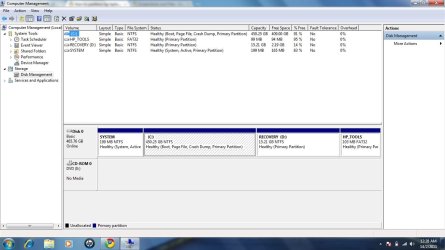
it's come with 500GB HDD..(C: /450GB n D: recovery 15GB)
i need to shrink my C: ..450GB is too big..cz i need drive to save my data..
what step i need to do??
is it can be partition without formatting???
there 1 more partition said system..is it in this drive windows being install??
n 1 more drive HP tools..
one more Q:
if the partition being made..
then make recovery..is it goes back to factory setting..(what i mean is the partition made being lost n also the data)
i've bought HP G42-380TX..
it's come with 500GB HDD..(C: /450GB n D: recovery 15GB)
i need to shrink my C: ..450GB is too big..cz i need drive to save my data..
what step i need to do??
is it can be partition without formatting???
there 1 more partition said system..is it in this drive windows being install??
n 1 more drive HP tools..
one more Q:
if the partition being made..
then make recovery..is it goes back to factory setting..(what i mean is the partition made being lost n also the data)
My Computer
At a glance
windows 7 ultimateIntel(R) Core(TM)2 Duo CPU [email protected]1GB DDR2 766MHzGeForce 7050/nForce 610
- OS
- windows 7 ultimate
- CPU
- Intel(R) Core(TM)2 Duo CPU [email protected]
- Motherboard
- Zotac nForce 610i Value
- Memory
- 1GB DDR2 766MHz
- Graphics Card(s)
- GeForce 7050/nForce 610
- Monitor(s) Displays
- Samsung 19" SyncMaster 933BW
- Screen Resolution
- 1440 x 900
- Hard Drives
- Maxtor STM3250310AS ATA Device
- Internet Speed
- Cecom Broadband 3.6 MBps