
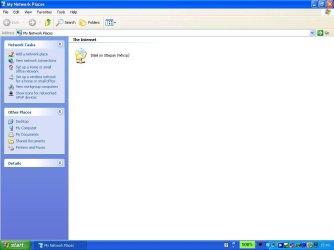
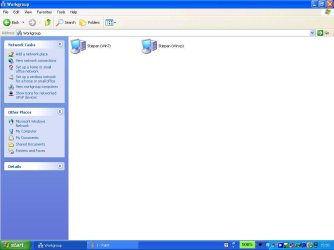
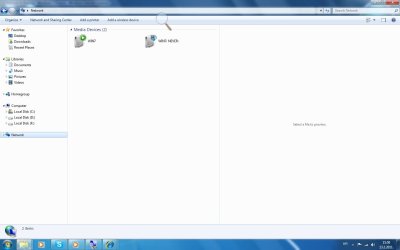
Delete this from XP & WIN 7

neverall

New member
how to delete and destroy this connections on xp and win 7
 

Attachments

  • 1.JPG
    1.JPG
    59.8 KB · Views: 21
  • 2.JPG
    2.JPG
    60.5 KB · Views: 14
  • 3.jpg
    3.jpg
    114.3 KB · Views: 12

My Computer

Computer Manufacturer/Model Number
AMD
OS
windows 7 pro
CPU
X2 DUAL CORE AM2 4600+
Motherboard
ASUS M2N
Memory
4GB DDR2 800 MHZ
Graphics Card(s)
3D CLUB GTS8800 320 MB
Sound Card
ON BOARD
Monitor(s) Displays
PHILIPS 19 INCH
Hard Drives
WD 6400 AAKS
PSU
SILENT GREEN LC POWER 550 WATS
Disabling network sharing should remove those folders.
They are only your share folders, and should only be accessible on your own local network.
Unless you've put something in the share folders, those locations should be empty.
 

My Computer

Computer Manufacturer/Model Number
Insane hobo technologies. ;-)
OS
Windows 7 x64
CPU
Intel i7 2600k
Motherboard
Asrock z68 extreme 4 gen 3
Memory
G.skill Ripjaw 16gigs @ 1866
Graphics Card(s)
Nvidia gtx580 (evga)
Sound Card
Integrated HD audio + hdmi
Monitor(s) Displays
24" ASUS widescreen + 42" insignia
Screen Resolution
1080p (1920x1080)
Hard Drives
128 Samsung 830
256 Samsung 840
3 x 1tb storage drive (various)
1 western digital 1tb (eSATA)
1 Seagate 1tb (eSATA)
PSU
1 kilowatt SLI/Crossfire rated Silverstone modular
Case
NZXT Phantom + additional 220 fan
Cooling
Zalmann
Keyboard
Microsoft wireless 3000 (v2)
Mouse
MS - wireless 5000 (bluetrack)
Internet Speed
depends on if you ask me or my provider.
Other Info
The above information is provided as is, and the author assumes no responsibility for issues it may cause with your sanity or fanboyism.
please be a little bit specific,i used add a network setup wizzard now i want it back as it was,system restore dont work on win xp,...;on win 7 i can delete thoose two icons..please:(assist....
Disabling network sharing should remove those folders.
They are only your share folders, and should only be accessible on your own local network.
Unless you've put something in the share folders, those locations should be empty.
 

My Computer

Computer Manufacturer/Model Number
AMD
OS
windows 7 pro
CPU
X2 DUAL CORE AM2 4600+
Motherboard
ASUS M2N
Memory
4GB DDR2 800 MHZ
Graphics Card(s)
3D CLUB GTS8800 320 MB
Sound Card
ON BOARD
Monitor(s) Displays
PHILIPS 19 INCH
Hard Drives
WD 6400 AAKS
PSU
SILENT GREEN LC POWER 550 WATS
directions for disabling file sharing in xp
How to Turn Off File Sharing on Windows XP | eHow.com

for win 7
Disable File Sharing: Windows - Computing Services - Carnegie Mellon University

These items are only appearing because you have file shares enabled, at least that should be the case. Disabling it (possible reboot required to take effect) should remove them.

As I said though those folders are harmless and don't signify any kind of security problem or anything.
Disabling sharing may also cause problems for your network printer if you have one though.
 

My Computer

Computer Manufacturer/Model Number
Insane hobo technologies. ;-)
OS
Windows 7 x64
CPU
Intel i7 2600k
Motherboard
Asrock z68 extreme 4 gen 3
Memory
G.skill Ripjaw 16gigs @ 1866
Graphics Card(s)
Nvidia gtx580 (evga)
Sound Card
Integrated HD audio + hdmi
Monitor(s) Displays
24" ASUS widescreen + 42" insignia
Screen Resolution
1080p (1920x1080)
Hard Drives
128 Samsung 830
256 Samsung 840
3 x 1tb storage drive (various)
1 western digital 1tb (eSATA)
1 Seagate 1tb (eSATA)
PSU
1 kilowatt SLI/Crossfire rated Silverstone modular
Case
NZXT Phantom + additional 220 fan
Cooling
Zalmann
Keyboard
Microsoft wireless 3000 (v2)
Mouse
MS - wireless 5000 (bluetrack)
Internet Speed
depends on if you ask me or my provider.
Other Info
The above information is provided as is, and the author assumes no responsibility for issues it may cause with your sanity or fanboyism.
directions for disabling file sharing in xp
How to Turn Off File Sharing on Windows XP | eHow.com

for win 7
Disable File Sharing: Windows - Computing Services - Carnegie Mellon University

These items are only appearing because you have file shares enabled, at least that should be the case. Disabling it (possible reboot required to take effect) should remove them.

As I said though those folders are harmless and don't signify any kind of security problem or anything.
Disabling sharing may also cause problems for your network printer if you have one though.
i killed it by reinstalling network card ..boom:))
 

My Computer

Computer Manufacturer/Model Number
AMD
OS
windows 7 pro
CPU
X2 DUAL CORE AM2 4600+
Motherboard
ASUS M2N
Memory
4GB DDR2 800 MHZ
Graphics Card(s)
3D CLUB GTS8800 320 MB
Sound Card
ON BOARD
Monitor(s) Displays
PHILIPS 19 INCH
Hard Drives
WD 6400 AAKS
PSU
SILENT GREEN LC POWER 550 WATS
directions for disabling file sharing in xp
How to Turn Off File Sharing on Windows XP | eHow.com

for win 7
Disable File Sharing: Windows - Computing Services - Carnegie Mellon University

These items are only appearing because you have file shares enabled, at least that should be the case. Disabling it (possible reboot required to take effect) should remove them.

As I said though those folders are harmless and don't signify any kind of security problem or anything.
Disabling sharing may also cause problems for your network printer if you have one though.
i killed it by reinstalling network card ..boom:))

Yes that simply destroyed the network you created. The folders are still there and being shared should you actually search for them though.
I'll consider this resolved as you seem happy with the result.
 

My Computer

Computer Manufacturer/Model Number
Insane hobo technologies. ;-)
OS
Windows 7 x64
CPU
Intel i7 2600k
Motherboard
Asrock z68 extreme 4 gen 3
Memory
G.skill Ripjaw 16gigs @ 1866
Graphics Card(s)
Nvidia gtx580 (evga)
Sound Card
Integrated HD audio + hdmi
Monitor(s) Displays
24" ASUS widescreen + 42" insignia
Screen Resolution
1080p (1920x1080)
Hard Drives
128 Samsung 830
256 Samsung 840
3 x 1tb storage drive (various)
1 western digital 1tb (eSATA)
1 Seagate 1tb (eSATA)
PSU
1 kilowatt SLI/Crossfire rated Silverstone modular
Case
NZXT Phantom + additional 220 fan
Cooling
Zalmann
Keyboard
Microsoft wireless 3000 (v2)
Mouse
MS - wireless 5000 (bluetrack)
Internet Speed
depends on if you ask me or my provider.
Other Info
The above information is provided as is, and the author assumes no responsibility for issues it may cause with your sanity or fanboyism.
directions for disabling file sharing in xp
How to Turn Off File Sharing on Windows XP | eHow.com

for win 7
Disable File Sharing: Windows - Computing Services - Carnegie Mellon University

These items are only appearing because you have file shares enabled, at least that should be the case. Disabling it (possible reboot required to take effect) should remove them.

As I said though those folders are harmless and don't signify any kind of security problem or anything.
Disabling sharing may also cause problems for your network printer if you have one though.
i killed it by reinstalling network card ..boom:))

Yes that simply destroyed the network you created. The folders are still there and being shared should you actually search for them though.
I'll consider this resolved as you seem happy with the result.

not resolved...guide me like blinded,step by stepp...any way to corect this...folders still there
 

My Computer

Computer Manufacturer/Model Number
AMD
OS
windows 7 pro
CPU
X2 DUAL CORE AM2 4600+
Motherboard
ASUS M2N
Memory
4GB DDR2 800 MHZ
Graphics Card(s)
3D CLUB GTS8800 320 MB
Sound Card
ON BOARD
Monitor(s) Displays
PHILIPS 19 INCH
Hard Drives
WD 6400 AAKS
PSU
SILENT GREEN LC POWER 550 WATS
If you follow the directions at the links I provided it should stop the folders from being shared. They may still appear in the network windows, but clicking on them will just result in a error message.
 

My Computer

Computer Manufacturer/Model Number
Insane hobo technologies. ;-)
OS
Windows 7 x64
CPU
Intel i7 2600k
Motherboard
Asrock z68 extreme 4 gen 3
Memory
G.skill Ripjaw 16gigs @ 1866
Graphics Card(s)
Nvidia gtx580 (evga)
Sound Card
Integrated HD audio + hdmi
Monitor(s) Displays
24" ASUS widescreen + 42" insignia
Screen Resolution
1080p (1920x1080)
Hard Drives
128 Samsung 830
256 Samsung 840
3 x 1tb storage drive (various)
1 western digital 1tb (eSATA)
1 Seagate 1tb (eSATA)
PSU
1 kilowatt SLI/Crossfire rated Silverstone modular
Case
NZXT Phantom + additional 220 fan
Cooling
Zalmann
Keyboard
Microsoft wireless 3000 (v2)
Mouse
MS - wireless 5000 (bluetrack)
Internet Speed
depends on if you ask me or my provider.
Other Info
The above information is provided as is, and the author assumes no responsibility for issues it may cause with your sanity or fanboyism.
so is there a solution to remove their present on system...pls
If you follow the directions at the links I provided it should stop the folders from being shared. They may still appear in the network windows, but clicking on them will just result in a error message.
 

My Computer

Computer Manufacturer/Model Number
AMD
OS
windows 7 pro
CPU
X2 DUAL CORE AM2 4600+
Motherboard
ASUS M2N
Memory
4GB DDR2 800 MHZ
Graphics Card(s)
3D CLUB GTS8800 320 MB
Sound Card
ON BOARD
Monitor(s) Displays
PHILIPS 19 INCH
Hard Drives
WD 6400 AAKS
PSU
SILENT GREEN LC POWER 550 WATS
the shared folder for the computer you are on will always show on that computer.
Deleting the public folder could possibly cause some applications and even windows to become unresponsive.

Just out of curiosity why are you so anxious to remove these items?
 

My Computer

Computer Manufacturer/Model Number
Insane hobo technologies. ;-)
OS
Windows 7 x64
CPU
Intel i7 2600k
Motherboard
Asrock z68 extreme 4 gen 3
Memory
G.skill Ripjaw 16gigs @ 1866
Graphics Card(s)
Nvidia gtx580 (evga)
Sound Card
Integrated HD audio + hdmi
Monitor(s) Displays
24" ASUS widescreen + 42" insignia
Screen Resolution
1080p (1920x1080)
Hard Drives
128 Samsung 830
256 Samsung 840
3 x 1tb storage drive (various)
1 western digital 1tb (eSATA)
1 Seagate 1tb (eSATA)
PSU
1 kilowatt SLI/Crossfire rated Silverstone modular
Case
NZXT Phantom + additional 220 fan
Cooling
Zalmann
Keyboard
Microsoft wireless 3000 (v2)
Mouse
MS - wireless 5000 (bluetrack)
Internet Speed
depends on if you ask me or my provider.
Other Info
The above information is provided as is, and the author assumes no responsibility for issues it may cause with your sanity or fanboyism.
just a man hard to sattisfie,so if it s ok and normal ill live it as it is.......
the shared folder for the computer you are on will always show on that computer.
Deleting the public folder could possibly cause some applications and even windows to become unresponsive.

Just out of curiosity why are you so anxious to remove these items?
 

My Computer

Computer Manufacturer/Model Number
AMD
OS
windows 7 pro
CPU
X2 DUAL CORE AM2 4600+
Motherboard
ASUS M2N
Memory
4GB DDR2 800 MHZ
Graphics Card(s)
3D CLUB GTS8800 320 MB
Sound Card
ON BOARD
Monitor(s) Displays
PHILIPS 19 INCH
Hard Drives
WD 6400 AAKS
PSU
SILENT GREEN LC POWER 550 WATS
like I said disabling the sharing which I linked how-to's on above, will prevent you from actually being able to access the locations from any computer but the one you are on.
They don't represent a problem though. It's actually normal network behavior.
 

My Computer

Computer Manufacturer/Model Number
Insane hobo technologies. ;-)
OS
Windows 7 x64
CPU
Intel i7 2600k
Motherboard
Asrock z68 extreme 4 gen 3
Memory
G.skill Ripjaw 16gigs @ 1866
Graphics Card(s)
Nvidia gtx580 (evga)
Sound Card
Integrated HD audio + hdmi
Monitor(s) Displays
24" ASUS widescreen + 42" insignia
Screen Resolution
1080p (1920x1080)
Hard Drives
128 Samsung 830
256 Samsung 840
3 x 1tb storage drive (various)
1 western digital 1tb (eSATA)
1 Seagate 1tb (eSATA)
PSU
1 kilowatt SLI/Crossfire rated Silverstone modular
Case
NZXT Phantom + additional 220 fan
Cooling
Zalmann
Keyboard
Microsoft wireless 3000 (v2)
Mouse
MS - wireless 5000 (bluetrack)
Internet Speed
depends on if you ask me or my provider.
Other Info
The above information is provided as is, and the author assumes no responsibility for issues it may cause with your sanity or fanboyism.
thanks:)
like I said disabling the sharing which I linked how-to's on above, will prevent you from actually being able to access the locations from any computer but the one you are on.
They don't represent a problem though. It's actually normal network behavior.
 

My Computer

Computer Manufacturer/Model Number
AMD
OS
windows 7 pro
CPU
X2 DUAL CORE AM2 4600+
Motherboard
ASUS M2N
Memory
4GB DDR2 800 MHZ
Graphics Card(s)
3D CLUB GTS8800 320 MB
Sound Card
ON BOARD
Monitor(s) Displays
PHILIPS 19 INCH
Hard Drives
WD 6400 AAKS
PSU
SILENT GREEN LC POWER 550 WATS
Back
Top