Windows 7 SP1 Install Fail 0x8007000e

y0himba

Desktop Freak
Power User
Local time
11:07 AM
Messages
105
Location
In a house.
Hello. I have 5 computers in the house, all running Windows 7 Ultimate (All Legal). I have successfully installed Windows 7 SP1 on 4 of them, but this PC, the main one, fails with the following message:

ERROR_OUTOFMEMORY(0x8007000e)

This computer is a Q6600 Quad core with 4GB RAM, and two 1 Terabyte drives. I have run Memtest x86 and both 2gb modules pass. From what I can tell there are no issues with my RAM or drives.

I have done a chkdsk /r /v on both drives, no issues found.
I have defragged and cleaned both drives.
Drive C: 89% free
Drive D: 65% free
Ram was 46% used during the install.
Install lasts about 1 hour and 20 minutes and then fails with the above code.

I made sure to disable all startup programs, antivirus, Spybot Search & Destroy. Only 57 running processes at install time.

About 2 weeks ago, I replaced two 500gb drives with these two 1tb drives. I used EASEUS drive copy to clone the drives, then EASEUS Partition Master Free to extend the partition into the unused space after. I needed to use the Windows 7 DVD to boot and it performed a repair. I was able to boot after that.

The system boots and runs really well, and I have had no issues. System Restore creates a restore point every time I try to install.

When I go to Advanced System Properties, Advanced Tab, Startup and Recovery, under System Startup at the top it says "Windows 7 Ultimate (recovered)"

I have no idea what is going on here. I usually troubleshoot myself, and very seldom ask for help, but I am at a loss.

All Google results point to a Vista SP install.

What information do you guys need? Help, please?
 

My Computer My Computer

Computer type
PC/Desktop
Computer Manufacturer/Model Number
Alienware Aurora-R4
OS
Windows 7 Professional x64
CPU
Intel(R) Core(TM) i7-3820 CPU, 4 Cores, 8 Logical Cores
Motherboard
Alienware
Memory
32 GB DDR3 1600
Graphics Card(s)
ATI Radeon HD 8950 3GB vDDR5 & ATI Radeon HD 7950 3GB vDDR5
Sound Card
Realtek 7.1 Audio
Monitor(s) Displays
Dell SP2309W 23 inch
Screen Resolution
2048x1152
Hard Drives
7.3 TB in 4 drives (Raid 0), 2TB NAS backup drive.
PSU
875w
Case
ALX Chasis with active venting
Cooling
Liquid cooled with active venting and fans.
Keyboard
Alienware TactX
Mouse
Alienware TactX
Internet Speed
15mb Cable
Antivirus
Malwarebytes
Browser
Pale Moon (Optimized Mozilla Based)
Other Info
http://www.y0himba.net
Hello. I have 5 computers in the house, all running Windows 7 Ultimate (All Legal). I have successfully installed Windows 7 SP1 on 4 of them, but this PC, the main one, fails with the following message:

ERROR_OUTOFMEMORY(0x8007000e)

This computer is a Q6600 Quad core with 4GB RAM, and two 1 Terabyte drives. I have run Memtest x86 and both 2gb modules pass. From what I can tell there are no issues with my RAM or drives.

I have done a chkdsk /r /v on both drives, no issues found.
I have defragged and cleaned both drives.
Drive C: 89% free
Drive D: 65% free
Ram was 46% used during the install.
Install lasts about 1 hour and 20 minutes and then fails with the above code.

I made sure to disable all startup programs, antivirus, Spybot Search & Destroy. Only 57 running processes at install time.

About 2 weeks ago, I replaced two 500gb drives with these two 1tb drives. I used EASEUS drive copy to clone the drives, then EASEUS Partition Master Free to extend the partition into the unused space after. I needed to use the Windows 7 DVD to boot and it performed a repair. I was able to boot after that.

The system boots and runs really well, and I have had no issues. System Restore creates a restore point every time I try to install.

When I go to Advanced System Properties, Advanced Tab, Startup and Recovery, under System Startup at the top it says "Windows 7 Ultimate (recovered)"

I have no idea what is going on here. I usually troubleshoot myself, and very seldom ask for help, but I am at a loss.

All Google results point to a Vista SP install.

What information do you guys need? Help, please?


Several possibilities but we need more info.

1-SP-1 has some problems where some of the previous updates need to be installed
2-That error code seems to pop up mostly in regards to email but there are several references to it also having problems with an antivirus app.
 

My Computer My Computer

Computer Manufacturer/Model Number
HP Pavillion dv-7 1005 Tx
OS
Win 8 Release candidate 8400
CPU
[email protected]
Memory
4 gigs
Graphics Card(s)
Nvidia 9600M
Sound Card
HD built-in
Monitor(s) Displays
17" Wxga
Screen Resolution
1440x900
Cooling
none
Internet Speed
45Mb down 5Mb up
Several possibilities but we need more info.

1-SP-1 has some problems where some of the previous updates need to be installed
2-That error code seems to pop up mostly in regards to email but there are several references to it also having problems with an antivirus app.

I checked that KB and compared the needed updates with what I have installed in my update history and everything is installed. I had one hidden update (card reader update) and I installed that.

My Antivirus was both disabled and the services were stopped so they were completely not running. I also made sure that the SDWin Security service wasn't running in the background and closed Teatimer.

partitions.jpg
 

My Computer My Computer

Computer type
PC/Desktop
Computer Manufacturer/Model Number
Alienware Aurora-R4
OS
Windows 7 Professional x64
CPU
Intel(R) Core(TM) i7-3820 CPU, 4 Cores, 8 Logical Cores
Motherboard
Alienware
Memory
32 GB DDR3 1600
Graphics Card(s)
ATI Radeon HD 8950 3GB vDDR5 & ATI Radeon HD 7950 3GB vDDR5
Sound Card
Realtek 7.1 Audio
Monitor(s) Displays
Dell SP2309W 23 inch
Screen Resolution
2048x1152
Hard Drives
7.3 TB in 4 drives (Raid 0), 2TB NAS backup drive.
PSU
875w
Case
ALX Chasis with active venting
Cooling
Liquid cooled with active venting and fans.
Keyboard
Alienware TactX
Mouse
Alienware TactX
Internet Speed
15mb Cable
Antivirus
Malwarebytes
Browser
Pale Moon (Optimized Mozilla Based)
Other Info
http://www.y0himba.net
Hi, y0himba.

I don't believe the error is related to your hard-drive space but rather the temporary file storage areas. I suggest that you run the Cleaning Manager Utility:

START | type cmd.exe into the start search box | right-click on cmd.exe above under programs | select Run as Administrator | type cleanmgr tuneup in the cmd/DOS screen. Check the following boxes:
- Temp Setup Files
- Downloaded Program Files
- Temp Internet Files
- Recycle Bin
- System error memory dump files (NOT the next line - minidump files)
- Temp Files
- Temp Windows Installation Files
 

My Computer My Computer

OS
Windows 7 & Windows Vista Ultimate
Corrine,
I didn't have any problem with downloading SP1 on my desktop or laptop.
I downloaded the smaller files first/rebooted then went after the big file SP1 by itself with no problems.

Some members are having a slower than normal restart after all said and done but I didn't even have that.
Just adding my experience with SP1/ THW
 

My Computer My Computer

Computer Manufacturer/Model Number
HP M9077c
OS
Windows 7 Home Premium 64bit
CPU
Intel(R)Core(TM)2 quad [email protected] 2.39GHz
Motherboard
ASUSeK
Memory
6GB DDR2 6400
Graphics Card(s)
GeForce 8500/512MB
Sound Card
Realtek High Def Audio
Monitor(s) Displays
HP w2408 LCD 24" widescreen
Screen Resolution
1920x1200
Cooling
6 pack of Bud
Keyboard
MS wireless Inteli
Mouse
MS wireless Inteli
I didn't have any issues either but since every machine is different, with varying software configurations, the possibilities are endless.
 

My Computer My Computer

OS
Windows 7 & Windows Vista Ultimate
Maybe it's because we are nicer to our computer and don't go where we don't belong or download tons of games or music files.
I am to old and slow to play games and my choice of music is when I hear my golf ball hitting the bottom of the cup!
Don't ask how many strokes it takes to hit the bottom of the cup!:o
 

My Computer My Computer

Computer Manufacturer/Model Number
HP M9077c
OS
Windows 7 Home Premium 64bit
CPU
Intel(R)Core(TM)2 quad [email protected] 2.39GHz
Motherboard
ASUSeK
Memory
6GB DDR2 6400
Graphics Card(s)
GeForce 8500/512MB
Sound Card
Realtek High Def Audio
Monitor(s) Displays
HP w2408 LCD 24" widescreen
Screen Resolution
1920x1200
Cooling
6 pack of Bud
Keyboard
MS wireless Inteli
Mouse
MS wireless Inteli
Hi, y0himba.

I don't believe the error is related to your hard-drive space but rather the temporary file storage areas. I suggest that you run the Cleaning Manager Utility:

START | type cmd.exe into the start search box | right-click on cmd.exe above under programs | select Run as Administrator | type cleanmgr tuneup in the cmd/DOS screen. Check the following boxes:
- Temp Setup Files
- Downloaded Program Files
- Temp Internet Files
- Recycle Bin
- System error memory dump files (NOT the next line - minidump files)
- Temp Files
- Temp Windows Installation Files

As per the original post, I cleaned the drive. I should have been more specific that I had used both MS Disk Cleanup and CCleaner. I have been attempting to track the install process each time I try, and it appears there is an issue with folks who have upgraded from Vista to Windows 7. I got my first copy of Windows 7 Ultimate from one of the launch events almost 2 months before general release. I did an upgrade install from Vista, so I think, just a hunch, that there is an issue with file mismatch errors. I ran SFC /SCANNOW in safe mode, however no issues were found. I am at an impasse.

As for the comments about going places one shouldn't, that is off topic and I take it as a personal insult. I am very outspoken about being anti-warez. I have 5 kids and a granddaughter and would not want them to follow the current go with the flow attitude towards that type of thing. I prefer to teach them to be outspoken as well, and let people know what lowlifes they are for being thieves. No matter what excuse or justification or excuse is used, it is theft, period.

So back to the subject, any other suggestions? I would prefer not to do a format, however a repair install might be necessary. Are there any more command line options for SFC? Any way to log the install output so I can see the errors?
 

My Computer My Computer

Computer type
PC/Desktop
Computer Manufacturer/Model Number
Alienware Aurora-R4
OS
Windows 7 Professional x64
CPU
Intel(R) Core(TM) i7-3820 CPU, 4 Cores, 8 Logical Cores
Motherboard
Alienware
Memory
32 GB DDR3 1600
Graphics Card(s)
ATI Radeon HD 8950 3GB vDDR5 & ATI Radeon HD 7950 3GB vDDR5
Sound Card
Realtek 7.1 Audio
Monitor(s) Displays
Dell SP2309W 23 inch
Screen Resolution
2048x1152
Hard Drives
7.3 TB in 4 drives (Raid 0), 2TB NAS backup drive.
PSU
875w
Case
ALX Chasis with active venting
Cooling
Liquid cooled with active venting and fans.
Keyboard
Alienware TactX
Mouse
Alienware TactX
Internet Speed
15mb Cable
Antivirus
Malwarebytes
Browser
Pale Moon (Optimized Mozilla Based)
Other Info
http://www.y0himba.net
My off topic was directed to Corrine as a little humorous input that she and I share.

If I have insulted you I apologize as I see you are relatively new to 7 Forums.
Those of us who have been here longer will do this on occasion to break up the tension one has with some of these Service Pack updates that cause problems.
 

My Computer My Computer

Computer Manufacturer/Model Number
HP M9077c
OS
Windows 7 Home Premium 64bit
CPU
Intel(R)Core(TM)2 quad [email protected] 2.39GHz
Motherboard
ASUSeK
Memory
6GB DDR2 6400
Graphics Card(s)
GeForce 8500/512MB
Sound Card
Realtek High Def Audio
Monitor(s) Displays
HP w2408 LCD 24" widescreen
Screen Resolution
1920x1200
Cooling
6 pack of Bud
Keyboard
MS wireless Inteli
Mouse
MS wireless Inteli
Recovered showing because of the repair. Mine shows this also after I did a repair. Not a big deal. Windows way of telling you it was done.
That should have nothing to do with SP1 installation.


"Windows 7 Ultimate (recovered)" - I needed to use the Windows 7 DVD to boot and it performed a repair.

---------------------------------------------------------
Possible fix.
I've been looking off and on for cure since you made your first post.


Look and see if the SP1 is listed in Win Updates. I'll get you there.
It may be damaged when it downloaded.

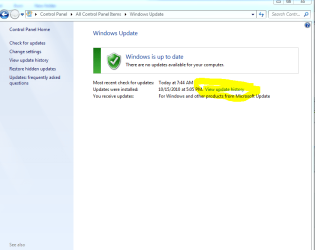
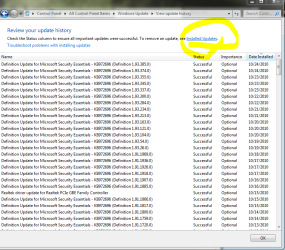
Left picture below open Win Update then click "View Update History" marked in yellow.

Next window to open is right picture and click "Installed Updates".

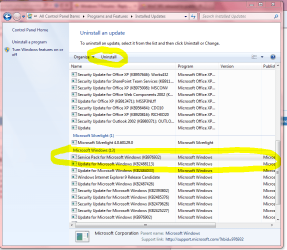
Bottom picture is of my listing and yours will be similar. Find the "Service Pack" I have highlighted in yellow if it is in the list.

If it is in the listing.
Highlight the Service Pack then click Uninstall circled in yellow at top left.
Follow prompts and Yes to restart when prompted.


Then run the Option One of below tutorial.
Clean out leftovers.
http://www.sevenforums.com/tutorials/122262-windows-7-sp1-disk-cleanup-tool.html

Then you can try to download again if you want.
It might work the second go.

This should get you back to the beginning at least.

If SP1 is not in the Update listing I'm stumped but will continue searching.

I don't guarantee the above will work.
Only thing I can think of at the moment.
I leave it to you.

Mike
 

Attachments

  • Windows Update.PNG
    Windows Update.PNG
    25.8 KB · Views: 208
  • Installed Updates.PNG
    Installed Updates.PNG
    25.7 KB · Views: 765
  • Service Pack.PNG
    Service Pack.PNG
    54.7 KB · Views: 330

My Computer My Computer

Computer Manufacturer/Model Number
Hopalong/ Godzilla
OS
Windows7 Pro 64bit SP-1; Windows XP Pro 32bit
CPU
Intel Core i7-870 Lynnfield 2.93GHz LGA 1156 95W Quad-Core
Motherboard
ASUS P7P55D-E PRO
Memory
8GB@1400MHz Crucial Ballistix DDR3-1600 4x2GB
Graphics Card(s)
ASUS ENGTX460 DirectCU/2DI/1GD5 1GB 256-bit GDDR5
Sound Card
VIA Onboard
Monitor(s) Displays
Asus VS248H-P 24"; Samsung SyncMaster 941BW 19"ws
Screen Resolution
1920x1080; 1440x900
Hard Drives
Samsung 830 120GB SSD
Intel 320 120GB SSD
Western Digital Caviar Black WD7501AALS 750GB 7200 RPM SATA 3.0Gb/s
Western Digital Caviar Black WD6401AALS 640GB 7200 RPM SATA 3.0Gb/s
PSU
COOLER MASTER Silent Pro RS850-AMBAJ3-US 850W Modular
Case
COOLER MASTER HAF 932 RC-932-KKN5-GP Black
Cooling
Scythe "Mugen-2 Rev.B" (2 ScytheKaze-Jyuni PWM fans)
Keyboard
Logitech K-320
Mouse
Kensington
Antivirus
Avast Inernet Suite
Browser
IE 9 ; Chrome
@Hopalong X: Great idea and instructions, but the service pack is not there. Thanks for the suggestion.

If I do a repair install, will I lose everything? What effect will it have on my system?
 

My Computer My Computer

Computer type
PC/Desktop
Computer Manufacturer/Model Number
Alienware Aurora-R4
OS
Windows 7 Professional x64
CPU
Intel(R) Core(TM) i7-3820 CPU, 4 Cores, 8 Logical Cores
Motherboard
Alienware
Memory
32 GB DDR3 1600
Graphics Card(s)
ATI Radeon HD 8950 3GB vDDR5 & ATI Radeon HD 7950 3GB vDDR5
Sound Card
Realtek 7.1 Audio
Monitor(s) Displays
Dell SP2309W 23 inch
Screen Resolution
2048x1152
Hard Drives
7.3 TB in 4 drives (Raid 0), 2TB NAS backup drive.
PSU
875w
Case
ALX Chasis with active venting
Cooling
Liquid cooled with active venting and fans.
Keyboard
Alienware TactX
Mouse
Alienware TactX
Internet Speed
15mb Cable
Antivirus
Malwarebytes
Browser
Pale Moon (Optimized Mozilla Based)
Other Info
http://www.y0himba.net
Here is the tutorial for repair install.
http://www.sevenforums.com/tutorials/3413-repair-install.html

As you can see early in the tutorial. I added the red lettering. Everything is saved.

This will show you how to do a repair install (aka: in-place upgrade install) to fix your currently installed Windows 7 and preserve your user accounts, data, programs, and system drivers.

Do a Repair installation if:
  • A System Restore did not help fix your Windows 7.
  • There is no other easier option left that can fix your Windows 7.
  • You DO NOT want to do a Clean reinstall of Windows 7.
  • You DO want to preserve your user accounts, data, programs, and system drivers.
Before repair install.

Also one more possibility. To the left of my yellow circle at top. Click the "Troubleshoot problems with installing updates."
It is a Wizard type window with choices to follow. Follow prompts.
If one set of choices doesn't work retry with new ones possibly will. Usually by third try your running on hope.

140121d1298517950-windows-7-sp1-install-fail-0x8007000e-installed-updates.png
 

My Computer My Computer

Computer Manufacturer/Model Number
Hopalong/ Godzilla
OS
Windows7 Pro 64bit SP-1; Windows XP Pro 32bit
CPU
Intel Core i7-870 Lynnfield 2.93GHz LGA 1156 95W Quad-Core
Motherboard
ASUS P7P55D-E PRO
Memory
8GB@1400MHz Crucial Ballistix DDR3-1600 4x2GB
Graphics Card(s)
ASUS ENGTX460 DirectCU/2DI/1GD5 1GB 256-bit GDDR5
Sound Card
VIA Onboard
Monitor(s) Displays
Asus VS248H-P 24"; Samsung SyncMaster 941BW 19"ws
Screen Resolution
1920x1080; 1440x900
Hard Drives
Samsung 830 120GB SSD
Intel 320 120GB SSD
Western Digital Caviar Black WD7501AALS 750GB 7200 RPM SATA 3.0Gb/s
Western Digital Caviar Black WD6401AALS 640GB 7200 RPM SATA 3.0Gb/s
PSU
COOLER MASTER Silent Pro RS850-AMBAJ3-US 850W Modular
Case
COOLER MASTER HAF 932 RC-932-KKN5-GP Black
Cooling
Scythe "Mugen-2 Rev.B" (2 ScytheKaze-Jyuni PWM fans)
Keyboard
Logitech K-320
Mouse
Kensington
Antivirus
Avast Inernet Suite
Browser
IE 9 ; Chrome
I have a few questions:

Looking at the guide, if I were to slipstream SP1 into my original Windows 7 DVD, I should be able to do a repair install with SP1 already included?

I have the 'My Documents' folder including My Music, My Videos, and so forth moved to my physical D: drive, and everything points there. Will the repair install break this?

Since I upgraded from Windows Vista, and the issue is possibly Vista files related, will the repair install fix the files that are causing errors? sfc /scannow found no integrity issues and performed no repairs. There were no errors at all. My Windows 7 is Vanilla, no user modifications to files. Normal tweaks.
 

My Computer My Computer

Computer type
PC/Desktop
Computer Manufacturer/Model Number
Alienware Aurora-R4
OS
Windows 7 Professional x64
CPU
Intel(R) Core(TM) i7-3820 CPU, 4 Cores, 8 Logical Cores
Motherboard
Alienware
Memory
32 GB DDR3 1600
Graphics Card(s)
ATI Radeon HD 8950 3GB vDDR5 & ATI Radeon HD 7950 3GB vDDR5
Sound Card
Realtek 7.1 Audio
Monitor(s) Displays
Dell SP2309W 23 inch
Screen Resolution
2048x1152
Hard Drives
7.3 TB in 4 drives (Raid 0), 2TB NAS backup drive.
PSU
875w
Case
ALX Chasis with active venting
Cooling
Liquid cooled with active venting and fans.
Keyboard
Alienware TactX
Mouse
Alienware TactX
Internet Speed
15mb Cable
Antivirus
Malwarebytes
Browser
Pale Moon (Optimized Mozilla Based)
Other Info
http://www.y0himba.net

My Computer My Computer

Computer Manufacturer/Model Number
Hopalong/ Godzilla
OS
Windows7 Pro 64bit SP-1; Windows XP Pro 32bit
CPU
Intel Core i7-870 Lynnfield 2.93GHz LGA 1156 95W Quad-Core
Motherboard
ASUS P7P55D-E PRO
Memory
8GB@1400MHz Crucial Ballistix DDR3-1600 4x2GB
Graphics Card(s)
ASUS ENGTX460 DirectCU/2DI/1GD5 1GB 256-bit GDDR5
Sound Card
VIA Onboard
Monitor(s) Displays
Asus VS248H-P 24"; Samsung SyncMaster 941BW 19"ws
Screen Resolution
1920x1080; 1440x900
Hard Drives
Samsung 830 120GB SSD
Intel 320 120GB SSD
Western Digital Caviar Black WD7501AALS 750GB 7200 RPM SATA 3.0Gb/s
Western Digital Caviar Black WD6401AALS 640GB 7200 RPM SATA 3.0Gb/s
PSU
COOLER MASTER Silent Pro RS850-AMBAJ3-US 850W Modular
Case
COOLER MASTER HAF 932 RC-932-KKN5-GP Black
Cooling
Scythe "Mugen-2 Rev.B" (2 ScytheKaze-Jyuni PWM fans)
Keyboard
Logitech K-320
Mouse
Kensington
Antivirus
Avast Inernet Suite
Browser
IE 9 ; Chrome
I slipstreamed SP1 and am in the process of a repair install with the slipstreamed disc. It is taking a LONG time, so I am afraid it is moving My Documents, Movies, Music Etc. back to the default C: drive location. Oh well, SP1 will already be installed so it is worth tweaking Windows 7 again.
 

My Computer My Computer

Computer type
PC/Desktop
Computer Manufacturer/Model Number
Alienware Aurora-R4
OS
Windows 7 Professional x64
CPU
Intel(R) Core(TM) i7-3820 CPU, 4 Cores, 8 Logical Cores
Motherboard
Alienware
Memory
32 GB DDR3 1600
Graphics Card(s)
ATI Radeon HD 8950 3GB vDDR5 & ATI Radeon HD 7950 3GB vDDR5
Sound Card
Realtek 7.1 Audio
Monitor(s) Displays
Dell SP2309W 23 inch
Screen Resolution
2048x1152
Hard Drives
7.3 TB in 4 drives (Raid 0), 2TB NAS backup drive.
PSU
875w
Case
ALX Chasis with active venting
Cooling
Liquid cooled with active venting and fans.
Keyboard
Alienware TactX
Mouse
Alienware TactX
Internet Speed
15mb Cable
Antivirus
Malwarebytes
Browser
Pale Moon (Optimized Mozilla Based)
Other Info
http://www.y0himba.net
Glad you seem to have everything under control.

Let us know if all is successful.

Sorry I couldn't be more help.
Mike
 

My Computer My Computer

Computer Manufacturer/Model Number
Hopalong/ Godzilla
OS
Windows7 Pro 64bit SP-1; Windows XP Pro 32bit
CPU
Intel Core i7-870 Lynnfield 2.93GHz LGA 1156 95W Quad-Core
Motherboard
ASUS P7P55D-E PRO
Memory
8GB@1400MHz Crucial Ballistix DDR3-1600 4x2GB
Graphics Card(s)
ASUS ENGTX460 DirectCU/2DI/1GD5 1GB 256-bit GDDR5
Sound Card
VIA Onboard
Monitor(s) Displays
Asus VS248H-P 24"; Samsung SyncMaster 941BW 19"ws
Screen Resolution
1920x1080; 1440x900
Hard Drives
Samsung 830 120GB SSD
Intel 320 120GB SSD
Western Digital Caviar Black WD7501AALS 750GB 7200 RPM SATA 3.0Gb/s
Western Digital Caviar Black WD6401AALS 640GB 7200 RPM SATA 3.0Gb/s
PSU
COOLER MASTER Silent Pro RS850-AMBAJ3-US 850W Modular
Case
COOLER MASTER HAF 932 RC-932-KKN5-GP Black
Cooling
Scythe "Mugen-2 Rev.B" (2 ScytheKaze-Jyuni PWM fans)
Keyboard
Logitech K-320
Mouse
Kensington
Antivirus
Avast Inernet Suite
Browser
IE 9 ; Chrome
5 hours so far. On the last step, "Transferring files, settings and programs (72%)". I think it may be transferring my music and videos back to the D: drive. I hope so at any rate.

I love my little Netbook, but I really wanted to play DDO while my wife was at work...

tedious.jpg
 

My Computer My Computer

Computer type
PC/Desktop
Computer Manufacturer/Model Number
Alienware Aurora-R4
OS
Windows 7 Professional x64
CPU
Intel(R) Core(TM) i7-3820 CPU, 4 Cores, 8 Logical Cores
Motherboard
Alienware
Memory
32 GB DDR3 1600
Graphics Card(s)
ATI Radeon HD 8950 3GB vDDR5 & ATI Radeon HD 7950 3GB vDDR5
Sound Card
Realtek 7.1 Audio
Monitor(s) Displays
Dell SP2309W 23 inch
Screen Resolution
2048x1152
Hard Drives
7.3 TB in 4 drives (Raid 0), 2TB NAS backup drive.
PSU
875w
Case
ALX Chasis with active venting
Cooling
Liquid cooled with active venting and fans.
Keyboard
Alienware TactX
Mouse
Alienware TactX
Internet Speed
15mb Cable
Antivirus
Malwarebytes
Browser
Pale Moon (Optimized Mozilla Based)
Other Info
http://www.y0himba.net
I slipstreamed SP1 and am in the process of a repair install with the slipstreamed disc. It is taking a LONG time, so I am afraid it is moving My Documents, Movies, Music Etc. back to the default C: drive location. Oh well, SP1 will already be installed so it is worth tweaking Windows 7 again.

Did you start this from in Windows?

Mine tells me that I cannot do it unless I have SP1 installed!
 

My Computer My Computer

Computer Manufacturer/Model Number
Custom Build
OS
Win7 Ultimate x64, Windows 8 Enterprise x64
CPU
AMD Phenom Quad Core 9865
Motherboard
Foxconn A6VMX
Memory
4GB
Graphics Card(s)
ATI RADEON HD3450
Sound Card
Realtek HD
Monitor(s) Displays
Samsung SyncMaster P2250
Screen Resolution
1920 x 1080
Hard Drives
Seagate ST380815AS (80GB) System Disk
Seagate ST31000528AS (1TB) - 2 Partitions (Programs & Storage)
Samsung HD1035SJ (1TB) - 3 Partitions (Downloads & BackUp)
PSU
450 watt
Case
Generic
Cooling
CPU & Case Fan
Keyboard
Logitech MK700
Mouse
Logitech M705
Internet Speed
20Gbs

My Computer My Computer

Computer Manufacturer/Model Number
Hopalong/ Godzilla
OS
Windows7 Pro 64bit SP-1; Windows XP Pro 32bit
CPU
Intel Core i7-870 Lynnfield 2.93GHz LGA 1156 95W Quad-Core
Motherboard
ASUS P7P55D-E PRO
Memory
8GB@1400MHz Crucial Ballistix DDR3-1600 4x2GB
Graphics Card(s)
ASUS ENGTX460 DirectCU/2DI/1GD5 1GB 256-bit GDDR5
Sound Card
VIA Onboard
Monitor(s) Displays
Asus VS248H-P 24"; Samsung SyncMaster 941BW 19"ws
Screen Resolution
1920x1080; 1440x900
Hard Drives
Samsung 830 120GB SSD
Intel 320 120GB SSD
Western Digital Caviar Black WD7501AALS 750GB 7200 RPM SATA 3.0Gb/s
Western Digital Caviar Black WD6401AALS 640GB 7200 RPM SATA 3.0Gb/s
PSU
COOLER MASTER Silent Pro RS850-AMBAJ3-US 850W Modular
Case
COOLER MASTER HAF 932 RC-932-KKN5-GP Black
Cooling
Scythe "Mugen-2 Rev.B" (2 ScytheKaze-Jyuni PWM fans)
Keyboard
Logitech K-320
Mouse
Kensington
Antivirus
Avast Inernet Suite
Browser
IE 9 ; Chrome
I have created the file, will try installing it over the weekend.

Thanks.
 

My Computer My Computer

Computer Manufacturer/Model Number
Custom Build
OS
Win7 Ultimate x64, Windows 8 Enterprise x64
CPU
AMD Phenom Quad Core 9865
Motherboard
Foxconn A6VMX
Memory
4GB
Graphics Card(s)
ATI RADEON HD3450
Sound Card
Realtek HD
Monitor(s) Displays
Samsung SyncMaster P2250
Screen Resolution
1920 x 1080
Hard Drives
Seagate ST380815AS (80GB) System Disk
Seagate ST31000528AS (1TB) - 2 Partitions (Programs & Storage)
Samsung HD1035SJ (1TB) - 3 Partitions (Downloads & BackUp)
PSU
450 watt
Case
Generic
Cooling
CPU & Case Fan
Keyboard
Logitech MK700
Mouse
Logitech M705
Internet Speed
20Gbs
Back
Top