Unable to run win7 on new motherboard

Robert S

New member
Local time
7:25 AM
Messages
13
I've had to replace my motherboard. When I start win7 it continuously reboots after the "starting windows 7" screen. I have tried the troubleshooting startup but it didn't detect any problems. I have also booted from the original win7 disk and run the repair utility but it didn't find any problems. I ran "bootsect /nt60 SYS /mbr" from the command prompt but this has not fixed the problem.

I've got Win7 Home edition OEM. Maybe this doesn't allow running off new hardware??

Has anyone got any suggestions?
 

My Computer My Computer

At a glance

Win 7 Home Premium
OS
Win 7 Home Premium
Sounds like a major driver issue.
Have you tried just f8 booting to safe mode?
...it's possible it won't support new hardware, that would be an activation issue though. Sounds like you aren't even getting in.
 

My Computer My Computer

At a glance

Windows 7 x64Intel i7 2600kG.skill Ripjaw 16gigs @ 1866Nvidia gtx580 (evga)
Computer Manufacturer/Model Number
Insane hobo technologies. ;-)
OS
Windows 7 x64
CPU
Intel i7 2600k
Motherboard
Asrock z68 extreme 4 gen 3
Memory
G.skill Ripjaw 16gigs @ 1866
Graphics Card(s)
Nvidia gtx580 (evga)
Sound Card
Integrated HD audio + hdmi
Monitor(s) Displays
24" ASUS widescreen + 42" insignia
Screen Resolution
1080p (1920x1080)
Hard Drives
128 Samsung 830
256 Samsung 840
3 x 1tb storage drive (various)
1 western digital 1tb (eSATA)
1 Seagate 1tb (eSATA)
PSU
1 kilowatt SLI/Crossfire rated Silverstone modular
Case
NZXT Phantom + additional 220 fan
Cooling
Zalmann
Keyboard
Microsoft wireless 3000 (v2)
Mouse
MS - wireless 5000 (bluetrack)
Internet Speed
depends on if you ask me or my provider.
Other Info
The above information is provided as is, and the author assumes no responsibility for issues it may cause with your sanity or fanboyism.
I've had to replace my motherboard. When I start win7 it continuously reboots after the "starting windows 7" screen. I have tried the troubleshooting startup but it didn't detect any problems. I have also booted from the original win7 disk and run the repair utility but it didn't find any problems. I ran "bootsect /nt60 SYS /mbr" from the command prompt but this has not fixed the problem.

I've got Win7 Home edition OEM. Maybe this doesn't allow running off new hardware??

Has anyone got any suggestions?

Your have a OEM copy of windows is tied to the original motherboard it was installed on unless replaced with the exact same make/model motherboard supplied by the OEM manufacturer and the replacement of the original motherboard may also have to be done by the manufacturer to reactivate OEM copy. A new/different motherboard will require a new retail copy of windows home premium of which has a different EULA and can be reinstalled on a different computer or reinstalled on the same computer repeatedly but only one computer at a time.

A retail copy also allows multiple hardware changes including Mobo but in some cases phone activation by Microsoft is required if windows does not validate after re-installation.
 

My Computer My Computer

At a glance

Windows 10 Pro x 2/Windows 11 HomeIntel i7 2600K @ 3.40 GHzCorsair Vengeance 16GB DDR3 1600MHz CL8 Dual ...EVGA GeForce RTX 3080 XC3 ULTRA GAMING 10GB G...
Computer type
PC/Desktop
Computer Manufacturer/Model Number
My own abomination, I call it the Money Pit
OS
Windows 10 Pro x 2/Windows 11 Home
CPU
Intel i7 2600K @ 3.40 GHz
Motherboard
ASUS Sabertooth P67
Memory
Corsair Vengeance 16GB DDR3 1600MHz CL8 Dual Channel Kit
Graphics Card(s)
EVGA GeForce RTX 3080 XC3 ULTRA GAMING 10GB GDDR6X
Sound Card
Onboard Realtek or Nvidia High Definition Audio (HDMI)
Monitor(s) Displays
Samsung JS7000 50" SUHD TV or Samsung 27" FHD 60Hz 8ms GTG V
Screen Resolution
1920 x 1080
Hard Drives
1 x Samsung 870 EVO 250 GB SSD (Windows 10 Pro), 1 x Samsung 850 EVO 250 GB SSD (Windows 10 Pro)
PSU
Corsair AX860 - 860W Modular Power Supply
Case
Phanteks Enthoo Luxe Full Tower Case - Black
Cooling
CORSAIR Hydro Series H150i PRO RGB 360mm Liquid CPU Cooler
Keyboard
Logitech K830 Illuminated Living-Room Keyboard
Mouse
Logitech MX Anywhere 2S Wireless Mouse
Internet Speed
100 Mbps
Antivirus
ESET Internet Security
Browser
Latest Version Of Firefox & Microsoft Edge Chromium Stable
Other Info
LG Super Multi Blue Internal Blu-ray Disk Rewriter - BH10LS30
6x2 HDMI Switcher (6 inputs, 2 outputs) so I can send the output of my Cable Box, Roku, or any my 4 computers to either my TV or Monitor separately or simultaneously.
Looks like a major drivers issue as Maguscreed has already pointed out. Get hold of a generic win7 install disk and do a clean install with that for the same edition that came preinstalled on the computer. That'll install generic drivers for most devices, you can update to specialized drivers later.

Activation is a separate issue. You can always use the COA sticker key and activate by phone.
 

My Computer My Computer

At a glance

Windows 7 x64 pro/ Windows 7 x86 Pro/ XP SP3 x86
Computer Manufacturer/Model Number
Too many to describe...
OS
Windows 7 x64 pro/ Windows 7 x86 Pro/ XP SP3 x86
It could be as simple as changing a setting or two in the BIOS of the new motherboard.
 

My Computer My Computer

At a glance

Windows 7 Ultimate 64bitIntel i7 3770K16GB DDR3 1333 Corsair XMS3XFX HD6950 2GB EyeFinity
Computer Manufacturer/Model Number
HAL-9000
OS
Windows 7 Ultimate 64bit
CPU
Intel i7 3770K
Motherboard
Asus Sabertooth Z77
Memory
16GB DDR3 1333 Corsair XMS3
Graphics Card(s)
XFX HD6950 2GB EyeFinity
Sound Card
Logitech G35 & Sennheiser PC135 & VIA HD
Monitor(s) Displays
23" HP 2310e, 23" Samsung B2230, 21.5" Viewsonic
Screen Resolution
5760x1080
Hard Drives
16TB of Storage
128GB & 256GB Crucial M4 SSD's, 2X 1TB WD Black, 3x 2TB WD, 3x 2TB Samsung F4, 1.5TB Seagate, WD 500GB,
PSU
Antec True Power New 650watt
Case
Cooler Master HAF-932
Cooling
Corsair H60 Hydro Cooler, 3x 230mm Fans, 2x120mm Fan
Keyboard
Logitech G15 and G13
Mouse
Logitech G700 Gaming Mouse
Internet Speed
50/10 Mbit
Other Info
Speakers : Alesis M1 Active Mk2 Studio Monitors , APC RS 1200 UPS, HP 4500DN Color Laser, HP P1006 mono Laser, Kodak 8500 Dye-Sub, Epson 1280 inkjet, Epson Worforce 610 MFC
I ended up doing a fresh install. Managed to activate it no problems. I had to purchase new antivirus but it was cheaper than a retail edition of W7.
 

My Computer My Computer

At a glance

Win 7 Home Premium
OS
Win 7 Home Premium
I ended up doing a fresh install. Managed to activate it no problems. I had to purchase new antivirus but it was cheaper than a retail edition of W7.

Glad you were able to re-activate after a fresh install. This tutorial will show you how to make a system image that does not require re-activation when used. It also restores your system to the same condition as when it was created. There are also lots of really good free 3rd party imaging solutions such as Macrium reflect, free Acronis editions for owners of WD and Seagate drives and a free Paragon backup/restore edition available, some of which are listed here.
 

My Computer My Computer

At a glance

Windows 10 Pro x 2/Windows 11 HomeIntel i7 2600K @ 3.40 GHzCorsair Vengeance 16GB DDR3 1600MHz CL8 Dual ...EVGA GeForce RTX 3080 XC3 ULTRA GAMING 10GB G...
Computer type
PC/Desktop
Computer Manufacturer/Model Number
My own abomination, I call it the Money Pit
OS
Windows 10 Pro x 2/Windows 11 Home
CPU
Intel i7 2600K @ 3.40 GHz
Motherboard
ASUS Sabertooth P67
Memory
Corsair Vengeance 16GB DDR3 1600MHz CL8 Dual Channel Kit
Graphics Card(s)
EVGA GeForce RTX 3080 XC3 ULTRA GAMING 10GB GDDR6X
Sound Card
Onboard Realtek or Nvidia High Definition Audio (HDMI)
Monitor(s) Displays
Samsung JS7000 50" SUHD TV or Samsung 27" FHD 60Hz 8ms GTG V
Screen Resolution
1920 x 1080
Hard Drives
1 x Samsung 870 EVO 250 GB SSD (Windows 10 Pro), 1 x Samsung 850 EVO 250 GB SSD (Windows 10 Pro)
PSU
Corsair AX860 - 860W Modular Power Supply
Case
Phanteks Enthoo Luxe Full Tower Case - Black
Cooling
CORSAIR Hydro Series H150i PRO RGB 360mm Liquid CPU Cooler
Keyboard
Logitech K830 Illuminated Living-Room Keyboard
Mouse
Logitech MX Anywhere 2S Wireless Mouse
Internet Speed
100 Mbps
Antivirus
ESET Internet Security
Browser
Latest Version Of Firefox & Microsoft Edge Chromium Stable
Other Info
LG Super Multi Blue Internal Blu-ray Disk Rewriter - BH10LS30
6x2 HDMI Switcher (6 inputs, 2 outputs) so I can send the output of my Cable Box, Roku, or any my 4 computers to either my TV or Monitor separately or simultaneously.
Before updating from WinXP to Vista Home Premium to Vista Ultimate I have always used third party backup software. However, since Vista Ulitmate I have been using the backup and restore feature in Windows. I am pleasantly surprised how easy and efficient it is. Also, it saves me the cost of updating third party software.

After making the present clean install of Win7 Ultimate x64 I used Windows backup feature and made a backup image of my C:/ partition to one of my external hdd's.

It's efficient, free and very easy:).
 

My Computer My Computer

At a glance

Win7 Ultimate x64Intel Core i7 950 (4x 3066 MHz with HT) Quad ...6GB DDR3 1333MhzNvidia GTS 450 (1024MB GDDR5 | DX 11)
Computer Manufacturer/Model Number
Deviantsystems
OS
Win7 Ultimate x64
CPU
Intel Core i7 950 (4x 3066 MHz with HT) Quad Core
Motherboard
Asus P6X58D-E
Memory
6GB DDR3 1333Mhz
Graphics Card(s)
Nvidia GTS 450 (1024MB GDDR5 | DX 11)
Sound Card
Intel HD Audio via Realtek ALC889 with 8-channel support
Monitor(s) Displays
Sony Bravia 32"
Screen Resolution
1080i, x1768x992
Hard Drives
2x WD 1TB 7200 RPM Sata
PSU
OCZ ModXStream Pro 600W 80+
Case
Lian Li PC-7FN
Cooling
Processor cooling: Scythe Big Shuriken SCBSK-1000
Keyboard
Microsoft Ergonomic
Mouse
Logitec Trackball
I've had to replace my motherboard. When I start win7 it continuously reboots after the "starting windows 7" screen. I have tried the troubleshooting startup but it didn't detect any problems. I have also booted from the original win7 disk and run the repair utility but it didn't find any problems. I ran "bootsect /nt60 SYS /mbr" from the command prompt but this has not fixed the problem.

I've got Win7 Home edition OEM. Maybe this doesn't allow running off new hardware??

Has anyone got any suggestions?

Your have a OEM copy of windows is tied to the original motherboard it was installed on unless replaced with the exact same make/model motherboard supplied by the OEM manufacturer and the replacement of the original motherboard may also have to be done by the manufacturer to reactivate OEM copy. A new/different motherboard will require a new retail copy of windows home premium of which has a different EULA and can be reinstalled on a different computer or reinstalled on the same computer repeatedly but only one computer at a time.

A retail copy also allows multiple hardware changes including Mobo but in some cases phone activation by Microsoft is required if windows does not validate after re-installation.

I am glad that Robert S was able to solve his problem but isn't what you posted about the OEM copy of windows being tied to the mobo correct?
 

My Computer My Computer

At a glance

Win7 Ultimate x64Intel Core i7 950 (4x 3066 MHz with HT) Quad ...6GB DDR3 1333MhzNvidia GTS 450 (1024MB GDDR5 | DX 11)
Computer Manufacturer/Model Number
Deviantsystems
OS
Win7 Ultimate x64
CPU
Intel Core i7 950 (4x 3066 MHz with HT) Quad Core
Motherboard
Asus P6X58D-E
Memory
6GB DDR3 1333Mhz
Graphics Card(s)
Nvidia GTS 450 (1024MB GDDR5 | DX 11)
Sound Card
Intel HD Audio via Realtek ALC889 with 8-channel support
Monitor(s) Displays
Sony Bravia 32"
Screen Resolution
1080i, x1768x992
Hard Drives
2x WD 1TB 7200 RPM Sata
PSU
OCZ ModXStream Pro 600W 80+
Case
Lian Li PC-7FN
Cooling
Processor cooling: Scythe Big Shuriken SCBSK-1000
Keyboard
Microsoft Ergonomic
Mouse
Logitec Trackball
I've had to replace my motherboard. When I start win7 it continuously reboots after the "starting windows 7" screen. I have tried the troubleshooting startup but it didn't detect any problems. I have also booted from the original win7 disk and run the repair utility but it didn't find any problems. I ran "bootsect /nt60 SYS /mbr" from the command prompt but this has not fixed the problem.

I've got Win7 Home edition OEM. Maybe this doesn't allow running off new hardware??

Has anyone got any suggestions?

Your have a OEM copy of windows is tied to the original motherboard it was installed on unless replaced with the exact same make/model motherboard supplied by the OEM manufacturer and the replacement of the original motherboard may also have to be done by the manufacturer to reactivate OEM copy. A new/different motherboard will require a new retail copy of windows home premium of which has a different EULA and can be reinstalled on a different computer or reinstalled on the same computer repeatedly but only one computer at a time.

A retail copy also allows multiple hardware changes including Mobo but in some cases phone activation by Microsoft is required if windows does not validate after re-installation.

I am glad that Robert S was able to solve his problem but isn't what you posted about the OEM copy of windows being tied to the mobo correct?

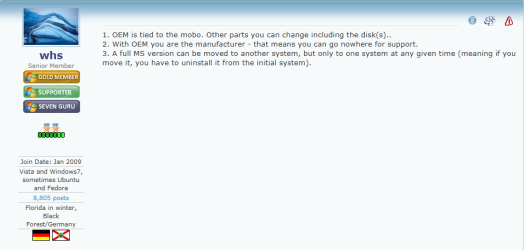
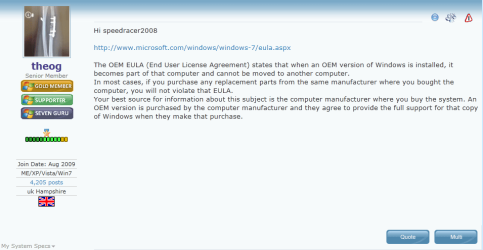
Hi C32C3, From the thread OEM version - a little info please...

2011-02-26_033411.png2011-02-26_032313.png

License Terms

Fill in required fields in above link for Clarification.
 
Last edited:

My Computer My Computer

At a glance

Windows 10 Pro x 2/Windows 11 HomeIntel i7 2600K @ 3.40 GHzCorsair Vengeance 16GB DDR3 1600MHz CL8 Dual ...EVGA GeForce RTX 3080 XC3 ULTRA GAMING 10GB G...
Computer type
PC/Desktop
Computer Manufacturer/Model Number
My own abomination, I call it the Money Pit
OS
Windows 10 Pro x 2/Windows 11 Home
CPU
Intel i7 2600K @ 3.40 GHz
Motherboard
ASUS Sabertooth P67
Memory
Corsair Vengeance 16GB DDR3 1600MHz CL8 Dual Channel Kit
Graphics Card(s)
EVGA GeForce RTX 3080 XC3 ULTRA GAMING 10GB GDDR6X
Sound Card
Onboard Realtek or Nvidia High Definition Audio (HDMI)
Monitor(s) Displays
Samsung JS7000 50" SUHD TV or Samsung 27" FHD 60Hz 8ms GTG V
Screen Resolution
1920 x 1080
Hard Drives
1 x Samsung 870 EVO 250 GB SSD (Windows 10 Pro), 1 x Samsung 850 EVO 250 GB SSD (Windows 10 Pro)
PSU
Corsair AX860 - 860W Modular Power Supply
Case
Phanteks Enthoo Luxe Full Tower Case - Black
Cooling
CORSAIR Hydro Series H150i PRO RGB 360mm Liquid CPU Cooler
Keyboard
Logitech K830 Illuminated Living-Room Keyboard
Mouse
Logitech MX Anywhere 2S Wireless Mouse
Internet Speed
100 Mbps
Antivirus
ESET Internet Security
Browser
Latest Version Of Firefox & Microsoft Edge Chromium Stable
Other Info
LG Super Multi Blue Internal Blu-ray Disk Rewriter - BH10LS30
6x2 HDMI Switcher (6 inputs, 2 outputs) so I can send the output of my Cable Box, Roku, or any my 4 computers to either my TV or Monitor separately or simultaneously.
Back
Top