Solved "Windows was unable to complete the format." Help!

icevonshredula

New member
Member
Local time
10:21 AM
Messages
30
Hello. I'm trying to format one of my two hard drives in NTFS with Windows 7 64-bit, but I receive the error message:
Code:
Windows was unable to complete the format.
I installed a new 1TB SATA drive yesterday along with a 120GB HDD (IDE) which I already had. After installing Windows 7 on the new 1TB and backing up all of my AppData and documents from my original 120GB, I tried to reformat the old disk and received this error.

Since the installation of Windows 7 on the 1TB, I also changed the drive letters of both disks and did so in both of the installed operating systems. They do not match each other. This is what I fear may be the cause of the problem.

On a side note, I ran "chkdsk" in the cmd and received:
Code:
Access Denied as you do not have suffficient privileges.
You have to invoke this utility running in elevated mode.
I'm guessing this means I have to run the cmd in an administator mode somehow? My account is an administrator, but I don't know how to run the cmd this way, so could someone explain to me how to do this?

Anyway if anyone knows how I can fix this, I'd really appreciate some help! Thanks.
 

My Computer My Computer

OS
Windows 7 Ultimate 64-bit
Hi,

To run chkdsk as an administrator do the following:

1. Click Start Orb, type cmd in the search box.
2. Right-click on cmd, and choose "Run as adminstrator", then hit enter.
3. Now type chkdsk /f, and hit enter.

Regards,
Golden
 

My Computer My Computer

Computer type
PC/Desktop
Computer Manufacturer/Model Number
Golden Mk. I.4
OS
Windows 10 Pro x64 ; Xubuntu x64
CPU
Intel i7 860 @ 2.80 GHz O/C'ed to 4.0GHz
Motherboard
Gigabyte P55A-UD3R Rev.1. Award BIOS F13
Memory
16GB Corsair Vengance DDR3 @ 661 MHz Dual Channel (9-9-9-24)
Graphics Card(s)
EVGA NVidia GTX 560 1024MB
Sound Card
Realtek Integrated
Monitor(s) Displays
Dual Samsung SyncMaster 2494HS
Screen Resolution
1920*1080 and 1920*1080
Hard Drives
1*Samsung 840 EVO 120GB SSD;
1*OCZ Vertex 2 60GB SSD;
2*Samsung F3 SpinPoint 1TB in RAID0;
1*Samsung F1 SpinPoint 1TB;
2*Western Digital 1TB External USB 3.0
1*Western Digital 500GB External USB 3.0
1*Seagate 500GB External USB 2.0
PSU
Thermaltake ToughPower QFan 750W
Case
Thermaltake Element S VK60001W2Z
Cooling
Corsair H60 Water Cooling, 2*230mm and 2*80mm case fans
Keyboard
Logitech G110
Mouse
Logitech MX518
Hi,

To run chkdsk as an administrator do the following:

1. Click Start Orb, type cmd in the search box.
2. Right-click on cmd, and choose "Run as adminstrator", then hit enter.
3. Now type chkdsk /f, and hit enter.

Regards,
Golden
Awesome, thanks. Not sure if I'll need to use it yet, but good to know.

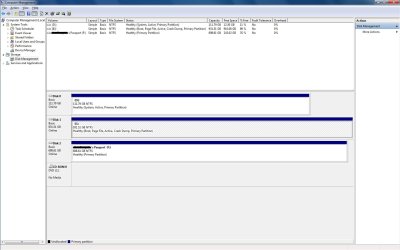
As for my disk management, here's a screenshot of the whole window:

Disk Management.jpg

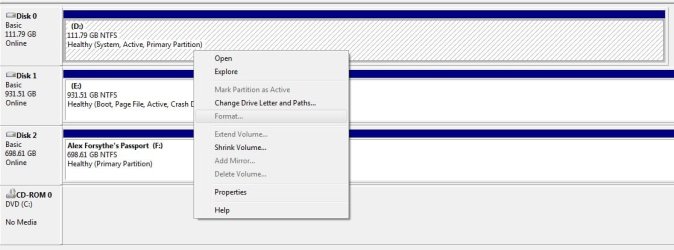
And here's what it looks like when I attempt to format the disk:

Format Attempt.jpg

As you can see, there isn't actually an option to format the 120GB from my disk management window. The only way I've attempted to format the disk is straight from explorer.
 

My Computer My Computer

OS
Windows 7 Ultimate 64-bit
Your Disk Management screenshot is showing you may be Dual booting, & have NO C: HD drive.
Therefore your D: is the boot drive & can not be formated.
 

My Computer My Computer

OS
ME/XP/Vista/Win7
Hello.


You will need to move the data cable of the 1TB "Disk 1" to the #1 SATA port of the motherboard and set it as the second boot device after the CD/DVD drive and do the 3 separate startup repairs with the restarts discussed in this tutorial at the link below to create the "System" boot files to that Windows partition then the older HDD can be formatted.


Startup Repair - Run 3 Separate Times

How to Run a Startup Repair in Windows 7


Be sure to post back with any further questions you may have and to keep us informed.
 

My Computer My Computer

Computer Manufacturer/Model Number
* BFK Customs *
OS
W 7 64-bit Ultimate
CPU
Intel Q9550 Yorkfield
Motherboard
ASUS P5Q Pro
Memory
8GB Dominator 8500C5D
Graphics Card(s)
ATI : XFX 5870
Sound Card
Realtek HD Audio 7-1
Monitor(s) Displays
1x 47" LCD HDMI & 3x 26" LCD HDMI
Screen Resolution
1920x1080P & 1920x1200
Hard Drives
1x 80GB Intel X25-M G2 SSD : 1x 500GB & 1x 640GB WD Caviar Black(s)
PSU
Corsair 620HX
Case
Cooler Master RC-690
Cooling
Tuniq Tower 120, 2x 140mm and 3x 120mm case fans
Keyboard
Microsoft 500
Mouse
Razer Diamondback 3G
Internet Speed
14 Mb/s
Other Info
1x Koutech 3Gb/s SATA HDD Hot Swap Rack
Because you installed to new HD with old HD plugged in, it configured a Dual Boot placing the System files on the old HD. You need to recover the boot files into the new install by running Repairs with the old HD unplugged.

Once you swap the 1tb to DISK0, set as first HD to boot in BIOS setup then run 3 startup repairs from DVD/Repair CD until it starts on its own, you can plug back in the smaller HD as DISK1 to wipe it with Diskpart Clean All command: http://www.sevenforums.com/tutorials/52129-disk-clean-clean-all-diskpart-command.html
 
Agree with theog, Bare Foot Kid and gregrocker.

Your boot files are on the old 120GB drive, win7 won't let you format it because then your computer would not boot.
In your Disk Mangement snip, Disc0, where it says: "Healthy (System, Active, Primary partition)" the 'System' indicates where your boot files are, in this case the 120GB drive.

Follow the advice in the above posts and you will be able to boot your new OS and format the old drive.
 

My Computer My Computer

Computer type
PC/Desktop
Computer Manufacturer/Model Number
76~2.0
OS
Windows 7 Ult x64 - SP1/ Windows 8 Pro x64
CPU
Intel Core i5-3570K 4.6GHz
Motherboard
Gigabyte GA-Z77X UD3H, f18
Memory
8GB (2X4GB) DDR3 1600 Corsair Vengeance CL8 1.5v
Graphics Card(s)
Sapphire HD 7770 Vapor-X OC 1GB DDR5
Sound Card
Onboard VIA VT2021
Monitor(s) Displays
22" LCD Dell
Screen Resolution
1680x1050
Hard Drives
Samsung 840Pro 128GB SSD,
Seagate Barracuda 500GB SATA2 7200rpm 32MB cache, Seagate Barracuda 1TB SATA2 7200rpm 32MB cache,
PSU
Corsair HX650W
Case
Cooler Master Storm Scout
Cooling
Corsair H80 2x12cm Noctua NF P12 , 2x14cm case fans
Keyboard
Logitech Wave
Mouse
CM Sentinel
Internet Speed
Dismal
Antivirus
Avast
Browser
Opera Next
Other Info
Haswell laptop: HP Envy 17t-j, i7-4700MQ, GeForce 740M 2GB DDR3, 17.3" Full HD 1920x1080, 16GB RAM, Samsung 840 Pro 128GB, 1TB Hitachi 7200 HDD,
Desktop: eSATA ports,
External eSATA Seagate 500GB SATA2 7200rpm,
External WD USB 500GB

My Computer My Computer

OS
Windows 7 Ultimate 64-bit
Yes , much quicker - commands are the way to go.

You might still want to set the HD containing windows ( Disk1 ) as first in bios order - saves bios checking the other hd first.
 

My Computers My Computers

System One System Two

  • Computer type
    PC/Desktop
    OS
    7 X64
    CPU
    i5 8400
    Motherboard
    gigabyte b365m ds3h
    Memory
    2x8gb 3200mhz
    Hard Drives
    various
    PSU
    pure power 11 400w cm
    Case
    Coolermaster
    Cooling
    cryorig m9i
  • Computer type
    PC/Desktop
    OS
    7x64
    CPU
    g5400
    Motherboard
    ga b365m ds3h
    Memory
    8gb ddr4 2400
    PSU
    xfx pro 450w
Good to see you got it running and thanks for the update.
 

My Computer My Computer

Computer Manufacturer/Model Number
* BFK Customs *
OS
W 7 64-bit Ultimate
CPU
Intel Q9550 Yorkfield
Motherboard
ASUS P5Q Pro
Memory
8GB Dominator 8500C5D
Graphics Card(s)
ATI : XFX 5870
Sound Card
Realtek HD Audio 7-1
Monitor(s) Displays
1x 47" LCD HDMI & 3x 26" LCD HDMI
Screen Resolution
1920x1080P & 1920x1200
Hard Drives
1x 80GB Intel X25-M G2 SSD : 1x 500GB & 1x 640GB WD Caviar Black(s)
PSU
Corsair 620HX
Case
Cooler Master RC-690
Cooling
Tuniq Tower 120, 2x 140mm and 3x 120mm case fans
Keyboard
Microsoft 500
Mouse
Razer Diamondback 3G
Internet Speed
14 Mb/s
Other Info
1x Koutech 3Gb/s SATA HDD Hot Swap Rack
Ah yes. I did set the BIOS correctly, though I forgot to mention that. Thanks :)
 

My Computer My Computer

OS
Windows 7 Ultimate 64-bit
Good to see all is going well.
 

My Computer My Computer

Computer Manufacturer/Model Number
* BFK Customs *
OS
W 7 64-bit Ultimate
CPU
Intel Q9550 Yorkfield
Motherboard
ASUS P5Q Pro
Memory
8GB Dominator 8500C5D
Graphics Card(s)
ATI : XFX 5870
Sound Card
Realtek HD Audio 7-1
Monitor(s) Displays
1x 47" LCD HDMI & 3x 26" LCD HDMI
Screen Resolution
1920x1080P & 1920x1200
Hard Drives
1x 80GB Intel X25-M G2 SSD : 1x 500GB & 1x 640GB WD Caviar Black(s)
PSU
Corsair 620HX
Case
Cooler Master RC-690
Cooling
Tuniq Tower 120, 2x 140mm and 3x 120mm case fans
Keyboard
Microsoft 500
Mouse
Razer Diamondback 3G
Internet Speed
14 Mb/s
Other Info
1x Koutech 3Gb/s SATA HDD Hot Swap Rack
Back
Top