Solved Dual boot original Vista with Windows 7?

Hi ,

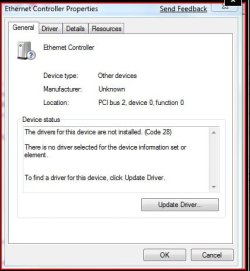
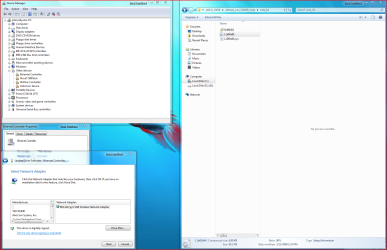
Just saw the screenshot - try updating the Ethernet Controller, browse to the Vista folder (whichever bit version you have ) and see if it picks it up.


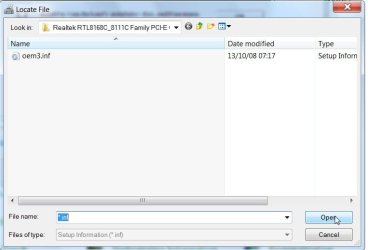
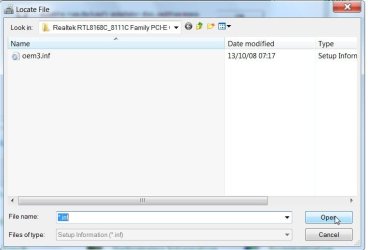
The LIE60 is the one to Open when you get to the bit that asks for the .inf
DD102009-01-19_010837.jpg


SIW2
 

My Computers My Computers

  • At a glance

    7 X64i5 84002x8gb 3200mhz
    Computer type
    PC/Desktop
    OS
    7 X64
    CPU
    i5 8400
    Motherboard
    gigabyte b365m ds3h
    Memory
    2x8gb 3200mhz
    Hard Drives
    various
    PSU
    pure power 11 400w cm
    Case
    Coolermaster
    Cooling
    cryorig m9i
  • At a glance

    7x64g54008gb ddr4 2400
    Computer type
    PC/Desktop
    OS
    7x64
    CPU
    g5400
    Motherboard
    ga b365m ds3h
    Memory
    8gb ddr4 2400
    PSU
    xfx pro 450w
Just looked in Vista device manager and expanded every item and there's no mention at all of an ethernet controller. I'm confused. Thanks for your time, J
 

My Computer My Computer

At a glance

Windows 7 Home Premium 64 biti7 [email protected]2x4GB Corsair Vegeance DDR3XFX GTX 260 Black Edition
Computer Manufacturer/Model Number
The Monolith. 3.1
OS
Windows 7 Home Premium 64 bit
CPU
i7 [email protected]
Motherboard
Gigabyte Z77-D3H
Memory
2x4GB Corsair Vegeance DDR3
Graphics Card(s)
XFX GTX 260 Black Edition
Sound Card
none-through large stereo hi fi
Monitor(s) Displays
Croosover 27MDP LED IPS Dell 2408 WFP
Screen Resolution
2560x1440 1920x1200
Hard Drives
1x Samsung 840Pro 128GB SSD
1x Samsung Spinpoint F1 1TB
PSU
Corsair AX 850 Watt
Case
Cooler Master ACTS 840
Cooling
Be Quiet! Dark Rock Pro
Keyboard
Enermax Aurora
Mouse
Logitech Ballmouse
Internet Speed
20MBPS
Sorry for being dumb but you lost me there. I'm running 64 bit Vista. Where's the Vista folder. Do you mean find it in Vista and transfer it?
Also, back in & what do I do with it and what do I do with the inf. in LIE60 assuming I find it? Thanks,J
 

My Computer My Computer

At a glance

Windows 7 Home Premium 64 biti7 [email protected]2x4GB Corsair Vegeance DDR3XFX GTX 260 Black Edition
Computer Manufacturer/Model Number
The Monolith. 3.1
OS
Windows 7 Home Premium 64 bit
CPU
i7 [email protected]
Motherboard
Gigabyte Z77-D3H
Memory
2x4GB Corsair Vegeance DDR3
Graphics Card(s)
XFX GTX 260 Black Edition
Sound Card
none-through large stereo hi fi
Monitor(s) Displays
Croosover 27MDP LED IPS Dell 2408 WFP
Screen Resolution
2560x1440 1920x1200
Hard Drives
1x Samsung 840Pro 128GB SSD
1x Samsung Spinpoint F1 1TB
PSU
Corsair AX 850 Watt
Case
Cooler Master ACTS 840
Cooling
Be Quiet! Dark Rock Pro
Keyboard
Enermax Aurora
Mouse
Logitech Ballmouse
Internet Speed
20MBPS
Hi,

Go back a couple of pages to my posts #33 and #34- instead of updating the Network Adapter, try updating this

DD152009-01-19_214634.jpg


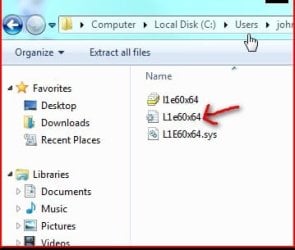
The folder you browse to is this one you posted earlier (assuming you have 64bit 7 installed

DD162009-01-19_214722.jpg

When you get to this , where it asks for the .inf,

DD102009-01-19_010837.jpg

this is the one you open

DD172009-01-19_214827.jpg

May not work, but it's worth a go.

SIW2
 

My Computers My Computers

  • At a glance

    7 X64i5 84002x8gb 3200mhz
    Computer type
    PC/Desktop
    OS
    7 X64
    CPU
    i5 8400
    Motherboard
    gigabyte b365m ds3h
    Memory
    2x8gb 3200mhz
    Hard Drives
    various
    PSU
    pure power 11 400w cm
    Case
    Coolermaster
    Cooling
    cryorig m9i
  • At a glance

    7x64g54008gb ddr4 2400
    Computer type
    PC/Desktop
    OS
    7x64
    CPU
    g5400
    Motherboard
    ga b365m ds3h
    Memory
    8gb ddr4 2400
    PSU
    xfx pro 450w
Not that I'm showing off like, but over the weekend I implemented a triple install of Windows 7 x86, Windows 7 x64 & my production Vista x86 install.

Had to install the x64 vista by booting to the DVD from BIOS rather than from within Vista or Windows 7 x86, but apart from that it was really easy to implement.

The only slight confusion is that when booting up you then have 2 x 'Windows 7' as well as 'Microsoft Windows Vista', and have to remember which Windows 7 is which! (you would have thought they would have labelled them x64 & x86 to help in this!).

This is the first time that I've installed an x64 OS despite having a 64-bit processor, and I'm pleased to see that there were no problems over that found with legacy devices in x86, with the slight exception of my old V.92 modem (which I never use now and is not connected to the phone line) for which there does not seem to be a 64-bit driver.

x64 is very fast indeed, and I am so impressed that I will be buying x64 RTM when it goes on sale. The x86 Windows 7 Beta has now been ditched!
 

My Computer My Computer

At a glance

Windows 7 Home Premium x64Pentium D 9454GB 667MHz DDR2NVidia 8800GT
OS
Windows 7 Home Premium x64
CPU
Pentium D 945
Motherboard
Dell DXP051
Memory
4GB 667MHz DDR2
Graphics Card(s)
NVidia 8800GT
Sound Card
Soundblaster Audigy 2 ZS
Monitor(s) Displays
1680 x 1050
Screen Resolution
1680 x 1050
Hard Drives
1 x Intel MX-25 G2 SSD, 1 x 7200RPM Western Digital
PSU
Stock Dell
Case
Stock Dell XPS400
Cooling
Stock Dell XPS400
Internet Speed
13.4Mbps Throughput / 15.3Mbps Synch
Hi ceejay,

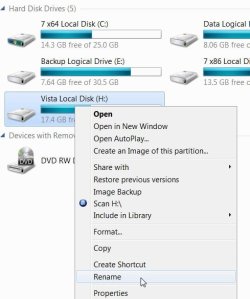
You could change the Disk Label like this,

RENAME2009-01-19_221122.jpg


or through bcdedit, or you may like to get the free EasyBCD and iReboot from this site - think you'll find them useful

Download EasyBCD 1.7.2 - NeoSmart Technologies

Hope it helps

SIW2
 

My Computers My Computers

  • At a glance

    7 X64i5 84002x8gb 3200mhz
    Computer type
    PC/Desktop
    OS
    7 X64
    CPU
    i5 8400
    Motherboard
    gigabyte b365m ds3h
    Memory
    2x8gb 3200mhz
    Hard Drives
    various
    PSU
    pure power 11 400w cm
    Case
    Coolermaster
    Cooling
    cryorig m9i
  • At a glance

    7x64g54008gb ddr4 2400
    Computer type
    PC/Desktop
    OS
    7x64
    CPU
    g5400
    Motherboard
    ga b365m ds3h
    Memory
    8gb ddr4 2400
    PSU
    xfx pro 450w
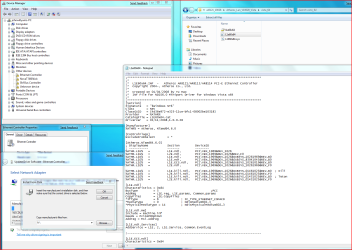
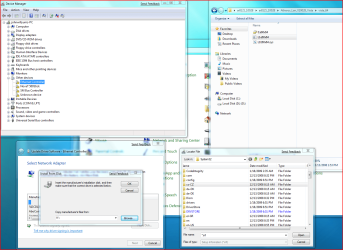
Hi. I've tried to follow what you said but did not get to a file asking for inf. just one that wanted and a correct drive and had a blued out in the box. Here's a couple of screenshots . I had already browsed to the zip file with the 64 file in it so I opened that but nothing happened.
I have the impression I'm getting closer, am I living in a fools paradise?:confused:
 

Attachments

  • Screenshot 1.PNG
    Screenshot 1.PNG
    143.3 KB · Views: 119
  • screenshot2.PNG
    screenshot2.PNG
    118 KB · Views: 35

My Computer My Computer

At a glance

Windows 7 Home Premium 64 biti7 [email protected]2x4GB Corsair Vegeance DDR3XFX GTX 260 Black Edition
Computer Manufacturer/Model Number
The Monolith. 3.1
OS
Windows 7 Home Premium 64 bit
CPU
i7 [email protected]
Motherboard
Gigabyte Z77-D3H
Memory
2x4GB Corsair Vegeance DDR3
Graphics Card(s)
XFX GTX 260 Black Edition
Sound Card
none-through large stereo hi fi
Monitor(s) Displays
Croosover 27MDP LED IPS Dell 2408 WFP
Screen Resolution
2560x1440 1920x1200
Hard Drives
1x Samsung 840Pro 128GB SSD
1x Samsung Spinpoint F1 1TB
PSU
Corsair AX 850 Watt
Case
Cooler Master ACTS 840
Cooling
Be Quiet! Dark Rock Pro
Keyboard
Enermax Aurora
Mouse
Logitech Ballmouse
Internet Speed
20MBPS
Got to sleep now, got an early start tomorrow. Thanks again, J
 

My Computer My Computer

At a glance

Windows 7 Home Premium 64 biti7 [email protected]2x4GB Corsair Vegeance DDR3XFX GTX 260 Black Edition
Computer Manufacturer/Model Number
The Monolith. 3.1
OS
Windows 7 Home Premium 64 bit
CPU
i7 [email protected]
Motherboard
Gigabyte Z77-D3H
Memory
2x4GB Corsair Vegeance DDR3
Graphics Card(s)
XFX GTX 260 Black Edition
Sound Card
none-through large stereo hi fi
Monitor(s) Displays
Croosover 27MDP LED IPS Dell 2408 WFP
Screen Resolution
2560x1440 1920x1200
Hard Drives
1x Samsung 840Pro 128GB SSD
1x Samsung Spinpoint F1 1TB
PSU
Corsair AX 850 Watt
Case
Cooler Master ACTS 840
Cooling
Be Quiet! Dark Rock Pro
Keyboard
Enermax Aurora
Mouse
Logitech Ballmouse
Internet Speed
20MBPS
Hi John,

It won't be able to pick up the drivers while they are compressed (zipped).

Rt click the zip file and select Extract - then do as before, but this time pick up the uncompressed x64 folder.

See if that does the trick

SIW2
 

My Computers My Computers

  • At a glance

    7 X64i5 84002x8gb 3200mhz
    Computer type
    PC/Desktop
    OS
    7 X64
    CPU
    i5 8400
    Motherboard
    gigabyte b365m ds3h
    Memory
    2x8gb 3200mhz
    Hard Drives
    various
    PSU
    pure power 11 400w cm
    Case
    Coolermaster
    Cooling
    cryorig m9i
  • At a glance

    7x64g54008gb ddr4 2400
    Computer type
    PC/Desktop
    OS
    7x64
    CPU
    g5400
    Motherboard
    ga b365m ds3h
    Memory
    8gb ddr4 2400
    PSU
    xfx pro 450w
Good morning SIW2,
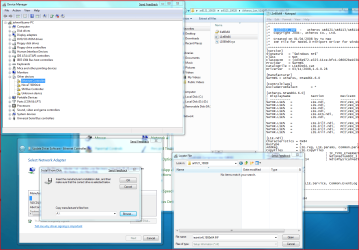
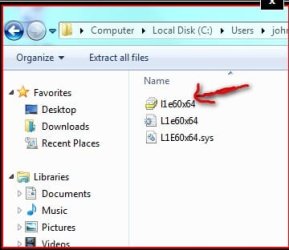
Tried as you suggested and extracted the zip file. This gave me ar8121_10028 on my desktop. I then went through the process again and this time got to the request for inf. (blued) I tried opening the 64 bit L1e60x64 file (the middle one) and it just opened. Then tried copy and paste but it wouldn't do it. I then did the drop down box and chose the ar8121-10028 file and clicked open. Still no result. I must be missing something at this stage.
Off to work now so I'll try again tonight. Here are the snips of what I just tried. Thanks a lot, John:)
 

Attachments

  • desktop3.PNG
    desktop3.PNG
    129.3 KB · Views: 38
  • desktop4.PNG
    desktop4.PNG
    104.8 KB · Views: 28
  • desktop5.PNG
    desktop5.PNG
    149.4 KB · Views: 40

My Computer My Computer

At a glance

Windows 7 Home Premium 64 biti7 [email protected]2x4GB Corsair Vegeance DDR3XFX GTX 260 Black Edition
Computer Manufacturer/Model Number
The Monolith. 3.1
OS
Windows 7 Home Premium 64 bit
CPU
i7 [email protected]
Motherboard
Gigabyte Z77-D3H
Memory
2x4GB Corsair Vegeance DDR3
Graphics Card(s)
XFX GTX 260 Black Edition
Sound Card
none-through large stereo hi fi
Monitor(s) Displays
Croosover 27MDP LED IPS Dell 2408 WFP
Screen Resolution
2560x1440 1920x1200
Hard Drives
1x Samsung 840Pro 128GB SSD
1x Samsung Spinpoint F1 1TB
PSU
Corsair AX 850 Watt
Case
Cooler Master ACTS 840
Cooling
Be Quiet! Dark Rock Pro
Keyboard
Enermax Aurora
Mouse
Logitech Ballmouse
Internet Speed
20MBPS
Hi John,

Sadly, those drivers you downloaded aren't going to do the trick.

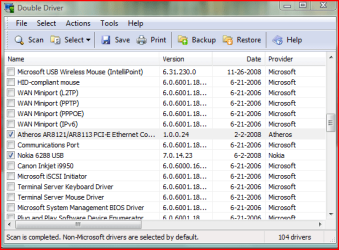
You could try exactly the same process, but use the drivers copied from Your Vista installation by DriverDouble.

They must contain the .inf. -- the copy I made of my Vista drivers using DriverDouble looks like this

DD302009-01-20_132454.jpg

SIW2


SIW2
 

My Computers My Computers

  • At a glance

    7 X64i5 84002x8gb 3200mhz
    Computer type
    PC/Desktop
    OS
    7 X64
    CPU
    i5 8400
    Motherboard
    gigabyte b365m ds3h
    Memory
    2x8gb 3200mhz
    Hard Drives
    various
    PSU
    pure power 11 400w cm
    Case
    Coolermaster
    Cooling
    cryorig m9i
  • At a glance

    7x64g54008gb ddr4 2400
    Computer type
    PC/Desktop
    OS
    7x64
    CPU
    g5400
    Motherboard
    ga b365m ds3h
    Memory
    8gb ddr4 2400
    PSU
    xfx pro 450w
mine is dual booting xp and 7.
i just boot to xp, plug my 4Gb USB (with 7 installer package), install 7, select drive replacing my vista on it.

noticed that 7 is much faster as compared to vista.

Athlon XP 1700 (1.4Ghz)
1Gb DDR Memory
GeForce 6200 128Mb -Aero enabled
c:\ -15Gb Partition (XP Installed)
d:\ -20Gb (7 installed)
e:\ -15Gb Partition

cheers
 

My Computer My Computer

At a glance

Windows 7 BetaAthlon XP +1700 1.47Ghz1.0 Gb DDRGeForce N6200 DDR 128Mb 64Bit
OS
Windows 7 Beta
CPU
Athlon XP +1700 1.47Ghz
Motherboard
M7VIQ
Memory
1.0 Gb DDR
Graphics Card(s)
GeForce N6200 DDR 128Mb 64Bit
Sound Card
C-Media 8738 6Ch
Monitor(s) Displays
15" VGA
Screen Resolution
1028X728 70Hz
Hard Drives
Maxtor 20Gb
Hitachi 30Gb
Hi SIW2,
This is a pic of the doubldriver box I've just pulled up.
The drivers seem to be exactly the same as the ones I've just been trying ie.
Atheros AR8121 AR8113.
What do you suggest?
Thanks, John:(
 

Attachments

  • doubledriver q.PNG
    doubledriver q.PNG
    18.5 KB · Views: 10

My Computer My Computer

At a glance

Windows 7 Home Premium 64 biti7 [email protected]2x4GB Corsair Vegeance DDR3XFX GTX 260 Black Edition
Computer Manufacturer/Model Number
The Monolith. 3.1
OS
Windows 7 Home Premium 64 bit
CPU
i7 [email protected]
Motherboard
Gigabyte Z77-D3H
Memory
2x4GB Corsair Vegeance DDR3
Graphics Card(s)
XFX GTX 260 Black Edition
Sound Card
none-through large stereo hi fi
Monitor(s) Displays
Croosover 27MDP LED IPS Dell 2408 WFP
Screen Resolution
2560x1440 1920x1200
Hard Drives
1x Samsung 840Pro 128GB SSD
1x Samsung Spinpoint F1 1TB
PSU
Corsair AX 850 Watt
Case
Cooler Master ACTS 840
Cooling
Be Quiet! Dark Rock Pro
Keyboard
Enermax Aurora
Mouse
Logitech Ballmouse
Internet Speed
20MBPS
Hi,

Worth getting DD to copy those - look and see if they contain a .inf file - if so, use those.

Also , now you have unzipped the downloaded files , see what is inside this :

DD502009-01-20_222351.jpg


SIW2
 

My Computers My Computers

  • At a glance

    7 X64i5 84002x8gb 3200mhz
    Computer type
    PC/Desktop
    OS
    7 X64
    CPU
    i5 8400
    Motherboard
    gigabyte b365m ds3h
    Memory
    2x8gb 3200mhz
    Hard Drives
    various
    PSU
    pure power 11 400w cm
    Case
    Coolermaster
    Cooling
    cryorig m9i
  • At a glance

    7x64g54008gb ddr4 2400
    Computer type
    PC/Desktop
    OS
    7x64
    CPU
    g5400
    Motherboard
    ga b365m ds3h
    Memory
    8gb ddr4 2400
    PSU
    xfx pro 450w
hi there,
i already installed Windows 7, and am using Vista Home Premium now, and both versions are 64 bit, and each one is on a separate hard drive..
actually, i need to dual-boot the two versions while they are on different hard drives, cause i can't free space on my current Vista partition.,

thanks in advance,
Mostafa
 

My Computer My Computer

At a glance

Microsoft Windows 7 HomePremium, 64-bitIntel Core2Quad Q6600, 2.4 GHz, 8 MB L2 Cache4 GB Kingston 800 MHz (2x2 GB)NVIDIA GeForce XFX 8500 GT, 512 MB
Computer Manufacturer/Model Number
Self-Built
OS
Microsoft Windows 7 HomePremium, 64-bit
CPU
Intel Core2Quad Q6600, 2.4 GHz, 8 MB L2 Cache
Motherboard
ASUS P5K
Memory
4 GB Kingston 800 MHz (2x2 GB)
Graphics Card(s)
NVIDIA GeForce XFX 8500 GT, 512 MB
Sound Card
Realtek HD Audio On-Board
Monitor(s) Displays
19" PHILIPS Wide Display WXGA (191EW)
Screen Resolution
1366*768 pixles
Hard Drives
320 GB Western Digital SATA HDD
1 TB Samsung SATA HDD (HD 105 SI)
PSU
Gamma
Case
Gamma
Keyboard
A4 Tech iKeyWorks Office (KBS-8) PS2
Mouse
Genius Wired Mouse (NetScroll 120) USB
Internet Speed
1 Mbps ADSL
Hi Nosha,

From your brief description, it seems you could add the entry for 7 to Vista bcd.

Then add the entry for Vista to 7 bcd.

You should then get a dual boot menu, no matter which HD is first in the Bios boot order.

When you installed 7, did you detach the Vista HD so they are completely independent?
 

My Computers My Computers

  • At a glance

    7 X64i5 84002x8gb 3200mhz
    Computer type
    PC/Desktop
    OS
    7 X64
    CPU
    i5 8400
    Motherboard
    gigabyte b365m ds3h
    Memory
    2x8gb 3200mhz
    Hard Drives
    various
    PSU
    pure power 11 400w cm
    Case
    Coolermaster
    Cooling
    cryorig m9i
  • At a glance

    7x64g54008gb ddr4 2400
    Computer type
    PC/Desktop
    OS
    7x64
    CPU
    g5400
    Motherboard
    ga b365m ds3h
    Memory
    8gb ddr4 2400
    PSU
    xfx pro 450w
Hi Nosha,

From your brief description, it seems you could add the entry for 7 to Vista bcd.

Then add the entry for Vista to 7 bcd.

You should then get a dual boot menu, no matter which HD is first in the Bios boot order.

When you installed 7, did you detach the Vista HD so they are completely independent?


first, thanks for fast reply..
second, yes, i installed Windows 7 on its hard drive and it was connected alone..
third, i don't know what "bcd" means, and consequently don't know how to do it!! so, a little elaboration might help here, please...

thanks once again.,
 

My Computer My Computer

At a glance

Microsoft Windows 7 HomePremium, 64-bitIntel Core2Quad Q6600, 2.4 GHz, 8 MB L2 Cache4 GB Kingston 800 MHz (2x2 GB)NVIDIA GeForce XFX 8500 GT, 512 MB
Computer Manufacturer/Model Number
Self-Built
OS
Microsoft Windows 7 HomePremium, 64-bit
CPU
Intel Core2Quad Q6600, 2.4 GHz, 8 MB L2 Cache
Motherboard
ASUS P5K
Memory
4 GB Kingston 800 MHz (2x2 GB)
Graphics Card(s)
NVIDIA GeForce XFX 8500 GT, 512 MB
Sound Card
Realtek HD Audio On-Board
Monitor(s) Displays
19" PHILIPS Wide Display WXGA (191EW)
Screen Resolution
1366*768 pixles
Hard Drives
320 GB Western Digital SATA HDD
1 TB Samsung SATA HDD (HD 105 SI)
PSU
Gamma
Case
Gamma
Keyboard
A4 Tech iKeyWorks Office (KBS-8) PS2
Mouse
Genius Wired Mouse (NetScroll 120) USB
Internet Speed
1 Mbps ADSL
With new native VHD boot in Windows 7, any dual-boot based on physical partition is so old school and 1.0. Here is the detailed instruction how you can do it from a Vista machine. And I've done it and am using it every day w/ switching two OSs back and forth w/o any problem. Definitely worth checking it out.

Native Boot to Windows 7 in VHD from Windows Vista


My Computer My Computer

At a glance

Windows 7
OS
Windows 7
Try this:

With Vista drive as first in Bios boot order, boot 7 dvd - run startup repair.

That should put 7 entry in Vista Boot Configuration Data.

If you also want Vista in the boot menu option when you have 7 drive as the first HD in Bios boot order:

Set 7 drive as 1st in bios order

Boot into 7

Open an elevated command prompt and type:

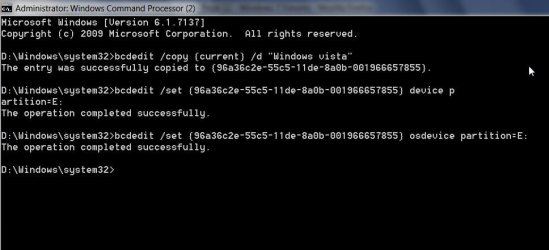
bcdedit /copy {current} /d "Windows Vista"

It will return a long number in brackets - a GUID or identifier.

Type that, including brackets into the commands below ( Replace the D: with the Vista drive letter as seen when booted into 7)

Press enter after each command.

bcdedit /set {THE-GUID-YOU-GOT} device partition=D:

bcdedit /set {THE-GUID-YOU-GOT} osdevice partition=D:

close cmd prompt.

That's it.
 

My Computers My Computers

  • At a glance

    7 X64i5 84002x8gb 3200mhz
    Computer type
    PC/Desktop
    OS
    7 X64
    CPU
    i5 8400
    Motherboard
    gigabyte b365m ds3h
    Memory
    2x8gb 3200mhz
    Hard Drives
    various
    PSU
    pure power 11 400w cm
    Case
    Coolermaster
    Cooling
    cryorig m9i
  • At a glance

    7x64g54008gb ddr4 2400
    Computer type
    PC/Desktop
    OS
    7x64
    CPU
    g5400
    Motherboard
    ga b365m ds3h
    Memory
    8gb ddr4 2400
    PSU
    xfx pro 450w
Type cmd in start search - when it pops up , rt click and run as admin - it looks like this:

( I am in D and have added a Vista entry for E )

BCD COPY2009-06-19_175813.jpg
 

My Computers My Computers

  • At a glance

    7 X64i5 84002x8gb 3200mhz
    Computer type
    PC/Desktop
    OS
    7 X64
    CPU
    i5 8400
    Motherboard
    gigabyte b365m ds3h
    Memory
    2x8gb 3200mhz
    Hard Drives
    various
    PSU
    pure power 11 400w cm
    Case
    Coolermaster
    Cooling
    cryorig m9i
  • At a glance

    7x64g54008gb ddr4 2400
    Computer type
    PC/Desktop
    OS
    7x64
    CPU
    g5400
    Motherboard
    ga b365m ds3h
    Memory
    8gb ddr4 2400
    PSU
    xfx pro 450w
Back
Top