
HDD to SSD

Music Guy123

New member
Member
VIP
Local time
10:14 PM
Messages
197
Hi there,

I am a little confused by this whole thing so I really need this in very easy and clear steps!!! Basically I currently have an HDD drive but I want to change that to a SSD drive. I haven't yet bought the SSD drive but I have been recommended one by a friend. The only problem is, is that I don't know how to move windows and all my programs onto the SSD drive. It might be worth saying that I have two drive slots in my laptop, both of which are filled with HDD drives but I want to swap the one containing windows and my programs.

Any help would be much appreciated!!!
 

My Computer My Computer

At a glance

Windows 7 Home Premium 64bitAMD Turion(tm) Dual-Core Mobile M5004GB (2x2GB) DDR2AMD M880G with ATI Mobility Radeon HD 4200
Computer Manufacturer/Model Number
Packard Bell
OS
Windows 7 Home Premium 64bit
CPU
AMD Turion(tm) Dual-Core Mobile M500
Motherboard
Packard Bell EasyNote LJ71
Memory
4GB (2x2GB) DDR2
Graphics Card(s)
AMD M880G with ATI Mobility Radeon HD 4200
Sound Card
ATI High Definition Audio Device (Integrated)
Monitor(s) Displays
1st: Built in 17.3" 16:9 2nd: Philips 17.1" 4:3
Screen Resolution
1st: 1600x900 2nd: 1280x1024
Hard Drives
2x WD blue scorpio 500GB
PSU
Laptop battery/power brick
Case
Laptop
Cooling
Custom built cooling stand
Keyboard
Integrated
Mouse
Touchpad & logitek wireless mouse M205
Internet Speed
0.2mb/s download
Other Info
Wireless adapter:
Atheros AR5B39 Wireless Network Adapter
See my tutorial for details: http://www.sevenforums.com/tutorials/149969-ssd-install-transfer-operating-system.html if you have questions, post back.

PS: you are lucky to have 2 drive bays. Then you do not an external enclosure. Keep the drive with the OS in the laptop and replace the other disk with the SSD. Later you can still switch them.

If you really want to make your life easy, take the progrm from Paragon that I linked in the tutorial.
 

My Computer My Computer

At a glance

Vista, Windows7, Mint Mate, Zorin, Windows 8from 1.6GHz Duo to i7
Computer Manufacturer/Model Number
HP, Dell, Gateway, Toshiba - 4 laptops and 2 desktops
OS
Vista, Windows7, Mint Mate, Zorin, Windows 8
CPU
from 1.6GHz Duo to i7
Monitor(s) Displays
2x HP w2207
Hard Drives
5x HDD, 7x SSD, 12x Externals
Keyboard
with trackball - no mices
Mouse
Trackball mice
Internet Speed
DSL 6000
Thank u very much.

Just a couple of questions, how do I disable defragmentation on just one hard drive???

I am proposing to put the OS and some programs on the drive. The OS is explained in the tutorial but the programs, do I just cut and paste???

Currently, I have two hdd in my laptop, one for the OS and the programs and the other for data like music and docs. I was thinking to temporarily remove the music and docs one with the ssd while I move across the OS and other stuff, is that right???

When I have finished transferring the stuff, do I just take out the hdd and put the ssd in the c bay??? What would happen if I left them both in???

At the end of your tutorial, you mentioned about what not to do when moving files, I got a little confused!!! Please could you exposing it to me!!!

Sorry for all the questions, thanks for the help so far! BTW, I will be doing the easy way hopefully!!!
 

My Computer My Computer

At a glance

Windows 7 Home Premium 64bitAMD Turion(tm) Dual-Core Mobile M5004GB (2x2GB) DDR2AMD M880G with ATI Mobility Radeon HD 4200
Computer Manufacturer/Model Number
Packard Bell
OS
Windows 7 Home Premium 64bit
CPU
AMD Turion(tm) Dual-Core Mobile M500
Motherboard
Packard Bell EasyNote LJ71
Memory
4GB (2x2GB) DDR2
Graphics Card(s)
AMD M880G with ATI Mobility Radeon HD 4200
Sound Card
ATI High Definition Audio Device (Integrated)
Monitor(s) Displays
1st: Built in 17.3" 16:9 2nd: Philips 17.1" 4:3
Screen Resolution
1st: 1600x900 2nd: 1280x1024
Hard Drives
2x WD blue scorpio 500GB
PSU
Laptop battery/power brick
Case
Laptop
Cooling
Custom built cooling stand
Keyboard
Integrated
Mouse
Touchpad & logitek wireless mouse M205
Internet Speed
0.2mb/s download
Other Info
Wireless adapter:
Atheros AR5B39 Wireless Network Adapter
1. Type Defrag into Start/search. There you can schedule disks individually. You can also right click on the disk/partition in Computer, go to Properties > Tools tab and defrag from there whenever you like.

2. When you move the OS, the program files and all the program settings are automatically moved with it. And DO NOT cut/paste - that would create a mess.

3. Yes, for the OS transfer you have to remove the data disk and put the SSD into that bay. Once the OS works again from the SSD (you have to change the boot sequence in the BIOS), you can then put the data disk into the bay where the OS HDD was.

4. In the explanation about moving user folders I stress the point that you never move them to the root of the other disk but to predefined folders (else you loose the location tab). But in your case I would do that differently. Since you already have your user folders on the data disk/partition, just right click on the top folders of each type (documents, music, video, etc.) and Include them into the appropriate library.

PS; am I right in the assumption that you are going to get the Paragon program for the task - I think you should. It is so much easier and all automatic. There is nothing you have to do other than change the BIOS boot sequence when it is done.
 

My Computer My Computer

At a glance

Vista, Windows7, Mint Mate, Zorin, Windows 8from 1.6GHz Duo to i7
Computer Manufacturer/Model Number
HP, Dell, Gateway, Toshiba - 4 laptops and 2 desktops
OS
Vista, Windows7, Mint Mate, Zorin, Windows 8
CPU
from 1.6GHz Duo to i7
Monitor(s) Displays
2x HP w2207
Hard Drives
5x HDD, 7x SSD, 12x Externals
Keyboard
with trackball - no mices
Mouse
Trackball mice
Internet Speed
DSL 6000
Yeah I think I will get the program, my other option is that I am insured by techfriend but that could take ages so will get the program. How do u change the boot sequence in the bios???

Thank you so much for the help - much appreciated!!!
 

My Computer My Computer

At a glance

Windows 7 Home Premium 64bitAMD Turion(tm) Dual-Core Mobile M5004GB (2x2GB) DDR2AMD M880G with ATI Mobility Radeon HD 4200
Computer Manufacturer/Model Number
Packard Bell
OS
Windows 7 Home Premium 64bit
CPU
AMD Turion(tm) Dual-Core Mobile M500
Motherboard
Packard Bell EasyNote LJ71
Memory
4GB (2x2GB) DDR2
Graphics Card(s)
AMD M880G with ATI Mobility Radeon HD 4200
Sound Card
ATI High Definition Audio Device (Integrated)
Monitor(s) Displays
1st: Built in 17.3" 16:9 2nd: Philips 17.1" 4:3
Screen Resolution
1st: 1600x900 2nd: 1280x1024
Hard Drives
2x WD blue scorpio 500GB
PSU
Laptop battery/power brick
Case
Laptop
Cooling
Custom built cooling stand
Keyboard
Integrated
Mouse
Touchpad & logitek wireless mouse M205
Internet Speed
0.2mb/s download
Other Info
Wireless adapter:
Atheros AR5B39 Wireless Network Adapter
Windows 7 will automatically disable defragmentation for the SSD when it determines that it is an SSD.
 

My Computer My Computer

At a glance

Windows 10 Pro x64, Windows 8.1 Pro x64, Wind...INTEL i9-7920X LGA 206664 GB (4 X 16 GB) G-Skill V Series DDR4 3200 ...EVGA GTX 1060 SC 3 GB
Computer type
PC/Desktop
Computer Manufacturer/Model Number
Custom Built
OS
Windows 10 Pro x64, Windows 8.1 Pro x64, Windows 7 Ultimate x64 SP1,
CPU
INTEL i9-7920X LGA 2066
Motherboard
Gigabyte X299-WU8 F3
Memory
64 GB (4 X 16 GB) G-Skill V Series DDR4 3200 Quad Channel
Graphics Card(s)
EVGA GTX 1060 SC 3 GB
Sound Card
Realtek Onboard ALC1220
Monitor(s) Displays
2 x Samsung S27E310
Screen Resolution
1920x1080
Hard Drives
Samsung 2 x 970 EVO Plus 500 GB NVMe
1 x 6TB WD 6003FZBX SATA
1 x 6TB WD 60EFRX SATA
12 x 3TB WD 30EFRX SATA
PSU
Seasonic X-1050
Case
Thermaltake Armor+
Cooling
Corsair H80i V2 Liquid AOI Cooler
Keyboard
Logitech G510s
Mouse
Logitech MX Master 2S
Internet Speed
200 Mb/s
Antivirus
ESET NOD32 13.1
Browser
EDGE (Dev, Canary, Beta), Chrome
Other Info
ASUS RT-AC68U router
Malwarebytes 4.0.4
Have worked out how to change boot order, does the hibernate thing really matter, I use hibernate quite a bit!!!
 

My Computer My Computer

At a glance

Windows 7 Home Premium 64bitAMD Turion(tm) Dual-Core Mobile M5004GB (2x2GB) DDR2AMD M880G with ATI Mobility Radeon HD 4200
Computer Manufacturer/Model Number
Packard Bell
OS
Windows 7 Home Premium 64bit
CPU
AMD Turion(tm) Dual-Core Mobile M500
Motherboard
Packard Bell EasyNote LJ71
Memory
4GB (2x2GB) DDR2
Graphics Card(s)
AMD M880G with ATI Mobility Radeon HD 4200
Sound Card
ATI High Definition Audio Device (Integrated)
Monitor(s) Displays
1st: Built in 17.3" 16:9 2nd: Philips 17.1" 4:3
Screen Resolution
1st: 1600x900 2nd: 1280x1024
Hard Drives
2x WD blue scorpio 500GB
PSU
Laptop battery/power brick
Case
Laptop
Cooling
Custom built cooling stand
Keyboard
Integrated
Mouse
Touchpad & logitek wireless mouse M205
Internet Speed
0.2mb/s download
Other Info
Wireless adapter:
Atheros AR5B39 Wireless Network Adapter
Yeah I think I will get the program, my other option is that I am insured by techfriend but that could take ages so will get the program. How do u change the boot sequence in the bios???

Thank you so much for the help - much appreciated!!!
Unfortunately every BIOS is a bit different. That is why there is no exact way for changing the boot sequence that I can describe.

In general terms: When you start the system you first get the BIOS splash screen. On that, it says how to get into the BIOS setup (many times by tapping F2). Once in there, you can only navigate with the arrow keys (mouse does not work). You have to get to the disk setup and change it there. Then, on the bottom of the screen you find the instructions on how to exit "with change". After that it will boot automatically.

The other option you have is to take the SSD out of the bay that you used to transfer the OS and put it back into the bay where the OS HDD was. And then put your data disk back into the bay from where it came. That way the boot order remains what it was with the HDDs.
 

My Computer My Computer

At a glance

Vista, Windows7, Mint Mate, Zorin, Windows 8from 1.6GHz Duo to i7
Computer Manufacturer/Model Number
HP, Dell, Gateway, Toshiba - 4 laptops and 2 desktops
OS
Vista, Windows7, Mint Mate, Zorin, Windows 8
CPU
from 1.6GHz Duo to i7
Monitor(s) Displays
2x HP w2207
Hard Drives
5x HDD, 7x SSD, 12x Externals
Keyboard
with trackball - no mices
Mouse
Trackball mice
Internet Speed
DSL 6000
Yeah thanks, had already worked it out!!!
 

My Computer My Computer

At a glance

Windows 7 Home Premium 64bitAMD Turion(tm) Dual-Core Mobile M5004GB (2x2GB) DDR2AMD M880G with ATI Mobility Radeon HD 4200
Computer Manufacturer/Model Number
Packard Bell
OS
Windows 7 Home Premium 64bit
CPU
AMD Turion(tm) Dual-Core Mobile M500
Motherboard
Packard Bell EasyNote LJ71
Memory
4GB (2x2GB) DDR2
Graphics Card(s)
AMD M880G with ATI Mobility Radeon HD 4200
Sound Card
ATI High Definition Audio Device (Integrated)
Monitor(s) Displays
1st: Built in 17.3" 16:9 2nd: Philips 17.1" 4:3
Screen Resolution
1st: 1600x900 2nd: 1280x1024
Hard Drives
2x WD blue scorpio 500GB
PSU
Laptop battery/power brick
Case
Laptop
Cooling
Custom built cooling stand
Keyboard
Integrated
Mouse
Touchpad & logitek wireless mouse M205
Internet Speed
0.2mb/s download
Other Info
Wireless adapter:
Atheros AR5B39 Wireless Network Adapter
Have worked out how to change boot order, does the hibernate thing really matter, I use hibernate quite a bit!!!
The hiberfile takes lot of space on the SSD (as much as you have RAM). I never use hibernate, but if you can afford the space on the SSD, there is no need to delete the hiberfile.
 

My Computer My Computer

At a glance

Vista, Windows7, Mint Mate, Zorin, Windows 8from 1.6GHz Duo to i7
Computer Manufacturer/Model Number
HP, Dell, Gateway, Toshiba - 4 laptops and 2 desktops
OS
Vista, Windows7, Mint Mate, Zorin, Windows 8
CPU
from 1.6GHz Duo to i7
Monitor(s) Displays
2x HP w2207
Hard Drives
5x HDD, 7x SSD, 12x Externals
Keyboard
with trackball - no mices
Mouse
Trackball mice
Internet Speed
DSL 6000
Windows 7 will automatically disable defragmentation for the SSD when it determines that it is an SSD.
That is true for an initial installation from the installation disk. But here we are talking about a transfer of an existing OS which is different. And I am not certain whether the Paragon migration tool does the disabling - the documentation does not list it.
 

My Computer My Computer

At a glance

Vista, Windows7, Mint Mate, Zorin, Windows 8from 1.6GHz Duo to i7
Computer Manufacturer/Model Number
HP, Dell, Gateway, Toshiba - 4 laptops and 2 desktops
OS
Vista, Windows7, Mint Mate, Zorin, Windows 8
CPU
from 1.6GHz Duo to i7
Monitor(s) Displays
2x HP w2207
Hard Drives
5x HDD, 7x SSD, 12x Externals
Keyboard
with trackball - no mices
Mouse
Trackball mice
Internet Speed
DSL 6000
I just did a ( very quick ) check on some partitioning apps.

Interesting results:

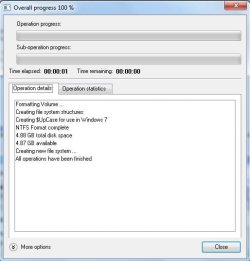
1. I used the free Paragon B&R11, as well as Paragon Migrate OS to SSD.

Automatically aligns to nt6 rules

automatically writes nt6 disk code

automatically writes nt6 bootcode during format including Uppercase for win7 support

paragonformat.jpg


2. Partition Wizard latest 5.2 edition.

Writes "standard" xp style disk code and nt5 (xp) boot code during format, does not align to nt6 rules.

3. Easeus latest 8.1 pm pro.

Easeus PM Pro lets you choose in dropdown which disk code to write- but doesn't align to nt6 rules, and writes nt5 bootcode during format.
 
Last edited:

My Computers My Computers

  • At a glance

    7 X64i5 84002x8gb 3200mhz
    Computer type
    PC/Desktop
    OS
    7 X64
    CPU
    i5 8400
    Motherboard
    gigabyte b365m ds3h
    Memory
    2x8gb 3200mhz
    Hard Drives
    various
    PSU
    pure power 11 400w cm
    Case
    Coolermaster
    Cooling
    cryorig m9i
  • At a glance

    7x64g54008gb ddr4 2400
    Computer type
    PC/Desktop
    OS
    7x64
    CPU
    g5400
    Motherboard
    ga b365m ds3h
    Memory
    8gb ddr4 2400
    PSU
    xfx pro 450w
Do I need the full edition of the program or could I get away with the free one???
 

My Computer My Computer

At a glance

Windows 7 Home Premium 64bitAMD Turion(tm) Dual-Core Mobile M5004GB (2x2GB) DDR2AMD M880G with ATI Mobility Radeon HD 4200
Computer Manufacturer/Model Number
Packard Bell
OS
Windows 7 Home Premium 64bit
CPU
AMD Turion(tm) Dual-Core Mobile M500
Motherboard
Packard Bell EasyNote LJ71
Memory
4GB (2x2GB) DDR2
Graphics Card(s)
AMD M880G with ATI Mobility Radeon HD 4200
Sound Card
ATI High Definition Audio Device (Integrated)
Monitor(s) Displays
1st: Built in 17.3" 16:9 2nd: Philips 17.1" 4:3
Screen Resolution
1st: 1600x900 2nd: 1280x1024
Hard Drives
2x WD blue scorpio 500GB
PSU
Laptop battery/power brick
Case
Laptop
Cooling
Custom built cooling stand
Keyboard
Integrated
Mouse
Touchpad & logitek wireless mouse M205
Internet Speed
0.2mb/s download
Other Info
Wireless adapter:
Atheros AR5B39 Wireless Network Adapter
Migrate OS to SSD is not normally available free ( keep your eye out though - they did give away a special free edition recently - it may still be available on various sites, magazine covermount dvd's, etc. - plus they are bound to give it away again - may be a few months, tho . )

If you google Paragon OS to SSD or Paragon OS to SSD Special Edition - you may come up with something still current.

The Paragon FREE B&R11 does not include the migrate os feature - it is an imaging app.

However, I tested it for nt6 compliance , as you can see above - and it turns out to be the most advanced imaging app - more so than paid versions from other companies - it also includes basic partitioning as a bonus.
 

My Computers My Computers

  • At a glance

    7 X64i5 84002x8gb 3200mhz
    Computer type
    PC/Desktop
    OS
    7 X64
    CPU
    i5 8400
    Motherboard
    gigabyte b365m ds3h
    Memory
    2x8gb 3200mhz
    Hard Drives
    various
    PSU
    pure power 11 400w cm
    Case
    Coolermaster
    Cooling
    cryorig m9i
  • At a glance

    7x64g54008gb ddr4 2400
    Computer type
    PC/Desktop
    OS
    7x64
    CPU
    g5400
    Motherboard
    ga b365m ds3h
    Memory
    8gb ddr4 2400
    PSU
    xfx pro 450w
If you google Paragon OS to SSD or Paragon OS to SSD Special Edition - you may come up with something still current.

SIW2:

Thanks for the tip. I found the Special Edition version via Google.

Do you know what features it has or lacks compared to the ordinary edition?

I looked at Paragon-Software.com and could not find any info about the product at all.
 

My Computer My Computer

At a glance

Windows 7 Home Premium SP1, 64-bitIntel Skylake i5-6600K, not overclocked8 GB HyperX DDR4-2666 (2 x 4 GB)none; graphics are integrated on CPU
Computer type
PC/Desktop
Computer Manufacturer/Model Number
Ignatz Special; 4 speed manual gearbox; factory air conditioning; one of one
OS
Windows 7 Home Premium SP1, 64-bit
CPU
Intel Skylake i5-6600K, not overclocked
Motherboard
AsRock Z170M Extreme 4, micro ATX
Memory
8 GB HyperX DDR4-2666 (2 x 4 GB)
Graphics Card(s)
none; graphics are integrated on CPU
Sound Card
onboard: Realtek ALC1150; external: USB Behringer UF0-202
Monitor(s) Displays
Dell S2340M 23 inch IPS
Screen Resolution
1600 x 900
Hard Drives
System: Crucial MX100 series SSD, 128 GB;
Data: Samsung Spinpoint 103SJ, 1 TB;
Backup: WD Caviar Green WD30EZRX-00D8PB0, 3 TB
PSU
Rosewill SilentNight 500 watt fanless, semi-modular
Case
Antec Solo II
Cooling
Noctua NH-U12S; Noctua F12 intake, Noctua S12A exhaust
Keyboard
Microsoft 200 6JH-00001 USB
Mouse
Dell or Microsoft optical wired; USB
Antivirus
Microsoft Security Essentials and Malwarebytes Premium
Browser
Pale Moon
Other Info
All fans PWM; speeds at idle: CPU circa 500 rpm; intake circa 600 rpm; exhaust circa 600 rpm; CPU temps 27 idle and 47 C load in a warm room (27 C/81 F) when running Intel Extreme Tuning Utility stress test.
I have so may versions of it that Paragon kept sending me - I have lost track. LOL.

I think you just don't get any free updates or a winpe cd - it should work fine as it is, you can run it from within your o/s.

http://www.paragon-software.com/technologies/components/migrate-OS-to-SSD/

there is a little thing to click after it has found the o/s 's - select which folders to transfer, or something similar - so you can migrate to a smaller drive.

It doesn't need to be an ssd - hd will be fine too.
 

My Computers My Computers

  • At a glance

    7 X64i5 84002x8gb 3200mhz
    Computer type
    PC/Desktop
    OS
    7 X64
    CPU
    i5 8400
    Motherboard
    gigabyte b365m ds3h
    Memory
    2x8gb 3200mhz
    Hard Drives
    various
    PSU
    pure power 11 400w cm
    Case
    Coolermaster
    Cooling
    cryorig m9i
  • At a glance

    7x64g54008gb ddr4 2400
    Computer type
    PC/Desktop
    OS
    7x64
    CPU
    g5400
    Motherboard
    ga b365m ds3h
    Memory
    8gb ddr4 2400
    PSU
    xfx pro 450w
On the right side of this Paragon Migration tool site you find "Documentation". It does not say too much but it is a start. Apart from migration to SSD and HDD it also works for Revo drives. If you have questions, send them a mail. They are very cooperative.
 

My Computer My Computer

At a glance

Vista, Windows7, Mint Mate, Zorin, Windows 8from 1.6GHz Duo to i7
Computer Manufacturer/Model Number
HP, Dell, Gateway, Toshiba - 4 laptops and 2 desktops
OS
Vista, Windows7, Mint Mate, Zorin, Windows 8
CPU
from 1.6GHz Duo to i7
Monitor(s) Displays
2x HP w2207
Hard Drives
5x HDD, 7x SSD, 12x Externals
Keyboard
with trackball - no mices
Mouse
Trackball mice
Internet Speed
DSL 6000
Ok, have managed to get a legal serial number from paragon, they are still discretely giving it away for free!!! The only problem is that I need to download the demo version so that I can input the serial number into it, could anyone provide a link???
 

My Computer My Computer

At a glance

Windows 7 Home Premium 64bitAMD Turion(tm) Dual-Core Mobile M5004GB (2x2GB) DDR2AMD M880G with ATI Mobility Radeon HD 4200
Computer Manufacturer/Model Number
Packard Bell
OS
Windows 7 Home Premium 64bit
CPU
AMD Turion(tm) Dual-Core Mobile M500
Motherboard
Packard Bell EasyNote LJ71
Memory
4GB (2x2GB) DDR2
Graphics Card(s)
AMD M880G with ATI Mobility Radeon HD 4200
Sound Card
ATI High Definition Audio Device (Integrated)
Monitor(s) Displays
1st: Built in 17.3" 16:9 2nd: Philips 17.1" 4:3
Screen Resolution
1st: 1600x900 2nd: 1280x1024
Hard Drives
2x WD blue scorpio 500GB
PSU
Laptop battery/power brick
Case
Laptop
Cooling
Custom built cooling stand
Keyboard
Integrated
Mouse
Touchpad & logitek wireless mouse M205
Internet Speed
0.2mb/s download
Other Info
Wireless adapter:
Atheros AR5B39 Wireless Network Adapter
I don't think the specila edition serial will work with demo installer.

You need the special edition installer. Ignatzatzsonic found it on google recently.

Do you have the link for the free serial giveaway?
 

My Computers My Computers

  • At a glance

    7 X64i5 84002x8gb 3200mhz
    Computer type
    PC/Desktop
    OS
    7 X64
    CPU
    i5 8400
    Motherboard
    gigabyte b365m ds3h
    Memory
    2x8gb 3200mhz
    Hard Drives
    various
    PSU
    pure power 11 400w cm
    Case
    Coolermaster
    Cooling
    cryorig m9i
  • At a glance

    7x64g54008gb ddr4 2400
    Computer type
    PC/Desktop
    OS
    7x64
    CPU
    g5400
    Motherboard
    ga b365m ds3h
    Memory
    8gb ddr4 2400
    PSU
    xfx pro 450w
Ok, this is the link, u have to fill in your email address and name, make sure that u set your language in English, this page is in German but your browser could translate it for you (google chrome does). If not, it is fairly obvious what to do, your country doesn't matter but your language is really important, stick anything that u don't understand into google translate.

Anyways, here is the link: Paragon Software Registrierung

Good luck, post back with any problems!!!
 

My Computer My Computer

At a glance

Windows 7 Home Premium 64bitAMD Turion(tm) Dual-Core Mobile M5004GB (2x2GB) DDR2AMD M880G with ATI Mobility Radeon HD 4200
Computer Manufacturer/Model Number
Packard Bell
OS
Windows 7 Home Premium 64bit
CPU
AMD Turion(tm) Dual-Core Mobile M500
Motherboard
Packard Bell EasyNote LJ71
Memory
4GB (2x2GB) DDR2
Graphics Card(s)
AMD M880G with ATI Mobility Radeon HD 4200
Sound Card
ATI High Definition Audio Device (Integrated)
Monitor(s) Displays
1st: Built in 17.3" 16:9 2nd: Philips 17.1" 4:3
Screen Resolution
1st: 1600x900 2nd: 1280x1024
Hard Drives
2x WD blue scorpio 500GB
PSU
Laptop battery/power brick
Case
Laptop
Cooling
Custom built cooling stand
Keyboard
Integrated
Mouse
Touchpad & logitek wireless mouse M205
Internet Speed
0.2mb/s download
Other Info
Wireless adapter:
Atheros AR5B39 Wireless Network Adapter
Back
Top