Latest Realtek HD Audio Driver Version

I have never done this update. My audio comes built in on my motherboard. Do I need it?

You can if you want updated driver.
 

My Computer My Computer

At a glance

Windows 8.1 - 64 BitIntel Core i5-4670K (Haswell)8GB DDR3-RAM PC1600 CL9 ADATA XPG V1.0 blackGigabyte NVIDIA GTX 770 Graphics Card (2GB, D...
Computer type
PC/Desktop
Computer Manufacturer/Model Number
Self Built
OS
Windows 8.1 - 64 Bit
CPU
Intel Core i5-4670K (Haswell)
Motherboard
Gigabyte GA-Z87X-D3H
Memory
8GB DDR3-RAM PC1600 CL9 ADATA XPG V1.0 black
Graphics Card(s)
Gigabyte NVIDIA GTX 770 Graphics Card (2GB, DDR5, PCI-E)
Sound Card
ASUS Xonar DX 7.1 | Turtle Beach HPA 2
Monitor(s) Displays
Samsung SyncMaster P2270HD
Screen Resolution
1080p
Hard Drives
Samsung 840 Evo 250 GB (OS only)
Seagate Barracuda 1TB S-ATA
Seagate Barracuda 250GB S-ATA
Maxtor 250GB S-ATA (Backup only)
WD Elements 500Gb/Go
PSU
750 watts
Case
Zalman GS-1000 Special Edition
Cooling
Zalman CNPS10X Performa
Keyboard
Logitech K350
Mouse
Logitech M705 | Razer Vespula Mouse Pad
Internet Speed
Virgin Media - 60Mbps
Antivirus
Microsoft Security Essentials
Other Info
120mm fans x 4
(2 on top, 1 at rear, 1 at bottom)
I have never done this update. My audio comes built in on my motherboard. Do I need it?
If you're running Win7 and you have a very early version of the Realtek-provided drivers for your onboard Realtek HD Audio chip, or more likely a Microsoft-provided "original version with Win7" of "generic" drivers to provide sound from this hardware, you really should update to the real Realtek-provided drivers.

Early on in the driver sequence for Win7, Realtek failed to provide the "10-band user-customizable EQ" which had been available with previous OS environments (e.g. in WinXP).

This was eventually made available again in the Win7 driver at about the 2.52 version as I recall, some time back. For me this was reason enough to make that transition, as for me the availability of the 10-band EQ provides greatly improved sound quality for my relatively simple sound setup which actually have very good speakers.

For this reason alone, I would recommend strongly that you update your system to the latest Realtek HD Audio Codec drivers... from Realtek.
 

My Computer My Computer

At a glance

Windows 7 Pro x64 (1), Win7 Pro X64 (2)i5-3350p 3.1Ghz/6MB-cache (1); E8400 3.0Ghz/6...8GB PC3-12800 DDR3 (1); 4GB PC3-10600 DDR3 (2)ATI HD7750 (1), (see TV cards); ATI R7 250 (2)
Computer type
PC/Desktop
Computer Manufacturer/Model Number
Home-built, two systems (1) and (2)
OS
Windows 7 Pro x64 (1), Win7 Pro X64 (2)
CPU
i5-3350p 3.1Ghz/6MB-cache (1); E8400 3.0Ghz/6MB-cache (2)
Motherboard
ASUS P8Z77-V Pro (1); ASUS P5Q3 (2)
Memory
8GB PC3-12800 DDR3 (1); 4GB PC3-10600 DDR3 (2)
Graphics Card(s)
ATI HD7750 (1), (see TV cards); ATI R7 250 (2)
Sound Card
Realtek ALC892 HD Audio (1); Realtek ALC1200 HD Audio (2)
Monitor(s) Displays
Eizo HD2441W LCD, Eizo S2433W (1); Eizo 24" S2433W (2)
Screen Resolution
1920x1200, 1920x1200 (1); 1920x1200 (2)
Hard Drives
(1) 1TB SATA-II (7200RPM), 2x2TB SATA-III (7200RPM), 250GB SATA-III (10000RPM) for OS; 2x2TB external USB 3.0

(2) 320GB SATA-II (7200RPM), 750GB SATA-II (7200RPM), 150GB SATA-II (10000RPM) for OS; 2TB external USB 3.0
PSU
Nesteq ECS-6001 600W (1); Nesteq ECS-5001 500W (2)
Case
Acousti-Case 360 (1) and (2)
Cooling
Noctua NH-U12P SE2 for CPU, 2x120mm case fans (1) and (2)
Keyboard
IBM PS/2 (1) and (2)
Mouse
Logitech MX Revolution wireless (1); Microsoft wired (2)
Internet Speed
100mbps down / 10mbps up
Antivirus
Microsoft Security Essentials; Malwarebyte Anti-Malware Pro
Browser
Firefox
Other Info
Ceton InfiniTV 4-tuner cablecard-enabled TV card as well as Hauppauge HVR-2250 OTA/ATSC 2-tuner TV card in (1), running under Win7 WMC
I just did the update. I have never done this as my motherboard never say anything about it. I think its up to Windows to install it and it is the generic.

Is there any difference in the audio after doing this?
 

My Computer My Computer

At a glance

Windows 7 x64
OS
Windows 7 x64
I just did the update. I have never done this as my motherboard never say anything about it. I think its up to Windows to install it and it is the generic.

Is there any difference in the audio after doing this?
Well, for one, if you did the upgrade successfully (and re-booted as requested) you should now see an orange speaker icon in the System Tray, in addition to the standard white Windows speaker icon. This is the Realtek HD Audio Manager. You can open it up and configure your speakers to whatever they should be (surround sound, quadraphonic, stereo, etc.).

You can also go into the Effects tab and play with the 10-band EQ (i.e. 10 frequency bands of bass and treble tone control, instead of just bass and treble). This has to produce improved sound, I would say... assuming you have decent speakers connected to your computer.
 

My Computer My Computer

At a glance

Windows 7 Pro x64 (1), Win7 Pro X64 (2)i5-3350p 3.1Ghz/6MB-cache (1); E8400 3.0Ghz/6...8GB PC3-12800 DDR3 (1); 4GB PC3-10600 DDR3 (2)ATI HD7750 (1), (see TV cards); ATI R7 250 (2)
Computer type
PC/Desktop
Computer Manufacturer/Model Number
Home-built, two systems (1) and (2)
OS
Windows 7 Pro x64 (1), Win7 Pro X64 (2)
CPU
i5-3350p 3.1Ghz/6MB-cache (1); E8400 3.0Ghz/6MB-cache (2)
Motherboard
ASUS P8Z77-V Pro (1); ASUS P5Q3 (2)
Memory
8GB PC3-12800 DDR3 (1); 4GB PC3-10600 DDR3 (2)
Graphics Card(s)
ATI HD7750 (1), (see TV cards); ATI R7 250 (2)
Sound Card
Realtek ALC892 HD Audio (1); Realtek ALC1200 HD Audio (2)
Monitor(s) Displays
Eizo HD2441W LCD, Eizo S2433W (1); Eizo 24" S2433W (2)
Screen Resolution
1920x1200, 1920x1200 (1); 1920x1200 (2)
Hard Drives
(1) 1TB SATA-II (7200RPM), 2x2TB SATA-III (7200RPM), 250GB SATA-III (10000RPM) for OS; 2x2TB external USB 3.0

(2) 320GB SATA-II (7200RPM), 750GB SATA-II (7200RPM), 150GB SATA-II (10000RPM) for OS; 2TB external USB 3.0
PSU
Nesteq ECS-6001 600W (1); Nesteq ECS-5001 500W (2)
Case
Acousti-Case 360 (1) and (2)
Cooling
Noctua NH-U12P SE2 for CPU, 2x120mm case fans (1) and (2)
Keyboard
IBM PS/2 (1) and (2)
Mouse
Logitech MX Revolution wireless (1); Microsoft wired (2)
Internet Speed
100mbps down / 10mbps up
Antivirus
Microsoft Security Essentials; Malwarebyte Anti-Malware Pro
Browser
Firefox
Other Info
Ceton InfiniTV 4-tuner cablecard-enabled TV card as well as Hauppauge HVR-2250 OTA/ATSC 2-tuner TV card in (1), running under Win7 WMC
Yah, I see all that for the first time. It ask for the reboot.

I am in the Effects tab. I can see only one place to play the sound and thats at the Speaker Configuration tab. How do I play sound at the SOund Effects tab?
 

My Computer My Computer

At a glance

Windows 7 x64
OS
Windows 7 x64
I am in the Effects tab. I can see only one place to play the sound and thats at the Speaker Configuration tab. How do I play sound at the SOund Effects tab?
You don't "play" sound in the Sound Effects tab. You only set your EQ sliders in the Sound Effects tab.

Presumably you have a second window open simultaneously, say with Winamp or Windows Media Player or some music/video player program that produces sound.

And as you adjust the sliders in the EQ of the Realtek HD Audio Manager, you can hear the difference occurring from whatever sound is being produced from your second video/music player window.

The idea is that you adjust the EQ sliders to produce the quality of sound you want, and then you SAVE that EQ with some custom name of your own choosing. That saved EQ can then be selected by its name, from the dropdown list of Equalizer setting... along with the pre-built special effect EQ names provided by Realtek.

Once you select an EQ, it's now in effect until you change to another EQ. So once you select an EQ (or, you can even just move the sliders from wherever they currently are to make a "temporary modification", and you don't even really need to save that modified EQ configuration as a name unless you really want to save it) you can close the whole Realtek HD Audio Manager window. The last selected/modified EQ slider settings will remain in effect.

You can have as many custom EQ's saved as you care to create. But you have to select them using this Sound Effects tab if you want to change the one currently in effect.


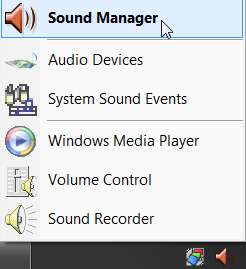
(1) So... you get started by opening Realtek HD Audio Manager by right-clicking on the orange speaker icon in the System Tray. Then you select the Sound Manager item at the top of the popup menu to open the main window.

realtekeq3.jpg


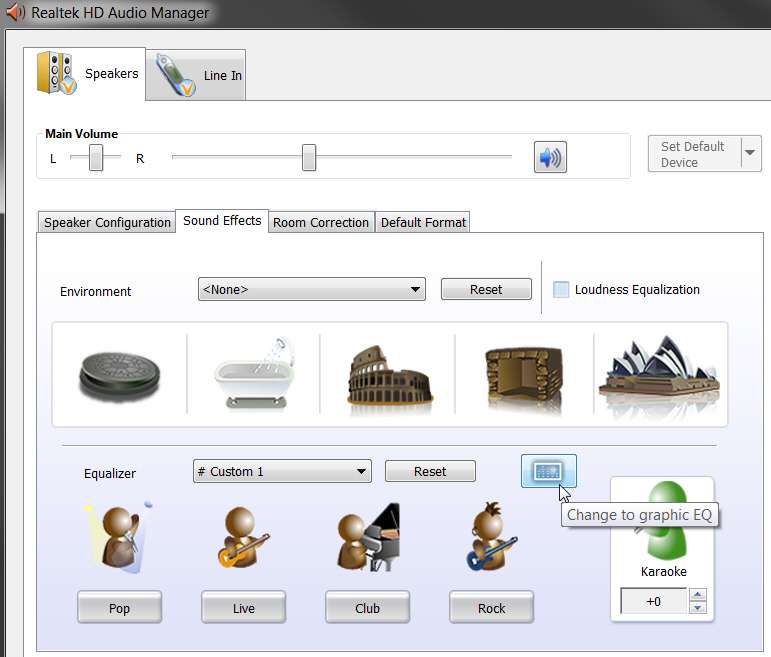
(2) Next, on the main window of HD Audio Manager you select the Sound Effects tab and you push the "equalizer" button.
realtekeq1.jpg


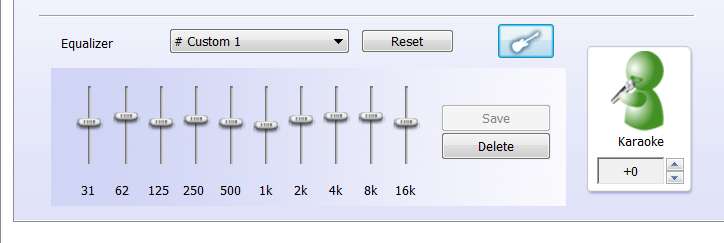
(3) You now have the 10-band EQ presentation, instead of the original initial default "Realtek-provided pre-built EQ presets" presentation. On this 10-band EQ slider presentation you can then customize as you want.

realtekeq2.jpg

After you adjust the sliders to your liking, push the SAVE button and choose a name to save that EQ under (or, choose an existing name if you want to replace a previously saved setting with the newly modified version).


NOTE: you should take a screenshot of each of your custom EQ's slider settings, and save that JPG somewhere for future reference. Unfortunately there are no numerical flyout-Help values if you hover the mouse over a slider, so there's no way to precisely digitally duplicate this EQ again if you had to start over. Only your screenshot will give you an image for you to approximate a newly built EQ from the screenshot, if you have to rebuild.

And... you WILL have to rebuild your custom EQ's when you upgrade to a new version of the Realtek HD Audio Codec driver, if you do decide to upgrade again. Unfortunately, because the "upgrade" to a new Realtek driver is actually a 2-step process that (a) uninstalls the old driver, and then (b) installs the new driver, in that process all of your custom EQ's are LOST!!! Don't complain to me about that (I'm as angry as you are), complain to Realtek! That's just how they did it.

And, there is no way to actually save or preserve those custom EQ definitions, as the folder in which they reside is newly created with a new name each time the driver upgrade process occurs, and there's no way to copy an old EQ definition into the new folder. Again, Realtek is at fault here... but there doesn't seem to be a workaround, although many of us have tried.

Hence my own "solution", which is simply to take a JPG screenshot of each of my custom EQ's and just re-build them all over again (approximately, obviously) if I do upgrade to a new driver version.

 

My Computer My Computer

At a glance

Windows 7 Pro x64 (1), Win7 Pro X64 (2)i5-3350p 3.1Ghz/6MB-cache (1); E8400 3.0Ghz/6...8GB PC3-12800 DDR3 (1); 4GB PC3-10600 DDR3 (2)ATI HD7750 (1), (see TV cards); ATI R7 250 (2)
Computer type
PC/Desktop
Computer Manufacturer/Model Number
Home-built, two systems (1) and (2)
OS
Windows 7 Pro x64 (1), Win7 Pro X64 (2)
CPU
i5-3350p 3.1Ghz/6MB-cache (1); E8400 3.0Ghz/6MB-cache (2)
Motherboard
ASUS P8Z77-V Pro (1); ASUS P5Q3 (2)
Memory
8GB PC3-12800 DDR3 (1); 4GB PC3-10600 DDR3 (2)
Graphics Card(s)
ATI HD7750 (1), (see TV cards); ATI R7 250 (2)
Sound Card
Realtek ALC892 HD Audio (1); Realtek ALC1200 HD Audio (2)
Monitor(s) Displays
Eizo HD2441W LCD, Eizo S2433W (1); Eizo 24" S2433W (2)
Screen Resolution
1920x1200, 1920x1200 (1); 1920x1200 (2)
Hard Drives
(1) 1TB SATA-II (7200RPM), 2x2TB SATA-III (7200RPM), 250GB SATA-III (10000RPM) for OS; 2x2TB external USB 3.0

(2) 320GB SATA-II (7200RPM), 750GB SATA-II (7200RPM), 150GB SATA-II (10000RPM) for OS; 2TB external USB 3.0
PSU
Nesteq ECS-6001 600W (1); Nesteq ECS-5001 500W (2)
Case
Acousti-Case 360 (1) and (2)
Cooling
Noctua NH-U12P SE2 for CPU, 2x120mm case fans (1) and (2)
Keyboard
IBM PS/2 (1) and (2)
Mouse
Logitech MX Revolution wireless (1); Microsoft wired (2)
Internet Speed
100mbps down / 10mbps up
Antivirus
Microsoft Security Essentials; Malwarebyte Anti-Malware Pro
Browser
Firefox
Other Info
Ceton InfiniTV 4-tuner cablecard-enabled TV card as well as Hauppauge HVR-2250 OTA/ATSC 2-tuner TV card in (1), running under Win7 WMC
I see it now. I did the cave and hanger thing and I hear echo in the sound effects.

I have a Klipsch 2.1 speaker with big subwoofer. I think its just an above average speaker.

What Environment and Equlizer setting would I set it to for playing movies. It has been NONE on both.

Thanks for your help.
 

My Computer My Computer

At a glance

Windows 7 x64
OS
Windows 7 x64
That is a matter of personal preference. All I can suggest is that you try various different configuration settings and see which sounds better to you.
 

My Computer My Computer

At a glance

Windows 8.1 Pro RTM x64Intel Core-i5-3570K 4-core @ 3.4GHz (Ivy Brid...4 x 4GB DDR3-1600 Corsair Vengeance CMZ8GX3M2...MSI GeForce GTX770 Gaming OC 2GB
Computer type
PC/Desktop
Computer Manufacturer/Model Number
Dwarf Dwf/11/2012 r09/2013
OS
Windows 8.1 Pro RTM x64
CPU
Intel Core-i5-3570K 4-core @ 3.4GHz (Ivy Bridge) (OC 4.4GHz)
Motherboard
ASRock Z77 Extreme4-M
Memory
4 x 4GB DDR3-1600 Corsair Vengeance CMZ8GX3M2A1600C9B (16GB)
Graphics Card(s)
MSI GeForce GTX770 Gaming OC 2GB
Sound Card
Realtek High Definition on board solution (ALC 898)
Monitor(s) Displays
ViewSonic VA1912w Widescreen (VGA)
Screen Resolution
1440x900
Hard Drives
OCZ Agility 3 SSD 120GB SATA III x2 (RAID 0)
Samsung HD501LJ 500GB SATA II x2
Hitachi HDS721010CLA332 1TB SATA II
Iomega 1.5TB Ext USB 2.0
WD 2.0TB Ext USB 3.0
PSU
XFX Pro Series 850W Semi-Modular
Case
Gigabyte IF233
Cooling
1 x 120mm Front Inlet 1 x 120mm Rear Exhaust
Keyboard
Microsoft Comfort Curve Keyboard 3000 (USB)
Mouse
Microsoft Comfort Mouse 3000 for Business (USB)
Internet Speed
NetGear DG834Gv3 ADSL Modem/Router (Ethernet) ~4.0 Mb/s (O2)
Antivirus
Avast! 8.0.1497
Browser
IE 11
Other Info
Optical Drive: HL-DT-ST BD-RE BH10LS30 SATA Bluray
Lexmark S305 Printer/Scanner/Copier (USB)
WEI Score: 8.1/8.1/8.5/8.5/8.25
Asus Eee PC 1011PX Netbook (Windows 7 x86 Starter)
thanks for the updates!

just a question though, my previous audio driver (i think it was 6.0.1.5548) were the default Realtek HD drivers that came with this laptop. Recently, I found my video players (MPC, KMPlayer, WMP, etc) began freezing on load up of a video randomly (only froze on load up -- if the player loaded the video and started playing, it worked fine). At first, I thought it was a video driver issue but then further testing revealed that my music player (winamp) was also mashed and could not play sound. Restarting fixed all of these issues temporarily but they would appear again sooner or later (sometimes it took a few weeks, sometimes it would happen in a day). However, today I found that disabling my sound driver fixed the video players -- they would no longer hang on start up and video would start playing and I could skip around, play with options, etc (obviously, I had no sound).

what would the cause of this problem be and would this update fix it?
 
Last edited:

My Computer My Computer

At a glance

Windows 7 Professional 64 bitintel i5-2500k2 x 4 GB G.Skill SniperAMD Radeon 6950 2GB
Computer Manufacturer/Model Number
Custom
OS
Windows 7 Professional 64 bit
CPU
intel i5-2500k
Motherboard
Gigabyte UD3H-B3-Z68X
Memory
2 x 4 GB G.Skill Sniper
Graphics Card(s)
AMD Radeon 6950 2GB
Sound Card
on board
Screen Resolution
1920x1080
Hard Drives
Samsung Spinpoint 1TB
PSU
Antec HCG 620W
I am in the Effects tab. I can see only one place to play the sound and thats at the Speaker Configuration tab. How do I play sound at the SOund Effects tab?
You don't "play" sound in the Sound Effects tab. You only set your EQ sliders in the Sound Effects tab.

Presumably you have a second window open simultaneously, say with Winamp or Windows Media Player or some music/video player program that produces sound.

And as you adjust the sliders in the EQ of the Realtek HD Audio Manager, you can hear the difference occurring from whatever sound is being produced from your second video/music player window.

The idea is that you adjust the EQ sliders to produce the quality of sound you want, and then you SAVE that EQ with some custom name of your own choosing. That saved EQ can then be selected by its name, from the dropdown list of Equalizer setting... along with the pre-built special effect EQ names provided by Realtek.

Once you select an EQ, it's now in effect until you change to another EQ. So once you select an EQ (or, you can even just move the sliders from wherever they currently are to make a "temporary modification", and you don't even really need to save that modified EQ configuration as a name unless you really want to save it) you can close the whole Realtek HD Audio Manager window. The last selected/modified EQ slider settings will remain in effect.

You can have as many custom EQ's saved as you care to create. But you have to select them using this Sound Effects tab if you want to change the one currently in effect.


(1) So... you get started by opening Realtek HD Audio Manager by right-clicking on the orange speaker icon in the System Tray. Then you select the Sound Manager item at the top of the popup menu to open the main window.

realtekeq3.jpg


(2) Next, on the main window of HD Audio Manager you select the Sound Effects tab and you push the "equalizer" button.
realtekeq1.jpg


(3) You now have the 10-band EQ presentation, instead of the original initial default "Realtek-provided pre-built EQ presets" presentation. On this 10-band EQ slider presentation you can then customize as you want.

realtekeq2.jpg

After you adjust the sliders to your liking, push the SAVE button and choose a name to save that EQ under (or, choose an existing name if you want to replace a previously saved setting with the newly modified version).


NOTE: you should take a screenshot of each of your custom EQ's slider settings, and save that JPG somewhere for future reference. Unfortunately there are no numerical flyout-Help values if you hover the mouse over a slider, so there's no way to precisely digitally duplicate this EQ again if you had to start over. Only your screenshot will give you an image for you to approximate a newly built EQ from the screenshot, if you have to rebuild.

And... you WILL have to rebuild your custom EQ's when you upgrade to a new version of the Realtek HD Audio Codec driver, if you do decide to upgrade again. Unfortunately, because the "upgrade" to a new Realtek driver is actually a 2-step process that (a) uninstalls the old driver, and then (b) installs the new driver, in that process all of your custom EQ's are LOST!!! Don't complain to me about that (I'm as angry as you are), complain to Realtek! That's just how they did it.

And, there is no way to actually save or preserve those custom EQ definitions, as the folder in which they reside is newly created with a new name each time the driver upgrade process occurs, and there's no way to copy an old EQ definition into the new folder. Again, Realtek is at fault here... but there doesn't seem to be a workaround, although many of us have tried.

Hence my own "solution", which is simply to take a JPG screenshot of each of my custom EQ's and just re-build them all over again (approximately, obviously) if I do upgrade to a new driver version.

hey bro can u tell me wta is ur sound version of realtek ALC883 mine is 6.0.1.5904 but 10band EQ is not available here :(
 

My Computer My Computer

At a glance

MS Windows 7 Ultimate 64-bit SP1Intel Core i5 2500 @ 3.30GHz8.00 GB Dual-Channel DDR3 @ 1333 MHzATI Radeon HD 5670 1GB DDR-5 (ASUStek Compute...
OS
MS Windows 7 Ultimate 64-bit SP1
CPU
Intel Core i5 2500 @ 3.30GHz
Motherboard
Intel Corporation DH67BL (LGA1155)
Memory
8.00 GB Dual-Channel DDR3 @ 1333 MHz
Graphics Card(s)
ATI Radeon HD 5670 1GB DDR-5 (ASUStek Computer Inc)
Sound Card
Realtek High Definition Audio
Monitor(s) Displays
Samsung Sync Master B2030
Screen Resolution
1600X900
Hard Drives
1TB Hitachi Sata-II 3Gb/Sec
WD 250 GB Portable USB 2.0
Case
IBall
Keyboard
I-Ball Cherry USB
Mouse
I-Ball Cherry USB
Internet Speed
300 kbps
can u tell me wta is ur sound version of realtek ALC883 mine is 6.0.1.5904 but 10band EQ is not available here :(
Please reply with complete English words. No texting abbreviations. It's just proper netiquette.

According to the first post at the top of this thread which always provides the link to the latest Realtek driver download as well as information about what it is:

RELEASE DATE: April 8th 2011
DRIVER VERSION: R 2.59
Driver Version in Device Manager: 6.0.1.6343

For sure, this version has the 10-band EQ, but your 6.0.1.5904 may be old, and may not have it yet.


I can assure you that the 10-band EQ which definitely was not available with the original release of the Win7 drivers for the Realtek chips, but was made available with a later release of the drivers by Realtek some months later. Probably around version 2.52 or so... last year... the 10-band EQ (which had been available with the WinXP driver) made its re-appearance into the Win7 driver.

Again, as I stated above in my earlier post and showed in the screenshot, you need to install the recent drive version properly, right-click on the orange "HD Audio Manager" icon in the System Tray and open it, select the "Sound Effects" tab, and then push the "EQ button", to present the 10-band EQ.

The default presentation on the "Sound Effects" tab doesn't show the 10-band EQ, but rather shows buttons for four of the Realtek-provided EQ pre-built presets for special effects. But if you push that button between the "Reset" button and the "Karaoke" item, that will toggle into to the 10-band EQ presentation and you can proceed from there.

Hope that helps clarify.
 

My Computer My Computer

At a glance

Windows 7 Pro x64 (1), Win7 Pro X64 (2)i5-3350p 3.1Ghz/6MB-cache (1); E8400 3.0Ghz/6...8GB PC3-12800 DDR3 (1); 4GB PC3-10600 DDR3 (2)ATI HD7750 (1), (see TV cards); ATI R7 250 (2)
Computer type
PC/Desktop
Computer Manufacturer/Model Number
Home-built, two systems (1) and (2)
OS
Windows 7 Pro x64 (1), Win7 Pro X64 (2)
CPU
i5-3350p 3.1Ghz/6MB-cache (1); E8400 3.0Ghz/6MB-cache (2)
Motherboard
ASUS P8Z77-V Pro (1); ASUS P5Q3 (2)
Memory
8GB PC3-12800 DDR3 (1); 4GB PC3-10600 DDR3 (2)
Graphics Card(s)
ATI HD7750 (1), (see TV cards); ATI R7 250 (2)
Sound Card
Realtek ALC892 HD Audio (1); Realtek ALC1200 HD Audio (2)
Monitor(s) Displays
Eizo HD2441W LCD, Eizo S2433W (1); Eizo 24" S2433W (2)
Screen Resolution
1920x1200, 1920x1200 (1); 1920x1200 (2)
Hard Drives
(1) 1TB SATA-II (7200RPM), 2x2TB SATA-III (7200RPM), 250GB SATA-III (10000RPM) for OS; 2x2TB external USB 3.0

(2) 320GB SATA-II (7200RPM), 750GB SATA-II (7200RPM), 150GB SATA-II (10000RPM) for OS; 2TB external USB 3.0
PSU
Nesteq ECS-6001 600W (1); Nesteq ECS-5001 500W (2)
Case
Acousti-Case 360 (1) and (2)
Cooling
Noctua NH-U12P SE2 for CPU, 2x120mm case fans (1) and (2)
Keyboard
IBM PS/2 (1) and (2)
Mouse
Logitech MX Revolution wireless (1); Microsoft wired (2)
Internet Speed
100mbps down / 10mbps up
Antivirus
Microsoft Security Essentials; Malwarebyte Anti-Malware Pro
Browser
Firefox
Other Info
Ceton InfiniTV 4-tuner cablecard-enabled TV card as well as Hauppauge HVR-2250 OTA/ATSC 2-tuner TV card in (1), running under Win7 WMC
ok got it thanks for ur help;)
 

My Computer My Computer

At a glance

MS Windows 7 Ultimate 64-bit SP1Intel Core i5 2500 @ 3.30GHz8.00 GB Dual-Channel DDR3 @ 1333 MHzATI Radeon HD 5670 1GB DDR-5 (ASUStek Compute...
OS
MS Windows 7 Ultimate 64-bit SP1
CPU
Intel Core i5 2500 @ 3.30GHz
Motherboard
Intel Corporation DH67BL (LGA1155)
Memory
8.00 GB Dual-Channel DDR3 @ 1333 MHz
Graphics Card(s)
ATI Radeon HD 5670 1GB DDR-5 (ASUStek Computer Inc)
Sound Card
Realtek High Definition Audio
Monitor(s) Displays
Samsung Sync Master B2030
Screen Resolution
1600X900
Hard Drives
1TB Hitachi Sata-II 3Gb/Sec
WD 250 GB Portable USB 2.0
Case
IBall
Keyboard
I-Ball Cherry USB
Mouse
I-Ball Cherry USB
Internet Speed
300 kbps
May 6, 2011

R2.60 is now available.
 

My Computer My Computer

At a glance

Windows 7 Home Premium x64 SP1Pentium Dual-Core CPU T500 @ 2.30Ghz4gb DDR3ATI Mobility Radeon HD 4500 (512mb)
Computer Manufacturer/Model Number
Toshiba Satellite L500
OS
Windows 7 Home Premium x64 SP1
CPU
Pentium Dual-Core CPU T500 @ 2.30Ghz
Memory
4gb DDR3
Graphics Card(s)
ATI Mobility Radeon HD 4500 (512mb)
Sound Card
Realtek High Definition Audio
Screen Resolution
1366 x 768
Hard Drives
500gb Sata Hard drive
Thank you Thomas. First post updated. :)
 

My Computer My Computer

At a glance

64-bit Windows 11 Pro for WorkstationsIntel i7-8700K OC'd to 5 GHz64 GB (4x16GB) G.SKILL TridentZ RGB DDR4 3600...ASUS ROG-STRIX-GTX1080TI-O11G-GAMING
Computer type
PC/Desktop
Computer Manufacturer/Model Number
Self built custom
OS
64-bit Windows 11 Pro for Workstations
CPU
Intel i7-8700K OC'd to 5 GHz
Motherboard
ASUS ROG Maximus XI Formula Z390
Memory
64 GB (4x16GB) G.SKILL TridentZ RGB DDR4 3600 MHz
Graphics Card(s)
ASUS ROG-STRIX-GTX1080TI-O11G-GAMING
Sound Card
Integrated
Monitor(s) Displays
2 x Samsung Odyssey G7 27"
Screen Resolution
2560x1440
Hard Drives
1TB Samsung 990 PRO M.2,
4TB Samsung 990 PRO PRO M.2,
TerraMaster F8 SSD Plus NAS
PSU
Seasonic Prime Titanium 850W
Case
Thermaltake Core P3
Cooling
Corsair Hydro H115i
Keyboard
Logitech wireless K800
Mouse
Logitech MX Master 4
Internet Speed
2 Gb/s Download and 100 Mb/s Upload
Antivirus
Malwarebyte Anti-Malware Premium
Browser
Google Chrome
Other Info
Logitech Z625 speaker system,
Logitech BRIO 4K Pro webcam,
HP Color LaserJet Pro MFP M477fdn,
APC SMART-UPS RT 1000 XL - SURT1000XLI,
Galaxy S23 Plus phone
Hey guys, is it just me or is the realtek website not working properly? The first link keeps saying "Object has moved here" and it just goes into a loop.

The second link works but none of the download links works =/

Anyone else having problems or is it just me?
 

My Computer My Computer

At a glance

windows 7 Ultimate x64
OS
windows 7 Ultimate x64
Hey guys, is it just me or is the realtek website not working properly? The first link keeps saying "Object has moved here" and it just goes into a loop.

The second link works but none of the download links works =/

Anyone else having problems or is it just me?

I had a similar problem and had to go else where to find the updates but that was about a month ago... and I forgot to bookmark the site...

But here is a page that has the link for 2.60

|MG| Realtek High Definition Audio for VistaWin 7 2.60 Download
 

My Computer My Computer

At a glance

Windows 7 Premium 64 bitIntel 870 quad core4g320 gt nvidia geforce
Computer Manufacturer/Model Number
Acer Aspire M3910
OS
Windows 7 Premium 64 bit
CPU
Intel 870 quad core
Motherboard
Acer
Memory
4g
Graphics Card(s)
320 gt nvidia geforce
Sound Card
Realtek
Monitor(s) Displays
Acer P236H
Screen Resolution
1920 x 1080
Hard Drives
450 GB Sata 7200 RPM
PSU
Not sure is 250, 300 or 350 watt Acer OEM, needs upgrading.
Case
Acer M3910
Cooling
Air cooled... Coolmaster for cpu.
Keyboard
Acer USB Keyboard... made in China :)
Mouse
Acer USB optical mouse... made in China :)
Internet Speed
Get upto 4Mbps download and .7Mbps download :(
Other Info
Need to upgrade my PSU, and graphics card for sure and a faster internet service... I would also like to make my computer as silent as possible... and to get wireless keyboard, mouse, headphones, speakers and mic... may wait till its time to get a new computer though and build one myself :)
Sound quality...

I have downloaded the new drivers (driver version: 6.0.1.6363) and updated them. but yet again the sound is very distorted. i have had my computer to a technician and even he does not know what to do...

pure sick of this shit now! wanna smash it up :(
 

My Computer My Computer

At a glance

Windows 7 ultimate
Computer Manufacturer/Model Number
acer aspire m1610
OS
Windows 7 ultimate
I have downloaded the new drivers (driver version: 6.0.1.6363) and updated them. but yet again the sound is very distorted. i have had my computer to a technician and even he does not know what to do...

pure sick of this shit now! wanna smash it up :(

Uninstall Realtek driver.

Use Driversweeper click on "Realtek" to clean up your stuff if anything got left behind.

Use ccleaner to clean up your registry and files.

At the last resort (not at Disney), do a clean install of your PC.
 

My Computer My Computer

At a glance

Windows 7 x64
OS
Windows 7 x64
R2.61 is now available !
 

My Computer My Computer

At a glance

The 8.1 OS made by Billy Microsoft
Computer type
PC/Desktop
OS
The 8.1 OS made by Billy Microsoft
Back
Top