
Solved Issues reinstalling win7 after ubuntu install

broeckie27

New member
Member
Local time
9:09 AM
Messages
95
Location
Belgium
Hi i had some issues on my laptop after incorrect dual boot win7- Ubuntu. Win 7 bootloader was first damaged i assume then deleted from my HD and a complete Ubuntu install was done, after a disk grub error. Enough said.
My computer is an Acer Aspire 5538G, windows HOME PREMIUM. I have 4 four recovery dvds which were setup using acer recovery.
When i boot from my dvd running the first dvd Win 7 installation seems to start off fine.
Windows installation files are loading but installation stops with a very sudden error before windows gives me the chance to enter the second dvd. Enter after entering dvd number 2 nothing happens. Then pc reboot which loads Ubuntu again. Should i try to enter my Computer with an active boot hirens boot and format my harddrives to NTFS ?Ubuntu uses another type of file system and my HD was completely formatted during Ubuntu setup.

Any suggestions are grately appreciated

Regards
 

My Computer My Computer

Computer type
PC/Desktop
Computer Manufacturer/Model Number
ASUS K53S
OS
MS Windows 7 Home Premium 64-bit SP1
CPU
Intel Core i7 2670QM @ 2.20GHZ
Motherboard
ASUSTeK Computer Inc. K53SV (CPU 1)
Memory
8.00 GB Dual-Channel DDR3 @ 665MHz
Graphics Card(s)
2047MB GeForce GT 540M (ASUStek Computer Inc)
Sound Card
Realtek High Definition Audio
Monitor(s) Displays
1
Hard Drives
596GB Hitachi HTS547564A9E384 (SATA)
Internet Speed
29,5 MBPS DOWNL AND 6 UPLOAD
Antivirus
Microsoft Security Essentials, SUPERANTISPYWARE
Browser
CHROME,IE
Other Info
i love to travel also
i have lived in Hungary & Ireland & Germany and Belgium
and worked in the Netherlands as i used to live in a bordertown.....
Hi all
God bless
Peace
Hello mate.


I'm just going to put this out there for you to consider; I would suggest a complete wipe of the Hard Disk Drive to remove Linux/Grub but that will over-write all data on the HDD for good.

After you have copied out or made back-ups of the data you need to save to external media; if you can find an exact Windows version that the PC shipped with you can do a clean install using the activation key on the COA sticker attached to the PC though it may require a robo-call to MS to sort the OEM batch-key.

How to Activate Windows 7 by Phone


If you can't find an exact same version, you could use the info in this tutorial to create an "all versions" installer of any version Windows installer, to install using the same method I posted above.

Windows 7 Universal Installation Disc - Create


After you have made backups of everything you care to save, the best method is to do a complete wipe (secure erase) of the entire Hard Disk Drive first, it over-writes everything, all the old Windows code including all the old drivers/programs, giving you the best possible space to install Windows to.

SSD / HDD : Optimize for Windows Reinstallation
 

My Computer My Computer

Computer Manufacturer/Model Number
* BFK Customs *
OS
W 7 64-bit Ultimate
CPU
Intel Q9550 Yorkfield
Motherboard
ASUS P5Q Pro
Memory
8GB Dominator 8500C5D
Graphics Card(s)
ATI : XFX 5870
Sound Card
Realtek HD Audio 7-1
Monitor(s) Displays
1x 47" LCD HDMI & 3x 26" LCD HDMI
Screen Resolution
1920x1080P & 1920x1200
Hard Drives
1x 80GB Intel X25-M G2 SSD : 1x 500GB & 1x 640GB WD Caviar Black(s)
PSU
Corsair 620HX
Case
Cooler Master RC-690
Cooling
Tuniq Tower 120, 2x 140mm and 3x 120mm case fans
Keyboard
Microsoft 500
Mouse
Razer Diamondback 3G
Internet Speed
14 Mb/s
Other Info
1x Koutech 3Gb/s SATA HDD Hot Swap Rack
Hey thanks for this advice

Gonna look into this for sure!!!

Take care and thank you
 

My Computer My Computer

Computer type
PC/Desktop
Computer Manufacturer/Model Number
ASUS K53S
OS
MS Windows 7 Home Premium 64-bit SP1
CPU
Intel Core i7 2670QM @ 2.20GHZ
Motherboard
ASUSTeK Computer Inc. K53SV (CPU 1)
Memory
8.00 GB Dual-Channel DDR3 @ 665MHz
Graphics Card(s)
2047MB GeForce GT 540M (ASUStek Computer Inc)
Sound Card
Realtek High Definition Audio
Monitor(s) Displays
1
Hard Drives
596GB Hitachi HTS547564A9E384 (SATA)
Internet Speed
29,5 MBPS DOWNL AND 6 UPLOAD
Antivirus
Microsoft Security Essentials, SUPERANTISPYWARE
Browser
CHROME,IE
Other Info
i love to travel also
i have lived in Hungary & Ireland & Germany and Belgium
and worked in the Netherlands as i used to live in a bordertown.....
Hi all
God bless
Peace
You're welcome and be sure to post back to keep us informed how it goes.
 

My Computer My Computer

Computer Manufacturer/Model Number
* BFK Customs *
OS
W 7 64-bit Ultimate
CPU
Intel Q9550 Yorkfield
Motherboard
ASUS P5Q Pro
Memory
8GB Dominator 8500C5D
Graphics Card(s)
ATI : XFX 5870
Sound Card
Realtek HD Audio 7-1
Monitor(s) Displays
1x 47" LCD HDMI & 3x 26" LCD HDMI
Screen Resolution
1920x1080P & 1920x1200
Hard Drives
1x 80GB Intel X25-M G2 SSD : 1x 500GB & 1x 640GB WD Caviar Black(s)
PSU
Corsair 620HX
Case
Cooler Master RC-690
Cooling
Tuniq Tower 120, 2x 140mm and 3x 120mm case fans
Keyboard
Microsoft 500
Mouse
Razer Diamondback 3G
Internet Speed
14 Mb/s
Other Info
1x Koutech 3Gb/s SATA HDD Hot Swap Rack
Hi. I'm no expert, but have a bit of Windows/Ubuntu dual-boot experience. You accidentally wiped-out your Windows with the Ubuntu install, but are receiving a Grub error. I think that Grub was misplaced on your hard drive, that's the reason for the error. Windows won't install because Grub still exists somewhere on your drive. Enter into Repair Mode on your Windows CD. Use the Command Prompt option and type 'Bootrec.exe /FixMbr'. Hit Enter and reboot. That should remove Grub from your drive and allow Windows to install. If you are still planning to dual-boot Windows has to be installed first.
 

My Computer My Computer

OS
Windows 7 Home Premium 32bit
Removing Grub from your drive should be all you need to reinstall Windows. However, a general rule about partitioning with Windows/Linux(Ubuntu) is that a partition created by a particular operating system should be removed by that particular operating system and NOT the other. If removing Grub does not allow you to install Windows and overwrite the existing Ubuntu install then you should use GParted to remove it.
 

My Computer My Computer

OS
Windows 7 Home Premium 32bit

My Computer My Computer

OS
ME/XP/Vista/Win7
Hey Guys thanks so much for all your advices. Apologies for my late reply .... I was able to almost reinstall my Home Premium got Home Premium Acer Revory From my desktop Acer Pc. But when booting im still having Disk Grub error.
Right now i boot via Hirens boot Press 12 every i choose boot from Dvd - then Hirens boots and i choose BOOT FROM HARD DRIVE - Then windows Start.

Should i completly do A format as instructed by THEOG above or is there a way that i fix this within my Windows setup as i am able to start windows booting with Hirens Boot CD? Windows Boatloaders do not show up .
Thanks again for any advice
 

My Computer My Computer

Computer type
PC/Desktop
Computer Manufacturer/Model Number
ASUS K53S
OS
MS Windows 7 Home Premium 64-bit SP1
CPU
Intel Core i7 2670QM @ 2.20GHZ
Motherboard
ASUSTeK Computer Inc. K53SV (CPU 1)
Memory
8.00 GB Dual-Channel DDR3 @ 665MHz
Graphics Card(s)
2047MB GeForce GT 540M (ASUStek Computer Inc)
Sound Card
Realtek High Definition Audio
Monitor(s) Displays
1
Hard Drives
596GB Hitachi HTS547564A9E384 (SATA)
Internet Speed
29,5 MBPS DOWNL AND 6 UPLOAD
Antivirus
Microsoft Security Essentials, SUPERANTISPYWARE
Browser
CHROME,IE
Other Info
i love to travel also
i have lived in Hungary & Ireland & Germany and Belgium
and worked in the Netherlands as i used to live in a bordertown.....
Hi all
God bless
Peace

My Computer My Computer

Computer type
PC/Desktop
Computer Manufacturer/Model Number
ASUS K53S
OS
MS Windows 7 Home Premium 64-bit SP1
CPU
Intel Core i7 2670QM @ 2.20GHZ
Motherboard
ASUSTeK Computer Inc. K53SV (CPU 1)
Memory
8.00 GB Dual-Channel DDR3 @ 665MHz
Graphics Card(s)
2047MB GeForce GT 540M (ASUStek Computer Inc)
Sound Card
Realtek High Definition Audio
Monitor(s) Displays
1
Hard Drives
596GB Hitachi HTS547564A9E384 (SATA)
Internet Speed
29,5 MBPS DOWNL AND 6 UPLOAD
Antivirus
Microsoft Security Essentials, SUPERANTISPYWARE
Browser
CHROME,IE
Other Info
i love to travel also
i have lived in Hungary & Ireland & Germany and Belgium
and worked in the Netherlands as i used to live in a bordertown.....
Hi all
God bless
Peace
Hello again.


Before we make any further specific recommendations will you please post a snip/screen-shot of the entire disk management drive map with a full description as to which drive/partition is which, so we can see what you have going on as there may be a fairly simple way to resolve the situation.

In the Windows start menu right click computer and click manage, in the left pane of the "Computer Management" window that opens click disk management and post a maximized snip of that.


How to Upload and Post a Screenshot and File in Seven Forums
 

My Computer My Computer

Computer Manufacturer/Model Number
* BFK Customs *
OS
W 7 64-bit Ultimate
CPU
Intel Q9550 Yorkfield
Motherboard
ASUS P5Q Pro
Memory
8GB Dominator 8500C5D
Graphics Card(s)
ATI : XFX 5870
Sound Card
Realtek HD Audio 7-1
Monitor(s) Displays
1x 47" LCD HDMI & 3x 26" LCD HDMI
Screen Resolution
1920x1080P & 1920x1200
Hard Drives
1x 80GB Intel X25-M G2 SSD : 1x 500GB & 1x 640GB WD Caviar Black(s)
PSU
Corsair 620HX
Case
Cooler Master RC-690
Cooling
Tuniq Tower 120, 2x 140mm and 3x 120mm case fans
Keyboard
Microsoft 500
Mouse
Razer Diamondback 3G
Internet Speed
14 Mb/s
Other Info
1x Koutech 3Gb/s SATA HDD Hot Swap Rack
All Linux code must be deleted.As you have had linux on the HD you need do a Clean all & full format.


Type in command line
DISKPART
LIST DISK
SELECT DISK # (win HD)
CLEAN ALL
CREATE PARTITION PRIMARY
SELECT PARTITION 1
ACTIVE
FORMAT fs=NTFS
ASSIGN
EXIT
EXIT

http://www.sevenforums.com/tutorials/91339-ssd-hdd-optimize-windows-reinstallation.html

You need to do the CLEAN ALL command.

You can do this from the Startup Repair CD:
http://www.sevenforums.com/tutorials/2083-system-repair-disc-create.html
 

My Computer My Computer

OS
ME/XP/Vista/Win7
Hi i was able to take a screenshot from my partitions but as my Windows is setup in Dutch i m hoping it makes any sense
 

Attachments

  • Partitions.jpg
    Partitions.jpg
    43.4 KB · Views: 13

My Computer My Computer

Computer type
PC/Desktop
Computer Manufacturer/Model Number
ASUS K53S
OS
MS Windows 7 Home Premium 64-bit SP1
CPU
Intel Core i7 2670QM @ 2.20GHZ
Motherboard
ASUSTeK Computer Inc. K53SV (CPU 1)
Memory
8.00 GB Dual-Channel DDR3 @ 665MHz
Graphics Card(s)
2047MB GeForce GT 540M (ASUStek Computer Inc)
Sound Card
Realtek High Definition Audio
Monitor(s) Displays
1
Hard Drives
596GB Hitachi HTS547564A9E384 (SATA)
Internet Speed
29,5 MBPS DOWNL AND 6 UPLOAD
Antivirus
Microsoft Security Essentials, SUPERANTISPYWARE
Browser
CHROME,IE
Other Info
i love to travel also
i have lived in Hungary & Ireland & Germany and Belgium
and worked in the Netherlands as i used to live in a bordertown.....
Hi all
God bless
Peace
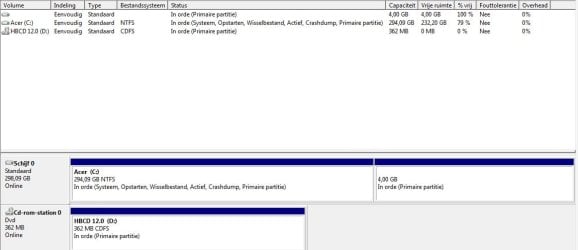
Have used the CLEAN ALL command?
 

My Computer My Computer

OS
ME/XP/Vista/Win7
The partition listings seem correct so if Win7 will not start it is likely due to GRUB corruption.

You can attempt to repair it by booting the Win7 Repair CD to run Startup Repair
up to 3 separate times with reboots.

I would first delete the 4gb partition if that is where GRUB was located as it's presence on HD can render Win7 irreparable.

If the repairs fail then wipe the HD as suggested to get rid of GRUB corruption and reinstall Win7: SSD - HDD Optimize for Windows Reinstallation
 
Again thanks so much for your replys i have not done the Clean and i will give this a try right now.
Seriously greatful for all the help

will come back at this for sure
 

My Computer My Computer

Computer type
PC/Desktop
Computer Manufacturer/Model Number
ASUS K53S
OS
MS Windows 7 Home Premium 64-bit SP1
CPU
Intel Core i7 2670QM @ 2.20GHZ
Motherboard
ASUSTeK Computer Inc. K53SV (CPU 1)
Memory
8.00 GB Dual-Channel DDR3 @ 665MHz
Graphics Card(s)
2047MB GeForce GT 540M (ASUStek Computer Inc)
Sound Card
Realtek High Definition Audio
Monitor(s) Displays
1
Hard Drives
596GB Hitachi HTS547564A9E384 (SATA)
Internet Speed
29,5 MBPS DOWNL AND 6 UPLOAD
Antivirus
Microsoft Security Essentials, SUPERANTISPYWARE
Browser
CHROME,IE
Other Info
i love to travel also
i have lived in Hungary & Ireland & Germany and Belgium
and worked in the Netherlands as i used to live in a bordertown.....
Hi all
God bless
Peace
No, do not use the CLEAN command, is will not delete GRUB.
Use the CLEAN ALL command, which will delete GRUB.
 

My Computer My Computer

OS
ME/XP/Vista/Win7
Thanks for the advice and your update

Thanks for the advice and your update
Looking into this
XXX
 

My Computer My Computer

Computer type
PC/Desktop
Computer Manufacturer/Model Number
ASUS K53S
OS
MS Windows 7 Home Premium 64-bit SP1
CPU
Intel Core i7 2670QM @ 2.20GHZ
Motherboard
ASUSTeK Computer Inc. K53SV (CPU 1)
Memory
8.00 GB Dual-Channel DDR3 @ 665MHz
Graphics Card(s)
2047MB GeForce GT 540M (ASUStek Computer Inc)
Sound Card
Realtek High Definition Audio
Monitor(s) Displays
1
Hard Drives
596GB Hitachi HTS547564A9E384 (SATA)
Internet Speed
29,5 MBPS DOWNL AND 6 UPLOAD
Antivirus
Microsoft Security Essentials, SUPERANTISPYWARE
Browser
CHROME,IE
Other Info
i love to travel also
i have lived in Hungary & Ireland & Germany and Belgium
and worked in the Netherlands as i used to live in a bordertown.....
Hi all
God bless
Peace
Hi i just tried booting from My Acer Recovery CD i choose repair settings to default enter the first dvd then the second dvd and Pc hangs simply doesn t do anything . After rebooting I have the Disk grub error and again only with hirens boot i am able to log on booting via harddrive .

After turning down laptop incorreclyt i was able to boot into recovery menu with Dos option where i added in the following commands
DISKPART
LIST DISK
SELECT DISK # (win HD) -- Here i am only to select partition 1 or partition 2 no C or D
Then after when i tap CLEAN ALL i get an VDS-error - Cleaning up is not allowed on the disk ......

When booting again via Hirens boot using NTLDR -tool it gives me the following information Windows could not start because the following file is missing or corrupt: windows root -system32 -ntoskrnl.exe Please reinstall a copy of the above file

Any suggestions are always welcome as ever

as i have 4 recovery cds and i already reinstalled windows 7 once after doing a format Hd with active boot which had me able to logon to windows only when booting from Hirens cd - first boot from dvd then boot from harddrive -
Is there a tool in particular i should use to Format my pc as the first format with A Active Boot cd was not able to remove The Linux Grub?
 

My Computer My Computer

Computer type
PC/Desktop
Computer Manufacturer/Model Number
ASUS K53S
OS
MS Windows 7 Home Premium 64-bit SP1
CPU
Intel Core i7 2670QM @ 2.20GHZ
Motherboard
ASUSTeK Computer Inc. K53SV (CPU 1)
Memory
8.00 GB Dual-Channel DDR3 @ 665MHz
Graphics Card(s)
2047MB GeForce GT 540M (ASUStek Computer Inc)
Sound Card
Realtek High Definition Audio
Monitor(s) Displays
1
Hard Drives
596GB Hitachi HTS547564A9E384 (SATA)
Internet Speed
29,5 MBPS DOWNL AND 6 UPLOAD
Antivirus
Microsoft Security Essentials, SUPERANTISPYWARE
Browser
CHROME,IE
Other Info
i love to travel also
i have lived in Hungary & Ireland & Germany and Belgium
and worked in the Netherlands as i used to live in a bordertown.....
Hi all
God bless
Peace

My Computer My Computer

Computer Manufacturer/Model Number
* BFK Customs *
OS
W 7 64-bit Ultimate
CPU
Intel Q9550 Yorkfield
Motherboard
ASUS P5Q Pro
Memory
8GB Dominator 8500C5D
Graphics Card(s)
ATI : XFX 5870
Sound Card
Realtek HD Audio 7-1
Monitor(s) Displays
1x 47" LCD HDMI & 3x 26" LCD HDMI
Screen Resolution
1920x1080P & 1920x1200
Hard Drives
1x 80GB Intel X25-M G2 SSD : 1x 500GB & 1x 640GB WD Caviar Black(s)
PSU
Corsair 620HX
Case
Cooler Master RC-690
Cooling
Tuniq Tower 120, 2x 140mm and 3x 120mm case fans
Keyboard
Microsoft 500
Mouse
Razer Diamondback 3G
Internet Speed
14 Mb/s
Other Info
1x Koutech 3Gb/s SATA HDD Hot Swap Rack
Back
Top