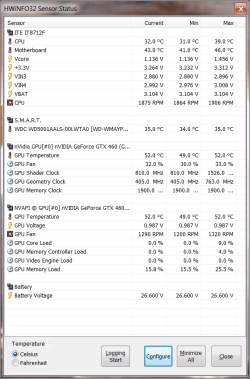
Another free option to Speedfan,
HWiNFO, HWiNFO32 & HWiNFO64 - Hardware Information and Analysis Tools
can display reading s in either the tray or in a gadget. If you try it and want to use the gadget have to go with the 32 bit version at the moment as there is a bug in the 64 bit that the readings won't show in the gadget, but works fine in the 32 bit version.
HWiNFO, HWiNFO32 & HWiNFO64 - Hardware Information and Analysis Tools
can display reading s in either the tray or in a gadget. If you try it and want to use the gadget have to go with the 32 bit version at the moment as there is a bug in the 64 bit that the readings won't show in the gadget, but works fine in the 32 bit version.
My Computer
At a glance
Win 7 Ultimate x64FX-8350 @ 4.6 GHz so farADATA XPG V1 Series Black 8GB DDR3 1600Sapphire R9 270x Dual-X
- Computer type
- PC/Desktop
- Computer Manufacturer/Model Number
- Me
- OS
- Win 7 Ultimate x64
- CPU
- FX-8350 @ 4.6 GHz so far
- Motherboard
- Asus M5A97 EVO
- Memory
- ADATA XPG V1 Series Black 8GB DDR3 1600
- Graphics Card(s)
- Sapphire R9 270x Dual-X
- Sound Card
- Xonar DGX w/ Corsair Vengence 1300
- Monitor(s) Displays
- Acer S232HL Abid
- Screen Resolution
- 1920x1080
- Hard Drives
- 120 GB OCZ Vertex 3
500 GB Seagate 7200.12
- PSU
- Antec Earthwatts 650W Green
- Case
- Antec Three Hundred
- Cooling
- Cooler Master 212 EVO
- Keyboard
- Logitech G510
- Mouse
- Logitech G500s
- Internet Speed
- 35000/3000