Black Screen Of Death

sam49

New member
Member
VIP
Local time
6:05 AM
Messages
140

Hi guy’s,
I hope someone can give me asome help please.
The full details of my system before anyone can help.The computer is an Intel core 2 duo 6600 2.40 Ghz with 2 meg ram. Nvidia Gforce 8600 GT graphics card.
I have no onboard VGA graphics just the Gforce, and I am not sure if I have DVI display the monitor just connects with the normal socket.

The hard drive I am installing to is a 80Gig SATA and I formatted it before starting with the windows 7 RC boot dvd so it is a clean install.

I downloaded the installation file and burn the image with Nero on a slow speed.When I boot from the DVD all works ok and the computer restarts a few times, and then just a black screen.
After several attempts i did manage to get as far as inputting the serial number and windows 7 started up it then connected to the internet and downloaded some updates and then restarted and i was back to the black sreen, i could at that time boot into safe mode but i was not able to connect to the internet and download new video drivers.
Then after foollowing some advice i did another install, I tried a reinstall and now I can’t get as far as the serial number.
I can’t understand this as I did have it running just the once even if it was in safe mode.
I have run the Windows 7 RC upgrade advisor and that says my computer is ok to run Windows 7 including the Gforce card.


Hope someone can help please. :cry:


My Computer My Computer

Computer Manufacturer/Model Number
Custom Made
OS
Windows 7 Professional 64 Bit
CPU
Intel Core I7 920 @ 2.6 GHz
Motherboard
Asus P6T SE
Memory
12 Meg Triple Channel DDR3
Graphics Card(s)
Nvidia Gforce GTX 260
Sound Card
On Board
Monitor(s) Displays
DGM
Hard Drives
500 gig Sata
PSU
Not sure
Case
Thermalite
Cooling
Standard cooling
Keyboard
Usb
Mouse
Usb
Internet Speed
7meg
The Geforce card shouldn't be a problem because Windows 7 comes with support for that card.

The first thing I will get out of the way. Did you verify the disc after burn? You should.

Second, download all necessary drivers from the company website. It's probably a good idea to do that before installing Windows if you can. Do not use Windows update to install drivers if you can help it, because it can cause problems (old drivers).
 

My Computer My Computer

Computer Manufacturer/Model Number
Too many to list.
OS
XP, Seven, 2008R2
CPU
AMD, Intel, VIA
Motherboard
Various
Memory
Corsair, Kingston, etc.
Graphics Card(s)
ATI, NVIDIA
Monitor(s) Displays
Samsung
Hard Drives
Maxtor, Western Digital
Keyboard
qwerty
Internet Speed
22 Mb/s @ home, 1 Gb/s @ server
Other Info
All of my systems still run fastest on XP 32-bit for the most part. Win7 is fun to play with, but I still prefer XP for raw speed, security, and functionality.
Hi yes i did verify the disk after the burnand i have made two differant burns and they are both have the same problem.
Ok i will download Windows 7 drivers but untill i can get windows running i carnt see how to install these drivers.
What i carnt understand i did have it running but only in safe mode but it was running.

But i carnt get as far as inputting the serial number anf i i try to boot into safe mode now it says windown cannot start in safe mode.

Regards Edward
 

My Computer My Computer

Computer Manufacturer/Model Number
Custom Made
OS
Windows 7 Professional 64 Bit
CPU
Intel Core I7 920 @ 2.6 GHz
Motherboard
Asus P6T SE
Memory
12 Meg Triple Channel DDR3
Graphics Card(s)
Nvidia Gforce GTX 260
Sound Card
On Board
Monitor(s) Displays
DGM
Hard Drives
500 gig Sata
PSU
Not sure
Case
Thermalite
Cooling
Standard cooling
Keyboard
Usb
Mouse
Usb
Internet Speed
7meg
Did you change something since the first time you installed it? Because originally you said it was Windows update that caused a problem.

connected to the internet and downloaded some updates and then restarted and i was back to the black sreen


It almost seems as if Windows 7 is incompatible with something in your computer.
 

My Computer My Computer

Computer Manufacturer/Model Number
Too many to list.
OS
XP, Seven, 2008R2
CPU
AMD, Intel, VIA
Motherboard
Various
Memory
Corsair, Kingston, etc.
Graphics Card(s)
ATI, NVIDIA
Monitor(s) Displays
Samsung
Hard Drives
Maxtor, Western Digital
Keyboard
qwerty
Internet Speed
22 Mb/s @ home, 1 Gb/s @ server
Other Info
All of my systems still run fastest on XP 32-bit for the most part. Win7 is fun to play with, but I still prefer XP for raw speed, security, and functionality.
Hello Edward, welcome.

First off, this sounds like the Setup disk might be bad (by that I mean the RC install). If possible, download a new copy DIRECTLY from Microsoft, and burn it again.

Then, find all the newest drivers for your Hardware. Burn these on a disk as well, or put them on a Flash Drive.
Start a new install, and DISCONNECT from the internet completely. Don't select Updates, and don't even connect. Skip it, its easy to do later. Before you start the actual install, it should ask if you have any drivers. This is when you put in the media with your new drivers and select it.

Then continue with installation and it should work.

~Lordbob
 

My Computer My Computer

Computer Manufacturer/Model Number
Hera
OS
Windows 7 Ultimate x64, Mint 9
CPU
Intel i5-2500k
Motherboard
ASUS P8P67 Pro
Memory
2x 4Gb Corsair VENGEANCE DDR3-1600
Graphics Card(s)
NVidia GeForce N260GTX Twin Frozr
Sound Card
Realtek HD OnBoard Audio
Monitor(s) Displays
ASUS 24" Monitor
Screen Resolution
1920x1080
Hard Drives
G.SKILL Phoenix Series 60GB SATA II MLC Internal Solid State Drive (SSD)
SAMSUNG Spinpoint F3R 1TB 7200 RPM 32MB Cache SATA II
PSU
Cooler Master Real Power Pro 750W
Case
Cooler Master Haf 932
Cooling
Fans
Keyboard
Razer Tarantula
Mouse
Razer Lachesis
Internet Speed
not fast enough
Hi it took me several trys at installing it before it get it to work and then it just asked for the serial number and it loaded up ok downloaded spome upodates (Not sure just what) and then restarted to the black screen.
I have formated the drive again so all data should be gone.
But when i try to install now as the computer restarts after the instalation i get the black screen before i have to put in the serial number.
I have not changed anything on my computer only formated the harddrive.
Regards
 

My Computer My Computer

Computer Manufacturer/Model Number
Custom Made
OS
Windows 7 Professional 64 Bit
CPU
Intel Core I7 920 @ 2.6 GHz
Motherboard
Asus P6T SE
Memory
12 Meg Triple Channel DDR3
Graphics Card(s)
Nvidia Gforce GTX 260
Sound Card
On Board
Monitor(s) Displays
DGM
Hard Drives
500 gig Sata
PSU
Not sure
Case
Thermalite
Cooling
Standard cooling
Keyboard
Usb
Mouse
Usb
Internet Speed
7meg
Hi it took me several trys at installing it before it get it to work and then it just asked for the serial number and it loaded up ok downloaded spome upodates (Not sure just what) and then restarted to the black screen.
I have formated the drive again so all data should be gone.
But when i try to install now as the computer restarts after the instalation i get the black screen before i have to put in the serial number.
I have not changed anything on my computer only formated the harddrive.
Regards
Are you going to try my advice?

It may also be a bad DVD drive. Do you have another you can install from?

~Lordbob
 

My Computer My Computer

Computer Manufacturer/Model Number
Hera
OS
Windows 7 Ultimate x64, Mint 9
CPU
Intel i5-2500k
Motherboard
ASUS P8P67 Pro
Memory
2x 4Gb Corsair VENGEANCE DDR3-1600
Graphics Card(s)
NVidia GeForce N260GTX Twin Frozr
Sound Card
Realtek HD OnBoard Audio
Monitor(s) Displays
ASUS 24" Monitor
Screen Resolution
1920x1080
Hard Drives
G.SKILL Phoenix Series 60GB SATA II MLC Internal Solid State Drive (SSD)
SAMSUNG Spinpoint F3R 1TB 7200 RPM 32MB Cache SATA II
PSU
Cooler Master Real Power Pro 750W
Case
Cooler Master Haf 932
Cooling
Fans
Keyboard
Razer Tarantula
Mouse
Razer Lachesis
Internet Speed
not fast enough
Ok i will try and download a new version of the image file from microsoft, do you think the 64 bit edition will work any better or not.
Sorry no i dont have another drive i could try but i will have a look round and see if i can borrow one.
Will the Sata connection be a problem do you think
 

My Computer My Computer

Computer Manufacturer/Model Number
Custom Made
OS
Windows 7 Professional 64 Bit
CPU
Intel Core I7 920 @ 2.6 GHz
Motherboard
Asus P6T SE
Memory
12 Meg Triple Channel DDR3
Graphics Card(s)
Nvidia Gforce GTX 260
Sound Card
On Board
Monitor(s) Displays
DGM
Hard Drives
500 gig Sata
PSU
Not sure
Case
Thermalite
Cooling
Standard cooling
Keyboard
Usb
Mouse
Usb
Internet Speed
7meg
bsod

Hi it took me several trys at installing it before it get it to work and then it just asked for the serial number and it loaded up ok downloaded spome upodates (Not sure just what) and then restarted to the black screen.
I have formated the drive again so all data should be gone.
But when i try to install now as the computer restarts after the instalation i get the black screen before i have to put in the serial number.
I have not changed anything on my computer only formated the harddrive.
Regards

OK I suspect the update downloaded a bad driver. You may have to install win 7 again and not use the download drivers during setup.

Hope this helps

Ken
 

My Computer My Computer

Computer Manufacturer/Model Number
HP Pavillion dv-7 1005 Tx
OS
Win 8 Release candidate 8400
CPU
[email protected]
Memory
4 gigs
Graphics Card(s)
Nvidia 9600M
Sound Card
HD built-in
Monitor(s) Displays
17" Wxga
Screen Resolution
1440x900
Cooling
none
Internet Speed
45Mb down 5Mb up

My Computer My Computer

Computer type
PC/Desktop
Computer Manufacturer/Model Number
Bruce ... somewhere in his 40's
OS
Windows 7 Ultimate 32bit SP1
CPU
Intel(R) Core(TM)2 Quad CPU @ 2.40GHz, 2400 MHz
Motherboard
INTEL/D975XBX2
Memory
4 GB
Graphics Card(s)
ATI Radeon HD 2600 Pro
Monitor(s) Displays
Samsung SyncMaster 914v
Screen Resolution
1280 x 1024
Hard Drives
2/500GB each ... ST3500630AS ATA Device.
One is not connected
PSU
Rocketfish 700 W
Case
G.Skill Gigabyte Chassis
Keyboard
Standard PS/2 Keyboard
Mouse
Microsoft PS/2 Mouse
Internet Speed
DSL
Antivirus
Avira Internet Security
Browser
IE 11
Other Info
ATI HDMI Audio
Ok i will try and download a new version of the image file from microsoft, do you think the 64 bit edition will work any better or not.
Sorry no i dont have another drive i could try but i will have a look round and see if i can borrow one.
Will the Sata connection be a problem do you think
SATA will cause no issue.
Only get the x64 if you have OVER 2 gigs of RAM. If you have MORE than 4 gigs, then the x32 will only read 3 somthing.

~Lordbob
 

My Computer My Computer

Computer Manufacturer/Model Number
Hera
OS
Windows 7 Ultimate x64, Mint 9
CPU
Intel i5-2500k
Motherboard
ASUS P8P67 Pro
Memory
2x 4Gb Corsair VENGEANCE DDR3-1600
Graphics Card(s)
NVidia GeForce N260GTX Twin Frozr
Sound Card
Realtek HD OnBoard Audio
Monitor(s) Displays
ASUS 24" Monitor
Screen Resolution
1920x1080
Hard Drives
G.SKILL Phoenix Series 60GB SATA II MLC Internal Solid State Drive (SSD)
SAMSUNG Spinpoint F3R 1TB 7200 RPM 32MB Cache SATA II
PSU
Cooler Master Real Power Pro 750W
Case
Cooler Master Haf 932
Cooling
Fans
Keyboard
Razer Tarantula
Mouse
Razer Lachesis
Internet Speed
not fast enough
Yes i did download it from there but i will try again and use imgburn this time

Thanks guys
 

My Computer My Computer

Computer Manufacturer/Model Number
Custom Made
OS
Windows 7 Professional 64 Bit
CPU
Intel Core I7 920 @ 2.6 GHz
Motherboard
Asus P6T SE
Memory
12 Meg Triple Channel DDR3
Graphics Card(s)
Nvidia Gforce GTX 260
Sound Card
On Board
Monitor(s) Displays
DGM
Hard Drives
500 gig Sata
PSU
Not sure
Case
Thermalite
Cooling
Standard cooling
Keyboard
Usb
Mouse
Usb
Internet Speed
7meg
There is 1 option you could try

http://www.sevenforums.com/installation-setup/11273-install-windows-7-safe-mode.html

Use the tutorial to disable your GFX card (as that may be what is giving the black screen), this will cause windows to use 'Standard VGA Adaptor'. But you will then be able to access the net and download then install the lates drivers.

update: as it's the restart that's failing i'm going to asume that it's not a bad burn as the main install gets to 100%
 

My Computer My Computer

Computer Manufacturer/Model Number
Compaq Desktop
OS
Windows 7 Ultimate x64
CPU
AMD Sempron Dual Core
Memory
3GB
Graphics Card(s)
NVIDIA GeForce 6150SE nForce 430
Screen Resolution
1024x768
Hard Drives
150GB Sata
Hi yes i did verify the disk after the burnand i have made two differant burns and they are both have the same problem.
= Verify the burn has no effect - what ever you do if you burn at speeds over 4X your asking for redundancy errors. (Failure to install.)
Ok i will download Windows 7 drivers but untill i can get windows running i carnt see how to install these drivers.
(If you check stay on internet all the time. Win7 will DL and install all the proper Drivers for you EXCEPT SATA Drivers.)
What i carnt understand i did have it running but only in safe mode but it was running.(Safe mode does not load any drivers for hardware. everything is BASIC.)
1. So apparently you have a BAD DRIVER.
2. make sure you run the Win7 UPDATE Advisor.
3. remove your firewalls
4. remove your Antiviris.
5. you can install any OS via HDD. uncompress the iso to a clean partition other than the one you want as boot drive.
6. click setup.exe
7. Now since you have some problems.
really need some info. see below.

But i carnt get as far as inputting the serial number anf i i try to boot into safe mode now it says windown cannot start in safe mode.

Regards Edward
1. Where did you download your version of Win7?
2. c/p the full name of your download.
3. are you doing a 100% clean install.?
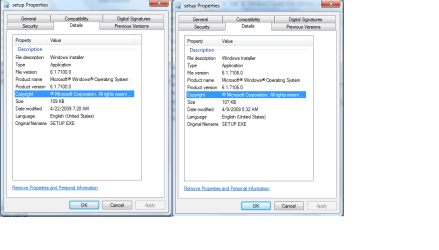
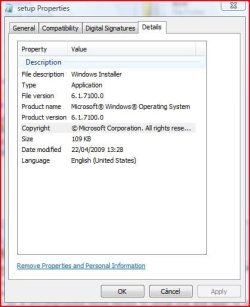
4. when the iso is uncompressed move mouse to setup.exe and open to see properties. what version is your setup.
5. Have you formatted :ntfs since failure to install.
plz enter your system in system specs. 100% easier to review that way than try to open back to 1st page. The more details the better.
enough ?'s for now. hope this helps. and every ? is very important to getting your system going.
 

Attachments

  • setup-.png
    setup-.png
    25.5 KB · Views: 68
Yeah it really does seem like a graphics issue after all, although I had assumed that it wouldn't be a problem because I've used newer cards than the 8600GT (8800GT, 9800GT, etc) and they work fine for me.

Just for the heck of it, check your monitor cable and also go into the BIOS and make sure your RAM has the proper timings and voltage.
 

My Computer My Computer

Computer Manufacturer/Model Number
Too many to list.
OS
XP, Seven, 2008R2
CPU
AMD, Intel, VIA
Motherboard
Various
Memory
Corsair, Kingston, etc.
Graphics Card(s)
ATI, NVIDIA
Monitor(s) Displays
Samsung
Hard Drives
Maxtor, Western Digital
Keyboard
qwerty
Internet Speed
22 Mb/s @ home, 1 Gb/s @ server
Other Info
All of my systems still run fastest on XP 32-bit for the most part. Win7 is fun to play with, but I still prefer XP for raw speed, security, and functionality.
Sam, if your motherboard is an ATI chipset instead of an nVidia chipset, you might be suffering the same problem a few of us have.

On my pc, i cannot do a restart. If i just restart, i get black screen, no matter which DVI port I use from the video card.

To solve this, instead of a restart, completely power down the system, wait 10 seconds, then power up.
 

My Computer My Computer

OS
all of them
orbital shark said:
UPDATE: as it's the restart that's failing i'm going to asume that it's not a bad burn as the main install gets to 100%
which restart are you in reference to. the 1st full restart or the 2n full restart.
every test install for me sofar.
1. full restart at 21% (failure could be video)
2. full restart at 80% (failure is not VIDEO)
3. final full restart at transfer all that actually should be at 86%. (Failure is not Video).
 
Snuffy, sorry if i wasn't too clear.

If it was a bad burn then the copying would fail @ a certain % (expanding files). It's the only time that Windows is using the DVD drive, after the first restart Windows uses the files already copied to HD. Therefore, if it gets to the first restart then it can't be a bad burn, it must be hardware :)
 

My Computer My Computer

Computer Manufacturer/Model Number
Compaq Desktop
OS
Windows 7 Ultimate x64
CPU
AMD Sempron Dual Core
Memory
3GB
Graphics Card(s)
NVIDIA GeForce 6150SE nForce 430
Screen Resolution
1024x768
Hard Drives
150GB Sata
Hi guys i am at the moment downloading the isop file again from microsoft.
The file name i did download is as follows 7100.0.090421-1700_x86fre_client_en-us_retail_ultimate-grc1culfrer_en_dvd
I have run the Win 7 updatye advisor and it reports no problems.

I do apreciate all the help from this forum but i am not able to remove my antivirus or firewall as it is a clean install and there are none installed.

I removed all my spare drives and my erthernet cable so all the drive on my computer are just the DVD drive and a 80 Sata harddrive.

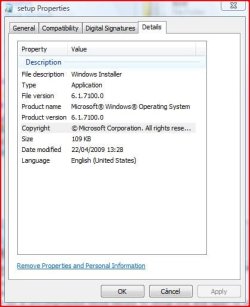
I have attached the iso details hope it works and i will update my system details in a little while
 

Attachments

  • File specs.JPG
    File specs.JPG
    34.6 KB · Views: 136

My Computer My Computer

Computer Manufacturer/Model Number
Custom Made
OS
Windows 7 Professional 64 Bit
CPU
Intel Core I7 920 @ 2.6 GHz
Motherboard
Asus P6T SE
Memory
12 Meg Triple Channel DDR3
Graphics Card(s)
Nvidia Gforce GTX 260
Sound Card
On Board
Monitor(s) Displays
DGM
Hard Drives
500 gig Sata
PSU
Not sure
Case
Thermalite
Cooling
Standard cooling
Keyboard
Usb
Mouse
Usb
Internet Speed
7meg
Sorry posted twice
 

Attachments

  • File specs.JPG
    File specs.JPG
    34.6 KB · Views: 16
Last edited:

My Computer My Computer

Computer Manufacturer/Model Number
Custom Made
OS
Windows 7 Professional 64 Bit
CPU
Intel Core I7 920 @ 2.6 GHz
Motherboard
Asus P6T SE
Memory
12 Meg Triple Channel DDR3
Graphics Card(s)
Nvidia Gforce GTX 260
Sound Card
On Board
Monitor(s) Displays
DGM
Hard Drives
500 gig Sata
PSU
Not sure
Case
Thermalite
Cooling
Standard cooling
Keyboard
Usb
Mouse
Usb
Internet Speed
7meg
Back
Top