Announcing: 7stacks - stacks for 7 (freeware)

Thanks everyone for all the positive comments. FYI, version 1.1 now available. Download away. Changes are:

- Fixed Stack and Grid disappearing off screen when the Windows Taskbar has AutoHide turned on. It will now range-check all 4 sides to make sure it appears completely on screen.
- Added Preferences window and accompanying JumpList entry.
- Added Close Stack preference. You can now choose to close the stack either by clicking away from it (the way it did in 1.0), or by clicking the stack icon a 2nd time (the way its done is Mac OS X).
 
Last edited by a moderator:

My Computer My Computer

Computer Manufacturer/Model Number
Custom Built
OS
Windows 7 RC build 7100
CPU
Core 2 Quad Q6600 (OC to 3.0 GHz)
Motherboard
DFI Lanparty DK P35-T2RS
Memory
2GB DDR2 800
Graphics Card(s)
GF 8600 GT
Monitor(s) Displays
22" Acer LCD
Screen Resolution
1680x1050
Hard Drives
640 GB Western Digital
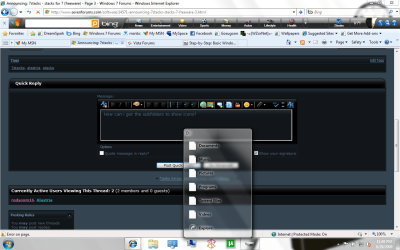
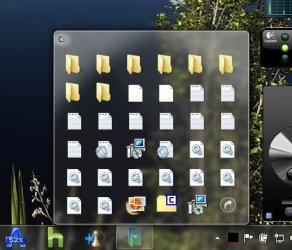
How can i get the subfolders to show icons?

Untitled3.png
 

My Computer My Computer

Computer Manufacturer/Model Number
Dell Vostro 1000
OS
Windows 7 Ultimate x86
CPU
AMD Sempron 3600+
Graphics Card(s)
ATI Radeon Xpress 1150
Monitor(s) Displays
Generic PnP Monitor
Screen Resolution
1200 x 800
Hard Drives
WD Scorpio Blue 500 GB (WD5000BEVT)
Mouse
Logitech V320 Cordless Optical Mouse
How can i get the subfolders to show icons?

View attachment 16106

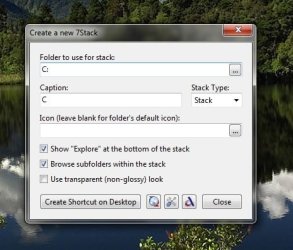
It seems that for drives, the shortcut cannot include the trailing slash. So, don't point the shortcut to "D:\", point it to "D:". Then the icons will show up as they should. Also, the caption cannot include a colon. See the attached screenshots.

The app will do all this automatically in the next version.

And a big thanks to everyone for finding the bugs for me.
 

Attachments

  • 1.jpg
    1.jpg
    30.2 KB · Views: 3,510
  • 2.jpg
    2.jpg
    30.5 KB · Views: 37

My Computer My Computer

Computer Manufacturer/Model Number
Custom Built
OS
Windows 7 RC build 7100
CPU
Core 2 Quad Q6600 (OC to 3.0 GHz)
Motherboard
DFI Lanparty DK P35-T2RS
Memory
2GB DDR2 800
Graphics Card(s)
GF 8600 GT
Monitor(s) Displays
22" Acer LCD
Screen Resolution
1680x1050
Hard Drives
640 GB Western Digital

My Computer My Computer

Computer Manufacturer/Model Number
AMD Athlon 64 3200+, Lenovo G560 i3
OS
Windows 7 Ultimate, Ubuntu
Motherboard
Gigabyte K8T8000
Memory
DDR 2Gb (!)
Graphics Card(s)
6600GT
Monitor(s) Displays
MultiMonitor (2) LCD
Hard Drives
Old Seagate 75
Big Western Digital
Samsung 500Gb pulled out of an external drive and installed
Ext: Maxtor (Firewire), 1Gb Lacie (Samsung)
Mouse
Logitech MX620 Cordless
So, don't point the shortcut to "D:\", point it to "D:"

Beautiful. It works great now.
Great work so far!! :)
 

My Computer My Computer

Computer Manufacturer/Model Number
Dell Vostro 1000
OS
Windows 7 Ultimate x86
CPU
AMD Sempron 3600+
Graphics Card(s)
ATI Radeon Xpress 1150
Monitor(s) Displays
Generic PnP Monitor
Screen Resolution
1200 x 800
Hard Drives
WD Scorpio Blue 500 GB (WD5000BEVT)
Mouse
Logitech V320 Cordless Optical Mouse
I am gonna grab this when I go home and it seems a donation might be in order too.
 

My Computer My Computer

OS
Windows 7 x64 Pro
CPU
Intel 990X
Motherboard
Asus P6T Deluxe V2
Memory
CORSAIR XMS3 6GB SDRAM DDR3 1600 (7-7-7-20)
Graphics Card(s)
2 x BFG 285 GTX OCXs in SLI
Sound Card
X-fi Elite Pro
Monitor(s) Displays
HP LP 3065
Screen Resolution
2560 x 1600
Hard Drives
2 x 150 gb Velociraptors RAID 0
PSU
PC Power & Cooling 750W
Case
CM Stacker 832
Cooling
Stock cooler
Keyboard
Saitek Eclipse II
Mouse
Logitech MX Revolution
Bugaloos:

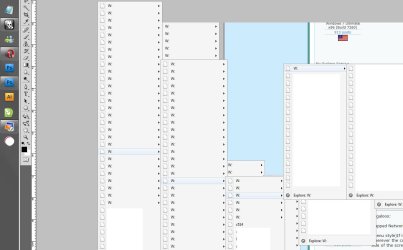
-Mapped Networks drives' subfolders get labeled with the letter of the network drive.(see pic)

-(menu style)If it's a deep folder, it'll take a second for the flyout to come up and the popup menu pops up wherever the cursor is. So if you move the cursor off to the righ real quick, the folder popups on the right side of the screen.(see pic)

-Mapped Network drives don't show icons for files(see pic)

bugaloos.jpg

-Locations set directly from the network(not mapped drives) don't show subfolder directory names

-Putting a slash in the directory will create a dead file on the desktop.

Wishlist:
-Using the preference on the jumplist should bring up the rest of the options (style/icon/directory) configures.

-Being able to set how many files per subfolder can show in menu style

-Send the "Active state" to the taskbar item so you can tell which stack you're currently using.(visual consistency more than anything)
 
Last edited:

My Computer My Computer

OS
7264x64/7260x86
Bugaloos:

-Mapped Networks drives' subfolders get labeled with the letter of the network drive.(see pic)

-(menu style)If it's a deep folder, it'll take a second for the flyout to come up and the popup menu pops up wherever the cursor is. So if you move the cursor off to the righ real quick, the folder popups on the right side of the screen.(see pic)

-Mapped Network drives don't show icons for files

-Mapped drives directly from the network(not mapped drives) don't show subfolder directory names

-Putting a slash in the directory will create a dead file on the desktop.

Wishlist:
-Using the preference on the jumplist should bring up the rest of the options (style/icon/directory) configures. (not a bug, just a wish =P )

-Being able to set how many files per subfolder can show in menu style

First, Problem 2 .. Yes, you're absolutely, right. That will be fixed in v1.2.

Problems 1, 3, 4, and 5 are all relate back to this same bug I mentioned earlier. Just make sure the stack points to "W:", not "W:\" That trailing slash apparently goofs everything up. I will also have that fixed in v1.2.

I'm gonna see if there's a way to edit a stack via a jumplist entry. I agree that that would be very handy to have. I'm gonna have to see if the jumplist is capable of doing that. The jumplist is kind of convoluted to work with. You have to do everything w/ the jumplist by passing command-line parameters from EXE to EXE. Yuck...
 

My Computer My Computer

Computer Manufacturer/Model Number
Custom Built
OS
Windows 7 RC build 7100
CPU
Core 2 Quad Q6600 (OC to 3.0 GHz)
Motherboard
DFI Lanparty DK P35-T2RS
Memory
2GB DDR2 800
Graphics Card(s)
GF 8600 GT
Monitor(s) Displays
22" Acer LCD
Screen Resolution
1680x1050
Hard Drives
640 GB Western Digital
Hehe, you're right, I coulda sworn I killed the slash. My bad.

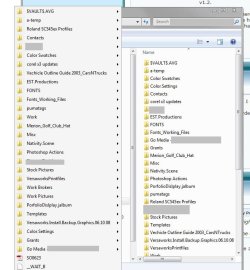
I've noticed the ordering of folders is not alphabetical. Is there a reason why that's happening.
 

My Computer My Computer

OS
7264x64/7260x86
Hehe, you're right, I coulda sworn I killed the slash. My bad.

I've noticed the ordering of folders is not alphabetical. Is there a reason why that's happening.

That's odd. They're alphabetical on mine. Could I see a screenshot?
 

My Computer My Computer

Computer Manufacturer/Model Number
Custom Built
OS
Windows 7 RC build 7100
CPU
Core 2 Quad Q6600 (OC to 3.0 GHz)
Motherboard
DFI Lanparty DK P35-T2RS
Memory
2GB DDR2 800
Graphics Card(s)
GF 8600 GT
Monitor(s) Displays
22" Acer LCD
Screen Resolution
1680x1050
Hard Drives
640 GB Western Digital
Yup, left side is the 7 stacks flyout and right side is the explorer window.order.jpg
 

My Computer My Computer

OS
7264x64/7260x86
OK, that's weird. IIRC, folder contents should automatically be retrieved alphabetically, but clearly they're not. In 1.2, I'll run an alphabetical sort on everything before displaying it.

Thanks for finding this.
 

My Computer My Computer

Computer Manufacturer/Model Number
Custom Built
OS
Windows 7 RC build 7100
CPU
Core 2 Quad Q6600 (OC to 3.0 GHz)
Motherboard
DFI Lanparty DK P35-T2RS
Memory
2GB DDR2 800
Graphics Card(s)
GF 8600 GT
Monitor(s) Displays
22" Acer LCD
Screen Resolution
1680x1050
Hard Drives
640 GB Western Digital
Might have something to do with it being a network destination, I just tried doing regular folders directly off my computer and they are sorted properly.

I tried to navigate to a folder that has 5000 files in it, and it hangs.(it's a really messy folder that I don't really use, but it happened to be in one of my drives, I know not common).

Maybe a quick folder check to not try and pull that many files?
 

My Computer My Computer

OS
7264x64/7260x86
Might have something to do with it being a network destination, I just tried doing regular folders directly off my computer and they are sorted properly.

I tried to navigate to a folder that has 5000 files in it, and it hangs.(it's a really messy folder that I don't really use, but it happened to be in one of my drives, I know not common).

Maybe a quick folder check to not try and pull that many files?

1) That makes sense. Network locations use different file system (NFS), which may not be alphabetized. Like I said, just to be on the safe side, I'll run everything through a sorter in 1.2.

2) Yea, I could see where 5000 files would make it hang (at least for a few minutes). I could cap the maximum number of items displayed in any menu to say 500 or 1000. I'll run some tests to see what works.
 

My Computer My Computer

Computer Manufacturer/Model Number
Custom Built
OS
Windows 7 RC build 7100
CPU
Core 2 Quad Q6600 (OC to 3.0 GHz)
Motherboard
DFI Lanparty DK P35-T2RS
Memory
2GB DDR2 800
Graphics Card(s)
GF 8600 GT
Monitor(s) Displays
22" Acer LCD
Screen Resolution
1680x1050
Hard Drives
640 GB Western Digital
How do you recreate it? Just create a new stack? What happens when you use up the 10 stacks, does it start over with the first one(rewriting it), or just not make any new stacks?

Sorry I missed your post from yesterday.

The 10-stack limit is for Average Joes. Theoretically, you can make as many stacks as you want (50? 100?), as long as you're willing to roll up your sleeves a little :D. Let me explain...

Microsoft (in their infinite wisdom :sarc:) decided that you couldn't pin the same EXE twice. You can, however, change the shortcut's target location after it's pinned to another EXE. Yes, this is beyond screwy.

So, for the average user's sake, I made 10 identical stack EXEs, and let the "CreateStack" app sort out which EXE gets used. This keeps the hassle for average users to a minimum.

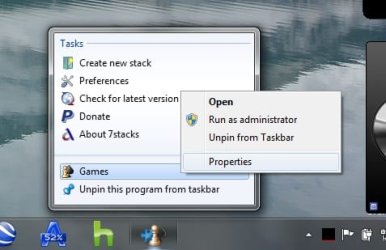
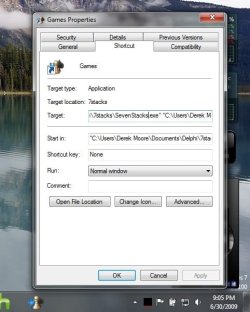
BUT, if you know what you're doing, you can get around this limitation. Right-click on a stack icon in the Taskbar to display the jumplist, and then right-click on the name of that icon, and select Properties. This lets you can edit the shortcut within the Taskbar. Change the Target location of the shortcut from say "SevenStacks3.exe" to "SevenStacks0.exe", and click OK. Keep manually pointing all your stacks to "SevenStacks0.exe" (or whatever number), and you can have hundreds of stacks if you'd like. See the attached screenshots for a tutorial.
 

Attachments

  • 1.jpg
    1.jpg
    22.2 KB · Views: 70
  • 2.jpg
    2.jpg
    41.3 KB · Views: 35

My Computer My Computer

Computer Manufacturer/Model Number
Custom Built
OS
Windows 7 RC build 7100
CPU
Core 2 Quad Q6600 (OC to 3.0 GHz)
Motherboard
DFI Lanparty DK P35-T2RS
Memory
2GB DDR2 800
Graphics Card(s)
GF 8600 GT
Monitor(s) Displays
22" Acer LCD
Screen Resolution
1680x1050
Hard Drives
640 GB Western Digital
Tried the soft tonight.

Work great, I'll adopt it for sur!
But I see two little issue:

No multimonitor support for some windows (new stack, preferences, etc). The windows should appear centered on the primary monitor instead of on the "global center" (between the 2 monitors if you have dual-screen, not really nice)

I use taskbar on the right side of the screen, I add a stack somewhere in the middle of the taskbar. The stack appear on the upper right corner. It should appear near the stack icon.


That's all I have to say at this time ;)
Great work.
 

My Computer My Computer

OS
Vista H.P. SP1 x32 Seven RC x64
CPU
Q6600 @ 3.4Ghz
Motherboard
GA-EP45-DS3L
Memory
4Go PC2-6400
Graphics Card(s)
8500GT @ 700/500
Sound Card
Audigy Platinium
Monitor(s) Displays
Mitsubishi Diamond Pro 920 + Mitsubishi Diamond Pro 720
Screen Resolution
1600x1200 twice
Hard Drives
Hitachi 160Go
Maxtor 160Go (system drive)
Maxtor 200Go in Antec MX-1 EC external box (eSATA-USB2.0)
PSU
Corsair VX550W
Case
Thermaltake Xaser III
Cooling
Watercooling (CPU, GPU, HDD, NB)
Keyboard
MS Wireless Multimedia 6000 V2.0
Mouse
IntellEye Explorer 3.0
Internet Speed
ADSL 18Mbit/s/1Mbit/s
I love stacks however what I hate is that I can not right click and change the flyout mode.

I hate having to recreate the folder to change the look!
 

My Computer My Computer

OS
Windows 7 7264
CPU
AMD Phenon X4955 Black Edition 3.2 Quad Core
Motherboard
ASUS M4A79T Deluxe AM3 DDR3 AMD 790FX ATX AMD Motherboard
Memory
8GB CORSAIR XMS3 DHX 4GB 240-Pin DDR3 SDRAM DDR3 1600
Graphics Card(s)
SAPPHIRE Radeon HD 4890 1GB 256-bit GDDR5 PCI Exp 2.0 16x
Sound Card
Onboard Asus
Monitor(s) Displays
Hanns G 28" Widscreen Baby!
Screen Resolution
1900x1200
Hard Drives
Western Digital Caviar Black WD1001FALS 1TB 7200 RPM 32MB Cache SATA 3.0Gb

Western Digital 320gb 7200 RPM 16MB Cache
PSU
CORSAIR CMPSU-750TX 750W ATX12V / EPS12V
Case
Custom Made ATX
Cooling
Air
Keyboard
Microsoft Wired for gaming
Mouse
Wired for gaming 2200
Internet Speed
Comcast 24GB
Tried the soft tonight.

Work great, I'll adopt it for sur!
But I see two little issue:

No multimonitor support for some windows (new stack, preferences, etc). The windows should appear centered on the primary monitor instead of on the "global center" (between the 2 monitors if you have dual-screen, not really nice)

I use taskbar on the right side of the screen, I add a stack somewhere in the middle of the taskbar. The stack appear on the upper right corner. It should appear near the stack icon.


That's all I have to say at this time ;)
Great work.

Multimonitor support is coming in v1.2.

I love stacks however what I hate is that I can not right click and change the flyout mode.

I hate having to recreate the folder to change the look!

I am also trying to get this into 1.2, but it may have to wait until 1.3. v1.2 should be out Saturday.
 

My Computer My Computer

Computer Manufacturer/Model Number
Custom Built
OS
Windows 7 RC build 7100
CPU
Core 2 Quad Q6600 (OC to 3.0 GHz)
Motherboard
DFI Lanparty DK P35-T2RS
Memory
2GB DDR2 800
Graphics Card(s)
GF 8600 GT
Monitor(s) Displays
22" Acer LCD
Screen Resolution
1680x1050
Hard Drives
640 GB Western Digital
Multimonitor support is coming in v1.2.


I am also trying to get this into 1.2, but it may have to wait until 1.3. v1.2 should be out Saturday.

great maybe one more thing. Can you allow PNG or JPG images as the Icons like RocketDock and others do?

FInding and making a ICO file are a pain in the ass.
 

My Computer My Computer

OS
Windows 7 7264
CPU
AMD Phenon X4955 Black Edition 3.2 Quad Core
Motherboard
ASUS M4A79T Deluxe AM3 DDR3 AMD 790FX ATX AMD Motherboard
Memory
8GB CORSAIR XMS3 DHX 4GB 240-Pin DDR3 SDRAM DDR3 1600
Graphics Card(s)
SAPPHIRE Radeon HD 4890 1GB 256-bit GDDR5 PCI Exp 2.0 16x
Sound Card
Onboard Asus
Monitor(s) Displays
Hanns G 28" Widscreen Baby!
Screen Resolution
1900x1200
Hard Drives
Western Digital Caviar Black WD1001FALS 1TB 7200 RPM 32MB Cache SATA 3.0Gb

Western Digital 320gb 7200 RPM 16MB Cache
PSU
CORSAIR CMPSU-750TX 750W ATX12V / EPS12V
Case
Custom Made ATX
Cooling
Air
Keyboard
Microsoft Wired for gaming
Mouse
Wired for gaming 2200
Internet Speed
Comcast 24GB
Great app, +5 support for alternate image types (PNG at the very least).
 

My Computers My Computers

System One System Two

  • Computer type
    PC/Desktop
    Computer Manufacturer/Model Number
    The Beast Model A (homebrew)
    OS
    Windows 11 21H2 Current build
    CPU
    AMD Ryzen 9 3950X
    Motherboard
    MSI MEG X570 GODLIKE
    Memory
    4 * 32 GB - Corsair Vengeance 3600 MHz
    Graphics Card(s)
    EVGA GeForce RTX 3080 Ti XC3 ULTRA GAMING (12G-P5-3955-KR)
    Sound Card
    Realtek® ALC1220 Codec
    Monitor(s) Displays
    2x Eve Spectrum ES07D03 4K Gaming Monitor (Matte) | Eve Spec
    Screen Resolution
    3x 3840 x 2160
    Hard Drives
    3x Samsung 980 Pro NVMe PCIe 4 M.2 2 TB SSD (MZ-V8P2T0B/AM) } 3x Sabrent Rocket NVMe 4.0 1 TB SSD
    PSU
    PC Power & Cooling’s Silencer Series 1050 Watt, 80 Plus Plat
    Case
    Fractal Design Define 7 XL Dark ATX Full Tower Case
    Cooling
    SteelSeries Apex Pro Wired Gaming Keyboard
    Keyboard
    SteelSeries Apex Pro
    Mouse
    Logitech MX Master 3S | MX Master 3 for business
    Internet Speed
    AT&T LightSpeed Gigabit Duplex Ftth
    Antivirus
    Windows Defender + MB 3
    Browser
    Nightly (default) + Firefox (stable),Chrome, Edge
  • Computer type
    PC/Desktop
    System Manufacturer/Model Number
    Dell Latitude E5470
    OS
    ChromeOS Flex Dev Channel (current)
    CPU
    Intel(R) Core(TM) i5-6300U CPU @ 2.40GHz, 2501 Mhz, 2 Core(s), 4 Logical Processor(s)
    Motherboard
    Dell
    Memory
    16 GB
    Graphics Card(s)
    Intel(R) HD Graphics 520
    Sound Card
    Intel(R) HD Graphics 520 + RealTek Audio
    Monitor(s) Displays
    Dell laptop display 15"
    Screen Resolution
    1920 * 1080
    Hard Drives
    Toshiba 128GB M.2 22300 drive
    INTEL Cherryville 520 Series SSDSC2CW180A 180 GB SATA III SSD
    PSU
    Dell
    Case
    Dell
    Cooling
    Dell
    Keyboard
    Dell
    Mouse
    Logitech MX Master 3S (shared w. Sys 1) | Dell TouchPad
    Internet Speed
    AT&T LightSpeed Gigabit Duplex Ftth
Back
Top