ATI Radeon Driver uninstall ... not in add/remove programs

Randomizer

New member
Local time
6:43 PM
Messages
19
Hi all. Just got a new ATI Radeon video card to replace a 4870. I thought I was using ATI Video drivers but I don't seem to have anything to uninstall (before the upgrade). Nothing ATI shows up in Revo, CCleaner or within add/remove programs. Would this mean I have been using Windows video drivers? How can I tell for sure?
 

My Computer My Computer

Computer Manufacturer/Model Number
CyberPower / to spec
OS
Windows 7
CPU
Intel Quad Core Q9550
Motherboard
Gigabyte GA-EP45T-DS3R
Memory
4GB Kingston HyperX 1600Mhz
Graphics Card(s)
ATI Radeon 4870 (H.I.S.)
Sound Card
onboard
Monitor(s) Displays
Dell 2408WFP
Hard Drives
Western Digital Raptor 150GB; 10,000RPM; 16MB Cache SATA-II
Western Digital Caviar Black WD1001FALS 1TB; 7200RPM; 32MB Cache; SATA-II
PSU
Corsair TX650W
Case
Cooler Master Cosmos
Cooling
Asetek 120MM Watercooler
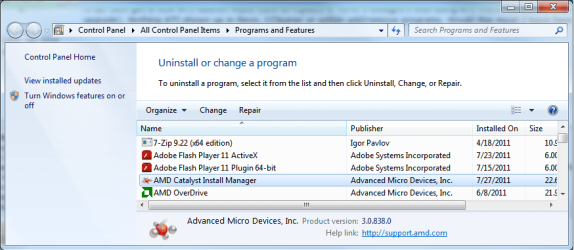
This is what should be in Programs and Features if you have installed any of the ATI/AMD drivers since Windows 7 came out,

CIM.png

What does it show for your card in Device Manager? If it shows the card's name and followed by "Microsoft (WDDM)", then you have been using the default Windows driver.
 

My Computer My Computer

Computer type
PC/Desktop
Computer Manufacturer/Model Number
Me
OS
Win 7 Ultimate x64
CPU
FX-8350 @ 4.6 GHz so far
Motherboard
Asus M5A97 EVO
Memory
ADATA XPG V1 Series Black 8GB DDR3 1600
Graphics Card(s)
Sapphire R9 270x Dual-X
Sound Card
Xonar DGX w/ Corsair Vengence 1300
Monitor(s) Displays
Acer S232HL Abid
Screen Resolution
1920x1080
Hard Drives
120 GB OCZ Vertex 3
500 GB Seagate 7200.12
PSU
Antec Earthwatts 650W Green
Case
Antec Three Hundred
Cooling
Cooler Master 212 EVO
Keyboard
Logitech G510
Mouse
Logitech G500s
Internet Speed
35000/3000
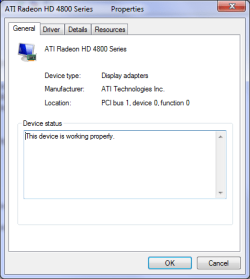
Not there. Nothing related either. I see only ATI Radeon HD 4800 Series as a display adapter within device manager. Does this mean I've been using the windows drivers? If so - should these be uninstalled to install a new 5xxx series card?
 

My Computer My Computer

Computer Manufacturer/Model Number
CyberPower / to spec
OS
Windows 7
CPU
Intel Quad Core Q9550
Motherboard
Gigabyte GA-EP45T-DS3R
Memory
4GB Kingston HyperX 1600Mhz
Graphics Card(s)
ATI Radeon 4870 (H.I.S.)
Sound Card
onboard
Monitor(s) Displays
Dell 2408WFP
Hard Drives
Western Digital Raptor 150GB; 10,000RPM; 16MB Cache SATA-II
Western Digital Caviar Black WD1001FALS 1TB; 7200RPM; 32MB Cache; SATA-II
PSU
Corsair TX650W
Case
Cooler Master Cosmos
Cooling
Asetek 120MM Watercooler
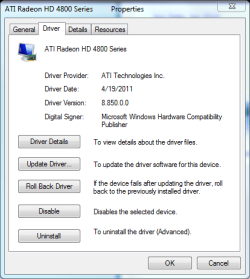
When you select Properties for the card in Device Manager and click on the driver tab, who does it show as the driver provider? maybe even a screen shot of what it shows, and then I can see which driver version if it is from ATI/AMD you have.
 

My Computer My Computer

Computer type
PC/Desktop
Computer Manufacturer/Model Number
Me
OS
Win 7 Ultimate x64
CPU
FX-8350 @ 4.6 GHz so far
Motherboard
Asus M5A97 EVO
Memory
ADATA XPG V1 Series Black 8GB DDR3 1600
Graphics Card(s)
Sapphire R9 270x Dual-X
Sound Card
Xonar DGX w/ Corsair Vengence 1300
Monitor(s) Displays
Acer S232HL Abid
Screen Resolution
1920x1080
Hard Drives
120 GB OCZ Vertex 3
500 GB Seagate 7200.12
PSU
Antec Earthwatts 650W Green
Case
Antec Three Hundred
Cooling
Cooler Master 212 EVO
Keyboard
Logitech G510
Mouse
Logitech G500s
Internet Speed
35000/3000
ATI Technologies Inc.
 

My Computer My Computer

Computer Manufacturer/Model Number
CyberPower / to spec
OS
Windows 7
CPU
Intel Quad Core Q9550
Motherboard
Gigabyte GA-EP45T-DS3R
Memory
4GB Kingston HyperX 1600Mhz
Graphics Card(s)
ATI Radeon 4870 (H.I.S.)
Sound Card
onboard
Monitor(s) Displays
Dell 2408WFP
Hard Drives
Western Digital Raptor 150GB; 10,000RPM; 16MB Cache SATA-II
Western Digital Caviar Black WD1001FALS 1TB; 7200RPM; 32MB Cache; SATA-II
PSU
Corsair TX650W
Case
Cooler Master Cosmos
Cooling
Asetek 120MM Watercooler
Driver Provider: ATI Technologies Inc
Driver Date: 4/19/2011
Driver Version: 8.850.0.0
Digital Signer: Microsoft Windows Hardware Compatibility Publisher
 

My Computer My Computer

Computer Manufacturer/Model Number
CyberPower / to spec
OS
Windows 7
CPU
Intel Quad Core Q9550
Motherboard
Gigabyte GA-EP45T-DS3R
Memory
4GB Kingston HyperX 1600Mhz
Graphics Card(s)
ATI Radeon 4870 (H.I.S.)
Sound Card
onboard
Monitor(s) Displays
Dell 2408WFP
Hard Drives
Western Digital Raptor 150GB; 10,000RPM; 16MB Cache SATA-II
Western Digital Caviar Black WD1001FALS 1TB; 7200RPM; 32MB Cache; SATA-II
PSU
Corsair TX650W
Case
Cooler Master Cosmos
Cooling
Asetek 120MM Watercooler
screenshot
 

Attachments

  • Video Driver Properties.PNG
    Video Driver Properties.PNG
    10.8 KB · Views: 22

My Computer My Computer

Computer Manufacturer/Model Number
CyberPower / to spec
OS
Windows 7
CPU
Intel Quad Core Q9550
Motherboard
Gigabyte GA-EP45T-DS3R
Memory
4GB Kingston HyperX 1600Mhz
Graphics Card(s)
ATI Radeon 4870 (H.I.S.)
Sound Card
onboard
Monitor(s) Displays
Dell 2408WFP
Hard Drives
Western Digital Raptor 150GB; 10,000RPM; 16MB Cache SATA-II
Western Digital Caviar Black WD1001FALS 1TB; 7200RPM; 32MB Cache; SATA-II
PSU
Corsair TX650W
Case
Cooler Master Cosmos
Cooling
Asetek 120MM Watercooler
and
 

Attachments

  • Driver.PNG
    Driver.PNG
    14.1 KB · Views: 17

My Computer My Computer

Computer Manufacturer/Model Number
CyberPower / to spec
OS
Windows 7
CPU
Intel Quad Core Q9550
Motherboard
Gigabyte GA-EP45T-DS3R
Memory
4GB Kingston HyperX 1600Mhz
Graphics Card(s)
ATI Radeon 4870 (H.I.S.)
Sound Card
onboard
Monitor(s) Displays
Dell 2408WFP
Hard Drives
Western Digital Raptor 150GB; 10,000RPM; 16MB Cache SATA-II
Western Digital Caviar Black WD1001FALS 1TB; 7200RPM; 32MB Cache; SATA-II
PSU
Corsair TX650W
Case
Cooler Master Cosmos
Cooling
Asetek 120MM Watercooler
Catalyst 11.5,

Previous ATI Catalyst

Didn't happen to update it through Windows Update did you? If so and that is the only way that you have updated the drivers for it, that would be why you're not seeing any entries in Programs and Features to uninstall it.

With not having the Catalyst Install Manager (CIM) showing in Programs and Features and to uninstall the current driver (and get it back to the default Windows driver), you're going to have to uninstall through Device Manager and also select to uninstall the software with it, restarting after each time and letting Windows detect and install the last until it shows up as the driver being the default Windows driver; then uninstall one last time, power down and switch cards. Once detected by Windows then install the latest from the link I posted previously.
 

My Computer My Computer

Computer type
PC/Desktop
Computer Manufacturer/Model Number
Me
OS
Win 7 Ultimate x64
CPU
FX-8350 @ 4.6 GHz so far
Motherboard
Asus M5A97 EVO
Memory
ADATA XPG V1 Series Black 8GB DDR3 1600
Graphics Card(s)
Sapphire R9 270x Dual-X
Sound Card
Xonar DGX w/ Corsair Vengence 1300
Monitor(s) Displays
Acer S232HL Abid
Screen Resolution
1920x1080
Hard Drives
120 GB OCZ Vertex 3
500 GB Seagate 7200.12
PSU
Antec Earthwatts 650W Green
Case
Antec Three Hundred
Cooling
Cooler Master 212 EVO
Keyboard
Logitech G510
Mouse
Logitech G500s
Internet Speed
35000/3000
I may have inadvertently allowed WU to get to this driver. I'll work through your suggestion. Thank you.
One addition question though - what am I uninstalling one last time once I am seeing the default Windows driver?
 

My Computer My Computer

Computer Manufacturer/Model Number
CyberPower / to spec
OS
Windows 7
CPU
Intel Quad Core Q9550
Motherboard
Gigabyte GA-EP45T-DS3R
Memory
4GB Kingston HyperX 1600Mhz
Graphics Card(s)
ATI Radeon 4870 (H.I.S.)
Sound Card
onboard
Monitor(s) Displays
Dell 2408WFP
Hard Drives
Western Digital Raptor 150GB; 10,000RPM; 16MB Cache SATA-II
Western Digital Caviar Black WD1001FALS 1TB; 7200RPM; 32MB Cache; SATA-II
PSU
Corsair TX650W
Case
Cooler Master Cosmos
Cooling
Asetek 120MM Watercooler
What is the 'Previous ATI Catalyst' link? I have already downloaded the current ATI drivers / software for the new HD5670 card from here: ATI Radeon
 

My Computer My Computer

Computer Manufacturer/Model Number
CyberPower / to spec
OS
Windows 7
CPU
Intel Quad Core Q9550
Motherboard
Gigabyte GA-EP45T-DS3R
Memory
4GB Kingston HyperX 1600Mhz
Graphics Card(s)
ATI Radeon 4870 (H.I.S.)
Sound Card
onboard
Monitor(s) Displays
Dell 2408WFP
Hard Drives
Western Digital Raptor 150GB; 10,000RPM; 16MB Cache SATA-II
Western Digital Caviar Black WD1001FALS 1TB; 7200RPM; 32MB Cache; SATA-II
PSU
Corsair TX650W
Case
Cooler Master Cosmos
Cooling
Asetek 120MM Watercooler
I may have inadvertently allowed WU to get to this driver.

One addition question though - what am I uninstalling one last time once I am seeing the default Windows driver?
I don't think you're running the Windows video driver. You're clearly running the ATI driver, even if it got applied through your Win7 installation and/or Windows Update.

Normally the downloaded ATI driver package (either complete "suite" or "separates" for driver and then Catalyst Control Center, which is how I do it to keep what I install to a minimum) will also install that ATI Catalyst Install Manager, which is how you would then do an uninstall.

That surely seems like the only reason you don't have the ATI Catalyst Install Manager showing in your Control Panel -> uninstall a program.


Anyway, I would think you can delete everything for your existing ATI video driver using Driver Sweeper. Obviously it is intended to delete any last bits and pieces left over from uninstalling using the Install Manager, but I believe it should get rid of everything for you. Follow the several steps, including re-boot into Safe Mode, and when you finally come back up in normal mode you WILL be running with the default Microsoft video drivers.

Then you should be able to run the official ATI Catalyst driver install. And you WILL then end up with that Catalyst Install Manager to use in the future, if you need to.
 

My Computer My Computer

Computer type
PC/Desktop
Computer Manufacturer/Model Number
Home-built, two systems (1) and (2)
OS
Windows 7 Pro x64 (1), Win7 Pro X64 (2)
CPU
i5-3350p 3.1Ghz/6MB-cache (1); E8400 3.0Ghz/6MB-cache (2)
Motherboard
ASUS P8Z77-V Pro (1); ASUS P5Q3 (2)
Memory
8GB PC3-12800 DDR3 (1); 4GB PC3-10600 DDR3 (2)
Graphics Card(s)
ATI HD7750 (1), (see TV cards); ATI R7 250 (2)
Sound Card
Realtek ALC892 HD Audio (1); Realtek ALC1200 HD Audio (2)
Monitor(s) Displays
Eizo HD2441W LCD, Eizo S2433W (1); Eizo 24" S2433W (2)
Screen Resolution
1920x1200, 1920x1200 (1); 1920x1200 (2)
Hard Drives
(1) 1TB SATA-II (7200RPM), 2x2TB SATA-III (7200RPM), 250GB SATA-III (10000RPM) for OS; 2x2TB external USB 3.0

(2) 320GB SATA-II (7200RPM), 750GB SATA-II (7200RPM), 150GB SATA-II (10000RPM) for OS; 2TB external USB 3.0
PSU
Nesteq ECS-6001 600W (1); Nesteq ECS-5001 500W (2)
Case
Acousti-Case 360 (1) and (2)
Cooling
Noctua NH-U12P SE2 for CPU, 2x120mm case fans (1) and (2)
Keyboard
IBM PS/2 (1) and (2)
Mouse
Logitech MX Revolution wireless (1); Microsoft wired (2)
Internet Speed
100mbps down / 10mbps up
Antivirus
Microsoft Security Essentials; Malwarebyte Anti-Malware Pro
Browser
Firefox
Other Info
Ceton InfiniTV 4-tuner cablecard-enabled TV card as well as Hauppauge HVR-2250 OTA/ATSC 2-tuner TV card in (1), running under Win7 WMC
Back
Top