Hello all,
@ Bare Foot Kid thank you for your link . The story comes as dsperber description . I would keep your information as reference. Thank you anyway.
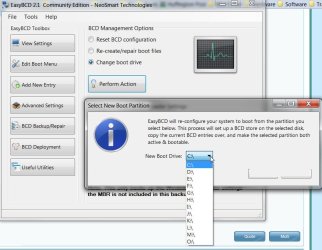
please see in the attach file , might this affirm that the change has been done the right way?
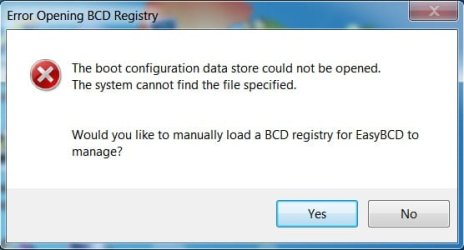
However there is some error massage on launching EasyBCD after boot drive alteration, wishfully that this might not be some sort of unexpected symptom s before reboot.
please kindly confirm,
@ Bare Foot Kid thank you for your link . The story comes as dsperber description . I would keep your information as reference. Thank you anyway.
HD can only have one Active partition which should be where your System boot files for any/all OS's on the HD reside, which is XP now. If you construct the SysReserved partition it needs to be Active.
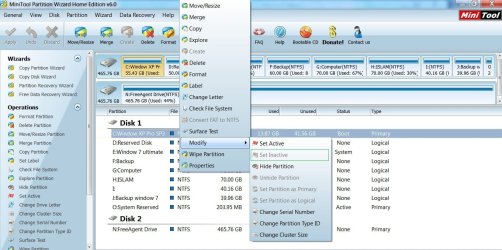
I believe it should mark your new O partition as "active" and also mark your current boot partition as "inactive". But you can use Partition Wizard to double-check this, before you re-boot.
please see in the attach file , might this affirm that the change has been done the right way?
My Computer
At a glance
Windows 7 Ultimate 32 bit , Window 7Intel(R) Core(TM) i5 CPUM 430 @ 2.27GHz, Inte...2.00 GB,NVIDIA GeForce 310M
- Computer type
- PC/Desktop
- Computer Manufacturer/Model Number
- Acer Aspire 4740G , Acer Aspire4930
- OS
- Windows 7 Ultimate 32 bit , Window 7
- CPU
- Intel(R) Core(TM) i5 CPUM 430 @ 2.27GHz, Intel core duo pro
- Motherboard
- Acer Aspire 4740 Acer Aspire4930
- Memory
- 2.00 GB,
- Graphics Card(s)
- NVIDIA GeForce 310M
- Sound Card
- (1) Realtek High Definition Audio (2) NVIDIA High Definiti
- Monitor(s) Displays
- Mobile PC Display
- Screen Resolution
- 1366x768
- Hard Drives
- WDC WD5000BEVT-22A0RT0 ATA Device , 500 GB
- Mouse
- TECFON