Solved Where is my system reserved partition,please ?

Hello all,

@ Bare Foot Kid
thank you for your link . The story comes as dsperber description . I would keep your information as reference. Thank you anyway. :)

HD can only have one Active partition which should be where your System boot files for any/all OS's on the HD reside, which is XP now. If you construct the SysReserved partition it needs to be Active.


I believe it should mark your new O partition as "active" and also mark your current boot partition as "inactive". But you can use Partition Wizard to double-check this, before you re-boot.


please see in the attach file , might this affirm that the change has been done the right way?
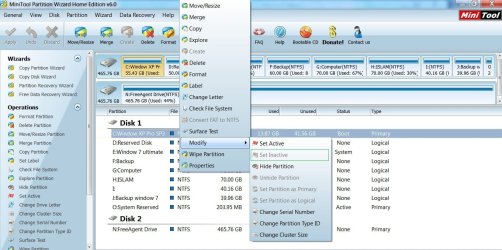

O active C boot after BCD.jpg

However there is some error massage on launching EasyBCD after boot drive alteration, wishfully that this might not be some sort of unexpected symptom s before reboot.
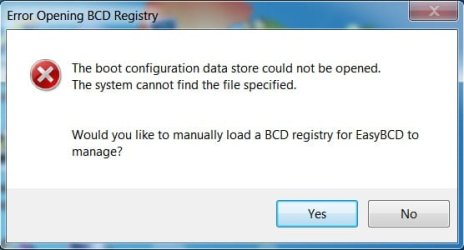
error msg after active O in PW.jpg


please kindly confirm,


My Computer My Computer

At a glance

Windows 7 Ultimate 32 bit , Window 7Intel(R) Core(TM) i5 CPUM 430 @ 2.27GHz, Inte...2.00 GB,NVIDIA GeForce 310M
Computer type
PC/Desktop
Computer Manufacturer/Model Number
Acer Aspire 4740G , Acer Aspire4930
OS
Windows 7 Ultimate 32 bit , Window 7
CPU
Intel(R) Core(TM) i5 CPUM 430 @ 2.27GHz, Intel core duo pro
Motherboard
Acer Aspire 4740 Acer Aspire4930
Memory
2.00 GB,
Graphics Card(s)
NVIDIA GeForce 310M
Sound Card
(1) Realtek High Definition Audio (2) NVIDIA High Definiti
Monitor(s) Displays
Mobile PC Display
Screen Resolution
1366x768
Hard Drives
WDC WD5000BEVT-22A0RT0 ATA Device , 500 GB
Mouse
TECFON
You must write the System boot files to the new System Reserved partition before it will start or be used to Dual Boot with XP.

To do this, boot the WIn7 DVD Repair console or Repair CD to run Startup Repair up to 3 separate times with reboots, until Win7 starts. This does not always work for various reasons.

Then install EasyBCD to Win7 and Add XP.

Remove the SysReserved drive letter in Disk mgmt or using your partition manager.
 
You must write the System boot files to the new System Reserved partition before it will start or be used to Dual Boot with XP.
This is precisely what "change boot drive" from EasyBCD does:

Upon selecting the "Change boot drive" you'll be prompted to select which letter you'd like to use as the new boot partition. When you confirm the selection, EasyBCD will automatically:
  • Install the BOOTMGR bootloader to the selected partition
  • Make the selected partition active
  • Install the bootloader to both the bootsector and the MBR of the selected partition
  • Copy all entries from the old boot partition to the newly-selected one
  • Update partition references to work with the new boot partition
It's just an "all-in-one" function that does all the things we certainly can do manually step-by-step using both EasyBCD and PW. But this "change boot drive" function is obviously all the things that need doing, wrapped up into a single-click. It's a terrific feature.


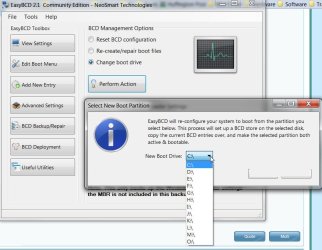
I still haven't heard more detail on what happens when "perform action" is pressed, and the dropdown list showing all available partitions is presented. If the new O "system reserved" partition really exists, then it should be in that list, and it should be selectable, and then the OK on the dialog should complete all of the above steps. And a re-boot should then work exactly as is hoped for.
 

My Computer My Computer

At a glance

Windows 7 Pro x64 (1), Win7 Pro X64 (2)i5-3350p 3.1Ghz/6MB-cache (1); E8400 3.0Ghz/6...8GB PC3-12800 DDR3 (1); 4GB PC3-10600 DDR3 (2)ATI HD7750 (1), (see TV cards); ATI R7 250 (2)
Computer type
PC/Desktop
Computer Manufacturer/Model Number
Home-built, two systems (1) and (2)
OS
Windows 7 Pro x64 (1), Win7 Pro X64 (2)
CPU
i5-3350p 3.1Ghz/6MB-cache (1); E8400 3.0Ghz/6MB-cache (2)
Motherboard
ASUS P8Z77-V Pro (1); ASUS P5Q3 (2)
Memory
8GB PC3-12800 DDR3 (1); 4GB PC3-10600 DDR3 (2)
Graphics Card(s)
ATI HD7750 (1), (see TV cards); ATI R7 250 (2)
Sound Card
Realtek ALC892 HD Audio (1); Realtek ALC1200 HD Audio (2)
Monitor(s) Displays
Eizo HD2441W LCD, Eizo S2433W (1); Eizo 24" S2433W (2)
Screen Resolution
1920x1200, 1920x1200 (1); 1920x1200 (2)
Hard Drives
(1) 1TB SATA-II (7200RPM), 2x2TB SATA-III (7200RPM), 250GB SATA-III (10000RPM) for OS; 2x2TB external USB 3.0

(2) 320GB SATA-II (7200RPM), 750GB SATA-II (7200RPM), 150GB SATA-II (10000RPM) for OS; 2TB external USB 3.0
PSU
Nesteq ECS-6001 600W (1); Nesteq ECS-5001 500W (2)
Case
Acousti-Case 360 (1) and (2)
Cooling
Noctua NH-U12P SE2 for CPU, 2x120mm case fans (1) and (2)
Keyboard
IBM PS/2 (1) and (2)
Mouse
Logitech MX Revolution wireless (1); Microsoft wired (2)
Internet Speed
100mbps down / 10mbps up
Antivirus
Microsoft Security Essentials; Malwarebyte Anti-Malware Pro
Browser
Firefox
Other Info
Ceton InfiniTV 4-tuner cablecard-enabled TV card as well as Hauppauge HVR-2250 OTA/ATSC 2-tuner TV card in (1), running under Win7 WMC
please see in the attach file , might this affirm that the change has been done the right way?
I don't know why you're trying to make your C-partition "active", as we want to make your new O-partition "active" for the new configuration. I assume you're not actually pushing "apply" in Partition Wizard, so it's hard to know exactly what is or is not currently your state of affiars.

If/when we get this accomlished, your primary C (WinXP) partition will end up just being primary and where WinXP lives. And E will be logical and where Win7 lives. And your new primary O will be "active+boot" and will truly be a real "system reserved" partition, just as if Win7 had built it for you. And the boot manager files and menu previously on C (that allowed you to choose WinXP or Win7) will have been copied over to O (by the EasyBCD "change boot drive" process), so when you boot it will really look identical to how it worked before. It's just that we've moved some things around and made some changes.

You should be using EasyBCD to accomplish this. Earlier I asked what the dropdown list of partitions showed when you checked "change boot drive" and pushed "perform actions". Is your new O partition shown in the dropdown list or not??

To avoid all speculation and confusion, can you please post a screenshot from DISKMGMT. Please maximize the window and spread the columns so we can see all text, before you take the screenshot.

Thanks.
 

My Computer My Computer

At a glance

Windows 7 Pro x64 (1), Win7 Pro X64 (2)i5-3350p 3.1Ghz/6MB-cache (1); E8400 3.0Ghz/6...8GB PC3-12800 DDR3 (1); 4GB PC3-10600 DDR3 (2)ATI HD7750 (1), (see TV cards); ATI R7 250 (2)
Computer type
PC/Desktop
Computer Manufacturer/Model Number
Home-built, two systems (1) and (2)
OS
Windows 7 Pro x64 (1), Win7 Pro X64 (2)
CPU
i5-3350p 3.1Ghz/6MB-cache (1); E8400 3.0Ghz/6MB-cache (2)
Motherboard
ASUS P8Z77-V Pro (1); ASUS P5Q3 (2)
Memory
8GB PC3-12800 DDR3 (1); 4GB PC3-10600 DDR3 (2)
Graphics Card(s)
ATI HD7750 (1), (see TV cards); ATI R7 250 (2)
Sound Card
Realtek ALC892 HD Audio (1); Realtek ALC1200 HD Audio (2)
Monitor(s) Displays
Eizo HD2441W LCD, Eizo S2433W (1); Eizo 24" S2433W (2)
Screen Resolution
1920x1200, 1920x1200 (1); 1920x1200 (2)
Hard Drives
(1) 1TB SATA-II (7200RPM), 2x2TB SATA-III (7200RPM), 250GB SATA-III (10000RPM) for OS; 2x2TB external USB 3.0

(2) 320GB SATA-II (7200RPM), 750GB SATA-II (7200RPM), 150GB SATA-II (10000RPM) for OS; 2TB external USB 3.0
PSU
Nesteq ECS-6001 600W (1); Nesteq ECS-5001 500W (2)
Case
Acousti-Case 360 (1) and (2)
Cooling
Noctua NH-U12P SE2 for CPU, 2x120mm case fans (1) and (2)
Keyboard
IBM PS/2 (1) and (2)
Mouse
Logitech MX Revolution wireless (1); Microsoft wired (2)
Internet Speed
100mbps down / 10mbps up
Antivirus
Microsoft Security Essentials; Malwarebyte Anti-Malware Pro
Browser
Firefox
Other Info
Ceton InfiniTV 4-tuner cablecard-enabled TV card as well as Hauppauge HVR-2250 OTA/ATSC 2-tuner TV card in (1), running under Win7 WMC
Hello all,

@ Desperber actually before change boot drive the application seems to have some sort of problem yet I still continue . hopefully you wouldn’t mind that I use your picture since I didn’t take the snapshot then ; however, the letter O did really present on the top of the list and I did selected it .

easybcd_before perform.jpg
and consequence as the figure

I don't know why you're trying to make your C-partition "active", as we want to make your new O-partition "active" for the new configuration. I assume you're not actually pushing "apply" in Partition Wizard

honestly, I did really pressing "apply" and O drive did really represents in easybcd and selectable as indicated above. Also I didn’t really try to make C partition active instead I tried to follow your instruction . My purpose is would just like to affirm that if i did as you advise, would it become like portrayed in the figure? That was the real snap short before re-boot .

unfortunately , I reboot since yesterday resulting in dark screen with instruction to press Ctrl +Alt+Del and my system is freezing up to now.

The problem is XP dvd file corrupted , and I still unable to recover with any backup version , also optical drive doesn’t work ; nonetheless, usb still bootable . Wishfully that I could create bootable USB with window 7 image file.

hopefully that you all would still advise for further query,


have a nice day


My Computer My Computer

At a glance

Windows 7 Ultimate 32 bit , Window 7Intel(R) Core(TM) i5 CPUM 430 @ 2.27GHz, Inte...2.00 GB,NVIDIA GeForce 310M
Computer type
PC/Desktop
Computer Manufacturer/Model Number
Acer Aspire 4740G , Acer Aspire4930
OS
Windows 7 Ultimate 32 bit , Window 7
CPU
Intel(R) Core(TM) i5 CPUM 430 @ 2.27GHz, Intel core duo pro
Motherboard
Acer Aspire 4740 Acer Aspire4930
Memory
2.00 GB,
Graphics Card(s)
NVIDIA GeForce 310M
Sound Card
(1) Realtek High Definition Audio (2) NVIDIA High Definiti
Monitor(s) Displays
Mobile PC Display
Screen Resolution
1366x768
Hard Drives
WDC WD5000BEVT-22A0RT0 ATA Device , 500 GB
Mouse
TECFON
@ Desperber actually before change boot drive the application seems to have some sort of problem yet I still continue . hopefully you wouldn’t mind that I use your picture since I didn’t take the snapshot then ; however, the letter O did really present on the top of the list and I did selected it
Ok. That's good to hear. Your new O drive SHOULD have appeared in that list, and you SHOULD have selected it and pushed OK. That's exactly the proper course of action at that step.


and consequence as the figure
Also looks good to me. Your C partition is no longer "active" (it now says "boot" which is fine, and implies "primary" as well) and your O partition shows "active" which is what we're looking for.

Looks bootable from this picture, if you ask me.


unfortunately , I reboot since yesterday resulting in dark screen with instruction to press Ctrl +Alt+Del and my system is freezing up to now.

The problem is XP dvd file corrupted , and I still unable to recover with any backup version , also optical drive doesn’t work ; nonetheless, usb still bootable . Wishfully that I could create bootable USB with window 7 image file.
If you have that standalone bootable Partition Wizard CD I had described earlier and recommended that you download and burn from their ISO, you can boot to it and examine your hard drive right now.

In absolute worst case, remember that even if EasyBCD did swap your boot drive, placing the boot manager files into O, copying the boot menu over from C to O, and marking C as non-active and O as active, then you can always revert back to what you had by reversing the "active" partitions using this standalone Partition Wizard boot CD. EasyBCD did not delete anything from your C partition in the "change boot drive" process, it only marked it inactive and marked O active.

So it seems to me you can get back to normal by booting to the PW CD, and use it to make O inactive, and make C active again. That should put you back exactly where you were before. Yes, we haven't accomplished what we wanted (yet), but at least you're back in business exactly as you were before.

Then we can review things slowly and carefully.


Now... if your optical drive is somehow defective, and you can't even read that standalone PW boot CD, well, that's a more serious problem. You wouldn't even be able to reinstall anything from scratch even if you wanted to, unless you have a working CD/DVD drive.

What do you mean "it doesn't" work? Do you mean you just can't boot from it? Is it properly inserted into the "boot device sequence" in your BIOS? Is this a new problem? Obviously it used to work, since you had installed WinXP at one time and must have booted from the WinXP installation DVD.
 

My Computer My Computer

At a glance

Windows 7 Pro x64 (1), Win7 Pro X64 (2)i5-3350p 3.1Ghz/6MB-cache (1); E8400 3.0Ghz/6...8GB PC3-12800 DDR3 (1); 4GB PC3-10600 DDR3 (2)ATI HD7750 (1), (see TV cards); ATI R7 250 (2)
Computer type
PC/Desktop
Computer Manufacturer/Model Number
Home-built, two systems (1) and (2)
OS
Windows 7 Pro x64 (1), Win7 Pro X64 (2)
CPU
i5-3350p 3.1Ghz/6MB-cache (1); E8400 3.0Ghz/6MB-cache (2)
Motherboard
ASUS P8Z77-V Pro (1); ASUS P5Q3 (2)
Memory
8GB PC3-12800 DDR3 (1); 4GB PC3-10600 DDR3 (2)
Graphics Card(s)
ATI HD7750 (1), (see TV cards); ATI R7 250 (2)
Sound Card
Realtek ALC892 HD Audio (1); Realtek ALC1200 HD Audio (2)
Monitor(s) Displays
Eizo HD2441W LCD, Eizo S2433W (1); Eizo 24" S2433W (2)
Screen Resolution
1920x1200, 1920x1200 (1); 1920x1200 (2)
Hard Drives
(1) 1TB SATA-II (7200RPM), 2x2TB SATA-III (7200RPM), 250GB SATA-III (10000RPM) for OS; 2x2TB external USB 3.0

(2) 320GB SATA-II (7200RPM), 750GB SATA-II (7200RPM), 150GB SATA-II (10000RPM) for OS; 2TB external USB 3.0
PSU
Nesteq ECS-6001 600W (1); Nesteq ECS-5001 500W (2)
Case
Acousti-Case 360 (1) and (2)
Cooling
Noctua NH-U12P SE2 for CPU, 2x120mm case fans (1) and (2)
Keyboard
IBM PS/2 (1) and (2)
Mouse
Logitech MX Revolution wireless (1); Microsoft wired (2)
Internet Speed
100mbps down / 10mbps up
Antivirus
Microsoft Security Essentials; Malwarebyte Anti-Malware Pro
Browser
Firefox
Other Info
Ceton InfiniTV 4-tuner cablecard-enabled TV card as well as Hauppauge HVR-2250 OTA/ATSC 2-tuner TV card in (1), running under Win7 WMC
Delete Partition O:, & Mark partition C: ACTIVE.
or
Reinstall Win XP & Windows 7, so that all boot files are on partition O:.
 

My Computer My Computer

At a glance

ME/XP/Vista/Win7
OS
ME/XP/Vista/Win7
Hello all,

Thank you for constant advice. None of my backup could be recovered at all also - actually- the optical drive had symptom recently ; nonetheless, still be able to boot from USB drive.

wishfully, it would work,
 
Last edited:

My Computer My Computer

At a glance

Windows 7 Ultimate 32 bit , Window 7Intel(R) Core(TM) i5 CPUM 430 @ 2.27GHz, Inte...2.00 GB,NVIDIA GeForce 310M
Computer type
PC/Desktop
Computer Manufacturer/Model Number
Acer Aspire 4740G , Acer Aspire4930
OS
Windows 7 Ultimate 32 bit , Window 7
CPU
Intel(R) Core(TM) i5 CPUM 430 @ 2.27GHz, Intel core duo pro
Motherboard
Acer Aspire 4740 Acer Aspire4930
Memory
2.00 GB,
Graphics Card(s)
NVIDIA GeForce 310M
Sound Card
(1) Realtek High Definition Audio (2) NVIDIA High Definiti
Monitor(s) Displays
Mobile PC Display
Screen Resolution
1366x768
Hard Drives
WDC WD5000BEVT-22A0RT0 ATA Device , 500 GB
Mouse
TECFON

My Computer My Computer

At a glance

ME/XP/Vista/Win7
OS
ME/XP/Vista/Win7
Thank you theog, i have just seen the similar thread also .
 

My Computer My Computer

At a glance

Windows 7 Ultimate 32 bit , Window 7Intel(R) Core(TM) i5 CPUM 430 @ 2.27GHz, Inte...2.00 GB,NVIDIA GeForce 310M
Computer type
PC/Desktop
Computer Manufacturer/Model Number
Acer Aspire 4740G , Acer Aspire4930
OS
Windows 7 Ultimate 32 bit , Window 7
CPU
Intel(R) Core(TM) i5 CPUM 430 @ 2.27GHz, Intel core duo pro
Motherboard
Acer Aspire 4740 Acer Aspire4930
Memory
2.00 GB,
Graphics Card(s)
NVIDIA GeForce 310M
Sound Card
(1) Realtek High Definition Audio (2) NVIDIA High Definiti
Monitor(s) Displays
Mobile PC Display
Screen Resolution
1366x768
Hard Drives
WDC WD5000BEVT-22A0RT0 ATA Device , 500 GB
Mouse
TECFON
Thank you for constant advice. None of my backup could be recovered at all also - actually- the optical drive had symptom recently ; nonetheless, still be able to boot from USB drive.
Although it requires buying the "Partition Wizard Professional Edition" (rather than using the "free" version), it is now possible to boot standalone Partition Wizard from USB flash drive.

So you can boot either from its standalone CD or its standalone flash drive, whichever or both you create.

When you buy PW Professional (current price $29) they will send you an email containing the license key as well as a download link for "Partition Wizard Bootable Media Builder". You run this second product and specify whether you'd like to build a standalone bootable CD and/or a standalone bootable USB flash drive.

Here's the description of the flash drive version.


Just another thought for the future, to make sure your "arsenal of tools and weapons" is complete enough to cope with all unexpected situations and needs.
 

My Computer My Computer

At a glance

Windows 7 Pro x64 (1), Win7 Pro X64 (2)i5-3350p 3.1Ghz/6MB-cache (1); E8400 3.0Ghz/6...8GB PC3-12800 DDR3 (1); 4GB PC3-10600 DDR3 (2)ATI HD7750 (1), (see TV cards); ATI R7 250 (2)
Computer type
PC/Desktop
Computer Manufacturer/Model Number
Home-built, two systems (1) and (2)
OS
Windows 7 Pro x64 (1), Win7 Pro X64 (2)
CPU
i5-3350p 3.1Ghz/6MB-cache (1); E8400 3.0Ghz/6MB-cache (2)
Motherboard
ASUS P8Z77-V Pro (1); ASUS P5Q3 (2)
Memory
8GB PC3-12800 DDR3 (1); 4GB PC3-10600 DDR3 (2)
Graphics Card(s)
ATI HD7750 (1), (see TV cards); ATI R7 250 (2)
Sound Card
Realtek ALC892 HD Audio (1); Realtek ALC1200 HD Audio (2)
Monitor(s) Displays
Eizo HD2441W LCD, Eizo S2433W (1); Eizo 24" S2433W (2)
Screen Resolution
1920x1200, 1920x1200 (1); 1920x1200 (2)
Hard Drives
(1) 1TB SATA-II (7200RPM), 2x2TB SATA-III (7200RPM), 250GB SATA-III (10000RPM) for OS; 2x2TB external USB 3.0

(2) 320GB SATA-II (7200RPM), 750GB SATA-II (7200RPM), 150GB SATA-II (10000RPM) for OS; 2TB external USB 3.0
PSU
Nesteq ECS-6001 600W (1); Nesteq ECS-5001 500W (2)
Case
Acousti-Case 360 (1) and (2)
Cooling
Noctua NH-U12P SE2 for CPU, 2x120mm case fans (1) and (2)
Keyboard
IBM PS/2 (1) and (2)
Mouse
Logitech MX Revolution wireless (1); Microsoft wired (2)
Internet Speed
100mbps down / 10mbps up
Antivirus
Microsoft Security Essentials; Malwarebyte Anti-Malware Pro
Browser
Firefox
Other Info
Ceton InfiniTV 4-tuner cablecard-enabled TV card as well as Hauppauge HVR-2250 OTA/ATSC 2-tuner TV card in (1), running under Win7 WMC
Thank you for all support

:)
 

My Computer My Computer

At a glance

Windows 7 Ultimate 32 bit , Window 7Intel(R) Core(TM) i5 CPUM 430 @ 2.27GHz, Inte...2.00 GB,NVIDIA GeForce 310M
Computer type
PC/Desktop
Computer Manufacturer/Model Number
Acer Aspire 4740G , Acer Aspire4930
OS
Windows 7 Ultimate 32 bit , Window 7
CPU
Intel(R) Core(TM) i5 CPUM 430 @ 2.27GHz, Intel core duo pro
Motherboard
Acer Aspire 4740 Acer Aspire4930
Memory
2.00 GB,
Graphics Card(s)
NVIDIA GeForce 310M
Sound Card
(1) Realtek High Definition Audio (2) NVIDIA High Definiti
Monitor(s) Displays
Mobile PC Display
Screen Resolution
1366x768
Hard Drives
WDC WD5000BEVT-22A0RT0 ATA Device , 500 GB
Mouse
TECFON
This is a disastrous thread because of refusal to heed the advice of those who knew it was going to go wrong from long experience.

The procedure when trying to construct a System Reserved partition (when there is good reason - for which there isn't here for reasons already given) is to mark it Active and run Startup Repair 3 times to write the System boot files onto the partition. This has been done hundreds of times here, whereas using EasyBCD to construct SysReserved is not a solution I ever recall us using, just as using PW Rebuild MBR won't do the job correctly since neither can enable the Repair console on F8 tools menu.

To rescue your Dual boot, Use your Win7 DVD Repair console or Repair CD: System Repair Disc - Create. To not have prepared one for an experimental process is reckless.

If you cannot boot a disk, then write the DVD ISO to flash stick using UltraISO trial version: On File tab Open DVD or ISO, on Bootable Tab select Write Disk Image, Format, Write. Boot stick under USB, Removable or HD's.

Boot the DVD/CD preferably, or stick, or tap F8 key repeatedly at bootup to choose Repair My Computer, on first screen press Shift + F10 or click through to System Recovery Options to open a Command Prompthttp://www.sevenforums.com/tutorials/668-system-recovery-options.html, type:

DISKPART
LIST DISK
SEL Disk 0 (confirm this is Win7 HD)
LIST PART
Sel Part 1 (confirm this is XP partition)
Active
Exit

Now close Command Box, proceed to Second screen of Repair My Computer to check for Win7 installation, accept any offered Repair, if none offered click through to Recovery Tools list to run Startup Repair with reboots until Win7 starts.
 

My Computer My Computer

At a glance

W 7 64-bit UltimateIntel Q9550 Yorkfield8GB Dominator 8500C5DATI : XFX 5870
Computer Manufacturer/Model Number
* BFK Customs *
OS
W 7 64-bit Ultimate
CPU
Intel Q9550 Yorkfield
Motherboard
ASUS P5Q Pro
Memory
8GB Dominator 8500C5D
Graphics Card(s)
ATI : XFX 5870
Sound Card
Realtek HD Audio 7-1
Monitor(s) Displays
1x 47" LCD HDMI & 3x 26" LCD HDMI
Screen Resolution
1920x1080P & 1920x1200
Hard Drives
1x 80GB Intel X25-M G2 SSD : 1x 500GB & 1x 640GB WD Caviar Black(s)
PSU
Corsair 620HX
Case
Cooler Master RC-690
Cooling
Tuniq Tower 120, 2x 140mm and 3x 120mm case fans
Keyboard
Microsoft 500
Mouse
Razer Diamondback 3G
Internet Speed
14 Mb/s
Other Info
1x Koutech 3Gb/s SATA HDD Hot Swap Rack
Back
Top