Group Policy - Apply to a Specific User or Group

How to Apply Local Group Policies to Specific User or Group in Windows

   Information
Windows has three layers of local GPOs:

  • Local Group Policy Local Group Policy is the only local GPO that allows both computer configuration and user configuration settings to be applied to all users of the computer.
  • Administrators and Non-Administrators local Group Policy Administrators and Non-Administrators local Group Policy contains only user configuration settings. This policy is applied based on whether the user account being used is a member of the local Administrators group.
  • User-specific local Group Policy User-specific local Group Policy contains only user configuration settings. This policy is applied to individual users and groups.
These layers of local GPOs are processed in the following order: local Group Policy, Administrators and Non-Administrators local Group Policy, user-specific local Group Policy.


This tutorial will show you how to apply local group policies to only a specific user or group instead of all users in Vista, Windows 7, Windows 8, and Windows 10.

You must be logged in as an administrator to be able to do this tutorial.

   Note
A computer running Windows can have one or more local policy objects associated with it. Local Group Policy is managed through the local Group Policy object (GPO).

The local GPO is stored on individual computers in the hidden C:\Windows\System32\GroupPolicy system folder.

User-specific and group-specific local GPOs are stored in the hidden C:\Windows\System32\GroupPolicyUsers system folder.

   Warning
The Local Group Policy Editor will only be available in:

  • Vista Business, Ultimate, and Enterprise editions.
  • Windows 7 Professional, Ultimate, and Enterprise editions
  • Windows 8/8.1 Pro and Enterprise editions.
  • Windows 10 Pro and Enterprise editions.


Here's How:1. Open the Start Menu, then type mmc.exe in the search box and press Enter.
NOTE: In Windows 8, you could press Windows+R keys to open the Run dialog, then type mmc.exe, and click/tap on OK instead.

2. If prompted by UAC, then click on Yes (Windows 7/8) or Continue (Vista).

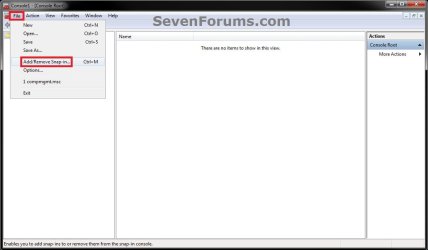
3. In the MMC Console window, click on File (Menu bar) and Add/Remove Snap-in. (see screenshot below)Step1.jpg

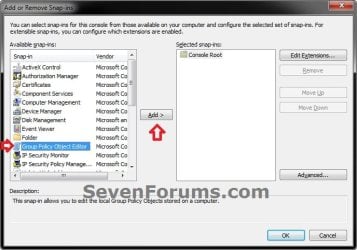
4. In the left pane, select Group Policy Object Editor, and click on the Add button. (see screenshot below)Step2.jpg

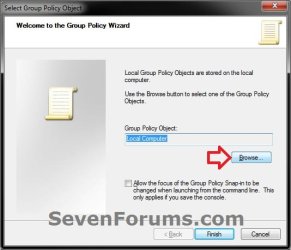
5. Click on the Browse button. (see screenshot below)Step3.jpg

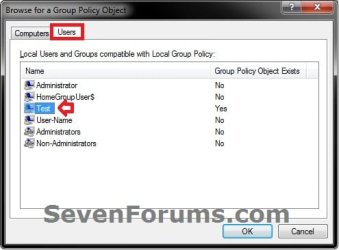
6. Click on the Users tab, select an available user account (ex: Test) or a group from the list that you want to only have group policy applied to, and click on OK. (see screenshot and table below)
   Note
The other names (Test and User-name) listed are user accounts on my computer. You will have your own user account names listed instead.


Group NameDescription
AdministratorName of Built-in Administrator account user
HomeGroupUser$All HomeGroup Users group
AdministratorsAll Users in the administrators group
Non-AdministratorsAll users except administrators group


Step4.jpg

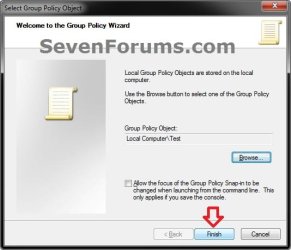
7. Click on the Finish button. (see screenshot below)Step5.jpg

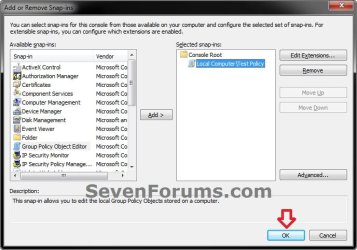
8. Click on OK. (see screenshot below)Step6.jpg

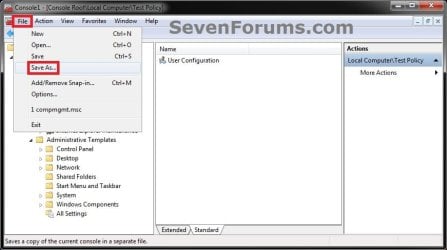
9. In the MMC Console window, click on File (Menu bar) and Save As. (see screenshot below)Step7.jpg

10. Select to save to your Desktop, type in a name (ex: Test_Group_Policy) that you would like to have for this "specific" group policy MSC file, then click on the Save button. (see screenshot below)
NOTE: You can use any name you like, but it would make it easier for you to know what user (ex: Test) or group this "specific" group policy MMC console was for later if you included the user or group name.Step8.jpg

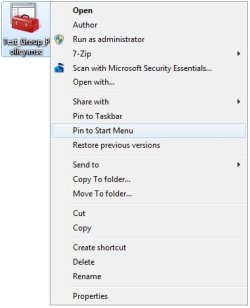
11. Move the MSC file (ex: Test_Group_Policy.msc) for the specific user or group to where you would to keep it saved at. (see screenshot below)
NOTE: You can also Pin to Taskbar or Pin to Start Menu this MSC file.Step10.jpg

12. Whenever you open this MSC file (ex: Test_Group_Policy.msc), you will be able to apply group policies to only this specific user (ex: Test) or group. (see screenshot below)Step9.jpg

13. Repeat the above steps if you wish to create a new MSC group policy file for a different specific user or group.


That's it,
Shawn Brink


Last edited:
Hi,


I am trying to manage some users via a group. I made a group and added some users to it. Thus far no problem.
After that in MMC I wanted to add a module to the editor as discribed above. After clicking on the Brows button I did not see my new Group! Only all users and the Group Administrators and the group all nonadministrators.
What do I have to do to see my own new Group? Or is this not possible this way?

Windows 7 Pro 64 bit

Hope you can help me.

Ruud Amesz
 
Last edited:

My Computer My Computer

At a glance

Windows 7 Pro 64 bit4Gb
Computer Manufacturer/Model Number
Dell Vostro 260 ST
OS
Windows 7 Pro 64 bit
Memory
4Gb
Hello Ruud, and welcome to Seven Forums.

It appears that new custom groups are not available to be selected for this. :)

You could create one per specific user of the group, or use Local Security Policy in Local Policies -> User Rights Assignment to add and set for a custom new group.
 

My Computer My Computer

At a glance

64-bit Windows 11 Pro for WorkstationsIntel i7-8700K OC'd to 5 GHz64 GB (4x16GB) G.SKILL TridentZ RGB DDR4 3600...ASUS ROG-STRIX-GTX1080TI-O11G-GAMING
Computer type
PC/Desktop
Computer Manufacturer/Model Number
Self built custom
OS
64-bit Windows 11 Pro for Workstations
CPU
Intel i7-8700K OC'd to 5 GHz
Motherboard
ASUS ROG Maximus XI Formula Z390
Memory
64 GB (4x16GB) G.SKILL TridentZ RGB DDR4 3600 MHz
Graphics Card(s)
ASUS ROG-STRIX-GTX1080TI-O11G-GAMING
Sound Card
Integrated
Monitor(s) Displays
2 x Samsung Odyssey G7 27"
Screen Resolution
2560x1440
Hard Drives
1TB Samsung 990 PRO M.2,
4TB Samsung 990 PRO PRO M.2,
TerraMaster F8 SSD Plus NAS
PSU
Seasonic Prime Titanium 850W
Case
Thermaltake Core P3
Cooling
Corsair Hydro H115i
Keyboard
Logitech wireless K800
Mouse
Logitech MX Master 4
Internet Speed
2 Gb/s Download and 100 Mb/s Upload
Antivirus
Malwarebyte Anti-Malware Premium
Browser
Google Chrome
Other Info
Logitech Z625 speaker system,
Logitech BRIO 4K Pro webcam,
HP Color LaserJet Pro MFP M477fdn,
APC SMART-UPS RT 1000 XL - SURT1000XLI,
Galaxy S23 Plus phone
group policy editor

um yeah i read through the steps did 1 by 1 then i got stopped bc i dont have group policy editor in the scroll list to choose from so im stumped
 

My Computer My Computer

At a glance

windows 7 at 64 bit2100mhzddr2 4096 bytesati mobility radeon hd 4200 series
Computer Manufacturer/Model Number
gateway/nv53
OS
windows 7 at 64 bit
CPU
2100mhz
Motherboard
gateway sjv50tr
Memory
ddr2 4096 bytes
Graphics Card(s)
ati mobility radeon hd 4200 series
Sound Card
high definiton audio device
Monitor(s) Displays
i have a laptop
Hard Drives
WDC WD5000BEVT-22AORTO ATA DEVICE
PSU
19VOLTS
Case
laptop
Cooling
DONT KNOW HOW TO FIND WHAT KIND OF COOLING FAN I HAVE
Hello Grinreaper,

What edition of Windows 7 do you have?

The Windows 7 Starter, Home Basic, and Home Premium editions do not have the Local Group Policy Editor available in them.
 

My Computer My Computer

At a glance

64-bit Windows 11 Pro for WorkstationsIntel i7-8700K OC'd to 5 GHz64 GB (4x16GB) G.SKILL TridentZ RGB DDR4 3600...ASUS ROG-STRIX-GTX1080TI-O11G-GAMING
Computer type
PC/Desktop
Computer Manufacturer/Model Number
Self built custom
OS
64-bit Windows 11 Pro for Workstations
CPU
Intel i7-8700K OC'd to 5 GHz
Motherboard
ASUS ROG Maximus XI Formula Z390
Memory
64 GB (4x16GB) G.SKILL TridentZ RGB DDR4 3600 MHz
Graphics Card(s)
ASUS ROG-STRIX-GTX1080TI-O11G-GAMING
Sound Card
Integrated
Monitor(s) Displays
2 x Samsung Odyssey G7 27"
Screen Resolution
2560x1440
Hard Drives
1TB Samsung 990 PRO M.2,
4TB Samsung 990 PRO PRO M.2,
TerraMaster F8 SSD Plus NAS
PSU
Seasonic Prime Titanium 850W
Case
Thermaltake Core P3
Cooling
Corsair Hydro H115i
Keyboard
Logitech wireless K800
Mouse
Logitech MX Master 4
Internet Speed
2 Gb/s Download and 100 Mb/s Upload
Antivirus
Malwarebyte Anti-Malware Premium
Browser
Google Chrome
Other Info
Logitech Z625 speaker system,
Logitech BRIO 4K Pro webcam,
HP Color LaserJet Pro MFP M477fdn,
APC SMART-UPS RT 1000 XL - SURT1000XLI,
Galaxy S23 Plus phone
Exporting the policy settings

How do you export the settings once you have created the changes?
Thanks
JAy
 

My Computer My Computer

At a glance

Win 7 All Versions
OS
Win 7 All Versions
Hello Jay, and welcome to Seven Forums.

The MSC file at the end of the tutorial is basically the export of your settings and shortcut all in one for that specific user or group. :)

If you would like a .txt file listing of a setting, then you could select and right click on a policy in the left pane, and click on Export. This will export only what you see in the middle pane for the selected policy though. For a list of all settings, select the All Settings option in the left pane instead.

Hope this helps,
Shawn
 

My Computer My Computer

At a glance

64-bit Windows 11 Pro for WorkstationsIntel i7-8700K OC'd to 5 GHz64 GB (4x16GB) G.SKILL TridentZ RGB DDR4 3600...ASUS ROG-STRIX-GTX1080TI-O11G-GAMING
Computer type
PC/Desktop
Computer Manufacturer/Model Number
Self built custom
OS
64-bit Windows 11 Pro for Workstations
CPU
Intel i7-8700K OC'd to 5 GHz
Motherboard
ASUS ROG Maximus XI Formula Z390
Memory
64 GB (4x16GB) G.SKILL TridentZ RGB DDR4 3600 MHz
Graphics Card(s)
ASUS ROG-STRIX-GTX1080TI-O11G-GAMING
Sound Card
Integrated
Monitor(s) Displays
2 x Samsung Odyssey G7 27"
Screen Resolution
2560x1440
Hard Drives
1TB Samsung 990 PRO M.2,
4TB Samsung 990 PRO PRO M.2,
TerraMaster F8 SSD Plus NAS
PSU
Seasonic Prime Titanium 850W
Case
Thermaltake Core P3
Cooling
Corsair Hydro H115i
Keyboard
Logitech wireless K800
Mouse
Logitech MX Master 4
Internet Speed
2 Gb/s Download and 100 Mb/s Upload
Antivirus
Malwarebyte Anti-Malware Premium
Browser
Google Chrome
Other Info
Logitech Z625 speaker system,
Logitech BRIO 4K Pro webcam,
HP Color LaserJet Pro MFP M477fdn,
APC SMART-UPS RT 1000 XL - SURT1000XLI,
Galaxy S23 Plus phone
Can I import them on a different machine?
Thanks
Jay
 

My Computer My Computer

At a glance

Win 7 All Versions
OS
Win 7 All Versions
Jay,

I haven't tried it, but it would have to be for a specific group and not user. If you wanted to give it a try, you could see if copying the MSC file at the end of the tutorial to another machine to see if it works or not with the same policy settings set.

Please let us know how it went. :)
 

My Computer My Computer

At a glance

64-bit Windows 11 Pro for WorkstationsIntel i7-8700K OC'd to 5 GHz64 GB (4x16GB) G.SKILL TridentZ RGB DDR4 3600...ASUS ROG-STRIX-GTX1080TI-O11G-GAMING
Computer type
PC/Desktop
Computer Manufacturer/Model Number
Self built custom
OS
64-bit Windows 11 Pro for Workstations
CPU
Intel i7-8700K OC'd to 5 GHz
Motherboard
ASUS ROG Maximus XI Formula Z390
Memory
64 GB (4x16GB) G.SKILL TridentZ RGB DDR4 3600 MHz
Graphics Card(s)
ASUS ROG-STRIX-GTX1080TI-O11G-GAMING
Sound Card
Integrated
Monitor(s) Displays
2 x Samsung Odyssey G7 27"
Screen Resolution
2560x1440
Hard Drives
1TB Samsung 990 PRO M.2,
4TB Samsung 990 PRO PRO M.2,
TerraMaster F8 SSD Plus NAS
PSU
Seasonic Prime Titanium 850W
Case
Thermaltake Core P3
Cooling
Corsair Hydro H115i
Keyboard
Logitech wireless K800
Mouse
Logitech MX Master 4
Internet Speed
2 Gb/s Download and 100 Mb/s Upload
Antivirus
Malwarebyte Anti-Malware Premium
Browser
Google Chrome
Other Info
Logitech Z625 speaker system,
Logitech BRIO 4K Pro webcam,
HP Color LaserJet Pro MFP M477fdn,
APC SMART-UPS RT 1000 XL - SURT1000XLI,
Galaxy S23 Plus phone
Apply to Startup folder?

HI,

I'm trying to lock down some public use PCs for a library so they only access the Internet. I've created an MMC file(?) based on the instructions above, for one specific user/profile on my PC and I saved it, but I am stuck at step #10 - I don't understand how to APPLY it - and it sounds like it is only applied if I RUN it, correct? So, my question is, can I send it to startup and will doing so automatically apply it/run it every time that user profile is logged in?

Or can I make a change in the registry to make these settings stick permanently and ONLY for THIS SPECIFIC USER (Not for the Admin profile)?
I am new to all of this and somewhat overwhelmed by some of the options available for managing a Windows 7 user profile. Most of what I've been reading I have never heard of before and I am afraid of changing anything for fear that I won't be able to undo it or understand how to describe it if I need help!

I will say I need some way to be able to log out of this profile and switch to the Admin profile if/when I need to fix anything, test, apply updates manually, etc.

Thanks!
 

My Computer My Computer

At a glance

Windows 7 Professional 64-bit
OS
Windows 7 Professional 64-bit
Hello Pallipe, and welcome to Seven Forums.

Just by setting the policy in the MMC, it will be applied to that user automatically until manually changed. The MSC from step 10 is to just to make it easy to be able to change or make more policy settings to be applied for that specific user instead of starting over again. :)

Hope this helps,
Shawn
 
Last edited:

My Computer My Computer

At a glance

64-bit Windows 11 Pro for WorkstationsIntel i7-8700K OC'd to 5 GHz64 GB (4x16GB) G.SKILL TridentZ RGB DDR4 3600...ASUS ROG-STRIX-GTX1080TI-O11G-GAMING
Computer type
PC/Desktop
Computer Manufacturer/Model Number
Self built custom
OS
64-bit Windows 11 Pro for Workstations
CPU
Intel i7-8700K OC'd to 5 GHz
Motherboard
ASUS ROG Maximus XI Formula Z390
Memory
64 GB (4x16GB) G.SKILL TridentZ RGB DDR4 3600 MHz
Graphics Card(s)
ASUS ROG-STRIX-GTX1080TI-O11G-GAMING
Sound Card
Integrated
Monitor(s) Displays
2 x Samsung Odyssey G7 27"
Screen Resolution
2560x1440
Hard Drives
1TB Samsung 990 PRO M.2,
4TB Samsung 990 PRO PRO M.2,
TerraMaster F8 SSD Plus NAS
PSU
Seasonic Prime Titanium 850W
Case
Thermaltake Core P3
Cooling
Corsair Hydro H115i
Keyboard
Logitech wireless K800
Mouse
Logitech MX Master 4
Internet Speed
2 Gb/s Download and 100 Mb/s Upload
Antivirus
Malwarebyte Anti-Malware Premium
Browser
Google Chrome
Other Info
Logitech Z625 speaker system,
Logitech BRIO 4K Pro webcam,
HP Color LaserJet Pro MFP M477fdn,
APC SMART-UPS RT 1000 XL - SURT1000XLI,
Galaxy S23 Plus phone
Yes that helps, thanks.

Now I am wondering how to disable a group policy object, or delete one. Something strange has happened where all but 2 settings I changed have gone back to "not configured" status, yet the policy as I had it still seems to be applying to that user profile. I am using Windows 7 Pro. Any ideas? Thanks!
 

My Computer My Computer

At a glance

Windows 7 Professional 64-bit
OS
Windows 7 Professional 64-bit
Hello Pallipe,

Is this in the same MMC that was created for the specific user, and not in the usual Group Policy (gpedit.msc)?
 

My Computer My Computer

At a glance

64-bit Windows 11 Pro for WorkstationsIntel i7-8700K OC'd to 5 GHz64 GB (4x16GB) G.SKILL TridentZ RGB DDR4 3600...ASUS ROG-STRIX-GTX1080TI-O11G-GAMING
Computer type
PC/Desktop
Computer Manufacturer/Model Number
Self built custom
OS
64-bit Windows 11 Pro for Workstations
CPU
Intel i7-8700K OC'd to 5 GHz
Motherboard
ASUS ROG Maximus XI Formula Z390
Memory
64 GB (4x16GB) G.SKILL TridentZ RGB DDR4 3600 MHz
Graphics Card(s)
ASUS ROG-STRIX-GTX1080TI-O11G-GAMING
Sound Card
Integrated
Monitor(s) Displays
2 x Samsung Odyssey G7 27"
Screen Resolution
2560x1440
Hard Drives
1TB Samsung 990 PRO M.2,
4TB Samsung 990 PRO PRO M.2,
TerraMaster F8 SSD Plus NAS
PSU
Seasonic Prime Titanium 850W
Case
Thermaltake Core P3
Cooling
Corsair Hydro H115i
Keyboard
Logitech wireless K800
Mouse
Logitech MX Master 4
Internet Speed
2 Gb/s Download and 100 Mb/s Upload
Antivirus
Malwarebyte Anti-Malware Premium
Browser
Google Chrome
Other Info
Logitech Z625 speaker system,
Logitech BRIO 4K Pro webcam,
HP Color LaserJet Pro MFP M477fdn,
APC SMART-UPS RT 1000 XL - SURT1000XLI,
Galaxy S23 Plus phone
Using a custom group

I am trying to use your tutorial to set the "Restrict Internet communications" policy to a large group of local users (150+), but as mentioned above I cannot use my custom group. Can you add more detail to using the Local Security Policy to accomplish this?

I went ahead and used the "non-Administrators" group as a test, but it seems to have no effect.

Thanks for your help.
Andy

Hello Ruud, and welcome to Seven Forums.

It appears that new custom groups are not available to be selected for this. :)

You could create one per specific user of the group, or use Local Security Policy in Local Policies -> User Rights Assignment to add and set for a custom new group.
 

My Computer My Computer

At a glance

Windows 7 Enterprise 32bit
OS
Windows 7 Enterprise 32bit
Hello Andy, and welcome to Seven Forums.

Yeah, it stinks, but you can only apply it to specific users and not to a custom group. :(

Is this custom group of users also members of the administrators group as well? If so, then the "non-Administrators" group would not be applied to them.
 

My Computer My Computer

At a glance

64-bit Windows 11 Pro for WorkstationsIntel i7-8700K OC'd to 5 GHz64 GB (4x16GB) G.SKILL TridentZ RGB DDR4 3600...ASUS ROG-STRIX-GTX1080TI-O11G-GAMING
Computer type
PC/Desktop
Computer Manufacturer/Model Number
Self built custom
OS
64-bit Windows 11 Pro for Workstations
CPU
Intel i7-8700K OC'd to 5 GHz
Motherboard
ASUS ROG Maximus XI Formula Z390
Memory
64 GB (4x16GB) G.SKILL TridentZ RGB DDR4 3600 MHz
Graphics Card(s)
ASUS ROG-STRIX-GTX1080TI-O11G-GAMING
Sound Card
Integrated
Monitor(s) Displays
2 x Samsung Odyssey G7 27"
Screen Resolution
2560x1440
Hard Drives
1TB Samsung 990 PRO M.2,
4TB Samsung 990 PRO PRO M.2,
TerraMaster F8 SSD Plus NAS
PSU
Seasonic Prime Titanium 850W
Case
Thermaltake Core P3
Cooling
Corsair Hydro H115i
Keyboard
Logitech wireless K800
Mouse
Logitech MX Master 4
Internet Speed
2 Gb/s Download and 100 Mb/s Upload
Antivirus
Malwarebyte Anti-Malware Premium
Browser
Google Chrome
Other Info
Logitech Z625 speaker system,
Logitech BRIO 4K Pro webcam,
HP Color LaserJet Pro MFP M477fdn,
APC SMART-UPS RT 1000 XL - SURT1000XLI,
Galaxy S23 Plus phone
Brink,

Thank you for the reply. Yes it does stink. Oh well, what can you do. :huh:

Yes, I think the non-administrators should work, but it turns out that the "Restrict Internet communications" policy isn't quite restrictive enough for what I'm trying to do. Back to the drawing board.

Thanks again.

Andy

Hello Andy, and welcome to Seven Forums.

Yeah, it stinks, but you can only apply it to specific users and not to a custom group. :(

Is this custom group of users also members of the administrators group as well? If so, then the "non-Administrators" group would not be applied to them.
 

My Computer My Computer

At a glance

Windows 7 Enterprise 32bit
OS
Windows 7 Enterprise 32bit
Well, only 150+ users to add. :shock:
 

My Computer My Computer

At a glance

64-bit Windows 11 Pro for WorkstationsIntel i7-8700K OC'd to 5 GHz64 GB (4x16GB) G.SKILL TridentZ RGB DDR4 3600...ASUS ROG-STRIX-GTX1080TI-O11G-GAMING
Computer type
PC/Desktop
Computer Manufacturer/Model Number
Self built custom
OS
64-bit Windows 11 Pro for Workstations
CPU
Intel i7-8700K OC'd to 5 GHz
Motherboard
ASUS ROG Maximus XI Formula Z390
Memory
64 GB (4x16GB) G.SKILL TridentZ RGB DDR4 3600 MHz
Graphics Card(s)
ASUS ROG-STRIX-GTX1080TI-O11G-GAMING
Sound Card
Integrated
Monitor(s) Displays
2 x Samsung Odyssey G7 27"
Screen Resolution
2560x1440
Hard Drives
1TB Samsung 990 PRO M.2,
4TB Samsung 990 PRO PRO M.2,
TerraMaster F8 SSD Plus NAS
PSU
Seasonic Prime Titanium 850W
Case
Thermaltake Core P3
Cooling
Corsair Hydro H115i
Keyboard
Logitech wireless K800
Mouse
Logitech MX Master 4
Internet Speed
2 Gb/s Download and 100 Mb/s Upload
Antivirus
Malwarebyte Anti-Malware Premium
Browser
Google Chrome
Other Info
Logitech Z625 speaker system,
Logitech BRIO 4K Pro webcam,
HP Color LaserJet Pro MFP M477fdn,
APC SMART-UPS RT 1000 XL - SURT1000XLI,
Galaxy S23 Plus phone
apply group policy to multiple computers

hey,

this post was exceptionally helpful to me. many thanks.

please forgive me if this question makes no sense. i am a teacher come tech coordinator at a high school - so this is new to me and i have very little experience.

my first goal was to apply a group policy to a "student user" on the computer in order to limit personalization, access to control panel, etc., which with your help, i've done successfully.

my second goal is to apply these same group policy to all the other 30 laptops in the cart.

i know i can make a copy of the msc and install it on the adminstrators' desktop of a second computer but how do i actually link it to the student user on the second computer so that the msc actually applies?

again, sorry if this makes no sense.

thanks,

chandler
 

My Computer My Computer

At a glance

windows 7 32 bit
Computer type
PC/Desktop
OS
windows 7 32 bit
Hello Chandler, and welcome to Seven Forums.

I believe that it's not possible to apply a local group policy across multiple computers. The laptops would have to all be members of the same domain to be able to apply a group policy across all of them instead.

If they are just local PCs, then you may need to set the policy on each one. :(
 

My Computer My Computer

At a glance

64-bit Windows 11 Pro for WorkstationsIntel i7-8700K OC'd to 5 GHz64 GB (4x16GB) G.SKILL TridentZ RGB DDR4 3600...ASUS ROG-STRIX-GTX1080TI-O11G-GAMING
Computer type
PC/Desktop
Computer Manufacturer/Model Number
Self built custom
OS
64-bit Windows 11 Pro for Workstations
CPU
Intel i7-8700K OC'd to 5 GHz
Motherboard
ASUS ROG Maximus XI Formula Z390
Memory
64 GB (4x16GB) G.SKILL TridentZ RGB DDR4 3600 MHz
Graphics Card(s)
ASUS ROG-STRIX-GTX1080TI-O11G-GAMING
Sound Card
Integrated
Monitor(s) Displays
2 x Samsung Odyssey G7 27"
Screen Resolution
2560x1440
Hard Drives
1TB Samsung 990 PRO M.2,
4TB Samsung 990 PRO PRO M.2,
TerraMaster F8 SSD Plus NAS
PSU
Seasonic Prime Titanium 850W
Case
Thermaltake Core P3
Cooling
Corsair Hydro H115i
Keyboard
Logitech wireless K800
Mouse
Logitech MX Master 4
Internet Speed
2 Gb/s Download and 100 Mb/s Upload
Antivirus
Malwarebyte Anti-Malware Premium
Browser
Google Chrome
Other Info
Logitech Z625 speaker system,
Logitech BRIO 4K Pro webcam,
HP Color LaserJet Pro MFP M477fdn,
APC SMART-UPS RT 1000 XL - SURT1000XLI,
Galaxy S23 Plus phone
In addition, the only time the policy would be applied for a local user on another machine is if the username and password was exactly the same on all machines.

For example to apply the group policy object that can be copied the credentials applied for the original user would need to be the same. If you setup a policy for the user - STUDENT with a password of : P@55word - then to apply it to other machines they must have a user with the exact same username and password. This 'fools' the machine in believing the user account is the same as the one that the policy is applied to.

   Note
The user account must have a password otherwise this will not work


Similar to creating custom share permissions in a peer to peer network.

Hope This Helps,
Josh! :)
 
Last edited:

My Computer My Computer

At a glance

Windows 7 Professional x64 SP1 ; Windows Serv...Intel Core i5 2400 @ 3.10GHz8.0GB DDR3 @ 665MHz (2GBx4)AMD Radeon HD 6870
Computer type
PC/Desktop
Computer Manufacturer/Model Number
Custom Built
OS
Windows 7 Professional x64 SP1 ; Windows Server 2012 R2 Standard
CPU
Intel Core i5 2400 @ 3.10GHz
Motherboard
Foxconn H67MP-S/-V/H67MP
Memory
8.0GB DDR3 @ 665MHz (2GBx4)
Graphics Card(s)
AMD Radeon HD 6870
Sound Card
Realtek High Definition Audio
Monitor(s) Displays
AOC 2243W & SMB1930NW
Screen Resolution
1440x900 & 1920x1080
Hard Drives
977GB Seagate ST31000524AS ATA Drive (SATA)
250GB WD iSCSI attached Drive
PSU
750W Gaming PSU
Case
Novatech Night
Cooling
Fan
Keyboard
Dell Standard PS/2 Keyboard
Mouse
R.A.T 07 Gaming Mouse
Internet Speed
Download: 10 Mbps Ping: 30ms Upload: 0.81 Mbps
Browser
Google Chrome
Other Info
Optiarc DVD RW AD-5260S ATA Device
Back
Top