Solved HD Stopped booting after resize C: drive

vinmicrosoft

New member
Local time
3:09 PM
Messages
27
Hello All,
sorry my English is not so good.
I am using Win7 ultimate with 2 GB RAm, 350 GB WD SATA HDD.
I Installed Win7 ultimate yesterday on Fresh HDD .By default it took for System: 100 MB space, C:\123.22 GB (Boot drive) space and E:\174.77 GB .
Then I decided to resize C: drive partition to make more free space in order to create other partition.
So , I used Paragon Partition Manager 11 Special Edition software and resize c:\ to 115 GB. That process completed successfully. Now problem is my PC is not booting.
I mean when I boot my PC it detect WD SATA HD but no go ahead from that status.Even I cannot change Bios nor change Boot option.

I am very worried. Please help me. :(
confused.gif
 

My Computer My Computer

OS
Win 7 Ultimate
CPU
Intel
Motherboard
ASRock Wolfdale 1333- D667 Dule Core
Memory
2 GB DDR -2
Hard Drives
350 GB SATA Western Digital
Are you able to enter BIOS?
Do you have a Laptop or a Desktop?

If you have a Desktop, try resetting your BIOS, by removing the battery.

YBL
 

My Computer My Computer

Computer Manufacturer/Model Number
AMD _(Assembled)_
OS
Dual Booting Windows 7 64-Bit Ultimate Edition and Fedora 16.
CPU
AMD Phenom X4 925
Motherboard
MSI 785g-E53
Memory
4gb DDR3 G.skill RipJaws
Graphics Card(s)
ATI Radeon HD 6770
Sound Card
Realtek
Monitor(s) Displays
Dell IN2020M LED
Screen Resolution
1600*900 20"
Hard Drives
Seagate 500 Gibs
External 320 Gb Western Digital(Got Glitchy)
PSU
Cooler Master
Case
Cooler Master
Cooling
Cooler Master
Keyboard
Logitech K100
Mouse
Razor Death Adder v2 3500 dPi (Razer Goliathus Pad)
Internet Speed
Back to college Internet with Cyberroam X|
Thanks for reply
I also tried using removing cmos battery to enter in Bios but failed :(
I am using Dekstop.
PC Freeze after dectecting my WD SATA Hard disk
 

My Computer My Computer

OS
Win 7 Ultimate
CPU
Intel
Motherboard
ASRock Wolfdale 1333- D667 Dule Core
Memory
2 GB DDR -2
Hard Drives
350 GB SATA Western Digital
You should try Startup Repair to correct missing boot files. You will need a Windows 7 Installation Disk, or if you created one earlier, a Windows 7 Repair Disk.

It is sometimes necessary to run Startup Repair 3 or 4 times to correct the boot files.

Here's how: http://www.sevenforums.com/tutorials/681-startup-repair.html?ltr=S
 

My Computer My Computer

Computer type
PC/Desktop
Computer Manufacturer/Model Number
Home Built - Jan 2013
OS
Windows 7 64 Bit Home Premium SP1
CPU
i7-3820
Motherboard
Asus P9X79-PRO - Bios 4608
Memory
GSkill F3-14900CL9Q - 16GB
Graphics Card(s)
EVGA GeForce GTX660 - Driver 352.86
Sound Card
On board Realtek ALC898
Monitor(s) Displays
Acer S271HL
Screen Resolution
1920 x 1080
Hard Drives
#1- Samsung 840 Pro Series
#2- Western Digital WD1002FAEX Sata3 Black
#3- Western Digital WD1002FAEX Sata3 Black
PSU
Corsair CMPSU-850TX-V2 - 850 watt (by Seasonic)
Case
Corsair Obsidian 550D
Cooling
Standard 3 120mm case fans, Cooler Master Hyper 212 EVO
Keyboard
MS KC-0405
Mouse
Intellimouse 5-button
Internet Speed
56 Mbits/Sec (on a good day)
Antivirus
Avast & Malwarebytes
Browser
Firefox
Other Info
Asus DVD - DRW-24B1ST 24X
TVeblen, I am even not able to reach at Boot option. Otherwise i could format HD and Reinstall win7.
but At boot screen, It detect RAM, DVD Writer drive and then WD SATA HD drive then after not going anywhere. It just freeze.
So I cannot use Startup repair option.
I also tried to use HD in other pc but same problem is there also
Please please help me.
 

My Computer My Computer

OS
Win 7 Ultimate
CPU
Intel
Motherboard
ASRock Wolfdale 1333- D667 Dule Core
Memory
2 GB DDR -2
Hard Drives
350 GB SATA Western Digital
when I boot my PC it detect WD SATA HD but no go ahead from that status.Even I cannot change Bios nor change Boot option.
This is not good. Can you remove the WD drive from the system completely, and then get into BIOS?

It sounds like your HDD is dead, since it kills the other PC too, unless it is the cable you are using.
 

My Computer My Computer

Computer type
Laptop
Computer Manufacturer/Model Number
Dell Latitude E6540 Laptop
OS
Windows 7 Professional 64bit
CPU
Intel Core i7 4600M @ 2.90GHz
Motherboard
Dell Inc. 0CYT5F (SOCKET 0)
Memory
16.0GB Dual-Channel DDR3 @ 797MHz (11-11-11-28)
Graphics Card(s)
Intel HD Graphics 4600 (Dell) 2048MB ATI AMD Radeon HD 8790M
Sound Card
Realtek High Definition Audio
Monitor(s) Displays
HP ZR30w (2560x1600@60Hz)
Hard Drives
256GB LITEONIT LMT-256M6M-41 mm SATA (SSD)
1TB Samsung SSD 860 EVO mSATA SATA (SSD)
2TB USB 3.0 USB Device
115GB SanDisk Ultra Fit USB
Other Info
Multiple Dell E-Port Plus II Port Replicator/Docking Stations 0Y72NH USB 3.0 + 130W AC Adapters
+1 ^

Not good at all. If I can find some info on what may have happened and any possible solution I will post back.

Do you have backups of your personal files? Meaning: are you OK with just throwing that drive away and getting a new one to do a fresh install on?
 

My Computer My Computer

Computer type
PC/Desktop
Computer Manufacturer/Model Number
Home Built - Jan 2013
OS
Windows 7 64 Bit Home Premium SP1
CPU
i7-3820
Motherboard
Asus P9X79-PRO - Bios 4608
Memory
GSkill F3-14900CL9Q - 16GB
Graphics Card(s)
EVGA GeForce GTX660 - Driver 352.86
Sound Card
On board Realtek ALC898
Monitor(s) Displays
Acer S271HL
Screen Resolution
1920 x 1080
Hard Drives
#1- Samsung 840 Pro Series
#2- Western Digital WD1002FAEX Sata3 Black
#3- Western Digital WD1002FAEX Sata3 Black
PSU
Corsair CMPSU-850TX-V2 - 850 watt (by Seasonic)
Case
Corsair Obsidian 550D
Cooling
Standard 3 120mm case fans, Cooler Master Hyper 212 EVO
Keyboard
MS KC-0405
Mouse
Intellimouse 5-button
Internet Speed
56 Mbits/Sec (on a good day)
Antivirus
Avast & Malwarebytes
Browser
Firefox
Other Info
Asus DVD - DRW-24B1ST 24X
Maxseven - Thanks, I will do as you said and post back result here

TVblen- Thanks, Yes I have all backup as HDD in this issue just came 2-3 days ago as a Replacment of my old WD hdd. I am afraid i need to again replace new HD also. :shock::confused::mad:
 

My Computer My Computer

OS
Win 7 Ultimate
CPU
Intel
Motherboard
ASRock Wolfdale 1333- D667 Dule Core
Memory
2 GB DDR -2
Hard Drives
350 GB SATA Western Digital

My Computer My Computer

OS
ME/XP/Vista/Win7
No theog , I am not able to boot by dvd or cd. Infect booting process could not reach till that place.
Just freeze after detecting HDD drive.
 

My Computer My Computer

OS
Win 7 Ultimate
CPU
Intel
Motherboard
ASRock Wolfdale 1333- D667 Dule Core
Memory
2 GB DDR -2
Hard Drives
350 GB SATA Western Digital
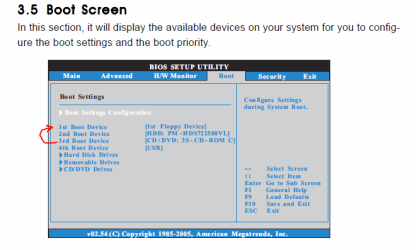
You can boot from a DVD/CD if you change the Boot Order in your system's BIOS.

Normally you press a key (F2 or DEL or F10) as soon as you see the BIOS screens appear to enter BIOS Settings. Then you navigate to the BOOT Tab and find where to change the boot order. Just choose a boot order that boots the CD/DVD Drive before the hard drive.

This is not only important in order to try the Startup Repair, but it would also be needed to use a Diagnostic Disk.

You can download a Hard Drive Diagnostic Utility from your hard drive manufacturer's website as an ISO. Burn the ISO to a CD, then boot with it and it will (normally) run the diagnostic on the hard drive without need for an operating system.

This may tell you once and for all whether the drive is bad.
 

My Computer My Computer

Computer type
PC/Desktop
Computer Manufacturer/Model Number
Home Built - Jan 2013
OS
Windows 7 64 Bit Home Premium SP1
CPU
i7-3820
Motherboard
Asus P9X79-PRO - Bios 4608
Memory
GSkill F3-14900CL9Q - 16GB
Graphics Card(s)
EVGA GeForce GTX660 - Driver 352.86
Sound Card
On board Realtek ALC898
Monitor(s) Displays
Acer S271HL
Screen Resolution
1920 x 1080
Hard Drives
#1- Samsung 840 Pro Series
#2- Western Digital WD1002FAEX Sata3 Black
#3- Western Digital WD1002FAEX Sata3 Black
PSU
Corsair CMPSU-850TX-V2 - 850 watt (by Seasonic)
Case
Corsair Obsidian 550D
Cooling
Standard 3 120mm case fans, Cooler Master Hyper 212 EVO
Keyboard
MS KC-0405
Mouse
Intellimouse 5-button
Internet Speed
56 Mbits/Sec (on a good day)
Antivirus
Avast & Malwarebytes
Browser
Firefox
Other Info
Asus DVD - DRW-24B1ST 24X
TVeblen, unfortunately, I am not able to Bios settings :(

My motherboard is Asrock Wolfdale1333-D667 R2.0. I am little bit suspicious that this motherboard does not supports Win7. However on website , they are claming that it has Vista support.

ASRock > Products > Wolfdale1333-D667 R2.0

I never faced such issues when i was using windows xp prof edition. But when I upgraded with win7, it starts troubling. I replaced and got new hdd from WD. But facing problem with new one also.

Do you know any similar issues ?
IS that any option available to format hdd in this case. So I can install xp again.


My Computer My Computer

OS
Win 7 Ultimate
CPU
Intel
Motherboard
ASRock Wolfdale 1333- D667 Dule Core
Memory
2 GB DDR -2
Hard Drives
350 GB SATA Western Digital
The operating system (any operating system) will never have any effect on the BIOS or your ability to get into the BIOS settings. The BIOS is loaded and runs it's startup routine before the hard drive is detected, which must be performed before the OS is started.

If the BIOS cannot complete it's startup routine it will end in a failure and the hard drive will not be booted at all.

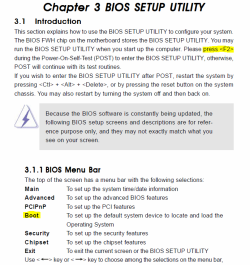
Below are some snips from your ASROCK manual.
Resist the temptation to make any changes in your BIOS, other than changing the boot order, unless you absolutely know what the change will do!

You've got to be pressing that F2 key repeatedly just after you press the power button - or just as anything appears on the screen.
 

Attachments

  • Manual1.PNG
    Manual1.PNG
    38.8 KB · Views: 9
  • Manual2.PNG
    Manual2.PNG
    13.8 KB · Views: 12
Last edited:

My Computer My Computer

Computer type
PC/Desktop
Computer Manufacturer/Model Number
Home Built - Jan 2013
OS
Windows 7 64 Bit Home Premium SP1
CPU
i7-3820
Motherboard
Asus P9X79-PRO - Bios 4608
Memory
GSkill F3-14900CL9Q - 16GB
Graphics Card(s)
EVGA GeForce GTX660 - Driver 352.86
Sound Card
On board Realtek ALC898
Monitor(s) Displays
Acer S271HL
Screen Resolution
1920 x 1080
Hard Drives
#1- Samsung 840 Pro Series
#2- Western Digital WD1002FAEX Sata3 Black
#3- Western Digital WD1002FAEX Sata3 Black
PSU
Corsair CMPSU-850TX-V2 - 850 watt (by Seasonic)
Case
Corsair Obsidian 550D
Cooling
Standard 3 120mm case fans, Cooler Master Hyper 212 EVO
Keyboard
MS KC-0405
Mouse
Intellimouse 5-button
Internet Speed
56 Mbits/Sec (on a good day)
Antivirus
Avast & Malwarebytes
Browser
Firefox
Other Info
Asus DVD - DRW-24B1ST 24X
I never faced such issues when i was using windows xp prof edition. But when I upgraded with win7, it starts troubling. I replaced and got new hdd from WD. But facing problem with new one also.

Do you know any similar issues ?
IS that any option available to format hdd in this case. So I can install xp again.
I have never heard of an OS installation (of any kind) killing a hard drive in the manner you have described--btw what CPU do you have installed?

Unless you can get some computers' BIOS to recognize your hard drive, I know of no way you can re-format it...
 

My Computer My Computer

Computer type
Laptop
Computer Manufacturer/Model Number
Dell Latitude E6540 Laptop
OS
Windows 7 Professional 64bit
CPU
Intel Core i7 4600M @ 2.90GHz
Motherboard
Dell Inc. 0CYT5F (SOCKET 0)
Memory
16.0GB Dual-Channel DDR3 @ 797MHz (11-11-11-28)
Graphics Card(s)
Intel HD Graphics 4600 (Dell) 2048MB ATI AMD Radeon HD 8790M
Sound Card
Realtek High Definition Audio
Monitor(s) Displays
HP ZR30w (2560x1600@60Hz)
Hard Drives
256GB LITEONIT LMT-256M6M-41 mm SATA (SSD)
1TB Samsung SSD 860 EVO mSATA SATA (SSD)
2TB USB 3.0 USB Device
115GB SanDisk Ultra Fit USB
Other Info
Multiple Dell E-Port Plus II Port Replicator/Docking Stations 0Y72NH USB 3.0 + 130W AC Adapters
To -TVeblen and all friends,

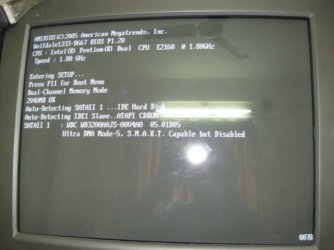
I am posting screenshot of my PC for clarification of my issue. There you can see that I have pressed F2 button to enter into Bios but i am unable to do that as booting process stopped after detecting my WD SATA hard disk.
But if i remove my harddisk then i can enter bios as normally.

If you need more details then please tell me.
 

Attachments

  • Picture 196.jpg
    Picture 196.jpg
    41.4 KB · Views: 15

My Computer My Computer

OS
Win 7 Ultimate
CPU
Intel
Motherboard
ASRock Wolfdale 1333- D667 Dule Core
Memory
2 GB DDR -2
Hard Drives
350 GB SATA Western Digital
Ah, I see now.

Well, you can disconnect the hard drive to get into the BIOS settings and change the boot order to boot from CD first, but if the hard drive crashes the BIOS then I don't see how you could run any diagnostics.

But before we declare the drive dead...

Why were you replacing the drive in the first place? What happened to the old drive? Was it this same problem or something different?
 

My Computer My Computer

Computer type
PC/Desktop
Computer Manufacturer/Model Number
Home Built - Jan 2013
OS
Windows 7 64 Bit Home Premium SP1
CPU
i7-3820
Motherboard
Asus P9X79-PRO - Bios 4608
Memory
GSkill F3-14900CL9Q - 16GB
Graphics Card(s)
EVGA GeForce GTX660 - Driver 352.86
Sound Card
On board Realtek ALC898
Monitor(s) Displays
Acer S271HL
Screen Resolution
1920 x 1080
Hard Drives
#1- Samsung 840 Pro Series
#2- Western Digital WD1002FAEX Sata3 Black
#3- Western Digital WD1002FAEX Sata3 Black
PSU
Corsair CMPSU-850TX-V2 - 850 watt (by Seasonic)
Case
Corsair Obsidian 550D
Cooling
Standard 3 120mm case fans, Cooler Master Hyper 212 EVO
Keyboard
MS KC-0405
Mouse
Intellimouse 5-button
Internet Speed
56 Mbits/Sec (on a good day)
Antivirus
Avast & Malwarebytes
Browser
Firefox
Other Info
Asus DVD - DRW-24B1ST 24X

My Computer My Computer

Computer type
Laptop
Computer Manufacturer/Model Number
Dell Latitude E6540 Laptop
OS
Windows 7 Professional 64bit
CPU
Intel Core i7 4600M @ 2.90GHz
Motherboard
Dell Inc. 0CYT5F (SOCKET 0)
Memory
16.0GB Dual-Channel DDR3 @ 797MHz (11-11-11-28)
Graphics Card(s)
Intel HD Graphics 4600 (Dell) 2048MB ATI AMD Radeon HD 8790M
Sound Card
Realtek High Definition Audio
Monitor(s) Displays
HP ZR30w (2560x1600@60Hz)
Hard Drives
256GB LITEONIT LMT-256M6M-41 mm SATA (SSD)
1TB Samsung SSD 860 EVO mSATA SATA (SSD)
2TB USB 3.0 USB Device
115GB SanDisk Ultra Fit USB
Other Info
Multiple Dell E-Port Plus II Port Replicator/Docking Stations 0Y72NH USB 3.0 + 130W AC Adapters
I want say to heartily thank you to all friends who help me and a special thanks to TVeblen. :).
For my issue I have decided create RMA for my faulty HDD and also decided to buy new motherboard who supports windows 7. Hope in future i will never face such problem.
God bless you all. :)
 

My Computer My Computer

OS
Win 7 Ultimate
CPU
Intel
Motherboard
ASRock Wolfdale 1333- D667 Dule Core
Memory
2 GB DDR -2
Hard Drives
350 GB SATA Western Digital
Back
Top