Solved System Reserve Partition

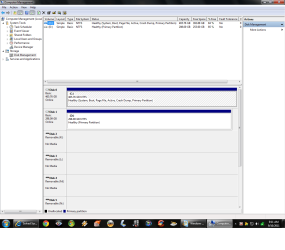
Good work Dusty. Now I would delete D and extend C into its space using Disk Mgmt

Next, Please again tap F8 at reboot to access boot manager.

Choose Win7 HD to boot then immediately begin tapping F8 again to access Advanced Boot Options menu.

Is Repair My Computer on this menu?
 
Good work Dusty. Now I would delete D and extend C into its space using Disk Mgmt

When I do this, what should I expect to happen to those applications that I have installed on the D: Partition? This will isolate the OS (my original intention) but it now resides on a 140GB HDD all by itself.

Where do you now recommend that I put the applications that currently reside on D:?


Next, Please again tap F8 at reboot to access boot manager.

Choose Win7 HD to boot then immediately begin tapping F8 again to access Advanced Boot Options menu.

Is Repair My Computer on this menu?

Yes, the above F8 exercise worked as described and I ended up in the "Advanced Boot Options" menu and "Repair My Computer" is the first option listed.

My responses are highlighted above.

Where might I go to learn more about all the other options in the "Advanced Boot Options" menu. Some sound self explanatory but others not so much so?
 

My Computer

Computer Manufacturer/Model Number
Polywell
OS
Windows 7x32 Home Premium & XP SP3 x86
CPU
Athlon 64FX
Motherboard
ASUS M2N32SLI Delux
Memory
Corsair CM2X1024-8500C5
Graphics Card(s)
GeForce 7950X2 (Dual)
Monitor(s) Displays
ViewSonic A90f+ (Two)
Screen Resolution
1280x1024
Hard Drives
WD1500ADFD-00NLR1 (Originally Raid5)

Changed to three individual drives after HD crashed. May return to RAID5 if I locate a suitable HD.
PSU
TurboColl 1KW
Case
Polywell
Cooling
Cool'n'Quiet (Questionable Operation)
Keyboard
Logitech
Mouse
Logitech
Internet Speed
1GHertz (I think)
Other Info
Sony CD-RW CRX320EE

HP DVD Writer 1140d (may need to replace??)
http://www.sevenforums.com/tutorials/666-advanced-boot-options.html

I would uninstall programs which were installed to the separate partition other than OS which no one would have advised you to do here. Programs write reg keys which integrate themselves into the OS so need to be on the same partition for imaging and other reasons.

Does the Repair My Computer console on Advanced Boot Tools menu work. See if it discovers your installation when you boot into it.
 
http://www.sevenforums.com/tutorials/666-advanced-boot-options.html

I would uninstall programs which were installed to the separate partition other than OS which no one would have advised you to do here. Programs write reg keys which integrate themselves into the OS so need to be on the same partition for imaging and other reasons.

Are you telling me that some applications might not work properly if installed into a location other than that of the OS?

Does the Repair My Computer console on Advanced Boot Tools menu work. See if it discovers your installation when you boot into it.

Yes, it works. It boots into W7 and takes me to the Repair Console after asking for my "password".

My responses are highlighted above.
 

My Computer

Computer Manufacturer/Model Number
Polywell
OS
Windows 7x32 Home Premium & XP SP3 x86
CPU
Athlon 64FX
Motherboard
ASUS M2N32SLI Delux
Memory
Corsair CM2X1024-8500C5
Graphics Card(s)
GeForce 7950X2 (Dual)
Monitor(s) Displays
ViewSonic A90f+ (Two)
Screen Resolution
1280x1024
Hard Drives
WD1500ADFD-00NLR1 (Originally Raid5)

Changed to three individual drives after HD crashed. May return to RAID5 if I locate a suitable HD.
PSU
TurboColl 1KW
Case
Polywell
Cooling
Cool'n'Quiet (Questionable Operation)
Keyboard
Logitech
Mouse
Logitech
Internet Speed
1GHertz (I think)
Other Info
Sony CD-RW CRX320EE

HP DVD Writer 1140d (may need to replace??)
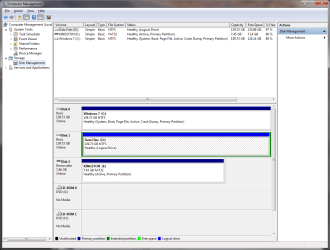
I agree, get rid of that D: partition and turn E: into a primary partition.

Get it to look like this.
 

Attachments

  • Disk Management.png
    Disk Management.png
    48.3 KB · Views: 15

My Computer

Computer Manufacturer/Model Number
Myself
OS
Windows 7 Ultimate 64Bit
CPU
C2D E8200
Motherboard
XFX 750i
Memory
8GB PNY PC2-6400
Graphics Card(s)
BFG 9600GT x 2
Sound Card
Stock XFX Optical
Monitor(s) Displays
Gateway 22" HD Display
Hard Drives
C: 1 TB G: 500 GB H: 500 GB
PSU
Ultra LSP 550 Pro Lifetime Series
Case
Xion2
Cooling
ThermalTake
OKAY. I am following the lead.

After Deleting D.png
 

My Computer

Computer Manufacturer/Model Number
Polywell
OS
Windows 7x32 Home Premium & XP SP3 x86
CPU
Athlon 64FX
Motherboard
ASUS M2N32SLI Delux
Memory
Corsair CM2X1024-8500C5
Graphics Card(s)
GeForce 7950X2 (Dual)
Monitor(s) Displays
ViewSonic A90f+ (Two)
Screen Resolution
1280x1024
Hard Drives
WD1500ADFD-00NLR1 (Originally Raid5)

Changed to three individual drives after HD crashed. May return to RAID5 if I locate a suitable HD.
PSU
TurboColl 1KW
Case
Polywell
Cooling
Cool'n'Quiet (Questionable Operation)
Keyboard
Logitech
Mouse
Logitech
Internet Speed
1GHertz (I think)
Other Info
Sony CD-RW CRX320EE

HP DVD Writer 1140d (may need to replace??)
Now I have a different problem. It might warrant a new thread but I am going to continue this one.

After achieving the reconfiguration show in the last snip above, I shut down and installed a HDD that I acquired. It is identical to the other two that have been in my computer.

After getting it installed (incorrectly I later discover), the system would not boot. After some frustration and cussing under my breathe at persons not to be blamd (or to be named), I gathered myself together and came to realize that 1) the recently introduced HD had an operating system on it (maybe not the cause of my problem) and 2) I installed it into SATA1. I have had the HDs in SATA2 and SATA3 which is where they were before back in the very beginning.

Right now, all I have connected is the primary drive in SATA2. My Data drive is disconnected as is the new drive.

My question is where must I install the three drives without creating more problems.

Is it necessary to have the drive with the OS (C:) installed in a lower numbered SATA position than the others?

Do they need to be sequential?

Does it matter where I install the new drive. I have openings (with cables) in SATA 1 and 2 and SATA 5 and 6.

 

My Computer

Computer Manufacturer/Model Number
Polywell
OS
Windows 7x32 Home Premium & XP SP3 x86
CPU
Athlon 64FX
Motherboard
ASUS M2N32SLI Delux
Memory
Corsair CM2X1024-8500C5
Graphics Card(s)
GeForce 7950X2 (Dual)
Monitor(s) Displays
ViewSonic A90f+ (Two)
Screen Resolution
1280x1024
Hard Drives
WD1500ADFD-00NLR1 (Originally Raid5)

Changed to three individual drives after HD crashed. May return to RAID5 if I locate a suitable HD.
PSU
TurboColl 1KW
Case
Polywell
Cooling
Cool'n'Quiet (Questionable Operation)
Keyboard
Logitech
Mouse
Logitech
Internet Speed
1GHertz (I think)
Other Info
Sony CD-RW CRX320EE

HP DVD Writer 1140d (may need to replace??)
It does not really matter as long as you set the BIOS boot sequence correctly - meaning that the HDD from which you wish to boot is first in the boot sequence (can be second after the CD reader).

I suspect you could not boot because you had fooled the MBR which is pointing to the bootmgr of the OS you last installed.
 

My Computer

Computer Manufacturer/Model Number
HP, Dell, Gateway, Toshiba - 4 laptops and 2 desktops
OS
Vista, Windows7, Mint Mate, Zorin, Windows 8
CPU
from 1.6GHz Duo to i7
Monitor(s) Displays
2x HP w2207
Hard Drives
5x HDD, 7x SSD, 12x Externals
Keyboard
with trackball - no mices
Mouse
Trackball mice
Internet Speed
DSL 6000
This is going to become another one of those days. I now can not connect the HD that had been my DATA D: drive into the system. If I do, the systems comes up into Windows to the MS flags and hangs there.

Without doing anything else other than disconnect the SATA cable to the drive and reboot - all is well.

The new drive that was just introduced into the system (using the same SATA cable) works.

I find it hard to believe that I could stomp on a HD that way. This particular HD was loaded with files I really do not want to lose. I have backups but they are on other drives and flash sticks.
 

My Computer

Computer Manufacturer/Model Number
Polywell
OS
Windows 7x32 Home Premium & XP SP3 x86
CPU
Athlon 64FX
Motherboard
ASUS M2N32SLI Delux
Memory
Corsair CM2X1024-8500C5
Graphics Card(s)
GeForce 7950X2 (Dual)
Monitor(s) Displays
ViewSonic A90f+ (Two)
Screen Resolution
1280x1024
Hard Drives
WD1500ADFD-00NLR1 (Originally Raid5)

Changed to three individual drives after HD crashed. May return to RAID5 if I locate a suitable HD.
PSU
TurboColl 1KW
Case
Polywell
Cooling
Cool'n'Quiet (Questionable Operation)
Keyboard
Logitech
Mouse
Logitech
Internet Speed
1GHertz (I think)
Other Info
Sony CD-RW CRX320EE

HP DVD Writer 1140d (may need to replace??)
Today has not been a good day but I guess it could be worse.

I still have an operational computer running Windows 7.

I may have lost a HDD that was loaded with personal files.

The primary task, however, is to try to figure out the latest HD failure. With it installed, the system starts to boot up but hangs on the MS Flags.

Gotta try to figure out if these two HDDs are really bad or is it something I have been doing.
 
Last edited:

My Computer

Computer Manufacturer/Model Number
Polywell
OS
Windows 7x32 Home Premium & XP SP3 x86
CPU
Athlon 64FX
Motherboard
ASUS M2N32SLI Delux
Memory
Corsair CM2X1024-8500C5
Graphics Card(s)
GeForce 7950X2 (Dual)
Monitor(s) Displays
ViewSonic A90f+ (Two)
Screen Resolution
1280x1024
Hard Drives
WD1500ADFD-00NLR1 (Originally Raid5)

Changed to three individual drives after HD crashed. May return to RAID5 if I locate a suitable HD.
PSU
TurboColl 1KW
Case
Polywell
Cooling
Cool'n'Quiet (Questionable Operation)
Keyboard
Logitech
Mouse
Logitech
Internet Speed
1GHertz (I think)
Other Info
Sony CD-RW CRX320EE

HP DVD Writer 1140d (may need to replace??)
Connect the power cable to your new sata hd, start the pc, let it boot to windows as usual then connect the data cable. It should pop up the found new hardware window. After that give it a letter and format it. Through disk management.

I gotta ask, why are you bringing all these problems on yourself ?
Your missing a good race!

:picnic:
 

My Computer

Computer Manufacturer/Model Number
Myself
OS
Windows 7 Ultimate 64Bit
CPU
C2D E8200
Motherboard
XFX 750i
Memory
8GB PNY PC2-6400
Graphics Card(s)
BFG 9600GT x 2
Sound Card
Stock XFX Optical
Monitor(s) Displays
Gateway 22" HD Display
Hard Drives
C: 1 TB G: 500 GB H: 500 GB
PSU
Ultra LSP 550 Pro Lifetime Series
Case
Xion2
Cooling
ThermalTake
I have to agree with Zomby. You seem to play around too much with the system.
 

My Computer

Computer Manufacturer/Model Number
HP, Dell, Gateway, Toshiba - 4 laptops and 2 desktops
OS
Vista, Windows7, Mint Mate, Zorin, Windows 8
CPU
from 1.6GHz Duo to i7
Monitor(s) Displays
2x HP w2207
Hard Drives
5x HDD, 7x SSD, 12x Externals
Keyboard
with trackball - no mices
Mouse
Trackball mice
Internet Speed
DSL 6000
Run the maker's HD diagnostics extended CD scan and Disk Check on each HD. That will tell.

Where are we now on the latest mess?
 
Sorry guys. I would just like to get this darn thing operating. I was almost there. I suppose it does all seem to be self inflicted doesn't it. That is probably because I should not be messing with this computer at all. I could go sit in my rocker and watch game shows.

Hang in there with me, please.

Windows works, the fans are running at the right speef, power is stable, the video is clear and bright and I am the only senior citizen I know who has built his own gaming computer and can use it (a little).:cool:
 

My Computer

Computer Manufacturer/Model Number
Polywell
OS
Windows 7x32 Home Premium & XP SP3 x86
CPU
Athlon 64FX
Motherboard
ASUS M2N32SLI Delux
Memory
Corsair CM2X1024-8500C5
Graphics Card(s)
GeForce 7950X2 (Dual)
Monitor(s) Displays
ViewSonic A90f+ (Two)
Screen Resolution
1280x1024
Hard Drives
WD1500ADFD-00NLR1 (Originally Raid5)

Changed to three individual drives after HD crashed. May return to RAID5 if I locate a suitable HD.
PSU
TurboColl 1KW
Case
Polywell
Cooling
Cool'n'Quiet (Questionable Operation)
Keyboard
Logitech
Mouse
Logitech
Internet Speed
1GHertz (I think)
Other Info
Sony CD-RW CRX320EE

HP DVD Writer 1140d (may need to replace??)
Run the maker's HD diagnostics extended CD scan and Disk Check on each HD. That will tell.

Where are we now on the latest mess?

Except for the fact that I now only have two 140GB HDD and there was three when this fiasco started (a month or more along) - everything works.

The OS and Applications all reside on the same Partition. What personal data files t I still have are all located on the second HDD.

Cool'and'Quiet is working. The machines idles around 39°C now. It was in the mid-fifties.

Windows 7, as best I can tell, is working. The XP machine has gone to a nursing home to live out its later years. I am legal now.

Now maybe I can get back out to the wood shop for a few days each week and make some saw dust. Haven't done that in a month or so. Hope nothing goes wrong out there like it has while playing "safe" at the computer desk. Bad things there cause trips to the ER.:eek:

Thanks again.

About the HDDs: neither one of the failed units are recognized (listed in the bios) so I don't think I can do the diagnostics. If I am wrong, please let me know. As stated earlier, if I mount either one of them, the system hangs up during the load process. Seems like 300GB lost forever.
 

My Computer

Computer Manufacturer/Model Number
Polywell
OS
Windows 7x32 Home Premium & XP SP3 x86
CPU
Athlon 64FX
Motherboard
ASUS M2N32SLI Delux
Memory
Corsair CM2X1024-8500C5
Graphics Card(s)
GeForce 7950X2 (Dual)
Monitor(s) Displays
ViewSonic A90f+ (Two)
Screen Resolution
1280x1024
Hard Drives
WD1500ADFD-00NLR1 (Originally Raid5)

Changed to three individual drives after HD crashed. May return to RAID5 if I locate a suitable HD.
PSU
TurboColl 1KW
Case
Polywell
Cooling
Cool'n'Quiet (Questionable Operation)
Keyboard
Logitech
Mouse
Logitech
Internet Speed
1GHertz (I think)
Other Info
Sony CD-RW CRX320EE

HP DVD Writer 1140d (may need to replace??)
Try plugging HD's into another computer to see if the same exists in BIOS. You can also try booting the diagnostics CD to see if it sees either.
 
Try plugging HD's into another computer to see if the same exists in BIOS. You can also try booting the diagnostics CD to see if it sees either.

I do have DataLifeguard Diagnostics loaded on the computer. But if I mount the HDDs, I cannot get to a point where I can run the diagnostics. I have to find a boot version that will do the same sorta test.

In the meantime, I am going to leave well enough alone.
 

My Computer

Computer Manufacturer/Model Number
Polywell
OS
Windows 7x32 Home Premium & XP SP3 x86
CPU
Athlon 64FX
Motherboard
ASUS M2N32SLI Delux
Memory
Corsair CM2X1024-8500C5
Graphics Card(s)
GeForce 7950X2 (Dual)
Monitor(s) Displays
ViewSonic A90f+ (Two)
Screen Resolution
1280x1024
Hard Drives
WD1500ADFD-00NLR1 (Originally Raid5)

Changed to three individual drives after HD crashed. May return to RAID5 if I locate a suitable HD.
PSU
TurboColl 1KW
Case
Polywell
Cooling
Cool'n'Quiet (Questionable Operation)
Keyboard
Logitech
Mouse
Logitech
Internet Speed
1GHertz (I think)
Other Info
Sony CD-RW CRX320EE

HP DVD Writer 1140d (may need to replace??)
Data Lifeguard ISO needs to be burned to CD to run Extended test on each HD, not run from Windows.
 
About the HDDs: neither one of the failed units are recognized (listed in the bios) so I don't think I can do the diagnostics. If I am wrong, please let me know. As stated earlier, if I mount either one of them, the system hangs up during the load process. Seems like 300GB lost forever.
This is probably a long shot, but I would try one of the USB adapters (permits connection of IDE and SATA hard drives to a USB port, includes a power supply) to see if you can mount either of these drives in that manner, at the Windows desktop of course. This kinda thing:

Newegg.com - Vantec 2.5"/3.5"/5.25" SATA/IDE to USB 2.0 Adapter - Model CB-ISATAU2
 

My Computer

Computer type
Laptop
Computer Manufacturer/Model Number
Dell Latitude E6540 Laptop
OS
Windows 7 Professional 64bit
CPU
Intel Core i7 4600M @ 2.90GHz
Motherboard
Dell Inc. 0CYT5F (SOCKET 0)
Memory
16.0GB Dual-Channel DDR3 @ 797MHz (11-11-11-28)
Graphics Card(s)
Intel HD Graphics 4600 (Dell) 2048MB ATI AMD Radeon HD 8790M
Sound Card
Realtek High Definition Audio
Monitor(s) Displays
HP ZR30w (2560x1600@60Hz)
Hard Drives
256GB LITEONIT LMT-256M6M-41 mm SATA (SSD)
1TB Samsung SSD 860 EVO mSATA SATA (SSD)
2TB USB 3.0 USB Device
115GB SanDisk Ultra Fit USB
Other Info
Multiple Dell E-Port Plus II Port Replicator/Docking Stations 0Y72NH USB 3.0 + 130W AC Adapters
About the HDDs: neither one of the failed units are recognized (listed in the bios) so I don't think I can do the diagnostics. If I am wrong, please let me know. As stated earlier, if I mount either one of them, the system hangs up during the load process. Seems like 300GB lost forever.
This is probably a long shot, but I would try one of the USB adapters (permits connection of IDE and SATA hard drives to a USB port, includes a power supply) to see if you can mount either of these drives in that manner, at the Windows desktop of course. This kinda thing:

Newegg.com - Vantec 2.5"/3.5"/5.25" SATA/IDE to USB 2.0 Adapter - Model CB-ISATAU2
I'll look into this jsut for the hell of it but the Data LifeGuard Test pretty much confirmed that I have two useless drives.
 

My Computer

Computer Manufacturer/Model Number
Polywell
OS
Windows 7x32 Home Premium & XP SP3 x86
CPU
Athlon 64FX
Motherboard
ASUS M2N32SLI Delux
Memory
Corsair CM2X1024-8500C5
Graphics Card(s)
GeForce 7950X2 (Dual)
Monitor(s) Displays
ViewSonic A90f+ (Two)
Screen Resolution
1280x1024
Hard Drives
WD1500ADFD-00NLR1 (Originally Raid5)

Changed to three individual drives after HD crashed. May return to RAID5 if I locate a suitable HD.
PSU
TurboColl 1KW
Case
Polywell
Cooling
Cool'n'Quiet (Questionable Operation)
Keyboard
Logitech
Mouse
Logitech
Internet Speed
1GHertz (I think)
Other Info
Sony CD-RW CRX320EE

HP DVD Writer 1140d (may need to replace??)
Back
Top