Solved Shrink OS Volume

Perfect Disk: Rightclick the disk or partition you want to Defrag, select Offline Defrag, then System. It reboots and completes task.

As I said I stopped using it because PW has proved to be the actual Perfect Disk tool.
 
I'm not a Novice to Partition Wizard and have used it often.
However, I used for the first time the other day on my OS (Boot,...) partition to shrink it to a size able to accommodate an SSD. Sorry to say it moved files and screwed up! The MFT wasn't the issue.
I recovered from an image and completed the job. But take WHS's advice early in the thread and basically be prepared to recover from a PW foul up.

Also, if you ever invoke your factory recovery you'll be back to the old partition structure.
 

My Computer My Computer

Computer type
PC/Desktop
Computer Manufacturer/Model Number
Own build
OS
Windows 7x64 Home Premium SP1
CPU
Intel i7 2600k
Motherboard
ASUS P8Z68 Deluxe
Memory
G.Skill Ripjaws (DDR3-1600) 2x4GB
Graphics Card(s)
Nvidia GeForce GTS 450; Intel HD Graphics 3000(GT2+)
Monitor(s) Displays
Dell Ultrasharp IPS panel U2311H, Samsung SyncMaster P2350
Screen Resolution
1920x1080
Hard Drives
Samsung 850 Pro SSD 256GB, Samsung SSD 840 120GB, Seagates 1TB Barracuda ST31000528AS x2
PSU
Seasonic M12II 520W
Case
Lian Li Lancool PC-K60
Cooling
Case: 1x120mm, 3x140mm CPU: Hyper 212+
Keyboard
Logitech MK520 (wireless)
Mouse
Logitech MK520
Internet Speed
6-7 Mbps
Antivirus
Norton Security Premium, Malwarebytes on 2 (MSE on 3rd PC)
Browser
FireFox
Other Info
Audio: Logitech Z523 2.1
Well, I decided that I had put off using Partition Wizard for long enough. The process was rather simple really. It performed as stated with one exception. During the resizing operation, before I clicked Apply and started the resizing I was never offered the opportunity to retain or change the partition letter. I was not offered the opportunity to assign a letter after the operation was completed. I've spent the past three hours trying to find an answer to the problem, to no avail.

I'm concerned that without a letter for the OS partition the computer may fail to boot into Windows, even though with this Dell the boot is initiated from the Recovery partition. I've taken all the actions stipulated in the Help menu but "Change Volume Letter" and "Change Drive Letter" are grayed out and not available. I did highlight the OS partition and then clicked on the "Change Volume Label", which was not grayed out, and the OS partition is indeed labeled as "OS" but I'm still a little hesitant to simply exit the application and attempt a boot.

I'm on my laptop now. The desktop, which is where I shrank the OS partition, is sitting there doing nothing, with the Partition Wizard on hold. Oh well, what can I say? I was hoping one of you would still be awake and has encountered this issue in the past and would know either what I'm doing wrong or what I'm failing to do.

I'll let the desktop sit there all night and half of tomorrow with Partition Wizard running if I can overcome this problem, or learning through the past experience of others that the computer will boot properly I'll attempt a boot.

I'm not overly concerned about it. If it doesn't boot properly I can always try a repair with the installation DVD first, and if that fails I can use one of my Acronis or Windows Backup and Restore backups, even though I realize I'll be trying to put an image of a 900GB+ partition onto a 200GB partition. I bet that's going to be a swell deal. If push comes to shove I'll simply do a clean install. I don't get too excited over anything. It accomplishes nothing.
 

My Computer My Computer

Computer Manufacturer/Model Number
1.Dell Studio XPS 7100 Desktop; 2.Dell XPS 17 Laptop
OS
1.Windows 7 Ultimate x64; 2.Windows 7 Ultimate x64
CPU
1.AMD Phenom II X6 1075T; 2.Intel Core i7-2720QM 2.20 GHz
Memory
1.8GB DDR3; 2.8GB DDR3
Graphics Card(s)
1.AMD HD 5670 1GB; 2.NVIDIA GeForce GT 555M 3GB
Monitor(s) Displays
1.Samsung SyncMaster; 2.17.3in FHD
Screen Resolution
1.1600X900; 2.1920X1080
Hard Drives
1.1TB; 2.1TB 500GB X2
Keyboard
1.Microsoft Wireless; 2.Backlit
Mouse
Microsoft Wireless; 2.Microsoft Wireless Mobile 3500
Internet Speed
10.0 Mbps
Windows assigns a letter to your primary installation itself. I'm not sure if this is "virtual" or "actual" but in Win7, you will notice that the primary disk that you booted from would always be C:\. This is especially noticeable on multi-boot systems.

Besides, you can also use diskpart later on.
 

My Computer My Computer

Computer Manufacturer/Model Number
Asus G73SW-XN2
OS
Windows 2000 5.0 Build 2195
CPU
Intel Core i7-2630QM@2GHz(2.9GHz Turbo Boost) [Sandy Bridge]
Motherboard
Asus G73SW (Intel HM65 Chipset)
Memory
Kingston DDR3 1333 16GB (4GBx4)
Graphics Card(s)
nVidia GTX 460m 1.5GB
Sound Card
EAX Advanced HD 5.0, THX TruStudio
Monitor(s) Displays
17.3 in. primary & 23 in. secondary
Screen Resolution
1920x1080
Hard Drives
Seagate Momentus XT (SATA II) 500 GB @ 7200 RPM
Hitachi (SATA II) 500GB @ 7200 RPM

Non Raid because ASUS was crappy to choose an HM65 Chipset
Keyboard
Built-in 102-Key Backlit Keyboard
Other Info
It's a Laptop.
Windows assigns a letter to your primary installation itself. I'm not sure if this is "virtual" or "actual" but in Win7, you will notice that the primary disk that you booted from would always be C:\. This is especially noticeable on multi-boot systems.

Besides, you can also use diskpart later on.

Hello, arkhi. I don't know why, but with Dell the Recovery partition is the active partition and the boot is initiated from there. I'm not so sure it will be able to recognize my OS partition. My Recovery partition was not tampered with during the resizing (shrinking) of my OS partition, the OS partition taking up over 900GB on the drive. I shrank it down to 200GB but now it does not have a letter. It is labeled as *. I've learned that many other people have had this problem using Partition Wizard but I have not as of yet seen the answer to the problem. I'll probably just pull the CD, exit the application and see what happens. Live and learn.

I appreciate your input.
 

My Computer My Computer

Computer Manufacturer/Model Number
1.Dell Studio XPS 7100 Desktop; 2.Dell XPS 17 Laptop
OS
1.Windows 7 Ultimate x64; 2.Windows 7 Ultimate x64
CPU
1.AMD Phenom II X6 1075T; 2.Intel Core i7-2720QM 2.20 GHz
Memory
1.8GB DDR3; 2.8GB DDR3
Graphics Card(s)
1.AMD HD 5670 1GB; 2.NVIDIA GeForce GT 555M 3GB
Monitor(s) Displays
1.Samsung SyncMaster; 2.17.3in FHD
Screen Resolution
1.1600X900; 2.1920X1080
Hard Drives
1.1TB; 2.1TB 500GB X2
Keyboard
1.Microsoft Wireless; 2.Backlit
Mouse
Microsoft Wireless; 2.Microsoft Wireless Mobile 3500
Internet Speed
10.0 Mbps
If your recovery partitions is not tampered with, and let's assume that it somehow fails to recognize your OS partition because it did not have a letter, the worst that would happen is that when you boot, you will have a message similar to this:

Windows 7 could not start because the below file is missing or corrupt:
C:\Windows\System32\Ntoskrnl.exe

That can be remedied easily by booting to recovery http://www.sevenforums.com/tutorials/668-system-recovery-options.html
Then, using the following info from technet to assign a letter Assign, change, or remove a drive letter: Storage Services; Local File Systems

But just to be sure, always, ALWAYS backup your data BEFOREHAND by using http://www.sevenforums.com/tutorials/663-backup-complete-computer-create-image-backup.html
 

My Computer My Computer

Computer Manufacturer/Model Number
Asus G73SW-XN2
OS
Windows 2000 5.0 Build 2195
CPU
Intel Core i7-2630QM@2GHz(2.9GHz Turbo Boost) [Sandy Bridge]
Motherboard
Asus G73SW (Intel HM65 Chipset)
Memory
Kingston DDR3 1333 16GB (4GBx4)
Graphics Card(s)
nVidia GTX 460m 1.5GB
Sound Card
EAX Advanced HD 5.0, THX TruStudio
Monitor(s) Displays
17.3 in. primary & 23 in. secondary
Screen Resolution
1920x1080
Hard Drives
Seagate Momentus XT (SATA II) 500 GB @ 7200 RPM
Hitachi (SATA II) 500GB @ 7200 RPM

Non Raid because ASUS was crappy to choose an HM65 Chipset
Keyboard
Built-in 102-Key Backlit Keyboard
Other Info
It's a Laptop.
Hello again, arkhi. I decided to just go for it. The computer booted in a most excellent manner. Hopefully, I won't experience any problems with all the programs working properly. I think I'm OK. I went to Computer and there it was, labeled as C, just as it is supposed to be.

I now have a 200 GB OS partition (C) and a 700GB+ unallocated partition. Of course, I still have the Dell utility partition, which is first and contains a few MB and the Dell Recovery partition, which is the second and contains a few GB. These three partitions are all primary partitions. In your opinion, would it be better to use Windows Disk Management to format this 700GB+ unallocated space and then shrink it so that I end up with two logical partitions or use Partition Wizard to slice this big partition into two partitions, reboot and then let Windows Disk Management format each partition?

Thank you again for your time and your assistance.

C.B.
 

My Computer My Computer

Computer Manufacturer/Model Number
1.Dell Studio XPS 7100 Desktop; 2.Dell XPS 17 Laptop
OS
1.Windows 7 Ultimate x64; 2.Windows 7 Ultimate x64
CPU
1.AMD Phenom II X6 1075T; 2.Intel Core i7-2720QM 2.20 GHz
Memory
1.8GB DDR3; 2.8GB DDR3
Graphics Card(s)
1.AMD HD 5670 1GB; 2.NVIDIA GeForce GT 555M 3GB
Monitor(s) Displays
1.Samsung SyncMaster; 2.17.3in FHD
Screen Resolution
1.1600X900; 2.1920X1080
Hard Drives
1.1TB; 2.1TB 500GB X2
Keyboard
1.Microsoft Wireless; 2.Backlit
Mouse
Microsoft Wireless; 2.Microsoft Wireless Mobile 3500
Internet Speed
10.0 Mbps
I'm concerned that without a letter for the OS partition the computer may fail to boot into Windows
You worry about the wrong thing. The system will always boot from the active partition - with or without letter.

In your opinion, would it be better to use Windows Disk Management to format this 700GB+ unallocated space and then shrink it so that I end up with two logical partitions or use Partition Wizard to slice this big partition into two partitions, reboot and then let Windows Disk Management format each partition?
I suggest you use Disk Management. If it is unallocated, you just define a first new partition of the size you want. if it is less than 700GB, it will leave the rest still unallocated where you can define a second partition.

As I had said earlier, Partition Wizard has its traps. You are much safer with Disk Management.
 

My Computer My Computer

Computer Manufacturer/Model Number
HP, Dell, Gateway, Toshiba - 4 laptops and 2 desktops
OS
Vista, Windows7, Mint Mate, Zorin, Windows 8
CPU
from 1.6GHz Duo to i7
Monitor(s) Displays
2x HP w2207
Hard Drives
5x HDD, 7x SSD, 12x Externals
Keyboard
with trackball - no mices
Mouse
Trackball mice
Internet Speed
DSL 6000
As always, whs, I appreciate your time and your assistance. I'll do everything from within Disk Management. I'm going to bed. It's been a long day.

C.B.
 

My Computer My Computer

Computer Manufacturer/Model Number
1.Dell Studio XPS 7100 Desktop; 2.Dell XPS 17 Laptop
OS
1.Windows 7 Ultimate x64; 2.Windows 7 Ultimate x64
CPU
1.AMD Phenom II X6 1075T; 2.Intel Core i7-2720QM 2.20 GHz
Memory
1.8GB DDR3; 2.8GB DDR3
Graphics Card(s)
1.AMD HD 5670 1GB; 2.NVIDIA GeForce GT 555M 3GB
Monitor(s) Displays
1.Samsung SyncMaster; 2.17.3in FHD
Screen Resolution
1.1600X900; 2.1920X1080
Hard Drives
1.1TB; 2.1TB 500GB X2
Keyboard
1.Microsoft Wireless; 2.Backlit
Mouse
Microsoft Wireless; 2.Microsoft Wireless Mobile 3500
Internet Speed
10.0 Mbps
Now you have 3 primary partitions and 700MB of unallocated space.

To create additional partitions in this space, just use windows disk management. Create a simple volume and select the size of the first partiton you wish to have (for ex. 350 GB). An extended partition is created for the entire 700 GB and a logical drive of 350 GB inside this extended partition. Right click again in the free space and select all the available area and a second logical drive of another 350 GB will be created. You can reduce the values and get more logical drives in extended partition if you desire.

You have not mentioned whether MyDefrag did the job of bringing the files together or not?
 

My Computer My Computer

Computer Manufacturer/Model Number
Toshiba Satellite P775-S7232
OS
MS Windows 7 Ultimate 64-bit SP1
CPU
i5-2410M 2.3GHz (2.9GHz Turbo-Boost) Sandy Bridge 32nm
Motherboard
Toshiba PHRAA ver. PSBY1U-00F003
Memory
4GB+4GB Samsung DDR3 PC3-10700 (1333 MHz)
Graphics Card(s)
Video Intel(R) HD Graphics Family, 1696MB available memory
Sound Card
Realtek High Definition Audio version=6.0.1.6323
Monitor(s) Displays
17.3 " Trubrite TFT LCD, LED Backlit
Screen Resolution
1600x900 32 bit, Native support for 720P content
Hard Drives
TOSHIBA MK6476GSXN
580.614 [GB] partitioned C: 80GB and D: 500GB with hidden recovery partitons.

Spare bay for 2nd HDD but no SATA connector :-(
PSU
Toshiba AC/DC Adapter
Case
Notebook
Cooling
Built-in Fan
Keyboard
Premium Raised Tile keyboard
Mouse
Logitech M215 wireless mouse
Internet Speed
Not fast enough
Other Info
Built-in Harman Kardon speakers with Dolby Advanced Audio, Waves MaxxAudio® 3. HDMI, 1xUSB3+3xUSB2 ports, WebCam, Battery life 4hrs 11mins, 4GB Readyboost SDHC card, WD My Book Essential Ext HDDs 2 TB, 2x1TB, My Passport SE 1TB and WDTV 1st Gen for Multimedia playing on a Sony Wega 32" LCD.
Recent addition to my toys are Asus Transformer Pad TF300T with 32GB onboard sd card + 32GB microsd card.
  • Like
Reactions: whs
During the resizing operation, before I clicked Apply and started the resizing I was never offered the opportunity to retain or change the partition letter. I was not offered the opportunity to assign a letter after the operation was completed. I've spent the past three hours trying to find an answer to the problem, to no avail.

You cannot change the drive letter on the OS partition or it will ruin Win7. I don´t know why you would want to try.

Please post back another screenshot of your full Disk Mgmt drive map with listings. If PW CD disagrees with this in any way, post a camera snap or type out its differing listings.

I am traveling and distracted but growing baffled at why a simple partition shrink which we´ve done here thousands of times has become such a complicated mess. PW CD does this flawlessly without a single documented case of CD failure, irrespective of scares which have been thrown up about occasional failure of its installed version.


I'm not a Novice to Partition Wizard and have used it often.
However, I used for the first time the other day on my OS (Boot,...) partition to shrink it to a size able to accommodate an SSD. Sorry to say it moved files and screwed up! The MFT wasn't the issue.
I recovered from an image and completed the job. But take WHS's advice early in the thread and basically be prepared to recover from a PW foul up.

Also, if you ever invoke your factory recovery you'll be back to the old partition structure.

Did you use the PW CD? While we´ve had failures using PW installed version which must commit to RAM at reboot to complete tasks, I recall no failure reported in thousands of cases where PW CD has been used here to do both simple and complicated partitioning operations.

Please document thoroughly with screenshots any PW boot disk failures, as non-specific comments disparaging the most important tool we use here are not helpful and confuse the OP.

 
OK now; here we go. My sixty-one year old brain has apparently dwindled to the size of a walnut because I can't figure out how to use the multi-quote, and this is after reading several articles about it on the Internet. I will henceforth, to my chagrin, engage in copy and paste.

"You have not mentioned whether MyDefrag did the job of bringing the files together or not?"

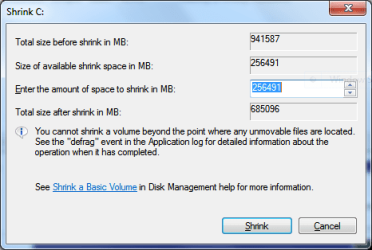
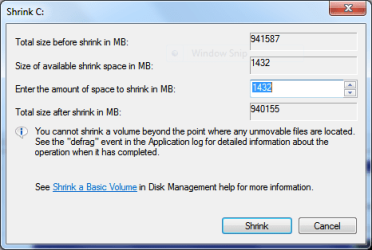
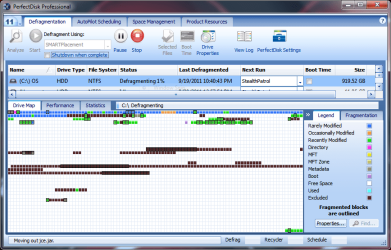
rraod, I spent time on the MyDefrag forum and I also read the user manual before running MyDefrag. I ran it with the script "System Disk Monthly". The available shrink space before running MyDefrag was 256,491MB and after running it the available shrink space was 1432MB. I then ran my PerfectDisk 11 Professional to see where on the drive the files were located. I have attached three screenshots showing the results.

"You cannot change the drive letter on the OS partition or it will ruin Windows 7. I don´t know why you would want to try."

gregrocker, I had no intention of changing the letter of my OS partition. I simply wanted to retain it. I was disappointed that PW did not point out, anywhere in the help menu, on the application interface or on its website, that the partition letter would not change and that the inability to change it was in fact a protective measure for the benefit of the user. I spent a lot of time researching the issue on the Internet because I was worried that the letter would change or would be absent after the resizing operation. I used the PW bootable CD that I had burned from the ISO.

I am amazed at the ease of use and simplicity of the user interface of Partition Wizard. It performed flawlessly and did so in a timely manner. I have nothing but praise for the developers of the application. If the PW application was developed by individuals as opposed to a huge corporation I would gladly offer a financial donation as my way of supporting their endeavor. I see no way to do that on the PW website but then again, I could have overlooked it.

I sincerely thank everyone who assisted me with my resizing efforts. Sharing your knowledge and time with a novice is something most people are not willing to do. It says a lot about your character. I have noticed much impatience, frustration and aggravation by others in many forums while attempting to assist a novice such as myself. I experienced none of that in this thread, which again attests to your character and genuine desire to share your knowledge. You have my respect and admiration.

I apologize if my rambling in any of my posts caused any consternation among you. That's my nature; I'm not only a reader but also a person who often talks too much.

C.B.
 

Attachments

  • Shrink attempt.PNG
    Shrink attempt.PNG
    11.5 KB · Views: 4
  • Available shrink after running MyDefrag on Desktop.PNG
    Available shrink after running MyDefrag on Desktop.PNG
    11.5 KB · Views: 4
  • After running MyDefrag.PNG
    After running MyDefrag.PNG
    43.1 KB · Views: 15

My Computer My Computer

Computer Manufacturer/Model Number
1.Dell Studio XPS 7100 Desktop; 2.Dell XPS 17 Laptop
OS
1.Windows 7 Ultimate x64; 2.Windows 7 Ultimate x64
CPU
1.AMD Phenom II X6 1075T; 2.Intel Core i7-2720QM 2.20 GHz
Memory
1.8GB DDR3; 2.8GB DDR3
Graphics Card(s)
1.AMD HD 5670 1GB; 2.NVIDIA GeForce GT 555M 3GB
Monitor(s) Displays
1.Samsung SyncMaster; 2.17.3in FHD
Screen Resolution
1.1600X900; 2.1920X1080
Hard Drives
1.1TB; 2.1TB 500GB X2
Keyboard
1.Microsoft Wireless; 2.Backlit
Mouse
Microsoft Wireless; 2.Microsoft Wireless Mobile 3500
Internet Speed
10.0 Mbps
Is everything in good order now??

Btw: at your tender age you have plenty of time to learn all that stuff. I started with the PC at age 70.
 

My Computer My Computer

Computer Manufacturer/Model Number
HP, Dell, Gateway, Toshiba - 4 laptops and 2 desktops
OS
Vista, Windows7, Mint Mate, Zorin, Windows 8
CPU
from 1.6GHz Duo to i7
Monitor(s) Displays
2x HP w2207
Hard Drives
5x HDD, 7x SSD, 12x Externals
Keyboard
with trackball - no mices
Mouse
Trackball mice
Internet Speed
DSL 6000
Dear CBM,

We were only anxious about you and your task...and be ready with any other advice you may need in time.

So our requests might have sounded as impatient demands. But in the end all of us were just waiting for you to finish the task and declare the results. so that we can say Yahoo.......
 

My Computer My Computer

Computer Manufacturer/Model Number
Toshiba Satellite P775-S7232
OS
MS Windows 7 Ultimate 64-bit SP1
CPU
i5-2410M 2.3GHz (2.9GHz Turbo-Boost) Sandy Bridge 32nm
Motherboard
Toshiba PHRAA ver. PSBY1U-00F003
Memory
4GB+4GB Samsung DDR3 PC3-10700 (1333 MHz)
Graphics Card(s)
Video Intel(R) HD Graphics Family, 1696MB available memory
Sound Card
Realtek High Definition Audio version=6.0.1.6323
Monitor(s) Displays
17.3 " Trubrite TFT LCD, LED Backlit
Screen Resolution
1600x900 32 bit, Native support for 720P content
Hard Drives
TOSHIBA MK6476GSXN
580.614 [GB] partitioned C: 80GB and D: 500GB with hidden recovery partitons.

Spare bay for 2nd HDD but no SATA connector :-(
PSU
Toshiba AC/DC Adapter
Case
Notebook
Cooling
Built-in Fan
Keyboard
Premium Raised Tile keyboard
Mouse
Logitech M215 wireless mouse
Internet Speed
Not fast enough
Other Info
Built-in Harman Kardon speakers with Dolby Advanced Audio, Waves MaxxAudio® 3. HDMI, 1xUSB3+3xUSB2 ports, WebCam, Battery life 4hrs 11mins, 4GB Readyboost SDHC card, WD My Book Essential Ext HDDs 2 TB, 2x1TB, My Passport SE 1TB and WDTV 1st Gen for Multimedia playing on a Sony Wega 32" LCD.
Recent addition to my toys are Asus Transformer Pad TF300T with 32GB onboard sd card + 32GB microsd card.
Is everything in good order now??

Btw: at your tender age you have plenty of time to learn all that stuff. I started with the PC at age 70.

Everything is fine, whs, and the OS seems to be performing normally. The two main reasons I wanted to shrink the OS partition were to decrease read/write times and the time it took to do backups. I'm going to run an Acronis backup and Windows Backup and Restore backup soon so as to determine if the Acronis backup still takes two hours to complete and the Windows backup one hour to complete. I'm concerned with only one thing when I do a backup and that is the system image. I keep all my data on two external drives. Actually, I see no reason to purchase any more Acronis upgrades.

I'm going to start another thread, if one does not already exist, about any advantages to placing the page file on a partition other than the OS partition.

C.B.
 

My Computer My Computer

Computer Manufacturer/Model Number
1.Dell Studio XPS 7100 Desktop; 2.Dell XPS 17 Laptop
OS
1.Windows 7 Ultimate x64; 2.Windows 7 Ultimate x64
CPU
1.AMD Phenom II X6 1075T; 2.Intel Core i7-2720QM 2.20 GHz
Memory
1.8GB DDR3; 2.8GB DDR3
Graphics Card(s)
1.AMD HD 5670 1GB; 2.NVIDIA GeForce GT 555M 3GB
Monitor(s) Displays
1.Samsung SyncMaster; 2.17.3in FHD
Screen Resolution
1.1600X900; 2.1920X1080
Hard Drives
1.1TB; 2.1TB 500GB X2
Keyboard
1.Microsoft Wireless; 2.Backlit
Mouse
Microsoft Wireless; 2.Microsoft Wireless Mobile 3500
Internet Speed
10.0 Mbps
Dear CBM,

We were only anxious about you and your task...and be ready with any other advice you may need in time.

So our requests might have sounded as impatient demands. But in the end all of us were just waiting for you to finish the task and declare the results. so that we can say Yahoo.......

I noticed no impatience, frustration or aggravation by any of those who assisted me in this thread. As I stated earlier, all of you have my respect and admiration.

C.B.
 

My Computer My Computer

Computer Manufacturer/Model Number
1.Dell Studio XPS 7100 Desktop; 2.Dell XPS 17 Laptop
OS
1.Windows 7 Ultimate x64; 2.Windows 7 Ultimate x64
CPU
1.AMD Phenom II X6 1075T; 2.Intel Core i7-2720QM 2.20 GHz
Memory
1.8GB DDR3; 2.8GB DDR3
Graphics Card(s)
1.AMD HD 5670 1GB; 2.NVIDIA GeForce GT 555M 3GB
Monitor(s) Displays
1.Samsung SyncMaster; 2.17.3in FHD
Screen Resolution
1.1600X900; 2.1920X1080
Hard Drives
1.1TB; 2.1TB 500GB X2
Keyboard
1.Microsoft Wireless; 2.Backlit
Mouse
Microsoft Wireless; 2.Microsoft Wireless Mobile 3500
Internet Speed
10.0 Mbps
CBM, there is absolutely no gain to be had by moving the pagefile. This file is used so rarely, that it is not worth worrying about it. Go to Resource Monitor > Memory tab on the bottom right is a graph that shows you the activity on the Pagefile (hard faults).

I really do not understand why your backups would take so long. How much data is in your OS Partition ?? My System backs up in about 12 minutes and restores in less than 20. But I use free Macrium. Maybe you should try it. Tutorial: http://www.sevenforums.com/tutorials/73828-imaging-free-macrium.html?ltr=I
 

My Computer My Computer

Computer Manufacturer/Model Number
HP, Dell, Gateway, Toshiba - 4 laptops and 2 desktops
OS
Vista, Windows7, Mint Mate, Zorin, Windows 8
CPU
from 1.6GHz Duo to i7
Monitor(s) Displays
2x HP w2207
Hard Drives
5x HDD, 7x SSD, 12x Externals
Keyboard
with trackball - no mices
Mouse
Trackball mice
Internet Speed
DSL 6000
CBM, there is absolutely no gain to be had by moving the pagefile. This file is used so rarely, that it is not worth worrying about it. Go to Resource Monitor > Memory tab on the bottom right is a graph that shows you the activity on the Pagefile (hard faults).

I really do not understand why your backups would take so long. How much data is in your OS Partition ?? My System backs up in about 12 minutes and restores in less than 20. But I use free Macrium. Maybe you should try it. Tutorial: http://www.sevenforums.com/tutorials/73828-imaging-free-macrium.html?ltr=I

My Acronis backups always take appx. two hours and tech support at Acronis has never been able to determine why. The only thing I keep on my operating systems on all my computers are the program files; no pictures, no videos, no music, no nothing. My Acronis TIH 2012 seems to be incapable of backing up my email and once again, the Acronis techs can't understand why. My support request on this issue has been open for many weeks and has been bumped up to the senior tech level with no answer provided as of yet. I really don't think much of Acronis TIH. I use Paragon on the laptop. I'll look into Macrium. Thank you for the link.

I'll leave the page file where it is. I have not started a thread regarding this issue and will not do so.

C.B.
 

My Computer My Computer

Computer Manufacturer/Model Number
1.Dell Studio XPS 7100 Desktop; 2.Dell XPS 17 Laptop
OS
1.Windows 7 Ultimate x64; 2.Windows 7 Ultimate x64
CPU
1.AMD Phenom II X6 1075T; 2.Intel Core i7-2720QM 2.20 GHz
Memory
1.8GB DDR3; 2.8GB DDR3
Graphics Card(s)
1.AMD HD 5670 1GB; 2.NVIDIA GeForce GT 555M 3GB
Monitor(s) Displays
1.Samsung SyncMaster; 2.17.3in FHD
Screen Resolution
1.1600X900; 2.1920X1080
Hard Drives
1.1TB; 2.1TB 500GB X2
Keyboard
1.Microsoft Wireless; 2.Backlit
Mouse
Microsoft Wireless; 2.Microsoft Wireless Mobile 3500
Internet Speed
10.0 Mbps
I'm not a Novice to Partition Wizard and have used it often.
However, I used for the first time the other day on my OS (Boot,...) partition to shrink it to a size able to accommodate an SSD. Sorry to say it moved files and screwed up! The MFT wasn't the issue.
I recovered from an image and completed the job. But take WHS's advice early in the thread and basically be prepared to recover from a PW foul up.

Also, if you ever invoke your factory recovery you'll be back to the old partition structure.

Did you use the PW CD? While we´ve had failures using PW installed version which must commit to RAM at reboot to complete tasks, I recall no failure reported in thousands of cases where PW CD has been used here to do both simple and complicated partitioning operations.

Please document thoroughly with screenshots any PW boot disk failures, as non-specific comments disparaging the most important tool we use here are not helpful and confuse the OP.
(1) I'm at least as technically competent in this area as you are. I also remind you that I am part of this forum so I like to think I am part of the "we".
(2) I provide advice all the time on using the live boot CD when doing partition operations and I tend to follow my own advice. Yes I used the boot CD.
(3) The comment was not "disparaging" it was a statement of fact. I provide advice all the time and if I had more to offer on this matter I would have provided it.
(4) I use Partition Wizard frequently and my advice was to never take a partition operation lightly and assume it could fail. What gives you the right to tell me this advice isn't helpful.
 

My Computer My Computer

Computer type
PC/Desktop
Computer Manufacturer/Model Number
Own build
OS
Windows 7x64 Home Premium SP1
CPU
Intel i7 2600k
Motherboard
ASUS P8Z68 Deluxe
Memory
G.Skill Ripjaws (DDR3-1600) 2x4GB
Graphics Card(s)
Nvidia GeForce GTS 450; Intel HD Graphics 3000(GT2+)
Monitor(s) Displays
Dell Ultrasharp IPS panel U2311H, Samsung SyncMaster P2350
Screen Resolution
1920x1080
Hard Drives
Samsung 850 Pro SSD 256GB, Samsung SSD 840 120GB, Seagates 1TB Barracuda ST31000528AS x2
PSU
Seasonic M12II 520W
Case
Lian Li Lancool PC-K60
Cooling
Case: 1x120mm, 3x140mm CPU: Hyper 212+
Keyboard
Logitech MK520 (wireless)
Mouse
Logitech MK520
Internet Speed
6-7 Mbps
Antivirus
Norton Security Premium, Malwarebytes on 2 (MSE on 3rd PC)
Browser
FireFox
Other Info
Audio: Logitech Z523 2.1
CBM, there is absolutely no gain to be had by moving the pagefile. This file is used so rarely, that it is not worth worrying about it. Go to Resource Monitor > Memory tab on the bottom right is a graph that shows you the activity on the Pagefile (hard faults).

I really do not understand why your backups would take so long. How much data is in your OS Partition ?? My System backs up in about 12 minutes and restores in less than 20. But I use free Macrium. Maybe you should try it. Tutorial: http://www.sevenforums.com/tutorials/73828-imaging-free-macrium.html?ltr=I

Hello again whs. I noticed this warning in the tutorial and I believe it applies to my situation with my Dell computers having the Recovery partition initiate the boot. I'm going to try it later today. I've had enough of Acronis, although I'm not going to badmouth the product.

warnsmall.png
Warning

The recovery instructions work perfectly well with a "traditional" installation where the bootmgr resides on the C partition. If, however, you have a seperate 100 or 200MB partition where the bootmgr resides (usually a hidden partition), then you must not mark the C partition as active. Rather mark the partition as primary or logical. Else, your restored system will become unbootable.

My OS partition is already marked as primary. I'll have to check the Macrium help menu and the user interface to determine the initial setting and whether or not I'll have to change anything.

C.B.
 

My Computer My Computer

Computer Manufacturer/Model Number
1.Dell Studio XPS 7100 Desktop; 2.Dell XPS 17 Laptop
OS
1.Windows 7 Ultimate x64; 2.Windows 7 Ultimate x64
CPU
1.AMD Phenom II X6 1075T; 2.Intel Core i7-2720QM 2.20 GHz
Memory
1.8GB DDR3; 2.8GB DDR3
Graphics Card(s)
1.AMD HD 5670 1GB; 2.NVIDIA GeForce GT 555M 3GB
Monitor(s) Displays
1.Samsung SyncMaster; 2.17.3in FHD
Screen Resolution
1.1600X900; 2.1920X1080
Hard Drives
1.1TB; 2.1TB 500GB X2
Keyboard
1.Microsoft Wireless; 2.Backlit
Mouse
Microsoft Wireless; 2.Microsoft Wireless Mobile 3500
Internet Speed
10.0 Mbps
Back
Top