Solved Unable to change language (pack) nor Repair installing.

3viljimmy

New member
Local time
8:22 AM
Messages
14
Hello, I'm new to the 7forums and I need help.
I've been trying to fix my Windows for 3 days straight now and I'm not really progressing.

This is to help you understand what situation I'm in:
I've asked my dad to help me with something and he did a little extra which messed up my register and after working on that for about a day we decided to Repair install my windows and see if it helped, he got me this Win7 SP1 ISO and upgraded and everything went just fine, but the language was in English and I was unable to change it. I've been on this forum and a few others looking for a solution and didn't quite find out what to do, what I've done so far is:
- Checking optional updates, yet there were none considering LP's and I couldn't find the 'show hidding updates' check either.
- Copying language files from another computer, which got the language into the list of selectable languages but I ended up having a 50/50 English - Dutch on my computer.
So after a lot of trying my dad got me this ISO which was included all versions including my 64 bit Ultimate SP1 version which I've been using but it was all in Dutch, so we got that problem out of the way.
But when I go to the setup it asks me where to install and when I choose the C: drive it only says it would overwrite it and I never get to those the 'Upgrade' option to Repair install.

So basically what I'm asking for here is this:
- How do I fully install this language pack into my windows? (Microsoft site hasn't been any help, couldn't find anything in optional updates and even with separate LP files I couldn't install the language, that means both trying to copy files from another computer and copying into the register and dloading from this site: Download Windows 7 MUI Language Packs (Official 32-bit and 64-bit Direct Download Links) « My Digital Life)

or

- How do I repair install this Dutch Windows 7 x64 Ultimate after I have repair installed another Windows 7 x64 Ultimate on my computer.

Oh and if you want to know why I don't just reinstall Windows, it's because I have 600GB of Files and Programs on it atm that I don't want to lose.

I'm sorry for the unneeded information but I thought it might help some of you understand what kind of problem I'm dealing with here.


Because I changed the subject, this should probably be moved to another section found to be more appropriate or should I just mark as fixed and make another thread considering my problem?

Alright, getting pretty close here.
We've copied almost every Dutch LP file into my own Windows and almost everything is in Dutch now, but some things can't be changed it seems.
When we create a new user account, there seems to be more in Dutch than on my own account for some reason.
(both accounts have Dutch selected as language however)
So can anyone tell me where to change account options in the Registry?
I might be able to copy the settings from the account that has more in Dutch.

For example, when I click the start menu orb there's this tab called: Devices and Printers.
When I got on the other user account which I just made it's called: Apparaten en Printers.

I suspect this to be changeable in the Registry.
 
Last edited:

My Computer My Computer

At a glance

Windows 7 Ultimate x64AMD Phenom II 1090TCorsair Vengeance 8GB (2x4)Sapphire HD 7950 Boost
Computer type
PC/Desktop
OS
Windows 7 Ultimate x64
CPU
AMD Phenom II 1090T
Motherboard
MSI 890FXA-GD70
Memory
Corsair Vengeance 8GB (2x4)
Graphics Card(s)
Sapphire HD 7950 Boost
Monitor(s) Displays
Samsung SyncMaster 2032MW, BenQ 2420T
Screen Resolution
1680x1050, 1920x1080
Hard Drives
Crucial M4 128GB (SSD)
Samsung Spinpoint F1 1TB (HDD)
PSU
Coolermaster 520W
Case
Thermaltake Soprano
Cooling
Gelid Tranquillo Rev.2 (CPU)
Keyboard
Max Keyboard Nighthawk x8 (Cherry MX Brown)
Mouse
Logitech G9x
Internet Speed
30/3
Antivirus
Bitdefender
Browser
Pale Moon
Err I went from a Windows with a Dutch lp -> English one that can't change for some reason.
And I'm now trying to upgrade to the dutch one, but I cannot use Repair Upgrade.
If that makes sense..
They were all different ISO's too which makes it even worse.

But I'm not sure if upgrading from Dutch to English caused the problem, I don't think I can install any language at all.

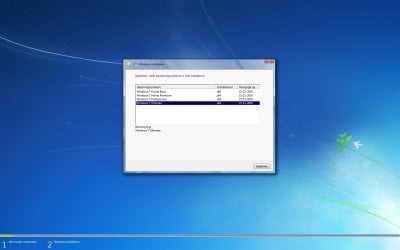
So what I get now when I start up the setup.exe I get these steps:
1. choose OS type (Home premium, Ultimate etc.)
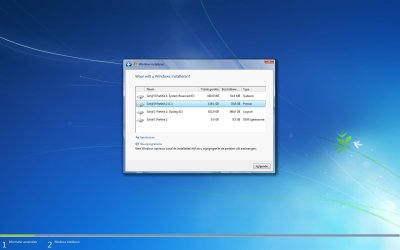
2. Where to install
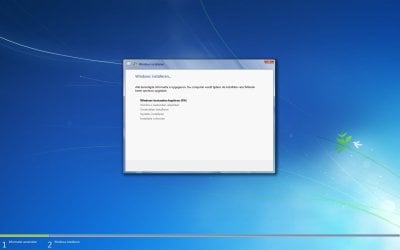
3. Goes straight to installing.

So I don't think I can get a repair install anymore or I'm misunderstanding you.
Can you please point out what to do? (If it's not too much work, like in steps)

Do I download the X64 Dutch version of your link and use the program on the second link to remove/ignore the ei.cfg file?

And did you mean Repair install from DVD?
I mean, do I boot of the DVD?
 
Last edited:

My Computer My Computer

At a glance

Windows 7 Ultimate x64AMD Phenom II 1090TCorsair Vengeance 8GB (2x4)Sapphire HD 7950 Boost
Computer type
PC/Desktop
OS
Windows 7 Ultimate x64
CPU
AMD Phenom II 1090T
Motherboard
MSI 890FXA-GD70
Memory
Corsair Vengeance 8GB (2x4)
Graphics Card(s)
Sapphire HD 7950 Boost
Monitor(s) Displays
Samsung SyncMaster 2032MW, BenQ 2420T
Screen Resolution
1680x1050, 1920x1080
Hard Drives
Crucial M4 128GB (SSD)
Samsung Spinpoint F1 1TB (HDD)
PSU
Coolermaster 520W
Case
Thermaltake Soprano
Cooling
Gelid Tranquillo Rev.2 (CPU)
Keyboard
Max Keyboard Nighthawk x8 (Cherry MX Brown)
Mouse
Logitech G9x
Internet Speed
30/3
Antivirus
Bitdefender
Browser
Pale Moon
Sorry I thought you had run a Repair Install before. It is run from the desktop choosing Upgrade install.

Do you want English version? If so use the English ISO by unlocking all versions in any other ISO of the desired bit version, burn to DVD and run Setup as Admin from desktop.
 
That's what I did last time actually, I DID run the Repair Install that you linked, but I can't do it again, because it skips the option to 'Upgrade'. It just doesn't show the steps shown in the tutorial like it did when I Repair Installed last time.

Win7 problem 1.jpg

Win7 problem 2.jpg

Win7 problem 3.jpg

So basically, I get 2 questions asked and it starts installing immediately.
 

My Computer My Computer

At a glance

Windows 7 Ultimate x64AMD Phenom II 1090TCorsair Vengeance 8GB (2x4)Sapphire HD 7950 Boost
Computer type
PC/Desktop
OS
Windows 7 Ultimate x64
CPU
AMD Phenom II 1090T
Motherboard
MSI 890FXA-GD70
Memory
Corsair Vengeance 8GB (2x4)
Graphics Card(s)
Sapphire HD 7950 Boost
Monitor(s) Displays
Samsung SyncMaster 2032MW, BenQ 2420T
Screen Resolution
1680x1050, 1920x1080
Hard Drives
Crucial M4 128GB (SSD)
Samsung Spinpoint F1 1TB (HDD)
PSU
Coolermaster 520W
Case
Thermaltake Soprano
Cooling
Gelid Tranquillo Rev.2 (CPU)
Keyboard
Max Keyboard Nighthawk x8 (Cherry MX Brown)
Mouse
Logitech G9x
Internet Speed
30/3
Antivirus
Bitdefender
Browser
Pale Moon
Hi there
Goede morgen

What version of Windows are you running

If it's Ultimate or Enterprise you can install any language from the download site.

You then need to go into control panel ==> region and language ===> keyboards and languages ===>choose display language===> choose what one you want then ==> administrative settings copy settings click both boxes.

Dutch can be installed on an English based W7 install if the original W7 was English.

Home premium can't install LIP's unfortunately. I think Professional will allow you to install ONE language but you can't change it. Ultimate and Enterprise allow multiple languages.

Cheers
jimbo
 

My Computer My Computer

At a glance

Linux CENTOS 7 / various Windows OS'es and se...Intel i7 Intel i58GB, 16GBOn Motherboard
Computer type
PC/Desktop
Computer Manufacturer/Model Number
Custom built, several laptops HP/ASUS
OS
Linux CENTOS 7 / various Windows OS'es and servers
CPU
Intel i7 Intel i5
Memory
8GB, 16GB
Graphics Card(s)
On Motherboard
Sound Card
Realtek HD audio
Monitor(s) Displays
Apple Cinema display, Samsung LCD
Screen Resolution
1920 X 1080
Hard Drives
4 X 1TB SATA
Mouse
Toshiba wireless laser
Internet Speed
> 20MB up
Hello and goede morgen!

I'm running Ultimate x64 and I have always been using that one + I'm 100% sure I installed it like that.
The problem is: I cannot install the LP because it gives me this message telling me I can't install it but it gives me no reason as of why not.
I did what you suggested but nothing changed because I don't have a normally installed Dutch LP on this computer.
It's still 50/50ish English - Dutch. (It wasn't able to install before I tried to manually install it either)

I also really wouldn't mind if I could force a Repair Install by choosing the 'Upgrade' option but I have no idea if I could get that into my setup somehow. (as you can see, it is left out in my current setups in the pictures on my previous post)
 

My Computer My Computer

At a glance

Windows 7 Ultimate x64AMD Phenom II 1090TCorsair Vengeance 8GB (2x4)Sapphire HD 7950 Boost
Computer type
PC/Desktop
OS
Windows 7 Ultimate x64
CPU
AMD Phenom II 1090T
Motherboard
MSI 890FXA-GD70
Memory
Corsair Vengeance 8GB (2x4)
Graphics Card(s)
Sapphire HD 7950 Boost
Monitor(s) Displays
Samsung SyncMaster 2032MW, BenQ 2420T
Screen Resolution
1680x1050, 1920x1080
Hard Drives
Crucial M4 128GB (SSD)
Samsung Spinpoint F1 1TB (HDD)
PSU
Coolermaster 520W
Case
Thermaltake Soprano
Cooling
Gelid Tranquillo Rev.2 (CPU)
Keyboard
Max Keyboard Nighthawk x8 (Cherry MX Brown)
Mouse
Logitech G9x
Internet Speed
30/3
Antivirus
Bitdefender
Browser
Pale Moon
Your screenshots show that your computer has a 9.5 GB recovery (OEM) partition. Just use your PC specific tools to do a complete factory recovery. Consult your manual or manufacturer's website to learn how.

Kari
 

My Computer My Computer

At a glance

Windows 10 Pro x64 EN-GB1.6 GHz Intel Core i7-720QM Processor6 GBATI Mobility Radeon HD 5850 Graphics
Computer type
Laptop
Computer Manufacturer/Model Number
HP ENVY 17-1150eg
OS
Windows 10 Pro x64 EN-GB
CPU
1.6 GHz Intel Core i7-720QM Processor
Memory
6 GB
Graphics Card(s)
ATI Mobility Radeon HD 5850 Graphics
Sound Card
Beats sound system with integrated subwoofer
Monitor(s) Displays
17" laptop display, 22" LED and 32" Full HD TV through HDMI
Screen Resolution
1600*900 (1), 1920*1080 (2&3)
Hard Drives
Internal: 2 x 500 GB SATA Hard Disk Drive 7200 rpm
External: 2TB for backups, 3TB USB3 network drive for media
Cooling
As Envy runs a bit warm, I have it on a Cooler Master pad
Keyboard
Logitech diNovo Media Desktop Laser (bluetooth)
Mouse
Logitech Performance Mouse MX
Internet Speed
50/10 Mbps VDSL
Antivirus
Windows Defender 4.3.9431.0
Browser
Maxthon 3.5.2., IE11
Hi there
Good suggestion from Kari

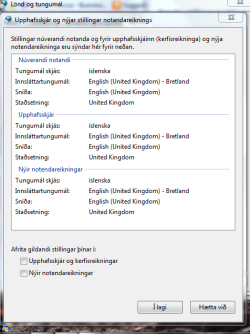
BTW Ultimate should work like this
I'm using English (UK) W7 x-64 Ultimate with Icelandic LP installed

screenshot


Cheers
jimbo
 

Attachments

  • lang.png
    lang.png
    24.9 KB · Views: 52

My Computer My Computer

At a glance

Linux CENTOS 7 / various Windows OS'es and se...Intel i7 Intel i58GB, 16GBOn Motherboard
Computer type
PC/Desktop
Computer Manufacturer/Model Number
Custom built, several laptops HP/ASUS
OS
Linux CENTOS 7 / various Windows OS'es and servers
CPU
Intel i7 Intel i5
Memory
8GB, 16GB
Graphics Card(s)
On Motherboard
Sound Card
Realtek HD audio
Monitor(s) Displays
Apple Cinema display, Samsung LCD
Screen Resolution
1920 X 1080
Hard Drives
4 X 1TB SATA
Mouse
Toshiba wireless laser
Internet Speed
> 20MB up
Your screenshots show that your computer has a 9.5 GB recovery (OEM) partition. Just use your PC specific tools to do a complete factory recovery. Consult your manual or manufacturer's website to learn how.

Kari

Hi Kari

Two little problems:
1) Recovery Partition is on Disk1, not on Disk0.
2) System Reserved has a letter E:, Should not have a letter.

Hi 3viljimmy

   Information
We always assume you have made your Recovery Disks using the OEM manufacturer's Recovery Media Creator app the first day you had your new PC.
& made the Startup Repair CD.
startup repair disc-create


Did you make the OEM manufacturer's Recovery Disks?
 

My Computer My Computer

At a glance

ME/XP/Vista/Win7
OS
ME/XP/Vista/Win7
Your screenshots show that your computer has a 9.5 GB recovery (OEM) partition. Just use your PC specific tools to do a complete factory recovery. Consult your manual or manufacturer's website to learn how.

Kari

I do believe this is from right before I did my first Repair Install, would this get me back to right before it and make me able to use my new ISO file?

I'll have a look at it nonetheless.

Hi 3viljimmy

   Information
We always assume you have made your Recovery Disks using the OEM manufacturer's Recovery Media Creator app the first day you had your new PC.
& made the Startup Repair CD.
startup repair disc-create


Did you make the OEM manufacturer's Recovery Disks?

No, we have not, and I must've missed that message.. my bad..
We do still have the same ISO file but it wasn't running SP1.

Oh and I've always had a D: drive, is that still a problem?
 

My Computer My Computer

At a glance

Windows 7 Ultimate x64AMD Phenom II 1090TCorsair Vengeance 8GB (2x4)Sapphire HD 7950 Boost
Computer type
PC/Desktop
OS
Windows 7 Ultimate x64
CPU
AMD Phenom II 1090T
Motherboard
MSI 890FXA-GD70
Memory
Corsair Vengeance 8GB (2x4)
Graphics Card(s)
Sapphire HD 7950 Boost
Monitor(s) Displays
Samsung SyncMaster 2032MW, BenQ 2420T
Screen Resolution
1680x1050, 1920x1080
Hard Drives
Crucial M4 128GB (SSD)
Samsung Spinpoint F1 1TB (HDD)
PSU
Coolermaster 520W
Case
Thermaltake Soprano
Cooling
Gelid Tranquillo Rev.2 (CPU)
Keyboard
Max Keyboard Nighthawk x8 (Cherry MX Brown)
Mouse
Logitech G9x
Internet Speed
30/3
Antivirus
Bitdefender
Browser
Pale Moon
Alright, getting pretty close here.
We've copied almost every Dutch LP file into my own Windows and almost everything is in Dutch now, but some things can't be changed it seems.
When we create a new user account, there seems to be more in Dutch than on my own account for some reason.
(both accounts have Dutch selected as language however)
So can anyone tell me where to change account options in the Registry?
I might be able to copy the settings from the account that has more in Dutch.

For example, when I click the start menu orb there's this tab called: Devices and Printers.
When I got on the other user account which I just made it's called: Apparaten en Printers.

I suspect this to be changeable in the Registry.
 

My Computer My Computer

At a glance

Windows 7 Ultimate x64AMD Phenom II 1090TCorsair Vengeance 8GB (2x4)Sapphire HD 7950 Boost
Computer type
PC/Desktop
OS
Windows 7 Ultimate x64
CPU
AMD Phenom II 1090T
Motherboard
MSI 890FXA-GD70
Memory
Corsair Vengeance 8GB (2x4)
Graphics Card(s)
Sapphire HD 7950 Boost
Monitor(s) Displays
Samsung SyncMaster 2032MW, BenQ 2420T
Screen Resolution
1680x1050, 1920x1080
Hard Drives
Crucial M4 128GB (SSD)
Samsung Spinpoint F1 1TB (HDD)
PSU
Coolermaster 520W
Case
Thermaltake Soprano
Cooling
Gelid Tranquillo Rev.2 (CPU)
Keyboard
Max Keyboard Nighthawk x8 (Cherry MX Brown)
Mouse
Logitech G9x
Internet Speed
30/3
Antivirus
Bitdefender
Browser
Pale Moon
I would not mess with the Registry unless you find a known fix for that.

Since new accounts are working correctly you can transfer your files over to a new account and then when it's set up as you wish delete the problem account.

You'll need to have at least one Administrative account.
 
Alright then, if anyone knows, please share with me.

If not, does anyone know how to transfer account settings?
 

My Computer My Computer

At a glance

Windows 7 Ultimate x64AMD Phenom II 1090TCorsair Vengeance 8GB (2x4)Sapphire HD 7950 Boost
Computer type
PC/Desktop
OS
Windows 7 Ultimate x64
CPU
AMD Phenom II 1090T
Motherboard
MSI 890FXA-GD70
Memory
Corsair Vengeance 8GB (2x4)
Graphics Card(s)
Sapphire HD 7950 Boost
Monitor(s) Displays
Samsung SyncMaster 2032MW, BenQ 2420T
Screen Resolution
1680x1050, 1920x1080
Hard Drives
Crucial M4 128GB (SSD)
Samsung Spinpoint F1 1TB (HDD)
PSU
Coolermaster 520W
Case
Thermaltake Soprano
Cooling
Gelid Tranquillo Rev.2 (CPU)
Keyboard
Max Keyboard Nighthawk x8 (Cherry MX Brown)
Mouse
Logitech G9x
Internet Speed
30/3
Antivirus
Bitdefender
Browser
Pale Moon
I don't recommend transferring account settings as they can be a corruption path. Better to start over with new ones.

Favorites/Bookmarks can be exported to an HTML file using the browser Export function, then reimported back in. IE9 Favorites are also populated in your Favorites User folder.

However if you want to try anyway, you can simply copy over hidden AppData file contents under your User name. You must unhide them first in Control panel>Folder Options.

There is also Windows Easy Transfer Wizard available by typing its name in Start Search box but is hardly worth the trouble.
 
Wow!
When I was trying to copy my old account to my new account, I logged out for a sec to check an option and I noticed it had magically changed while editing my newer account, the only thing I see in English now is: Starting Windows, Logging on/off (which I don't see anymore because I'm using only 1 account now) and the Welcome message.
If only I could change those to Dutch..
I'm very happy however because I had to change and re-do so much stuff..

So, unless someone knows how to fix those last few English remains I guess I could mark as resolved.
So I'll leave this open for a few days.
 

My Computer My Computer

At a glance

Windows 7 Ultimate x64AMD Phenom II 1090TCorsair Vengeance 8GB (2x4)Sapphire HD 7950 Boost
Computer type
PC/Desktop
OS
Windows 7 Ultimate x64
CPU
AMD Phenom II 1090T
Motherboard
MSI 890FXA-GD70
Memory
Corsair Vengeance 8GB (2x4)
Graphics Card(s)
Sapphire HD 7950 Boost
Monitor(s) Displays
Samsung SyncMaster 2032MW, BenQ 2420T
Screen Resolution
1680x1050, 1920x1080
Hard Drives
Crucial M4 128GB (SSD)
Samsung Spinpoint F1 1TB (HDD)
PSU
Coolermaster 520W
Case
Thermaltake Soprano
Cooling
Gelid Tranquillo Rev.2 (CPU)
Keyboard
Max Keyboard Nighthawk x8 (Cherry MX Brown)
Mouse
Logitech G9x
Internet Speed
30/3
Antivirus
Bitdefender
Browser
Pale Moon
Hi there
I think the Logon screen and welcome message is available from the Region and Language settings
Choose Administrative
Copy settings

then you should see 2 boxes -- copy to welcome screen and the other one (I'm not on my own machine now so I can't remember)

Check both those boxes and you'll find you should get your new logon screen etc in Dutch (or whatever)

Cheers
jimbo
 

My Computer My Computer

At a glance

Linux CENTOS 7 / various Windows OS'es and se...Intel i7 Intel i58GB, 16GBOn Motherboard
Computer type
PC/Desktop
Computer Manufacturer/Model Number
Custom built, several laptops HP/ASUS
OS
Linux CENTOS 7 / various Windows OS'es and servers
CPU
Intel i7 Intel i5
Memory
8GB, 16GB
Graphics Card(s)
On Motherboard
Sound Card
Realtek HD audio
Monitor(s) Displays
Apple Cinema display, Samsung LCD
Screen Resolution
1920 X 1080
Hard Drives
4 X 1TB SATA
Mouse
Toshiba wireless laser
Internet Speed
> 20MB up
Hey,

It doesn't work but I don't come across the log-in screen anyway since I have only 1 account.
 

My Computer My Computer

At a glance

Windows 7 Ultimate x64AMD Phenom II 1090TCorsair Vengeance 8GB (2x4)Sapphire HD 7950 Boost
Computer type
PC/Desktop
OS
Windows 7 Ultimate x64
CPU
AMD Phenom II 1090T
Motherboard
MSI 890FXA-GD70
Memory
Corsair Vengeance 8GB (2x4)
Graphics Card(s)
Sapphire HD 7950 Boost
Monitor(s) Displays
Samsung SyncMaster 2032MW, BenQ 2420T
Screen Resolution
1680x1050, 1920x1080
Hard Drives
Crucial M4 128GB (SSD)
Samsung Spinpoint F1 1TB (HDD)
PSU
Coolermaster 520W
Case
Thermaltake Soprano
Cooling
Gelid Tranquillo Rev.2 (CPU)
Keyboard
Max Keyboard Nighthawk x8 (Cherry MX Brown)
Mouse
Logitech G9x
Internet Speed
30/3
Antivirus
Bitdefender
Browser
Pale Moon
Back
Top