MBR - Restore Windows 7 Master Boot Record

How to Restore the Windows 7 MBR (Master Boot Record)

   Information
If you have been dual booting with Linux, then you probably know one of the Linux boot managers like Grub or LILO has been installed in the MBR of your hard drive. What can you do when you no longer want Linux on that hard drive? This tutorial will show you how to use your 7 DVD and BOOTSECT.EXE to restore the "bootsector code" of the MBR and allow you to begin booting to Windows 7 again.
   Tip
You can use this method to update the bootsector code for Windows 7, Vista, XP, 2000 or switch between Bootmgr and NTLDR. Just check the Microsoft TechNet site for the correct command.


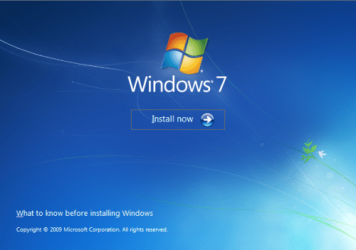
Here's How:1. Boot your computer to the Windows 7 DVD (or to a "Repair CD"). At this screen choose to install now.
25672d1251414873-mbr-restore-windows-7-master-boot-record-mbr_02.png


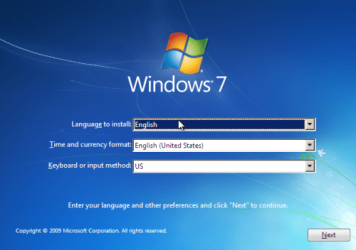
2. Select your language and click next.
25673d1251414836-mbr-restore-windows-7-master-boot-record-mbr_03.png


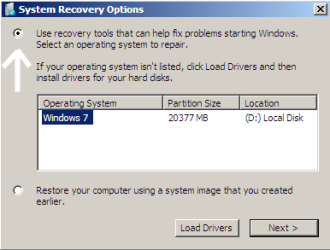
3. Click the button for "Use recovery tools".
25674d1251414836-mbr-restore-windows-7-master-boot-record-mbr_04.png


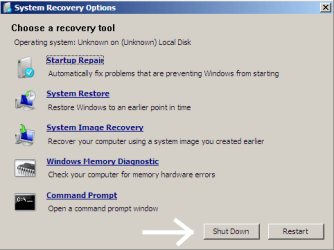
4. Then select "Command Prompt".
25675d1251414836-mbr-restore-windows-7-master-boot-record-mbr_05.png


5. When open, the command prompt will look like this:
53598d1251414836-mbr-restore-windows-7-master-boot-record-mbr_16.png


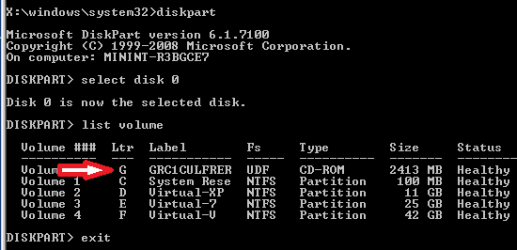
6. The command we will use, bootsect.exe, is in a folder (named boot) on the DVD.We need to know what drive letter has been assigned the DVD drive to access the folder.

Code:
Type: [B]diskpart[/B]
and press [B]Enter[/B]
 
Type: [B]select disk 0[/B] (zero)
and press [B]Enter[/B]
 
type: [B]list volume[/B]
and press [B]Enter[/B]
In this screen shot, the 7 DVD is letter: G
53599d1251414836-mbr-restore-windows-7-master-boot-record-mbr_17a.png


7. Use your DVD drive letter and

Code:
Type: [B]exit[/B]
and press [B]Enter[/B]
 
to close Diskpart
 
Type: [B]G:[/B] (use the letter of your DVD drive)
and press [B]Enter[/B]
 
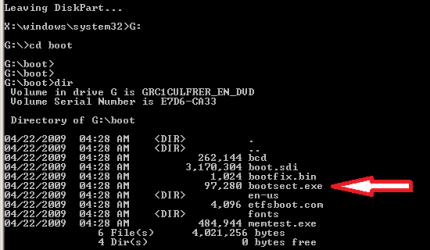
Type: [B]cd boot[/B]
and press [B]Enter[/B]
 
Type: [B]dir[/B]
and press [B]Enter[/B]
to verify that bootcect.exe is there (if you really need to)
53600d1251414836-mbr-restore-windows-7-master-boot-record-mbr_18a.png


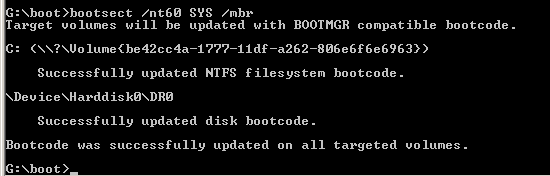
8. To restore the "bootsector code":

Code:
TYPE: [B]bootsect /nt60 SYS /mbr[/B]
and press [B]Enter[/B]
53601d1251414836-mbr-restore-windows-7-master-boot-record-mbr_19.png


NOTE: If this method fails to restore the MBR, you can try the bootrec command as it is also a tool for repairing the MBR.


9. When completed successfully,

Code:
Type: [B]exit[/B]
and press [B]Enter[/B]
This will close the command prompt window.

10. Now select Shut Down or Restart
25680d1251414836-mbr-restore-windows-7-master-boot-record-mbr_10.png


11. Then you can reboot your computer into Windows.
25681d1251414836-mbr-restore-windows-7-master-boot-record-mbr_12.png


Attachments

  • mbr_02.png
    mbr_02.png
    53.7 KB · Views: 1,640,315
  • mbr_03.png
    mbr_03.png
    54.3 KB · Views: 1,635,478
  • mbr_04.png
    mbr_04.png
    6.9 KB · Views: 1,633,763
  • mbr_05.png
    mbr_05.png
    10.5 KB · Views: 1,579,666
  • mbr_10.png
    mbr_10.png
    10.4 KB · Views: 1,576,678
  • mbr_12.png
    mbr_12.png
    5.3 KB · Views: 1,552,307
  • mbr_16.png
    mbr_16.png
    3.3 KB · Views: 1,554,623
  • mbr_17a.png
    mbr_17a.png
    3.8 KB · Views: 1,565,873
  • mbr_18a.png
    mbr_18a.png
    3.7 KB · Views: 1,620,585
  • mbr_19.png
    mbr_19.png
    2.4 KB · Views: 1,569,958
Last edited by a moderator:
Thanks MM!

I do not know why my "Install Now" screen shot does not have the "Repair Your Computer" option while the one you posted does. I do know when you click on the "Install Now" button, the "installer" checks your computer for any Windows OS already installed and will offer to repair a damaged OS before proceeding to install a new OS to an existing system. So I believe selecting either option will deliver you to the same screen with the options to repair the computer? I will look into it.

Cheers!
Robert
 

My Computer

OS
...
remove xp from dual boot with win 7.

Hello!!
I have triple boot of windows xp sp2, windows xp sp3 and windows 7. Now i want to leave windows xps since i don't use them. should use this method(mentioned abovehere) to remove xp. I first install xp sp3 then xp sp2 and after that install win 7.
 

My Computer

OS
windows 7 ultimate 32 bit
Hello!!
I have triple boot of windows xp sp2, windows xp sp3 and windows 7. Now i want to leave windows xps since i don't use them. should use this method(mentioned abovehere) to remove xp. I first install xp sp3 then xp sp2 and after that install win 7.
Hello vkash, and welcome to Windows Seven Forums!

No. When you remove the "XPs", you will still have in place the "Windows Boot Loader" and so will not need to restore the "boot code" in the MBR. Most likely, as you say XP3 was installed first, Windows Seven put its boot files in the XP3 partition. So when you remove XP3, you will also remove the Windows Seven boot files. One way to correct this is after removing the "XPs", do a "Startup Repair" (you may need to do the repair more than once to fix everything). This will reinstall your Windows Seven boot files into your Windows Seven partition (assuming there is only this partition left) and allow booting into your Windows Seven again.

http://www.sevenforums.com/tutorials/681-startup-repair.html

You have other options as well and if you with to discuss them I suggest you make a new thread for your questions. We are happy to help out as best as we can!

Cheers!
Robert
 

My Computer

OS
...
Oh THANK YOU! This MBR restore saved my butt and who knows how many hours! Thank you! It worked perfectly. Now if I can just discover how to get rid of the darn "reriredt host" virus!

~ John:D
 

My Computer

Computer Manufacturer/Model Number
Asus
OS
Win 7
CPU
Intel
Motherboard
ASUS
Memory
4GB
Graphics Card(s)
ARI Radion
Sound Card
Intergrated Digital hi-def
Monitor(s) Displays
Samsun 245BW
Hard Drives
Various WD 2TB ans 1 TB and Maxtor 500 and 300 GB
Case
OEM
Cooling
5 fans
Oh THANK YOU! This MBR restore saved my butt and who knows how many hours! Thank you! It worked perfectly. Now if I can just discover how to get rid of the darn "reriredt host" virus!

~ John:D
Hello lo7us, and welcome to Windows Seven Forums!

Thanks for letting us know you found a solution here! We are always glad to help others like we were helped ourselves.

You can always start a new thread if you want help with your "virus"?

Cheers!
Robert
 

My Computer

OS
...
Quick, easy and effective.
Thank you.
 

My Computer

Computer Manufacturer/Model Number
Home Build
OS
Windows 7 Home Premium 64bit.
CPU
Phenom II 565
Motherboard
AMD M5A97
Memory
8GB Kingston HyperX DDR3 1600 MHz
Graphics Card(s)
XFX Ratheon 4750
Monitor(s) Displays
Scantron
Hard Drives
500GB SATA3 Seagate Baracuda
External 40 GB PATA Seagate
PSU
Logisys 480W
This guide worked (with some difficulties). I had to do all steps 4 times because the 1st time an error ocurred, the 2nd time the line ">bootsect/nt60 sys /mbr" did not worked well, the 3rd time I used ">bootsect/nt60 all" did not work well either, it was til the 4th time I used both lines windows started normally.

Thank you :)
 

My Computer

OS
Windows 7 Ultimate x64
CPU
Intel Core 2 Quad Q8200 @2.3GHz
Motherboard
Gigabite P43
Memory
8GB DDR2
Graphics Card(s)
Nvidia 9500 GT 512MB
Sound Card
Realtek HD auido
Monitor(s) Displays
Samsumg 19"
Hard Drives
500GB HDD Sata
DVD-Room
PSU
500W
Case
Vorago ATX Black
Cooling
Cooler Master
glad to see you got your problem resolved.
 

My Computer

Computer Manufacturer/Model Number
Systemax N2000 Gaming PC
OS
Windows 7 Ultimate x64
CPU
Q6600 @2.4ghz (G0 stepping)
Motherboard
XFX nforce 680i LT
Memory
8 gb OCZ vista essential sli PC-6400
Graphics Card(s)
Dual 9800gt in SLI mode
Sound Card
Integrated 8.1 High Definition Audio
Monitor(s) Displays
Dual Sceptre x246w 24 inch monitors
Screen Resolution
1920 x 1200 each monitor
Hard Drives
500 GB SATA II / 7500 rpm
PSU
Cooler Master Real Power Pro 1250W
Case
N2000 server tower
Cooling
Thermaltake Bigwater 760 is
Keyboard
MS Intelitype 6000 v2.0
Mouse
MS Intelipoint 6000
Internet Speed
Wi-power 1.5GB up / 512k down
Other Info
Windows 7 Ultimate x64, Windows 7 Pro x64, Windows Home Premium X86, Windows XP pro, Windows Home Server x86, Ubuntu 10.4 x86 and x64, Ubuntu server 10.4, SQL Server 2005, MySQL 5.0
This guide worked (with some difficulties). I had to do all steps 4 times because the 1st time an error ocurred, the 2nd time the line ">bootsect/nt60 sys /mbr" did not worked well, the 3rd time I used ">bootsect/nt60 all" did not work well either, it was til the 4th time I used both lines windows started normally.

Thank you :)
Thanks for letting us know your experience, Sladex. Welcome to Windows Seven Forums!
 

My Computer

OS
...
omg thank you

oh my f$$king god you saved me.your tutorial was so simple to follow as well.after searching thruogh about a precise estimate of 64 searches and methods on finding my problom .you did it thank you.
 

My Computer

OS
windows 7 premuin 64 bit
Memory
3gb
oh my f$$king god you saved me.your tutorial was so simple to follow as well.after searching thruogh about a precise estimate of 64 searches and methods on finding my problom .you did it thank you.
p1ocx, you are most welcome. Glad it worked for you! Thanks for letting us know, and welcome to Windows Seven Forums!

Cheers!
Robert
 

My Computer

OS
...
Boot folder is missing from OS drive

Hi, this thread has been very helpful so far, but I haven't fixed my problem yet.

I just installed windows 7 on an ssd the other day, and for some reason, the BOOT folder decided to go onto my internal, data HDD. I tried to boot up without the data HDD, and it won't work.

I've tried system restore, bootrec /fixmbr, bootrec /fixboot, and I've also tried this tutorial, including bootsect /nt60 all /mbr. None of these are able to reinstate the BOOT folder to my ssd.

Would it work if I moved the BOOT folder from the HDD to the SSD, or is there a better way?

Thanks,
James
 

My Computer

OS
windows 7 ultimate x64
Hi, this thread has been very helpful so far, but I haven't fixed my problem yet.

I just installed windows 7 on an ssd the other day, and for some reason, the BOOT folder decided to go onto my internal, data HDD. I tried to boot up without the data HDD, and it won't work.

I've tried system restore, bootrec /fixmbr, bootrec /fixboot, and I've also tried this tutorial, including bootsect /nt60 all /mbr. None of these are able to reinstate the BOOT folder to my ssd.

Would it work if I moved the BOOT folder from the HDD to the SSD, or is there a better way?

Thanks,
James
Hello James, and welcome to Windows Seven Forums.

The simplest solution, in my opinion, would be to install Windows Seven onto the SSD with the Data Drive disconnected. Then after you are able to successfully boot, reconnect the Data Drive.

Here are some SSD tutorials you might find helpful?

http://www.sevenforums.com/tutorials/149969-ssd-install-transfer-operating-system.html
http://www.sevenforums.com/tutorials/113967-ssd-alignment.html
http://www.sevenforums.com/tutorials/70822-ssd-tweaks-optimizations-windows-7-a.html
http://www.sevenforums.com/tutorials/91339-ssd-hdd-optimize-windows-reinstallation.html

Cheers!
Robert
 

My Computer

OS
...
Thanks, worked a treat!

A (:
Welcome to Windows Seven Forums, adredwood!

Thanks for letting us know you found a solution here that worked for you!

Cheers!
Robert
 

My Computer

OS
...
Hello I had a Agent SDG.GEn Trojan virus in my master boots for every drive (even CDrom drives)
I used "bootsect /nt60 all" then "bootsect /nt52 all" to clear them
Just using "bootsect /nt60 all" left the virus still in sector 1, to clear sector 0 and sector 1, you had to use both the commands above. Make sure to repeat the commands until all drives come back as updated.
Also it may take like 15 minute or longer using the windows install cd to get the option to use the command prompt.
Thanks
Dr. G
 

My Computer

OS
Windows 7 Ultimate x64
Hi there :) Ok here is the thing .. I have this win32/agent.sdg.gen trojan in MBR sector of the 0.physical disk
So i tried the above poster's commands .. but it still exists in the MBR sector .
So im asking : how i can erase whole MBR sectors (if possible) i mean i want to clean that MBR and than rebuild it from w7 install disk .i just need the commands and it might work
Thx in advance
 

My Computer

OS
windows 7 ultimate x64
CPU
Q9400 oced @ 3.2 ghz
Motherboard
Gigabyte GA-EP45-UD3
Memory
Corsair Dominator CM2X2048-8500C5D 4gb
Graphics Card(s)
Zotac GeForce 9800 GTX+
Sound Card
Realtek integrated
Monitor(s) Displays
Lg W2261vp
Hard Drives
Hitachi HDT725025VLA380 (232 GB)
Seagate ST3500410AS (465 GB)
PSU
Chieftec 550 w
Cooling
Nexus FLC-300
I also had it in sector 0 and sector 1,
But when I did the command it stayed in sector 1, so I tried ALL of following commands (Multiple times each) because sometimes they fail to write to a drive. Then it worked
bootsect /nt60 all
bootsect /nt52 all
bootsect /nt60 SYS /mbr
bootsect /nt52 SYS /mbr
bootsect /nt60 SYS G:
bootsect /nt52 SYS G:
As for the last one go through all your drive letters, I just put G: as an example
Also try selecting a select disk 0 then repeat the above all command
Check if each drive was updated by reading the results
Hope that helps
 

My Computer

OS
Windows 7 Ultimate x64
Just had the 'opportunity' to use this tutorial. Thanks by the way. Great job.

My experience with was:

Got to the section - bootsect /nt60 SYS /mbr - It did nothing except show me how to get to the help section of bootsect which was - bootsect /help.

Looking through there I noticed it mentioned using the actual drive letter which can be seen in the screen when you are identifying your cd-rom.

So instead of - bootsect /nt60 SYS /mbr - I used - bootsect /nt60 F: /mbr - & a problem solved.

Thanks again.
 

My Computer

Computer Manufacturer/Model Number
Custom
OS
Windows 7 Pro x64 -- PCLinuxOS KDE4 FullMonty 2011
CPU
i7-875k @ Turbo - 7,6,5,5 - 3.6ghz
Motherboard
Asus P7P55D-E Deluxe
Memory
Corsair CMD8GX3M4A1600C8 8gb
Graphics Card(s)
Asus EAH5850 DirectCU/2DIS/1GD5
Sound Card
On Board
Monitor(s) Displays
Samsung SyncMaster T220 - Panasonic VT30a 50"
Screen Resolution
1680x1050 -
Hard Drives
Corsair Force 3 SSD 120GB x 2 ::
WD VelociRaptor 150GB WD1500HLFS x 2
PSU
Corsair HX-850 Power Supply
Case
Coolmaster HAF 932
Cooling
Corsair H50
Keyboard
Logitech Wireless MK700
Mouse
Logitech Wireless MX620
Internet Speed
Good enough for now
Other Info
Voip. Insanely cheap phone calls.
Back
Top