MBR - Restore Windows 7 Master Boot Record

How to Restore the Windows 7 MBR (Master Boot Record)

   Information
If you have been dual booting with Linux, then you probably know one of the Linux boot managers like Grub or LILO has been installed in the MBR of your hard drive. What can you do when you no longer want Linux on that hard drive? This tutorial will show you how to use your 7 DVD and BOOTSECT.EXE to restore the "bootsector code" of the MBR and allow you to begin booting to Windows 7 again.
   Tip
You can use this method to update the bootsector code for Windows 7, Vista, XP, 2000 or switch between Bootmgr and NTLDR. Just check the Microsoft TechNet site for the correct command.


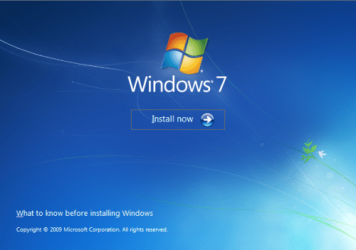
Here's How:1. Boot your computer to the Windows 7 DVD (or to a "Repair CD"). At this screen choose to install now.
25672d1251414873-mbr-restore-windows-7-master-boot-record-mbr_02.png


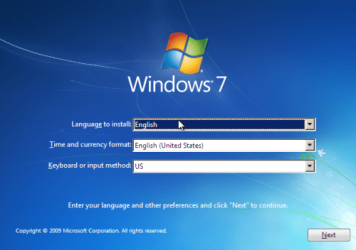
2. Select your language and click next.
25673d1251414836-mbr-restore-windows-7-master-boot-record-mbr_03.png


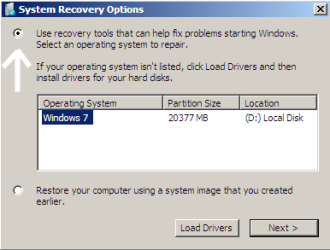
3. Click the button for "Use recovery tools".
25674d1251414836-mbr-restore-windows-7-master-boot-record-mbr_04.png


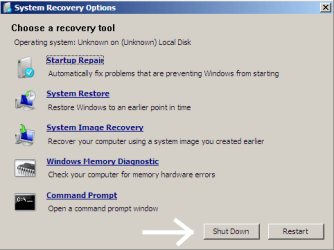
4. Then select "Command Prompt".
25675d1251414836-mbr-restore-windows-7-master-boot-record-mbr_05.png


5. When open, the command prompt will look like this:
53598d1251414836-mbr-restore-windows-7-master-boot-record-mbr_16.png


6. The command we will use, bootsect.exe, is in a folder (named boot) on the DVD.We need to know what drive letter has been assigned the DVD drive to access the folder.

Code:
Type: [B]diskpart[/B]
and press [B]Enter[/B]
 
Type: [B]select disk 0[/B] (zero)
and press [B]Enter[/B]
 
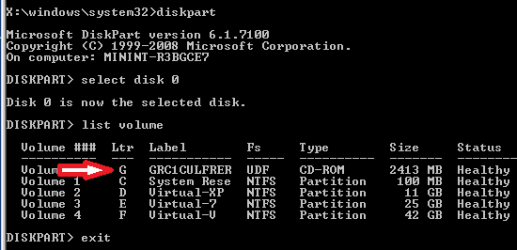
type: [B]list volume[/B]
and press [B]Enter[/B]
In this screen shot, the 7 DVD is letter: G
53599d1251414836-mbr-restore-windows-7-master-boot-record-mbr_17a.png


7. Use your DVD drive letter and

Code:
Type: [B]exit[/B]
and press [B]Enter[/B]
 
to close Diskpart
 
Type: [B]G:[/B] (use the letter of your DVD drive)
and press [B]Enter[/B]
 
Type: [B]cd boot[/B]
and press [B]Enter[/B]
 
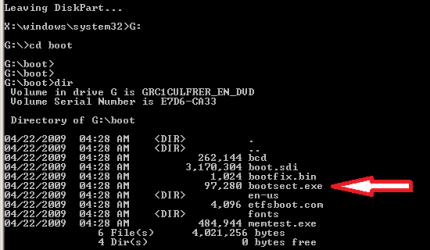
Type: [B]dir[/B]
and press [B]Enter[/B]
to verify that bootcect.exe is there (if you really need to)
53600d1251414836-mbr-restore-windows-7-master-boot-record-mbr_18a.png


8. To restore the "bootsector code":

Code:
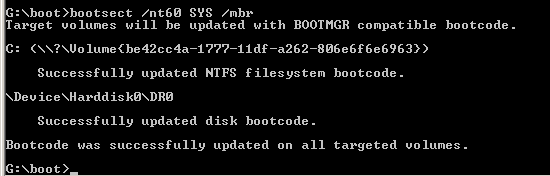
TYPE: [B]bootsect /nt60 SYS /mbr[/B]
and press [B]Enter[/B]
53601d1251414836-mbr-restore-windows-7-master-boot-record-mbr_19.png


NOTE: If this method fails to restore the MBR, you can try the bootrec command as it is also a tool for repairing the MBR.


9. When completed successfully,

Code:
Type: [B]exit[/B]
and press [B]Enter[/B]
This will close the command prompt window.

10. Now select Shut Down or Restart
25680d1251414836-mbr-restore-windows-7-master-boot-record-mbr_10.png


11. Then you can reboot your computer into Windows.
25681d1251414836-mbr-restore-windows-7-master-boot-record-mbr_12.png


Attachments

  • mbr_02.png
    mbr_02.png
    220.2 KB · Views: 1,640,315
  • mbr_03.png
    mbr_03.png
    212.8 KB · Views: 1,635,478
  • mbr_04.png
    mbr_04.png
    13.3 KB · Views: 1,633,763
  • mbr_05.png
    mbr_05.png
    25.7 KB · Views: 1,579,666
  • mbr_10.png
    mbr_10.png
    25 KB · Views: 1,576,678
  • mbr_12.png
    mbr_12.png
    18.2 KB · Views: 1,552,307
  • mbr_16.png
    mbr_16.png
    6.1 KB · Views: 1,554,623
  • mbr_17a.png
    mbr_17a.png
    13.4 KB · Views: 1,565,873
  • mbr_18a.png
    mbr_18a.png
    14.7 KB · Views: 1,620,585
  • mbr_19.png
    mbr_19.png
    5.3 KB · Views: 1,569,958
Last edited by a moderator:
That is probabaly because it couldn't identify the system partition.
 

My Computers

System One System Two

  • Computer type
    PC/Desktop
    OS
    7 X64
    CPU
    i5 8400
    Motherboard
    gigabyte b365m ds3h
    Memory
    2x8gb 3200mhz
    Hard Drives
    various
    PSU
    pure power 11 400w cm
    Case
    Coolermaster
    Cooling
    cryorig m9i
  • Computer type
    PC/Desktop
    OS
    7x64
    CPU
    g5400
    Motherboard
    ga b365m ds3h
    Memory
    8gb ddr4 2400
    PSU
    xfx pro 450w
Well, I Tried Your Process COmpletely and successfully.

Everything went well untill i pressed the shut down button. Because when i reboot my computer, i just see a "Underscore" flashing on my screen.

I am Very Much Depressed atm.
 

My Computer

OS
Windows 7 32 Bit
Not to Worry. I Fixed it.

After your process, i had to fix the MBR. thats all.

Thanks a Tonne for the work you are doing !
 

My Computer

OS
Windows 7 32 Bit
Just had the 'opportunity' to use this tutorial. Thanks by the way. Great job.

My experience with was:

Got to the section - bootsect /nt60 SYS /mbr - It did nothing except show me how to get to the help section of bootsect which was - bootsect /help.

Looking through there I noticed it mentioned using the actual drive letter which can be seen in the screen when you are identifying your cd-rom.

So instead of - bootsect /nt60 SYS /mbr - I used - bootsect /nt60 F: /mbr - & a problem solved.

Thanks again.
Thanks for letting us know! Glad you got your solution.

Cheers!
Robert
 

My Computer

OS
...
no active partition

hi
excecpt "recovery" & "system" i have 4 partition : C D G I
i delete I and after reboot
before boot loader i see this :
"Error No active partition "
"Operating System Not Found"
what do i do ?
 

My Computer

OS
Windows 7 pro 64bit
CPU
core i5
hi
excecpt "recovery" & "system" i have 4 partition : C D G I
i delete I and after reboot
before boot loader i see this :
"Error No active partition "
"Operating System Not Found"
what do i do ?
Hello robohamid, and welcome to Windows Seven Forums!

My first suggestion would be for you to try the "Startup Repair".
http://www.sevenforums.com/tutorials/681-startup-repair.html

The "Active Partition" holds the "Boot Code". When starting up, the computer looks for the partition "Marked" as "Active". If it can not find the partition with the "Active" mark, you will get that warning message.

If a startup repair cannot restore the "Active" mark to the correct partition, then you may need to download this software: Partition Wizard

Best Free Partition Manager Freeware for Windows 7, Windows Vista, and Windows XP 32 bit & 64 bit. MiniTool Free Partition Manager Software Home Edition.

and use the software to mark the correct partition active yourself. Please let us know if you need any assistance with this?

Cheers!
Robert
 

My Computer

OS
...
oh tAnk a lot
but i sHould mArk C as acTive ?
i have winDows on C.
I have no way of knowing which partition has the boot code from the small amount of information you have given.

I suspect what you posted as the "System" partition is the very small "System Reserved" partition that has the boot code and should be be the "Active" partition, but I can not see that from here. I would suggest you mark that partition "Active" as a test and see if the computer will boot correctly.

If it does not boot correctly, you can mark another partition ( like "C" ) active and test to see if that will allow the computer to boot correctly. If after testing all partitions you are still not able to boot correctly, then mark "C" active and do the "Startup Repair." The repair software should be able to write the boot code to the "C" partition and allow the computer to boot correctly.

Cheers!
Robert
 

My Computer

OS
...
my mean of "system" was that "System Reserved"
but i dont have any active partition.
and install Open Suse 12 after it i uSe from Suse boot loader to start my windows
with this condition,is it necessary to mark each partition as active ?
 

My Computer

OS
Windows 7 pro 64bit
CPU
core i5
my mean of "system" was that "System Reserved"
but i dont have any active partition.
and install Open Suse 12 after it i uSe from Suse boot loader to start my windows
with this condition,is it necessary to mark each partition as active ?
No. Only one partition can be "Active" at a time.

In simple language, "Boot Loader" software changes the "Active" partition when you select the Operating System you want to start. So when you select "Suse" from the boot menu, the software marks the "Suse" partition "Active" so the computer can boot to it. Then after, if you now want to start Windows, the "Boot Loader" software marks the Windows System partition active so the computer can boot to Windows.

If you have removed "Suse" and/or its "Boot Loader" and the "System Reserved" is not marked "Active", then as the warning message said: you do not have any "Active" partition to boot to. You must mark the "System Reserved" partition "Active" so Windows can boot.

When you select a different partition and mark it as "Active", then the first partition is no longer the active one. There can only be one "Active" partition on a hard drive.

Cheers!
Robert
 

My Computer

OS
...
MBR

Just found your website. A lifesaver, easyBCD really messed things up. Now realize that I don't need it to dual boot Win 7 and 8. Thanks again. Now going to check out the Windows 8 forum.
 

My Computer

Computer Manufacturer/Model Number
HP P6
OS
Windows 7 Professional 64bit
CPU
2.50 gigahertz Intel Pentium Dual-Core
Motherboard
ASUSTeK Computer INC. P5K Premium Rev 1.xx
Memory
8
Graphics Card(s)
NVIDIA GeForce GT 430 [Display adapter]
Monitor(s) Displays
HP 2211 [Monitor] (21.7"vis, s/n CNK134152S, August 2011)
Other Info
Also running Fedora 17
Just found your website. A lifesaver, easyBCD really messed things up. Now realize that I don't need it to dual boot Win 7 and 8. Thanks again. Now going to check out the Windows 8 forum.
Welcome to Windows Seven Forums! Glad you found some help here and for letting us know.

Cheers!
Robert
 

My Computer

OS
...
iseeuu you saved my sanity.. I have been banging my head against a "TPM measurement is missing" issue for AGES and I restored my bootloader following your instructions and bam it worked.

http://answers.microsoft.com/en-us/...-missing/56f04143-36f6-4345-8367-95642214af71

Either way it's working now so I suspect this was it.

I also forced a BIOS update but I had not received any update prompts (Gigabyte) and I updated only a month or so ago (when I built the PC) so I doubt that was the issue.

Although I DID select 'clear DMI data pool' at the same time, so maybe I can't be sure...
 

My Computer

OS
Australian Capital Territory
iseeuu you saved my sanity.. I have been banging my head against a "TPM measurement is missing" issue for AGES and I restored my bootloader following your instructions and bam it worked.

Win7 BitLocker - Required TPM Measurement is Missing - Microsoft Answers

Either way it's working now so I suspect this was it.

I also forced a BIOS update but I had not received any update prompts (Gigabyte) and I updated only a month or so ago (when I built the PC) so I doubt that was the issue.

Although I DID select 'clear DMI data pool' at the same time, so maybe I can't be sure...
Welcome to Windows seven Forums, canberraplanne!

Thanks for letting us know you found a fix here!

Cheers!
Robert
 

My Computer

OS
...
Iseeuu,


Just want to say a million thanks for this piece!!! It did save my skin. :thumbsup:
 

My Computer

OS
Windows 7 Ultimate x32
Back
Top