Windows will not recognise my backup image on external hard drive?

That is good. Hopefully the bootmgr is intact.

Now attach that VHD and rename it in My Computer. Pick an easy name like 'VHD for image'.
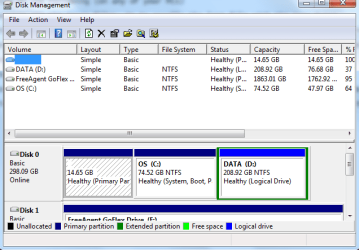
what exactly do you mean by "attatch" that image?
 

My Computer My Computer

At a glance

windows 7 home premium 64 bit
OS
windows 7 home premium 64 bit
See step 2 in my original instructions.

I suugest you copy my instructions into a Wordpad. Go to All Programs > Acessories and right click on Wordpad. Then pin it to the taskbar. That way you can open it from the taskbar and paste the indtructions into it. Then minimize the Wordpad. That way when you hover over it you can read the instructions.
 

My Computer My Computer

At a glance

Vista, Windows7, Mint Mate, Zorin, Windows 8from 1.6GHz Duo to i7
Computer Manufacturer/Model Number
HP, Dell, Gateway, Toshiba - 4 laptops and 2 desktops
OS
Vista, Windows7, Mint Mate, Zorin, Windows 8
CPU
from 1.6GHz Duo to i7
Monitor(s) Displays
2x HP w2207
Hard Drives
5x HDD, 7x SSD, 12x Externals
Keyboard
with trackball - no mices
Mouse
Trackball mice
Internet Speed
DSL 6000
See step 2 in my original instructions.

I suugest you copy my instructions into a Wordpad. Go to All Programs > Acessories and right click on Wordpad. Then pin it to the taskbar. That way you can open it from the taskbar and paste the indtructions into it. Then minimize the Wordpad. That way when you hover over it you can read the instructions.
ok which do i highlight before pressing attach?
 

Attachments

  • disk mang..png
    disk mang..png
    18.2 KB · Views: 32

My Computer My Computer

At a glance

windows 7 home premium 64 bit
OS
windows 7 home premium 64 bit
You do not highlight any. Go click on the Attach button - top left next to File and then navigate to your VHD. Double click on the VHD and it should should appear as a virtual drive in Disk Management and in My Computer.
 

My Computer My Computer

At a glance

Vista, Windows7, Mint Mate, Zorin, Windows 8from 1.6GHz Duo to i7
Computer Manufacturer/Model Number
HP, Dell, Gateway, Toshiba - 4 laptops and 2 desktops
OS
Vista, Windows7, Mint Mate, Zorin, Windows 8
CPU
from 1.6GHz Duo to i7
Monitor(s) Displays
2x HP w2207
Hard Drives
5x HDD, 7x SSD, 12x Externals
Keyboard
with trackball - no mices
Mouse
Trackball mice
Internet Speed
DSL 6000
You do not highlight any. Go click on the Attach button - top left next to File and then navigate to your VHD. Double click on the VHD and it should should appear as a virtual drive in Disk Management and in My Computer.
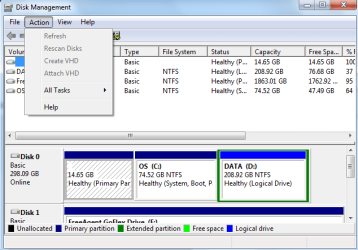
if i dont highlight a drive, then it stays greyed out
 

Attachments

  • greyed out.png
    greyed out.png
    17.6 KB · Views: 19

My Computer My Computer

At a glance

windows 7 home premium 64 bit
OS
windows 7 home premium 64 bit
Hmm, that is very strange. What is this All Tasks - I do not have that. Is the attach behind that.

BTW: I made a Video tutorial for you on how to deal with Macrium. It is currently uploading to YouTube. We'll use it later.
 

My Computer My Computer

At a glance

Vista, Windows7, Mint Mate, Zorin, Windows 8from 1.6GHz Duo to i7
Computer Manufacturer/Model Number
HP, Dell, Gateway, Toshiba - 4 laptops and 2 desktops
OS
Vista, Windows7, Mint Mate, Zorin, Windows 8
CPU
from 1.6GHz Duo to i7
Monitor(s) Displays
2x HP w2207
Hard Drives
5x HDD, 7x SSD, 12x Externals
Keyboard
with trackball - no mices
Mouse
Trackball mice
Internet Speed
DSL 6000
Hmm, that is very strange. What is this All Tasks - I do not have that. Is the attach behind that.

BTW: I made a Video tutorial for you on how to deal with Macrium. It is currently uploading to YouTube. We'll use it later.
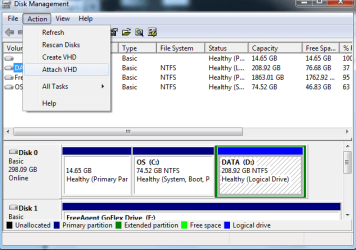
in All Tasks its just like delete volume, move volume, etc. But you can see that when I highlight a drive, the Attach option opens up.
 

Attachments

  • disk mang1.png
    disk mang1.png
    18 KB · Views: 16

My Computer My Computer

At a glance

windows 7 home premium 64 bit
OS
windows 7 home premium 64 bit
So try that. But use the drive where your VHD is stored. Just to make sure there will be no damage to the system drives.

I have never seen that type of Attach operation.
 

My Computer My Computer

At a glance

Vista, Windows7, Mint Mate, Zorin, Windows 8from 1.6GHz Duo to i7
Computer Manufacturer/Model Number
HP, Dell, Gateway, Toshiba - 4 laptops and 2 desktops
OS
Vista, Windows7, Mint Mate, Zorin, Windows 8
CPU
from 1.6GHz Duo to i7
Monitor(s) Displays
2x HP w2207
Hard Drives
5x HDD, 7x SSD, 12x Externals
Keyboard
with trackball - no mices
Mouse
Trackball mice
Internet Speed
DSL 6000
So try that. But use the drive where your VHD is stored. Just to make sure there will be no damage to the system drives.

I have never seen that type of Attach operation.
ok, well i copied my back up to the D drive hoping that would make windows recognize it. But the point is, I have the back up on external HDD and D drive. Which do I choose? Also I don't want to corrupt the back up because it's all I have.
 

My Computer My Computer

At a glance

windows 7 home premium 64 bit
OS
windows 7 home premium 64 bit
Use the copy.
 

My Computer My Computer

At a glance

Vista, Windows7, Mint Mate, Zorin, Windows 8from 1.6GHz Duo to i7
Computer Manufacturer/Model Number
HP, Dell, Gateway, Toshiba - 4 laptops and 2 desktops
OS
Vista, Windows7, Mint Mate, Zorin, Windows 8
CPU
from 1.6GHz Duo to i7
Monitor(s) Displays
2x HP w2207
Hard Drives
5x HDD, 7x SSD, 12x Externals
Keyboard
with trackball - no mices
Mouse
Trackball mice
Internet Speed
DSL 6000

Attachments

  • attached.png
    attached.png
    20.2 KB · Views: 18

My Computer My Computer

At a glance

windows 7 home premium 64 bit
OS
windows 7 home premium 64 bit
Now you have to image that VHD with Macrium. I have made this little video tutorial for you. You have to really turn up your speakers because for some odd reason the sound is very low. Also, in some places the cursor hops around where it should not be. But it is better than nothing. Have a look and if you have a question let me know.
 

My Computer My Computer

At a glance

Vista, Windows7, Mint Mate, Zorin, Windows 8from 1.6GHz Duo to i7
Computer Manufacturer/Model Number
HP, Dell, Gateway, Toshiba - 4 laptops and 2 desktops
OS
Vista, Windows7, Mint Mate, Zorin, Windows 8
CPU
from 1.6GHz Duo to i7
Monitor(s) Displays
2x HP w2207
Hard Drives
5x HDD, 7x SSD, 12x Externals
Keyboard
with trackball - no mices
Mouse
Trackball mice
Internet Speed
DSL 6000
Now you have to image that VHD with Macrium. I have made this little video tutorial for you. You have to really turn up your speakers because for some odd reason the sound is very low. Also, in some places the cursor hops around where it should not be. But it is better than nothing. Have a look and if you have a question let me know.
great...when i put a blank DVD in, every one says i need to insert a blank one, but i've already gone through like 5 new ones so i know at least one of them is new...is there an alternative or fix to this?
 

My Computer My Computer

At a glance

windows 7 home premium 64 bit
OS
windows 7 home premium 64 bit
I don't really know what you are doing. I never had this problem and I burnt at least 6 recovery CDs. I suspect your CDs are no good.
 

My Computer My Computer

At a glance

Vista, Windows7, Mint Mate, Zorin, Windows 8from 1.6GHz Duo to i7
Computer Manufacturer/Model Number
HP, Dell, Gateway, Toshiba - 4 laptops and 2 desktops
OS
Vista, Windows7, Mint Mate, Zorin, Windows 8
CPU
from 1.6GHz Duo to i7
Monitor(s) Displays
2x HP w2207
Hard Drives
5x HDD, 7x SSD, 12x Externals
Keyboard
with trackball - no mices
Mouse
Trackball mice
Internet Speed
DSL 6000
I don't really know what you are doing. I never had this problem and I burnt at least 6 recovery CDs. I suspect your CDs are no good.
they are DVD+R DL RW is what they say
 

My Computer My Computer

At a glance

windows 7 home premium 64 bit
OS
windows 7 home premium 64 bit
No, not DVDs - you need a blank CD.
 

My Computer My Computer

At a glance

Vista, Windows7, Mint Mate, Zorin, Windows 8from 1.6GHz Duo to i7
Computer Manufacturer/Model Number
HP, Dell, Gateway, Toshiba - 4 laptops and 2 desktops
OS
Vista, Windows7, Mint Mate, Zorin, Windows 8
CPU
from 1.6GHz Duo to i7
Monitor(s) Displays
2x HP w2207
Hard Drives
5x HDD, 7x SSD, 12x Externals
Keyboard
with trackball - no mices
Mouse
Trackball mice
Internet Speed
DSL 6000
No, not DVDs - you need a blank CD.
ok well i'm going to wal mart then. Which features do i need to make sure i buy on the CD's?
 

My Computer My Computer

At a glance

windows 7 home premium 64 bit
OS
windows 7 home premium 64 bit
Any old CD will do. Buy a pack of 10 or so. They are cheap.
 

My Computer My Computer

At a glance

Vista, Windows7, Mint Mate, Zorin, Windows 8from 1.6GHz Duo to i7
Computer Manufacturer/Model Number
HP, Dell, Gateway, Toshiba - 4 laptops and 2 desktops
OS
Vista, Windows7, Mint Mate, Zorin, Windows 8
CPU
from 1.6GHz Duo to i7
Monitor(s) Displays
2x HP w2207
Hard Drives
5x HDD, 7x SSD, 12x Externals
Keyboard
with trackball - no mices
Mouse
Trackball mice
Internet Speed
DSL 6000

My Computer My Computer

At a glance

windows 7 home premium 64 bit
OS
windows 7 home premium 64 bit
No, DVDs do NOT work. It may work with the BartPE version. I am just trying that. But that is long - see below.

Just a word of warning. Up to now I used the 'old' (from Macrium Rel. 4.2) Linux CDs for recovery. And those were easy and straight forward. I just tried out the new Linux version (from this rel.5) and ran into a problem. When I got to the last step which is "Select target drive", it did not give me the option to select the partition from where I had taken my test image. I needed the 5th out of 5 partitions, but it only showed 2 partitions as options - the 2nd and the 3d.

I do not know whether that is particular to my Linux CD or to the fact that I did not image the system, but if you run into the same snag, we will have to use the BartPE CD version. Unfortunately that takes a long time to produce because it needs a 1.7GB file which it has to download from Microsoft.

I would still say you should try with the Linux version because that is quick. But if you run into the same problem as me (which may not be the case because you are restoring the system and not a little rinky dink test partition), then we have to go the long route with the BartPE version.
 

My Computer My Computer

At a glance

Vista, Windows7, Mint Mate, Zorin, Windows 8from 1.6GHz Duo to i7
Computer Manufacturer/Model Number
HP, Dell, Gateway, Toshiba - 4 laptops and 2 desktops
OS
Vista, Windows7, Mint Mate, Zorin, Windows 8
CPU
from 1.6GHz Duo to i7
Monitor(s) Displays
2x HP w2207
Hard Drives
5x HDD, 7x SSD, 12x Externals
Keyboard
with trackball - no mices
Mouse
Trackball mice
Internet Speed
DSL 6000
Back
Top