i7 2600k overheating.

Open hardware monitor and the warning messages are coming from asus suite II
 

My Computer

Computer Manufacturer/Model Number
Custom
OS
windows 7 64
CPU
Intel i7 2600k 1155
Motherboard
ASUS p8z68-v/gen3
Memory
kingston 4gb
Graphics Card(s)
Nvidia GTX580
Monitor(s) Displays
46" Hitachi tv
Screen Resolution
1920 x 1080 60hz
PSU
cosair TX850w
Case
HAF32
Keyboard
Logitech k120
Mouse
Razer abyssus
That's not good if true. No output on the 5 volt rail.

What program is providing these power supply warnings?

Open hardware monitor and the warning messages are coming from asus suite II

I hope everythings ok, getting sick of computers lol :(

Sorry about double post.
 

My Computer

Computer Manufacturer/Model Number
Custom
OS
windows 7 64
CPU
Intel i7 2600k 1155
Motherboard
ASUS p8z68-v/gen3
Memory
kingston 4gb
Graphics Card(s)
Nvidia GTX580
Monitor(s) Displays
46" Hitachi tv
Screen Resolution
1920 x 1080 60hz
PSU
cosair TX850w
Case
HAF32
Keyboard
Logitech k120
Mouse
Razer abyssus
bluehoney,
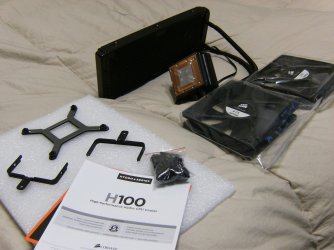
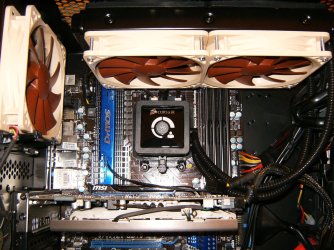
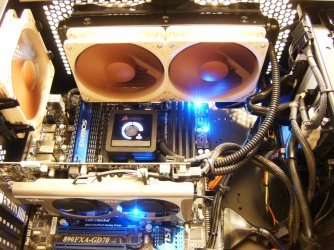
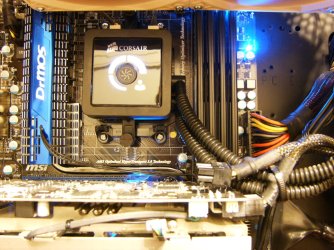
Let's tackle the cooler questions first. I would re-seat the CPU with fresh compound and see what happens to temps. Larger air or water cooling solutions are excellent answers for those mostly in extremely hot areas or those pushing our rig's with fairly aggressive overclocking. You say you are or aren't over clocking? I have installed large air and multiple sealed water solutions and have settled on the H100 with a push/pull 4 fan set up. To say I'm pleased is an understatement but with everything in life "your mileage may vary". I'll tell you that these systems are truly sealed and only apt to leak if you pull a real bone headed move and I can't even imagine what that could be!
HPIM1447.JPG

HPIM1452.JPG

HPIM1472.JPG

HPIM1463.JPG

HPIM1471.JPG
 

My Computer

Computer type
PC/Desktop
Computer Manufacturer/Model Number
A blend of brains, brawn and dumb luck.
OS
Windows 7 Ultimate 64
CPU
i7 3770k OC'd 4.6 @ 1.17v, also FX 8120 & i5 miniITX
Motherboard
MSI P67A-GD80 b3
Memory
32 gb G.Skill Sniper DDR3 10-12-12-31 @ 2133
Graphics Card(s)
XFX Radeon 7870 2GB DDR5
Sound Card
Sound Blaster Z Series Card
Monitor(s) Displays
(2) LG LED 23" 1920 x 1080 2ms Monitors via mini d-port
Screen Resolution
1680 X 1050 p
Hard Drives
Samsung 256 gb 830 SSD sata III
(1) 1 tb WD Black
(2) 1 tb Hitachi deskmates/sata II
(2) 1 tb WD green/sata II
(2) 3 tb Seagate Barracuda
(1) 120 gb OCZ Vertex SS
(1) Drobo 5N w/5 Seagate 3tb
PSU
EVGA modular 1000G2 80% gold rating & APC 1200 RS
Case
CoolerMaster Storm Styker
Cooling
7 case fans 140mm & 120mm, NZXT Kraken X60
Keyboard
(2) Logitech Illuminated Keyboards (1) usb (1) wireless
Mouse
Logitech G700 & T-BC21 - nano nx for the laptop
Internet Speed
Basic 120mbps down
Antivirus
Trend Micro Titanium Max Security & Malwarebytes Premium
Browser
Chrome and IE 10
Other Info
5 Noctua case fans + 3 Noctua in p/p on NZXT cooler
Integrated hot swap drive bays for 2.5" Drives
(2) Lite-on dvd/cd/Blu Ray optical 22X
Integrated fan controller and led on/off
HP Officejet Pro 8630 all-n-one
Hot-swappable 3.5" hard drive bay
Netgear Nighthawk router
Asus USB 3 & sata 6 PCIe card
Vantec IDE to sata adptr./Ultra sata adptr
Lenovo L420 i5 lappy with m sata
Drobo 5N advanced NAS
Nice pictures :D
I re-seated it earlier this morning and put a pea size of TIM on, I've seen a difference of around 5c lower than it has been getting.

I have went ahead and bought the COOLER MASTER Hyper 212 Plus should arrive on monday :)
 

My Computer

Computer Manufacturer/Model Number
Custom
OS
windows 7 64
CPU
Intel i7 2600k 1155
Motherboard
ASUS p8z68-v/gen3
Memory
kingston 4gb
Graphics Card(s)
Nvidia GTX580
Monitor(s) Displays
46" Hitachi tv
Screen Resolution
1920 x 1080 60hz
PSU
cosair TX850w
Case
HAF32
Keyboard
Logitech k120
Mouse
Razer abyssus
bluehoney, That should make a nice difference. I'm scratching my head on the voltage issue as it seems that a system just would blue or black screen or worse with radically lower voltage. It's odd that you get these high temps and now this warning. As silly as this sounds next time you inside the case un-make and re-make all PSU connections to the mobo and make double sure you hear a click and both connections are totally seated. I trust Corsair PSU's even though I've never owned one, seems tons of people here use them with great success. ODD?
 

My Computer

Computer type
PC/Desktop
Computer Manufacturer/Model Number
A blend of brains, brawn and dumb luck.
OS
Windows 7 Ultimate 64
CPU
i7 3770k OC'd 4.6 @ 1.17v, also FX 8120 & i5 miniITX
Motherboard
MSI P67A-GD80 b3
Memory
32 gb G.Skill Sniper DDR3 10-12-12-31 @ 2133
Graphics Card(s)
XFX Radeon 7870 2GB DDR5
Sound Card
Sound Blaster Z Series Card
Monitor(s) Displays
(2) LG LED 23" 1920 x 1080 2ms Monitors via mini d-port
Screen Resolution
1680 X 1050 p
Hard Drives
Samsung 256 gb 830 SSD sata III
(1) 1 tb WD Black
(2) 1 tb Hitachi deskmates/sata II
(2) 1 tb WD green/sata II
(2) 3 tb Seagate Barracuda
(1) 120 gb OCZ Vertex SS
(1) Drobo 5N w/5 Seagate 3tb
PSU
EVGA modular 1000G2 80% gold rating & APC 1200 RS
Case
CoolerMaster Storm Styker
Cooling
7 case fans 140mm & 120mm, NZXT Kraken X60
Keyboard
(2) Logitech Illuminated Keyboards (1) usb (1) wireless
Mouse
Logitech G700 & T-BC21 - nano nx for the laptop
Internet Speed
Basic 120mbps down
Antivirus
Trend Micro Titanium Max Security & Malwarebytes Premium
Browser
Chrome and IE 10
Other Info
5 Noctua case fans + 3 Noctua in p/p on NZXT cooler
Integrated hot swap drive bays for 2.5" Drives
(2) Lite-on dvd/cd/Blu Ray optical 22X
Integrated fan controller and led on/off
HP Officejet Pro 8630 all-n-one
Hot-swappable 3.5" hard drive bay
Netgear Nighthawk router
Asus USB 3 & sata 6 PCIe card
Vantec IDE to sata adptr./Ultra sata adptr
Lenovo L420 i5 lappy with m sata
Drobo 5N advanced NAS
Well i got a message saying the PSU fan is at 0 RPM, which means its not turning right? lol (I checked my case and it is)

Im using the HAF32 and it has 3 large fans and one small fan on the back, is it possible that these fans could be taking up to much of the PSU's power? should i try taking two of them out?
 

My Computer

Computer Manufacturer/Model Number
Custom
OS
windows 7 64
CPU
Intel i7 2600k 1155
Motherboard
ASUS p8z68-v/gen3
Memory
kingston 4gb
Graphics Card(s)
Nvidia GTX580
Monitor(s) Displays
46" Hitachi tv
Screen Resolution
1920 x 1080 60hz
PSU
cosair TX850w
Case
HAF32
Keyboard
Logitech k120
Mouse
Razer abyssus
In regards to the voltage, fan warnings.

You don't have Everest or any other temp monitors running at the same? I have Asus PC ProbeII running and if I run Everest or one other, I can't remember what, the PC Probe gives me incorrect readings but it returns to normal when I close Everest or the other one I'm running.
 

My Computer

Computer Manufacturer/Model Number
Self built
OS
Windows 7 Ultimate x64
CPU
Intel Pentium Dual Core E5200 2.5GHz (3.77GHz OC)
Motherboard
Asus P5Q-E
Memory
Corsair 4GB DDR2 (4x1GB CM2X1024-6400C4)
Graphics Card(s)
Palit GeForce GTS 250 (1024MB)
Sound Card
On Board (ADI AD2000B 8ch HD)
Monitor(s) Displays
Samsung 32in LCD TV
Screen Resolution
1360x768
Hard Drives
2 x 1TB Samsung 103SJ (Raid0)
2 x External 500GB Samsung 502IJ (NexStar 3 HD Enclosures)
PSU
550W Antec Neo HE 550
Case
Antec P180
Cooling
Xigmatex Red Scorpion CPU Cooler. 3x120mm Fans
Keyboard
Logitech MX5000 Laser (Combo)
Mouse
Logitech MX5000 Laser (Combo)
Internet Speed
ADSL2+ (avg 10 Mbps Down, 0.80 Mbps up)
Other Info
Gigabyte GN-WP01GS 54g Wireless Lan Card
In regards to the voltage, fan warnings.

You don't have Everest or any other temp monitors running at the same? I have Asus PC ProbeII running and if I run Everest or one other, I can't remember what, the PC Probe gives me incorrect readings but it returns to normal when I close Everest or the other one I'm running.

I do, I have the open hardware monitor and asus both running, ill close one right now :)
 

My Computer

Computer Manufacturer/Model Number
Custom
OS
windows 7 64
CPU
Intel i7 2600k 1155
Motherboard
ASUS p8z68-v/gen3
Memory
kingston 4gb
Graphics Card(s)
Nvidia GTX580
Monitor(s) Displays
46" Hitachi tv
Screen Resolution
1920 x 1080 60hz
PSU
cosair TX850w
Case
HAF32
Keyboard
Logitech k120
Mouse
Razer abyssus
Zero chance that a couple of fans are in any way to blame.
 

My Computer

Computer type
PC/Desktop
Computer Manufacturer/Model Number
A blend of brains, brawn and dumb luck.
OS
Windows 7 Ultimate 64
CPU
i7 3770k OC'd 4.6 @ 1.17v, also FX 8120 & i5 miniITX
Motherboard
MSI P67A-GD80 b3
Memory
32 gb G.Skill Sniper DDR3 10-12-12-31 @ 2133
Graphics Card(s)
XFX Radeon 7870 2GB DDR5
Sound Card
Sound Blaster Z Series Card
Monitor(s) Displays
(2) LG LED 23" 1920 x 1080 2ms Monitors via mini d-port
Screen Resolution
1680 X 1050 p
Hard Drives
Samsung 256 gb 830 SSD sata III
(1) 1 tb WD Black
(2) 1 tb Hitachi deskmates/sata II
(2) 1 tb WD green/sata II
(2) 3 tb Seagate Barracuda
(1) 120 gb OCZ Vertex SS
(1) Drobo 5N w/5 Seagate 3tb
PSU
EVGA modular 1000G2 80% gold rating & APC 1200 RS
Case
CoolerMaster Storm Styker
Cooling
7 case fans 140mm & 120mm, NZXT Kraken X60
Keyboard
(2) Logitech Illuminated Keyboards (1) usb (1) wireless
Mouse
Logitech G700 & T-BC21 - nano nx for the laptop
Internet Speed
Basic 120mbps down
Antivirus
Trend Micro Titanium Max Security & Malwarebytes Premium
Browser
Chrome and IE 10
Other Info
5 Noctua case fans + 3 Noctua in p/p on NZXT cooler
Integrated hot swap drive bays for 2.5" Drives
(2) Lite-on dvd/cd/Blu Ray optical 22X
Integrated fan controller and led on/off
HP Officejet Pro 8630 all-n-one
Hot-swappable 3.5" hard drive bay
Netgear Nighthawk router
Asus USB 3 & sata 6 PCIe card
Vantec IDE to sata adptr./Ultra sata adptr
Lenovo L420 i5 lappy with m sata
Drobo 5N advanced NAS
As Asus Suite II is producing the warnings I would run only that for a little amount of time, around half hour to an hour while using the computer under the same conditions that you get the warnings except no other monitoring programs running. Also take note of the values in Asus Suite.

If you have no warnings then run Hardware Monitor without closing Asus Suite and run for around the same time or until you get any warnings, if warnings appear again close Hardware Monitor and check the values in Asus Suite to see if they return to the same as before.
Do this a couple of times to confirm if it is a conflict between the two. If it is then you can safely ignore the errors when your running both.

If both report the same temps, voltages, other info then you shouldn't need both, although Hardware Monitor probably produces more info so you might want to run that occasionally.

PS. If your chewing to much power you would experience instability and possibably BSOD's.
 

My Computer

Computer Manufacturer/Model Number
Self built
OS
Windows 7 Ultimate x64
CPU
Intel Pentium Dual Core E5200 2.5GHz (3.77GHz OC)
Motherboard
Asus P5Q-E
Memory
Corsair 4GB DDR2 (4x1GB CM2X1024-6400C4)
Graphics Card(s)
Palit GeForce GTS 250 (1024MB)
Sound Card
On Board (ADI AD2000B 8ch HD)
Monitor(s) Displays
Samsung 32in LCD TV
Screen Resolution
1360x768
Hard Drives
2 x 1TB Samsung 103SJ (Raid0)
2 x External 500GB Samsung 502IJ (NexStar 3 HD Enclosures)
PSU
550W Antec Neo HE 550
Case
Antec P180
Cooling
Xigmatex Red Scorpion CPU Cooler. 3x120mm Fans
Keyboard
Logitech MX5000 Laser (Combo)
Mouse
Logitech MX5000 Laser (Combo)
Internet Speed
ADSL2+ (avg 10 Mbps Down, 0.80 Mbps up)
Other Info
Gigabyte GN-WP01GS 54g Wireless Lan Card
Yep :) software conflict between Asus suite and hardware monitor, I downloaded both on my laptop same problem, tried one without the other, as there's a few sites on the net saying there not compatible. YAY!!

Now im kind of wondering if my cpu cores have been getting up to 70-90c.

Are the cpu cores always hotter than the cpu itself?
 

My Computer

Computer Manufacturer/Model Number
Custom
OS
windows 7 64
CPU
Intel i7 2600k 1155
Motherboard
ASUS p8z68-v/gen3
Memory
kingston 4gb
Graphics Card(s)
Nvidia GTX580
Monitor(s) Displays
46" Hitachi tv
Screen Resolution
1920 x 1080 60hz
PSU
cosair TX850w
Case
HAF32
Keyboard
Logitech k120
Mouse
Razer abyssus
I have a system configuration similar to yours.
I use the Hyper 212 plus with artic silver paste. I use one supplied 120mm heat sink fan. I have a well cooled case. I am not overclocking.

1) On a warm day with running Prime 95 for ~30min or Handbrake near 100% on all cores my max core temperature is in the high 50 C. One core always records ~6C higher than the minimum core. I have reseated twice according to Artic Silver guidelines and the difference still appears. I'm not bothered.

2) Probe II run in conjunction with say HWMonitor can record very brief "Voltage glitches". I ignore them as an artifact.
Fans take little power and you have quite a large PSU. Unless it's faulty I think you are seeing an artifact.
 

My Computer

Computer type
PC/Desktop
Computer Manufacturer/Model Number
Own build
OS
Windows 7x64 Home Premium SP1
CPU
Intel i7 2600k
Motherboard
ASUS P8Z68 Deluxe
Memory
G.Skill Ripjaws (DDR3-1600) 2x4GB
Graphics Card(s)
Nvidia GeForce GTS 450; Intel HD Graphics 3000(GT2+)
Monitor(s) Displays
Dell Ultrasharp IPS panel U2311H, Samsung SyncMaster P2350
Screen Resolution
1920x1080
Hard Drives
Samsung 850 Pro SSD 256GB, Samsung SSD 840 120GB, Seagates 1TB Barracuda ST31000528AS x2
PSU
Seasonic M12II 520W
Case
Lian Li Lancool PC-K60
Cooling
Case: 1x120mm, 3x140mm CPU: Hyper 212+
Keyboard
Logitech MK520 (wireless)
Mouse
Logitech MK520
Internet Speed
6-7 Mbps
Antivirus
Norton Security Premium, Malwarebytes on 2 (MSE on 3rd PC)
Browser
FireFox
Other Info
Audio: Logitech Z523 2.1
My 2700k has core 2 thats approx 6C higher than the other 3 as well.
Reseated the HS and it didnt help. But after some looking around, it seems this is quite normal for the i7s to have one core always run a bit warmer. Odd.


At any count, thats why I suggested the 212.
Its a fine little cooler for the price, and even if you OC a bit itll do the job quite well. As a replacement for the stock its pretty amazing in comparison.

You really only need a bigger cooler if you plan on heavier OCing, or simply want something with a bit more flash.
 

My Computer

Computer Manufacturer/Model Number
Custom (Self Build)
OS
Windows 7 Home Premium 64bit
CPU
Intel Core i7 2700k
Motherboard
eVGA P67 SLI
Memory
8GB Mushkin Redline Ridgebacks @1866
Graphics Card(s)
EVGA GTX570 SC
Sound Card
XiFi Titanium HD
Monitor(s) Displays
LG W2453V
Screen Resolution
1920x1080
Hard Drives
Intel 320 80GB -- Intel X25-V 40GB --WD Black 1TB x2 -- WD Blue 640GB
PSU
Seasonic x750
Case
Corsair 600T SE White
Cooling
eVGA Superclocked CPU Cooler
Keyboard
Saitek Cyborg
Antivirus
Kaspersky
Browser
IE
Other Info
LG BD/DVD
On my system the core temps are always 10-15C higher than the cpu temp with any program I've tried that reads cpu and core temps separate.

I believe the core temps are the ones you should be concerned about as I have experienced problems, freezing, instability, when my cpu temp reported by PC Probe is around 15-20C less than max meaning my cores are pretty much at their max temps.

Generally different cores will experience different temps because different cores experience different loads depending on what your doing.
 

My Computer

Computer Manufacturer/Model Number
Self built
OS
Windows 7 Ultimate x64
CPU
Intel Pentium Dual Core E5200 2.5GHz (3.77GHz OC)
Motherboard
Asus P5Q-E
Memory
Corsair 4GB DDR2 (4x1GB CM2X1024-6400C4)
Graphics Card(s)
Palit GeForce GTS 250 (1024MB)
Sound Card
On Board (ADI AD2000B 8ch HD)
Monitor(s) Displays
Samsung 32in LCD TV
Screen Resolution
1360x768
Hard Drives
2 x 1TB Samsung 103SJ (Raid0)
2 x External 500GB Samsung 502IJ (NexStar 3 HD Enclosures)
PSU
550W Antec Neo HE 550
Case
Antec P180
Cooling
Xigmatex Red Scorpion CPU Cooler. 3x120mm Fans
Keyboard
Logitech MX5000 Laser (Combo)
Mouse
Logitech MX5000 Laser (Combo)
Internet Speed
ADSL2+ (avg 10 Mbps Down, 0.80 Mbps up)
Other Info
Gigabyte GN-WP01GS 54g Wireless Lan Card
@Duzzy
Tcase can be ~5-10C less than Tcore so you need to know what you are measuring. Most temp measuring programs use Tcore. This great post suggests 5C but I seem to find it closer to 10C
http://www.computerforum.com/129794-core2duo-core2quad-temperature-guide.html

ASUS BIOS releases above (v501 I think) on my motherboard decided to go from Tcore to Tcase without notifying users. Unfortunately they didn't change their temperature control curves. I gave up with ASUS technical support area. I clearly defined the problem and I don't think it ever got passed up the line.
Also, I am aware that the temperature readings in the BIOS are higher than normal out of BIOS ambient. This is not the issue.
 
Last edited:

My Computer

Computer type
PC/Desktop
Computer Manufacturer/Model Number
Own build
OS
Windows 7x64 Home Premium SP1
CPU
Intel i7 2600k
Motherboard
ASUS P8Z68 Deluxe
Memory
G.Skill Ripjaws (DDR3-1600) 2x4GB
Graphics Card(s)
Nvidia GeForce GTS 450; Intel HD Graphics 3000(GT2+)
Monitor(s) Displays
Dell Ultrasharp IPS panel U2311H, Samsung SyncMaster P2350
Screen Resolution
1920x1080
Hard Drives
Samsung 850 Pro SSD 256GB, Samsung SSD 840 120GB, Seagates 1TB Barracuda ST31000528AS x2
PSU
Seasonic M12II 520W
Case
Lian Li Lancool PC-K60
Cooling
Case: 1x120mm, 3x140mm CPU: Hyper 212+
Keyboard
Logitech MK520 (wireless)
Mouse
Logitech MK520
Internet Speed
6-7 Mbps
Antivirus
Norton Security Premium, Malwarebytes on 2 (MSE on 3rd PC)
Browser
FireFox
Other Info
Audio: Logitech Z523 2.1
@Duzzy
Tcase can be ~5-10C less than Tcore so you need to know what you are measuring. Most temp measuring programs use Tcore. This great post suggests 5C but I seem to find it closer to 10C

From my understanding this is because the TCase is nearly impossible to measure via software. And the sensors can not accurately report it.

If I recall correctly, the Tcase for the i5/i7s is supposed to be 72 or 73C.
I too have always felt the Core or Package CPU Temp is normally 10C higher than the actual Tcase, as a fairly close estimate.
 

My Computer

Computer Manufacturer/Model Number
Custom (Self Build)
OS
Windows 7 Home Premium 64bit
CPU
Intel Core i7 2700k
Motherboard
eVGA P67 SLI
Memory
8GB Mushkin Redline Ridgebacks @1866
Graphics Card(s)
EVGA GTX570 SC
Sound Card
XiFi Titanium HD
Monitor(s) Displays
LG W2453V
Screen Resolution
1920x1080
Hard Drives
Intel 320 80GB -- Intel X25-V 40GB --WD Black 1TB x2 -- WD Blue 640GB
PSU
Seasonic x750
Case
Corsair 600T SE White
Cooling
eVGA Superclocked CPU Cooler
Keyboard
Saitek Cyborg
Antivirus
Kaspersky
Browser
IE
Other Info
LG BD/DVD
@mjf
Nice info thanks.

And just because I feel like it, right now in Hardware Monitor mine has CPUTIN = 33C, Core 0 = 47C, Core 1 = 46 and from indoor thermometer Room temp = 26.9C.

CPU load from Task Manager = 1% - 10%.
CPU Fan = 1100rpm, One Case Fan = 1240rpm, Other 2 Case Fans not monitored.

Thats 14 and 13 degrees difference.
Not overclocked at the moment.
 

My Computer

Computer Manufacturer/Model Number
Self built
OS
Windows 7 Ultimate x64
CPU
Intel Pentium Dual Core E5200 2.5GHz (3.77GHz OC)
Motherboard
Asus P5Q-E
Memory
Corsair 4GB DDR2 (4x1GB CM2X1024-6400C4)
Graphics Card(s)
Palit GeForce GTS 250 (1024MB)
Sound Card
On Board (ADI AD2000B 8ch HD)
Monitor(s) Displays
Samsung 32in LCD TV
Screen Resolution
1360x768
Hard Drives
2 x 1TB Samsung 103SJ (Raid0)
2 x External 500GB Samsung 502IJ (NexStar 3 HD Enclosures)
PSU
550W Antec Neo HE 550
Case
Antec P180
Cooling
Xigmatex Red Scorpion CPU Cooler. 3x120mm Fans
Keyboard
Logitech MX5000 Laser (Combo)
Mouse
Logitech MX5000 Laser (Combo)
Internet Speed
ADSL2+ (avg 10 Mbps Down, 0.80 Mbps up)
Other Info
Gigabyte GN-WP01GS 54g Wireless Lan Card
I'd check that CPUTIN in HWMonitor (or SIW) is giving a meaningful reading.
Mine always reads 60C=nonsense.
 

My Computer

Computer type
PC/Desktop
Computer Manufacturer/Model Number
Own build
OS
Windows 7x64 Home Premium SP1
CPU
Intel i7 2600k
Motherboard
ASUS P8Z68 Deluxe
Memory
G.Skill Ripjaws (DDR3-1600) 2x4GB
Graphics Card(s)
Nvidia GeForce GTS 450; Intel HD Graphics 3000(GT2+)
Monitor(s) Displays
Dell Ultrasharp IPS panel U2311H, Samsung SyncMaster P2350
Screen Resolution
1920x1080
Hard Drives
Samsung 850 Pro SSD 256GB, Samsung SSD 840 120GB, Seagates 1TB Barracuda ST31000528AS x2
PSU
Seasonic M12II 520W
Case
Lian Li Lancool PC-K60
Cooling
Case: 1x120mm, 3x140mm CPU: Hyper 212+
Keyboard
Logitech MK520 (wireless)
Mouse
Logitech MK520
Internet Speed
6-7 Mbps
Antivirus
Norton Security Premium, Malwarebytes on 2 (MSE on 3rd PC)
Browser
FireFox
Other Info
Audio: Logitech Z523 2.1
It's the same temp thats reported by PC Probe and AI Suite. If you think it's low, I have Intel Speed Step enabled and because my CPU usage is low I'm only running half speed. I also only have a E5200 CPU with a decent heatsink and fan combo.
 

My Computer

Computer Manufacturer/Model Number
Self built
OS
Windows 7 Ultimate x64
CPU
Intel Pentium Dual Core E5200 2.5GHz (3.77GHz OC)
Motherboard
Asus P5Q-E
Memory
Corsair 4GB DDR2 (4x1GB CM2X1024-6400C4)
Graphics Card(s)
Palit GeForce GTS 250 (1024MB)
Sound Card
On Board (ADI AD2000B 8ch HD)
Monitor(s) Displays
Samsung 32in LCD TV
Screen Resolution
1360x768
Hard Drives
2 x 1TB Samsung 103SJ (Raid0)
2 x External 500GB Samsung 502IJ (NexStar 3 HD Enclosures)
PSU
550W Antec Neo HE 550
Case
Antec P180
Cooling
Xigmatex Red Scorpion CPU Cooler. 3x120mm Fans
Keyboard
Logitech MX5000 Laser (Combo)
Mouse
Logitech MX5000 Laser (Combo)
Internet Speed
ADSL2+ (avg 10 Mbps Down, 0.80 Mbps up)
Other Info
Gigabyte GN-WP01GS 54g Wireless Lan Card
Hello! Thought id come back and give those who helped me an update :)

The Highest ive seen the CPU temp go with this new cpu fan is 45c playing batman arkham city.

The only thing that worry's me is when I start up my computer, i get a message saying cpu fan error!

The cpu fan has been at around 500-600 RPM, its in red on my bios but the tempatures ive been getting seem to be fine, is this normal? thanks :)


Also dont ask about the whole hellboy thing :P private joke.
 

My Computer

Computer Manufacturer/Model Number
Custom
OS
windows 7 64
CPU
Intel i7 2600k 1155
Motherboard
ASUS p8z68-v/gen3
Memory
kingston 4gb
Graphics Card(s)
Nvidia GTX580
Monitor(s) Displays
46" Hitachi tv
Screen Resolution
1920 x 1080 60hz
PSU
cosair TX850w
Case
HAF32
Keyboard
Logitech k120
Mouse
Razer abyssus
Back
Top