Windows 7 restarts after hibernation

windowsuser7

New member
Local time
9:36 AM
Messages
9
I had a PC running windows XP Pro and hibernation worked fine. I recently updgraded to Windows 7 and the computer will completely hibernate and turn off. Three seconds later it turns back on and resumes windows. Right now I'm using hibernation by hitting the power button as it turns back on so that it will stay off. Upon closer examination I've found that hibernation works if I unplug all USB devices. If I have a USB device plugged in the computer will turn back on. It's not a BIOS issue because it worked with XP. I've gone through the device manager and turned off all wakeup options from the power management tab. It has to be a windows configuration setting for USB but I can't find anything anywhere. Any help would be greatly appreciated. Thanks.
 

My Computer My Computer

At a glance

Windows 7 Pro 32bitCore 2 Duo E6550 2.33 GHz4GB PC2 6400 (2X2GB)NVIDIA GeForce 8600 GT
OS
Windows 7 Pro 32bit
CPU
Core 2 Duo E6550 2.33 GHz
Motherboard
ASUS P5GC-MX/1333
Memory
4GB PC2 6400 (2X2GB)
Graphics Card(s)
NVIDIA GeForce 8600 GT
Sound Card
Onboard
Monitor(s) Displays
Single Display - DVI
Screen Resolution
1920 X 1080
Hard Drives
2 Seagate Barracuda 7200.12 Hard Drives.
1 Set for OS and Programs - 250 GB
1 Set for Data - 1TB
PSU
520W
Welcome to the forums!

I have been researching this same problem & solved it after I found a link to this page:

Windows 7 does not go to sleep

The "Powercfg -devicequery wake_armed" command entered in the command prompt will help reveal what device is preventing your machine from staying powered off.
 

My Computer My Computer

At a glance

Windows 7 Professional 64 Bit SP1Intel i7-3770K. Mild Overclock to 4.2 GhzCrucial Ballistix Sport 32GB DDR3-1600 (PC3-1...Intel 4000 - On CPU
Computer type
PC/Desktop
Computer Manufacturer/Model Number
Custom Build
OS
Windows 7 Professional 64 Bit SP1
CPU
Intel i7-3770K. Mild Overclock to 4.2 Ghz
Motherboard
ASUS Sabertooth Z77
Memory
Crucial Ballistix Sport 32GB DDR3-1600 (PC3-12800)
Graphics Card(s)
Intel 4000 - On CPU
Sound Card
On Board
Monitor(s) Displays
HP w2408h
Screen Resolution
1920 x 1200
Hard Drives
Samsung 840 Pro 256Gb SSD, --
Two - WDC WD1001FALS-00J7B0 SATA
PSU
Antec EarthWatts Green Series 650 Watt ATX
Case
Fractal Design Core 3000 ATX
Cooling
Corsair H80i Water Cooled
Keyboard
Logitech Illuminated
Mouse
Logitech Wireless Trackball M570 + Touchpad T650
Internet Speed
9.5 Mbps down - 25.4 Mbps upload
Antivirus
MSE
Browser
IE 10, Chrome
gregrocker
Thank you for the quick reply. I updated the Display driver but no change. I also disabled hibernation and deleted the hiberfile and then reinabled it. Still nothing. I downloaded and installed the Windows Performance Toolkit but I didn't see a command for hibernation. Which command do you want me to use?
 

My Computer My Computer

At a glance

Windows 7 Pro 32bitCore 2 Duo E6550 2.33 GHz4GB PC2 6400 (2X2GB)NVIDIA GeForce 8600 GT
OS
Windows 7 Pro 32bit
CPU
Core 2 Duo E6550 2.33 GHz
Motherboard
ASUS P5GC-MX/1333
Memory
4GB PC2 6400 (2X2GB)
Graphics Card(s)
NVIDIA GeForce 8600 GT
Sound Card
Onboard
Monitor(s) Displays
Single Display - DVI
Screen Resolution
1920 X 1080
Hard Drives
2 Seagate Barracuda 7200.12 Hard Drives.
1 Set for OS and Programs - 250 GB
1 Set for Data - 1TB
PSU
520W
TBoyd
Thanks for your help. I already have all devices disabled under powercfg. I did make one change in Power Options and enabled "Allow Hybrid Sleep" as the site directed but still no go.
 

My Computer My Computer

At a glance

Windows 7 Pro 32bitCore 2 Duo E6550 2.33 GHz4GB PC2 6400 (2X2GB)NVIDIA GeForce 8600 GT
OS
Windows 7 Pro 32bit
CPU
Core 2 Duo E6550 2.33 GHz
Motherboard
ASUS P5GC-MX/1333
Memory
4GB PC2 6400 (2X2GB)
Graphics Card(s)
NVIDIA GeForce 8600 GT
Sound Card
Onboard
Monitor(s) Displays
Single Display - DVI
Screen Resolution
1920 X 1080
Hard Drives
2 Seagate Barracuda 7200.12 Hard Drives.
1 Set for OS and Programs - 250 GB
1 Set for Data - 1TB
PSU
520W
TBoyd
Thanks for your help. I already have all devices disabled under powercfg. I did make one change in Power Options and enabled "Allow Hybrid Sleep" as the site directed but still no go.

Wow. I truly thought that link might help solve your issue.

Did you actually check via the command prompt to be sure that there is nothing found when using the "Powercfg -devicequery wake_armed" command?

Be sure you are using the elevated command prompt per their instructions.

BTW - I went back to the link I gave & saw nothing about enabling hybrid sleep. You might want to verify what you did.

NOTE: Please complete your system specs in this forum via the User CP.
 

My Computer My Computer

At a glance

Windows 7 Professional 64 Bit SP1Intel i7-3770K. Mild Overclock to 4.2 GhzCrucial Ballistix Sport 32GB DDR3-1600 (PC3-1...Intel 4000 - On CPU
Computer type
PC/Desktop
Computer Manufacturer/Model Number
Custom Build
OS
Windows 7 Professional 64 Bit SP1
CPU
Intel i7-3770K. Mild Overclock to 4.2 Ghz
Motherboard
ASUS Sabertooth Z77
Memory
Crucial Ballistix Sport 32GB DDR3-1600 (PC3-12800)
Graphics Card(s)
Intel 4000 - On CPU
Sound Card
On Board
Monitor(s) Displays
HP w2408h
Screen Resolution
1920 x 1200
Hard Drives
Samsung 840 Pro 256Gb SSD, --
Two - WDC WD1001FALS-00J7B0 SATA
PSU
Antec EarthWatts Green Series 650 Watt ATX
Case
Fractal Design Core 3000 ATX
Cooling
Corsair H80i Water Cooled
Keyboard
Logitech Illuminated
Mouse
Logitech Wireless Trackball M570 + Touchpad T650
Internet Speed
9.5 Mbps down - 25.4 Mbps upload
Antivirus
MSE
Browser
IE 10, Chrome
TBoyd
Thanks for your help. I already have all devices disabled under powercfg. I did make one change in Power Options and enabled "Allow Hybrid Sleep" as the site directed but still no go.

Wow. I truly thought that link might help solve your issue.

Did you actually check via the command prompt to be sure that there is nothing found when using the "Powercfg -devicequery wake_armed" command?

Be sure you are using the elevated command prompt per their instructions.

BTW - I went back to the link I gave & saw nothing about enabling hybrid sleep. You might want to verify what you did.

NOTE: Please complete your system specs in this forum via the User CP.


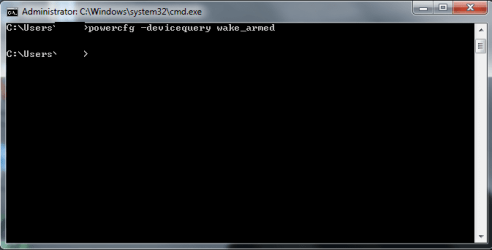
I did check via the porwercfg command at an elevated prompt. I had tried that previously and already cleared everything. Currently the command comes back blank.

Sorry about the hybrid sleep comment. The link showed to change the multimedia settings in advanced power management. While there I looked at everything and decided to enable hybrid sleep just to see if it would do anything.

I've updated my system specs. Let me know if you need anything else. Thanks for your help.
 

Attachments

  • Capture.PNG
    Capture.PNG
    10.4 KB · Views: 71

My Computer My Computer

At a glance

Windows 7 Pro 32bitCore 2 Duo E6550 2.33 GHz4GB PC2 6400 (2X2GB)NVIDIA GeForce 8600 GT
OS
Windows 7 Pro 32bit
CPU
Core 2 Duo E6550 2.33 GHz
Motherboard
ASUS P5GC-MX/1333
Memory
4GB PC2 6400 (2X2GB)
Graphics Card(s)
NVIDIA GeForce 8600 GT
Sound Card
Onboard
Monitor(s) Displays
Single Display - DVI
Screen Resolution
1920 X 1080
Hard Drives
2 Seagate Barracuda 7200.12 Hard Drives.
1 Set for OS and Programs - 250 GB
1 Set for Data - 1TB
PSU
520W
When you access Power Options>Advanced>Multimedia Settings>When Sharing Media, is it set to "Allow the computer to sleep"?

If that is set correctly, I don't know what else to suggest - except to examine your BIOS settings. I know it worked with XP, but there just might be something there that needs to be changed for Win7.

BTW - Your screenshot may not be an elevated command prompt. My elevated prompt reads " C: \Windows\system32>
This may make no difference, because I was able to run the "Powercfg -devicequery wake_armed" command from the normal CP.
 

My Computer My Computer

At a glance

Windows 7 Professional 64 Bit SP1Intel i7-3770K. Mild Overclock to 4.2 GhzCrucial Ballistix Sport 32GB DDR3-1600 (PC3-1...Intel 4000 - On CPU
Computer type
PC/Desktop
Computer Manufacturer/Model Number
Custom Build
OS
Windows 7 Professional 64 Bit SP1
CPU
Intel i7-3770K. Mild Overclock to 4.2 Ghz
Motherboard
ASUS Sabertooth Z77
Memory
Crucial Ballistix Sport 32GB DDR3-1600 (PC3-12800)
Graphics Card(s)
Intel 4000 - On CPU
Sound Card
On Board
Monitor(s) Displays
HP w2408h
Screen Resolution
1920 x 1200
Hard Drives
Samsung 840 Pro 256Gb SSD, --
Two - WDC WD1001FALS-00J7B0 SATA
PSU
Antec EarthWatts Green Series 650 Watt ATX
Case
Fractal Design Core 3000 ATX
Cooling
Corsair H80i Water Cooled
Keyboard
Logitech Illuminated
Mouse
Logitech Wireless Trackball M570 + Touchpad T650
Internet Speed
9.5 Mbps down - 25.4 Mbps upload
Antivirus
MSE
Browser
IE 10, Chrome
Sharing Media is set to "Allow the computer to sleep." I've gone through the bios and changed anything that I thought would help. Good call on the elevated command prompt. I checked again making sure it was elevated but got the same result. Let me know if you think of anything else. I've been playing around with different motherboard driver versions hoping to find something that will work. I'm still quite confident it has something to do with the USB ports but can't think of anywhere else to check. Thanks for your help.
 

My Computer My Computer

At a glance

Windows 7 Pro 32bitCore 2 Duo E6550 2.33 GHz4GB PC2 6400 (2X2GB)NVIDIA GeForce 8600 GT
OS
Windows 7 Pro 32bit
CPU
Core 2 Duo E6550 2.33 GHz
Motherboard
ASUS P5GC-MX/1333
Memory
4GB PC2 6400 (2X2GB)
Graphics Card(s)
NVIDIA GeForce 8600 GT
Sound Card
Onboard
Monitor(s) Displays
Single Display - DVI
Screen Resolution
1920 X 1080
Hard Drives
2 Seagate Barracuda 7200.12 Hard Drives.
1 Set for OS and Programs - 250 GB
1 Set for Data - 1TB
PSU
520W
Access the Performance log to see what is interfering with Hibernation, utilize System Resources which can help you gain clues as the the problem, work through hardware tests and other troubleshooting steps.

If these don't help PM our expert Cluberti who authored the Trace tutorial and expert on pinpointing these problems.
 
I did get a trace, and the machine sleeps (according to the trace) for less than one second - at 4.8 seconds into the trace, there's a sleep notification, and then at ~5.7 seconds there's wake activity. However, driver notification doesn't happen until about 56 seconds into the trace, and the CPUs are idle for that whole time (basically - a few ms at the beginning of activity on CPU 0, which is scheduling activity). I also see the last device slept before the long delay is the USB root bus driver, and Symantec's nsiproxy.sys driver. The machine does indeed wake due to this bus coming online:
"\Driver\umbus"
"\Driver\umbus"
"UMB\UMB\1&841921d&0&PrinterBusEnumerator"
"UMB\UMB\1&841921d&0&IPBusEnumRoot"

Note that the Symantec driver, even though the machine is totally "awake" at ~7 seconds into the trace, completely blocks all service activity until ~56seconds into the trace, so you might want to consider that as part of the problem (it is). Ultimately, however, the question really is, what do you have attached to the USB bus on this machine? This is actually possible to be a BIOS/hardware issue (Windows 7 is a lot more touchy about USB hardware, specifically, than XP or Vista was), but it could be a device plugged in as well.
 

My Computer My Computer

At a glance

Windows 10 Pro x64Intel Core i7 4790K @ 4.5GHz32GB DDR3Nvidia GeForce GTX970
Computer type
PC/Desktop
Computer Manufacturer/Model Number
Custom
OS
Windows 10 Pro x64
CPU
Intel Core i7 4790K @ 4.5GHz
Motherboard
Asus Maximus Hero VII
Memory
32GB DDR3
Graphics Card(s)
Nvidia GeForce GTX970
Sound Card
Realtek HD Audio
Screen Resolution
1920x1200
Hard Drives
1x Samsung 250GB SSD
4x WD RE 2TB (RAIDZ)
PSU
Corsair AX760i
Case
Fractal Design Define R4
Cooling
Noctua NH-D15
Thank you for your help in reading my trace. I'm a little confused about Symantec's nsiproxy.sys driver as I've never had any Symantec software on this computer at any time. I ran a search in the registry for symantec and came up with nothing. When I did a search for nsiproxy.sys I found entries in the following locations:


HKEY_LOCAL_MACHINE\COMPONENTS\DerivedData\Components\x86_microsoft-windows-usermodensi_31bf3856ad364e35_6.1.7600.16385_none_7238790328c77613\f!nsiproxy.sys


HKEY_LOCAL_MACHINE\COMPONENTS\DerivedData\VersionedIndex\6.1.7601.17592 (win7sp1_gdr.110408-1631)\ComponentFamilies\x86_microsoft-windows-usermodensi_31bf3856ad364e35_none_2b06ddd33993a118\f256!nsiproxy.sys


HKEY_LOCAL_MACHINE\SYSTEM\CurrentControlSet\Control\SafeBoot\Network\nsiproxy.sys


HKEY_LOCAL_MACHINE\SYSTEM\CurrentControlSet\Enum\Root\LEGACY_NSIPROXY\0000\DeviceDesc "@%SystemRoot%\system32\drivers\nsiproxy.sys,-2"


HKEY_LOCAL_MACHINE\SYSTEM\CurrentControlSet\services\nsi\Description "@%SystemRoot%\system32\nsisvc.dll,-201" and \DisplayName "@%SystemRoot%\system32\nsisvc.dll,-200"


HKEY_LOCAL_MACHINE\SYSTEM\CurrentControlSet\services\nsiproxy\Description "@%SystemRoot%\system32\drivers\nsiproxy.sys,-1" and \DisplayName "@%SystemRoot%\system32\drivers\nsiproxy.sys,-2" and \ImagePath "system32\drivers\nsiproxy.sys"


HKEY_USERS\.DEFAULT\Software\Classes\Local Settings\MuiCache\206\52C64B7E\@%SystemRoot%\system32\drivers\nsiproxy.sys,-2 "NSI proxy service driver."


HKEY_USERS\S-1-5-18\Software\Classes\Local Settings\MuiCache\206\52C64B7E\@%SystemRoot%\system32\drivers\nsiproxy.sys,-2 "NSI proxy service driver."


I'm not quite sure what to do about the nsiproxy.sys as it appears to be a part of windows. Any suggestions would be greatly appreciated. For USB devices I have an external hard drive, a connection an APC Battery Backup, a USB Hub and a few cables that currently aren't connected. One for another Hard drive and one for a Zune. Any cable that actually has a device on it causes the hibernate to restart. I've tried removing all USB devices and hibernation works. I can't tie it to a specific device because I can have any one device plugged in and hibernation will restart. I've checked the BIOS and under USB configuration I have these settings:


USB Function Enabled
Legacy USB Support Enabled
USB 2.0 Controller Enabled
USB 2.0 Controller Mode HiSpeed
BIOS EHCI Hand-Off Disabled


Could it just be coincidence that both my APC Battery and external hard drive have a BIOS compatibility issue? BTW, the Hard Drive is a laptop external enclosure. Rosewill is the brand.
 

My Computer My Computer

At a glance

Windows 7 Pro 32bitCore 2 Duo E6550 2.33 GHz4GB PC2 6400 (2X2GB)NVIDIA GeForce 8600 GT
OS
Windows 7 Pro 32bit
CPU
Core 2 Duo E6550 2.33 GHz
Motherboard
ASUS P5GC-MX/1333
Memory
4GB PC2 6400 (2X2GB)
Graphics Card(s)
NVIDIA GeForce 8600 GT
Sound Card
Onboard
Monitor(s) Displays
Single Display - DVI
Screen Resolution
1920 X 1080
Hard Drives
2 Seagate Barracuda 7200.12 Hard Drives.
1 Set for OS and Programs - 250 GB
1 Set for Data - 1TB
PSU
520W
Slight correction. The USB hub plugged in all by itself without anything plugged into it also triggers a restart. It's a logitech 4 port hub. So basically any active device causes a restart after hibernation.
 

My Computer My Computer

At a glance

Windows 7 Pro 32bitCore 2 Duo E6550 2.33 GHz4GB PC2 6400 (2X2GB)NVIDIA GeForce 8600 GT
OS
Windows 7 Pro 32bit
CPU
Core 2 Duo E6550 2.33 GHz
Motherboard
ASUS P5GC-MX/1333
Memory
4GB PC2 6400 (2X2GB)
Graphics Card(s)
NVIDIA GeForce 8600 GT
Sound Card
Onboard
Monitor(s) Displays
Single Display - DVI
Screen Resolution
1920 X 1080
Hard Drives
2 Seagate Barracuda 7200.12 Hard Drives.
1 Set for OS and Programs - 250 GB
1 Set for Data - 1TB
PSU
520W
Was this a factory preinstall which might have come with Symantec even though it was never used. This corruption remains until there is a Clean Reinstall - Factory OEM Windows 7.

Have you checked the USB hub in Device Manager to see if there are any Power Options on any tab to adjust so that it will not wake the device?
 
I had a similar problem, and I solved it by going to device manager, right-clicking the entries for the mouse, keyboard, lan card, and others related to USB ports, going to any power management tab, and unchecked "allow this device to wake the computer."
 

My Computer My Computer

At a glance

MS Windows 7 Home Premium 64-bit SP1Intel Core 2 Quad Q6600 @ 2.40GHzCorsair PC2-6400 (400 MHz) 4.00 GB DDR2GeForce 9600 GT 1024 MB
OS
MS Windows 7 Home Premium 64-bit SP1
CPU
Intel Core 2 Quad Q6600 @ 2.40GHz
Motherboard
ASUSTeK Computer INC. P5B-VM SE (LGA775)
Memory
Corsair PC2-6400 (400 MHz) 4.00 GB DDR2
Graphics Card(s)
GeForce 9600 GT 1024 MB
Sound Card
SB Audigy
Monitor(s) Displays
LG W2252
Screen Resolution
1680x1050 @ 60Hz
Hard Drives
977GB Seagate ST31000528AS ATA Device (SATA)
488GB Seagate ST3500630AS ATA Device (SATA)
PSU
Corsair HX750W
Case
Antec 900
Cooling
Thermaltake fans
Keyboard
Microsoft Sidewinder X6
Mouse
Microsoft Sidewinder Mouse
Internet Speed
2 Mbps
Other Info
D-Link DIR-655 router
WD My Book 1.0 TB
Buffalo NAS LS-CHL v2 2 TB
This is not a factory computer. It is a system that I built. I had XP running on it previously, but rather than do an upgrade option I did a clean install of Windows 7. The computer has never had Symantec software installed on it. nsiproxy.sys is a windows system file that comes from Microsoft.

I just checked the USB Hub's power management tab in device manager and it is not set to wakeup the computer. For the record the computer will reboot if the hub is plugged in, but if I unplug the hug and plug an external hard drive directly into the computer it will also reboot. It doesn't appear to be tied to any particular device. Anything plugged into the USB port will wake the computer after hibernation. This points to cluberti's finding that it has to do with the USB root bus driver.
 

My Computer My Computer

At a glance

Windows 7 Pro 32bitCore 2 Duo E6550 2.33 GHz4GB PC2 6400 (2X2GB)NVIDIA GeForce 8600 GT
OS
Windows 7 Pro 32bit
CPU
Core 2 Duo E6550 2.33 GHz
Motherboard
ASUS P5GC-MX/1333
Memory
4GB PC2 6400 (2X2GB)
Graphics Card(s)
NVIDIA GeForce 8600 GT
Sound Card
Onboard
Monitor(s) Displays
Single Display - DVI
Screen Resolution
1920 X 1080
Hard Drives
2 Seagate Barracuda 7200.12 Hard Drives.
1 Set for OS and Programs - 250 GB
1 Set for Data - 1TB
PSU
520W
Well, my finding was that the driver was being triggered to wake the machine. I sincerely doubt it is the root cause, as the hub doesn't wake the machine when the ports are unused - I do believe it is a firmware issue, but I would have no proof short of moving the existing install onto different hardware and retesting.

Sent from my SGH-i917 using Board Express
 

My Computer My Computer

At a glance

Windows 10 Pro x64Intel Core i7 4790K @ 4.5GHz32GB DDR3Nvidia GeForce GTX970
Computer type
PC/Desktop
Computer Manufacturer/Model Number
Custom
OS
Windows 10 Pro x64
CPU
Intel Core i7 4790K @ 4.5GHz
Motherboard
Asus Maximus Hero VII
Memory
32GB DDR3
Graphics Card(s)
Nvidia GeForce GTX970
Sound Card
Realtek HD Audio
Screen Resolution
1920x1200
Hard Drives
1x Samsung 250GB SSD
4x WD RE 2TB (RAIDZ)
PSU
Corsair AX760i
Case
Fractal Design Define R4
Cooling
Noctua NH-D15
I also had a similar issue with some software. When I left them running, the system would restart, but not if I shut them down.
 

My Computer My Computer

At a glance

MS Windows 7 Home Premium 64-bit SP1Intel Core 2 Quad Q6600 @ 2.40GHzCorsair PC2-6400 (400 MHz) 4.00 GB DDR2GeForce 9600 GT 1024 MB
OS
MS Windows 7 Home Premium 64-bit SP1
CPU
Intel Core 2 Quad Q6600 @ 2.40GHz
Motherboard
ASUSTeK Computer INC. P5B-VM SE (LGA775)
Memory
Corsair PC2-6400 (400 MHz) 4.00 GB DDR2
Graphics Card(s)
GeForce 9600 GT 1024 MB
Sound Card
SB Audigy
Monitor(s) Displays
LG W2252
Screen Resolution
1680x1050 @ 60Hz
Hard Drives
977GB Seagate ST31000528AS ATA Device (SATA)
488GB Seagate ST3500630AS ATA Device (SATA)
PSU
Corsair HX750W
Case
Antec 900
Cooling
Thermaltake fans
Keyboard
Microsoft Sidewinder X6
Mouse
Microsoft Sidewinder Mouse
Internet Speed
2 Mbps
Other Info
D-Link DIR-655 router
WD My Book 1.0 TB
Buffalo NAS LS-CHL v2 2 TB
Back
Top