Solved Main drive partition reading as "System Reserved" partition

HunterjWizzard

New member
Local time
8:31 AM
Messages
18
Hey there, not sure where to put this but here goes:

I had a friend bring me a laptop to fix, it had a nasty collection of viruses. So I took the hard drive out and plugged it in to anoter machine running XP to do a virus scan using Symantec Endpoint Protection. I didn't have a USB adapter handy so I just opened the case and installed it as a secondary drive. Scan was going well and finding plenty, but after 3 hours I needed to take the drive home to continue working on it, so I canceled the scan, shut down the PC, took the drive out, and went home.

At home where I did have a USB adapter I plugged it in and discovered that the system was now reading the drives inocorrectly. In My Womputer the main partition shows up as the 100mb System Reserved partition, while in Computer Management it shows up as a 280gb partition. In My Computer I see all the files one expects to see on the System Reserved partition and none of the operating system or user files.

So today I tried putting the drive back into the laptop and windows will not boot. Took it back out and tried it directly installed in a machine as a secondary drive, same as before, and get the same problem: can't access the main partition and can't see the little system reserved partition in the partition manager.

Does anyone have any suggestions? Thank you in advance and I apolopgise if this turns out to be a dumb question.
 

My Computer My Computer

At a glance

_
OS
_
The partition on that drive in which the boot manager files live must be set as "active", in order for the BIOS of your machine to go there to start the boot process. And it also must be of type "primary" in order for it to be set "active". If the partition in which the boot manager files you've mentioned live is currently not set as "active", then that would explain why you can't boot to that drive.

And of course, that hard drive must be listed as the first hard drive in the boot sequence of the BIOS setup, so that the "active" partition on that drive (which is supposed to contain the boot manager files) can be used to kick off the boot process.

This "active" partition is typically that 100MB "system reserved", with the real Win7 system partition itself being a second and much larger partition.

But there's nothing to prevent both (a) boot manager and (b) Win7 system from residing in the same physical partition, as long as (a) it's a "primary" partition and not "logical", and (b) is set as "active", and (c) the hard drive on which it lives is the 1st hard drive listed in the boot sequence for the BIOS.

Anyway, what is the nature of the two partitions you're looking at... i.e. the one with the boot manager files and the other with the Win7 system files?

Screenshot possible? You can also use Partition Wizard to examine the hard drive and modify the "active" vs. "inactive" status of the partitions if necessary.
 

My Computer My Computer

At a glance

Windows 7 Pro x64 (1), Win7 Pro X64 (2)i5-3350p 3.1Ghz/6MB-cache (1); E8400 3.0Ghz/6...8GB PC3-12800 DDR3 (1); 4GB PC3-10600 DDR3 (2)ATI HD7750 (1), (see TV cards); ATI R7 250 (2)
Computer type
PC/Desktop
Computer Manufacturer/Model Number
Home-built, two systems (1) and (2)
OS
Windows 7 Pro x64 (1), Win7 Pro X64 (2)
CPU
i5-3350p 3.1Ghz/6MB-cache (1); E8400 3.0Ghz/6MB-cache (2)
Motherboard
ASUS P8Z77-V Pro (1); ASUS P5Q3 (2)
Memory
8GB PC3-12800 DDR3 (1); 4GB PC3-10600 DDR3 (2)
Graphics Card(s)
ATI HD7750 (1), (see TV cards); ATI R7 250 (2)
Sound Card
Realtek ALC892 HD Audio (1); Realtek ALC1200 HD Audio (2)
Monitor(s) Displays
Eizo HD2441W LCD, Eizo S2433W (1); Eizo 24" S2433W (2)
Screen Resolution
1920x1200, 1920x1200 (1); 1920x1200 (2)
Hard Drives
(1) 1TB SATA-II (7200RPM), 2x2TB SATA-III (7200RPM), 250GB SATA-III (10000RPM) for OS; 2x2TB external USB 3.0

(2) 320GB SATA-II (7200RPM), 750GB SATA-II (7200RPM), 150GB SATA-II (10000RPM) for OS; 2TB external USB 3.0
PSU
Nesteq ECS-6001 600W (1); Nesteq ECS-5001 500W (2)
Case
Acousti-Case 360 (1) and (2)
Cooling
Noctua NH-U12P SE2 for CPU, 2x120mm case fans (1) and (2)
Keyboard
IBM PS/2 (1) and (2)
Mouse
Logitech MX Revolution wireless (1); Microsoft wired (2)
Internet Speed
100mbps down / 10mbps up
Antivirus
Microsoft Security Essentials; Malwarebyte Anti-Malware Pro
Browser
Firefox
Other Info
Ceton InfiniTV 4-tuner cablecard-enabled TV card as well as Hauppauge HVR-2250 OTA/ATSC 2-tuner TV card in (1), running under Win7 WMC
Well this is where it gets weird. The drive is showing 2 partitions, the System Reserved partition and a "recovery" partition(which I swear I deleted a year ago when I put 7 on there instead of vista). In My Computer the first drive shows up as System Reserved, clicking on properties shows it as 100mb and exploring it reveals the standard files one would expect.

Its only in partition manager that the main partition is visible. The 100mb System Reserved partition DOES NOT appear under partition manager, and there it shows as 280gb(as opposed to the 100 seen in My Computer)

I
ll try and come back with a screenshot in a minute. This is a really weird problem.
 

My Computer My Computer

At a glance

_
OS
_
te.JPG


As you can see, the problem is with Disk 3 and the I:\ drive. In My Computer it reads as 100mb and in partition manager its considerably different.
 

My Computer My Computer

At a glance

_
OS
_
As you can see, the problem is with Disk 3 and the I:\ drive. In My Computer it reads as 100mb and in partition manager its considerably different.
Well unfortunately, we can't see what we want to see. You've unwittingly blocked the important things we'd like to see with the My Computer overlay.

But I do see that DISKMGMT's numbers don't correspond to what Explorer shows.

What's important is what DISKMGMT.MSC shows, not My Computer.

Can you recreate that screenshot showing just the DISKMGMT.MSC output. Please make it full-screen, with the columns spread so that all the text in each cell if visible to us.

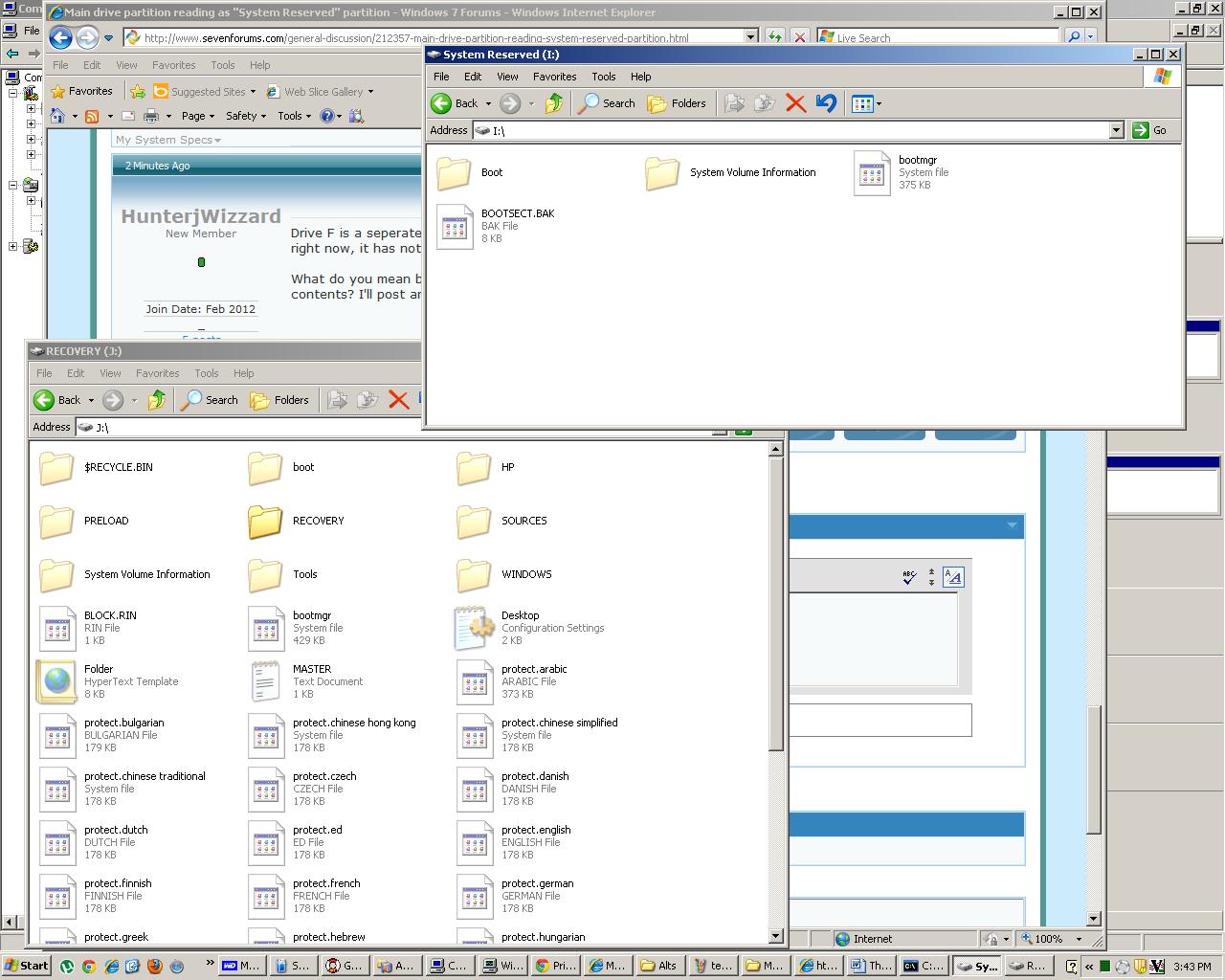
Also, can you post a screenshot from Windows Explorer (or equivalent) showing the contents of the two partitions I and J?
 

My Computer My Computer

At a glance

Windows 7 Pro x64 (1), Win7 Pro X64 (2)i5-3350p 3.1Ghz/6MB-cache (1); E8400 3.0Ghz/6...8GB PC3-12800 DDR3 (1); 4GB PC3-10600 DDR3 (2)ATI HD7750 (1), (see TV cards); ATI R7 250 (2)
Computer type
PC/Desktop
Computer Manufacturer/Model Number
Home-built, two systems (1) and (2)
OS
Windows 7 Pro x64 (1), Win7 Pro X64 (2)
CPU
i5-3350p 3.1Ghz/6MB-cache (1); E8400 3.0Ghz/6MB-cache (2)
Motherboard
ASUS P8Z77-V Pro (1); ASUS P5Q3 (2)
Memory
8GB PC3-12800 DDR3 (1); 4GB PC3-10600 DDR3 (2)
Graphics Card(s)
ATI HD7750 (1), (see TV cards); ATI R7 250 (2)
Sound Card
Realtek ALC892 HD Audio (1); Realtek ALC1200 HD Audio (2)
Monitor(s) Displays
Eizo HD2441W LCD, Eizo S2433W (1); Eizo 24" S2433W (2)
Screen Resolution
1920x1200, 1920x1200 (1); 1920x1200 (2)
Hard Drives
(1) 1TB SATA-II (7200RPM), 2x2TB SATA-III (7200RPM), 250GB SATA-III (10000RPM) for OS; 2x2TB external USB 3.0

(2) 320GB SATA-II (7200RPM), 750GB SATA-II (7200RPM), 150GB SATA-II (10000RPM) for OS; 2TB external USB 3.0
PSU
Nesteq ECS-6001 600W (1); Nesteq ECS-5001 500W (2)
Case
Acousti-Case 360 (1) and (2)
Cooling
Noctua NH-U12P SE2 for CPU, 2x120mm case fans (1) and (2)
Keyboard
IBM PS/2 (1) and (2)
Mouse
Logitech MX Revolution wireless (1); Microsoft wired (2)
Internet Speed
100mbps down / 10mbps up
Antivirus
Microsoft Security Essentials; Malwarebyte Anti-Malware Pro
Browser
Firefox
Other Info
Ceton InfiniTV 4-tuner cablecard-enabled TV card as well as Hauppauge HVR-2250 OTA/ATSC 2-tuner TV card in (1), running under Win7 WMC
te2.JPG


There ya go, hope thats a little more helpful. Basically, as far as my understanding, Disk 3 should have 3 partitions on it instead of two. Also that partiton should have a lot more on it, according to the user he had about 80 gigs free beforehand.
 

My Computer My Computer

At a glance

_
OS
_
What shows as F, with no file system on it... is that a Linux partition or what? It's "active", so I'm assuming that's what your BIOS is booting to. So what's on it???

Also, I edited my post after you saw it, but if would be very helpful if you could post a screenshot of your I and J partitions as presented by Windows Explorer (or Free commander, or whatever).
 

My Computer My Computer

At a glance

Windows 7 Pro x64 (1), Win7 Pro X64 (2)i5-3350p 3.1Ghz/6MB-cache (1); E8400 3.0Ghz/6...8GB PC3-12800 DDR3 (1); 4GB PC3-10600 DDR3 (2)ATI HD7750 (1), (see TV cards); ATI R7 250 (2)
Computer type
PC/Desktop
Computer Manufacturer/Model Number
Home-built, two systems (1) and (2)
OS
Windows 7 Pro x64 (1), Win7 Pro X64 (2)
CPU
i5-3350p 3.1Ghz/6MB-cache (1); E8400 3.0Ghz/6MB-cache (2)
Motherboard
ASUS P8Z77-V Pro (1); ASUS P5Q3 (2)
Memory
8GB PC3-12800 DDR3 (1); 4GB PC3-10600 DDR3 (2)
Graphics Card(s)
ATI HD7750 (1), (see TV cards); ATI R7 250 (2)
Sound Card
Realtek ALC892 HD Audio (1); Realtek ALC1200 HD Audio (2)
Monitor(s) Displays
Eizo HD2441W LCD, Eizo S2433W (1); Eizo 24" S2433W (2)
Screen Resolution
1920x1200, 1920x1200 (1); 1920x1200 (2)
Hard Drives
(1) 1TB SATA-II (7200RPM), 2x2TB SATA-III (7200RPM), 250GB SATA-III (10000RPM) for OS; 2x2TB external USB 3.0

(2) 320GB SATA-II (7200RPM), 750GB SATA-II (7200RPM), 150GB SATA-II (10000RPM) for OS; 2TB external USB 3.0
PSU
Nesteq ECS-6001 600W (1); Nesteq ECS-5001 500W (2)
Case
Acousti-Case 360 (1) and (2)
Cooling
Noctua NH-U12P SE2 for CPU, 2x120mm case fans (1) and (2)
Keyboard
IBM PS/2 (1) and (2)
Mouse
Logitech MX Revolution wireless (1); Microsoft wired (2)
Internet Speed
100mbps down / 10mbps up
Antivirus
Microsoft Security Essentials; Malwarebyte Anti-Malware Pro
Browser
Firefox
Other Info
Ceton InfiniTV 4-tuner cablecard-enabled TV card as well as Hauppauge HVR-2250 OTA/ATSC 2-tuner TV card in (1), running under Win7 WMC
Drive F is a seperate unrelated drive I am presently doing data recovery on for ANOTHER person right now, it has nothing to do with this problem.

What do you mean by a screenshot of I and J in Windows Explorer? Like open the drives and look at their contents? I'll post anything if it'll help.
 

My Computer My Computer

At a glance

_
OS
_
te3.JPG


I had to show hidden files to get it to display anything at all. This is really bizare, its like its reverterted to factory defaults somehow.
 

My Computer My Computer

At a glance

_
OS
_
Drive F is a seperate unrelated drive I am presently doing data recovery on for ANOTHER person right now, it has nothing to do with this problem.
Well I'm puzzled. The F partition shows as "active", and yet there's no file system on it. But that's where the BIOS should be going at boot time, to find some kind of boot manager files, assuming that drive is listed first in the boot sequence of your machine's BIOS.

Your C-partition shows as the Win7 "system" partition, but it's not "active". So the BIOS would not go to that drive and discover the partition to boot through, at boot time.

So, what is the hard drive shown in the BIOS boot sequence of your machine? Which of your drives is in that list first? That's where there should also be an "active" partition. But your C-partition is not shown as active.

So I'm confused as to how your machine boots.


What do you mean by a screenshot of I and J in Windows Explorer? Like open the drives and look at their contents? I'll post anything if it'll help.
Yes, that's what I mean.

I just want to see the contents of what is currently that large partition labeled "system reserved" (although the label is irrelevant). And also of that other "recovery" partition which you said you deleted some time back.

Just open each drive, set the "view" to "details" (or even "list" would work) and take a screenshot.
 

My Computer My Computer

At a glance

Windows 7 Pro x64 (1), Win7 Pro X64 (2)i5-3350p 3.1Ghz/6MB-cache (1); E8400 3.0Ghz/6...8GB PC3-12800 DDR3 (1); 4GB PC3-10600 DDR3 (2)ATI HD7750 (1), (see TV cards); ATI R7 250 (2)
Computer type
PC/Desktop
Computer Manufacturer/Model Number
Home-built, two systems (1) and (2)
OS
Windows 7 Pro x64 (1), Win7 Pro X64 (2)
CPU
i5-3350p 3.1Ghz/6MB-cache (1); E8400 3.0Ghz/6MB-cache (2)
Motherboard
ASUS P8Z77-V Pro (1); ASUS P5Q3 (2)
Memory
8GB PC3-12800 DDR3 (1); 4GB PC3-10600 DDR3 (2)
Graphics Card(s)
ATI HD7750 (1), (see TV cards); ATI R7 250 (2)
Sound Card
Realtek ALC892 HD Audio (1); Realtek ALC1200 HD Audio (2)
Monitor(s) Displays
Eizo HD2441W LCD, Eizo S2433W (1); Eizo 24" S2433W (2)
Screen Resolution
1920x1200, 1920x1200 (1); 1920x1200 (2)
Hard Drives
(1) 1TB SATA-II (7200RPM), 2x2TB SATA-III (7200RPM), 250GB SATA-III (10000RPM) for OS; 2x2TB external USB 3.0

(2) 320GB SATA-II (7200RPM), 750GB SATA-II (7200RPM), 150GB SATA-II (10000RPM) for OS; 2TB external USB 3.0
PSU
Nesteq ECS-6001 600W (1); Nesteq ECS-5001 500W (2)
Case
Acousti-Case 360 (1) and (2)
Cooling
Noctua NH-U12P SE2 for CPU, 2x120mm case fans (1) and (2)
Keyboard
IBM PS/2 (1) and (2)
Mouse
Logitech MX Revolution wireless (1); Microsoft wired (2)
Internet Speed
100mbps down / 10mbps up
Antivirus
Microsoft Security Essentials; Malwarebyte Anti-Malware Pro
Browser
Firefox
Other Info
Ceton InfiniTV 4-tuner cablecard-enabled TV card as well as Hauppauge HVR-2250 OTA/ATSC 2-tuner TV card in (1), running under Win7 WMC
There ya go, hope thats a little more helpful. Basically, as far as my understanding, Disk 3 should have 3 partitions on it instead of two. Also that partiton should have a lot more on it, according to the user he had about 80 gigs free beforehand.
What's very curious is that the upper-part of the DISKMGMT display shows that I ("system reserved") partition as its normal expected 100MB size, with 3/4 of it free. That's right, since the BOOTMGR program isn't large. Actually I would also have expected to see a BOOT.INI file there and it's not, but the upper display seems reasonable... if that truly were a "system reserved" partition. Plus, it's "active", which again is consistent.

As to why the lower part of the GUI presentation appears as it does, well that's quite a mystery.

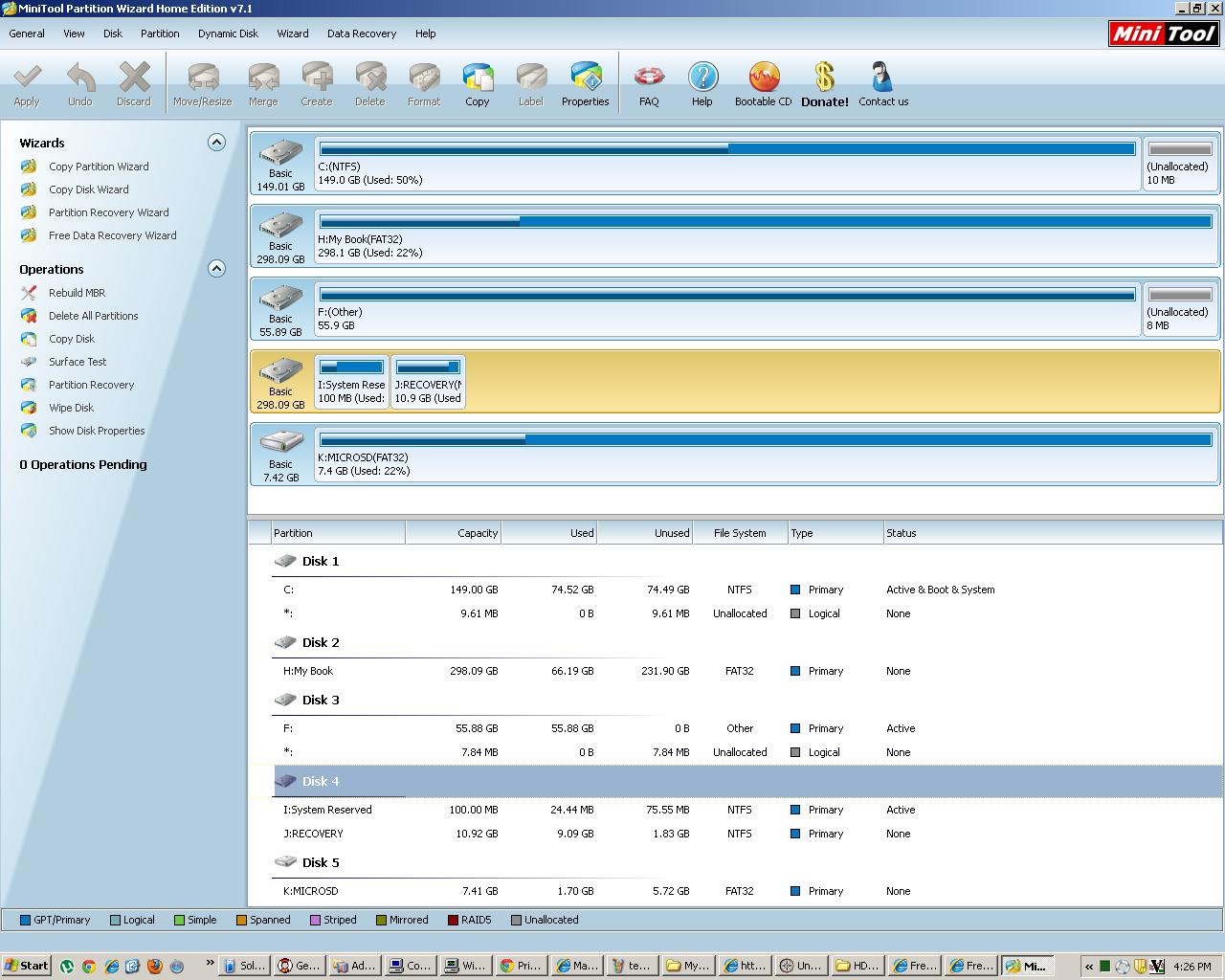
Just in passing, do you have Partition Wizard available? If not, please download and install the free Home Edition. You can also download and burn the ISO for standalone boot CD, but that's for another time. Just for now I'd like to see you run the installed Win7 version of PW and post a screenshot of what it thinks is on that drive and those two partitions.

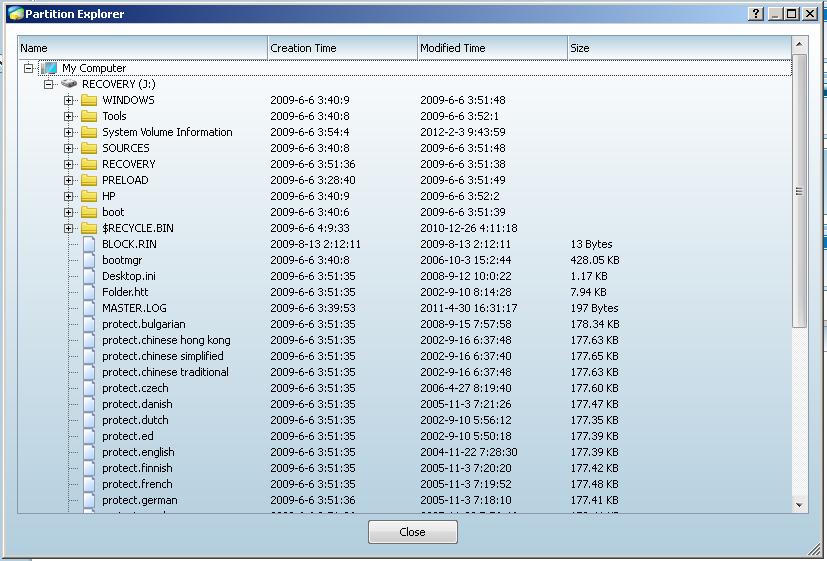
Also, PW has an "explore partition" function (on the left side), so if you could also click on that for each I and J and post screenshots, I'm most curious as to what the very smart Partition Wizard has to say about these two partitions.
 

My Computer My Computer

At a glance

Windows 7 Pro x64 (1), Win7 Pro X64 (2)i5-3350p 3.1Ghz/6MB-cache (1); E8400 3.0Ghz/6...8GB PC3-12800 DDR3 (1); 4GB PC3-10600 DDR3 (2)ATI HD7750 (1), (see TV cards); ATI R7 250 (2)
Computer type
PC/Desktop
Computer Manufacturer/Model Number
Home-built, two systems (1) and (2)
OS
Windows 7 Pro x64 (1), Win7 Pro X64 (2)
CPU
i5-3350p 3.1Ghz/6MB-cache (1); E8400 3.0Ghz/6MB-cache (2)
Motherboard
ASUS P8Z77-V Pro (1); ASUS P5Q3 (2)
Memory
8GB PC3-12800 DDR3 (1); 4GB PC3-10600 DDR3 (2)
Graphics Card(s)
ATI HD7750 (1), (see TV cards); ATI R7 250 (2)
Sound Card
Realtek ALC892 HD Audio (1); Realtek ALC1200 HD Audio (2)
Monitor(s) Displays
Eizo HD2441W LCD, Eizo S2433W (1); Eizo 24" S2433W (2)
Screen Resolution
1920x1200, 1920x1200 (1); 1920x1200 (2)
Hard Drives
(1) 1TB SATA-II (7200RPM), 2x2TB SATA-III (7200RPM), 250GB SATA-III (10000RPM) for OS; 2x2TB external USB 3.0

(2) 320GB SATA-II (7200RPM), 750GB SATA-II (7200RPM), 150GB SATA-II (10000RPM) for OS; 2TB external USB 3.0
PSU
Nesteq ECS-6001 600W (1); Nesteq ECS-5001 500W (2)
Case
Acousti-Case 360 (1) and (2)
Cooling
Noctua NH-U12P SE2 for CPU, 2x120mm case fans (1) and (2)
Keyboard
IBM PS/2 (1) and (2)
Mouse
Logitech MX Revolution wireless (1); Microsoft wired (2)
Internet Speed
100mbps down / 10mbps up
Antivirus
Microsoft Security Essentials; Malwarebyte Anti-Malware Pro
Browser
Firefox
Other Info
Ceton InfiniTV 4-tuner cablecard-enabled TV card as well as Hauppauge HVR-2250 OTA/ATSC 2-tuner TV card in (1), running under Win7 WMC
Curiously, the 298.09GB size of this mysterious Disk3 shown in the lower part is actually the same size as that of your My Book external drive.

Might be a WinXP oddity.

I'd be more inclined to trust Partition Wizard under any circumstances. Awaiting your screenshots from PW.
 

My Computer My Computer

At a glance

Windows 7 Pro x64 (1), Win7 Pro X64 (2)i5-3350p 3.1Ghz/6MB-cache (1); E8400 3.0Ghz/6...8GB PC3-12800 DDR3 (1); 4GB PC3-10600 DDR3 (2)ATI HD7750 (1), (see TV cards); ATI R7 250 (2)
Computer type
PC/Desktop
Computer Manufacturer/Model Number
Home-built, two systems (1) and (2)
OS
Windows 7 Pro x64 (1), Win7 Pro X64 (2)
CPU
i5-3350p 3.1Ghz/6MB-cache (1); E8400 3.0Ghz/6MB-cache (2)
Motherboard
ASUS P8Z77-V Pro (1); ASUS P5Q3 (2)
Memory
8GB PC3-12800 DDR3 (1); 4GB PC3-10600 DDR3 (2)
Graphics Card(s)
ATI HD7750 (1), (see TV cards); ATI R7 250 (2)
Sound Card
Realtek ALC892 HD Audio (1); Realtek ALC1200 HD Audio (2)
Monitor(s) Displays
Eizo HD2441W LCD, Eizo S2433W (1); Eizo 24" S2433W (2)
Screen Resolution
1920x1200, 1920x1200 (1); 1920x1200 (2)
Hard Drives
(1) 1TB SATA-II (7200RPM), 2x2TB SATA-III (7200RPM), 250GB SATA-III (10000RPM) for OS; 2x2TB external USB 3.0

(2) 320GB SATA-II (7200RPM), 750GB SATA-II (7200RPM), 150GB SATA-II (10000RPM) for OS; 2TB external USB 3.0
PSU
Nesteq ECS-6001 600W (1); Nesteq ECS-5001 500W (2)
Case
Acousti-Case 360 (1) and (2)
Cooling
Noctua NH-U12P SE2 for CPU, 2x120mm case fans (1) and (2)
Keyboard
IBM PS/2 (1) and (2)
Mouse
Logitech MX Revolution wireless (1); Microsoft wired (2)
Internet Speed
100mbps down / 10mbps up
Antivirus
Microsoft Security Essentials; Malwarebyte Anti-Malware Pro
Browser
Firefox
Other Info
Ceton InfiniTV 4-tuner cablecard-enabled TV card as well as Hauppauge HVR-2250 OTA/ATSC 2-tuner TV card in (1), running under Win7 WMC
Ok, most of what you're looking at and commenting on are drives that are unrelated. The only hard drive that's important here is Disk 3, I currently have it plugged in to my workstation which is running Windows XP.

Disk 3 is the only disk that is important here, ignore the rest. Just Disk 3 and the I:\ and J:\ drives.
 

My Computer My Computer

At a glance

_
OS
_
Ok, most of what you're looking at and commenting on are drives that are unrelated. The only hard drive that's important here is Disk 3, I currently have it plugged in to my workstation which is running Windows XP.

Disk 3 is the only disk that is important here, ignore the rest. Just Disk 3 and the I:\ and J:\ drives.
I understand that it is Disk3 to be concentrated on. But the other anomalies in the display are just that... anomalies, and should at least be noticed and commented on.

Do you have that Disk3 plugged in through a USB adapter? I'm still trying to guess as to where the DISKMGMT confusion is coming from, since your MyBook drive is also 298.09GB just like the claim for this problem drive.

How big is the problem Disk3 drive for real?

Can you install Partition Wizard and open it, and post the screenshot of what it thinks of your drives? And also the "explore partition" function from it for each of the two partitions, to contrast against what Windows Explorer in WinXP claimed for I and J.
 

My Computer My Computer

At a glance

Windows 7 Pro x64 (1), Win7 Pro X64 (2)i5-3350p 3.1Ghz/6MB-cache (1); E8400 3.0Ghz/6...8GB PC3-12800 DDR3 (1); 4GB PC3-10600 DDR3 (2)ATI HD7750 (1), (see TV cards); ATI R7 250 (2)
Computer type
PC/Desktop
Computer Manufacturer/Model Number
Home-built, two systems (1) and (2)
OS
Windows 7 Pro x64 (1), Win7 Pro X64 (2)
CPU
i5-3350p 3.1Ghz/6MB-cache (1); E8400 3.0Ghz/6MB-cache (2)
Motherboard
ASUS P8Z77-V Pro (1); ASUS P5Q3 (2)
Memory
8GB PC3-12800 DDR3 (1); 4GB PC3-10600 DDR3 (2)
Graphics Card(s)
ATI HD7750 (1), (see TV cards); ATI R7 250 (2)
Sound Card
Realtek ALC892 HD Audio (1); Realtek ALC1200 HD Audio (2)
Monitor(s) Displays
Eizo HD2441W LCD, Eizo S2433W (1); Eizo 24" S2433W (2)
Screen Resolution
1920x1200, 1920x1200 (1); 1920x1200 (2)
Hard Drives
(1) 1TB SATA-II (7200RPM), 2x2TB SATA-III (7200RPM), 250GB SATA-III (10000RPM) for OS; 2x2TB external USB 3.0

(2) 320GB SATA-II (7200RPM), 750GB SATA-II (7200RPM), 150GB SATA-II (10000RPM) for OS; 2TB external USB 3.0
PSU
Nesteq ECS-6001 600W (1); Nesteq ECS-5001 500W (2)
Case
Acousti-Case 360 (1) and (2)
Cooling
Noctua NH-U12P SE2 for CPU, 2x120mm case fans (1) and (2)
Keyboard
IBM PS/2 (1) and (2)
Mouse
Logitech MX Revolution wireless (1); Microsoft wired (2)
Internet Speed
100mbps down / 10mbps up
Antivirus
Microsoft Security Essentials; Malwarebyte Anti-Malware Pro
Browser
Firefox
Other Info
Ceton InfiniTV 4-tuner cablecard-enabled TV card as well as Hauppauge HVR-2250 OTA/ATSC 2-tuner TV card in (1), running under Win7 WMC
Here is the Partiton Wizard screen shot:

te4.JPG


Very useful program, that. It looks like its just not showing the main partition at all.

The anomolies are because I'm multi-tasking quite a bit, I have at least 3 unrelited crisis going at any given time. The problem drive(disk 3) is plugged in via a USB adapter and exhibits the exact same behavior and every computer tried so far. It is actually a 298gb drive(sheer coincidence that its the same size as athe mybook, and it was having this issue before being plugged into the same machine)
 

My Computer My Computer

At a glance

_
OS
_
I:\

teh5.JPG


J:\

teh6.JPG


Partition Wizard seems to reveal a few fun facts, mainly the big partiton with everything on it just appears to be missing entirely!
 

My Computer My Computer

At a glance

_
OS
_
Stratching my head, I don't know whats going on.

If you look at the screenshot in Post #6 Disk Management has conflicting info for Drive I: between whats written at the top and whats shown at the bottom (Size).

EDIT: Opps didn't see the second page of the thread.
 
Last edited:

My Computer My Computer

At a glance

Windows 7 Ultimate x64Intel Pentium Dual Core E5200 2.5GHz (3.77GHz...Corsair 4GB DDR2 (4x1GB CM2X1024-6400C4)Palit GeForce GTS 250 (1024MB)
Computer Manufacturer/Model Number
Self built
OS
Windows 7 Ultimate x64
CPU
Intel Pentium Dual Core E5200 2.5GHz (3.77GHz OC)
Motherboard
Asus P5Q-E
Memory
Corsair 4GB DDR2 (4x1GB CM2X1024-6400C4)
Graphics Card(s)
Palit GeForce GTS 250 (1024MB)
Sound Card
On Board (ADI AD2000B 8ch HD)
Monitor(s) Displays
Samsung 32in LCD TV
Screen Resolution
1360x768
Hard Drives
2 x 1TB Samsung 103SJ (Raid0)
2 x External 500GB Samsung 502IJ (NexStar 3 HD Enclosures)
PSU
550W Antec Neo HE 550
Case
Antec P180
Cooling
Xigmatex Red Scorpion CPU Cooler. 3x120mm Fans
Keyboard
Logitech MX5000 Laser (Combo)
Mouse
Logitech MX5000 Laser (Combo)
Internet Speed
ADSL2+ (avg 10 Mbps Down, 0.80 Mbps up)
Other Info
Gigabyte GN-WP01GS 54g Wireless Lan Card
Partition Wizard seems to reveal a few fun facts, mainly the big partiton with everything on it just appears to be missing entirely!
EDIT: never mind about the "orange" comments from earlier. The "selected" drive is always an orange background. It has nothing to do with "spanned", which would be an orange partition... not an orange background. Sorry for the confusion. Please disregard my comments above.


Nevertheless, it sure does look like the two partitions are truly (I) "system reserved", and (J) "recovery partition". The real OS partition, if it was supposed to be in the rest of the space on that drive... well, it just looks like it's gone.

I mean it's GONE! Doesn't even show the rest of that 298GB drive as "unallocated"! Very odd.


Now, Partition Wizard does also have a "partition recovery wizard" on the left side of the screen. It is pretty clever at actually resuscitating a disappeared or corrupted partition, if possible.

It won't do anything for real unless you give it the go-ahead, but you might select that Disk3 drive in the PW GUI and then click on the "partition recovery" function on the left, and see what develops and/or what it finds and suggests.
 

My Computer My Computer

At a glance

Windows 7 Pro x64 (1), Win7 Pro X64 (2)i5-3350p 3.1Ghz/6MB-cache (1); E8400 3.0Ghz/6...8GB PC3-12800 DDR3 (1); 4GB PC3-10600 DDR3 (2)ATI HD7750 (1), (see TV cards); ATI R7 250 (2)
Computer type
PC/Desktop
Computer Manufacturer/Model Number
Home-built, two systems (1) and (2)
OS
Windows 7 Pro x64 (1), Win7 Pro X64 (2)
CPU
i5-3350p 3.1Ghz/6MB-cache (1); E8400 3.0Ghz/6MB-cache (2)
Motherboard
ASUS P8Z77-V Pro (1); ASUS P5Q3 (2)
Memory
8GB PC3-12800 DDR3 (1); 4GB PC3-10600 DDR3 (2)
Graphics Card(s)
ATI HD7750 (1), (see TV cards); ATI R7 250 (2)
Sound Card
Realtek ALC892 HD Audio (1); Realtek ALC1200 HD Audio (2)
Monitor(s) Displays
Eizo HD2441W LCD, Eizo S2433W (1); Eizo 24" S2433W (2)
Screen Resolution
1920x1200, 1920x1200 (1); 1920x1200 (2)
Hard Drives
(1) 1TB SATA-II (7200RPM), 2x2TB SATA-III (7200RPM), 250GB SATA-III (10000RPM) for OS; 2x2TB external USB 3.0

(2) 320GB SATA-II (7200RPM), 750GB SATA-II (7200RPM), 150GB SATA-II (10000RPM) for OS; 2TB external USB 3.0
PSU
Nesteq ECS-6001 600W (1); Nesteq ECS-5001 500W (2)
Case
Acousti-Case 360 (1) and (2)
Cooling
Noctua NH-U12P SE2 for CPU, 2x120mm case fans (1) and (2)
Keyboard
IBM PS/2 (1) and (2)
Mouse
Logitech MX Revolution wireless (1); Microsoft wired (2)
Internet Speed
100mbps down / 10mbps up
Antivirus
Microsoft Security Essentials; Malwarebyte Anti-Malware Pro
Browser
Firefox
Other Info
Ceton InfiniTV 4-tuner cablecard-enabled TV card as well as Hauppauge HVR-2250 OTA/ATSC 2-tuner TV card in (1), running under Win7 WMC
I'm running a recovery option from Partition Wizard now, it looks like its found the missing partition and is showing it as lost or deleted, I think that may be the issue.

Edit: the drive is showing up as orange because I have it selected in the screenshot, just in case you were curious.
 

My Computer My Computer

At a glance

_
OS
_
Ok, Now we're getting somewhere:

te7.JPG


Thats the result of a "quick" scan. It will not allow me to select all 3 partitions, however. I can either select the 2 existing partitions or the 3rd discovered partition, so either way its telling me its going to delete some partitions.

Thanks for the help so far by the way, its progress.
 

My Computer My Computer

At a glance

_
OS
_
Back
Top