Windows.old Folder - Delete

How to Delete the Windows.old Folder in Windows 7

   Information
If you performed repair install, upgrade install, or a custom install without formatting the drive for a clean install and selected to install Windows 7 on the same partition of the previous Windows installation, then you may have a C:\Windows.old folder left over in your new installation.

If you already had a C:\Windows.old folder in the installation that you performed a repair install, upgrade install, or a custom install on, then it would be renamed to say C:\Windows.old.000 (older previous installation) in addition to the C:\Windows.old folder. The most recent previous installation will always be in the C:\Windows.old folder.

This will show you how to delete the Windows.old folder(s) generated during the installation to free up the hard drive space that the Windows.old folder(s) takes.
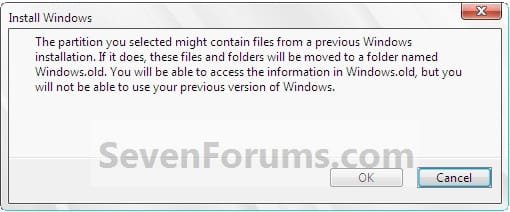
Install.jpg

   Note
The C:\Windows.old folder contains folders and files from the previous Windows installation. Be sure to copy any files or data that you may still want to keep to another location before deleting this folder.
   Tip
For how to

restore a Windows 7-based computer to a previous Windows installation by using the Windows.old folder, see: How to restore a Windows 7-based computer to a previous Windows installation by using the Windows.old folder
   Warning
Be sure to copy any files that you want out of the Windows.old folder before you delete it. Once deleted, they are gone.

You must logged in as an administrator to be able to do the steps in this tutorial.


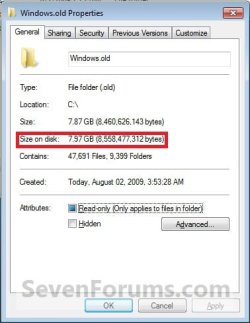
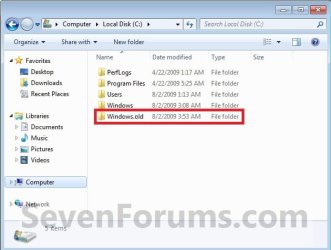
EXAMPLE: Windows.old Folder
NOTE: Notice how much space this folder uses.
Windows7-1.jpgWindows7-1B.jpg


OPTION ONE

Delete "Windows.old" Folder Using Disk Cleanup


1. Open Disk Cleanup.
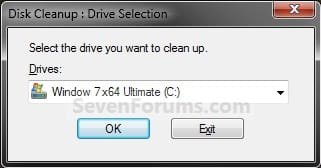
2. If prompted, select the Windows 7 C: drive, and click on OK. (see screenshot below)
NOTE: You will only see this if you have more than one HDD or partition with a drive letter.
Step1.jpg
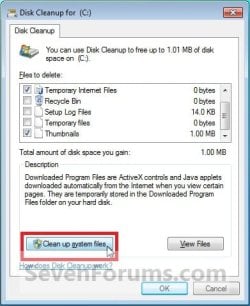
3. Click on the Clean up system files button. (see screenshot below)
Windows7-2.jpg
4. If prompted by UAC, then click on Yes.

5. Repeat step 2 above.

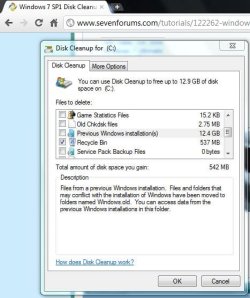
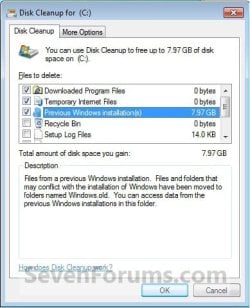
6. Check the Previous Windows installations box, and click on OK. (see screenshot below)
Windows7-3.jpg
7. Click on Delete Files. (see screenshot below)
Windows7-4.jpg
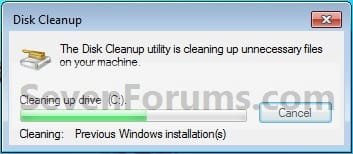
8. When Disk Cleanup finishes, the C:\Windows.old folder(s) will be deleted.
Windows7-5.jpg


OPTION TWO

Delete "Windows.old" Folder Using Elevated Command Prompt


1. Open a Elevated command prompt.

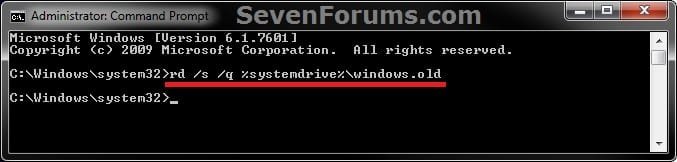
2. In the elevated command prompt, copy and paste the command below, and press Enter. (see screenshot below)
NOTE: If you had another say windows.old.000 folder that you also wanted to delete, then you could repeat this command substituting that name instead to also delete it.
RD /S /Q %SystemDrive%\windows.old
ELVTD_CMD.jpg
3. Close the command prompt.


OPTION THREE

Delete "Windows.old" Folder Using Command Prompt at Boot


NOTE: This would be a good option to do if OPTION ONE or OPTION TWO was unable to delete your C:\Windows.old folder.
1. Open the Disk Management (diskmgmt.msc), and make note of the name (ex: none) and total size (ex: 126 GB) of your Windows 7 drive. (see screenshot below)
NOTE: You will need to know this in step 3C.
Disk_Mangement.jpg
2. Using either you Windows 7 installation DVD or system repair disc, boot to a command prompt at boot (click on link for how).

3. To Verify the Windows 7 Drive Letter at Boot
NOTE: The Windows 7 drive letter may not always be C: at boot like it is while Windows is started, so be sure to verify it's drive letter before doing the command in step 4 for it to work.
A) In the command prompt, type diskpart and press enter. (see screenshot below)

B) In the command prompt, type list volume and press enter. (see screenshot below)

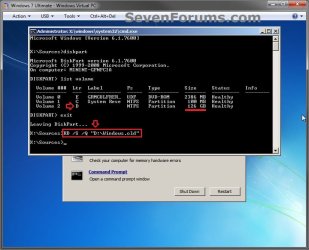
C) From the listed volumes, look for and verify the drive letter (ex: D: ) of your Windows 7 drive (ex: 126 GB w/ no name). (see screenshot below)

D) In the command prompt, type exit and press enter. (see screenshot below)
CMD-1.jpg
4. To Delete the "Windows.old" Folder
A) In the command prompt, type the command below and press enter. (see screenshot below)
NOTE: Be sure to substitute D in the command below with the actual drive letter of your Windows 7 drive as displayed from step 3 above instead. If you had another say windows.old.000 folder that you also want to delete, then you could repeat this command substituting that name instead of Windows.old to also delete it.
RD /S /Q "D:\Windows.old"
B) Close the command prompt window.
CMD-2.jpg
5. Click on the Restart button to restart the computer and start Windows 7, and to verify that the Windows.old folder has been deleted.
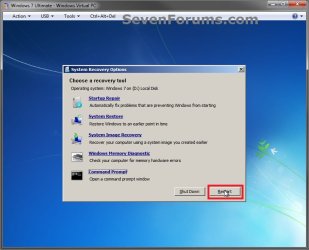
CMD-3.jpg
That's it,
Shawn


Last edited:
Shawn,
Thanks. I had meant to say RD rather than delete, which as you pointed out doesn't have the force option.

My real question was whether I could simply by logging in under an administrative account, running cmd as administrator, get rid of windows.old using RD. If I had one on this laptop, I'd try myself. Just didn't know whether this wasn't a feasibility.

Sure, it should also delete the folder unless it had some sort of "in use" or permissions issue. I added it as OPTION TWO to help. If it's not able to, then OPTION THREE should be able to. :)
 
Last edited:

My Computer

Computer type
PC/Desktop
Computer Manufacturer/Model Number
Self built custom
OS
64-bit Windows 11 Pro for Workstations
CPU
Intel i7-8700K OC'd to 5 GHz
Motherboard
ASUS ROG Maximus XI Formula Z390
Memory
64 GB (4x16GB) G.SKILL TridentZ RGB DDR4 3600 MHz
Graphics Card(s)
ASUS ROG-STRIX-GTX1080TI-O11G-GAMING
Sound Card
Integrated
Monitor(s) Displays
2 x Samsung Odyssey G7 27"
Screen Resolution
2560x1440
Hard Drives
1TB Samsung 990 PRO M.2,
4TB Samsung 990 PRO PRO M.2,
TerraMaster F8 SSD Plus NAS
PSU
Seasonic Prime Titanium 850W
Case
Thermaltake Core P3
Cooling
Corsair Hydro H115i
Keyboard
Logitech wireless K800
Mouse
Logitech MX Master 4
Internet Speed
2 Gb/s Download and 100 Mb/s Upload
Antivirus
Malwarebyte Anti-Malware Premium
Browser
Google Chrome
Other Info
Logitech Z625 speaker system,
Logitech BRIO 4K Pro webcam,
HP Color LaserJet Pro MFP M477fdn,
APC SMART-UPS RT 1000 XL - SURT1000XLI,
Galaxy S23 Plus phone
Shawn,
Thanks. Now I've got to find someone with a windows.old folder who has saved out everything they need and see what damage I can do.
karl
 

My Computer

Computer Manufacturer/Model Number
Toshiba Satellite S875D-S7239 laptop
OS
MS Windows 7 Ultimate SP1 64-bit
CPU
AMD A10-4600M
Motherboard
AMD Pumori (Socket FT1)
Memory
6.00 GB Dual-Channel DDR3 @ 798MHz (11-11-12-28)
Graphics Card(s)
AMD Radeon HD 7660G
Sound Card
High Definition Audio Device
Monitor(s) Displays
Generic PnP Monitor (1600x900@60Hz)
Screen Resolution
1600x900@60Hz
Hard Drives
SSD 119GB Corsair CSSD-V128GB2 ATA Device
Keyboard
Standard PS/2 Keyboard
Mouse
HP Wireless Optical Mobile Mouse Model FHA-3410
Internet Speed
What the local pub, local coffee shop offers.
Other Info
Optical Drive:MATSHITA BD-CMB UJ160B ATA Device


Also have an Asus ha1002xp netbook with Win 7 Ultimate installed.
LOL. :devil:
 

My Computer

Computer type
PC/Desktop
Computer Manufacturer/Model Number
Self built custom
OS
64-bit Windows 11 Pro for Workstations
CPU
Intel i7-8700K OC'd to 5 GHz
Motherboard
ASUS ROG Maximus XI Formula Z390
Memory
64 GB (4x16GB) G.SKILL TridentZ RGB DDR4 3600 MHz
Graphics Card(s)
ASUS ROG-STRIX-GTX1080TI-O11G-GAMING
Sound Card
Integrated
Monitor(s) Displays
2 x Samsung Odyssey G7 27"
Screen Resolution
2560x1440
Hard Drives
1TB Samsung 990 PRO M.2,
4TB Samsung 990 PRO PRO M.2,
TerraMaster F8 SSD Plus NAS
PSU
Seasonic Prime Titanium 850W
Case
Thermaltake Core P3
Cooling
Corsair Hydro H115i
Keyboard
Logitech wireless K800
Mouse
Logitech MX Master 4
Internet Speed
2 Gb/s Download and 100 Mb/s Upload
Antivirus
Malwarebyte Anti-Malware Premium
Browser
Google Chrome
Other Info
Logitech Z625 speaker system,
Logitech BRIO 4K Pro webcam,
HP Color LaserJet Pro MFP M477fdn,
APC SMART-UPS RT 1000 XL - SURT1000XLI,
Galaxy S23 Plus phone
How safe is this? I didn't realize I have almost 12.4 GB worth of files in the Previous Windows Installation Folder. I think most of those are Vista files though. I can't recall if I ever had XP on my laptop.
 

Attachments

  • prvs windows installation.JPG
    prvs windows installation.JPG
    59.8 KB · Views: 369

My Computer

Computer Manufacturer/Model Number
Dell Inspiron E 1505
OS
Windows 7 Professional 32 Bit
CPU
Genuine Intel(R) CPU T2080 @ 1.73GHz 1.73 GHz
Motherboard
DELL
Memory
2GB
Graphics Card(s)
ATI Mobility Radeon X1400
Sound Card
High Definition Audio Device
Screen Resolution
1280 by 800
Hard Drives
136 GB
Recovery 10 GB
Hello Pragnesh,

Yes, this will be for the C:\Windows.old folder that contains all the files from your previous installation in it. If there's nothing in there that you would like to copy back into Windows 7, then yes it's perfectly safe to have deleted through Disk Cleanup to regain the HDD space it is taking up. :)
 

My Computer

Computer type
PC/Desktop
Computer Manufacturer/Model Number
Self built custom
OS
64-bit Windows 11 Pro for Workstations
CPU
Intel i7-8700K OC'd to 5 GHz
Motherboard
ASUS ROG Maximus XI Formula Z390
Memory
64 GB (4x16GB) G.SKILL TridentZ RGB DDR4 3600 MHz
Graphics Card(s)
ASUS ROG-STRIX-GTX1080TI-O11G-GAMING
Sound Card
Integrated
Monitor(s) Displays
2 x Samsung Odyssey G7 27"
Screen Resolution
2560x1440
Hard Drives
1TB Samsung 990 PRO M.2,
4TB Samsung 990 PRO PRO M.2,
TerraMaster F8 SSD Plus NAS
PSU
Seasonic Prime Titanium 850W
Case
Thermaltake Core P3
Cooling
Corsair Hydro H115i
Keyboard
Logitech wireless K800
Mouse
Logitech MX Master 4
Internet Speed
2 Gb/s Download and 100 Mb/s Upload
Antivirus
Malwarebyte Anti-Malware Premium
Browser
Google Chrome
Other Info
Logitech Z625 speaker system,
Logitech BRIO 4K Pro webcam,
HP Color LaserJet Pro MFP M477fdn,
APC SMART-UPS RT 1000 XL - SURT1000XLI,
Galaxy S23 Plus phone
Yeah I'll just do it. I just checked and it's all vista files from about 5 years ago which I definitely do not need because I AM NOT planning to go back to Vista. In any case, all my important files are always backed up, and even if something happens to my computer, I always prefer to do a Clean install and start from scratch.
 

My Computer

Computer Manufacturer/Model Number
Dell Inspiron E 1505
OS
Windows 7 Professional 32 Bit
CPU
Genuine Intel(R) CPU T2080 @ 1.73GHz 1.73 GHz
Motherboard
DELL
Memory
2GB
Graphics Card(s)
ATI Mobility Radeon X1400
Sound Card
High Definition Audio Device
Screen Resolution
1280 by 800
Hard Drives
136 GB
Recovery 10 GB
Good deal then. :)
 

My Computer

Computer type
PC/Desktop
Computer Manufacturer/Model Number
Self built custom
OS
64-bit Windows 11 Pro for Workstations
CPU
Intel i7-8700K OC'd to 5 GHz
Motherboard
ASUS ROG Maximus XI Formula Z390
Memory
64 GB (4x16GB) G.SKILL TridentZ RGB DDR4 3600 MHz
Graphics Card(s)
ASUS ROG-STRIX-GTX1080TI-O11G-GAMING
Sound Card
Integrated
Monitor(s) Displays
2 x Samsung Odyssey G7 27"
Screen Resolution
2560x1440
Hard Drives
1TB Samsung 990 PRO M.2,
4TB Samsung 990 PRO PRO M.2,
TerraMaster F8 SSD Plus NAS
PSU
Seasonic Prime Titanium 850W
Case
Thermaltake Core P3
Cooling
Corsair Hydro H115i
Keyboard
Logitech wireless K800
Mouse
Logitech MX Master 4
Internet Speed
2 Gb/s Download and 100 Mb/s Upload
Antivirus
Malwarebyte Anti-Malware Premium
Browser
Google Chrome
Other Info
Logitech Z625 speaker system,
Logitech BRIO 4K Pro webcam,
HP Color LaserJet Pro MFP M477fdn,
APC SMART-UPS RT 1000 XL - SURT1000XLI,
Galaxy S23 Plus phone
thanks. got a bit more disc space now
 

My Computer

Computer Manufacturer/Model Number
dell/xps8300
OS
home premium 64 bit
CPU
3.30Ghz
Memory
8 gigs
Graphics Card(s)
NVIDIA Geforce GT 545
Sound Card
realtek onboard
You're welcome Wahrfor, and welcome to Seven Forums. :)
 

My Computer

Computer type
PC/Desktop
Computer Manufacturer/Model Number
Self built custom
OS
64-bit Windows 11 Pro for Workstations
CPU
Intel i7-8700K OC'd to 5 GHz
Motherboard
ASUS ROG Maximus XI Formula Z390
Memory
64 GB (4x16GB) G.SKILL TridentZ RGB DDR4 3600 MHz
Graphics Card(s)
ASUS ROG-STRIX-GTX1080TI-O11G-GAMING
Sound Card
Integrated
Monitor(s) Displays
2 x Samsung Odyssey G7 27"
Screen Resolution
2560x1440
Hard Drives
1TB Samsung 990 PRO M.2,
4TB Samsung 990 PRO PRO M.2,
TerraMaster F8 SSD Plus NAS
PSU
Seasonic Prime Titanium 850W
Case
Thermaltake Core P3
Cooling
Corsair Hydro H115i
Keyboard
Logitech wireless K800
Mouse
Logitech MX Master 4
Internet Speed
2 Gb/s Download and 100 Mb/s Upload
Antivirus
Malwarebyte Anti-Malware Premium
Browser
Google Chrome
Other Info
Logitech Z625 speaker system,
Logitech BRIO 4K Pro webcam,
HP Color LaserJet Pro MFP M477fdn,
APC SMART-UPS RT 1000 XL - SURT1000XLI,
Galaxy S23 Plus phone
You're welcome Wahrfor, and welcome to Seven Forums. :)

Thanks. What a useful place this is for win 7 novices like me
 

My Computer

Computer Manufacturer/Model Number
dell/xps8300
OS
home premium 64 bit
CPU
3.30Ghz
Memory
8 gigs
Graphics Card(s)
NVIDIA Geforce GT 545
Sound Card
realtek onboard
You're most welcome Emman, and welcome to Seven Forums. :)
 

My Computer

Computer type
PC/Desktop
Computer Manufacturer/Model Number
Self built custom
OS
64-bit Windows 11 Pro for Workstations
CPU
Intel i7-8700K OC'd to 5 GHz
Motherboard
ASUS ROG Maximus XI Formula Z390
Memory
64 GB (4x16GB) G.SKILL TridentZ RGB DDR4 3600 MHz
Graphics Card(s)
ASUS ROG-STRIX-GTX1080TI-O11G-GAMING
Sound Card
Integrated
Monitor(s) Displays
2 x Samsung Odyssey G7 27"
Screen Resolution
2560x1440
Hard Drives
1TB Samsung 990 PRO M.2,
4TB Samsung 990 PRO PRO M.2,
TerraMaster F8 SSD Plus NAS
PSU
Seasonic Prime Titanium 850W
Case
Thermaltake Core P3
Cooling
Corsair Hydro H115i
Keyboard
Logitech wireless K800
Mouse
Logitech MX Master 4
Internet Speed
2 Gb/s Download and 100 Mb/s Upload
Antivirus
Malwarebyte Anti-Malware Premium
Browser
Google Chrome
Other Info
Logitech Z625 speaker system,
Logitech BRIO 4K Pro webcam,
HP Color LaserJet Pro MFP M477fdn,
APC SMART-UPS RT 1000 XL - SURT1000XLI,
Galaxy S23 Plus phone
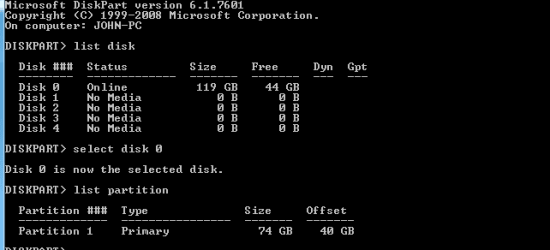
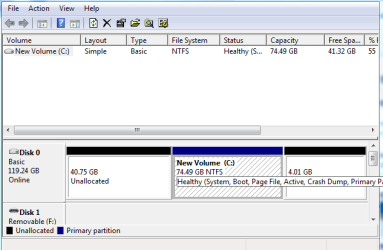
Hiyya Shawn the pain is back I have tried Option one nothing in there re old and option 2 I saw only tow aprtitions so went to 3 and found what is inthe pic. The old is in C: and sorry mate but I don't know what to do next as the others are marked empty.
 

Attachments

  • DISKPART.PNG
    DISKPART.PNG
    15.4 KB · Views: 452
  • DISKPART2.PNG
    DISKPART2.PNG
    33.5 KB · Views: 421

My Computer

Computer type
PC/Desktop
Computer Manufacturer/Model Number
Own build (new) Desk1 / Asus ROG Win 7 / Desk2 1st build
OS
Desk1 7 Home Prem / Desk2 10 Pro / Main lap Asus ROG 10 Pro 2 laptop Toshiba 7 Pro Asus P2520 7 & 10
CPU
Desk1 i5 3750K / Laptop i7 GTX 860M / Desk2 i5 2500
Motherboard
Desk1 Asus P877-V / Desk2 Gigabyte H67 UD3H / Laptop ?
Memory
Desk1 8GB (1866) / Desk2 16GB (1333) / Laptop 8Gb DDR3
Graphics Card(s)
Desk 1& 2NVidia GTX 650 & Laptops on board Intel
Sound Card
Desk 1 & 2 -XONAR DG Realtek High Def audio Laptop
Monitor(s) Displays
Desk 1 Benq HD 2450 / Desk2 Philips 24" / Laptop 17.5"
Screen Resolution
1920x1080 D1 & D2 & Laptop 1
Hard Drives
Desk1 Samsung 120GB 830 SSD
Asus ROG 256GB 850 Pro SSD
Desk2 Samsung 840 256 SSD
Toshiba 120GB EVO
PSU
Desk 1 Corsair HX 1050/ Laptop ? / Desk 2 Corsair HX 650
Case
Desk 1 Cooler HAF XM ? Toshiba laptop / Desk2 Coolermaster
Cooling
Fans on all Desk1 -2 Desk2 - all Coolermasters 5 Laptop ?
Keyboard
Desk 1 MS Sidewinder X6 Desk 2 MS Sidewinder X 4
Mouse
Desk 1&2 - Gigabyte MS 900 gamer - laptop - Logitec wireless
Internet Speed
ADSL2+
Other Info
One other Desktop (tester) and spare Toshba laptop both with SSD's
Running Kaspersky 2016 ISS on all machines config'd identically
Logitec audio stereo systems on each machine (x3)
Canon MG5250MFC
Router/modem TP-Link running WPA2SK
Hello John,

You needed to use list volume instead of list disk in diskpart to see the drive letters. :)

On a more important note though, is that how you wanted your partitions setup with those two separate unallocated spaces on your Disk 0 like that?

Normally, you would delete Disk 0 to make all of it unallocated space, then install Windows 7 to it. Afterwards, you would shrink the Windows 7 partition if you wanted to create any new partitions from it instead.
 

My Computer

Computer type
PC/Desktop
Computer Manufacturer/Model Number
Self built custom
OS
64-bit Windows 11 Pro for Workstations
CPU
Intel i7-8700K OC'd to 5 GHz
Motherboard
ASUS ROG Maximus XI Formula Z390
Memory
64 GB (4x16GB) G.SKILL TridentZ RGB DDR4 3600 MHz
Graphics Card(s)
ASUS ROG-STRIX-GTX1080TI-O11G-GAMING
Sound Card
Integrated
Monitor(s) Displays
2 x Samsung Odyssey G7 27"
Screen Resolution
2560x1440
Hard Drives
1TB Samsung 990 PRO M.2,
4TB Samsung 990 PRO PRO M.2,
TerraMaster F8 SSD Plus NAS
PSU
Seasonic Prime Titanium 850W
Case
Thermaltake Core P3
Cooling
Corsair Hydro H115i
Keyboard
Logitech wireless K800
Mouse
Logitech MX Master 4
Internet Speed
2 Gb/s Download and 100 Mb/s Upload
Antivirus
Malwarebyte Anti-Malware Premium
Browser
Google Chrome
Other Info
Logitech Z625 speaker system,
Logitech BRIO 4K Pro webcam,
HP Color LaserJet Pro MFP M477fdn,
APC SMART-UPS RT 1000 XL - SURT1000XLI,
Galaxy S23 Plus phone
Hello John,

You needed to use list volume instead of list disk in diskpart to see the drive letters. :)

On a more important note though, is that how you wanted your partitions setup with those two separate unallocated spaces on your Disk 0 like that?

Normally, you would delete Disk 0 to make all of it unallocated space, then install Windows 7 to it. Afterwards, you would shrink the Windows 7 partition if you wanted to create any new partitions from it instead.
Ok Shawn I will do that - sorry mate I was trying to rush things before going to work.

I don't know how those partitions came about - I just installed not knowing that the old install would be saved :o So when I saw how the drive was divided up it came as a complete surprise.

I did also ask in another thread re enabling UEFI and I am not sure but because I had the original install (32bit) in IDE and non UEFI perhaps enabling UEFI and ACHI before this install has completely mucked the whole process up. I did suggest in the other thread too that it may be an idea to completely wipe / erase this drive and start from scratch, just as you have just said, because the UEFI is not working anyway.
I don't have anything of any personal use on it as the machine is my tester and I use it mainly for testing out the free apps and different hardware the like
 

My Computer

Computer type
PC/Desktop
Computer Manufacturer/Model Number
Own build (new) Desk1 / Asus ROG Win 7 / Desk2 1st build
OS
Desk1 7 Home Prem / Desk2 10 Pro / Main lap Asus ROG 10 Pro 2 laptop Toshiba 7 Pro Asus P2520 7 & 10
CPU
Desk1 i5 3750K / Laptop i7 GTX 860M / Desk2 i5 2500
Motherboard
Desk1 Asus P877-V / Desk2 Gigabyte H67 UD3H / Laptop ?
Memory
Desk1 8GB (1866) / Desk2 16GB (1333) / Laptop 8Gb DDR3
Graphics Card(s)
Desk 1& 2NVidia GTX 650 & Laptops on board Intel
Sound Card
Desk 1 & 2 -XONAR DG Realtek High Def audio Laptop
Monitor(s) Displays
Desk 1 Benq HD 2450 / Desk2 Philips 24" / Laptop 17.5"
Screen Resolution
1920x1080 D1 & D2 & Laptop 1
Hard Drives
Desk1 Samsung 120GB 830 SSD
Asus ROG 256GB 850 Pro SSD
Desk2 Samsung 840 256 SSD
Toshiba 120GB EVO
PSU
Desk 1 Corsair HX 1050/ Laptop ? / Desk 2 Corsair HX 650
Case
Desk 1 Cooler HAF XM ? Toshiba laptop / Desk2 Coolermaster
Cooling
Fans on all Desk1 -2 Desk2 - all Coolermasters 5 Laptop ?
Keyboard
Desk 1 MS Sidewinder X6 Desk 2 MS Sidewinder X 4
Mouse
Desk 1&2 - Gigabyte MS 900 gamer - laptop - Logitec wireless
Internet Speed
ADSL2+
Other Info
One other Desktop (tester) and spare Toshba laptop both with SSD's
Running Kaspersky 2016 ISS on all machines config'd identically
Logitec audio stereo systems on each machine (x3)
Canon MG5250MFC
Router/modem TP-Link running WPA2SK
there is no option for cleanup system files in disk cleanup... what to do ??

its showing access denied when i tried to do it from command prompt......any solution ??
 
Last edited by a moderator:

My Computer

OS
windows 7 64 bit ultimate
Hello Max, and welcome to Seven Forums. :)

Are you logged in an administrator account? You will not be able to do this as a standard user.

Did you open an elevated command prompt? (right click -> Run as administrator)
 

My Computer

Computer type
PC/Desktop
Computer Manufacturer/Model Number
Self built custom
OS
64-bit Windows 11 Pro for Workstations
CPU
Intel i7-8700K OC'd to 5 GHz
Motherboard
ASUS ROG Maximus XI Formula Z390
Memory
64 GB (4x16GB) G.SKILL TridentZ RGB DDR4 3600 MHz
Graphics Card(s)
ASUS ROG-STRIX-GTX1080TI-O11G-GAMING
Sound Card
Integrated
Monitor(s) Displays
2 x Samsung Odyssey G7 27"
Screen Resolution
2560x1440
Hard Drives
1TB Samsung 990 PRO M.2,
4TB Samsung 990 PRO PRO M.2,
TerraMaster F8 SSD Plus NAS
PSU
Seasonic Prime Titanium 850W
Case
Thermaltake Core P3
Cooling
Corsair Hydro H115i
Keyboard
Logitech wireless K800
Mouse
Logitech MX Master 4
Internet Speed
2 Gb/s Download and 100 Mb/s Upload
Antivirus
Malwarebyte Anti-Malware Premium
Browser
Google Chrome
Other Info
Logitech Z625 speaker system,
Logitech BRIO 4K Pro webcam,
HP Color LaserJet Pro MFP M477fdn,
APC SMART-UPS RT 1000 XL - SURT1000XLI,
Galaxy S23 Plus phone
Max,

Do you have a C:\Windows.old folder? If so, then you also may try OPTION THREE to delete it at boot.

Did you not get a UAC prompt after clicking on Run as administrator, or a elevated command prompt not open? If not, do you have UAC turned on to at least the default level?
 

My Computer

Computer type
PC/Desktop
Computer Manufacturer/Model Number
Self built custom
OS
64-bit Windows 11 Pro for Workstations
CPU
Intel i7-8700K OC'd to 5 GHz
Motherboard
ASUS ROG Maximus XI Formula Z390
Memory
64 GB (4x16GB) G.SKILL TridentZ RGB DDR4 3600 MHz
Graphics Card(s)
ASUS ROG-STRIX-GTX1080TI-O11G-GAMING
Sound Card
Integrated
Monitor(s) Displays
2 x Samsung Odyssey G7 27"
Screen Resolution
2560x1440
Hard Drives
1TB Samsung 990 PRO M.2,
4TB Samsung 990 PRO PRO M.2,
TerraMaster F8 SSD Plus NAS
PSU
Seasonic Prime Titanium 850W
Case
Thermaltake Core P3
Cooling
Corsair Hydro H115i
Keyboard
Logitech wireless K800
Mouse
Logitech MX Master 4
Internet Speed
2 Gb/s Download and 100 Mb/s Upload
Antivirus
Malwarebyte Anti-Malware Premium
Browser
Google Chrome
Other Info
Logitech Z625 speaker system,
Logitech BRIO 4K Pro webcam,
HP Color LaserJet Pro MFP M477fdn,
APC SMART-UPS RT 1000 XL - SURT1000XLI,
Galaxy S23 Plus phone
problems

does removing windows.old file doesn't causes a problem into the current programs into the computer im using?such as a corrupt file?ty:D sorry for my english :D
 

My Computer

OS
Windows 7 bit 32
Back
Top