New SSD install problems - won't load windows on restart

mcdad77

New member
Local time
1:33 PM
Messages
2
I did a fresh install of windows 7 on my ssd. I unplugged the HDD while this occured. Everything went smoothly. When I plugged in the HDD I noticed a partition is also now on there.

Boot priority is set to the SSD and it is set to ahci mode in bios

I noticed yesterday that updates had installed and when I turned on the monitor (I have sleep disabled) I got that screen that said that windows wasn't able to boot and was trying to run repair. It said it couldn't repair. When I went to restart it said it couldn't restart and asked if I wanted to restart or run that repair that I woke the computer to seeing.

Is the partition that installed when i plugged in the HDD necessary? It does have an installation of Windows 7 on it. I only plan to boot windows off the SSD. How do I fix the computer so it boots properly upon restart and do I need to do anything to the HDD that has windows on it also.
 

My Computer My Computer

OS
windows 7 home 64bit
Post a screen shot of Windows Disk Management so we can see the details of your partitions on both drives.

You say "Is the partition that installed when I plugged in the HDD necessary?".

That's confusing. Simply plugging in a hard drive should not cause a partition to "install".

If the HDD was disconnected when Windows was installed to the SSD, the normally situation would be that the HDD could then be re-connected and you could then delete any or all partitions as you wish.
 

My Computer My Computer

Computer type
PC/Desktop
Computer Manufacturer/Model Number
Ignatz Special; 4 speed manual gearbox; factory air conditioning; one of one
OS
Windows 7 Home Premium SP1, 64-bit
CPU
Intel Skylake i5-6600K, not overclocked
Motherboard
AsRock Z170M Extreme 4, micro ATX
Memory
8 GB HyperX DDR4-2666 (2 x 4 GB)
Graphics Card(s)
none; graphics are integrated on CPU
Sound Card
onboard: Realtek ALC1150; external: USB Behringer UF0-202
Monitor(s) Displays
Dell S2340M 23 inch IPS
Screen Resolution
1600 x 900
Hard Drives
System: Crucial MX100 series SSD, 128 GB;
Data: Samsung Spinpoint 103SJ, 1 TB;
Backup: WD Caviar Green WD30EZRX-00D8PB0, 3 TB
PSU
Rosewill SilentNight 500 watt fanless, semi-modular
Case
Antec Solo II
Cooling
Noctua NH-U12S; Noctua F12 intake, Noctua S12A exhaust
Keyboard
Microsoft 200 6JH-00001 USB
Mouse
Dell or Microsoft optical wired; USB
Antivirus
Microsoft Security Essentials and Malwarebytes Premium
Browser
Pale Moon
Other Info
All fans PWM; speeds at idle: CPU circa 500 rpm; intake circa 600 rpm; exhaust circa 600 rpm; CPU temps 27 idle and 47 C load in a warm room (27 C/81 F) when running Intel Extreme Tuning Utility stress test.
I did a fresh install of windows 7 on my ssd. I unplugged the HDD while this occured. Everything went smoothly. When I plugged in the HDD I noticed a partition is also now on there.

Boot priority is set to the SSD and it is set to ahci mode in bios

I noticed yesterday that updates had installed and when I turned on the monitor (I have sleep disabled) I got that screen that said that windows wasn't able to boot and was trying to run repair. It said it couldn't repair. When I went to restart it said it couldn't restart and asked if I wanted to restart or run that repair that I woke the computer to seeing.

Is the partition that installed when i plugged in the HDD necessary? It does have an installation of Windows 7 on it. I only plan to boot windows off the SSD. How do I fix the computer so it boots properly upon restart and do I need to do anything to the HDD that has windows on it also.


Go here: (Windows 7 IT Pro Category) and check there is a (REGEDIT) that you can change so you will be able to boot to your "SSD" when you apply updates it changes the reg. and this change will not let you boot check it out you might have to re-install windows, (DO not boot) update, then change reg. then boot, microsoft will tell you how to do this just read...
 

My Computer My Computer

OS
win7_x86_64bit
CPU
A6-3500
Motherboard
ASUS FM1755m
Memory
8GB Gskill
Graphics Card(s)
PowerColor Radaion 6450 2GB PCX
Hard Drives
2-SSD 128s and 2-WD7200 1TB ea
PSU
ANTEC 500w
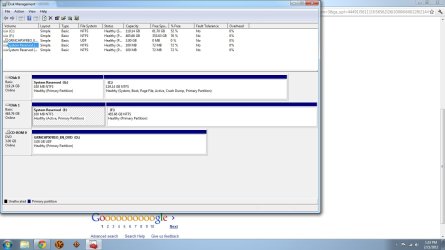
Ok so i used startup repair and now it gives me a boot manager and asks what i want to boot from. My disk management is in the attachment below. Basically I want to use the SSD as a boot disk with windows and programs and use the HDD for data.
 

Attachments

  • disk management.jpg
    disk management.jpg
    110 KB · Views: 81

My Computer My Computer

OS
windows 7 home 64bit
Can you go back to startup repair and go to a command prompt?

If so, then try these commands, in this order:

Diskpart (this takes you into the Diskpart command)

List disk (this will show you the 2 hard drives in the PC)

Select disk 0 (this selects your SSD)

List part (this will then show you the 2 partitions on the SSD)

Select part x (where x is the “system reserved” partition shown as G in your picture)

Active (this marks partition x active)

Select disk 1 (this will select the other drive, the HDD)

List part (this will show you the 2 partitions on the HDD)

Select part y (where y is the “system reserved” partition shown as E in your picture)

Inactive (this marks partition y as inactive)

Exit (this takes you out of the Diskpart command)

Then exit startup repair and reboot. Take another picture of Disk Management and post it. It should look different than your first picture.
 

My Computer My Computer

Computer type
PC/Desktop
Computer Manufacturer/Model Number
Ignatz Special; 4 speed manual gearbox; factory air conditioning; one of one
OS
Windows 7 Home Premium SP1, 64-bit
CPU
Intel Skylake i5-6600K, not overclocked
Motherboard
AsRock Z170M Extreme 4, micro ATX
Memory
8 GB HyperX DDR4-2666 (2 x 4 GB)
Graphics Card(s)
none; graphics are integrated on CPU
Sound Card
onboard: Realtek ALC1150; external: USB Behringer UF0-202
Monitor(s) Displays
Dell S2340M 23 inch IPS
Screen Resolution
1600 x 900
Hard Drives
System: Crucial MX100 series SSD, 128 GB;
Data: Samsung Spinpoint 103SJ, 1 TB;
Backup: WD Caviar Green WD30EZRX-00D8PB0, 3 TB
PSU
Rosewill SilentNight 500 watt fanless, semi-modular
Case
Antec Solo II
Cooling
Noctua NH-U12S; Noctua F12 intake, Noctua S12A exhaust
Keyboard
Microsoft 200 6JH-00001 USB
Mouse
Dell or Microsoft optical wired; USB
Antivirus
Microsoft Security Essentials and Malwarebytes Premium
Browser
Pale Moon
Other Info
All fans PWM; speeds at idle: CPU circa 500 rpm; intake circa 600 rpm; exhaust circa 600 rpm; CPU temps 27 idle and 47 C load in a warm room (27 C/81 F) when running Intel Extreme Tuning Utility stress test.
Back
Top